Software System Utilities Jackson Doughty, Nyan Min, and Seth Willis
Defragmentation/Optimization  A computer that is poorly organized can cause it to run slower because it takes more time to locate files  Contrast with application software 
Disk Utility Software Utility software is used to maintain the infrastructure of the computer by means of anti-virus, backup, data compression, disc cleaners etc. 
Backup Use of the computer compressing duplicate files in case something goes wrong such as your hard drive crashes 
File Management File management is the categorization of files through menus/folders so that it is easiest for an application to find ex. iTunes has folders of each song categorized so that it can open quickly with all info. presented nicely 
Account & Accessibility Management Account and accessibility management is the use of a password and username ex. account log in to a computer to access files 
Monitor & Keyboard Settings Keyboards often have keys for applications, or windows as an item's shortcut  Shortcuts can be made that can quicken the ease with which users can access content  
Virus Scan An anti-virus is a  program that protects a computer against viruses by identifying and removing any computer viruses that are found 
Malware Detectors & Removers A spy-ware remover is a program that detects and deletes spyware and other similar programs.  
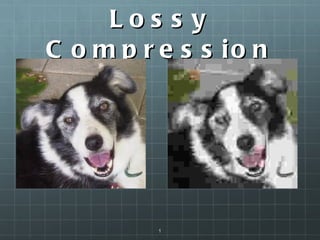
Compression Process of encoding information using fewer bits than the original representation Also called bit-rate reduction and source coding Lossy: data is lost during compression Multimedia (images, video, audio) Lossless: original data is retained Text files
Lossy Compression
Decompression Reversion of compressed data Lossless data will be decompressed to its original form Lossy data will be decompressed to its near-original form
Color Synchronization Goal is to get colors to look the exact same on every monitor Prevalent in web pages Nearly impossible because of the different factors (monitor, web browser, surrounding light, OS)

Software (system utilities)

  • 1.
    Software System UtilitiesJackson Doughty, Nyan Min, and Seth Willis
  • 2.
    Defragmentation/Optimization Acomputer that is poorly organized can cause it to run slower because it takes more time to locate files  Contrast with application software 
  • 3.
    Disk Utility SoftwareUtility software is used to maintain the infrastructure of the computer by means of anti-virus, backup, data compression, disc cleaners etc. 
  • 4.
    Backup Use ofthe computer compressing duplicate files in case something goes wrong such as your hard drive crashes 
  • 5.
    File Management Filemanagement is the categorization of files through menus/folders so that it is easiest for an application to find ex. iTunes has folders of each song categorized so that it can open quickly with all info. presented nicely 
  • 6.
    Account & AccessibilityManagement Account and accessibility management is the use of a password and username ex. account log in to a computer to access files 
  • 7.
    Monitor & KeyboardSettings Keyboards often have keys for applications, or windows as an item's shortcut  Shortcuts can be made that can quicken the ease with which users can access content  
  • 8.
    Virus Scan Ananti-virus is a  program that protects a computer against viruses by identifying and removing any computer viruses that are found 
  • 9.
    Malware Detectors &Removers A spy-ware remover is a program that detects and deletes spyware and other similar programs.  
  • 10.
    Compression Process ofencoding information using fewer bits than the original representation Also called bit-rate reduction and source coding Lossy: data is lost during compression Multimedia (images, video, audio) Lossless: original data is retained Text files
  • 11.
  • 12.
    Decompression Reversion ofcompressed data Lossless data will be decompressed to its original form Lossy data will be decompressed to its near-original form
  • 13.
    Color Synchronization Goalis to get colors to look the exact same on every monitor Prevalent in web pages Nearly impossible because of the different factors (monitor, web browser, surrounding light, OS)