Systems and Software
Applications software
 Application software allows users to perform useful tasks by
being applied to a particular problem. Application software
would not normally be applied to the management of the
resources of the computer such as memory or time spent
processing jobs.
 Application software is used for a specific job and purpose or
application ( hence the name) such as ordering, payroll,
stock control, games, creating websites, image editing and
so on.
Continue
Operating
System

Graphical
User
Interface

SYSTEMS
SOFTWARE

File
Management

BACK

Utilities
Systems software
 System Software controls the computer hardware and thus
providing a platform for application software to do a useful
task.
 The majority of these programs are supplied by the
manufacturer of a particular hardware component within your
computer. However, some are supplied with the operating
system such as “Windows explorer” which allows you to
access files.
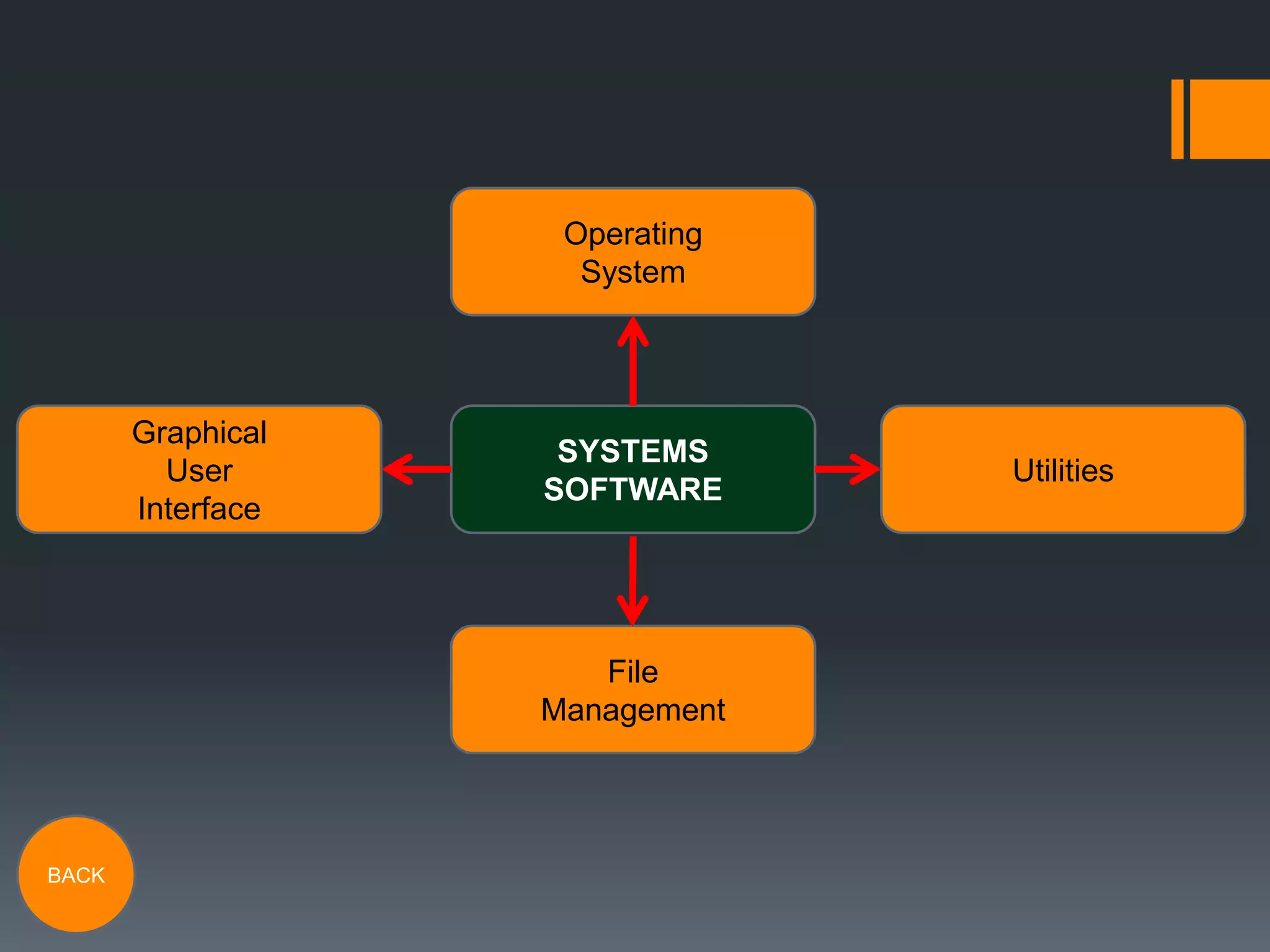
 System software consists of four programmes: the operating
system, Graphical User interface (or GUI), file management
and utilities.

BACK
Operating systems
 The main purpose of an operating system is to allow the
applications to interact with computer hardware, lets it
behave in a predictable way so that the application software
can use it.
 The operating system performs specialist tasks vital to the
functioning of the computer or other device with an operating
system. These are:
Diagnostic
checks

BACK

Input/output
management

Memory/data
management

Security and
other tasks
Diagnostic checks
 This is when the operating system performs and initial check
of the entire system when the computer is switched on (e.g.
booted up).
 These preliminary checks are very important for the safety
and smooth running of the computer, as it shows any
problems within the operating system.

BACK
Input/output management
 The operating system controls the receipt of inputted data
from the input devices such as the keyboard, mouse or touch
screen..
 It also controls the output of information by sending it to the
monitor and/or other output devices.

BACK
Memory/Data management
 The operating system also controls the memory and data
aspects of the computer as well as the input and output
processes.
 It controls the memory allocated by programs, as multiple
programs could be held in memory simultaneously.
 It also controls the flow of data to and from the main
processor, as well as working out where to store the data on
the hard disk drive.

BACK
Security and extra information
 The operating system deals with security issues such as
usernames and passwords.
 It also handles the interrupts occur when an application
software contains bugs or if there was a hardware fault.
 Some of the current most popular operating systems include
Windows, Macintosh os-x, UNIX and Linux.

BACK
Utilities
 A utility is a program that performs a very specific task and a
series of utilities comes as part of the systems software.
 Utilities are not widely regarded as applications because they
are fairly simple and will only perform one very specific task,
which is always related in some way to managing the
computers main resources.
 Examples of utilities include:
File
converters

BACK

Virus
scanners
File Converters
 File converters convert computer data inputted into a system
from one format to the another.
 Each computer program handles data in a different manner.
 Whenever any one of these variable is changed, data must
be converted in some way before it can be used by a
different computer, operating system or program.

BACK
Virus Scanners (Anti-Virus
Software)
 Antivirus or anti-virus software is software used to prevent,
detect and remove malware such as: computer viruses,
malicious BHOs, hijackers, ransom ware, key loggers,
backdoors, rootkits, Trojan horses, worms, malicious LSPs,
diallers, fraud tools, adware and spyware.
 Computer security, including protection from social
engineering techniques, is commonly offered in products and
services of antivirus software companies, such as MacAfee
and Norton security.
BACK
File management
 A file manager or file browser is a computer program that
provides a user interface to work with file systems.
 The most common operations performed on files or groups of
files are: create, open, edit, view, print, play, rename, move,
copy, delete and search/find.
 More complex operations include the ability to modify file
attributes, properties and file permissions.

BACK
Graphical User Interfaces
 A Graphical user interface (GUI) is a type of user interface
that allows users to interact with electronic devices and files
through graphical icons and visual indicators.
 GUIs were produced to enable people with basic IT
knowledge access the computers files and devices with
ease, as learning how to use a command input interface was
complicated and took time.
 GUI’s are used by virtually everybody, with experience or not,
and are used on virtually all of the operating systems around
the globe (including mobile devices), including Mac OS and
windows being the most popular.
BACK

As media studies software and systems presentation

  • 1.
  • 2.
    Applications software  Applicationsoftware allows users to perform useful tasks by being applied to a particular problem. Application software would not normally be applied to the management of the resources of the computer such as memory or time spent processing jobs.  Application software is used for a specific job and purpose or application ( hence the name) such as ordering, payroll, stock control, games, creating websites, image editing and so on. Continue
  • 3.
  • 4.
    Systems software  SystemSoftware controls the computer hardware and thus providing a platform for application software to do a useful task.  The majority of these programs are supplied by the manufacturer of a particular hardware component within your computer. However, some are supplied with the operating system such as “Windows explorer” which allows you to access files.  System software consists of four programmes: the operating system, Graphical User interface (or GUI), file management and utilities. BACK
  • 5.
    Operating systems  Themain purpose of an operating system is to allow the applications to interact with computer hardware, lets it behave in a predictable way so that the application software can use it.  The operating system performs specialist tasks vital to the functioning of the computer or other device with an operating system. These are: Diagnostic checks BACK Input/output management Memory/data management Security and other tasks
  • 6.
    Diagnostic checks  Thisis when the operating system performs and initial check of the entire system when the computer is switched on (e.g. booted up).  These preliminary checks are very important for the safety and smooth running of the computer, as it shows any problems within the operating system. BACK
  • 7.
    Input/output management  Theoperating system controls the receipt of inputted data from the input devices such as the keyboard, mouse or touch screen..  It also controls the output of information by sending it to the monitor and/or other output devices. BACK
  • 8.
    Memory/Data management  Theoperating system also controls the memory and data aspects of the computer as well as the input and output processes.  It controls the memory allocated by programs, as multiple programs could be held in memory simultaneously.  It also controls the flow of data to and from the main processor, as well as working out where to store the data on the hard disk drive. BACK
  • 9.
    Security and extrainformation  The operating system deals with security issues such as usernames and passwords.  It also handles the interrupts occur when an application software contains bugs or if there was a hardware fault.  Some of the current most popular operating systems include Windows, Macintosh os-x, UNIX and Linux. BACK
  • 10.
    Utilities  A utilityis a program that performs a very specific task and a series of utilities comes as part of the systems software.  Utilities are not widely regarded as applications because they are fairly simple and will only perform one very specific task, which is always related in some way to managing the computers main resources.  Examples of utilities include: File converters BACK Virus scanners
  • 11.
    File Converters  Fileconverters convert computer data inputted into a system from one format to the another.  Each computer program handles data in a different manner.  Whenever any one of these variable is changed, data must be converted in some way before it can be used by a different computer, operating system or program. BACK
  • 12.
    Virus Scanners (Anti-Virus Software) Antivirus or anti-virus software is software used to prevent, detect and remove malware such as: computer viruses, malicious BHOs, hijackers, ransom ware, key loggers, backdoors, rootkits, Trojan horses, worms, malicious LSPs, diallers, fraud tools, adware and spyware.  Computer security, including protection from social engineering techniques, is commonly offered in products and services of antivirus software companies, such as MacAfee and Norton security. BACK
  • 13.
    File management  Afile manager or file browser is a computer program that provides a user interface to work with file systems.  The most common operations performed on files or groups of files are: create, open, edit, view, print, play, rename, move, copy, delete and search/find.  More complex operations include the ability to modify file attributes, properties and file permissions. BACK
  • 14.
    Graphical User Interfaces A Graphical user interface (GUI) is a type of user interface that allows users to interact with electronic devices and files through graphical icons and visual indicators.  GUIs were produced to enable people with basic IT knowledge access the computers files and devices with ease, as learning how to use a command input interface was complicated and took time.  GUI’s are used by virtually everybody, with experience or not, and are used on virtually all of the operating systems around the globe (including mobile devices), including Mac OS and windows being the most popular. BACK