Using Social Medi@ to 
Extend our Reach
David Burns 
English Language Fellow 
5th ELTA Conference – May 2012 
Tirana, Albania
English Language Fellow Program 
Facebook: www.facebook.com/pages/English-Language-Fellow-Program 
Twitter: https://twitter.com/#!/elfellowprogram
Contact information: 
 Name: David Burns 
 Email: ELFellowAlbania@gmail.com 
 Mobile: 069 549 0927 
 Facebook: 
www.facebook.com/ELFellow.Albania 
 Twitter: @ELFellowAlbania
Warmer Activity! 
 Social networking activity you can use in your classes 
to get your students up and moving. 
 Practices team-building skills, ability to follow 
instructions, memory skills, speaking, listening & 
writing, the benefits of collaboration, etc. 
 Lots of variations on this type of activity. 
 Today, I’ll divide you into groups of varying size – the 
largest with 8 members and the smallest with only 1 
member.
Amendment I 
Congress shall make no law respecting an 
establishment of religion, or prohibiting the free 
exercise thereof; or abridging the freedom of speech, 
or of the press; or the right of the people peaceably to 
assemble, and to petition the Government for a 
redress of grievances. 
Source: The Constitution of the United States of America
Amendment IV 
The right of the people to be secure in their persons, 
houses, papers, and effects, against unreasonable 
searches and seizures, shall not be violated, and no 
Warrants shall issue, but upon probable cause, 
supported by Oath or affirmation, and particularly 
describing the place to be searched, and the persons 
or things to be seized.
What this presentation is 
and is not about: 
 It IS an attempt to give you some useful and practical ideas 
on how you can use modern education technology – and 
specifically social networking resources – in your 
classrooms and to assist your professional development 
goals. And it’s a great chance for us to share ideas. 
 It is NOT an attempt to promote specific companies or 
insinuate that you MUST use these online resources in your 
classes or in order to be effective. You are all wise enough 
to make mature and responsible choices regarding social 
media related to the social, political and religious realities in 
your respective host countries.
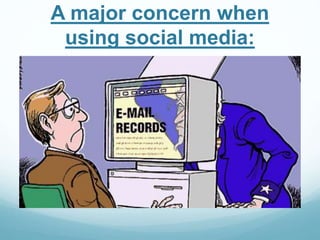
A major concern when 
using social media:
Privacy issues…
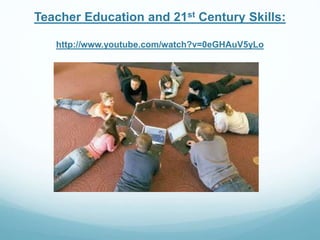
Teacher Education and 21st Century Skills: 
http://www.youtube.com/watch?v=0eGHAuV5yLo
Two key skills in today’s 
globalized world: 
 Non-routine thinking 

 Complex communications
Every student in the 21st 
Century needs to be able to: 
 Critically think 
 Problem solve 
 Collaborate 
 Communicate 
 Innovate 
 Be globally aware 
 Be self-directed 
 And be technology literate 
…Those are the new outcomes of the 21st Century 
Source “Teacher Education and 21st Century Skills” (YouTube video; Pearson Foundation).
Why should we include 
technology in the education of 
our children? 
Here are 10 good reasons: 
Source: John Page writing for www.21stCenturyTeacher.com
Reason 1 – Expansion of Time 
and Place 
 In a typical American high school, a student has access 
to a teacher for about 40-50 minutes a day or about 5% 
of her waking day, which is shared with 25+ other 
students. 
 Technology is NO substitute for an inspiring teacher, 
however online materials are far more available. 20 x 

more available. 
 Using the ‘textbook + classroom’ model, the places 
where learning can occur are limited. Yet a wireless 
laptop can access the teacher’s course materials and 
the entire internet from almost anywhere.
Reason 2 – Depth of 
Understanding 
 Interactive simulations, video chat discussions and 
debate, illustrations, etc., can produce a much greater 
depth of understanding of a concept. 
 Because the students have access to the same online 
tools, they can reinforce the ideas by experimenting 
with the simulations themselves, any time, any where.
Reason 3 – Learning vs. 
Teaching 
 Technology allows the tables to be turned. Instead of 
teaching (push), students can be given projects that 
require them to learn (pull) the necessary material 
themselves. 
 Key to this is the ability to get the information anytime 
and from anywhere (without the need to be in the 
physical presence of the teacher). 
 This project-based pull approach makes learning far 
more interesting and fun for the students.
Reason 4 – New media for self-expression 
 In the old days, students could write in a notebook, and 
what they wrote was seen only by the teacher. 
 Using modern technology students can express 
themselves and their creativity in many ways: make 
Power Point presentations, record/edit spoken word or 
music, create and share digital photograph albums, 
make a video, run or contribute to a class newspaper, 
run a web-based TV or radio station, do claymation, 
create a blog, start a web-site, etc…..
Reason 5 – Collaboration 
 A vital skill in the new digital world is the ability to work 
collaboratively on projects with others who may not be 
physically close. 
 Many university projects are undertaken by teams 
spread around the world. Students need to be 
prepared for this.
Reason 6 – Going Global 
 The worldview of the student can be expanded due to 
the very low cost (often free) of communicating with 
people around the globe. 
 One example, the internet permits free video 
conferencing which permits interaction in real time with 
sister schools in other countries. 
 From an educational viewpoint, what can be more 
important than understanding other cultures through 
collaboration and direct dialog?
Reason 7 – Individual pacing 
and sequence 
 Students are, of course, all very different. Information 
technologies can allow them to break step with the 
class and go at a pace and order that better suits that 
student. 
 Without disrupting class, they can repeat a difficult 
lessons and explore what they find interesting.
Reason 8 – Weight 
 Three textbooks and binders can weigh over 25 lbs. 
 A laptop weighs about 5 lbs and new tablets even less. 
 A 40 Gb hard drive can hold over 2 million pages with 
illustrations (and all are searchable and updateable).
Reason 9 – Personal 
Productivity 
 Students need productivity tools for the same reasons we 
do: they need to write, read, communicate, organize and 
schedule. 
 Most of your students will ONLY be aware of technology that 
we were not born and raised with: for many, laptops, email, 
cell phones, text messaging and internet social media sites 
are the ONLY tools they know and use.
Reason 10 – Lower cost 
 It is not unusual for a text to cost over $120 at colleges 
and universities. 
 Through the use of open, free educational tools on the 
web, the dependence on expensive paper textbooks 
can be reduced. 
 Today a decent laptop can cost as low as $99 
 Free eBooks are out there and available as ‘public 
domain’: see Google Books and their well-stocked 
virtual bookshelf Classics Shelf are good examples.
Now for my Top 20 list of 
social media* for educators 
Sources: 
 www.theedublogger.com 
 www.edublogs.com 
 www.whiteboardblog.co.uk 
 www.secondarysolutionsblog.com 
*All logos are registered trademarks.
20. Teacher Lingo
Teacher Lingo 
 www.teacherlingo.com 
 An educational community to connect teachers from 
every level. 
 Find teaching resources for your classroom or share 
your teacher created resources with the community and 
earn extra money. 
 Search by subject, grade level, and many categories to 
find Lesson Plans, Worksheets, Printables, and even 
eBooks.
19. Diigo
Diigo: Social Bookmarking 
 Online and social information management tool. 
 Collect and organize anything: bookmarks, highlights, 
notes, screenshots, pictures, audio, bibliography. 
 Access anywhere and easily share: PC & Mac, 
Android, all browsers, iPad, iPhone 
 Basic services are free to tryout: unlimited bookmarks, 
1,000 highlights, 30 cached pages. 
 Premium plans: $20 a year to $40 a year.
Other popular social 
bookmarking sites: 
 Reddit 
http://www.reddit.com/ 
 StumbleUpon 
http://www.stumbleupon.com/ 
 Deli.ci.ous 
http://delicious.com/
18. Dropbox
Dropbox 
 A free service that lets you bring your photos, 
docs, and videos anywhere and share them easily. 
 Never email yourself a file again! 
 Share documents, PDFs, videos, photos, lesson 
plans, etc. from anywhere. 
 Free up to 18GB. 
 Premium service: $99 a year and beyond.
Other cloud storage options: 
 Box 
https://www.box.com/ 
 SugarSync 
https://www.sugarsync.com/ 
 Google cloud storage: 
https://developers.google.com/storage/ 
 Comparison chart of major cloud storage options: 
http://www.bestfreecloudstorageproviders.com/
17. Email, Listserv, etc.
Email 
 Class email groups; send homework; links for 
follow up and comprehension tasks; updates on 
class times and assignment deadlines, etc. 
 Respond directly to students’ questions (works 
well for shy students) who may be more willing to 
ask for clarification via email.
16. Dipity 
www.dipity.com
Dipity: Online Timelines 
 Create an interactive, visually engaging timeline in 
minutes. 
 Use dynamic visualization tools to display photos, 
videos, news and blogs in chronological order. 
 Great for group student projects on any subject or 
research topic. 
 I’ve used it for U.S. Supreme Court cases and 
international law, and biographies of famous people.
15. Busuu 
www.busuu.com
Busuu 
 Busuu is a free online community for learning 
languages. 
 Connect for free with native speakers worldwide. 
 Enhance your language learning with online social 
media options – translating multiple languages in an 
open format. 
 Great opportunity to have your motivated students 
translate texts from Albanian to English, etc.
14. Flickr 
www.flickr.com
Photos 
 Flickr for Education 
http://www.flickr.com/groups/33384223@N00/ 
 Photo essays; presentations; share with parents and 
school administration; group projects. 
 Great privacy controls. 
 Other options: Shutterfly, Picasa, SmugMug, Phanfare, 
Snapfish, Zenfolio. 
 Top 20 photo sharing sites: 
http://web.appstorm.net/roundups/media-roundups/top-20- 
photo-storage-and-sharing-sites/
13. Apple
iTunes U 
http://www.apple.com/education/itunes-u/
iTunes U 
 The free iTunes U app gives students access to all the 
materials for your course in a single place. 
 Right in the app, they can play video or audio lectures. 
Read books and view presentations. See a list of all the 
assignments for the course and check them off as 
they’re completed. 
 And when you send a message or create a new 
assignment, students receive a push notification with 
the new information
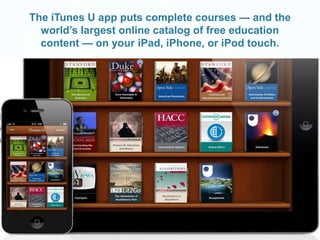
The iTunes U app puts complete courses — and the 
world’s largest online catalog of free education 
content — on your iPad, iPhone, or iPod touch.
12. Soundcloud 
www.soundcloud.com
Soundcloud 
 Create, record and share the sounds you create 
anywhere to friends, family and the world with 
SoundCloud, the world's largest community of sound 
creators. 
 Find and follow friends to share sounds with each 
other. Add comments and likes to everyone’s sounds 
too. 
 Share your sounds to sites and social networks. 
Connect SoundCloud with hundreds of apps to share 
everywhere.
Audacity 
www.audacity.com
11. Linked in
Linked in 
 Online CV/resume site. 
 Promote yourself and your skills and experience to 
prospective employers. 
 Network with like-minded people by joining professional 
Linked in groups. 
 Use it in class to demonstrate CV-writing skills, do job 
searches, find tips on how to interview, etc.
10. Wikis
Wikis 
Where to create Wikis: 
 Wikispaces www.wikispaces.com (public or private) 
 WetPaint www.wetpaint.com (community) 
 PBWiki www.pbwiki.com 
Editing and Viewing options (public, members only, 
administrator only, etc) 
 Wikipedia www.wikipedia Great opportunity for research, 
fact verification, and open source writing and publish 
projects for your students.
9. Moodle
Moodle 
 Modular Object-Oriented Dynamic Learning Environment 
 Moodle is an Open Source Course Management System 
(CMS), also known as a Learning Management System 
(LMS) or a Virtual Learning Environment (VLE). 
 Moodle has become very popular among educators around 
the world as a tool for creating web sites for their students. 
To work, it needs to be installed on a web server 
somewhere, either on one of your own computers or one at 
a web hosting company. 
Source: www.moodle.org
8. NING
Ning 
www.ning.com 
 Ning is an online service provider that provides a set of services 
and technology applications that enable users to create their own 
Networks utilizing the “Ning Platform“. 
 Has a good reputation for its privacy and information gathering 
policies. Certified by Truste and complies with EU Safe Harbor 
policies (regarding the collection, use and retention of personal 
information). 
 Shaping the Way We Teach English (U.S. State Dept.) 
http://shapingenglish.ning.com/ 
 English Language Teaching in the Russian Federation 
http://elt-russia.ning.com/
7. Pinterest 
http://pinterest.com/
Pinterest 
 Pinterest is a vision board-styled social photo sharing 
website and app where users can create and manage 
theme-based image collections. 
 Pinterest has an active and dynamic ‘education’ 
section that is frequently updated by educators around 
the world. 
 Fastest-growing social media site in USA. 
 http://pinterest.com/all/?category=education
6. Skype
Skype 
www.skype.com 
 Great potential for aiding ESL classroom collaboration 
with students and teachers around the world. 
 Webinars with different schools in your host country, 
region or anywhere in the world. 
 Classroom and cultural exchange opportunities. 
 Check out Skype in the Classroom (currently listing 
21,000 teachers, 1,500 projects, and 600 resources. 
http://education.skype.com/
5. YouTube
YouTube 
 YouTube for Schools initiative: 
http://www.youtube.com/schools 
 School administration and teachers can log in and 
watch any video, but students cannot log in and can 
only watch YouTube EDU videos plus videos their 
school has added. All comments and related videos are 
disabled and search is limited to YouTube EDU videos. 
 Has hundreds of playlists of videos that align with 
common educational standards, organized by subject 
and grade. 
 http://www.teachertube.com/
4. Twitter
Twitter 
 Twitter is a social network formed around shared 
interests. Twitter has LOTS of TESL and ELT-related 
members, many of whom are experts in their field. 
 Excellent professional resource for networking, 
research, teaching, learning, news, updates, 
collaborations, sharing, etc. 
 The ultimate guide to using Twitter in the classroom: 
http://edudemic.com/2011/09/twitter-in-education/
3. Blogs (edublogs, 
blogspot, etc)
Blogs 
 Edublogs: 10 ways to use your edublog to teach 
http://edublogs.org/10-ways-to-use-your-edublog-to-teach/ 
 Facilitate online discussions and collaboration. Create a 
class publication that students can easily publish to and you 
can easily edit. 
 Anything that you post to your blog will instantly be 
accessible by your students from school and from home. 
What’s more, you can easily manage who gets to access 
them through passwords and privacy measures. 
 Share lesson plans, stay in touch with parents, integrate 
video, podcasts and other media, and get your students 
blogging (make writing tasks fun and interactive).
2. Google 
www.google.com
http://www.google.com/edu/
Google for Teachers 
 Google docs 
 Google books 
 Lesson plan search 
 Classroom videos 
 Training and development 
 Connect with other teachers: blogs, groups, and with 
Google+ 
 Competitions, scholarships, conferences, Google apps, 
college tips, etc.
1. Facebook
Facebook 
 Love it or hate it, Facebook is probably where most of 
your students (and a majority of teachers) spend a lot 
of their time while online – go to where your audience 
is and speak to them in their language. 
 U.S. Embassies, RELO’s, American Corners, State 
Department, and most USG offices are using FB to 
actively and directly engage American citizens and host 
country citizens. 
 How do you use Facebook in your classes? How can 
you use FB? Should you use FB? Privacy? Options? 
Benefits?
Facebook 
 Groups (open or closed – join group). 
 Fan page (like) 
 Friend page (add friend) 
 Pretty good privacy options and non-tracking 
options.
What else? 
 Movie and music-making projects 
 Photo essays on any topic. 
 Social games online: Spelling bees, Jeapordy!, Trivia 
Pursuit, Scrabble, and most card games have online 
versions. 
 Mock trials, debates, campaigns. 
 Create a news broadcast with script, production and video. 
 Meet-ups – get together in your city with like-minded folk on 
any topic.
Recommendations: 
 In the 21st Century, 1st impressions are made digitally – 
electronically. 
 Elect a permanent member or board officer to your teachers 
organization or school who is in charge of 21st century 
marketing – VP for Social Media. 
 Brand your organization promising and then delivering 
quality – constant, relevant and quality information. 
 Conferences and retreats are great! But limited to only a 
few times a year – social media outreach is now 24/7 for 
students, teachers, businesses, groups, etc.
How to contact me: 
 www.facebook.com/ELFellow.Albania 
@ELFellowAlbania 
 ELFellow.Albania@gmail.com 
 + 355 69 549 0927
A farewell story… 
…but when we awaken in the morning, why do we wake UP? 
At a meeting, why does a topic come UP? Why do we speak UP, 
and why are the candidates UP for election, and why do bad 
businesses go belly UP? 
Why is it UP to the secretary to write UP a report? We call UP our 
friends, brighten UP a room, polish UP the silver, warm UP the 
leftovers and clean UP the kitchen and put UP with things we 
don’t like. 
We lock UP the house and fix UP the old car while giving a 
thumbs UP to something we like. 
People stir UP trouble, line UP to buy tickets, work UP an 
appetite, and think UP excuses. A thief sticks UP a bank….
Up, Up and Away 
To be dressed is one thing, but to be dressed UP is special! 
A drain must be opened UP because it is stopped UP. We open UP a 
store in the morning but then we close it UP at night. We seem to be 
pretty mixed UP about the word UP! 
When it threatens to rain, we say it is clouding UP. When the sun 
comes out we say it is clearing UP. When it rains, the earth soaks it 
UP. When it does not rain for awhile, things dry UP. 
If you are UP to it, you and your students might try building UP a list 
of the many ways UP is used. It will take UP a lot of your time, but if 
you don't give UP, you may wind UP with a hundred or more. 
One could go on & on, but I'll wrap this UP for now because my time 
is UP!
Shumë Faleminderit!

Social Media

  • 1.
    Using Social Medi@to Extend our Reach
  • 2.
    David Burns EnglishLanguage Fellow 5th ELTA Conference – May 2012 Tirana, Albania
  • 3.
    English Language FellowProgram Facebook: www.facebook.com/pages/English-Language-Fellow-Program Twitter: https://twitter.com/#!/elfellowprogram
  • 4.
    Contact information: Name: David Burns  Email: ELFellowAlbania@gmail.com  Mobile: 069 549 0927  Facebook: www.facebook.com/ELFellow.Albania  Twitter: @ELFellowAlbania
  • 5.
    Warmer Activity! Social networking activity you can use in your classes to get your students up and moving.  Practices team-building skills, ability to follow instructions, memory skills, speaking, listening & writing, the benefits of collaboration, etc.  Lots of variations on this type of activity.  Today, I’ll divide you into groups of varying size – the largest with 8 members and the smallest with only 1 member.
  • 6.
    Amendment I Congressshall make no law respecting an establishment of religion, or prohibiting the free exercise thereof; or abridging the freedom of speech, or of the press; or the right of the people peaceably to assemble, and to petition the Government for a redress of grievances. Source: The Constitution of the United States of America
  • 7.
    Amendment IV Theright of the people to be secure in their persons, houses, papers, and effects, against unreasonable searches and seizures, shall not be violated, and no Warrants shall issue, but upon probable cause, supported by Oath or affirmation, and particularly describing the place to be searched, and the persons or things to be seized.
  • 8.
    What this presentationis and is not about:  It IS an attempt to give you some useful and practical ideas on how you can use modern education technology – and specifically social networking resources – in your classrooms and to assist your professional development goals. And it’s a great chance for us to share ideas.  It is NOT an attempt to promote specific companies or insinuate that you MUST use these online resources in your classes or in order to be effective. You are all wise enough to make mature and responsible choices regarding social media related to the social, political and religious realities in your respective host countries.
  • 9.
    A major concernwhen using social media:
  • 10.
  • 11.
    Teacher Education and21st Century Skills: http://www.youtube.com/watch?v=0eGHAuV5yLo
  • 12.
    Two key skillsin today’s globalized world:  Non-routine thinking  Complex communications
  • 13.
    Every student inthe 21st Century needs to be able to:  Critically think  Problem solve  Collaborate  Communicate  Innovate  Be globally aware  Be self-directed  And be technology literate …Those are the new outcomes of the 21st Century Source “Teacher Education and 21st Century Skills” (YouTube video; Pearson Foundation).
  • 14.
    Why should weinclude technology in the education of our children? Here are 10 good reasons: Source: John Page writing for www.21stCenturyTeacher.com
  • 15.
    Reason 1 –Expansion of Time and Place  In a typical American high school, a student has access to a teacher for about 40-50 minutes a day or about 5% of her waking day, which is shared with 25+ other students.  Technology is NO substitute for an inspiring teacher, however online materials are far more available. 20 x more available.  Using the ‘textbook + classroom’ model, the places where learning can occur are limited. Yet a wireless laptop can access the teacher’s course materials and the entire internet from almost anywhere.
  • 16.
    Reason 2 –Depth of Understanding  Interactive simulations, video chat discussions and debate, illustrations, etc., can produce a much greater depth of understanding of a concept.  Because the students have access to the same online tools, they can reinforce the ideas by experimenting with the simulations themselves, any time, any where.
  • 17.
    Reason 3 –Learning vs. Teaching  Technology allows the tables to be turned. Instead of teaching (push), students can be given projects that require them to learn (pull) the necessary material themselves.  Key to this is the ability to get the information anytime and from anywhere (without the need to be in the physical presence of the teacher).  This project-based pull approach makes learning far more interesting and fun for the students.
  • 18.
    Reason 4 –New media for self-expression  In the old days, students could write in a notebook, and what they wrote was seen only by the teacher.  Using modern technology students can express themselves and their creativity in many ways: make Power Point presentations, record/edit spoken word or music, create and share digital photograph albums, make a video, run or contribute to a class newspaper, run a web-based TV or radio station, do claymation, create a blog, start a web-site, etc…..
  • 19.
    Reason 5 –Collaboration  A vital skill in the new digital world is the ability to work collaboratively on projects with others who may not be physically close.  Many university projects are undertaken by teams spread around the world. Students need to be prepared for this.
  • 20.
    Reason 6 –Going Global  The worldview of the student can be expanded due to the very low cost (often free) of communicating with people around the globe.  One example, the internet permits free video conferencing which permits interaction in real time with sister schools in other countries.  From an educational viewpoint, what can be more important than understanding other cultures through collaboration and direct dialog?
  • 21.
    Reason 7 –Individual pacing and sequence  Students are, of course, all very different. Information technologies can allow them to break step with the class and go at a pace and order that better suits that student.  Without disrupting class, they can repeat a difficult lessons and explore what they find interesting.
  • 22.
    Reason 8 –Weight  Three textbooks and binders can weigh over 25 lbs.  A laptop weighs about 5 lbs and new tablets even less.  A 40 Gb hard drive can hold over 2 million pages with illustrations (and all are searchable and updateable).
  • 23.
    Reason 9 –Personal Productivity  Students need productivity tools for the same reasons we do: they need to write, read, communicate, organize and schedule.  Most of your students will ONLY be aware of technology that we were not born and raised with: for many, laptops, email, cell phones, text messaging and internet social media sites are the ONLY tools they know and use.
  • 24.
    Reason 10 –Lower cost  It is not unusual for a text to cost over $120 at colleges and universities.  Through the use of open, free educational tools on the web, the dependence on expensive paper textbooks can be reduced.  Today a decent laptop can cost as low as $99  Free eBooks are out there and available as ‘public domain’: see Google Books and their well-stocked virtual bookshelf Classics Shelf are good examples.
  • 25.
    Now for myTop 20 list of social media* for educators Sources:  www.theedublogger.com  www.edublogs.com  www.whiteboardblog.co.uk  www.secondarysolutionsblog.com *All logos are registered trademarks.
  • 26.
  • 27.
    Teacher Lingo www.teacherlingo.com  An educational community to connect teachers from every level.  Find teaching resources for your classroom or share your teacher created resources with the community and earn extra money.  Search by subject, grade level, and many categories to find Lesson Plans, Worksheets, Printables, and even eBooks.
  • 28.
  • 29.
    Diigo: Social Bookmarking  Online and social information management tool.  Collect and organize anything: bookmarks, highlights, notes, screenshots, pictures, audio, bibliography.  Access anywhere and easily share: PC & Mac, Android, all browsers, iPad, iPhone  Basic services are free to tryout: unlimited bookmarks, 1,000 highlights, 30 cached pages.  Premium plans: $20 a year to $40 a year.
  • 30.
    Other popular social bookmarking sites:  Reddit http://www.reddit.com/  StumbleUpon http://www.stumbleupon.com/  Deli.ci.ous http://delicious.com/
  • 31.
  • 32.
    Dropbox  Afree service that lets you bring your photos, docs, and videos anywhere and share them easily.  Never email yourself a file again!  Share documents, PDFs, videos, photos, lesson plans, etc. from anywhere.  Free up to 18GB.  Premium service: $99 a year and beyond.
  • 33.
    Other cloud storageoptions:  Box https://www.box.com/  SugarSync https://www.sugarsync.com/  Google cloud storage: https://developers.google.com/storage/  Comparison chart of major cloud storage options: http://www.bestfreecloudstorageproviders.com/
  • 34.
  • 35.
    Email  Classemail groups; send homework; links for follow up and comprehension tasks; updates on class times and assignment deadlines, etc.  Respond directly to students’ questions (works well for shy students) who may be more willing to ask for clarification via email.
  • 36.
  • 37.
    Dipity: Online Timelines  Create an interactive, visually engaging timeline in minutes.  Use dynamic visualization tools to display photos, videos, news and blogs in chronological order.  Great for group student projects on any subject or research topic.  I’ve used it for U.S. Supreme Court cases and international law, and biographies of famous people.
  • 38.
  • 39.
    Busuu  Busuuis a free online community for learning languages.  Connect for free with native speakers worldwide.  Enhance your language learning with online social media options – translating multiple languages in an open format.  Great opportunity to have your motivated students translate texts from Albanian to English, etc.
  • 40.
  • 41.
    Photos  Flickrfor Education http://www.flickr.com/groups/33384223@N00/  Photo essays; presentations; share with parents and school administration; group projects.  Great privacy controls.  Other options: Shutterfly, Picasa, SmugMug, Phanfare, Snapfish, Zenfolio.  Top 20 photo sharing sites: http://web.appstorm.net/roundups/media-roundups/top-20- photo-storage-and-sharing-sites/
  • 42.
  • 43.
  • 44.
    iTunes U The free iTunes U app gives students access to all the materials for your course in a single place.  Right in the app, they can play video or audio lectures. Read books and view presentations. See a list of all the assignments for the course and check them off as they’re completed.  And when you send a message or create a new assignment, students receive a push notification with the new information
  • 45.
    The iTunes Uapp puts complete courses — and the world’s largest online catalog of free education content — on your iPad, iPhone, or iPod touch.
  • 46.
  • 47.
    Soundcloud  Create,record and share the sounds you create anywhere to friends, family and the world with SoundCloud, the world's largest community of sound creators.  Find and follow friends to share sounds with each other. Add comments and likes to everyone’s sounds too.  Share your sounds to sites and social networks. Connect SoundCloud with hundreds of apps to share everywhere.
  • 48.
  • 49.
  • 50.
    Linked in Online CV/resume site.  Promote yourself and your skills and experience to prospective employers.  Network with like-minded people by joining professional Linked in groups.  Use it in class to demonstrate CV-writing skills, do job searches, find tips on how to interview, etc.
  • 51.
  • 52.
    Wikis Where tocreate Wikis:  Wikispaces www.wikispaces.com (public or private)  WetPaint www.wetpaint.com (community)  PBWiki www.pbwiki.com Editing and Viewing options (public, members only, administrator only, etc)  Wikipedia www.wikipedia Great opportunity for research, fact verification, and open source writing and publish projects for your students.
  • 53.
  • 54.
    Moodle  ModularObject-Oriented Dynamic Learning Environment  Moodle is an Open Source Course Management System (CMS), also known as a Learning Management System (LMS) or a Virtual Learning Environment (VLE).  Moodle has become very popular among educators around the world as a tool for creating web sites for their students. To work, it needs to be installed on a web server somewhere, either on one of your own computers or one at a web hosting company. Source: www.moodle.org
  • 55.
  • 56.
    Ning www.ning.com Ning is an online service provider that provides a set of services and technology applications that enable users to create their own Networks utilizing the “Ning Platform“.  Has a good reputation for its privacy and information gathering policies. Certified by Truste and complies with EU Safe Harbor policies (regarding the collection, use and retention of personal information).  Shaping the Way We Teach English (U.S. State Dept.) http://shapingenglish.ning.com/  English Language Teaching in the Russian Federation http://elt-russia.ning.com/
  • 57.
  • 58.
    Pinterest  Pinterestis a vision board-styled social photo sharing website and app where users can create and manage theme-based image collections.  Pinterest has an active and dynamic ‘education’ section that is frequently updated by educators around the world.  Fastest-growing social media site in USA.  http://pinterest.com/all/?category=education
  • 59.
  • 60.
    Skype www.skype.com Great potential for aiding ESL classroom collaboration with students and teachers around the world.  Webinars with different schools in your host country, region or anywhere in the world.  Classroom and cultural exchange opportunities.  Check out Skype in the Classroom (currently listing 21,000 teachers, 1,500 projects, and 600 resources. http://education.skype.com/
  • 61.
  • 62.
    YouTube  YouTubefor Schools initiative: http://www.youtube.com/schools  School administration and teachers can log in and watch any video, but students cannot log in and can only watch YouTube EDU videos plus videos their school has added. All comments and related videos are disabled and search is limited to YouTube EDU videos.  Has hundreds of playlists of videos that align with common educational standards, organized by subject and grade.  http://www.teachertube.com/
  • 63.
  • 64.
    Twitter  Twitteris a social network formed around shared interests. Twitter has LOTS of TESL and ELT-related members, many of whom are experts in their field.  Excellent professional resource for networking, research, teaching, learning, news, updates, collaborations, sharing, etc.  The ultimate guide to using Twitter in the classroom: http://edudemic.com/2011/09/twitter-in-education/
  • 65.
    3. Blogs (edublogs, blogspot, etc)
  • 66.
    Blogs  Edublogs:10 ways to use your edublog to teach http://edublogs.org/10-ways-to-use-your-edublog-to-teach/  Facilitate online discussions and collaboration. Create a class publication that students can easily publish to and you can easily edit.  Anything that you post to your blog will instantly be accessible by your students from school and from home. What’s more, you can easily manage who gets to access them through passwords and privacy measures.  Share lesson plans, stay in touch with parents, integrate video, podcasts and other media, and get your students blogging (make writing tasks fun and interactive).
  • 67.
  • 68.
  • 69.
    Google for Teachers  Google docs  Google books  Lesson plan search  Classroom videos  Training and development  Connect with other teachers: blogs, groups, and with Google+  Competitions, scholarships, conferences, Google apps, college tips, etc.
  • 70.
  • 71.
    Facebook  Loveit or hate it, Facebook is probably where most of your students (and a majority of teachers) spend a lot of their time while online – go to where your audience is and speak to them in their language.  U.S. Embassies, RELO’s, American Corners, State Department, and most USG offices are using FB to actively and directly engage American citizens and host country citizens.  How do you use Facebook in your classes? How can you use FB? Should you use FB? Privacy? Options? Benefits?
  • 72.
    Facebook  Groups(open or closed – join group).  Fan page (like)  Friend page (add friend)  Pretty good privacy options and non-tracking options.
  • 73.
    What else? Movie and music-making projects  Photo essays on any topic.  Social games online: Spelling bees, Jeapordy!, Trivia Pursuit, Scrabble, and most card games have online versions.  Mock trials, debates, campaigns.  Create a news broadcast with script, production and video.  Meet-ups – get together in your city with like-minded folk on any topic.
  • 74.
    Recommendations:  Inthe 21st Century, 1st impressions are made digitally – electronically.  Elect a permanent member or board officer to your teachers organization or school who is in charge of 21st century marketing – VP for Social Media.  Brand your organization promising and then delivering quality – constant, relevant and quality information.  Conferences and retreats are great! But limited to only a few times a year – social media outreach is now 24/7 for students, teachers, businesses, groups, etc.
  • 75.
    How to contactme:  www.facebook.com/ELFellow.Albania @ELFellowAlbania  ELFellow.Albania@gmail.com  + 355 69 549 0927
  • 76.
    A farewell story… …but when we awaken in the morning, why do we wake UP? At a meeting, why does a topic come UP? Why do we speak UP, and why are the candidates UP for election, and why do bad businesses go belly UP? Why is it UP to the secretary to write UP a report? We call UP our friends, brighten UP a room, polish UP the silver, warm UP the leftovers and clean UP the kitchen and put UP with things we don’t like. We lock UP the house and fix UP the old car while giving a thumbs UP to something we like. People stir UP trouble, line UP to buy tickets, work UP an appetite, and think UP excuses. A thief sticks UP a bank….
  • 77.
    Up, Up andAway To be dressed is one thing, but to be dressed UP is special! A drain must be opened UP because it is stopped UP. We open UP a store in the morning but then we close it UP at night. We seem to be pretty mixed UP about the word UP! When it threatens to rain, we say it is clouding UP. When the sun comes out we say it is clearing UP. When it rains, the earth soaks it UP. When it does not rain for awhile, things dry UP. If you are UP to it, you and your students might try building UP a list of the many ways UP is used. It will take UP a lot of your time, but if you don't give UP, you may wind UP with a hundred or more. One could go on & on, but I'll wrap this UP for now because my time is UP!
  • 78.