By: Shundalyn Edwards
 Technology and education are
 pretty intertwined these days
 and nearly every teacher has a
 few favorite tech tools that
 make doing his or her job and
 connecting with students a
 little bit easier and more fun
 for all involved.
Social Learning
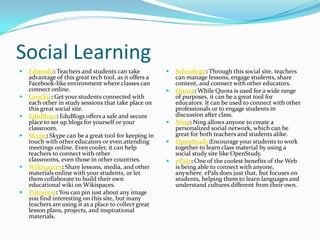
   Edmodo: Teachers and students can take                 Schoology: Through this social site, teachers
    advantage of this great tech tool, as it offers a       can manage lessons, engage students, share
    Facebook-like environment where classes can             content, and connect with other educators.
    connect online.                                        Quora: While Quora is used for a wide range
   Grockit: Get your students connected with               of purposes, it can be a great tool for
    each other in study sessions that take place on         educators. It can be used to connect with other
    this great social site.                                 professionals or to engage students in
   EduBlogs: EduBlogs offers a safe and secure             discussion after class.
    place to set up blogs for yourself or your             Ning: Ning allows anyone to create a
    classroom.                                              personalized social network, which can be
   Skype: Skype can be a great tool for keeping in         great for both teachers and students alike.
    touch with other educators or even attending           OpenStudy:Encourage your students to work
    meetings online. Even cooler, it can help               together to learn class material by using a
    teachers to connect with other                          social study site like OpenStudy.
    classrooms, even those in other countries.             ePals: One of the coolest benefits of the Web
   Wikispaces: Share lessons, media, and other             is being able to connect with anyone,
    materials online with your students, or let             anywhere. ePals does just that, but focuses on
    them collaborate to build their own                     students, helping them to learn languages and
    educational wiki on Wikispaces.                         understand cultures different from their own.
   Pinterest: You can pin just about any image
    you find interesting on this site, but many
    teachers are using it as a place to collect great
    lesson plans, projects, and inspirational
    materials.
Learning
These educational tools can help you to make lessons
  fun, interesting, and more effective.
 Khan Academy: Many teachers use this excellent collection of
  math, science, and finance lectures and quizzes to supplement their
  classroom materials.
 MangaHigh: MangaHigh offers teachers a wealth of resources for
  game-based learning in mathematics.
 FunBrain: If you’re looking for a great collection of educational
  games, look no further than FunBrain. On it, teachers can take
  advantage of fun tools for math and reading.
 Educreations: Educreations is an amazing online tool for the iPad that
  lets teachers (or students) create videos that teach a given topic. Perfect
  for studying or getting students to show off their knowledge.
 Animoto: Animoto makes it simple to create video-based lessons or
  presentations for the classroom and to share them with students or
  anyone else.
Lesson Planning and Tools
Use these tech tools to pull together great lessons and design amazing and memorable student projects.

 Teachers Pay Teachers: Have great lessons to share? Looking for something to add to your
    classes? On this site you can do both, selling your own class materials and buying high-quality
    resources from other teachers.
   Planboard: Make sure your lessons are organized and that your day runs smoothly with the
    help of this amazing online tool designed just for teachers.
   Timetoast: Timetoast is a pretty cool for student projects, allowing them to build
    sleek, interactive timelines in minutes.
   Capzles: There are so many different ways that Capzles can be used in the classroom, there’s
    bound to be an application that fits your needs. What does it do? Capzles makes it simple to
    gather media like photos, videos, documents, and even blog posts into one place, making it
    perfect for teaching, learning, or online projects.
   Prezi: Want to build presentations that will wow your students? Make use of this online tool
    that makes it simple to do all kinds of cool things with your lessons, even allowing
    collaboration between teachers.
   Wordle: Create stunning word clouds using Wordle, a great complement to language lessons
    of any kind.
   QR Codes: QR codes (or quick response codes) are showing up with greater frequency in
    education. If you’d like to get in on the trend, you’ll need a tool to create and manage the codes
    like Delivr and one to
Useful Tools
These tools can help you to stay connected, organized, and increase the ease of building
  multimedia lessons and learning tools.

 Evernote: Capture great ideas, photos, recordings, or just about anything else on your
  Evernote account, access it anywhere, and keep it organized. A must-have tool for lesson
  planning.
 Twitter: There are so many ways Twitter can be used in education. Teachers can connect
  with other educators, take part in chats, share their ideas, or even use it in the classroom
  to reach out to students.
 Google Education: Google offers a number of great edtech resources for
  teachers, including email and collaborative apps, videos, lesson plan search, professional
  development, and even educational grants.
 Dropbox: Easily store, share, and access any kind of data from anywhere with the easy-
  to-use and free Dropbox service.
 Diigo: Diigo lets you treat the web like paper-based reading material, making it simple to
  highlight, bookmark, take notes, or even add sticky notes.
 Apple iPad: One of the most widely used, though expensive, tech tools being used in
  today’s classroom is the Apple iPad. With a host of educational apps being developed for
  the device, it’s become a favorite of teachers and students alike across the nation.
Using technology for teaching and learning in the

Using technology for teaching and learning in the

  • 1.
  • 2.
     Technology andeducation are pretty intertwined these days and nearly every teacher has a few favorite tech tools that make doing his or her job and connecting with students a little bit easier and more fun for all involved.
  • 3.
    Social Learning  Edmodo: Teachers and students can take  Schoology: Through this social site, teachers advantage of this great tech tool, as it offers a can manage lessons, engage students, share Facebook-like environment where classes can content, and connect with other educators. connect online.  Quora: While Quora is used for a wide range  Grockit: Get your students connected with of purposes, it can be a great tool for each other in study sessions that take place on educators. It can be used to connect with other this great social site. professionals or to engage students in  EduBlogs: EduBlogs offers a safe and secure discussion after class. place to set up blogs for yourself or your  Ning: Ning allows anyone to create a classroom. personalized social network, which can be  Skype: Skype can be a great tool for keeping in great for both teachers and students alike. touch with other educators or even attending  OpenStudy:Encourage your students to work meetings online. Even cooler, it can help together to learn class material by using a teachers to connect with other social study site like OpenStudy. classrooms, even those in other countries.  ePals: One of the coolest benefits of the Web  Wikispaces: Share lessons, media, and other is being able to connect with anyone, materials online with your students, or let anywhere. ePals does just that, but focuses on them collaborate to build their own students, helping them to learn languages and educational wiki on Wikispaces. understand cultures different from their own.  Pinterest: You can pin just about any image you find interesting on this site, but many teachers are using it as a place to collect great lesson plans, projects, and inspirational materials.
  • 4.
    Learning These educational toolscan help you to make lessons fun, interesting, and more effective.  Khan Academy: Many teachers use this excellent collection of math, science, and finance lectures and quizzes to supplement their classroom materials.  MangaHigh: MangaHigh offers teachers a wealth of resources for game-based learning in mathematics.  FunBrain: If you’re looking for a great collection of educational games, look no further than FunBrain. On it, teachers can take advantage of fun tools for math and reading.  Educreations: Educreations is an amazing online tool for the iPad that lets teachers (or students) create videos that teach a given topic. Perfect for studying or getting students to show off their knowledge.  Animoto: Animoto makes it simple to create video-based lessons or presentations for the classroom and to share them with students or anyone else.
  • 5.
    Lesson Planning andTools Use these tech tools to pull together great lessons and design amazing and memorable student projects.  Teachers Pay Teachers: Have great lessons to share? Looking for something to add to your classes? On this site you can do both, selling your own class materials and buying high-quality resources from other teachers.  Planboard: Make sure your lessons are organized and that your day runs smoothly with the help of this amazing online tool designed just for teachers.  Timetoast: Timetoast is a pretty cool for student projects, allowing them to build sleek, interactive timelines in minutes.  Capzles: There are so many different ways that Capzles can be used in the classroom, there’s bound to be an application that fits your needs. What does it do? Capzles makes it simple to gather media like photos, videos, documents, and even blog posts into one place, making it perfect for teaching, learning, or online projects.  Prezi: Want to build presentations that will wow your students? Make use of this online tool that makes it simple to do all kinds of cool things with your lessons, even allowing collaboration between teachers.  Wordle: Create stunning word clouds using Wordle, a great complement to language lessons of any kind.  QR Codes: QR codes (or quick response codes) are showing up with greater frequency in education. If you’d like to get in on the trend, you’ll need a tool to create and manage the codes like Delivr and one to
  • 6.
    Useful Tools These toolscan help you to stay connected, organized, and increase the ease of building multimedia lessons and learning tools.  Evernote: Capture great ideas, photos, recordings, or just about anything else on your Evernote account, access it anywhere, and keep it organized. A must-have tool for lesson planning.  Twitter: There are so many ways Twitter can be used in education. Teachers can connect with other educators, take part in chats, share their ideas, or even use it in the classroom to reach out to students.  Google Education: Google offers a number of great edtech resources for teachers, including email and collaborative apps, videos, lesson plan search, professional development, and even educational grants.  Dropbox: Easily store, share, and access any kind of data from anywhere with the easy- to-use and free Dropbox service.  Diigo: Diigo lets you treat the web like paper-based reading material, making it simple to highlight, bookmark, take notes, or even add sticky notes.  Apple iPad: One of the most widely used, though expensive, tech tools being used in today’s classroom is the Apple iPad. With a host of educational apps being developed for the device, it’s become a favorite of teachers and students alike across the nation.