WordPress:
              An Introduction
                  Miko Coffey
                 Web Consultant
                www.usingmyhead.com
                miko@usingmyhead.com


Miko Coffey                            1
WordPress is...
 • A free publishing tool which allows
   people to manage blogs or websites
   without the need for a web team /
   technical team.


Miko Coffey                              2
WordPress has 3 flavours
 • WordPress.com Free
 • WordPress.com Premium
 • WordPress.org

 • WordPress MU = no longer


Miko Coffey                       3
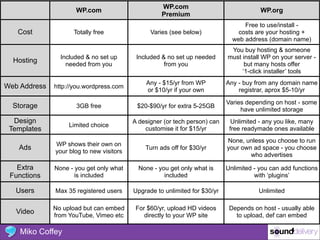
WP.com
                     WP.com                                                             WP.org
                                                    Premium
                                                                                  Free to use/install -
   Cost             Totally free                Varies (see below)              costs are your hosting +
                                                                              web address (domain name)
                                                                             You buy hosting & someone
                Included & no set up       Included & no set up needed      must install WP on your server -
  Hosting         needed from you                    from you                     but many hosts offer
                                                                                 ‘1-click installer’ tools
                                              Any - $15/yr from WP          Any - buy from any domain name
Web Address   http://you.wordpress.com
                                              or $10/yr if your own             registrar, aprox $5-10/yr

                                                                            Varies depending on host - some
  Storage            3GB free              $20-$90/yr for extra 5-25GB
                                                                                 have unlimited storage
  Design                                  A designer (or tech person) can     Unlimited - any you like, many
                   Limited choice
 Templates                                    customise it for $15/yr        free readymade ones available
                                                                            None, unless you choose to run
              WP shows their own on
   Ads                                        Turn ads off for $30/yr       your own ad space - you choose
              your blog to new visitors
                                                                                    who advertises

   Extra      None - you get only what      None - you get only what is     Unlimited - you can add functions
 Functions           is included                     included                         with ‘plugins’

   Users      Max 35 registered users     Upgrade to unlimited for $30/yr              Unlimited

              No upload but can embed      For $60/yr, upload HD videos      Depends on host - usually able
   Video      from YouTube, Vimeo etc         directly to your WP site         to upload, def can embed

    Miko Coffey                                                                                    4
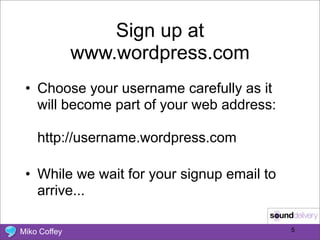
Sign up at
              www.wordpress.com
 • Choose your username carefully as it
   will become part of your web address:

    http://username.wordpress.com

 • While we wait for your signup email to
   arrive...

Miko Coffey                                 5
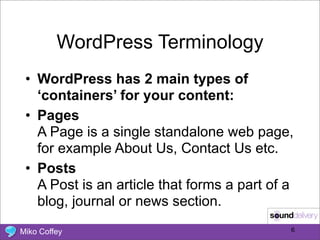
WordPress Terminology
 • WordPress has 2 main types of
   ‘containers’ for your content:
 • Pages
   A Page is a single standalone web page,
   for example About Us, Contact Us etc.
 • Posts
   A Post is an article that forms a part of a
   blog, journal or news section.

Miko Coffey                                  6
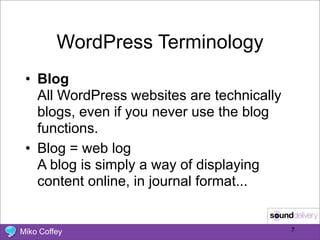
WordPress Terminology
 • Blog
   All WordPress websites are technically
   blogs, even if you never use the blog
   functions.
 • Blog = web log
   A blog is simply a way of displaying
   content online, in journal format...


Miko Coffey                                 7
WordPress / Blog Terminology
 • Blogs are displayed in reverse
   chronological order (newest article
   appears at the top)
 • Each post can be filed into 1 or more
   Categories (like a filing system)
 • Each post can be labeled with Tags, or
   key words associated with that article
 • Visitors can add their Comments to the
   post, and you can respond.
Miko Coffey                                 8
WordPress Terminology
 • Widgets
   A widget is a little chunk of functionality.
   Usually widgets sit in the sidebar of the
   page and offer such functions as a
   Search box, a snippet of info about the
   author, a list of links, a calendar, etc.


Miko Coffey                                       9
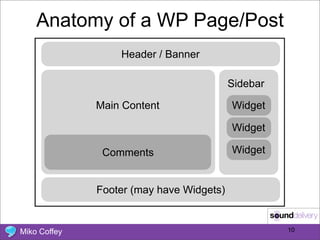
Anatomy of a WP Page/Post
                  Header / Banner

                                          Sidebar

              Main Content                Widget

                                          Widget

               Comments                   Widget


              Footer (may have Widgets)


Miko Coffey                                         10
WordPress Terminology
 • Theme (WordPress Theme)
   A design template that determines the
   overall look of your site: columns, colour
   schemes, fonts, Widget placement,
   width of main area, etc
 • Themes can be free, or ‘Premium’(you
   pay for the ability to use it on your site).
   WP.com comes with a choice of themes
   but you can’t use one that isn’t included
   (no Premium themes).
Miko Coffey                                   11
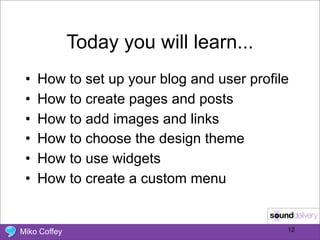
Today you will learn...
 •   How to set up your blog and user profile
 •   How to create pages and posts
 •   How to add images and links
 •   How to choose the design theme
 •   How to use widgets
 •   How to create a custom menu


Miko Coffey                                 12
Let’s do it!


Miko Coffey                  13
Thank You
            Miko Coffey
       www.usingmyhead.com
       miko@usingmyhead.com

Miko Coffey                   14

WordPress: An Introduction

  • 1.
    WordPress: An Introduction Miko Coffey Web Consultant www.usingmyhead.com miko@usingmyhead.com Miko Coffey 1
  • 2.
    WordPress is... •A free publishing tool which allows people to manage blogs or websites without the need for a web team / technical team. Miko Coffey 2
  • 3.
    WordPress has 3flavours • WordPress.com Free • WordPress.com Premium • WordPress.org • WordPress MU = no longer Miko Coffey 3
  • 4.
    WP.com WP.com WP.org Premium Free to use/install - Cost Totally free Varies (see below) costs are your hosting + web address (domain name) You buy hosting & someone Included & no set up Included & no set up needed must install WP on your server - Hosting needed from you from you but many hosts offer ‘1-click installer’ tools Any - $15/yr from WP Any - buy from any domain name Web Address http://you.wordpress.com or $10/yr if your own registrar, aprox $5-10/yr Varies depending on host - some Storage 3GB free $20-$90/yr for extra 5-25GB have unlimited storage Design A designer (or tech person) can Unlimited - any you like, many Limited choice Templates customise it for $15/yr free readymade ones available None, unless you choose to run WP shows their own on Ads Turn ads off for $30/yr your own ad space - you choose your blog to new visitors who advertises Extra None - you get only what None - you get only what is Unlimited - you can add functions Functions is included included with ‘plugins’ Users Max 35 registered users Upgrade to unlimited for $30/yr Unlimited No upload but can embed For $60/yr, upload HD videos Depends on host - usually able Video from YouTube, Vimeo etc directly to your WP site to upload, def can embed Miko Coffey 4
  • 5.
    Sign up at www.wordpress.com • Choose your username carefully as it will become part of your web address: http://username.wordpress.com • While we wait for your signup email to arrive... Miko Coffey 5
  • 6.
    WordPress Terminology •WordPress has 2 main types of ‘containers’ for your content: • Pages A Page is a single standalone web page, for example About Us, Contact Us etc. • Posts A Post is an article that forms a part of a blog, journal or news section. Miko Coffey 6
  • 7.
    WordPress Terminology •Blog All WordPress websites are technically blogs, even if you never use the blog functions. • Blog = web log A blog is simply a way of displaying content online, in journal format... Miko Coffey 7
  • 8.
    WordPress / BlogTerminology • Blogs are displayed in reverse chronological order (newest article appears at the top) • Each post can be filed into 1 or more Categories (like a filing system) • Each post can be labeled with Tags, or key words associated with that article • Visitors can add their Comments to the post, and you can respond. Miko Coffey 8
  • 9.
    WordPress Terminology •Widgets A widget is a little chunk of functionality. Usually widgets sit in the sidebar of the page and offer such functions as a Search box, a snippet of info about the author, a list of links, a calendar, etc. Miko Coffey 9
  • 10.
    Anatomy of aWP Page/Post Header / Banner Sidebar Main Content Widget Widget Comments Widget Footer (may have Widgets) Miko Coffey 10
  • 11.
    WordPress Terminology •Theme (WordPress Theme) A design template that determines the overall look of your site: columns, colour schemes, fonts, Widget placement, width of main area, etc • Themes can be free, or ‘Premium’(you pay for the ability to use it on your site). WP.com comes with a choice of themes but you can’t use one that isn’t included (no Premium themes). Miko Coffey 11
  • 12.
    Today you willlearn... • How to set up your blog and user profile • How to create pages and posts • How to add images and links • How to choose the design theme • How to use widgets • How to create a custom menu Miko Coffey 12
  • 13.
  • 14.
    Thank You Miko Coffey www.usingmyhead.com miko@usingmyhead.com Miko Coffey 14