Version 3


Sodick-America Corporation
Abstract

1)   What is Sm-ART?
2)   Sm-ART Builder
3)   Sm-ART Interface
4)   Sm-ART Language
5)   Sm-ART Assistant
6)   Sm-ART Possibilities
What is Sm-ART?
   A collective software to help middle users
    create and implement their own Graphical
    User Interface for Sodick America’s CNC
    Controllers.
   Sodick Machine Automated Real-Time
    Tuning (Sm-ART) Software consists of
    Sm-ART Builder, Sm-ART Interface, Sm-
    ART Language, and Sm-ART Assistant
Sm-ART Builder
   Graphical User Interface (GUI)
    Integrated Design Environment
    (IDE)
   Provides the tools necessary
    to create the user interface
   Create Forms and Components
    that have the ability to
    communicate with
    our CNC Controllers
Sm-ART Interface
    Takes the project created by Sm-ART B and loads the
     interface
    Directly communicates with
     our CNC Controllers
    Has an adaptive environment
    that changes properties of
    components with “Sm-ART
    Programs”
Sm-ART Language
   Translator Program that allows the user to change the
    language of a selected project
   Captures the “Caption”
    property of each
    component and puts them in
    an easy to read and edit table
Sm-ART Assistant
   A convenient Help Manual
What is possible with Sm-ART?
 Create Basic Widgets

 Customize “Style Sheet”

 Visualize Numerical Control (NC) Program

 Utilize Qt Meta Language (QML)
   Create basic Widgets such as Buttons, Checkboxes, Labels,
    Line Edits, and much more.
   Fully
    customize the
    look of each
    component
    with “Style
    Sheets”
   Visualize NC
    Programs
    before
    physically
    machining the
    work-piece
    with the
    Graphic
    component
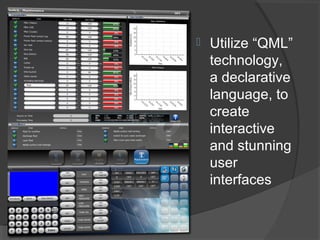
   Utilize “QML”
    technology,
    a declarative
    language, to
    create
    interactive
    and stunning
    user
    interfaces

Smart Software Presentation

  • 1.
  • 2.
    Abstract 1) What is Sm-ART? 2) Sm-ART Builder 3) Sm-ART Interface 4) Sm-ART Language 5) Sm-ART Assistant 6) Sm-ART Possibilities
  • 3.
    What is Sm-ART?  A collective software to help middle users create and implement their own Graphical User Interface for Sodick America’s CNC Controllers.  Sodick Machine Automated Real-Time Tuning (Sm-ART) Software consists of Sm-ART Builder, Sm-ART Interface, Sm- ART Language, and Sm-ART Assistant
  • 4.
    Sm-ART Builder  Graphical User Interface (GUI) Integrated Design Environment (IDE)  Provides the tools necessary to create the user interface  Create Forms and Components that have the ability to communicate with our CNC Controllers
  • 5.
    Sm-ART Interface  Takes the project created by Sm-ART B and loads the interface  Directly communicates with our CNC Controllers  Has an adaptive environment that changes properties of components with “Sm-ART Programs”
  • 6.
    Sm-ART Language  Translator Program that allows the user to change the language of a selected project  Captures the “Caption” property of each component and puts them in an easy to read and edit table
  • 7.
    Sm-ART Assistant  A convenient Help Manual
  • 8.
    What is possiblewith Sm-ART?  Create Basic Widgets  Customize “Style Sheet”  Visualize Numerical Control (NC) Program  Utilize Qt Meta Language (QML)
  • 9.
    Create basic Widgets such as Buttons, Checkboxes, Labels, Line Edits, and much more.
  • 10.
    Fully customize the look of each component with “Style Sheets”
  • 11.
    Visualize NC Programs before physically machining the work-piece with the Graphic component
  • 12.
    Utilize “QML” technology, a declarative language, to create interactive and stunning user interfaces