A GUI (Graphical User Interface) that allows users to interact with electronic devices like computers, hand- held devices (e.g. MP3’s, Portable media players etc), household devices and office equipment.  A graphical user interface offers icons and visual indicators unlike text based interfaces which use typed command labels or text navigation to completely represent the information and actions available to the user. These action are frequently performed by direct manipulation from the graphical elements. The term “GUI” is restricted historically to the scope of two-dimensional display screens capable of describing generic information, in tradition to computer science research. The term “GUI” could of been applicable to a type of interface that was non-generic e.g. Video games and volumetric displays.
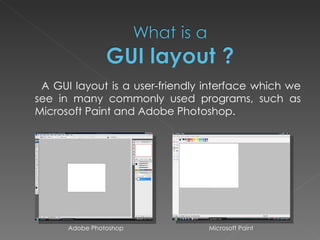
A GUI layout is a user-friendly interface which we see in many commonly used programs, such as Microsoft Paint and Adobe Photoshop. Adobe Photoshop  Microsoft Paint
GUI’s have a number of advantages which include: Simpler and easier to use Faster program development More complex program development by “novice” programmers Enables more detailed graphics to be displayed in the layout
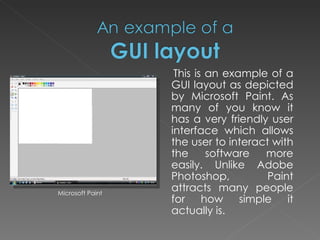
This is an example of a GUI layout as depicted by Microsoft Paint. As many of you know it has a very friendly user interface which allows the user to interact with the software more easily. Unlike Adobe Photoshop, Paint attracts many people for how simple it actually is. Microsoft Paint
Graphics tools in a GUI programming environment enable easy and rapid creation of graphic objects on the screen. Objects in a GUI programming environment can be inserted in a program under development to save time and make it much more simpler for a programmer who has no experience.
Command button - A graphic object labelled with text to indicate it’s function. Buttons usually perform an instantaneous action when clicked Radio Button - A radio button is a choice button to allow one choice from a group of choices. Check box - A check box is similar to a radio button but however allows more than one choice from each group. Cursor – Cursors are used to ‘point’ to particular GUI layout elements, as well as showing the state of the system (hourglass etc) or conveying a change of interactive possibilities offered by the interface. Dialogue box - A special window which pops up to give information or choices to the user.  Text boxes - Objects that contain text. They can be static and/or scrollable to hold the particular text off the screen that may the user activated to expose the rest of the text. List boxes - A form of menu in which options are shown as static or interactive list.

Gui Layout Presentation

  • 1.
  • 2.
    A GUI (GraphicalUser Interface) that allows users to interact with electronic devices like computers, hand- held devices (e.g. MP3’s, Portable media players etc), household devices and office equipment. A graphical user interface offers icons and visual indicators unlike text based interfaces which use typed command labels or text navigation to completely represent the information and actions available to the user. These action are frequently performed by direct manipulation from the graphical elements. The term “GUI” is restricted historically to the scope of two-dimensional display screens capable of describing generic information, in tradition to computer science research. The term “GUI” could of been applicable to a type of interface that was non-generic e.g. Video games and volumetric displays.
  • 3.
    A GUI layoutis a user-friendly interface which we see in many commonly used programs, such as Microsoft Paint and Adobe Photoshop. Adobe Photoshop Microsoft Paint
  • 4.
    GUI’s have anumber of advantages which include: Simpler and easier to use Faster program development More complex program development by “novice” programmers Enables more detailed graphics to be displayed in the layout
  • 5.
    This is anexample of a GUI layout as depicted by Microsoft Paint. As many of you know it has a very friendly user interface which allows the user to interact with the software more easily. Unlike Adobe Photoshop, Paint attracts many people for how simple it actually is. Microsoft Paint
  • 6.
    Graphics tools ina GUI programming environment enable easy and rapid creation of graphic objects on the screen. Objects in a GUI programming environment can be inserted in a program under development to save time and make it much more simpler for a programmer who has no experience.
  • 7.
    Command button -A graphic object labelled with text to indicate it’s function. Buttons usually perform an instantaneous action when clicked Radio Button - A radio button is a choice button to allow one choice from a group of choices. Check box - A check box is similar to a radio button but however allows more than one choice from each group. Cursor – Cursors are used to ‘point’ to particular GUI layout elements, as well as showing the state of the system (hourglass etc) or conveying a change of interactive possibilities offered by the interface. Dialogue box - A special window which pops up to give information or choices to the user. Text boxes - Objects that contain text. They can be static and/or scrollable to hold the particular text off the screen that may the user activated to expose the rest of the text. List boxes - A form of menu in which options are shown as static or interactive list.