Sessão Técnica Portugal GTUG
        Como fazer boas aplicações para Android

Diogo Júnio - @drjunior
Bernardo Pina - @bioblink
Manuel Silva - @manuelvsc
What’s a GTUG?

   GTUG stand for Google Technology Users Group

   GTUGs are user groups for people who are
    interested in Google's developer technology
What is Android?


   Is a mobile operating system
   Run on the Linux kernel
   Developed by Google and the Open Handset Alliance
    (a consortium of 48 hardware, software, and telecom companies )
   Was announced publicly on 5 November 2007
   First mobile device, the G1, was announced on
    September 2008
What is Android?


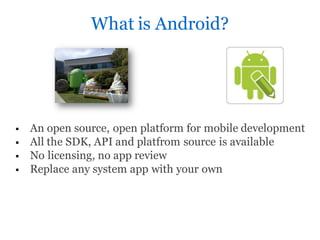
   An open source, open platform for mobile development
   All the SDK, API and platfrom source is available
   No licensing, no app review
   Replace any system app with your own
Programming Android Applications


    Written in Java
    Run in Dalvik Virtual Machine (optimized for mobile devices)
    Uses its own bytecode, not Java Bytecode
Resources –Hardware Dependent


   GSM
   Bluetooth, 3G, WIFI
   Touchscreen, keypad, Trackball
   Camera, GPS, Compass and Accelerometer
   NFC…
Resources –Hardware Independent


    Integrated Browser based on WebKit Engine
    Graphics 2d and 3d optimized(OpenGL ES 1.0)
    SQLite to save structured data
    Multimedia support
    (MPEG4, H.264, MP3, AAC, AMR, JPG, PNG, GIF)
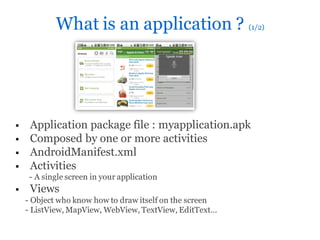
What is an application ? (1/2)


    Application package file : myapplication.apk
    Composed by one or more activities
    AndroidManifest.xml
    Activities
     - A single screen in your application
    Views
    - Object who know how to draw itself on the screen
    - ListView, MapView, WebView, TextView, EditText…
What is an application ? (2/2)


    Layouts
       - Views Containers
       - RelativeLayout, Linearlayout, FrameLayout…
    Permissions
    - Low level access to features(GSM, Internet, GPS, SMS…)
    - Declared by the developer
    - User prompt on the market at installation
    Services
    - Background services
    Notifications
    - Receive and react to broadcasted events
How to code ?


   Java SDK
   Android SDK
     - Android Emulator – Linux, Windows , Mac
     - Command Line Tools
     - adb - Android Debug Bridge
   Eclipse
   Eclipse Plugin - ADT
Tools
   ADT
   Android Emulator
   Android Virtual Device
   Hierarchy Viewer
   Layoutopt
   Draw 9-Patch
   Dalvik debug Monitor Service
   Android Debug Bridge
   Android Asset Packaging Tool
   Android interface definition language
   Sqlite3
   Traceview
   Mksdcard
   Dx
   Ui/Aplication Exerciser Monkey
   Android
   zipalign
Documentation/Help

        Android Developers website
   http://developer.android.com


        Android Developers Google Group
   http://groups.google.com/group/android-developers


        Twitter
   http://twitter.com/androiddev


        AndroidpPT– Android programming section
       http://www.androidpt.com/index.php?option=com_kunena&func=listcat&catid=40
&Itemid=31
User Interface Guidelines
  Icon Design Guidelines
   - The Icon Guidelines describe each kind of icon in detail, with
 specifications for the size, color, shading, and other details for making
 all your icons fit in the Android system.


  Activity and Task Design Guidelines
   - These guidelines describe how activities work, illustrates them
 with examples, and describes important underlying principles and
 mechanisms, such as multitasking, activity reuse, intents, the activity
 stack, and tasks. It covers this all from a high-level design perspective.


  Menu Design Guidelines
   - These guidelines describe the difference between Options and
 Context menus, how to arrange menu items, when to put commands
 on-screen, and other details about menu design.
http://developer.android.com/guide/practices/ui_guidelines/index.htm
l
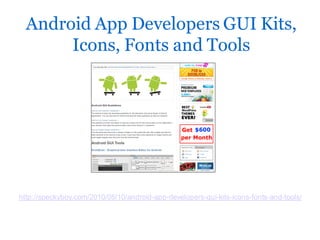
Android App Developers GUI Kits,
       Icons, Fonts and Tools


http://speckyboy.com/2010/05/10/android-app-developers-gui-kits-icons-fonts-and-tools/
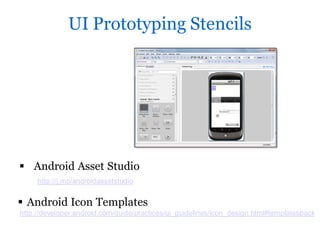
UI Prototyping Stencils


 Android Asset Studio
     http://j.mp/androidassetstudio


 Android Icon Templates
http://developer.android.com/guide/practices/ui_guidelines/icon_design.html#templatespack
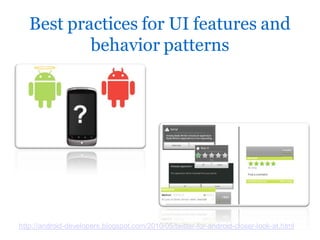
Best practices for UI features and
           behavior patterns


http://android-developers.blogspot.com/2010/05/twitter-for-android-closer-look-at.html
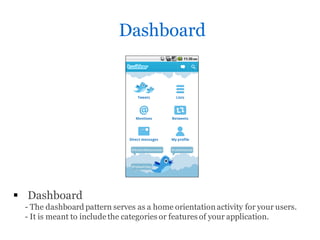
Dashboard


 Dashboard
 - The dashboard pattern serves as a home orientation activity for your users.
 - It is meant to include the categories or features of your application.
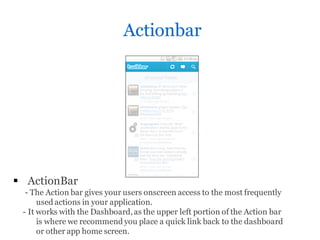
Actionbar


 ActionBar
  - The Action bar gives your users onscreen access to the most frequently
      used actions in your application.
 - It works with the Dashboard, as the upper left portion of the Action bar
      is where we recommend you place a quick link back to the dashboard
      or other app home screen.
Time to code!!!

PT GTUG 1st Technical Tession - Android

  • 1.
    Sessão Técnica PortugalGTUG Como fazer boas aplicações para Android Diogo Júnio - @drjunior Bernardo Pina - @bioblink Manuel Silva - @manuelvsc
  • 2.
    What’s a GTUG?  GTUG stand for Google Technology Users Group  GTUGs are user groups for people who are interested in Google's developer technology
  • 3.
    What is Android?  Is a mobile operating system  Run on the Linux kernel  Developed by Google and the Open Handset Alliance (a consortium of 48 hardware, software, and telecom companies )  Was announced publicly on 5 November 2007  First mobile device, the G1, was announced on September 2008
  • 4.
    What is Android?  An open source, open platform for mobile development  All the SDK, API and platfrom source is available  No licensing, no app review  Replace any system app with your own
  • 5.
    Programming Android Applications  Written in Java  Run in Dalvik Virtual Machine (optimized for mobile devices)  Uses its own bytecode, not Java Bytecode
  • 6.
    Resources –Hardware Dependent  GSM  Bluetooth, 3G, WIFI  Touchscreen, keypad, Trackball  Camera, GPS, Compass and Accelerometer  NFC…
  • 7.
    Resources –Hardware Independent  Integrated Browser based on WebKit Engine  Graphics 2d and 3d optimized(OpenGL ES 1.0)  SQLite to save structured data  Multimedia support (MPEG4, H.264, MP3, AAC, AMR, JPG, PNG, GIF)
  • 8.
    What is anapplication ? (1/2)  Application package file : myapplication.apk  Composed by one or more activities  AndroidManifest.xml  Activities - A single screen in your application  Views - Object who know how to draw itself on the screen - ListView, MapView, WebView, TextView, EditText…
  • 9.
    What is anapplication ? (2/2)  Layouts - Views Containers - RelativeLayout, Linearlayout, FrameLayout…  Permissions - Low level access to features(GSM, Internet, GPS, SMS…) - Declared by the developer - User prompt on the market at installation  Services - Background services  Notifications - Receive and react to broadcasted events
  • 10.
    How to code?  Java SDK  Android SDK - Android Emulator – Linux, Windows , Mac - Command Line Tools - adb - Android Debug Bridge  Eclipse  Eclipse Plugin - ADT
  • 11.
    Tools  ADT  Android Emulator  Android Virtual Device  Hierarchy Viewer  Layoutopt  Draw 9-Patch  Dalvik debug Monitor Service  Android Debug Bridge  Android Asset Packaging Tool  Android interface definition language  Sqlite3  Traceview  Mksdcard  Dx  Ui/Aplication Exerciser Monkey  Android  zipalign
  • 12.
    Documentation/Help Android Developers website http://developer.android.com Android Developers Google Group http://groups.google.com/group/android-developers Twitter http://twitter.com/androiddev AndroidpPT– Android programming section http://www.androidpt.com/index.php?option=com_kunena&func=listcat&catid=40 &Itemid=31
  • 13.
    User Interface Guidelines  Icon Design Guidelines - The Icon Guidelines describe each kind of icon in detail, with specifications for the size, color, shading, and other details for making all your icons fit in the Android system.  Activity and Task Design Guidelines - These guidelines describe how activities work, illustrates them with examples, and describes important underlying principles and mechanisms, such as multitasking, activity reuse, intents, the activity stack, and tasks. It covers this all from a high-level design perspective.  Menu Design Guidelines - These guidelines describe the difference between Options and Context menus, how to arrange menu items, when to put commands on-screen, and other details about menu design. http://developer.android.com/guide/practices/ui_guidelines/index.htm l
  • 14.
    Android App DevelopersGUI Kits, Icons, Fonts and Tools http://speckyboy.com/2010/05/10/android-app-developers-gui-kits-icons-fonts-and-tools/
  • 15.
    UI Prototyping Stencils Android Asset Studio http://j.mp/androidassetstudio  Android Icon Templates http://developer.android.com/guide/practices/ui_guidelines/icon_design.html#templatespack
  • 16.
    Best practices forUI features and behavior patterns http://android-developers.blogspot.com/2010/05/twitter-for-android-closer-look-at.html
  • 17.
    Dashboard  Dashboard -The dashboard pattern serves as a home orientation activity for your users. - It is meant to include the categories or features of your application.
  • 18.
    Actionbar  ActionBar - The Action bar gives your users onscreen access to the most frequently used actions in your application. - It works with the Dashboard, as the upper left portion of the Action bar is where we recommend you place a quick link back to the dashboard or other app home screen.
  • 19.