Jordan JonesGenealogyMedia.Comjordan@genealogymedia.comCraven County Genealogical Society 13 May 2008Smart Internet Searching for Genealogists
ONE MUST START WITH A DISCUSSION OF ACCESS …1 – Access: Search and Navigation
The Librarian’s Definition© 2008 GenealogyMedia.com 3“The availability of or permission to use records.” – Archives & Records Management Handbook, Oregon State U., http://osulibrary.oregonstate.edu/archives/handbook/definitions/“… the purpose of librarianship – enabling people to identify, locate, and use the information that will meet their … needs.”– The Information Professional’s Glossary, SIRLS, Arizona State U., http://www.sir.arizona.edu/resources/glossary.html
The Web Technologist’s Definition© 2008 GenealogyMedia.com 4For web sites, access similarly describes the permission and ability for people to “identify, locate, and use information.”
As of 2005, there were more than 11.5 billion web pages (http://www.cs.uiowa.edu/~asignori/web-size/). 	So how do you access the genealogical information you’re looking for?
Web Access© 2008 GenealogyMedia.com 5Navigation – That is, clicking through a pre-defined path in a website to find the information you need.  	A good navigation path is like a searchlight in fog.Search – Search is especially helpful: If you do not even know what website to use, or If you need to find information on a website and do not know how to navigate to the information.
Search Types© 2008 GenealogyMedia.com 6There are two kinds of search:Full-text search – Every significant word is part of the search (Google, NewspaperArchive, Footnote)
Database search – Words are searched against particular fields in a database, such as “surname” or “state” (Ancestry, SteveMorse.org,  NewspaperArchive, Footnote)	It’s important to keep in mind which kind of search you’re performing. A full-text search will not know a surname from any other collection of characters.
Design for Access© 2008 GenealogyMedia.com 7	A good web designer will focus on improving customer success through both paths (search and navigation) to the information
There are several kinds of search …© 2008 GenealogyMedia.com 82 – Search
How Search Engines Work© 2008 GenealogyMedia.com 9Web-Crawling “Spiders”These programs “crawl” through all the links on the web
IndexingThe search engine creates and manages
CachingSome web search applications (such as Google) store caches of all the pages they crawl
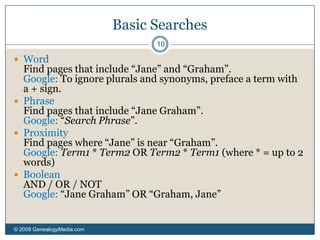
RankingLinks delivered are ranked in terms of relevance, popularity, authoritativeness and other criteria: The Secret Sauce.Basic Searches© 2008 GenealogyMedia.com 10WordFind pages that include “Jane” and “Graham”.Google: To ignore plurals and synonyms, preface a term with a + sign.
PhraseFind pages that include “Jane Graham”.Google: “Search Phrase”.
ProximityFind pages where “Jane” is near “Graham”.Google: Term1 * Term2 OR Term2 * Term1 (where * = up to 2 words)
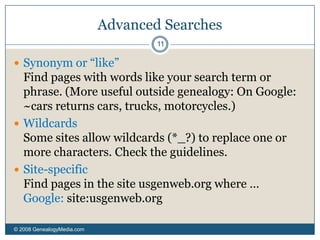
BooleanAND / OR / NOTGoogle: “Jane Graham” OR “Graham, Jane”Advanced Searches© 2008 GenealogyMedia.com 11Synonym or “like”Find pages with words like your search term or phrase. (More useful outside genealogy: On Google: ~cars returns cars, trucks, motorcycles.)WildcardsSome sites allow wildcards (*_?) to replace one or more characters. Check the guidelines.Site-specific Find pages in the site usgenweb.org where …Google: site:usgenweb.org
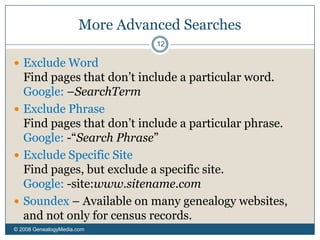
More Advanced Searches © 2008 GenealogyMedia.com 12Exclude WordFind pages that don’t include a particular word. Google: –SearchTermExclude PhraseFind pages that don’t include a particular phrase. Google: -“Search Phrase”Exclude Specific Site Find pages, but exclude a specific site.Google: -site:www.sitename.com Soundex – Available on many genealogy websites, and not only for census records.
Methodologies	© 2008 GenealogyMedia.com 13Look for advanced search pagesRead search guidelines on the siteExperimentIf you don’t find what you’re looking for, map out strategies for more specific searchesIn other words, plan your more complex Internet searches the way you’d plan a trip to a major repository
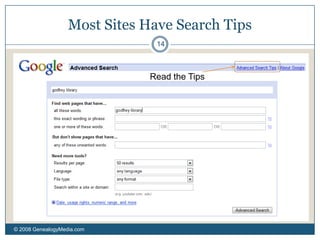
Most Sites Have Search Tips© 2008 GenealogyMedia.com 14Read the Tips
Using Google to its Potential© 2008 GenealogyMedia.com 153 – A Sample Search
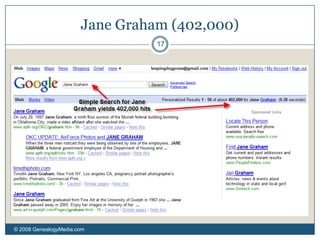
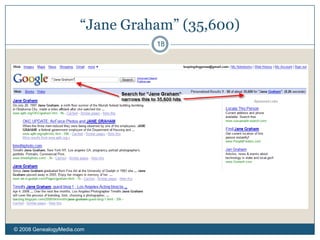
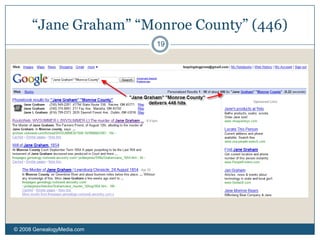
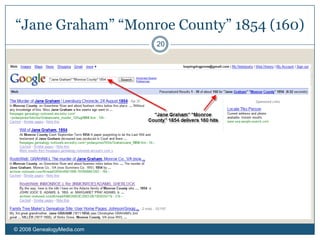
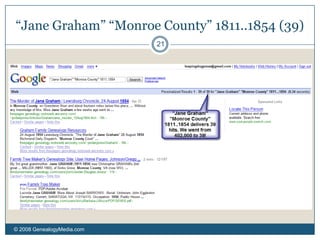
Finding Jane Graham© 2008 GenealogyMedia.com 16Facts: Jane Graham, was born in 1811 and died unmarried in 1854. She lived her life in Monroe County, VA (now WV).	Q: How do I search for her on Google?A: By increasing the specificity of my search.
Jane Graham (402,000)© 2008 GenealogyMedia.com 17
“Jane Graham” (35,600)© 2008 GenealogyMedia.com 18
“Jane Graham” “Monroe County” (446)© 2008 GenealogyMedia.com 19
“Jane Graham” “Monroe County” 1854 (160)© 2008 GenealogyMedia.com 20
“Jane Graham” “Monroe County” 1811..1854 (39)© 2008 GenealogyMedia.com 21
Site-specific search on Google, and searches at Newspaperarchive.com, footnote© 2008 GenealogyMedia.com 224 – Additional Search Examples
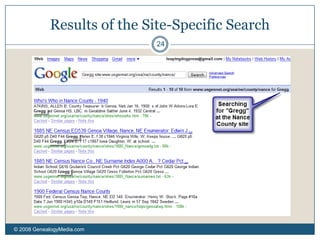
Searching a Specific Site on Google© 2008 GenealogyMedia.com 23Say I want to know all of the mentions of the surname “Gregg” on the US GenNet site for Nance County, NEhttp://www.usgennet.org/usa/ne/county/nance/How do I do this?I go to Google and search for:Gregg site:www.usgennet.org/usa/ne/county/nance/
Results of the Site-Specific Search© 2008 GenealogyMedia.com 24
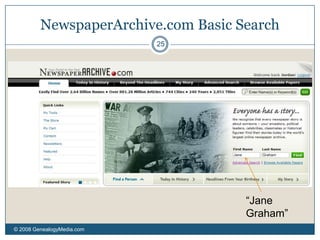
NewspaperArchive.com Basic Search© 2008 GenealogyMedia.com 25“Jane Graham”
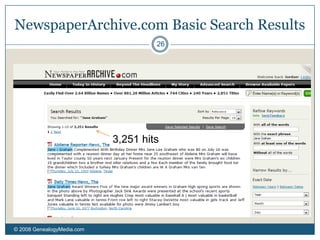
NewspaperArchive.com Basic Search Results© 2008 GenealogyMedia.com 263,251 hits
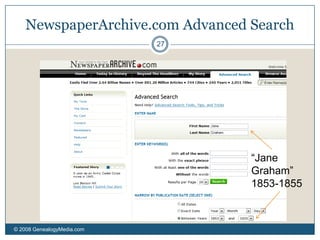
NewspaperArchive.com Advanced Search© 2008 GenealogyMedia.com 27“Jane Graham” 1853-1855
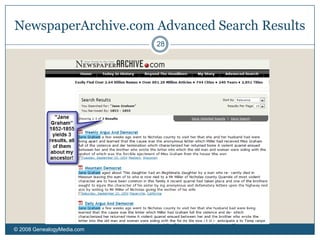
NewspaperArchive.com Advanced Search Results© 2008 GenealogyMedia.com 28
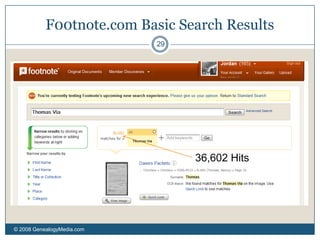
F00tnote.com Basic Search Results© 2008 GenealogyMedia.com 2936,602 Hits
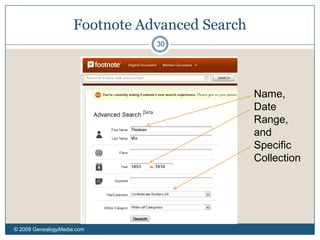
Footnote Advanced Search© 2008 GenealogyMedia.com 30Name, Date Range, and Specific Collection
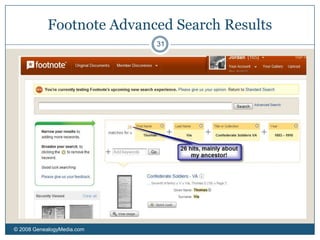
Footnote Advanced Search Results© 2008 GenealogyMedia.com 31
Stephen P. Morse’s One-Step Web Pages© 2008 GenealogyMedia.com 32No discussion of internet search for genealogists would be complete without a discussion of Stephen Morse’s One-Step Web Pages at:  http://www.stevemorse.org/Morse uses “deep linking” to skip past multiple search pages and get directly to the content.One great example is that the One-Step site allows you to search Ancestry (if you have an account) with surnames of fewer than 3 letters. It does this by sending 26 searches for each letter you don’t specify.
The Morse Controversy© 2008 GenealogyMedia.com 33Some web managers have either blocked the One-Step pages or merely protested their side-effects.The pages can limit a site’s ad revenue, as people skip pages with ads on their way to the information they seek.The pages can cause a lot of traffic to come to a website, either by making it easy to submit what are essentially multiple requests with one click, or by providing better advertising than some smaller sites have received.I’ll have more about this site in an answer to a question submitted.
Resolution© 2008 GenealogyMedia.com 34The One-Step pages are a benefit to researchersMorse has been able to work out most disputes, except with some larger companies. (And some sites have used his methods to improve their search capabilities.)
Responses to questions received in advance …© 2008 GenealogyMedia.com 35Questions
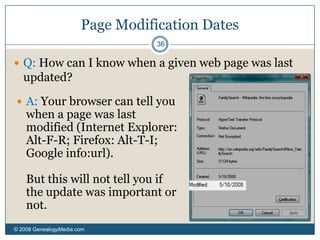
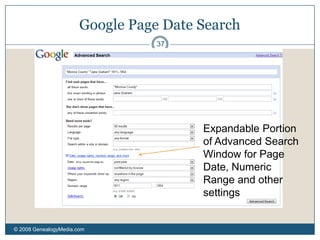
Page Modification Dates© 2008 GenealogyMedia.com 36Q: How can I know when a given web page was last updated? A: Your browser can tell you when a page was last modified (Internet Explorer: Alt-F-R; Firefox: Alt-T-I; Google info:url). But this will not tell you if the update was important or not.Google Page Date Search© 2008 GenealogyMedia.com 37Expandable Portion of Advanced Search Window for Page Date, Numeric Range and other settings
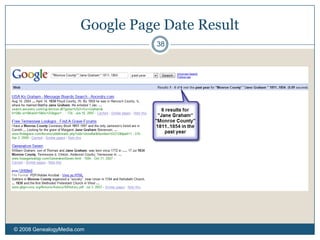
Google Page Date Result© 2008 GenealogyMedia.com 38
A Caveat About “Page Date” Searches on Google© 2008 GenealogyMedia.com 39Stephen Morse points out that Google is really tracking when they indexed a page, not when the page was last modified. Probably a better search for the age of a web page is Stephen Morse’s : http://stevemorse.org/google/googledate.html
Web Translation© 2008 GenealogyMedia.com 40Q: Are there any good web sites to help translate web pages written in another language? There are good sites in German but I can’t find a source to help me translate what they are saying.A: There are several, though all are limited since real translation requires a human touch.http://www.google.com/translate_thttp://babelfish.altavista.com/http://translation2.paralink.com/
Google Appliance© 2008 GenealogyMedia.com 41Q: Godfrey Memorial Library has “Godfrey Search” on its Web site to search its databases. “Godfrey Search” is powered by an “appliance” provided by Google. What is an appliance and how does it differ from a general Google search?A: The Google Search appliance is a server computer that indexes content on a specific site. 	Direct Google searches are often better, when you have the option of either, but Google cannot crawl the Godfrey Library site because it’s subscription based.
The New FamilySearch© 2008 GenealogyMedia.com 42Q: How will the New FamilySearch impact other free and paid web sites? A: This will depend on:
Content overlap
Rights and permissions issues	By the way, in case anyone could use an overview of the new FamilySearch, Wikipedia’s article provides a brief take on it: http://en.wikipedia.org/wiki/FamilySearch#New_FamilySearch
Evaluation of Quality© 2008 GenealogyMedia.com 43Q: How do you evaluate the info on a website as to its veracity?  	It is one thing if it is a scanned copy of a document, i.e. a census, but it is troublesome when you get family info off of some websites (I would say FamilySearch in particular) and the info is wrong-it appears it was obtained by someone and sent in to the Church.  On some sites there is no citation at all.Q: How do you evaluate the info on a website as to its veracity?  	It is one thing if it is a scanned copy of a document, i.e. a census, but it is troublesome when you get family info off of some websites (I would say FamilySearch in particular) and the info is wrong-it appears it was obtained by someone and sent in to the Church.  On some sites there is no citation at all.A: You’ve hit upon the most important issue: sourcing. 	Any unsourced information – on the Internet or anywhere else – should be considered suspect, because the standard of proof requires being able to reproduce and re-evaluate the research.
Narrowing Searches© 2008 GenealogyMedia.com 44Q: How can one narrow a search if there is a really common name and you don’t know much? Conversely, if there is an unusual name but you can’t find anything, are there tricks of the trade?A: Try the strategies we’ve mentioned to use date ranges, site-specific searches, inclusion, exclusion, etc. 	For both common and uncommon names, try alternate spellings. Something like Google only understands characters, not sounds. For my family, I have to look for Grimes as well as Graham, Leake as well as Lake.
Keeping Info© 2008 GenealogyMedia.com 45Q:  How do you keep this info?  	I spent a long time (and lots of printer cartridges) copying things only to discover later it was not the relative in my Family Tree at all. Is there a good Internet organizational tool?A: 	There are a number of strategies. One thing I do up front is check the following: Is the information sourced?   Does the information really connect to mine?If the information does not pass both tests, I may keep the link at del.icio.us (a link saving and sharing site) for later evaluation.	Another strategy is to use a family tree program, such as TMG, that allows you to store contradictory pieces of information.
Pre-Ellis Island Immigrants© 2008 GenealogyMedia.com 46How do you find immigration info on the internet for people who came to the US way before Ellis Island if you do not know what ship they came on or what port they came to  (and if they have a very common name)?These are challenging issues. 	You will need to perform multiple searches. I recommend Steven Morse’s site. It will allow you to search on more fields. You can also switch arrival ports to facilitate searching for the same passenger arriving in different ports. (Some searches require subscriptions.)

Smart Internet Searching for Genealogists

  • 1.
    Jordan JonesGenealogyMedia.Comjordan@genealogymedia.comCraven CountyGenealogical Society 13 May 2008Smart Internet Searching for Genealogists
  • 2.
    ONE MUST STARTWITH A DISCUSSION OF ACCESS …1 – Access: Search and Navigation
  • 3.
    The Librarian’s Definition©2008 GenealogyMedia.com 3“The availability of or permission to use records.” – Archives & Records Management Handbook, Oregon State U., http://osulibrary.oregonstate.edu/archives/handbook/definitions/“… the purpose of librarianship – enabling people to identify, locate, and use the information that will meet their … needs.”– The Information Professional’s Glossary, SIRLS, Arizona State U., http://www.sir.arizona.edu/resources/glossary.html
  • 4.
    The Web Technologist’sDefinition© 2008 GenealogyMedia.com 4For web sites, access similarly describes the permission and ability for people to “identify, locate, and use information.”
  • 5.
    As of 2005,there were more than 11.5 billion web pages (http://www.cs.uiowa.edu/~asignori/web-size/). So how do you access the genealogical information you’re looking for?
  • 6.
    Web Access© 2008GenealogyMedia.com 5Navigation – That is, clicking through a pre-defined path in a website to find the information you need. A good navigation path is like a searchlight in fog.Search – Search is especially helpful: If you do not even know what website to use, or If you need to find information on a website and do not know how to navigate to the information.
  • 7.
    Search Types© 2008GenealogyMedia.com 6There are two kinds of search:Full-text search – Every significant word is part of the search (Google, NewspaperArchive, Footnote)
  • 8.
    Database search –Words are searched against particular fields in a database, such as “surname” or “state” (Ancestry, SteveMorse.org, NewspaperArchive, Footnote) It’s important to keep in mind which kind of search you’re performing. A full-text search will not know a surname from any other collection of characters.
  • 9.
    Design for Access©2008 GenealogyMedia.com 7 A good web designer will focus on improving customer success through both paths (search and navigation) to the information
  • 10.
    There are severalkinds of search …© 2008 GenealogyMedia.com 82 – Search
  • 11.
    How Search EnginesWork© 2008 GenealogyMedia.com 9Web-Crawling “Spiders”These programs “crawl” through all the links on the web
  • 12.
    IndexingThe search enginecreates and manages
  • 13.
    CachingSome web searchapplications (such as Google) store caches of all the pages they crawl
  • 14.
    RankingLinks delivered areranked in terms of relevance, popularity, authoritativeness and other criteria: The Secret Sauce.Basic Searches© 2008 GenealogyMedia.com 10WordFind pages that include “Jane” and “Graham”.Google: To ignore plurals and synonyms, preface a term with a + sign.
  • 15.
    PhraseFind pages thatinclude “Jane Graham”.Google: “Search Phrase”.
  • 16.
    ProximityFind pages where“Jane” is near “Graham”.Google: Term1 * Term2 OR Term2 * Term1 (where * = up to 2 words)
  • 17.
    BooleanAND / OR/ NOTGoogle: “Jane Graham” OR “Graham, Jane”Advanced Searches© 2008 GenealogyMedia.com 11Synonym or “like”Find pages with words like your search term or phrase. (More useful outside genealogy: On Google: ~cars returns cars, trucks, motorcycles.)WildcardsSome sites allow wildcards (*_?) to replace one or more characters. Check the guidelines.Site-specific Find pages in the site usgenweb.org where …Google: site:usgenweb.org
  • 18.
    More Advanced Searches© 2008 GenealogyMedia.com 12Exclude WordFind pages that don’t include a particular word. Google: –SearchTermExclude PhraseFind pages that don’t include a particular phrase. Google: -“Search Phrase”Exclude Specific Site Find pages, but exclude a specific site.Google: -site:www.sitename.com Soundex – Available on many genealogy websites, and not only for census records.
  • 19.
    Methodologies © 2008 GenealogyMedia.com13Look for advanced search pagesRead search guidelines on the siteExperimentIf you don’t find what you’re looking for, map out strategies for more specific searchesIn other words, plan your more complex Internet searches the way you’d plan a trip to a major repository
  • 20.
    Most Sites HaveSearch Tips© 2008 GenealogyMedia.com 14Read the Tips
  • 21.
    Using Google toits Potential© 2008 GenealogyMedia.com 153 – A Sample Search
  • 22.
    Finding Jane Graham©2008 GenealogyMedia.com 16Facts: Jane Graham, was born in 1811 and died unmarried in 1854. She lived her life in Monroe County, VA (now WV). Q: How do I search for her on Google?A: By increasing the specificity of my search.
  • 23.
    Jane Graham (402,000)©2008 GenealogyMedia.com 17
  • 24.
    “Jane Graham” (35,600)©2008 GenealogyMedia.com 18
  • 25.
    “Jane Graham” “MonroeCounty” (446)© 2008 GenealogyMedia.com 19
  • 26.
    “Jane Graham” “MonroeCounty” 1854 (160)© 2008 GenealogyMedia.com 20
  • 27.
    “Jane Graham” “MonroeCounty” 1811..1854 (39)© 2008 GenealogyMedia.com 21
  • 28.
    Site-specific search onGoogle, and searches at Newspaperarchive.com, footnote© 2008 GenealogyMedia.com 224 – Additional Search Examples
  • 29.
    Searching a SpecificSite on Google© 2008 GenealogyMedia.com 23Say I want to know all of the mentions of the surname “Gregg” on the US GenNet site for Nance County, NEhttp://www.usgennet.org/usa/ne/county/nance/How do I do this?I go to Google and search for:Gregg site:www.usgennet.org/usa/ne/county/nance/
  • 30.
    Results of theSite-Specific Search© 2008 GenealogyMedia.com 24
  • 31.
    NewspaperArchive.com Basic Search©2008 GenealogyMedia.com 25“Jane Graham”
  • 32.
    NewspaperArchive.com Basic SearchResults© 2008 GenealogyMedia.com 263,251 hits
  • 33.
    NewspaperArchive.com Advanced Search©2008 GenealogyMedia.com 27“Jane Graham” 1853-1855
  • 34.
    NewspaperArchive.com Advanced SearchResults© 2008 GenealogyMedia.com 28
  • 35.
    F00tnote.com Basic SearchResults© 2008 GenealogyMedia.com 2936,602 Hits
  • 36.
    Footnote Advanced Search©2008 GenealogyMedia.com 30Name, Date Range, and Specific Collection
  • 37.
    Footnote Advanced SearchResults© 2008 GenealogyMedia.com 31
  • 38.
    Stephen P. Morse’sOne-Step Web Pages© 2008 GenealogyMedia.com 32No discussion of internet search for genealogists would be complete without a discussion of Stephen Morse’s One-Step Web Pages at: http://www.stevemorse.org/Morse uses “deep linking” to skip past multiple search pages and get directly to the content.One great example is that the One-Step site allows you to search Ancestry (if you have an account) with surnames of fewer than 3 letters. It does this by sending 26 searches for each letter you don’t specify.
  • 39.
    The Morse Controversy©2008 GenealogyMedia.com 33Some web managers have either blocked the One-Step pages or merely protested their side-effects.The pages can limit a site’s ad revenue, as people skip pages with ads on their way to the information they seek.The pages can cause a lot of traffic to come to a website, either by making it easy to submit what are essentially multiple requests with one click, or by providing better advertising than some smaller sites have received.I’ll have more about this site in an answer to a question submitted.
  • 40.
    Resolution© 2008 GenealogyMedia.com34The One-Step pages are a benefit to researchersMorse has been able to work out most disputes, except with some larger companies. (And some sites have used his methods to improve their search capabilities.)
  • 41.
    Responses to questionsreceived in advance …© 2008 GenealogyMedia.com 35Questions
  • 42.
    Page Modification Dates©2008 GenealogyMedia.com 36Q: How can I know when a given web page was last updated? A: Your browser can tell you when a page was last modified (Internet Explorer: Alt-F-R; Firefox: Alt-T-I; Google info:url). But this will not tell you if the update was important or not.Google Page Date Search© 2008 GenealogyMedia.com 37Expandable Portion of Advanced Search Window for Page Date, Numeric Range and other settings
  • 43.
    Google Page DateResult© 2008 GenealogyMedia.com 38
  • 44.
    A Caveat About“Page Date” Searches on Google© 2008 GenealogyMedia.com 39Stephen Morse points out that Google is really tracking when they indexed a page, not when the page was last modified. Probably a better search for the age of a web page is Stephen Morse’s : http://stevemorse.org/google/googledate.html
  • 45.
    Web Translation© 2008GenealogyMedia.com 40Q: Are there any good web sites to help translate web pages written in another language? There are good sites in German but I can’t find a source to help me translate what they are saying.A: There are several, though all are limited since real translation requires a human touch.http://www.google.com/translate_thttp://babelfish.altavista.com/http://translation2.paralink.com/
  • 46.
    Google Appliance© 2008GenealogyMedia.com 41Q: Godfrey Memorial Library has “Godfrey Search” on its Web site to search its databases. “Godfrey Search” is powered by an “appliance” provided by Google. What is an appliance and how does it differ from a general Google search?A: The Google Search appliance is a server computer that indexes content on a specific site. Direct Google searches are often better, when you have the option of either, but Google cannot crawl the Godfrey Library site because it’s subscription based.
  • 47.
    The New FamilySearch©2008 GenealogyMedia.com 42Q: How will the New FamilySearch impact other free and paid web sites? A: This will depend on:
  • 48.
  • 49.
    Rights and permissionsissues By the way, in case anyone could use an overview of the new FamilySearch, Wikipedia’s article provides a brief take on it: http://en.wikipedia.org/wiki/FamilySearch#New_FamilySearch
  • 50.
    Evaluation of Quality©2008 GenealogyMedia.com 43Q: How do you evaluate the info on a website as to its veracity?  It is one thing if it is a scanned copy of a document, i.e. a census, but it is troublesome when you get family info off of some websites (I would say FamilySearch in particular) and the info is wrong-it appears it was obtained by someone and sent in to the Church.  On some sites there is no citation at all.Q: How do you evaluate the info on a website as to its veracity?  It is one thing if it is a scanned copy of a document, i.e. a census, but it is troublesome when you get family info off of some websites (I would say FamilySearch in particular) and the info is wrong-it appears it was obtained by someone and sent in to the Church.  On some sites there is no citation at all.A: You’ve hit upon the most important issue: sourcing. Any unsourced information – on the Internet or anywhere else – should be considered suspect, because the standard of proof requires being able to reproduce and re-evaluate the research.
  • 51.
    Narrowing Searches© 2008GenealogyMedia.com 44Q: How can one narrow a search if there is a really common name and you don’t know much? Conversely, if there is an unusual name but you can’t find anything, are there tricks of the trade?A: Try the strategies we’ve mentioned to use date ranges, site-specific searches, inclusion, exclusion, etc. For both common and uncommon names, try alternate spellings. Something like Google only understands characters, not sounds. For my family, I have to look for Grimes as well as Graham, Leake as well as Lake.
  • 52.
    Keeping Info© 2008GenealogyMedia.com 45Q: How do you keep this info?  I spent a long time (and lots of printer cartridges) copying things only to discover later it was not the relative in my Family Tree at all. Is there a good Internet organizational tool?A: There are a number of strategies. One thing I do up front is check the following: Is the information sourced?   Does the information really connect to mine?If the information does not pass both tests, I may keep the link at del.icio.us (a link saving and sharing site) for later evaluation. Another strategy is to use a family tree program, such as TMG, that allows you to store contradictory pieces of information.
  • 53.
    Pre-Ellis Island Immigrants©2008 GenealogyMedia.com 46How do you find immigration info on the internet for people who came to the US way before Ellis Island if you do not know what ship they came on or what port they came to  (and if they have a very common name)?These are challenging issues. You will need to perform multiple searches. I recommend Steven Morse’s site. It will allow you to search on more fields. You can also switch arrival ports to facilitate searching for the same passenger arriving in different ports. (Some searches require subscriptions.)