Sharing on the Net by Alexa Goldstein Orr and Yesha Naik October 15, 2009  GSLIS 756 Image courtesy of  www.lumaxart.com/
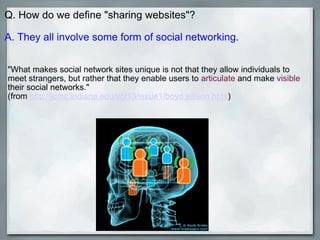
Q. How do we define "sharing websites"?   A. They all involve some form of social networking.   "What makes social network sites unique is not that they allow individuals to meet strangers, but rather that they enable users to  articulate  and make  visible  their social networks."  (from  http://jcmc.indiana.edu/vol13/issue1/boyd.ellison.html )      
Types of Sharing Sites    Social Professional Web content Photo Music Video Books  How-to  Mashups  
"Social" Social Networking Purpose: Socializing. Features: make new friends, keep in touch with existing friends, get back in touch with old friends, share the latest news, both personal and from the larger world. Friendster   Facebook  (ex: -  Sacramento Public ) MySpace  (ex:  BPL URLibrary ) Orkut Hi5 Twitter  (ex: -  Kansas City Public ) Bebo Lunch Ning  (ex:  LIS Students Ning ) 43Things  (ex: lifegoal -  be a librarian )     (these are just the tip of the iceberg)
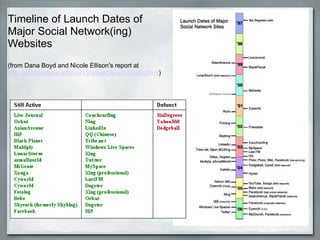
Timeline of Launch Dates of Major Social Network(ing) Websites   (from Dana Boyd and Nicole Ellison's report at  http://jcmc.indiana.edu/vol13/issue1/boyd.ellison.html )
Some examples of how libraries are using Twitter: For library announcements  To post news such as special events, holiday hours, exhibits, new book arrivals  Updated resources or reminders of important resources, instruction sessions and new reference services  Another communication tool with patrons/clients  As a reference service  As a way to keep in touch with librarian friends and colleagues as well as a way to collaborate on projects  As a way to stay on top of the latest technologies  For customer service  To send alerts about requested materials  As a short newsletter  As a public relations/marketing tool  As a way to get and share information about conferences and other professional development opportunities (i.e., registration deadlines, speakers, accommodation information, webinars)  Cataloging and tagging  Internal updates  For networking with other librarians, libraries, and library-affiliated organizations   (from  http://lis5313.ci.fsu.edu/wiki/index.php/Twittering_Libraries#Libraries_Using_Twitter )
Purpose: Share information found on websites, blogs. Features: find out about web trends, news (keeping your finger on the pulse of what's new and interesting, or even 'old' and interesting).    Digg   Stumbleupon  - ex:  Friends of Library group reddit Delicious Technorati - ex:  Library blogs featured    AddThis            also,  http://www.addthis.com/services     Web Content Sharing Sites
File Sharing Purpose: Foster collaboration and sharing of work and ideas. Features: Share docs, files, folders, presentations, lists...      Google Docs  (this was used for this presentation!)          Ex:  School Librarians  - requesting a novel Backpack PBWorks  (used to be PBWiki) -  Box SlideShare  - ex:  BPL's World Savvy program Best Online File Sharing Websites  (List from  lifehacker .org)     
Music Sharing Purpose: To share your musical interests with others. Features: Discover new music, facilitate e-commerce, listen to music online (legally), discover others with similar music interests.     Last.fm     Pandora     Twones
Book Sharing Purpose: Share reading interests. Features: keep track of books read, share reviews, facilitate e-commerce, find new books to read, recycle books, receive and send  actual  books (by mail.)   Virtual   Goodreads   LibraryThing   Goodreads vs. LibraryT hing Shelfari   example - LT example - GR    Actual   Paperback Swap BookMooch BookCrossing  
Photo Sharing Purpose: to post and publish digital photos online to share with others.  Features: Slideshows, geotagging, tagging (folksonomies), galleries,captioning, and multiple views (thumbnails, slideshows), online storage, and licensing. Flickr  ex: nypl   Fotonomy  Photobucket Picasa Web Albums
Video Sharing Purpose: to post and publish video footage online to share with others.  Features: server storage (hosted video clips can be stored on server), sharing with others, "mash ups" (see Mashups sites), comments, critiques, meeting others.  Vimeo Yahoo Video  Youtube ex: nypl
"Professional" Social Networking Purpose: maintain a list of contacts of people in your professional field that you and trust. Features: online rolodex, link to people you currently work with (called "direct contacts"), meet new people in your field, reconnect with people you've worked with before, recommend people for jobs, seek career advice, post your own resume, job-hunting, companies can find candidates.   LinkedIn example   Plaxo Ryze XING
How-to Sharing Purpose: online knowledge base of how-to information on many, many topics. Features: User-generated content by professionals and amateurs, multimedia (text,images, and/or video), option to make money, messaging, groups. eHow Howcast example   Videojug wikiHow
Other interesting sharing sites that we stumbled upon that do not fit our general categories... Weardrobe  http://weardrobe.com  (clothes)   Flixster   http://www.flixster.com/  (movies)   COLOURlovers  :: Color Trends + Palettes                   (colors for design (both on and offline))   Yelp   (reviews of restaurants and other venues) New ---  Posterous  "in the space between Twitter and a full blown blog"    http://posterous.com/    
Mashups - often fun, usually useful!   FlickrSudoku HousingMaps   Trendsmap    Spell With Flickr   TimeTube   Twitter Answers GolfBonk        
What does this mean for librarians? Patrons of all ages love social networking sites.  Social networking sites are virtual meeting sites for sharing information.  Librarians strive to be information experts.          How can librarians leverage these sites to their advantage?
Social Networking Literacy Competencies Understanding and articulating social networking sites and  their roles   Creating content   Evaluating information   Applying information ethically and legally   Searching and navigating   Interacting   Teaching   Providing services   Flexibility   Taken from “Social Networking Literacy Competencies for Librarians: Exploring Considerations and Engaging Participation” Contributed Paper, ACRL 14th National Conference, Pushing the Edge: Explore, Engage, Extend  - March 14, 2009.
Some of the many things you can do as a librarian: Libraries can use these sites to post jobs and promote themselves as places to work (see  LinkedIn example ) Librarians/libraries  can use these sites to publicize their collections (see  Flickr example ) Librarians/libraries  can use these sites to highlight their public services (see  Howcast example ) Librarians/libraries can use these sites to broadcast workshops and events to a larger audience (see  Youtube example ) Librarians/libraries can use these sites for Readers’ Advisory services (see  LibraryThing example )  Other suggestions?
The End Alexa Goldstein Orr and Yesha Naik

Sharing on the Net

  • 1.
    Sharing on theNet by Alexa Goldstein Orr and Yesha Naik October 15, 2009 GSLIS 756 Image courtesy of www.lumaxart.com/
  • 2.
    Q. How dowe define "sharing websites"?   A. They all involve some form of social networking.   "What makes social network sites unique is not that they allow individuals to meet strangers, but rather that they enable users to articulate and make visible their social networks." (from http://jcmc.indiana.edu/vol13/issue1/boyd.ellison.html )      
  • 3.
    Types of SharingSites   Social Professional Web content Photo Music Video Books  How-to Mashups  
  • 4.
    "Social" Social NetworkingPurpose: Socializing. Features: make new friends, keep in touch with existing friends, get back in touch with old friends, share the latest news, both personal and from the larger world. Friendster   Facebook  (ex: -  Sacramento Public ) MySpace (ex: BPL URLibrary ) Orkut Hi5 Twitter (ex: - Kansas City Public ) Bebo Lunch Ning  (ex: LIS Students Ning ) 43Things  (ex: lifegoal - be a librarian )     (these are just the tip of the iceberg)
  • 5.
    Timeline of LaunchDates of Major Social Network(ing) Websites   (from Dana Boyd and Nicole Ellison's report at http://jcmc.indiana.edu/vol13/issue1/boyd.ellison.html )
  • 6.
    Some examples ofhow libraries are using Twitter: For library announcements To post news such as special events, holiday hours, exhibits, new book arrivals Updated resources or reminders of important resources, instruction sessions and new reference services Another communication tool with patrons/clients As a reference service As a way to keep in touch with librarian friends and colleagues as well as a way to collaborate on projects As a way to stay on top of the latest technologies For customer service To send alerts about requested materials As a short newsletter As a public relations/marketing tool As a way to get and share information about conferences and other professional development opportunities (i.e., registration deadlines, speakers, accommodation information, webinars) Cataloging and tagging Internal updates For networking with other librarians, libraries, and library-affiliated organizations (from http://lis5313.ci.fsu.edu/wiki/index.php/Twittering_Libraries#Libraries_Using_Twitter )
  • 7.
    Purpose: Share informationfound on websites, blogs. Features: find out about web trends, news (keeping your finger on the pulse of what's new and interesting, or even 'old' and interesting).   Digg Stumbleupon  - ex: Friends of Library group reddit Delicious Technorati - ex: Library blogs featured    AddThis            also, http://www.addthis.com/services     Web Content Sharing Sites
  • 8.
    File Sharing Purpose:Foster collaboration and sharing of work and ideas. Features: Share docs, files, folders, presentations, lists...      Google Docs  (this was used for this presentation!)         Ex: School Librarians  - requesting a novel Backpack PBWorks  (used to be PBWiki) - Box SlideShare - ex: BPL's World Savvy program Best Online File Sharing Websites  (List from  lifehacker .org)     
  • 9.
    Music Sharing Purpose:To share your musical interests with others. Features: Discover new music, facilitate e-commerce, listen to music online (legally), discover others with similar music interests.     Last.fm   Pandora   Twones
  • 10.
    Book Sharing Purpose:Share reading interests. Features: keep track of books read, share reviews, facilitate e-commerce, find new books to read, recycle books, receive and send actual books (by mail.)   Virtual   Goodreads LibraryThing Goodreads vs. LibraryT hing Shelfari   example - LT example - GR   Actual   Paperback Swap BookMooch BookCrossing  
  • 11.
    Photo Sharing Purpose:to post and publish digital photos online to share with others.  Features: Slideshows, geotagging, tagging (folksonomies), galleries,captioning, and multiple views (thumbnails, slideshows), online storage, and licensing. Flickr  ex: nypl Fotonomy Photobucket Picasa Web Albums
  • 12.
    Video Sharing Purpose:to post and publish video footage online to share with others. Features: server storage (hosted video clips can be stored on server), sharing with others, "mash ups" (see Mashups sites), comments, critiques, meeting others. Vimeo Yahoo Video  Youtube ex: nypl
  • 13.
    "Professional" Social NetworkingPurpose: maintain a list of contacts of people in your professional field that you and trust. Features: online rolodex, link to people you currently work with (called "direct contacts"), meet new people in your field, reconnect with people you've worked with before, recommend people for jobs, seek career advice, post your own resume, job-hunting, companies can find candidates.   LinkedIn example Plaxo Ryze XING
  • 14.
    How-to Sharing Purpose:online knowledge base of how-to information on many, many topics. Features: User-generated content by professionals and amateurs, multimedia (text,images, and/or video), option to make money, messaging, groups. eHow Howcast example Videojug wikiHow
  • 15.
    Other interesting sharingsites that we stumbled upon that do not fit our general categories... Weardrobe  http://weardrobe.com  (clothes)   Flixster http://www.flixster.com/  (movies)   COLOURlovers :: Color Trends + Palettes                  (colors for design (both on and offline))   Yelp  (reviews of restaurants and other venues) New --- Posterous "in the space between Twitter and a full blown blog"    http://posterous.com/    
  • 16.
    Mashups - oftenfun, usually useful!   FlickrSudoku HousingMaps   Trendsmap    Spell With Flickr   TimeTube   Twitter Answers GolfBonk        
  • 17.
    What does thismean for librarians? Patrons of all ages love social networking sites.  Social networking sites are virtual meeting sites for sharing information.  Librarians strive to be information experts.          How can librarians leverage these sites to their advantage?
  • 18.
    Social Networking LiteracyCompetencies Understanding and articulating social networking sites and  their roles   Creating content   Evaluating information   Applying information ethically and legally   Searching and navigating   Interacting   Teaching   Providing services   Flexibility   Taken from “Social Networking Literacy Competencies for Librarians: Exploring Considerations and Engaging Participation” Contributed Paper, ACRL 14th National Conference, Pushing the Edge: Explore, Engage, Extend  - March 14, 2009.
  • 19.
    Some of themany things you can do as a librarian: Libraries can use these sites to post jobs and promote themselves as places to work (see LinkedIn example ) Librarians/libraries  can use these sites to publicize their collections (see Flickr example ) Librarians/libraries  can use these sites to highlight their public services (see Howcast example ) Librarians/libraries can use these sites to broadcast workshops and events to a larger audience (see Youtube example ) Librarians/libraries can use these sites for Readers’ Advisory services (see LibraryThing example )  Other suggestions?
  • 20.
    The End AlexaGoldstein Orr and Yesha Naik