Form Builder Messages and Alerts
http://ebiztechnics.blogspot.com
Objectives
• Default Messaging
• Identify Different Types of Messaging in Form Builder
• Create and control Alerts
http://ebiztechnics.blogspot.com
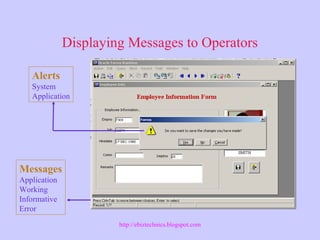
Displaying Messages to Operators
Messages
Application
Working
Informative
Error
Alerts
System
Application
http://ebiztechnics.blogspot.com
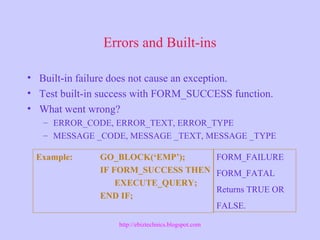
Errors and Built-ins
• Built-in failure does not cause an exception.
• Test built-in success with FORM_SUCCESS function.
• What went wrong?
– ERROR_CODE, ERROR_TEXT, ERROR_TYPE
– MESSAGE _CODE, MESSAGE _TEXT, MESSAGE _TYPE
Example: GO_BLOCK(‘EMP’);
IF FORM_SUCCESS THEN
EXECUTE_QUERY;
END IF;
FORM_FAILURE
FORM_FATAL
Returns TRUE OR
FALSE.
http://ebiztechnics.blogspot.com
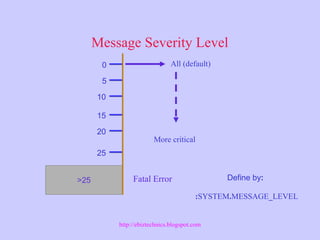
Message Severity Level
>25
20
15
10
5
0
25
All (default)
More critical
Define by:
:SYSTEM.MESSAGE_LEVEL
Fatal Error
http://ebiztechnics.blogspot.com
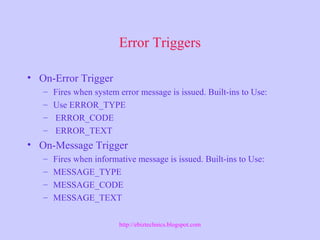
Error Triggers
• On-Error Trigger
– Fires when system error message is issued. Built-ins to Use:
– Use ERROR_TYPE
– ERROR_CODE
– ERROR_TEXT
• On-Message Trigger
– Fires when informative message is issued. Built-ins to Use:
– MESSAGE_TYPE
– MESSAGE_CODE
– MESSAGE_TEXT
http://ebiztechnics.blogspot.com
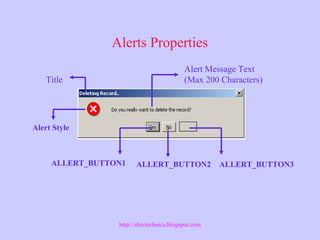
Alerts Properties
Title
ALLERT_BUTTON1 ALLERT_BUTTON3ALLERT_BUTTON2
Alert Message Text
(Max 200 Characters)
Alert Style
http://ebiztechnics.blogspot.com
Showing Alerts
DECLARE
n Number;
BEGIN
n:=SHOW_ALERT(‘Del_Alert’);
IF n = ALERT_BUTTON1 THEN
DELETE_RECORD;
END IF;
END;
OR
IF SHOW_ALERT('DEL_ALERT‘) = ALERT_BUTTON1 THEN
DELETE_RECORD;
END IF;
NOTE: SHOW_ALERT Function Returns Number.
http://ebiztechnics.blogspot.com
Displaying Errors to an Alert
Changing the Alert Button Label:
SET_ALERT_BUTTON_PROPERTY(‘Err_Alert’,
ALERT_BUTTON1,
LABEL,’O.K’);
SET_ALERT_PROPERTY(’Err_Alert’,
ALERT_MESSAGE_TEXT, ERROR_TYPE||
’-’||TO_CHAR(ERROR_CODE)||
’: ’||ERROR_TEXT);
n := SHOW_ALERT(’Err_Alert’);
http://ebiztechnics.blogspot.com
Summary
• Displaying Messages in Form Builder
• Built-ins
– ERROR_CODE, ERROR_TYPE, ERROR_TEXT
– MESSAGE_CODE, MESSAGE_TYPE, MESSAGE_TEXT.
• Testing Built-ins with FORM_SUCCESS
• Alerts
• Setting alert Properties at runtime.
http://ebiztechnics.blogspot.com

Oracle Forms: Messages

  • 1.
    Form Builder Messagesand Alerts http://ebiztechnics.blogspot.com
  • 2.
    Objectives • Default Messaging •Identify Different Types of Messaging in Form Builder • Create and control Alerts http://ebiztechnics.blogspot.com
  • 3.
    Displaying Messages toOperators Messages Application Working Informative Error Alerts System Application http://ebiztechnics.blogspot.com
  • 4.
    Errors and Built-ins •Built-in failure does not cause an exception. • Test built-in success with FORM_SUCCESS function. • What went wrong? – ERROR_CODE, ERROR_TEXT, ERROR_TYPE – MESSAGE _CODE, MESSAGE _TEXT, MESSAGE _TYPE Example: GO_BLOCK(‘EMP’); IF FORM_SUCCESS THEN EXECUTE_QUERY; END IF; FORM_FAILURE FORM_FATAL Returns TRUE OR FALSE. http://ebiztechnics.blogspot.com
  • 5.
    Message Severity Level >25 20 15 10 5 0 25 All(default) More critical Define by: :SYSTEM.MESSAGE_LEVEL Fatal Error http://ebiztechnics.blogspot.com
  • 6.
    Error Triggers • On-ErrorTrigger – Fires when system error message is issued. Built-ins to Use: – Use ERROR_TYPE – ERROR_CODE – ERROR_TEXT • On-Message Trigger – Fires when informative message is issued. Built-ins to Use: – MESSAGE_TYPE – MESSAGE_CODE – MESSAGE_TEXT http://ebiztechnics.blogspot.com
  • 7.
    Alerts Properties Title ALLERT_BUTTON1 ALLERT_BUTTON3ALLERT_BUTTON2 AlertMessage Text (Max 200 Characters) Alert Style http://ebiztechnics.blogspot.com
  • 8.
    Showing Alerts DECLARE n Number; BEGIN n:=SHOW_ALERT(‘Del_Alert’); IFn = ALERT_BUTTON1 THEN DELETE_RECORD; END IF; END; OR IF SHOW_ALERT('DEL_ALERT‘) = ALERT_BUTTON1 THEN DELETE_RECORD; END IF; NOTE: SHOW_ALERT Function Returns Number. http://ebiztechnics.blogspot.com
  • 9.
    Displaying Errors toan Alert Changing the Alert Button Label: SET_ALERT_BUTTON_PROPERTY(‘Err_Alert’, ALERT_BUTTON1, LABEL,’O.K’); SET_ALERT_PROPERTY(’Err_Alert’, ALERT_MESSAGE_TEXT, ERROR_TYPE|| ’-’||TO_CHAR(ERROR_CODE)|| ’: ’||ERROR_TEXT); n := SHOW_ALERT(’Err_Alert’); http://ebiztechnics.blogspot.com
  • 10.
    Summary • Displaying Messagesin Form Builder • Built-ins – ERROR_CODE, ERROR_TYPE, ERROR_TEXT – MESSAGE_CODE, MESSAGE_TYPE, MESSAGE_TEXT. • Testing Built-ins with FORM_SUCCESS • Alerts • Setting alert Properties at runtime. http://ebiztechnics.blogspot.com

Editor's Notes

  • #7 Example of On-Error trigger IF ERROR_CODE=40202 THEN MESSAGE(‘You must fill in the field for and employee’); ELSE MESSAGE(ERROR_TYPE||’-’||TO_CHAR(ERROR_CODE)||’:’||ERROR_TEXT); END IF; RAISE FORM_TRIGGER_FAILURE; Example of On-Message trigger IF MESSAGE_CODE=40350 THEN MESSAGE(‘No records found for search values’); ELSE MESSAGE(MESSAGE_TYPE||’-’||TO_CHAR(MESSAGE_CODE)||’:’||MESSAGE_TEXT); END IF;
  • #8 Note: Alert Style: Stop, Caution and Note