Your Family  Tree  May P. Chan Prairie History Room Regina Public Library © October 2009
Outline Brief Introduction to Google Developing a Search Strategy Google Search Tips Basic & Advanced Operators More Tips & Tricks Google Tools Google Language, Google Books, Google Maps, Google News and News Archive, Google Blogs, Google Reader, Google Alerts, Google Docs and iGoogle Additional Resources
World’s largest and most popular search engine Founded by Larry Page and Sergey Brin  Went live on September 4, 1989 Mission statement: "to organize the world's information and make it universally accessible and useful"  Processes millions of search requests each day and about 1 petabyte of user-generated data every hour ( Wired Magazine,  20. July, 2009)
How does Google Work? Google uses a web crawler or spider to visit websites and analyze its content for its worldwide index The program takes a snapshot of each page and saves it as a temporary record for its cache The more popular a website, the greater the frequency of visits
… Word of Caution Although more genealogical information (e.g. records, research tips, etc.) can be found online in a variety of options (e.g. websites, databases, blogs, message boards/forums, etc.) nowadays, less than 5% of the world’s records have been digitized Also, there is considerable amount of information available in online databases which are only accessible by queries as opposed to links which Google minimally covers. These databases are part of the invisible or deep Web and cover such things as library catalogs, government records, and phone books
Developing a Search Strategy Focus your query!  Instead of asking “I would like any information about the [Smith] family who settled in Saskatchewan”, ask “when Charles Smith did homestead in Saskatchewan?” Identify basic concepts.  Note: when you list keywords for your concept, keep in mind that some concepts may have more than one keyword associated with it. E.g. Saskatchewan—North-West Territories, Assiniboia West, Assiniboia East
Not all websites are reliable or trustworthy.  When you find a website, ask yourself: Who provided the information? Who is the “real” source? What tells me that it came from  that  source? Do they have a bias or an agenda? When was this website last updated? Does it ask for payment? Is payment secure? When searching in an unfamiliar database, remember to always read the instructions!
Always document your sources and your findings! Write down whether the source was online, in a book, newspaper, etc. Write down search terms that were used (e.g. spelling of surnames, dates, etc.) Write down url of the website or the database that was used (e.g. HeritageQuest Online) Write down when you accessed the resource ** Don’t forget to back-up your data on a regular basis!!!
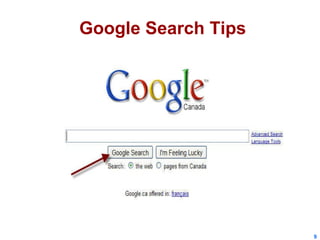
Google Search Tips
Keyword Basics Certain common words (“the” & “of”) or single characters (“a”) are ignored: E.g. the Statue of Liberty Stop Words Finds results containing the following words in any order or proximity: E.g. Nicholas Davin Regina Multiple Words Find results containing this word: E.g. Census Single Word
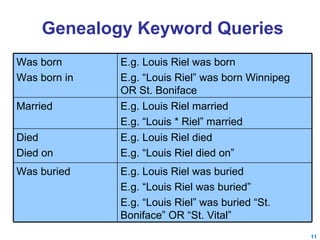
Genealogy Keyword Queries E.g. Louis Riel was buried E.g. “Louis Riel was buried” E.g. “Louis Riel” was buried “St. Boniface” OR “St. Vital” Was buried E.g. Louis Riel died E.g. “Louis Riel died on” Died Died on E.g. Louis Riel married E.g. “Louis * Riel” married Married E.g. Louis Riel was born E.g. “Louis Riel” was born Winnipeg OR St. Boniface  Was born  Was born in
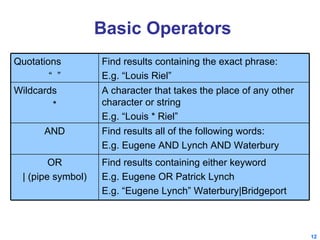
Basic Operators Find results containing the exact phrase: E.g. “Louis Riel” Quotations “  ” A character that takes the place of any other character or string E.g. “Louis * Riel” Wildcards * Find results containing either keyword E.g. Eugene OR Patrick Lynch E.g. “Eugene Lynch” Waterbury|Bridgeport OR | (pipe symbol) Find results all of the following words: E.g. Eugene AND Lynch AND Waterbury AND
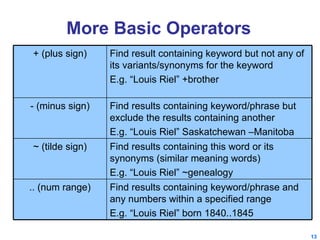
More Basic Operators Find result containing keyword but not any of its variants/synonyms for the keyword E.g. “Louis Riel” +brother + (plus sign) Find results containing keyword/phrase but exclude the results containing another E.g. “Louis Riel” Saskatchewan –Manitoba - (minus sign) Find results containing keyword/phrase and any numbers within a specified range E.g. “Louis Riel” born 1840..1845 .. (num range) Find results containing this word or its synonyms (similar meaning words) E.g. “Louis Riel” ~genealogy ~ (tilde sign)
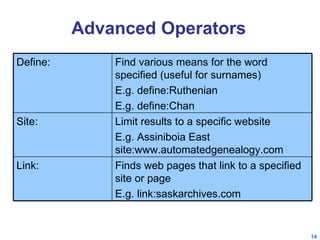
Advanced Operators Finds web pages that link to a specified site or page E.g. link:saskarchives.com Link: Limit results to a specific website E.g. Assiniboia East site:www.automatedgenealogy.com Site: Find various means for the word specified (useful for surnames) E.g. define:Ruthenian  E.g. define:Chan Define:
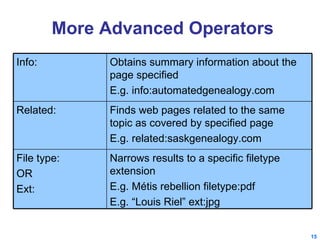
More Advanced Operators Finds web pages related to the same topic as covered by specified page E.g. related:saskgenealogy.com Related: Narrows results to a specific filetype extension E.g. Métis rebellion filetype:pdf E.g. “Louis Riel” ext:jpg File type: OR Ext: Obtains summary information about the page specified E.g. info:automatedgenealogy.com Info:
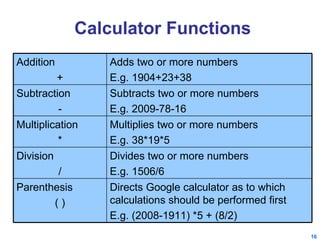
Calculator Functions Multiplies two or more numbers E.g. 38*19*5 Multiplication * Directs Google calculator as to which calculations should be performed first E.g. (2008-1911) *5 + (8/2) Parenthesis ( ) Divides two or more numbers  E.g. 1506/6 Division / Subtracts two or more numbers E.g. 2009-78-16 Subtraction - Adds two or more numbers E.g. 1904+23+38 Addition +
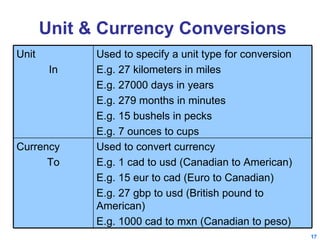
Unit & Currency Conversions Used to convert currency E.g. 1 cad to usd (Canadian to American) E.g. 15 eur to cad (Euro to Canadian) E.g. 27 gbp to usd (British pound to American) E.g. 1000 cad to mxn (Canadian to peso) Currency To Used to specify a unit type for conversion E.g. 27 kilometers in miles E.g. 27000 days in years E.g. 279 months in minutes E.g. 15 bushels in pecks E.g. 7 ounces to cups Unit  In
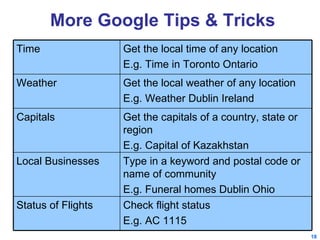
More Google Tips & Tricks Check flight status E.g. AC 1115 Status of Flights Type in a keyword and postal code or name of community E.g. Funeral homes Dublin Ohio Local Businesses Get the capitals of a country, state or region E.g. Capital of Kazakhstan Capitals Get the local weather of any location E.g. Weather Dublin Ireland Weather Get the local time of any location E.g. Time in Toronto Ontario Time
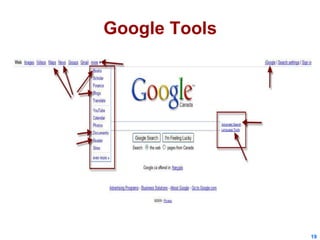
Google Tools
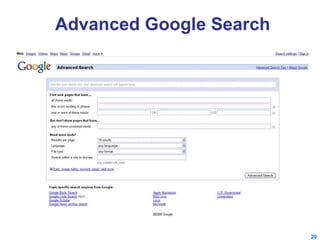
Advanced Google Search
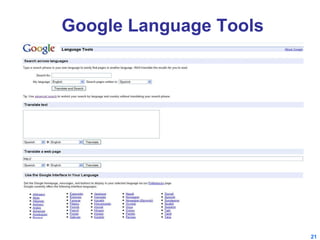
Google Language Tools
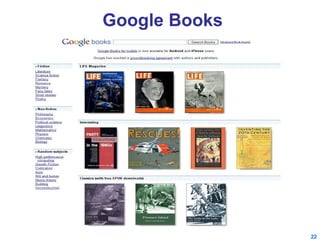
Google Books
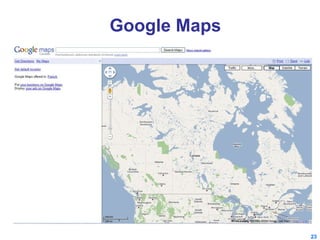
Google Maps
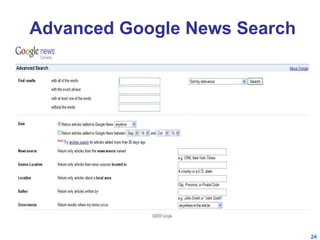
Advanced Google News Search
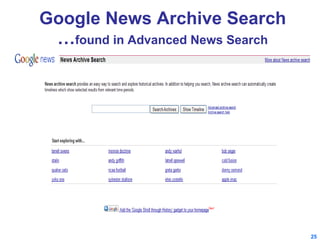
Google News Archive Search … found in Advanced News Search
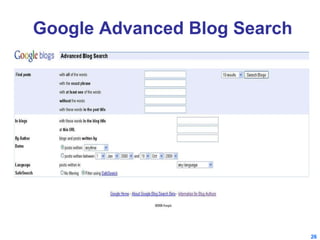
Google Advanced Blog Search
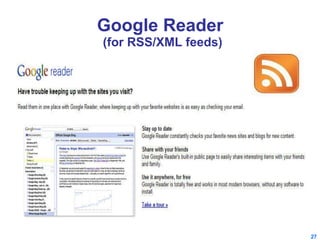
Google Reader  (for RSS/XML feeds)
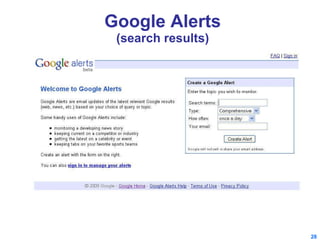
Google Alerts (search results)
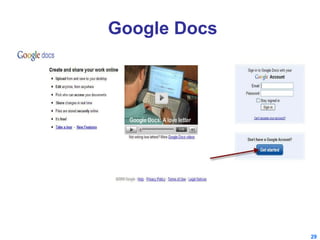
Google Docs
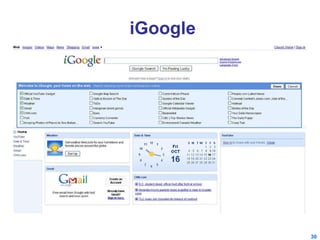
iGoogle
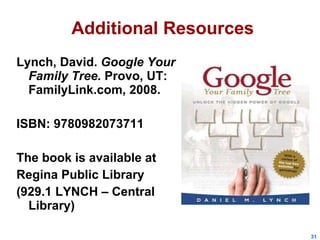
Additional Resources Lynch, David.  Google Your Family Tree.  Provo, UT: FamilyLink.com, 2008.  ISBN: 9780982073711  The book is available at Regina Public Library  (929.1 LYNCH – Central Library)
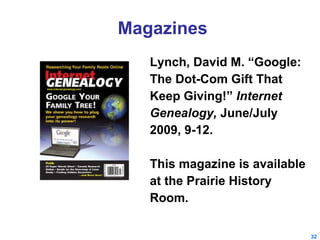
Magazines Lynch, David M. “Google: The Dot-Com Gift That Keep Giving!”  Internet  Genealogy,  June/July 2009, 9-12. This magazine is available at the Prairie History Room.
Websites Google Genealogy Style: 12 Google Search Tips for Genealogists  by Kimberly Powell http://genealogy.about.com/od/search_tips/a/google_search.htm Cyndis’ List – Googling for Grandma (list of resources—search tips, Google tools, books, etc.) http://www.cyndislist.com/google.htm
Videos Google Your Family Tree: Unlock the Hidden Power of Google http://www.youtube.com/watch?v=7ot9T0dehGc Google Alerts Genealogy Style  http://www.youtube.com/watch?v=zckI0SgOTp8 Genealogy and Family Tree Researchers - The Google Toolbar http://www.youtube.com/watch?v=9qefdagiK38 Using Google News Timeline for Genealogy & Family History http://www.youtube.com/watch?v=wrn1gt_CvN0
The End Contact: Email:  [email_address]

Google Your Family Tree

  • 1.
    Your Family Tree May P. Chan Prairie History Room Regina Public Library © October 2009
  • 2.
    Outline Brief Introductionto Google Developing a Search Strategy Google Search Tips Basic & Advanced Operators More Tips & Tricks Google Tools Google Language, Google Books, Google Maps, Google News and News Archive, Google Blogs, Google Reader, Google Alerts, Google Docs and iGoogle Additional Resources
  • 3.
    World’s largest andmost popular search engine Founded by Larry Page and Sergey Brin Went live on September 4, 1989 Mission statement: "to organize the world's information and make it universally accessible and useful" Processes millions of search requests each day and about 1 petabyte of user-generated data every hour ( Wired Magazine, 20. July, 2009)
  • 4.
    How does GoogleWork? Google uses a web crawler or spider to visit websites and analyze its content for its worldwide index The program takes a snapshot of each page and saves it as a temporary record for its cache The more popular a website, the greater the frequency of visits
  • 5.
    … Word ofCaution Although more genealogical information (e.g. records, research tips, etc.) can be found online in a variety of options (e.g. websites, databases, blogs, message boards/forums, etc.) nowadays, less than 5% of the world’s records have been digitized Also, there is considerable amount of information available in online databases which are only accessible by queries as opposed to links which Google minimally covers. These databases are part of the invisible or deep Web and cover such things as library catalogs, government records, and phone books
  • 6.
    Developing a SearchStrategy Focus your query! Instead of asking “I would like any information about the [Smith] family who settled in Saskatchewan”, ask “when Charles Smith did homestead in Saskatchewan?” Identify basic concepts. Note: when you list keywords for your concept, keep in mind that some concepts may have more than one keyword associated with it. E.g. Saskatchewan—North-West Territories, Assiniboia West, Assiniboia East
  • 7.
    Not all websitesare reliable or trustworthy. When you find a website, ask yourself: Who provided the information? Who is the “real” source? What tells me that it came from that source? Do they have a bias or an agenda? When was this website last updated? Does it ask for payment? Is payment secure? When searching in an unfamiliar database, remember to always read the instructions!
  • 8.
    Always document yoursources and your findings! Write down whether the source was online, in a book, newspaper, etc. Write down search terms that were used (e.g. spelling of surnames, dates, etc.) Write down url of the website or the database that was used (e.g. HeritageQuest Online) Write down when you accessed the resource ** Don’t forget to back-up your data on a regular basis!!!
  • 9.
  • 10.
    Keyword Basics Certaincommon words (“the” & “of”) or single characters (“a”) are ignored: E.g. the Statue of Liberty Stop Words Finds results containing the following words in any order or proximity: E.g. Nicholas Davin Regina Multiple Words Find results containing this word: E.g. Census Single Word
  • 11.
    Genealogy Keyword QueriesE.g. Louis Riel was buried E.g. “Louis Riel was buried” E.g. “Louis Riel” was buried “St. Boniface” OR “St. Vital” Was buried E.g. Louis Riel died E.g. “Louis Riel died on” Died Died on E.g. Louis Riel married E.g. “Louis * Riel” married Married E.g. Louis Riel was born E.g. “Louis Riel” was born Winnipeg OR St. Boniface Was born Was born in
  • 12.
    Basic Operators Findresults containing the exact phrase: E.g. “Louis Riel” Quotations “ ” A character that takes the place of any other character or string E.g. “Louis * Riel” Wildcards * Find results containing either keyword E.g. Eugene OR Patrick Lynch E.g. “Eugene Lynch” Waterbury|Bridgeport OR | (pipe symbol) Find results all of the following words: E.g. Eugene AND Lynch AND Waterbury AND
  • 13.
    More Basic OperatorsFind result containing keyword but not any of its variants/synonyms for the keyword E.g. “Louis Riel” +brother + (plus sign) Find results containing keyword/phrase but exclude the results containing another E.g. “Louis Riel” Saskatchewan –Manitoba - (minus sign) Find results containing keyword/phrase and any numbers within a specified range E.g. “Louis Riel” born 1840..1845 .. (num range) Find results containing this word or its synonyms (similar meaning words) E.g. “Louis Riel” ~genealogy ~ (tilde sign)
  • 14.
    Advanced Operators Findsweb pages that link to a specified site or page E.g. link:saskarchives.com Link: Limit results to a specific website E.g. Assiniboia East site:www.automatedgenealogy.com Site: Find various means for the word specified (useful for surnames) E.g. define:Ruthenian E.g. define:Chan Define:
  • 15.
    More Advanced OperatorsFinds web pages related to the same topic as covered by specified page E.g. related:saskgenealogy.com Related: Narrows results to a specific filetype extension E.g. Métis rebellion filetype:pdf E.g. “Louis Riel” ext:jpg File type: OR Ext: Obtains summary information about the page specified E.g. info:automatedgenealogy.com Info:
  • 16.
    Calculator Functions Multipliestwo or more numbers E.g. 38*19*5 Multiplication * Directs Google calculator as to which calculations should be performed first E.g. (2008-1911) *5 + (8/2) Parenthesis ( ) Divides two or more numbers E.g. 1506/6 Division / Subtracts two or more numbers E.g. 2009-78-16 Subtraction - Adds two or more numbers E.g. 1904+23+38 Addition +
  • 17.
    Unit & CurrencyConversions Used to convert currency E.g. 1 cad to usd (Canadian to American) E.g. 15 eur to cad (Euro to Canadian) E.g. 27 gbp to usd (British pound to American) E.g. 1000 cad to mxn (Canadian to peso) Currency To Used to specify a unit type for conversion E.g. 27 kilometers in miles E.g. 27000 days in years E.g. 279 months in minutes E.g. 15 bushels in pecks E.g. 7 ounces to cups Unit In
  • 18.
    More Google Tips& Tricks Check flight status E.g. AC 1115 Status of Flights Type in a keyword and postal code or name of community E.g. Funeral homes Dublin Ohio Local Businesses Get the capitals of a country, state or region E.g. Capital of Kazakhstan Capitals Get the local weather of any location E.g. Weather Dublin Ireland Weather Get the local time of any location E.g. Time in Toronto Ontario Time
  • 19.
  • 20.
  • 21.
  • 22.
  • 23.
  • 24.
  • 25.
    Google News ArchiveSearch … found in Advanced News Search
  • 26.
  • 27.
    Google Reader (for RSS/XML feeds)
  • 28.
  • 29.
  • 30.
  • 31.
    Additional Resources Lynch,David. Google Your Family Tree. Provo, UT: FamilyLink.com, 2008. ISBN: 9780982073711 The book is available at Regina Public Library (929.1 LYNCH – Central Library)
  • 32.
    Magazines Lynch, DavidM. “Google: The Dot-Com Gift That Keep Giving!” Internet Genealogy, June/July 2009, 9-12. This magazine is available at the Prairie History Room.
  • 33.
    Websites Google GenealogyStyle: 12 Google Search Tips for Genealogists by Kimberly Powell http://genealogy.about.com/od/search_tips/a/google_search.htm Cyndis’ List – Googling for Grandma (list of resources—search tips, Google tools, books, etc.) http://www.cyndislist.com/google.htm
  • 34.
    Videos Google YourFamily Tree: Unlock the Hidden Power of Google http://www.youtube.com/watch?v=7ot9T0dehGc Google Alerts Genealogy Style http://www.youtube.com/watch?v=zckI0SgOTp8 Genealogy and Family Tree Researchers - The Google Toolbar http://www.youtube.com/watch?v=9qefdagiK38 Using Google News Timeline for Genealogy & Family History http://www.youtube.com/watch?v=wrn1gt_CvN0
  • 35.
    The End Contact:Email: [email_address]

Editor's Notes

  • #4 Quote comes from " Why Is Obama's Top Antitrust Cop Gunning for Google? ". Wired Magazine . 20. July, 2009. Retrieved on July 21, 2009.