GL

BAL

Institute of Information Technology
Sixth Sense Technology
Presented By:Rahul Baghla
Rohitash Sharma
Mukesh Godara
CONTENTS
 INTRODUCTION

 EVOLUTION OF THE TECHNOLOGY
 COMPONENTS
 WORKING
 APPLICATIONS
 ADVANTAGES
 CONCLUSION
INTRODUCTION
 Sixth sense is a wearable gesture interface that augments the physical world around
us with the digital world.

 This technology is developed by Pranav Mistry ,a PhD student of MIT Media Lab.
 It lets us use natural hand gestures to interact with the digital world.
 It comprises a pocket projector ,a mirror and a camera. The hardware components
are coupled in pendent like mobile wearable device.
I
EVOLUTION OF THE TECHNOLOGY
Components
 CAMERA
 PROJECTOR
 MIRROR
 MOBILE COMPONENT
 COLOUR MARKERS
CAMERA

 Captures an object in view and tracks the users hand gestures.
 Can recognize individuals, pictures, books etc.
 Acts as an digital eye, connecting you to the world of digital information.
 Sends data to the mobile device for processing.
PROJECTOR

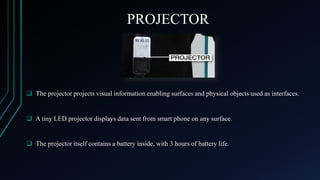
 The projector projects visual information enabling surfaces and physical objects used as interfaces.

 A tiny LED projector displays data sent from smart phone on any surface.

 The projector itself contains a battery inside, with 3 hours of battery life.
MIRROR

MOBILE

 The downward facing projector projects the output  The web enabled smart phone in the
image on the mirror.
 The mirror reflects image on the desired surface.

user’s pocket is used to process data.
COLOUR MARKERS
 It is at the tip of the user’s fingers.

 Marking the user’s fingers with red, yellow, green, blue tape help the web
cam recognize the gestures.

 The movement and arrangement of these makers are interpreted into gestures
that act as interaction instructions for the projected application interfaces
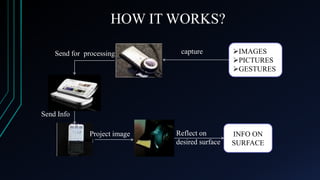
HOW IT WORKS?
Send for processing

capture

IMAGES
PICTURES
GESTURES

Send Info
Project image

Reflect on
desired surface

INFO ON
SURFACE
APPLICATIONS
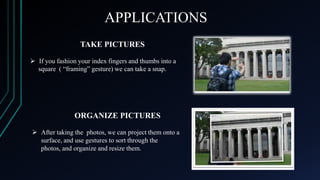
TAKE PICTURES
 If you fashion your index fingers and thumbs into a
square ( “framing” gesture) we can take a snap.

ORGANIZE PICTURES
 After taking the photos, we can project them onto a
surface, and use gestures to sort through the
photos, and organize and resize them.
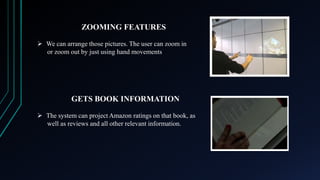
ZOOMING FEATURES
 We can arrange those pictures. The user can zoom in
or zoom out by just using hand movements

GETS BOOK INFORMATION
 The system can project Amazon ratings on that book, as
well as reviews and all other relevant information.
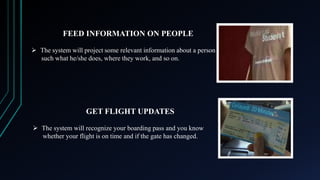
FEED INFORMATION ON PEOPLE
 The system will project some relevant information about a person
such what he/she does, where they work, and so on.

GET FLIGHT UPDATES
 The system will recognize your boarding pass and you know
whether your flight is on time and if the gate has changed.
MAKE A CALL
 You can use sixth sense to project a keypad onto your hand, then
use the that key pad to make a call.

CREATES MULTIMEDIA READING
EXPERIENCES
 Sixth sense can be programmed to project related videos onto
news paper articles you are reading.
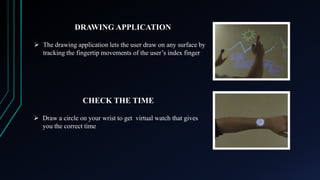
DRAWING APPLICATION
 The drawing application lets the user draw on any surface by
tracking the fingertip movements of the user’s index finger

CHECK THE TIME
 Draw a circle on your wrist to get virtual watch that gives
you the correct time
Microphone from the camera clips on to the
paper now the sound of the paper is now exactly
untouching the paper. Then camera tracks the
where the fingers are moving

GETS PRODUCT INFORMATION
 Sixth sense uses image recognition or marker technology to
recognize products we pick up and feed us information on
those products
ADVANTAGES
Portable
Supports multi-touch and multi-user interaction

Connectedness between world and information
Cost effective
Data access directly from machine in real time
Mind map the idea anywhere
CONCLUSION
 Sixth Sense recognizes the objects around us , displaying information
automatically and letting us to access it in any way we need.
 The Sixth Sense prototype implements several applications that
demonstrate the usefulness, viability and flexibility of the system.
Thank You !!

Any Queries ??

Sixth sense technology

  • 1.
  • 2.
    Sixth Sense Technology PresentedBy:Rahul Baghla Rohitash Sharma Mukesh Godara
  • 3.
    CONTENTS  INTRODUCTION  EVOLUTIONOF THE TECHNOLOGY  COMPONENTS  WORKING  APPLICATIONS  ADVANTAGES  CONCLUSION
  • 4.
    INTRODUCTION  Sixth senseis a wearable gesture interface that augments the physical world around us with the digital world.  This technology is developed by Pranav Mistry ,a PhD student of MIT Media Lab.  It lets us use natural hand gestures to interact with the digital world.  It comprises a pocket projector ,a mirror and a camera. The hardware components are coupled in pendent like mobile wearable device. I
  • 5.
    EVOLUTION OF THETECHNOLOGY
  • 6.
    Components  CAMERA  PROJECTOR MIRROR  MOBILE COMPONENT  COLOUR MARKERS
  • 7.
    CAMERA  Captures anobject in view and tracks the users hand gestures.  Can recognize individuals, pictures, books etc.  Acts as an digital eye, connecting you to the world of digital information.  Sends data to the mobile device for processing.
  • 8.
    PROJECTOR  The projectorprojects visual information enabling surfaces and physical objects used as interfaces.  A tiny LED projector displays data sent from smart phone on any surface.  The projector itself contains a battery inside, with 3 hours of battery life.
  • 9.
    MIRROR MOBILE  The downwardfacing projector projects the output  The web enabled smart phone in the image on the mirror.  The mirror reflects image on the desired surface. user’s pocket is used to process data.
  • 10.
    COLOUR MARKERS  Itis at the tip of the user’s fingers.  Marking the user’s fingers with red, yellow, green, blue tape help the web cam recognize the gestures.  The movement and arrangement of these makers are interpreted into gestures that act as interaction instructions for the projected application interfaces
  • 11.
    HOW IT WORKS? Sendfor processing capture IMAGES PICTURES GESTURES Send Info Project image Reflect on desired surface INFO ON SURFACE
  • 12.
    APPLICATIONS TAKE PICTURES  Ifyou fashion your index fingers and thumbs into a square ( “framing” gesture) we can take a snap. ORGANIZE PICTURES  After taking the photos, we can project them onto a surface, and use gestures to sort through the photos, and organize and resize them.
  • 13.
    ZOOMING FEATURES  Wecan arrange those pictures. The user can zoom in or zoom out by just using hand movements GETS BOOK INFORMATION  The system can project Amazon ratings on that book, as well as reviews and all other relevant information.
  • 14.
    FEED INFORMATION ONPEOPLE  The system will project some relevant information about a person such what he/she does, where they work, and so on. GET FLIGHT UPDATES  The system will recognize your boarding pass and you know whether your flight is on time and if the gate has changed.
  • 15.
    MAKE A CALL You can use sixth sense to project a keypad onto your hand, then use the that key pad to make a call. CREATES MULTIMEDIA READING EXPERIENCES  Sixth sense can be programmed to project related videos onto news paper articles you are reading.
  • 16.
    DRAWING APPLICATION  Thedrawing application lets the user draw on any surface by tracking the fingertip movements of the user’s index finger CHECK THE TIME  Draw a circle on your wrist to get virtual watch that gives you the correct time
  • 17.
    Microphone from thecamera clips on to the paper now the sound of the paper is now exactly untouching the paper. Then camera tracks the where the fingers are moving GETS PRODUCT INFORMATION  Sixth sense uses image recognition or marker technology to recognize products we pick up and feed us information on those products
  • 18.
    ADVANTAGES Portable Supports multi-touch andmulti-user interaction Connectedness between world and information Cost effective Data access directly from machine in real time Mind map the idea anywhere
  • 19.
    CONCLUSION  Sixth Senserecognizes the objects around us , displaying information automatically and letting us to access it in any way we need.  The Sixth Sense prototype implements several applications that demonstrate the usefulness, viability and flexibility of the system.
  • 20.
    Thank You !! AnyQueries ??