“NOW YOU CAN WEAR YOUR WORLD”
Presented By :-
0802CS131043
Kshitij Nagar
 Sixth Sense is a wearable gestural interface that
augments the physical world around us with digital
information and lets us use natural hand gestures to
interact with that information.
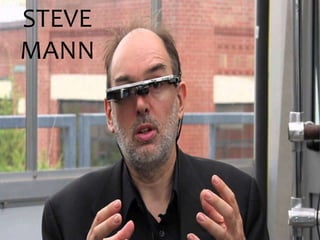
 Steve Mann is considered as the father of Sixth Sense
Technology who made wearable computer in 1990. He
implemented the Sixth Sense Technology as the neck
worn projector with a camera system.
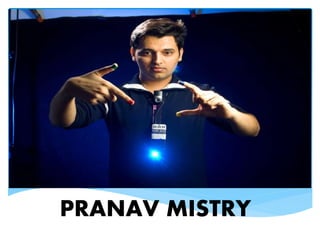
 Then his work was carried forward by Pranav Mistry
(Ph.D student in the Fluid Interfaces Group at the MIT
Media Lab).
INTRODUCTION
 SixthSense bridges the gap by bringing intangible, digital
information out into the tangible world, and allowing us to
interact with this information via natural hand.
 SixthSense comprises a pocket projector, a mirror and a camera.
The hardware components are coupled in a pendant like mobile
wearable device .
INTRODUCTION
STEVE
MANN
PRANAV MISTRY
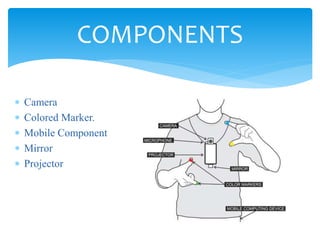
 Camera
 Colored Marker.
 Mobile Component
 Mirror
 Projector
COMPONENTS
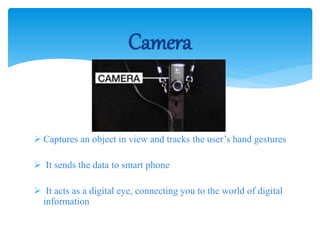
 Captures an object in view and tracks the user’s hand gestures
 It sends the data to smart phone
 It acts as a digital eye, connecting you to the world of digital
information
Camera
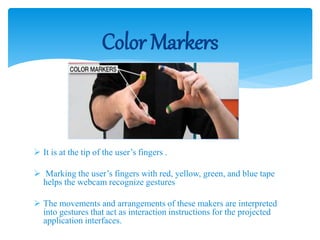
 It is at the tip of the user’s fingers .
 Marking the user’s fingers with red, yellow, green, and blue tape
helps the webcam recognize gestures
 The movements and arrangements of these makers are interpreted
into gestures that act as interaction instructions for the projected
application interfaces.
Color Markers
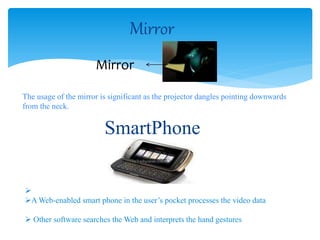
Mirror
Mirror
The usage of the mirror is significant as the projector dangles pointing downwards
from the neck.
SmartPhone

A Web-enabled smart phone in the user’s pocket processes the video data
 Other software searches the Web and interprets the hand gestures
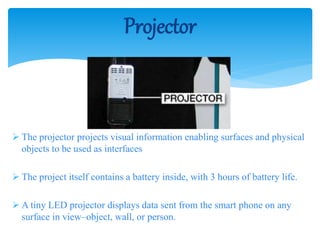
 The projector projects visual information enabling surfaces and physical
objects to be used as interfaces
 The project itself contains a battery inside, with 3 hours of battery life.
 A tiny LED projector displays data sent from the smart phone on any
surface in view–object, wall, or person.
Projector
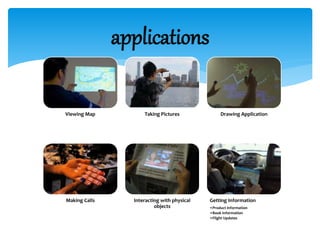
applications
Viewing Map Taking Pictures Drawing Application
Making Calls Interacting with physical
objects
Getting Information
•Product information
•Book Information
•Flight Updates
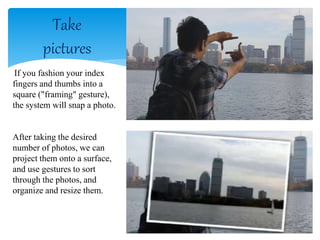
Take
pictures
If you fashion your index
fingers and thumbs into a
square ("framing" gesture),
the system will snap a photo.
After taking the desired
number of photos, we can
project them onto a surface,
and use gestures to sort
through the photos, and
organize and resize them.
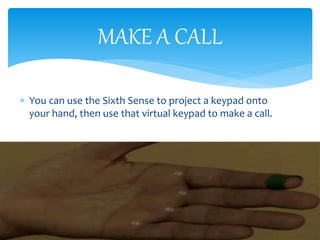
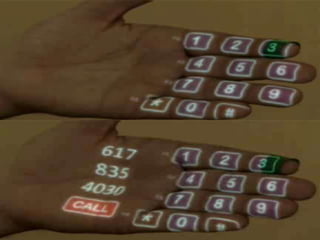
 You can use the Sixth Sense to project a keypad onto
your hand, then use that virtual keypad to make a call.
MAKE A CALL
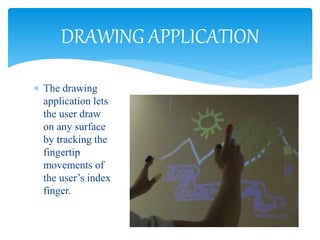
 The drawing
application lets
the user draw
on any surface
by tracking the
fingertip
movements of
the user’s index
finger.
DRAWING APPLICATION
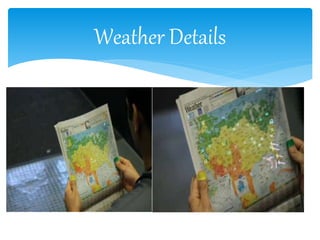
Weather Details
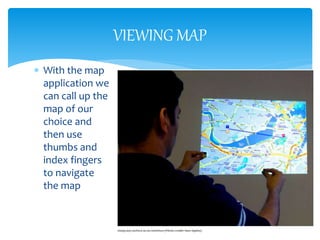
VIEWING MAP
 With the map
application we
can call up the
map of our
choice and
then use
thumbs and
index fingers
to navigate
the map
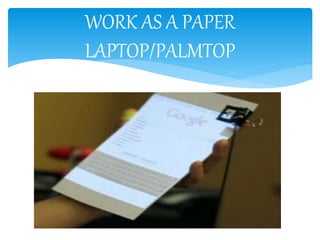
WORK AS A PAPER
LAPTOP/PALMTOP
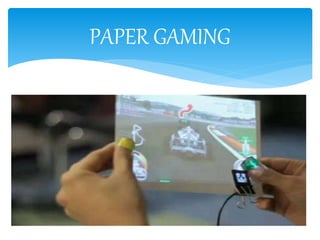
PAPER GAMING
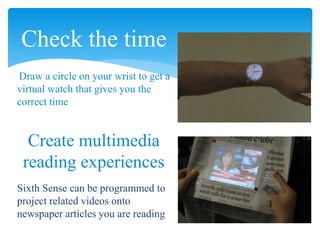
Check the time
Draw a circle on your wrist to get a
virtual watch that gives you the
correct time
Create multimedia
reading experiences
Sixth Sense can be programmed to
project related videos onto
newspaper articles you are reading
 The system will recognize your boarding pass and
let you know whether your flight is on time and if
the gate has changed.
GETTING INFORMATION
 Supports multi-touch and multi-user interaction
 Portable
 Connectedness between world and information
 Cost effective
 Data access directly from machine in real time
 Mind map the idea anywhere
 Cool
 It is an open source
Advantages
To get rid of color markers.
To incorporate camera and projector inside mobile
computing device.
To have 3D gesture tracking.
To make Sixth Sense work as fifth Sense for disabled
person.
FUTURE ENHANCEMENTS
 Sixth Sense recognizes the objects around us, displaying
information automatically and letting us to access it in any
way we need
 The Sixth Sense prototype implements several applications
that demonstrate the usefulness, viability and flexibility of
the system
 Allowing us to interact with this information via natural
hand gestures
 The potential of becoming the ultimate "transparent" user
interface for accessing information about everything
around us
CONCLUSION
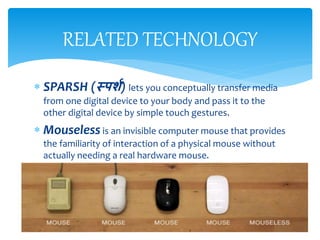
 SPARSH (स्पर्श) lets you conceptually transfer media
from one digital device to your body and pass it to the
other digital device by simple touch gestures.
 Mouseless is an invisible computer mouse that provides
the familiarity of interaction of a physical mouse without
actually needing a real hardware mouse.
RELATED TECHNOLOGY
Personality is the unbroken series of
Successful Gestures…
.
.
.
.
.
.
Technology is the unbroken series of
Successful Gestures…
Final Words to Say
 http://www.ted.com/talks/pattie_maes_demos_the_sixth_sense.html
 http://www.pranavmistry.com
 http://www.google.com
 http://www.slideshare.com
 http://www.youtube.com
references
 pranav@mit.edu
 pranavmistry@gmail.com
CONTACT
Sixth Sense Technology

Sixth Sense Technology

  • 1.
    “NOW YOU CANWEAR YOUR WORLD” Presented By :- 0802CS131043 Kshitij Nagar
  • 2.
     Sixth Senseis a wearable gestural interface that augments the physical world around us with digital information and lets us use natural hand gestures to interact with that information.  Steve Mann is considered as the father of Sixth Sense Technology who made wearable computer in 1990. He implemented the Sixth Sense Technology as the neck worn projector with a camera system.  Then his work was carried forward by Pranav Mistry (Ph.D student in the Fluid Interfaces Group at the MIT Media Lab). INTRODUCTION
  • 3.
     SixthSense bridgesthe gap by bringing intangible, digital information out into the tangible world, and allowing us to interact with this information via natural hand.  SixthSense comprises a pocket projector, a mirror and a camera. The hardware components are coupled in a pendant like mobile wearable device . INTRODUCTION
  • 4.
  • 5.
  • 8.
     Camera  ColoredMarker.  Mobile Component  Mirror  Projector COMPONENTS
  • 9.
     Captures anobject in view and tracks the user’s hand gestures  It sends the data to smart phone  It acts as a digital eye, connecting you to the world of digital information Camera
  • 10.
     It isat the tip of the user’s fingers .  Marking the user’s fingers with red, yellow, green, and blue tape helps the webcam recognize gestures  The movements and arrangements of these makers are interpreted into gestures that act as interaction instructions for the projected application interfaces. Color Markers
  • 11.
    Mirror Mirror The usage ofthe mirror is significant as the projector dangles pointing downwards from the neck. SmartPhone  A Web-enabled smart phone in the user’s pocket processes the video data  Other software searches the Web and interprets the hand gestures
  • 12.
     The projectorprojects visual information enabling surfaces and physical objects to be used as interfaces  The project itself contains a battery inside, with 3 hours of battery life.  A tiny LED projector displays data sent from the smart phone on any surface in view–object, wall, or person. Projector
  • 13.
    applications Viewing Map TakingPictures Drawing Application Making Calls Interacting with physical objects Getting Information •Product information •Book Information •Flight Updates
  • 14.
    Take pictures If you fashionyour index fingers and thumbs into a square ("framing" gesture), the system will snap a photo. After taking the desired number of photos, we can project them onto a surface, and use gestures to sort through the photos, and organize and resize them.
  • 15.
     You canuse the Sixth Sense to project a keypad onto your hand, then use that virtual keypad to make a call. MAKE A CALL
  • 17.
     The drawing applicationlets the user draw on any surface by tracking the fingertip movements of the user’s index finger. DRAWING APPLICATION
  • 18.
  • 19.
    VIEWING MAP  Withthe map application we can call up the map of our choice and then use thumbs and index fingers to navigate the map
  • 20.
    WORK AS APAPER LAPTOP/PALMTOP
  • 21.
  • 22.
    Check the time Drawa circle on your wrist to get a virtual watch that gives you the correct time Create multimedia reading experiences Sixth Sense can be programmed to project related videos onto newspaper articles you are reading
  • 23.
     The systemwill recognize your boarding pass and let you know whether your flight is on time and if the gate has changed. GETTING INFORMATION
  • 24.
     Supports multi-touchand multi-user interaction  Portable  Connectedness between world and information  Cost effective  Data access directly from machine in real time  Mind map the idea anywhere  Cool  It is an open source Advantages
  • 25.
    To get ridof color markers. To incorporate camera and projector inside mobile computing device. To have 3D gesture tracking. To make Sixth Sense work as fifth Sense for disabled person. FUTURE ENHANCEMENTS
  • 26.
     Sixth Senserecognizes the objects around us, displaying information automatically and letting us to access it in any way we need  The Sixth Sense prototype implements several applications that demonstrate the usefulness, viability and flexibility of the system  Allowing us to interact with this information via natural hand gestures  The potential of becoming the ultimate "transparent" user interface for accessing information about everything around us CONCLUSION
  • 27.
     SPARSH (स्पर्श)lets you conceptually transfer media from one digital device to your body and pass it to the other digital device by simple touch gestures.  Mouseless is an invisible computer mouse that provides the familiarity of interaction of a physical mouse without actually needing a real hardware mouse. RELATED TECHNOLOGY
  • 28.
    Personality is theunbroken series of Successful Gestures… . . . . . . Technology is the unbroken series of Successful Gestures… Final Words to Say
  • 29.
     http://www.ted.com/talks/pattie_maes_demos_the_sixth_sense.html  http://www.pranavmistry.com http://www.google.com  http://www.slideshare.com  http://www.youtube.com references
  • 30.