Improve your  I-Cue IQ Michael Walker Technology Integration Specialist [email_address] X 4050
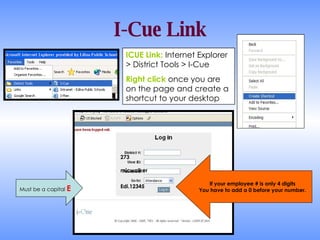
I-Cue Link ICUE Link:  Internet Explorer > District Tools > I-Cue Right click  once you are on the page and create a shortcut to your desktop If your employee # is only 4 digits You have to add a 0 before your number. Must be a capital  E 273 micwalker Edi.12345
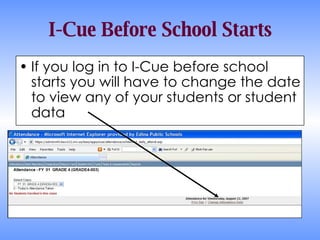
I-Cue Before School Starts If you log in to I-Cue before school starts you will have to change the date to view any of your students or student data
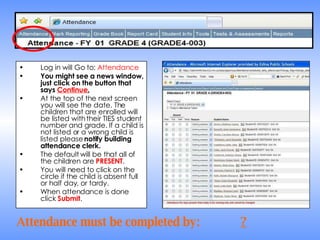
Log in will Go to:  Attendance You might see a news window, just click on the button that says  Continue . At the top of the next screen you will see the date. The children that are enrolled will be listed with their TIES student number and grade. If a child is not listed or a wrong child is listed please  notify building attendance clerk. The default will be that all of the children are  PRESENT .  You will need to click on the circle if the child is absent full or half day, or tardy.  When attendance is done click  Submit . Attendance must be completed by: ?
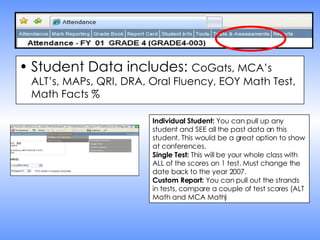
Student Data includes:  CoGats, MCA’s ALT’s, MAPs, QRI, DRA, Oral Fluency, EOY Math Test, Math Facts % Individual Student:  You can pull up any student and SEE all the past data on this student. This would be a great option to show at conferences. Single Test:  This will be your whole class with ALL of the scores on 1 test. Must change the date back to the year 2007. Custom Report:  You can pull out the strands in tests, compare a couple of test scores (ALT Math and MCA Math)
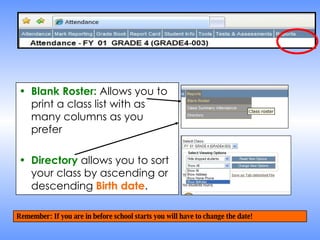
Blank Roster:  Allows you to print a class list with as many columns as you prefer Directory  allows you to sort your class by ascending or descending  Birth date . Remember: If you are in before school starts you will have to change the date!

Icue Review 2008

  • 1.
    Improve your I-Cue IQ Michael Walker Technology Integration Specialist [email_address] X 4050
  • 2.
    I-Cue Link ICUELink: Internet Explorer > District Tools > I-Cue Right click once you are on the page and create a shortcut to your desktop If your employee # is only 4 digits You have to add a 0 before your number. Must be a capital E 273 micwalker Edi.12345
  • 3.
    I-Cue Before SchoolStarts If you log in to I-Cue before school starts you will have to change the date to view any of your students or student data
  • 4.
    Log in willGo to: Attendance You might see a news window, just click on the button that says Continue . At the top of the next screen you will see the date. The children that are enrolled will be listed with their TIES student number and grade. If a child is not listed or a wrong child is listed please notify building attendance clerk. The default will be that all of the children are PRESENT . You will need to click on the circle if the child is absent full or half day, or tardy. When attendance is done click Submit . Attendance must be completed by: ?
  • 5.
    Student Data includes: CoGats, MCA’s ALT’s, MAPs, QRI, DRA, Oral Fluency, EOY Math Test, Math Facts % Individual Student: You can pull up any student and SEE all the past data on this student. This would be a great option to show at conferences. Single Test: This will be your whole class with ALL of the scores on 1 test. Must change the date back to the year 2007. Custom Report: You can pull out the strands in tests, compare a couple of test scores (ALT Math and MCA Math)
  • 6.
    Blank Roster: Allows you to print a class list with as many columns as you prefer Directory allows you to sort your class by ascending or descending Birth date . Remember: If you are in before school starts you will have to change the date!