Welcome to the Real-time world of web
Martin Bodocky
What’s SignalR?
 SignalR is an asynchronous signaling library for
ASP.Net, to help build real-time multi-user web
application.
 SignalR is a compete client and server side solution
with JavaScript(jQuery) on client and ASP.Net on the
back end to create these kinds of application.
How does it work? 1/2
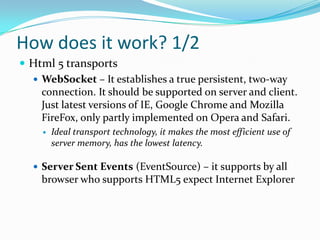
 Html 5 transports
 WebSocket – It establishes a true persistent, two-way
connection. It should be supported on server and client.
Just latest versions of IE, Google Chrome and Mozilla
FireFox, only partly implemented on Opera and Safari.
 Ideal transport technology, it makes the most efficient use of
server memory, has the lowest latency.
 Server Sent Events (EventSource) – it supports by all
browser who supports HTML5 expect Internet Explorer
How does it work? 2/2
 Comet(1) transports (when HTML5 is not supported)
 Forever Frame (IE only) – It creates a hidden IFrame on
which is executing scripts, those are continually sending
from server.
 Ajax long polling – It doesn’t create a persistent
connection, but instead polls the server with a request
that stays open until the server responds, at which point
the connection closes, and a new connection is
requested immediately.
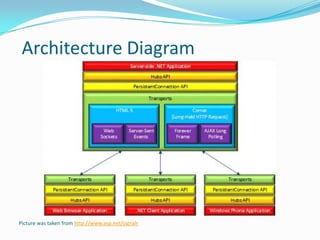
Picture was taken from http://www.asp.net/signalr
Architecture Diagram
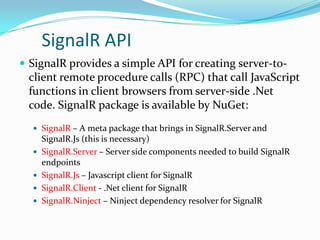
SignalR API
 SignalR provides a simple API for creating server-to-
client remote procedure calls (RPC) that call JavaScript
functions in client browsers from server-side .Net
code. SignalR package is available by NuGet:
 SignalR – A meta package that brings in SignalR.Server and
SignalR.Js (this is necessary)
 SignalR.Server – Server side components needed to build SignalR
endpoints
 SignalR.Js – Javascript client for SignalR
 SignalR.Client - .Net client for SignalR
 SignalR.Ninject – Ninject dependency resolver for SignalR
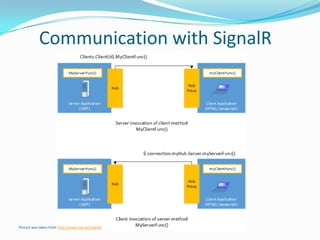
Communication with SignalR
Picture was taken from http://www.asp.net/signalr
Server Side – Hub 1/2
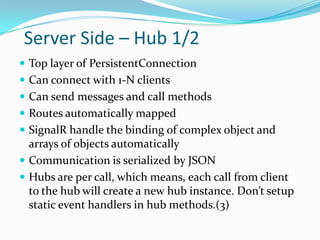
 Top layer of PersistentConnection
 Can connect with 1-N clients
 Can send messages and call methods
 Routes automatically mapped
 SignalR handle the binding of complex object and
arrays of objects automatically
 Communication is serialized by JSON
 Hubs are per call, which means, each call from client
to the hub will create a new hub instance. Don’t setup
static event handlers in hub methods.(3)
Server Side – Hub 2/2
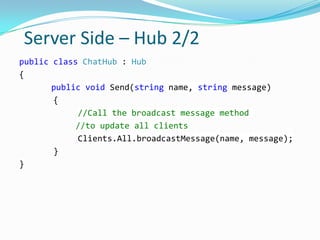
public class ChatHub : Hub
{
public void Send(string name, string message)
{
//Call the broadcast message method
//to update all clients
Clients.All.broadcastMessage(name, message);
}
}
Client Side 1/3
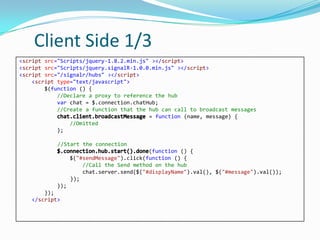
<script src="Scripts/jquery-1.8.2.min.js" ></script>
<script src="Scripts/jquery.signalR-1.0.0.min.js" ></script>
<script src="/signalr/hubs" ></script>
<script type="text/javascript">
$(function () {
//Declare a proxy to reference the hub
var chat = $.connection.chatHub;
//Create a function that the hub can call to broadcast messages
= function (name, message) {
//Omitted
};
//Start the connection
(function () {
$("#sendMessage").click(function () {
//Call the Send method on the hub
chat.server.send($("#displayName").val(), $("#message").val());
});
});
});
</script>
Client Side 2/3
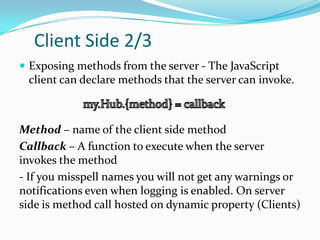
 Exposing methods from the server - The JavaScript
client can declare methods that the server can invoke.
Method – name of the client side method
Callback – A function to execute when the server
invokes the method
- If you misspell names you will not get any warnings or
notifications even when logging is enabled. On server
side is method call hosted on dynamic property (Clients)
Client Side 3/3
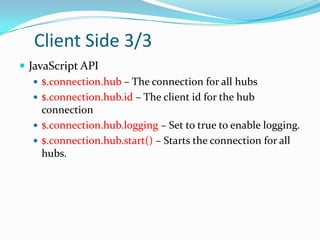
 JavaScript API
 $.connection.hub – The connection for all hubs
 $.connection.hub.id – The client id for the hub
connection
 $.connection.hub.logging – Set to true to enable logging.
 $.connection.hub.start() – Starts the connection for all
hubs.
Hub routing
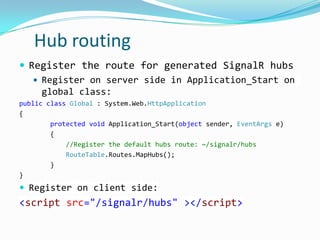
 Register the route for generated SignalR hubs
 Register on server side in Application_Start on
global class:
public class Global : System.Web.HttpApplication
{
protected void Application_Start(object sender, EventArgs e)
{
//Register the default hubs route: ~/signalr/hubs
RouteTable.Routes.MapHubs();
}
}
 Register on client side:
<script src="/signalr/hubs" ></script>
Some demos
Chat
Shape move
Stock ticker
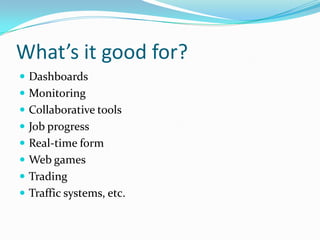
What’s it good for?
 Dashboards
 Monitoring
 Collaborative tools
 Job progress
 Real-time form
 Web games
 Trading
 Traffic systems, etc.
SignalR requirements
 OS:
 Windows Server 2012
 Windows Server 2008 R2
 Windows 8/7
 Windows Azure
 IIS – 7/7.5(with Extensionless URL(2)); 8/8 Express
 .Net – 4.5 framework
 Browser - http://caniuse.com/#feat=websockets
SignalR with SharePoint 2013
 There is a way:
http://melcher.it/2012/12/signalr-in-sharepoint-2013-
the-real-time-web-is-coming
http://spsignalr.codeplex.com/
References
 1.) Comet -
http://en.wikipedia.org/wiki/Comet_(programming)
 2.) ISS with Extesionless url support –
http://support.microsoft.com/kb/980368
 3.) Hub api giude server -
http://www.asp.net/signalr/overview/hubs-api/hubs-
api-guide-server

SignalR with asp.net

  • 1.
    Welcome to theReal-time world of web Martin Bodocky
  • 2.
    What’s SignalR?  SignalRis an asynchronous signaling library for ASP.Net, to help build real-time multi-user web application.  SignalR is a compete client and server side solution with JavaScript(jQuery) on client and ASP.Net on the back end to create these kinds of application.
  • 3.
    How does itwork? 1/2  Html 5 transports  WebSocket – It establishes a true persistent, two-way connection. It should be supported on server and client. Just latest versions of IE, Google Chrome and Mozilla FireFox, only partly implemented on Opera and Safari.  Ideal transport technology, it makes the most efficient use of server memory, has the lowest latency.  Server Sent Events (EventSource) – it supports by all browser who supports HTML5 expect Internet Explorer
  • 4.
    How does itwork? 2/2  Comet(1) transports (when HTML5 is not supported)  Forever Frame (IE only) – It creates a hidden IFrame on which is executing scripts, those are continually sending from server.  Ajax long polling – It doesn’t create a persistent connection, but instead polls the server with a request that stays open until the server responds, at which point the connection closes, and a new connection is requested immediately.
  • 5.
    Picture was takenfrom http://www.asp.net/signalr Architecture Diagram
  • 6.
    SignalR API  SignalRprovides a simple API for creating server-to- client remote procedure calls (RPC) that call JavaScript functions in client browsers from server-side .Net code. SignalR package is available by NuGet:  SignalR – A meta package that brings in SignalR.Server and SignalR.Js (this is necessary)  SignalR.Server – Server side components needed to build SignalR endpoints  SignalR.Js – Javascript client for SignalR  SignalR.Client - .Net client for SignalR  SignalR.Ninject – Ninject dependency resolver for SignalR
  • 7.
    Communication with SignalR Picturewas taken from http://www.asp.net/signalr
  • 8.
    Server Side –Hub 1/2  Top layer of PersistentConnection  Can connect with 1-N clients  Can send messages and call methods  Routes automatically mapped  SignalR handle the binding of complex object and arrays of objects automatically  Communication is serialized by JSON  Hubs are per call, which means, each call from client to the hub will create a new hub instance. Don’t setup static event handlers in hub methods.(3)
  • 9.
    Server Side –Hub 2/2 public class ChatHub : Hub { public void Send(string name, string message) { //Call the broadcast message method //to update all clients Clients.All.broadcastMessage(name, message); } }
  • 10.
    Client Side 1/3 <scriptsrc="Scripts/jquery-1.8.2.min.js" ></script> <script src="Scripts/jquery.signalR-1.0.0.min.js" ></script> <script src="/signalr/hubs" ></script> <script type="text/javascript"> $(function () { //Declare a proxy to reference the hub var chat = $.connection.chatHub; //Create a function that the hub can call to broadcast messages = function (name, message) { //Omitted }; //Start the connection (function () { $("#sendMessage").click(function () { //Call the Send method on the hub chat.server.send($("#displayName").val(), $("#message").val()); }); }); }); </script>
  • 11.
    Client Side 2/3 Exposing methods from the server - The JavaScript client can declare methods that the server can invoke. Method – name of the client side method Callback – A function to execute when the server invokes the method - If you misspell names you will not get any warnings or notifications even when logging is enabled. On server side is method call hosted on dynamic property (Clients)
  • 12.
    Client Side 3/3 JavaScript API  $.connection.hub – The connection for all hubs  $.connection.hub.id – The client id for the hub connection  $.connection.hub.logging – Set to true to enable logging.  $.connection.hub.start() – Starts the connection for all hubs.
  • 13.
    Hub routing  Registerthe route for generated SignalR hubs  Register on server side in Application_Start on global class: public class Global : System.Web.HttpApplication { protected void Application_Start(object sender, EventArgs e) { //Register the default hubs route: ~/signalr/hubs RouteTable.Routes.MapHubs(); } }  Register on client side: <script src="/signalr/hubs" ></script>
  • 14.
  • 15.
    What’s it goodfor?  Dashboards  Monitoring  Collaborative tools  Job progress  Real-time form  Web games  Trading  Traffic systems, etc.
  • 16.
    SignalR requirements  OS: Windows Server 2012  Windows Server 2008 R2  Windows 8/7  Windows Azure  IIS – 7/7.5(with Extensionless URL(2)); 8/8 Express  .Net – 4.5 framework  Browser - http://caniuse.com/#feat=websockets
  • 17.
    SignalR with SharePoint2013  There is a way: http://melcher.it/2012/12/signalr-in-sharepoint-2013- the-real-time-web-is-coming http://spsignalr.codeplex.com/
  • 18.
    References  1.) Comet- http://en.wikipedia.org/wiki/Comet_(programming)  2.) ISS with Extesionless url support – http://support.microsoft.com/kb/980368  3.) Hub api giude server - http://www.asp.net/signalr/overview/hubs-api/hubs- api-guide-server