The entire contents of this document are subject to copyright with all rights reserved. All copyrightable text and graphics, the selection, arrangement and presentation
of all information and the overall design of the document are the sole and exclusive property of Virtusa.
Copyright © 2012 Virtusa Corporation. All rights reserved
2000 West Park Drive
Westborough MA 01581 USA
Phone: 508 389 7300 Fax: 508 366 9901
Introduction to SignalR
SharePoint CEG | K-Talk
Shehan Peruma
August 23, 2013
2
Agenda
• Real-Time Web Technologies
• SignalR
• Getting Started
• Hubs API
• SignalR & SharePoint
• Summary
3
Real-Time Web Technologies
4
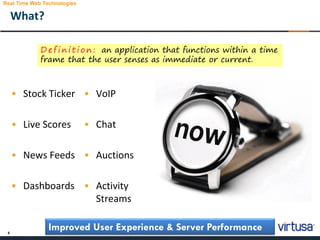
What?
• Stock Ticker
• Live Scores
• News Feeds
• Dashboards
• VoIP
• Chat
• Auctions
• Activity
Streams
Improved User Experience & Server Performance
D e f i n i t i o n : an application that functions within a time
frame that the user senses as immediate or current.
Real Time Web Technologies
5
How?
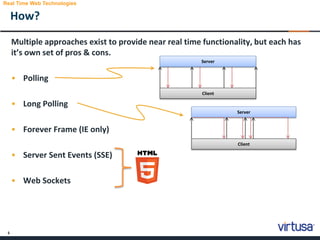
Multiple approaches exist to provide near real time functionality, but each has
it’s own set of pros & cons.
• Polling
• Long Polling
• Forever Frame (IE only)
• Server Sent Events (SSE)
• Web Sockets
Real Time Web Technologies
Server
Client
Server
Client
6
Response4
Response3
Response2
Response1
Web Sockets – Quick Intro.
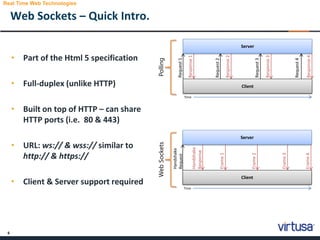
• Part of the Html 5 specification
• Full-duplex (unlike HTTP)
• Built on top of HTTP – can share
HTTP ports (i.e. 80 & 443)
• URL: ws:// & wss:// similar to
http:// & https://
• Client & Server support required
Real Time Web Technologies
Server
Client
Request1
Request2
Request3
Request4
Time
Frame3
Frame2
Frame1
Handshake
Response
Server
Client
Handshake
Request
Time
Frame4
PollingWebSockets
7
8
• Initially developed by members of the ASP.NET team
• Part of the ASP.NET Technologies
• Open source and hosted on GitHub
• Distributed via NuGet
• Requires .NET 4.0 and above
What is SignalR?
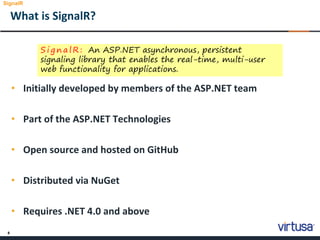
S i g n a l R : An ASP.NET asynchronous, persistent
signaling library that enables the real-time, multi-user
web functionality for applications.
SignalR
9
Demo – A Simple Example
11
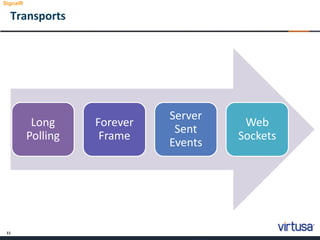
Transports
Long
Polling
Forever
Frame
Server
Sent
Events
Web
Sockets
SignalR
12
Demo – Transport Fallback
14
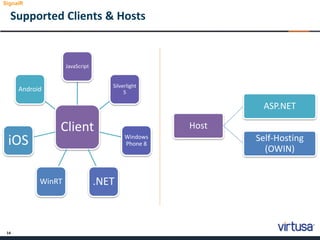
Supported Clients & Hosts
Client
JavaScript
Silverlight
5
Windows
Phone 8
.NETWinRT
iOS
Android
SignalR
Host
ASP.NET
Self-Hosting
(OWIN)
15
Demo – Clients
17
Connections & Hubs
SignalR
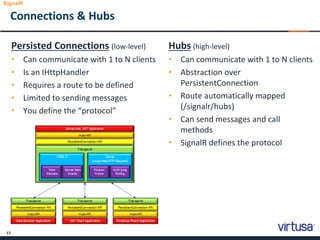
Persisted Connections (low-level)
• Can communicate with 1 to N clients
• Is an IHttpHandler
• Requires a route to be defined
• Limited to sending messages
• You define the “protocol”
Hubs (high-level)
• Can communicate with 1 to N clients
• Abstraction over
PersistentConnection
• Route automatically mapped
(/signalr/hubs)
• Can send messages and call
methods
• SignalR defines the protocol
18
Hubs
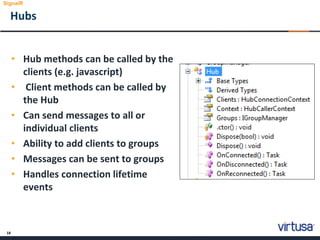
• Hub methods can be called by the
clients (e.g. javascript)
• Client methods can be called by
the Hub
• Can send messages to all or
individual clients
• Ability to add clients to groups
• Messages can be sent to groups
• Handles connection lifetime
events
SignalR
19
jQuery Proxy
• Two approaches:
• with generated proxy
• Use signalr.exe tool to create the proxy file.
• Without proxy but ‘late binding’
• Can be accessed by navigating to http://yoursite/signalr/hubs
• The proxy simplifies the code needed to communicate with the
server
SignalR
20
Getting Started
21
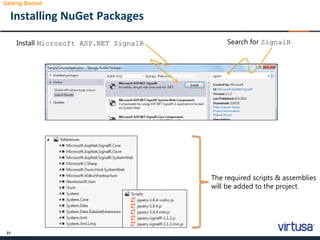
Installing NuGet Packages
Getting Started
Search for SignalRInstall Microsoft ASP.NET SignalR
The required scripts & assemblies
will be added to the project.
22
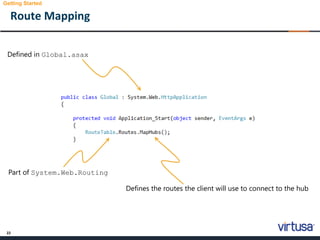
Route Mapping
Getting Started
Defined in Global.asax
Defines the routes the client will use to connect to the hub
Part of System.Web.Routing
23
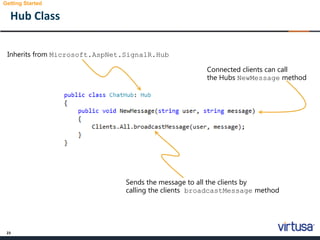
Hub Class
Getting Started
Inherits from Microsoft.AspNet.SignalR.Hub
Sends the message to all the clients by
calling the clients broadcastMessage method
Connected clients can call
the Hubs NewMessage method
24
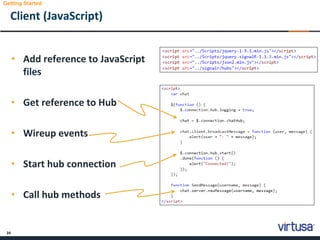
Client (JavaScript)
• Add reference to JavaScript
files
• Get reference to Hub
• Wireup events
• Start hub connection
• Call hub methods
Getting Started
25
Demo – Code/App
26
Hubs API
27
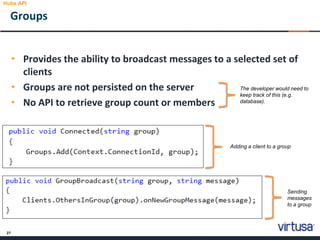
Groups
Hubs API
• Provides the ability to broadcast messages to a selected set of
clients
• Groups are not persisted on the server
• No API to retrieve group count or members
The developer would need to
keep track of this (e.g.
database).
Adding a client to a group
Sending
messages
to a group
28
Demo – Groups
29
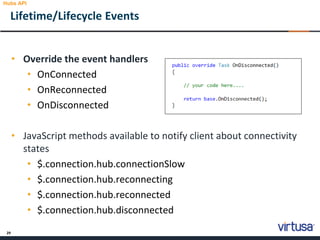
• Override the event handlers
• OnConnected
• OnReconnected
• OnDisconnected
• JavaScript methods available to notify client about connectivity
states
• $.connection.hub.connectionSlow
• $.connection.hub.reconnecting
• $.connection.hub.reconnected
• $.connection.hub.disconnected
Lifetime/Lifecycle Events
Hubs API
30
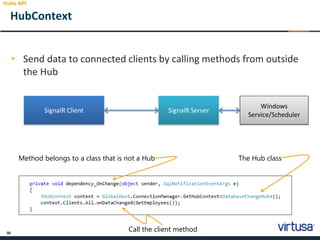
• Send data to connected clients by calling methods from outside
the Hub
HubContext
Hubs API
SignalR Client SignalR Server
Windows
Service/Scheduler
The Hub classMethod belongs to a class that is not a Hub
Call the client method
31
Demo – HubContext
32
• Authorize - specify which users or roles have access to a hub or
method
• Scaleout
• Windows Azure Service Bus
• Redis
• SQL Server
Other Features
Hubs API
33
SignalR & SharePoint
34
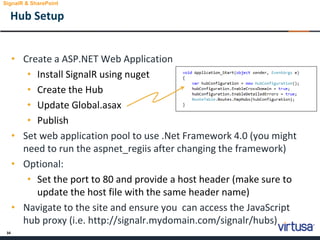
• Create a ASP.NET Web Application
• Install SignalR using nuget
• Create the Hub
• Update Global.asax
• Publish
• Set web application pool to use .Net Framework 4.0 (you might
need to run the aspnet_regiis after changing the framework)
• Optional:
• Set the port to 80 and provide a host header (make sure to
update the host file with the same header name)
• Navigate to the site and ensure you can access the JavaScript
hub proxy (i.e. http://signalr.mydomain.com/signalr/hubs)
Hub Setup
SignalR & SharePoint
35
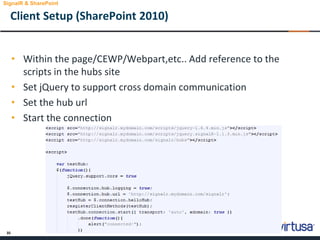
• Within the page/CEWP/Webpart,etc.. Add reference to the
scripts in the hubs site
• Set jQuery to support cross domain communication
• Set the hub url
• Start the connection
Client Setup (SharePoint 2010)
SignalR & SharePoint
36
Demo – SignalR & SharePoint
37
Summary
38
Summary
• Provides the ability to add real time web functionality to
applications
• Push data to clients and/or groups
• Hubs enables remote procedure calls (RPCs) to be made from a
server to connected clients and from clients to the server
• Not limited to web clients
39
Resources
• SignalR documentation - http://www.asp.net/signalr
• Pluralsight training -
http://pluralsight.com/training/Player?author=christian-
weyer&name=signalr-introduction-m2-
realtime&mode=live&clip=0&course=signalr-introduction
40
Q&A
Q&A
41
Thanks!
Thank you for attending!
www.virtusa.com
© 2012 All rights reserved. Virtusa and all other related logos are either registered trademarks or trademarks of Virtusa Corporation in the United States, the European Union, and/or India. All
other company and service names are the property of their respective holders and may be registered trademarks or trademarks in the United States and/or other countries.

Introduction to SignalR

  • 1.
    The entire contentsof this document are subject to copyright with all rights reserved. All copyrightable text and graphics, the selection, arrangement and presentation of all information and the overall design of the document are the sole and exclusive property of Virtusa. Copyright © 2012 Virtusa Corporation. All rights reserved 2000 West Park Drive Westborough MA 01581 USA Phone: 508 389 7300 Fax: 508 366 9901 Introduction to SignalR SharePoint CEG | K-Talk Shehan Peruma August 23, 2013
  • 2.
    2 Agenda • Real-Time WebTechnologies • SignalR • Getting Started • Hubs API • SignalR & SharePoint • Summary
  • 3.
  • 4.
    4 What? • Stock Ticker •Live Scores • News Feeds • Dashboards • VoIP • Chat • Auctions • Activity Streams Improved User Experience & Server Performance D e f i n i t i o n : an application that functions within a time frame that the user senses as immediate or current. Real Time Web Technologies
  • 5.
    5 How? Multiple approaches existto provide near real time functionality, but each has it’s own set of pros & cons. • Polling • Long Polling • Forever Frame (IE only) • Server Sent Events (SSE) • Web Sockets Real Time Web Technologies Server Client Server Client
  • 6.
    6 Response4 Response3 Response2 Response1 Web Sockets –Quick Intro. • Part of the Html 5 specification • Full-duplex (unlike HTTP) • Built on top of HTTP – can share HTTP ports (i.e. 80 & 443) • URL: ws:// & wss:// similar to http:// & https:// • Client & Server support required Real Time Web Technologies Server Client Request1 Request2 Request3 Request4 Time Frame3 Frame2 Frame1 Handshake Response Server Client Handshake Request Time Frame4 PollingWebSockets
  • 7.
  • 8.
    8 • Initially developedby members of the ASP.NET team • Part of the ASP.NET Technologies • Open source and hosted on GitHub • Distributed via NuGet • Requires .NET 4.0 and above What is SignalR? S i g n a l R : An ASP.NET asynchronous, persistent signaling library that enables the real-time, multi-user web functionality for applications. SignalR
  • 9.
    9 Demo – ASimple Example
  • 10.
  • 11.
  • 12.
    14 Supported Clients &Hosts Client JavaScript Silverlight 5 Windows Phone 8 .NETWinRT iOS Android SignalR Host ASP.NET Self-Hosting (OWIN)
  • 13.
  • 14.
    17 Connections & Hubs SignalR PersistedConnections (low-level) • Can communicate with 1 to N clients • Is an IHttpHandler • Requires a route to be defined • Limited to sending messages • You define the “protocol” Hubs (high-level) • Can communicate with 1 to N clients • Abstraction over PersistentConnection • Route automatically mapped (/signalr/hubs) • Can send messages and call methods • SignalR defines the protocol
  • 15.
    18 Hubs • Hub methodscan be called by the clients (e.g. javascript) • Client methods can be called by the Hub • Can send messages to all or individual clients • Ability to add clients to groups • Messages can be sent to groups • Handles connection lifetime events SignalR
  • 16.
    19 jQuery Proxy • Twoapproaches: • with generated proxy • Use signalr.exe tool to create the proxy file. • Without proxy but ‘late binding’ • Can be accessed by navigating to http://yoursite/signalr/hubs • The proxy simplifies the code needed to communicate with the server SignalR
  • 17.
  • 18.
    21 Installing NuGet Packages GettingStarted Search for SignalRInstall Microsoft ASP.NET SignalR The required scripts & assemblies will be added to the project.
  • 19.
    22 Route Mapping Getting Started Definedin Global.asax Defines the routes the client will use to connect to the hub Part of System.Web.Routing
  • 20.
    23 Hub Class Getting Started Inheritsfrom Microsoft.AspNet.SignalR.Hub Sends the message to all the clients by calling the clients broadcastMessage method Connected clients can call the Hubs NewMessage method
  • 21.
    24 Client (JavaScript) • Addreference to JavaScript files • Get reference to Hub • Wireup events • Start hub connection • Call hub methods Getting Started
  • 22.
  • 23.
  • 24.
    27 Groups Hubs API • Providesthe ability to broadcast messages to a selected set of clients • Groups are not persisted on the server • No API to retrieve group count or members The developer would need to keep track of this (e.g. database). Adding a client to a group Sending messages to a group
  • 25.
  • 26.
    29 • Override theevent handlers • OnConnected • OnReconnected • OnDisconnected • JavaScript methods available to notify client about connectivity states • $.connection.hub.connectionSlow • $.connection.hub.reconnecting • $.connection.hub.reconnected • $.connection.hub.disconnected Lifetime/Lifecycle Events Hubs API
  • 27.
    30 • Send datato connected clients by calling methods from outside the Hub HubContext Hubs API SignalR Client SignalR Server Windows Service/Scheduler The Hub classMethod belongs to a class that is not a Hub Call the client method
  • 28.
  • 29.
    32 • Authorize -specify which users or roles have access to a hub or method • Scaleout • Windows Azure Service Bus • Redis • SQL Server Other Features Hubs API
  • 30.
  • 31.
    34 • Create aASP.NET Web Application • Install SignalR using nuget • Create the Hub • Update Global.asax • Publish • Set web application pool to use .Net Framework 4.0 (you might need to run the aspnet_regiis after changing the framework) • Optional: • Set the port to 80 and provide a host header (make sure to update the host file with the same header name) • Navigate to the site and ensure you can access the JavaScript hub proxy (i.e. http://signalr.mydomain.com/signalr/hubs) Hub Setup SignalR & SharePoint
  • 32.
    35 • Within thepage/CEWP/Webpart,etc.. Add reference to the scripts in the hubs site • Set jQuery to support cross domain communication • Set the hub url • Start the connection Client Setup (SharePoint 2010) SignalR & SharePoint
  • 33.
    36 Demo – SignalR& SharePoint
  • 34.
  • 35.
    38 Summary • Provides theability to add real time web functionality to applications • Push data to clients and/or groups • Hubs enables remote procedure calls (RPCs) to be made from a server to connected clients and from clients to the server • Not limited to web clients
  • 36.
    39 Resources • SignalR documentation- http://www.asp.net/signalr • Pluralsight training - http://pluralsight.com/training/Player?author=christian- weyer&name=signalr-introduction-m2- realtime&mode=live&clip=0&course=signalr-introduction
  • 37.
  • 38.
  • 39.
    www.virtusa.com © 2012 Allrights reserved. Virtusa and all other related logos are either registered trademarks or trademarks of Virtusa Corporation in the United States, the European Union, and/or India. All other company and service names are the property of their respective holders and may be registered trademarks or trademarks in the United States and/or other countries.