
SignalR


  Eyal Vardi
  CEO E4D Solutions LTD
  Microsoft MVP Visual C#
  blog: www.eVardi.com
Expert Days 2012
                                                                                 


© 2010 E4D LTD. All rights reserved. Tel: 054-5-767-300, Email: Eyal@E4D.co.il
Agenda
           SignalR Server Side API

           SignalR JavaScript API

           SignalR Client .NET API

           SignalR Internals

           SignalR Extensibility


© 2010 E4D LTD. All rights reserved. Tel: 054-5-767-300, Email: Eyal@E4D.co.il
Sever Side


© 2010 E4D LTD. All rights reserved. Tel: 054-5-767-300, Email: Eyal@E4D.co.il
What is SignalR?
           SignalR is an asynchronous signaling library
            for ASP.NET, To help build real-time multi-
            user web application.
           SignalR is a complete client- and server-side
            solution with JS on client and ASP.NET on the
            back end to create these kinds of applications.


© 2010 E4D LTD. All rights reserved. Tel: 054-5-767-300, Email: Eyal@E4D.co.il
More Details on SignalR
           SignalR is broken up into a few package on
            NuGet:
                  SignalR - A meta package that brings in SignalR.Server and
                                 SignalR.Js (you should install this)

                  SignalR.Server - Server side components needed to build SignalR
                                             endpoints

                  SignalR.Js - Javascript client for SignalR

                  SignalR.Client - .NET client for SignalR

                  SignalR.Ninject - Ninject dependeny resolver for SignalR


© 2010 E4D LTD. All rights reserved. Tel: 054-5-767-300, Email: Eyal@E4D.co.il
Hub Class
           Hubs provide a higher level RPC
            framework over a PersistentConnection.
           SignalR will handle the binding of complex
            objects and arrays of objects automatically.


                       [HubName("Chat")]         Callable from                   the client
                       public class Chat : Hub
                       {
                            public string Send(string message)
                            {
                                return message;                                  Deserialization
                            }
                       }


© 2010 E4D LTD. All rights reserved. Tel: 054-5-767-300, Email: Eyal@E4D.co.il
Hub API
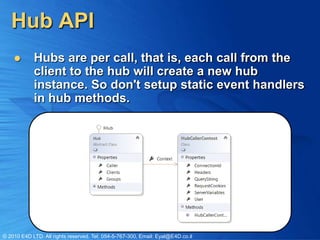
           Hubs are per call, that is, each call from the
            client to the hub will create a new hub
            instance. So don't setup static event handlers
            in hub methods.


© 2010 E4D LTD. All rights reserved. Tel: 054-5-767-300, Email: Eyal@E4D.co.il
Server Calling The Client
           To call client event/methods from the server
            use the Clients property.
           Parameters passed to the method will be
            JSON serialized before being sent to the client

                       [HubName("Chat")]
                       public class Chat : Hub
                       {
                            public void Send(string message)
                            {
                                // Call the addMessage method on all clients
                               Clients.addMessage(message);
                            }
                       }


© 2010 E4D LTD. All rights reserved. Tel: 054-5-767-300, Email: Eyal@E4D.co.il
Calling on Specific Connections
            There are some cases where we want to send
             a message to specific clients or groups. We
             can use the indexer on the Clients object to
             specify a connection id.


                      [HubName("Chat")]
                      public class Chat : Hub
                      {
                           public void Send(string message)
                           {
                              Clients[Context.ConnectionId].addMessage(message);
                           }
                      }


© 2010 E4D LTD. All rights reserved. Tel: 054-5-767-300, Email: Eyal@E4D.co.il
Managing Groups
           You can add connections to groups and send
            messages to particular groups.
           You may also return Task/Task<T> from a hub
            if you need to do async work.
                    public class MyHub : Hub, IDisconnect
                    {
                            public Task Join() {
                                return Groups.Add(Context.ConnectionId, "foo");
                            }

                             public Task Send(string message) {
                                 return Clients["foo"].addMessage(message);
                             }

                             public Task Disconnect() {
                                 return Clients["foo"].leave(Context.ConnectionId);
                             }
                    }


© 2010 E4D LTD. All rights reserved. Tel: 054-5-767-300, Email: Eyal@E4D.co.il
State Between Client & Server
           Any state sent from the client can be
            accessed via the Caller property.
           You can also set client side state just by
            setting any property on Caller.

                      [HubName("Chat")]
                      public class Chat : Hub
                      {
                           public void Send(string message)
                           {
                              // Access the id property set from the client.
                              string id = Caller.id;

                                 // Set a property on the client state
                                 Caller.name = "SignalR";
                             }
                      }

© 2010 E4D LTD. All rights reserved. Tel: 054-5-767-300, Email: Eyal@E4D.co.il
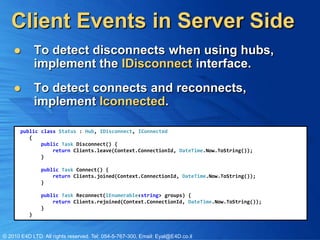
Client Events in Server Side
             To detect disconnects when using hubs,
              implement the IDisconnect interface.
             To detect connects and reconnects,
              implement Iconnected.

       public class Status : Hub, IDisconnect, IConnected
          {
              public Task Disconnect() {
                  return Clients.leave(Context.ConnectionId, DateTime.Now.ToString());
              }

               public Task Connect() {
                   return Clients.joined(Context.ConnectionId, DateTime.Now.ToString());
               }

               public Task Reconnect(IEnumerable<string> groups) {
                   return Clients.rejoined(Context.ConnectionId, DateTime.Now.ToString());
               }
          }


© 2010 E4D LTD. All rights reserved. Tel: 054-5-767-300, Email: Eyal@E4D.co.il
Broadcasting From Outside of a Hub

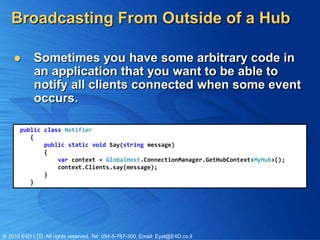
           Sometimes you have some arbitrary code in
            an application that you want to be able to
            notify all clients connected when some event
            occurs.

       public class Notifier
          {
              public static void Say(string message)
              {
                  var context = GlobalHost.ConnectionManager.GetHubContext<MyHub>();
                  context.Clients.say(message);
              }
          }


© 2010 E4D LTD. All rights reserved. Tel: 054-5-767-300, Email: Eyal@E4D.co.il
Hub Routing
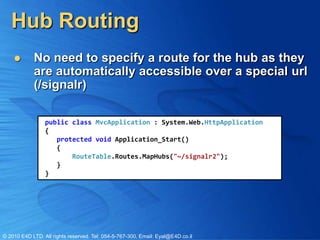
           No need to specify a route for the hub as they
            are automatically accessible over a special url
            (/signalr)

                 public class MvcApplication : System.Web.HttpApplication
                 {
                    protected void Application_Start()
                    {
                        RouteTable.Routes.MapHubs("~/signalr2");
                    }
                 }


© 2010 E4D LTD. All rights reserved. Tel: 054-5-767-300, Email: Eyal@E4D.co.il
Client Side


© 2010 E4D LTD. All rights reserved. Tel: 054-5-767-300, Email: Eyal@E4D.co.il
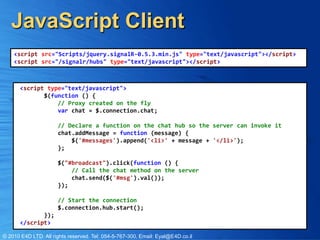
JavaScript Client
    <script src="Scripts/jquery.signalR-0.5.3.min.js" type="text/javascript"></script>
    <script src="/signalr/hubs" type="text/javascript"></script>


       <script type="text/javascript">
              $(function () {
                  // Proxy created on the fly
                  var chat = $.connection.chat;

                      // Declare a function on the chat hub so the server can invoke it
                      chat.addMessage = function (message) {
                          $('#messages').append('<li>' + message + '</li>');
                      };

                      $("#broadcast").click(function () {
                          // Call the chat method on the server
                          chat.send($('#msg').val());
                      });

                      // Start the connection
                      $.connection.hub.start();
              });
       </script>

© 2010 E4D LTD. All rights reserved. Tel: 054-5-767-300, Email: Eyal@E4D.co.il
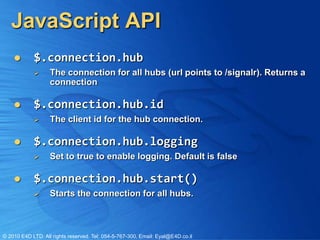
JavaScript API
           $.connection.hub
                  The connection for all hubs (url points to /signalr). Returns a
                   connection

           $.connection.hub.id
                  The client id for the hub connection.

           $.connection.hub.logging
                  Set to true to enable logging. Default is false

           $.connection.hub.start()
                  Starts the connection for all hubs.


© 2010 E4D LTD. All rights reserved. Tel: 054-5-767-300, Email: Eyal@E4D.co.il
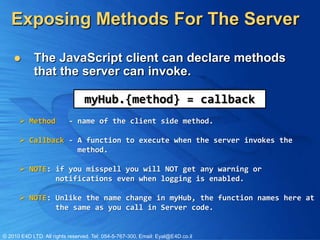
Exposing Methods For The Server

           The JavaScript client can declare methods
            that the server can invoke.

                                 myHub.{method} = callback
       Method             - name of the client side method.

       Callback - A function to execute when the server invokes the
                   method.

       NOTE: if you misspell you will NOT get any warning or
              notifications even when logging is enabled.

       NOTE: Unlike the name change in myHub, the function names here at
              the same as you call in Server code.


© 2010 E4D LTD. All rights reserved. Tel: 054-5-767-300, Email: Eyal@E4D.co.il
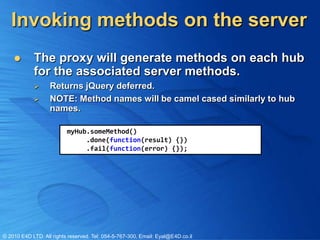
Invoking methods on the server
           The proxy will generate methods on each hub
            for the associated server methods.
                  Returns jQuery deferred.
                  NOTE: Method names will be camel cased similarly to hub
                   names.

                          myHub.someMethod()
                               .done(function(result) {})
                               .fail(function(error) {});


© 2010 E4D LTD. All rights reserved. Tel: 054-5-767-300, Email: Eyal@E4D.co.il
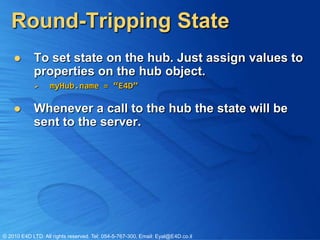
Round-Tripping State
           To set state on the hub. Just assign values to
            properties on the hub object.
                  myHub.name = “E4D”

           Whenever a call to the hub the state will be
            sent to the server.


© 2010 E4D LTD. All rights reserved. Tel: 054-5-767-300, Email: Eyal@E4D.co.il
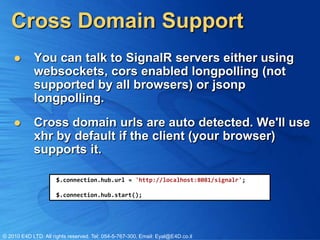
Cross Domain Support
           You can talk to SignalR servers either using
            websockets, cors enabled longpolling (not
            supported by all browsers) or jsonp
            longpolling.
           Cross domain urls are auto detected. We'll use
            xhr by default if the client (your browser)
            supports it.

                      $.connection.hub.url = 'http://localhost:8081/signalr';

                      $.connection.hub.start();


© 2010 E4D LTD. All rights reserved. Tel: 054-5-767-300, Email: Eyal@E4D.co.il
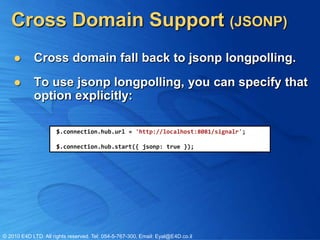
Cross Domain Support (JSONP)
           Cross domain fall back to jsonp longpolling.
           To use jsonp longpolling, you can specify that
            option explicitly:

                      $.connection.hub.url = 'http://localhost:8081/signalr';

                      $.connection.hub.start({ jsonp: true });


© 2010 E4D LTD. All rights reserved. Tel: 054-5-767-300, Email: Eyal@E4D.co.il
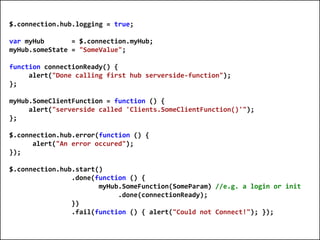
$.connection.hub.logging = true;

  var myHub       = $.connection.myHub;
  myHub.someState = "SomeValue";

  function connectionReady() {
       alert("Done calling first hub serverside-function");
  };

  myHub.SomeClientFunction = function () {
       alert("serverside called 'Clients.SomeClientFunction()'");
  };

  $.connection.hub.error(function () {
        alert("An error occured");
  });

  $.connection.hub.start()
                  .done(function () {
                         myHub.SomeFunction(SomeParam) //e.g. a login or init
                              .done(connectionReady);
                  })
                  .fail(function () { alert("Could not Connect!"); });


© 2010 E4D LTD. All rights reserved. Tel: 054-5-767-300, Email: Eyal@E4D.co.il
Client JavaScript


© 2010 E4D LTD. All rights reserved. Tel: 054-5-767-300, Email: Eyal@E4D.co.il
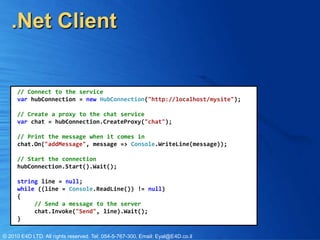
.Net Client


     // Connect to the service
     var hubConnection = new HubConnection("http://localhost/mysite");

     // Create a proxy to the chat service
     var chat = hubConnection.CreateProxy("chat");

     // Print the message when it comes in
     chat.On("addMessage", message => Console.WriteLine(message));

     // Start the connection
     hubConnection.Start().Wait();

     string line = null;
     while ((line = Console.ReadLine()) != null)
     {
          // Send a message to the server
          chat.Invoke("Send", line).Wait();
     }

© 2010 E4D LTD. All rights reserved. Tel: 054-5-767-300, Email: Eyal@E4D.co.il
SignalR Internals


© 2010 E4D LTD. All rights reserved. Tel: 054-5-767-300, Email: Eyal@E4D.co.il
Default Start Point
              The AspNetBootstrapper class initializes the
               Asp.Net hosting pipeline with HubDispatcher

      [assembly: PreApplicationStartMethod(typeof(AspNetBootstrapper), "Initialize")]

      namespace SignalR.Hosting.AspNet
      {
          public static class AspNetBootstrapper
          {
              ...
              // Initializes the ASP.NET host and sets up the default hub route (~/signalr).
              public static void Initialize()
              {                                             Add Route
                 ...
                 RouteTable.Routes.MapHubs();
                 ...
              }

                private static void OnAppDomainShutdown() { ... }
           }
      }


© 2010 E4D LTD. All rights reserved. Tel: 054-5-767-300, Email: Eyal@E4D.co.il
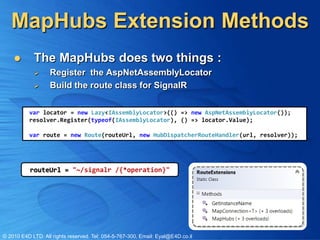
MapHubs Extension Methods
           The MapHubs does two things :
                  Register the AspNetAssemblyLocator
                  Build the route class for SignalR

          var locator = new Lazy<IAssemblyLocator>(() => new AspNetAssemblyLocator());
          resolver.Register(typeof(IAssemblyLocator), () => locator.Value);

          var route = new Route(routeUrl, new HubDispatcherRouteHandler(url, resolver));


           routeUrl = "~/signalr /{*operation}"


© 2010 E4D LTD. All rights reserved. Tel: 054-5-767-300, Email: Eyal@E4D.co.il
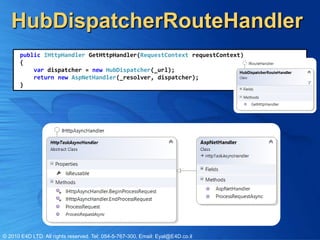
HubDispatcherRouteHandler
       public IHttpHandler GetHttpHandler(RequestContext requestContext)
       {
           var dispatcher = new HubDispatcher(_url);
           return new AspNetHandler(_resolver, dispatcher);
       }


© 2010 E4D LTD. All rights reserved. Tel: 054-5-767-300, Email: Eyal@E4D.co.il
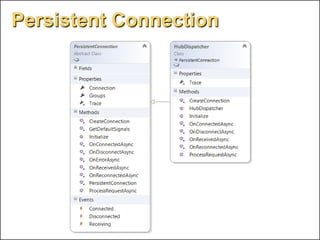
Persistent Connection


© 2010 E4D LTD. All rights reserved. Tel: 054-5-767-300, Email: Eyal@E4D.co.il
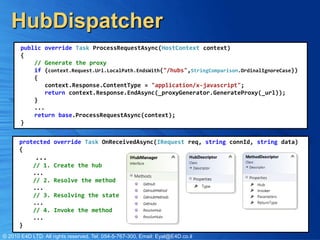
HubDispatcher
       public override Task ProcessRequestAsync(HostContext context)
       {
           // Generate the proxy
           if (context.Request.Url.LocalPath.EndsWith("/hubs",StringComparison.OrdinalIgnoreCase))
           {
               context.Response.ContentType = "application/x-javascript";
               return context.Response.EndAsync(_proxyGenerator.GenerateProxy(_url));
           }
           ...
           return base.ProcessRequestAsync(context);
       }


      protected override Task OnReceivedAsync(IRequest req, string connId, string data)
      {
             ...
            // 1.    Create the hub
            ...
            // 2.    Resolve the method
            ...
            // 3.    Resolving the state
            ...
            // 4.    Invoke the method
            ...
      }
© 2010 E4D LTD. All rights reserved. Tel: 054-5-767-300, Email: Eyal@E4D.co.il
SignalR Extensibility


© 2010 E4D LTD. All rights reserved. Tel: 054-5-767-300, Email: Eyal@E4D.co.il
Low Level Connection
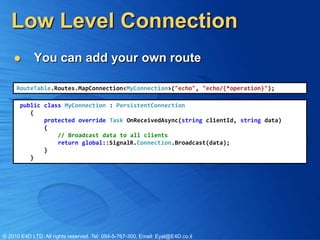
           You can add your own route

     RouteTable.Routes.MapConnection<MyConnection>("echo", "echo/{*operation}");

       public class MyConnection : PersistentConnection
          {
              protected override Task OnReceivedAsync(string clientId, string data)
              {
                  // Broadcast data to all clients
                  return global::SignalR.Connection.Broadcast(data);
              }
          }


© 2010 E4D LTD. All rights reserved. Tel: 054-5-767-300, Email: Eyal@E4D.co.il
SignalR Extensibility
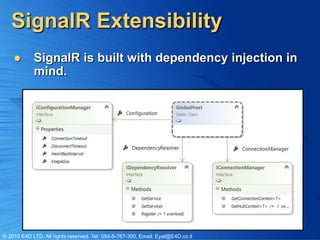
           SignalR is built with dependency injection in
            mind.


© 2010 E4D LTD. All rights reserved. Tel: 054-5-767-300, Email: Eyal@E4D.co.il
Configuring SignalR
          ConnectionTimeout
                 The amount of time to leave a connection open before timing
                  out. Default is 110 seconds.
          DisconnectTimeout
                 The amount of time to wait after a connection goes away
                  before raising the disconnect event. Default is 20 seconds.
          HeartBeatInterval
                 The interval for checking the state of a connection.
                  Default is 10 seconds.
          KeepAlive
                 The amount of time to wait before sending a keep alive packet
                  over an idle connection. Set to null to disable keep alive. This
                  is set to 30 seconds by default. When this is on, the
                  ConnectionTimeout will have no effect.

© 2010 E4D LTD. All rights reserved. Tel: 054-5-767-300, Email: Eyal@E4D.co.il
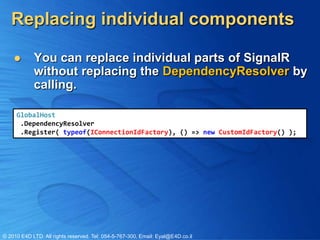
Replacing individual components

           You can replace individual parts of SignalR
            without replacing the DependencyResolver by
            calling.

     GlobalHost
      .DependencyResolver
      .Register( typeof(IConnectionIdFactory), () => new CustomIdFactory() );


© 2010 E4D LTD. All rights reserved. Tel: 054-5-767-300, Email: Eyal@E4D.co.il
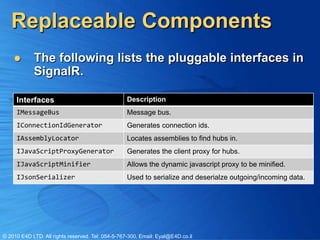
Replaceable Components
           The following lists the pluggable interfaces in
            SignalR.

     Interfaces                                    Description
     IMessageBus                                   Message bus.
     IConnectionIdGenerator                        Generates connection ids.
     IAssemblyLocator                              Locates assemblies to find hubs in.
     IJavaScriptProxyGenerator                     Generates the client proxy for hubs.
     IJavaScriptMinifier                           Allows the dynamic javascript proxy to be minified.
     IJsonSerializer                               Used to serialize and deserialze outgoing/incoming data.


© 2010 E4D LTD. All rights reserved. Tel: 054-5-767-300, Email: Eyal@E4D.co.il
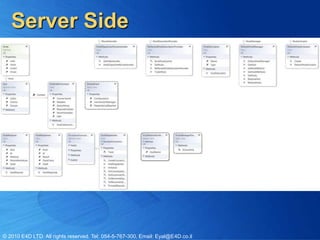
Server Side


© 2010 E4D LTD. All rights reserved. Tel: 054-5-767-300, Email: Eyal@E4D.co.il
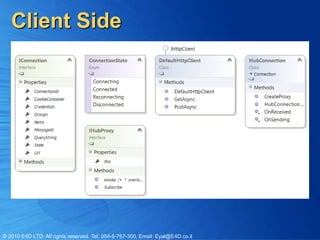
Client Side


© 2010 E4D LTD. All rights reserved. Tel: 054-5-767-300, Email: Eyal@E4D.co.il

SignalR

  • 1.
    SignalR EyalVardi CEO E4D Solutions LTD Microsoft MVP Visual C# blog: www.eVardi.com
  • 2.
    Expert Days 2012  © 2010 E4D LTD. All rights reserved. Tel: 054-5-767-300, Email: Eyal@E4D.co.il
  • 3.
    Agenda  SignalR Server Side API  SignalR JavaScript API  SignalR Client .NET API  SignalR Internals  SignalR Extensibility © 2010 E4D LTD. All rights reserved. Tel: 054-5-767-300, Email: Eyal@E4D.co.il
  • 4.
    Sever Side © 2010E4D LTD. All rights reserved. Tel: 054-5-767-300, Email: Eyal@E4D.co.il
  • 5.
    What is SignalR?  SignalR is an asynchronous signaling library for ASP.NET, To help build real-time multi- user web application.  SignalR is a complete client- and server-side solution with JS on client and ASP.NET on the back end to create these kinds of applications. © 2010 E4D LTD. All rights reserved. Tel: 054-5-767-300, Email: Eyal@E4D.co.il
  • 6.
    More Details onSignalR  SignalR is broken up into a few package on NuGet:  SignalR - A meta package that brings in SignalR.Server and SignalR.Js (you should install this)  SignalR.Server - Server side components needed to build SignalR endpoints  SignalR.Js - Javascript client for SignalR  SignalR.Client - .NET client for SignalR  SignalR.Ninject - Ninject dependeny resolver for SignalR © 2010 E4D LTD. All rights reserved. Tel: 054-5-767-300, Email: Eyal@E4D.co.il
  • 7.
    Hub Class  Hubs provide a higher level RPC framework over a PersistentConnection.  SignalR will handle the binding of complex objects and arrays of objects automatically. [HubName("Chat")] Callable from the client public class Chat : Hub { public string Send(string message) { return message; Deserialization } } © 2010 E4D LTD. All rights reserved. Tel: 054-5-767-300, Email: Eyal@E4D.co.il
  • 8.
    Hub API  Hubs are per call, that is, each call from the client to the hub will create a new hub instance. So don't setup static event handlers in hub methods. © 2010 E4D LTD. All rights reserved. Tel: 054-5-767-300, Email: Eyal@E4D.co.il
  • 9.
    Server Calling TheClient  To call client event/methods from the server use the Clients property.  Parameters passed to the method will be JSON serialized before being sent to the client [HubName("Chat")] public class Chat : Hub { public void Send(string message) { // Call the addMessage method on all clients Clients.addMessage(message); } } © 2010 E4D LTD. All rights reserved. Tel: 054-5-767-300, Email: Eyal@E4D.co.il
  • 10.
    Calling on SpecificConnections  There are some cases where we want to send a message to specific clients or groups. We can use the indexer on the Clients object to specify a connection id. [HubName("Chat")] public class Chat : Hub { public void Send(string message) { Clients[Context.ConnectionId].addMessage(message); } } © 2010 E4D LTD. All rights reserved. Tel: 054-5-767-300, Email: Eyal@E4D.co.il
  • 11.
    Managing Groups  You can add connections to groups and send messages to particular groups.  You may also return Task/Task<T> from a hub if you need to do async work. public class MyHub : Hub, IDisconnect { public Task Join() { return Groups.Add(Context.ConnectionId, "foo"); } public Task Send(string message) { return Clients["foo"].addMessage(message); } public Task Disconnect() { return Clients["foo"].leave(Context.ConnectionId); } } © 2010 E4D LTD. All rights reserved. Tel: 054-5-767-300, Email: Eyal@E4D.co.il
  • 12.
    State Between Client& Server  Any state sent from the client can be accessed via the Caller property.  You can also set client side state just by setting any property on Caller. [HubName("Chat")] public class Chat : Hub { public void Send(string message) { // Access the id property set from the client. string id = Caller.id; // Set a property on the client state Caller.name = "SignalR"; } } © 2010 E4D LTD. All rights reserved. Tel: 054-5-767-300, Email: Eyal@E4D.co.il
  • 13.
    Client Events inServer Side  To detect disconnects when using hubs, implement the IDisconnect interface.  To detect connects and reconnects, implement Iconnected. public class Status : Hub, IDisconnect, IConnected { public Task Disconnect() { return Clients.leave(Context.ConnectionId, DateTime.Now.ToString()); } public Task Connect() { return Clients.joined(Context.ConnectionId, DateTime.Now.ToString()); } public Task Reconnect(IEnumerable<string> groups) { return Clients.rejoined(Context.ConnectionId, DateTime.Now.ToString()); } } © 2010 E4D LTD. All rights reserved. Tel: 054-5-767-300, Email: Eyal@E4D.co.il
  • 14.
    Broadcasting From Outsideof a Hub  Sometimes you have some arbitrary code in an application that you want to be able to notify all clients connected when some event occurs. public class Notifier { public static void Say(string message) { var context = GlobalHost.ConnectionManager.GetHubContext<MyHub>(); context.Clients.say(message); } } © 2010 E4D LTD. All rights reserved. Tel: 054-5-767-300, Email: Eyal@E4D.co.il
  • 15.
    Hub Routing  No need to specify a route for the hub as they are automatically accessible over a special url (/signalr) public class MvcApplication : System.Web.HttpApplication { protected void Application_Start() { RouteTable.Routes.MapHubs("~/signalr2"); } } © 2010 E4D LTD. All rights reserved. Tel: 054-5-767-300, Email: Eyal@E4D.co.il
  • 16.
    Client Side © 2010E4D LTD. All rights reserved. Tel: 054-5-767-300, Email: Eyal@E4D.co.il
  • 17.
    JavaScript Client <script src="Scripts/jquery.signalR-0.5.3.min.js" type="text/javascript"></script> <script src="/signalr/hubs" type="text/javascript"></script> <script type="text/javascript"> $(function () { // Proxy created on the fly var chat = $.connection.chat; // Declare a function on the chat hub so the server can invoke it chat.addMessage = function (message) { $('#messages').append('<li>' + message + '</li>'); }; $("#broadcast").click(function () { // Call the chat method on the server chat.send($('#msg').val()); }); // Start the connection $.connection.hub.start(); }); </script> © 2010 E4D LTD. All rights reserved. Tel: 054-5-767-300, Email: Eyal@E4D.co.il
  • 18.
    JavaScript API  $.connection.hub  The connection for all hubs (url points to /signalr). Returns a connection  $.connection.hub.id  The client id for the hub connection.  $.connection.hub.logging  Set to true to enable logging. Default is false  $.connection.hub.start()  Starts the connection for all hubs. © 2010 E4D LTD. All rights reserved. Tel: 054-5-767-300, Email: Eyal@E4D.co.il
  • 19.
    Exposing Methods ForThe Server  The JavaScript client can declare methods that the server can invoke. myHub.{method} = callback  Method - name of the client side method.  Callback - A function to execute when the server invokes the method.  NOTE: if you misspell you will NOT get any warning or notifications even when logging is enabled.  NOTE: Unlike the name change in myHub, the function names here at the same as you call in Server code. © 2010 E4D LTD. All rights reserved. Tel: 054-5-767-300, Email: Eyal@E4D.co.il
  • 20.
    Invoking methods onthe server  The proxy will generate methods on each hub for the associated server methods.  Returns jQuery deferred.  NOTE: Method names will be camel cased similarly to hub names. myHub.someMethod() .done(function(result) {}) .fail(function(error) {}); © 2010 E4D LTD. All rights reserved. Tel: 054-5-767-300, Email: Eyal@E4D.co.il
  • 21.
    Round-Tripping State  To set state on the hub. Just assign values to properties on the hub object.  myHub.name = “E4D”  Whenever a call to the hub the state will be sent to the server. © 2010 E4D LTD. All rights reserved. Tel: 054-5-767-300, Email: Eyal@E4D.co.il
  • 22.
    Cross Domain Support  You can talk to SignalR servers either using websockets, cors enabled longpolling (not supported by all browsers) or jsonp longpolling.  Cross domain urls are auto detected. We'll use xhr by default if the client (your browser) supports it. $.connection.hub.url = 'http://localhost:8081/signalr'; $.connection.hub.start(); © 2010 E4D LTD. All rights reserved. Tel: 054-5-767-300, Email: Eyal@E4D.co.il
  • 23.
    Cross Domain Support(JSONP)  Cross domain fall back to jsonp longpolling.  To use jsonp longpolling, you can specify that option explicitly: $.connection.hub.url = 'http://localhost:8081/signalr'; $.connection.hub.start({ jsonp: true }); © 2010 E4D LTD. All rights reserved. Tel: 054-5-767-300, Email: Eyal@E4D.co.il
  • 24.
    $.connection.hub.logging = true; var myHub = $.connection.myHub; myHub.someState = "SomeValue"; function connectionReady() { alert("Done calling first hub serverside-function"); }; myHub.SomeClientFunction = function () { alert("serverside called 'Clients.SomeClientFunction()'"); }; $.connection.hub.error(function () { alert("An error occured"); }); $.connection.hub.start() .done(function () { myHub.SomeFunction(SomeParam) //e.g. a login or init .done(connectionReady); }) .fail(function () { alert("Could not Connect!"); }); © 2010 E4D LTD. All rights reserved. Tel: 054-5-767-300, Email: Eyal@E4D.co.il
  • 25.
    Client JavaScript © 2010E4D LTD. All rights reserved. Tel: 054-5-767-300, Email: Eyal@E4D.co.il
  • 26.
    .Net Client // Connect to the service var hubConnection = new HubConnection("http://localhost/mysite"); // Create a proxy to the chat service var chat = hubConnection.CreateProxy("chat"); // Print the message when it comes in chat.On("addMessage", message => Console.WriteLine(message)); // Start the connection hubConnection.Start().Wait(); string line = null; while ((line = Console.ReadLine()) != null) { // Send a message to the server chat.Invoke("Send", line).Wait(); } © 2010 E4D LTD. All rights reserved. Tel: 054-5-767-300, Email: Eyal@E4D.co.il
  • 27.
    SignalR Internals © 2010E4D LTD. All rights reserved. Tel: 054-5-767-300, Email: Eyal@E4D.co.il
  • 28.
    Default Start Point  The AspNetBootstrapper class initializes the Asp.Net hosting pipeline with HubDispatcher [assembly: PreApplicationStartMethod(typeof(AspNetBootstrapper), "Initialize")] namespace SignalR.Hosting.AspNet { public static class AspNetBootstrapper { ... // Initializes the ASP.NET host and sets up the default hub route (~/signalr). public static void Initialize() { Add Route ... RouteTable.Routes.MapHubs(); ... } private static void OnAppDomainShutdown() { ... } } } © 2010 E4D LTD. All rights reserved. Tel: 054-5-767-300, Email: Eyal@E4D.co.il
  • 29.
    MapHubs Extension Methods  The MapHubs does two things :  Register the AspNetAssemblyLocator  Build the route class for SignalR var locator = new Lazy<IAssemblyLocator>(() => new AspNetAssemblyLocator()); resolver.Register(typeof(IAssemblyLocator), () => locator.Value); var route = new Route(routeUrl, new HubDispatcherRouteHandler(url, resolver)); routeUrl = "~/signalr /{*operation}" © 2010 E4D LTD. All rights reserved. Tel: 054-5-767-300, Email: Eyal@E4D.co.il
  • 30.
    HubDispatcherRouteHandler public IHttpHandler GetHttpHandler(RequestContext requestContext) { var dispatcher = new HubDispatcher(_url); return new AspNetHandler(_resolver, dispatcher); } © 2010 E4D LTD. All rights reserved. Tel: 054-5-767-300, Email: Eyal@E4D.co.il
  • 31.
    Persistent Connection © 2010E4D LTD. All rights reserved. Tel: 054-5-767-300, Email: Eyal@E4D.co.il
  • 32.
    HubDispatcher public override Task ProcessRequestAsync(HostContext context) { // Generate the proxy if (context.Request.Url.LocalPath.EndsWith("/hubs",StringComparison.OrdinalIgnoreCase)) { context.Response.ContentType = "application/x-javascript"; return context.Response.EndAsync(_proxyGenerator.GenerateProxy(_url)); } ... return base.ProcessRequestAsync(context); } protected override Task OnReceivedAsync(IRequest req, string connId, string data) { ... // 1. Create the hub ... // 2. Resolve the method ... // 3. Resolving the state ... // 4. Invoke the method ... } © 2010 E4D LTD. All rights reserved. Tel: 054-5-767-300, Email: Eyal@E4D.co.il
  • 33.
    SignalR Extensibility © 2010E4D LTD. All rights reserved. Tel: 054-5-767-300, Email: Eyal@E4D.co.il
  • 34.
    Low Level Connection  You can add your own route RouteTable.Routes.MapConnection<MyConnection>("echo", "echo/{*operation}"); public class MyConnection : PersistentConnection { protected override Task OnReceivedAsync(string clientId, string data) { // Broadcast data to all clients return global::SignalR.Connection.Broadcast(data); } } © 2010 E4D LTD. All rights reserved. Tel: 054-5-767-300, Email: Eyal@E4D.co.il
  • 35.
    SignalR Extensibility  SignalR is built with dependency injection in mind. © 2010 E4D LTD. All rights reserved. Tel: 054-5-767-300, Email: Eyal@E4D.co.il
  • 36.
    Configuring SignalR  ConnectionTimeout  The amount of time to leave a connection open before timing out. Default is 110 seconds.  DisconnectTimeout  The amount of time to wait after a connection goes away before raising the disconnect event. Default is 20 seconds.  HeartBeatInterval  The interval for checking the state of a connection. Default is 10 seconds.  KeepAlive  The amount of time to wait before sending a keep alive packet over an idle connection. Set to null to disable keep alive. This is set to 30 seconds by default. When this is on, the ConnectionTimeout will have no effect. © 2010 E4D LTD. All rights reserved. Tel: 054-5-767-300, Email: Eyal@E4D.co.il
  • 37.
    Replacing individual components  You can replace individual parts of SignalR without replacing the DependencyResolver by calling. GlobalHost .DependencyResolver .Register( typeof(IConnectionIdFactory), () => new CustomIdFactory() ); © 2010 E4D LTD. All rights reserved. Tel: 054-5-767-300, Email: Eyal@E4D.co.il
  • 38.
    Replaceable Components  The following lists the pluggable interfaces in SignalR. Interfaces Description IMessageBus Message bus. IConnectionIdGenerator Generates connection ids. IAssemblyLocator Locates assemblies to find hubs in. IJavaScriptProxyGenerator Generates the client proxy for hubs. IJavaScriptMinifier Allows the dynamic javascript proxy to be minified. IJsonSerializer Used to serialize and deserialze outgoing/incoming data. © 2010 E4D LTD. All rights reserved. Tel: 054-5-767-300, Email: Eyal@E4D.co.il
  • 39.
    Server Side © 2010E4D LTD. All rights reserved. Tel: 054-5-767-300, Email: Eyal@E4D.co.il
  • 40.
    Client Side © 2010E4D LTD. All rights reserved. Tel: 054-5-767-300, Email: Eyal@E4D.co.il