Alex Konduforov
About me
 Live in Kharkov
 Work at AltexSoft
 Blogger (merle-amber.blogspot.com)
 Speaker at different conferences

and .NET user groups
 Kharkov AI club co-organizer
Web evolution
Event-based, real-time UI

Partial page updates (Ajax), RIA

Dynamic pages, forms

Static HTML pages
Users Want the
Latest Info
NOW!
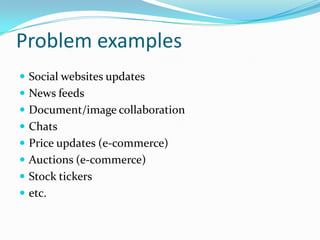
Social networks
Auctions
Stock tickers
Web chats
Other applications
 Live scores
 Real-time notifications
 Interactive games
 Collaborative apps

 Live user analytics
 etc.
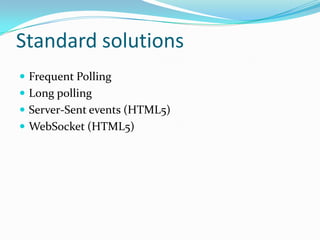
Standard solutions
 Frequent Polling
 Long polling
 Server-Sent events (HTML5)
 WebSocket (HTML5)
Polling
 Get updates frequently using Ajax requests
Pros:
 --Cons:
 Delay in results
 Wastes bandwidth & latency
Long polling
 Similar to usual polling (Ajax requests)
 Request waits longer (1-2 minutes)

Pros:
 Lower load on server
 No delays
Cons:
 Consumes server threads & connection resources
Server-Sent events
 HTML5, works over HTTP
 EventSource JavaScript API
 Content-type: text/event-stream

Pros:
 No need to reconnect
 No need in a special protocol or server implementation
Cons:
 Works in server-t0-client direction
WebSocket
 HTML5, new protocol (ws:// and wss://) on top of TCP

Pros:
 Full-duplex persistent connection (both ways)
Cons:
 Require Web Socket protocol support on client (IE10)
 Require Web Socket protocol support on server (IIS8)
What to do?
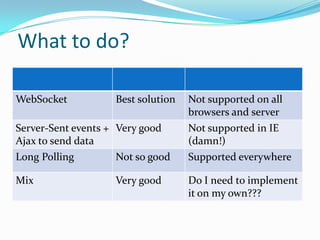
WebSocket

Best solution

Not supported on all
browsers and server

Server-Sent events + Very good
Ajax to send data
Long Polling
Not so good

Not supported in IE
(damn!)
Supported everywhere

Mix

Do I need to implement
it on my own???

Very good
Superman SignalR to the rescue!
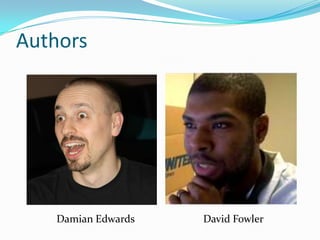
Authors

Damian Edwards

David Fowler
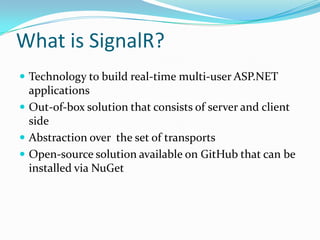
What is SignalR?
 Official MS technology to build real-time multi-user

ASP.NET applications: http://signalr.net/
 Out-of-box solution that consists of server and client
side
 Abstraction over the set of transports
 Open-source solution available on GitHub that can be
installed via NuGet
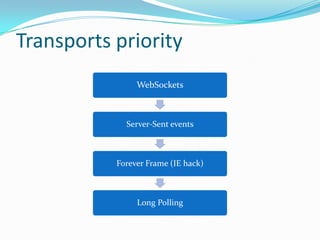
Transports priority
WebSockets

Server-Sent events

Forever Frame (IE hack)

Long Polling
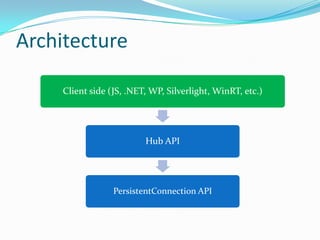
Architecture
Client side
JS, .NET/WinRT, WP, Silverlight, iOS/Android

Hub API

PersistentConnection API
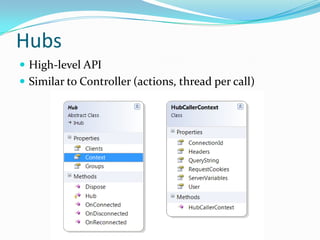
Hubs
 High-level API

 Similar to Controller (actions, thread per call)
Supported scenarios
 Client calling the server
 Server calling clients (all, group, one)
 State round-tripping between client and server
 Binding complex objects (JSON)

 Detecting connect, disconnect and reconnect clients
 Broadcasting from outside of a Hub
 Async scenarios (return Task/Task<T> to client)
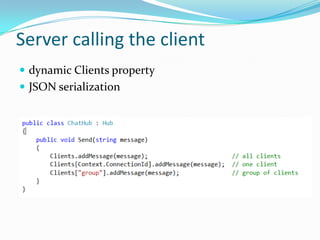
Server calling the client
 dynamic Clients property

 JSON serialization
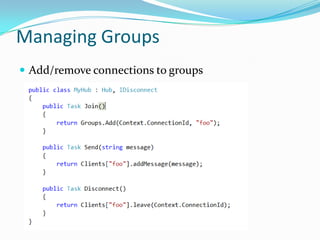
Managing Groups
 Add/remove connections to groups
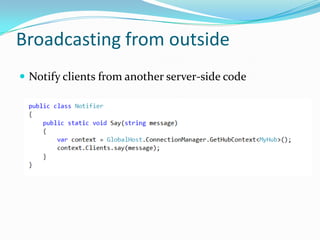
Broadcasting from outside
 Notify clients from another server-side code
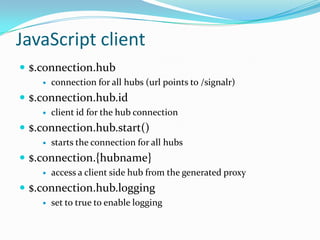
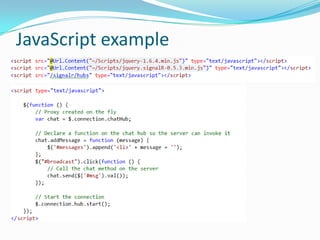
JavaScript client
 $.connection.hub


connection for all hubs (url points to /signalr)

 $.connection.hub.id


client id for the hub connection

 $.connection.hub.start()


starts the connection for all hubs

 $.connection.{hubname}


access a client side hub from the generated proxy
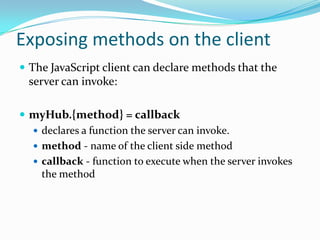
Exposing methods on the client
 The JavaScript client can declare methods that the

server can invoke:
 myHub.{method} = callback
 declares a function the server can invoke.
 method - name of the client side method
 callback - function to execute when the server invokes
the method
JavaScript example
Asynchronous execution
DEMO
Authentication
 Uses ASP.NET authentication mechanisms
 Provides the Authorize attribute for Hubs
 Forms and Windows authentications

 Certificates are available as well
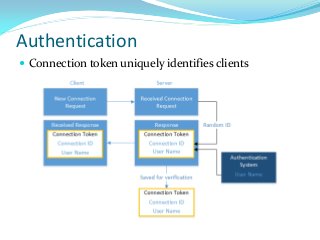
Authentication
 Connection token uniquely identifies clients
Security
 Cross-Site Request Forgery (CSRF) prevention
 Disable cross domain requests
 Pass connection token in query string, not cookie
 Verify connection token
 If authenticated user changes,

SignalR requires a re-connection
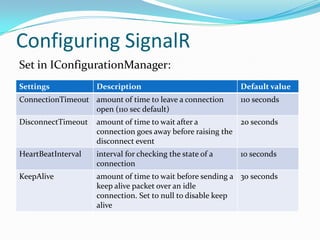
Configuring SignalR
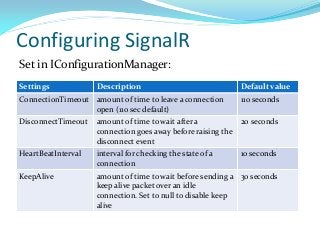
Set in IConfigurationManager:
Settings

Description

ConnectionTimeout amount of time to leave a connection
open (110 sec default)

Default value

110 seconds

DisconnectTimeout

amount of time to wait after a
20 seconds
connection goes away before raising the
disconnect event

HeartBeatInterval

interval for checking the state of a
connection

KeepAlive

amount of time to wait before sending a 30 seconds
keep alive packet over an idle
connection. Set to null to disable keep
alive

10 seconds
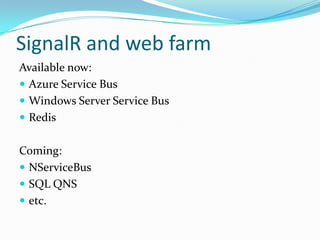
SignalR and web farm
 Azure Service Bus
 Windows Server Service Bus
 SQL Server
 Redis
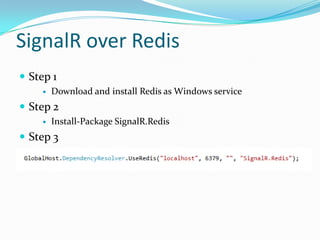
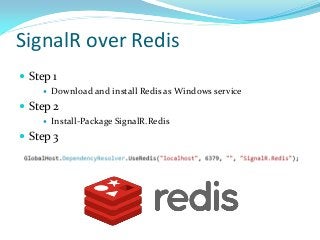
SignalR over Redis
 Step 1


Download and install Redis as Windows service

 Step 2


Install-Package SignalR.Redis

 Step 3
New features in v2.0
 .NET 4.5 only!
 iOS and Android support via Xamarin
 Portable .NET clients
 Self hosting package
 Backwards compatibility server support

 Cross domain support
 Easier unit testing
 JavaScript error handling

 New HubException exception
Safe to use?
 Version 2.0 released
 Dynamically evolving
 Proven and stable technology
 Used in many real-time .NET applications

 Open-source
Materials
 https://github.com/SignalR
 http://jabbr.net
 http://www.hanselman.com/blog/CategoryView.aspx?cate

gory=SignalR
 http://www.asp.net/signalr/overview/signalr-20
 http://merle-amber.blogspot.com/2012/11/real-timeaspnet-signalr.html
Thanks for listening!
 merle-amber.blogspot.com
 aikharkov.wordpress.com
 @konduforov

31337

Real-time ASP.NET with SignalR

  • 1.
  • 2.
    About me  Livein Kharkov  Work at AltexSoft  Blogger (merle-amber.blogspot.com)  Speaker at different conferences and .NET user groups  Kharkov AI club co-organizer
  • 3.
    Web evolution Event-based, real-timeUI Partial page updates (Ajax), RIA Dynamic pages, forms Static HTML pages
  • 4.
  • 5.
  • 6.
  • 7.
  • 8.
  • 9.
    Other applications  Livescores  Real-time notifications  Interactive games  Collaborative apps  Live user analytics  etc.
  • 10.
    Standard solutions  FrequentPolling  Long polling  Server-Sent events (HTML5)  WebSocket (HTML5)
  • 11.
    Polling  Get updatesfrequently using Ajax requests Pros:  --Cons:  Delay in results  Wastes bandwidth & latency
  • 12.
    Long polling  Similarto usual polling (Ajax requests)  Request waits longer (1-2 minutes) Pros:  Lower load on server  No delays Cons:  Consumes server threads & connection resources
  • 13.
    Server-Sent events  HTML5,works over HTTP  EventSource JavaScript API  Content-type: text/event-stream Pros:  No need to reconnect  No need in a special protocol or server implementation Cons:  Works in server-t0-client direction
  • 14.
    WebSocket  HTML5, newprotocol (ws:// and wss://) on top of TCP Pros:  Full-duplex persistent connection (both ways) Cons:  Require Web Socket protocol support on client (IE10)  Require Web Socket protocol support on server (IIS8)
  • 15.
    What to do? WebSocket Bestsolution Not supported on all browsers and server Server-Sent events + Very good Ajax to send data Long Polling Not so good Not supported in IE (damn!) Supported everywhere Mix Do I need to implement it on my own??? Very good
  • 16.
  • 17.
  • 18.
    What is SignalR? Official MS technology to build real-time multi-user ASP.NET applications: http://signalr.net/  Out-of-box solution that consists of server and client side  Abstraction over the set of transports  Open-source solution available on GitHub that can be installed via NuGet
  • 19.
  • 20.
    Architecture Client side JS, .NET/WinRT,WP, Silverlight, iOS/Android Hub API PersistentConnection API
  • 21.
    Hubs  High-level API Similar to Controller (actions, thread per call)
  • 22.
    Supported scenarios  Clientcalling the server  Server calling clients (all, group, one)  State round-tripping between client and server  Binding complex objects (JSON)  Detecting connect, disconnect and reconnect clients  Broadcasting from outside of a Hub  Async scenarios (return Task/Task<T> to client)
  • 23.
    Server calling theclient  dynamic Clients property  JSON serialization
  • 24.
    Managing Groups  Add/removeconnections to groups
  • 25.
    Broadcasting from outside Notify clients from another server-side code
  • 26.
    JavaScript client  $.connection.hub  connectionfor all hubs (url points to /signalr)  $.connection.hub.id  client id for the hub connection  $.connection.hub.start()  starts the connection for all hubs  $.connection.{hubname}  access a client side hub from the generated proxy
  • 27.
    Exposing methods onthe client  The JavaScript client can declare methods that the server can invoke:  myHub.{method} = callback  declares a function the server can invoke.  method - name of the client side method  callback - function to execute when the server invokes the method
  • 28.
  • 29.
  • 30.
  • 31.
    Authentication  Uses ASP.NETauthentication mechanisms  Provides the Authorize attribute for Hubs  Forms and Windows authentications  Certificates are available as well
  • 32.
    Authentication  Connection tokenuniquely identifies clients
  • 33.
    Security  Cross-Site RequestForgery (CSRF) prevention  Disable cross domain requests  Pass connection token in query string, not cookie  Verify connection token  If authenticated user changes, SignalR requires a re-connection
  • 34.
    Configuring SignalR Set inIConfigurationManager: Settings Description ConnectionTimeout amount of time to leave a connection open (110 sec default) Default value 110 seconds DisconnectTimeout amount of time to wait after a 20 seconds connection goes away before raising the disconnect event HeartBeatInterval interval for checking the state of a connection KeepAlive amount of time to wait before sending a 30 seconds keep alive packet over an idle connection. Set to null to disable keep alive 10 seconds
  • 35.
    SignalR and webfarm  Azure Service Bus  Windows Server Service Bus  SQL Server  Redis
  • 36.
    SignalR over Redis Step 1  Download and install Redis as Windows service  Step 2  Install-Package SignalR.Redis  Step 3
  • 37.
    New features inv2.0  .NET 4.5 only!  iOS and Android support via Xamarin  Portable .NET clients  Self hosting package  Backwards compatibility server support  Cross domain support  Easier unit testing  JavaScript error handling  New HubException exception
  • 38.
    Safe to use? Version 2.0 released  Dynamically evolving  Proven and stable technology  Used in many real-time .NET applications  Open-source
  • 39.
    Materials  https://github.com/SignalR  http://jabbr.net http://www.hanselman.com/blog/CategoryView.aspx?cate gory=SignalR  http://www.asp.net/signalr/overview/signalr-20  http://merle-amber.blogspot.com/2012/11/real-timeaspnet-signalr.html
  • 40.
    Thanks for listening! merle-amber.blogspot.com  aikharkov.wordpress.com  @konduforov 31337

Editor's Notes

  • #2 ПредставлениеПеред тем как начать доклад, хотелось бы спросить, что вы понимаете под понятием Real-time и как это может быть применимо к веб-приложениям?Сколько людей уже пробовали SignalR?
  • #4 Рассмотрим развитие вебы-программирования.Веб начинался 20 лет назад со статических HTML страниц. Потом появились скриптовые серверные языки программирования, которые позволили начать создавать динамические страницы, загружать данные на сервер. Следующий значительный этап – частичное обновление страницы (AJAX), появление Rich Internet Applications. Казалось бы, вот оно, счастье. Но и это не решает всех проблем. Все, что мы рассматривали до этого – следование парадигме запрос-ответ. Сервер ничего не знает о клиентах и не может посылать им сообщения. А без этого нельзя строить по-настоящему real-time UI.Сколько людей сталкивались с задачами обеспечения real-time UI, с какими именно?
  • #9 Есть еще и некоторые другие примеры.
  • #11 Какие есть стандартные решения для перечисленных задач.Самый первый исторически появившийся – Polling, т.е. постоянное обращение на сервер за обновлениямиЗатем программисты подумали и решили, что можно держать запрос открытым подольше, чтобы не забрасывать сервер запросами – Long Polling. Добиться большего на старой спецификации HTML и HTTP было сложно.Но когда появилась спецификация HTML5, то в нее было добавлено сразу 2 механизма: Server-Sent events и WebSockets. И если о последнем уже многие слышали, то про Server-Sent events не догадываешься, пока не столкнешься с соответств
  • #16 Итак, использоватьWebSocketеще рано, т.к. он пока не поддерживается во всех браузерах, и даже не на всех серверах. Если вам этого достаточно – отлично, а если нет?Можно использовать Server-SentEvents + отправку данных через старый-добрый XmlHttpRequest (Ajax), но он не поддерживается в IE (слава тебе).Можно всегда использовать Long Polling, но это бОльшая нагрузка на сервер + большинство браузеров все же поддерживают SSE.Хотелось бы иметь разные решения в разных ситуациях
  • #36 На данный момент