Welcome to SharePoint 2019
About Me
• Agusto Sipahutar has 20 years of IT experience with 15 years of dedicated hands on knowledge in SharePoint technology.
• Started journey from SP-2001 and continued with all the later versions SP-2007, 2010,2013,2016,2019 and SPO
• Acquired migration expertise from 2010 to 2013 and 2013 to 2016
• Achieved SharePoint 2010 Microsoft certifications
• Was selected 5 year(s) as MVP SharePoint Indonesia
• Published an e-book Programming SharePoint 2010 In Bahasa Indonesia for SharePoint Community
• Blogs http://agustox21.wordpress.com
• Email : agustox21@gmail.com
Topic Of Today :
• Overview SharePoint 2019
• SharePoint Design 2013 as one tools of SharePoint 2019
• How to Use Webpart and deploy a Webpart
• Document Management vs OneDrive
• Demo
Why SharePoint 2019
Overview :
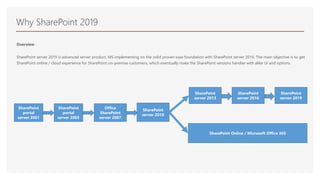
SharePoint server 2019 is advanced server product, MS implementing on the solid proven base foundation with SharePoint server 2016. The main objective is to get
SharePoint online / cloud experience for SharePoint on-premise customers, which eventually make the SharePoint versions handier with alike UI and options.
SharePoint
portal
server 2001
SharePoint
portal
server 2003
Office
SharePoint
server 2007
SharePoint
server 2010
SharePoint
server 2013
SharePoint
server 2016
SharePoint Online / Microsoft Office 365
SharePoint
server 2019
SharePoint 2019
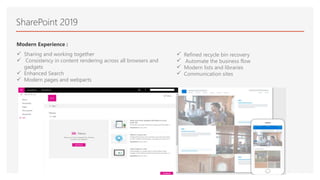
Modern Experience :
 Sharing and working together
 Consistency in content rendering across all browsers and
gadgets
 Enhanced Search
 Modern pages and webparts
 Refined recycle bin recovery
 Automate the business flow
 Modern lists and libraries
 Communication sites
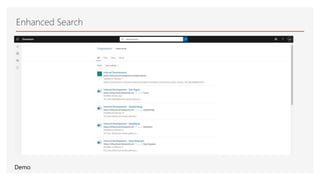
Enhanced Search
Demo
Recycle Bin
Unlike in SharePoint 2016, Microsoft has enhanced the scope to restore the accidental deletions across the users. In SP-19 SharePoint will maintain a copy of the file
in both author and deleted user recycle bin.
Demo
SharePoint Designer 2013
SharePoint Designer 2013 adalah program desain web dan aplikasi yang digunakan untuk membuat
dan mengkustomisasi situs SharePoint dan aplikasi. Dengan SharePoint Designer 2013, Anda bisa
membuat halaman data kaya, menyusun solusi alur kerja memungkinkan kuat dan mendesain tampilan
dan nuansa situs Anda.
Beberapa hal yang bisa dilakukan di dalam Sharepoint Designer 2013 :
• Melakukan Update terhadap Master Page (Master Design)
• Membuat Simple Custom workflow
Demo
Link : https://www.microsoft.com/en-us/download/details.aspx?id=35491
How To Use WebPart
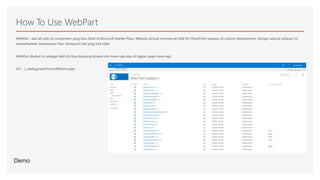
WebPart : ada lah add-on component yang bisa dibeli di Microsoft Market Place, Website penjual commercial Add-On SharePoint ataupun di-custom development. Dengan adanya webpart ini
menambahkan kemampuan fitur sharepoint site yang kita miliki
WebPart disebut itu sebagai Add-On bisa dipasang dimana site mana saja atau di bagian page mana saja.
Url : /_catalogs/wp/Forms/AllItems.aspx
Demo
Document Management vs OneDrive
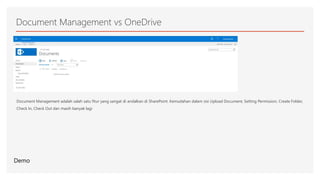
Document Management adalah salah satu fitur yang sangat di andalkan di SharePoint. Kemudahan dalam sisi Upload Document, Setting Permission, Create Folder,
Check In, Check Out dan masih banyak lagi
Demo
Demo
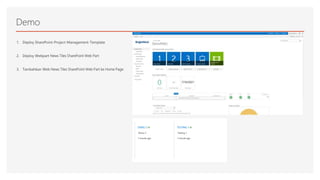
1. Deploy SharePoint-Project-Management-Template
2. Deploy Webpart News Tiles SharePoint Web Part
3. Tambahkan Web News Tiles SharePoint Web Part ke Home Page
More questions about SharePoint ?

Sharepoint 2019 Training

  • 1.
  • 2.
    About Me • AgustoSipahutar has 20 years of IT experience with 15 years of dedicated hands on knowledge in SharePoint technology. • Started journey from SP-2001 and continued with all the later versions SP-2007, 2010,2013,2016,2019 and SPO • Acquired migration expertise from 2010 to 2013 and 2013 to 2016 • Achieved SharePoint 2010 Microsoft certifications • Was selected 5 year(s) as MVP SharePoint Indonesia • Published an e-book Programming SharePoint 2010 In Bahasa Indonesia for SharePoint Community • Blogs http://agustox21.wordpress.com • Email : agustox21@gmail.com
  • 3.
    Topic Of Today: • Overview SharePoint 2019 • SharePoint Design 2013 as one tools of SharePoint 2019 • How to Use Webpart and deploy a Webpart • Document Management vs OneDrive • Demo
  • 4.
    Why SharePoint 2019 Overview: SharePoint server 2019 is advanced server product, MS implementing on the solid proven base foundation with SharePoint server 2016. The main objective is to get SharePoint online / cloud experience for SharePoint on-premise customers, which eventually make the SharePoint versions handier with alike UI and options. SharePoint portal server 2001 SharePoint portal server 2003 Office SharePoint server 2007 SharePoint server 2010 SharePoint server 2013 SharePoint server 2016 SharePoint Online / Microsoft Office 365 SharePoint server 2019
  • 5.
    SharePoint 2019 Modern Experience:  Sharing and working together  Consistency in content rendering across all browsers and gadgets  Enhanced Search  Modern pages and webparts  Refined recycle bin recovery  Automate the business flow  Modern lists and libraries  Communication sites
  • 6.
  • 7.
    Recycle Bin Unlike inSharePoint 2016, Microsoft has enhanced the scope to restore the accidental deletions across the users. In SP-19 SharePoint will maintain a copy of the file in both author and deleted user recycle bin. Demo
  • 8.
    SharePoint Designer 2013 SharePointDesigner 2013 adalah program desain web dan aplikasi yang digunakan untuk membuat dan mengkustomisasi situs SharePoint dan aplikasi. Dengan SharePoint Designer 2013, Anda bisa membuat halaman data kaya, menyusun solusi alur kerja memungkinkan kuat dan mendesain tampilan dan nuansa situs Anda. Beberapa hal yang bisa dilakukan di dalam Sharepoint Designer 2013 : • Melakukan Update terhadap Master Page (Master Design) • Membuat Simple Custom workflow Demo Link : https://www.microsoft.com/en-us/download/details.aspx?id=35491
  • 9.
    How To UseWebPart WebPart : ada lah add-on component yang bisa dibeli di Microsoft Market Place, Website penjual commercial Add-On SharePoint ataupun di-custom development. Dengan adanya webpart ini menambahkan kemampuan fitur sharepoint site yang kita miliki WebPart disebut itu sebagai Add-On bisa dipasang dimana site mana saja atau di bagian page mana saja. Url : /_catalogs/wp/Forms/AllItems.aspx Demo
  • 10.
    Document Management vsOneDrive Document Management adalah salah satu fitur yang sangat di andalkan di SharePoint. Kemudahan dalam sisi Upload Document, Setting Permission, Create Folder, Check In, Check Out dan masih banyak lagi Demo
  • 11.
    Demo 1. Deploy SharePoint-Project-Management-Template 2.Deploy Webpart News Tiles SharePoint Web Part 3. Tambahkan Web News Tiles SharePoint Web Part ke Home Page
  • 12.