sharepointmaven.com @gregoryzelfond
SHAREPOINT
SITE OWNER TRAINING
sharepointmaven.com @gregoryzelfondsharepointmaven.com @gregoryzelfond
Before we start…
 2-hour, FREE, on-demand session recording is
available at https://youtu.be/L--oAoZ5Juo
 You can also visit my YouTube Channel:
https://www.youtube.com/c/sharepointmaven
 Slides and Demo based off SharePoint Online,
however, similar functionality is available with
on-premises and older versions of SharePoint
sharepointmaven.com @gregoryzelfondsharepointmaven.com @gregoryzelfond
About Me
 Gregory Zelfond
 10+ years of experience with SharePoint
 Huge SharePoint Advocate, blogger
 Love to solve business problems using
code-free, out of the box SharePoint
configurations
 Owner of SharePoint Maven
sharepointmaven.com @gregoryzelfondsharepointmaven.com @gregoryzelfond
About SharePoint Maven
I HELP ORGANIZATIONS TO UNLOCK
THE POWER OF SHAREPOINT
MIGRATION CONSULTING TRAINING
sharepointmaven.com @gregoryzelfondsharepointmaven.com @gregoryzelfond
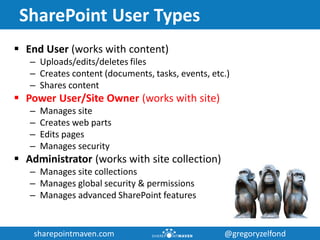
SharePoint User Types
 End User (works with content)
– Uploads/edits/deletes files
– Creates content (documents, tasks, events, etc.)
– Shares content
 Power User/Site Owner (works with site)
– Manages site
– Creates web parts
– Edits pages
– Manages security
 Administrator (works with site collection)
– Manages site collections
– Manages global security & permissions
– Manages advanced SharePoint features
sharepointmaven.com @gregoryzelfondsharepointmaven.com @gregoryzelfond
Prerequisites
 You know what SharePoint is
 You have been using SharePoint for a while
 You have Full Control (Site Admin) permission
sharepointmaven.com @gregoryzelfondsharepointmaven.com @gregoryzelfond
Agenda
– SharePoint Elements
– Sites
• Create New Site
• Navigation
• Look & Feel
• Security
– Pages
• Editing Pages
• Add new page
– Web Parts (Apps)
• Create new web parts
• Add Web Parts to a page
• Add custom metadata to lists and libraries
• Create custom views
– Q & A
sharepointmaven.com @gregoryzelfondsharepointmaven.com @gregoryzelfond
SHAREPOINT
ELEMENTS
sharepointmaven.com @gregoryzelfondsharepointmaven.com @gregoryzelfond
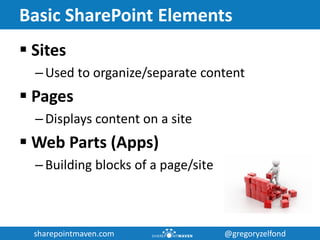
Basic SharePoint Elements
 Sites
– Used to organize/separate content
 Pages
– Displays content on a site
 Web Parts (Apps)
– Building blocks of a page/site
sharepointmaven.com @gregoryzelfondsharepointmaven.com @gregoryzelfond
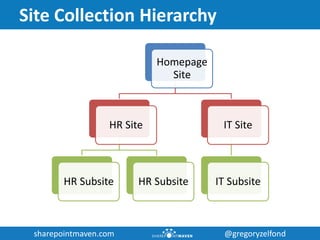
Site Collection Hierarchy
Homepage
Site
HR Site
HR Subsite HR Subsite
IT Site
IT Subsite
sharepointmaven.com @gregoryzelfondsharepointmaven.com @gregoryzelfond
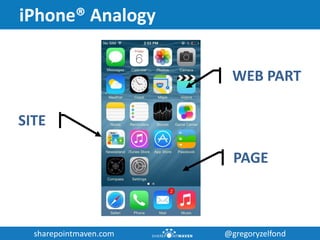
iPhone® Analogy
SITE
PAGE
WEB PART
sharepointmaven.com @gregoryzelfondsharepointmaven.com @gregoryzelfond
SITES
sharepointmaven.com @gregoryzelfondsharepointmaven.com @gregoryzelfond
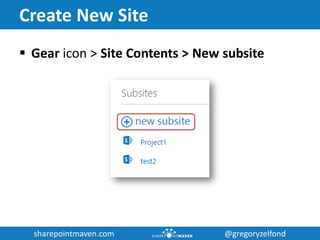
Create New Site
 Gear icon > Site Contents > New subsite
sharepointmaven.com @gregoryzelfondsharepointmaven.com @gregoryzelfond
SITE
NAVIGATION
sharepointmaven.com @gregoryzelfondsharepointmaven.com @gregoryzelfond
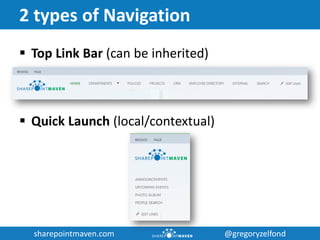
2 types of Navigation
 Top Link Bar (can be inherited)
 Quick Launch (local/contextual)
sharepointmaven.com @gregoryzelfondsharepointmaven.com @gregoryzelfond
LOOK & FEEL
sharepointmaven.com @gregoryzelfondsharepointmaven.com @gregoryzelfond
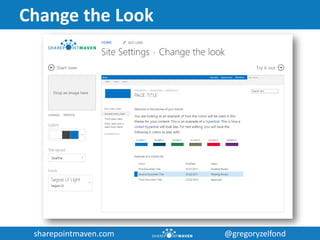
Change the Look
sharepointmaven.com @gregoryzelfondsharepointmaven.com @gregoryzelfond
SECURITY &
PERMISSIONS
sharepointmaven.com @gregoryzelfondsharepointmaven.com @gregoryzelfond
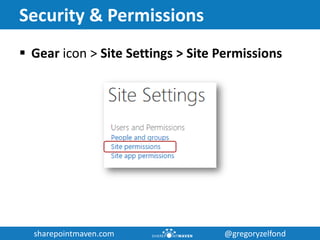
Security & Permissions
 Gear icon > Site Settings > Site Permissions
sharepointmaven.com @gregoryzelfondsharepointmaven.com @gregoryzelfond
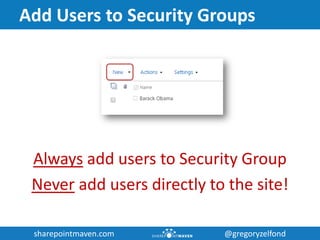
Add Users to Security Groups
Always add users to Security Group
Never add users directly to the site!
sharepointmaven.com @gregoryzelfondsharepointmaven.com @gregoryzelfond
PAGES
sharepointmaven.com @gregoryzelfondsharepointmaven.com @gregoryzelfond
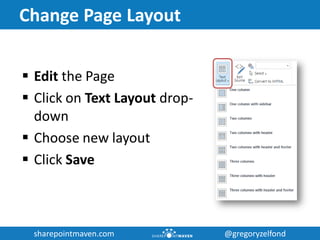
Change Page Layout
 Edit the Page
 Click on Text Layout drop-
down
 Choose new layout
 Click Save
sharepointmaven.com @gregoryzelfondsharepointmaven.com @gregoryzelfond
WEB PARTS
sharepointmaven.com @gregoryzelfondsharepointmaven.com @gregoryzelfond
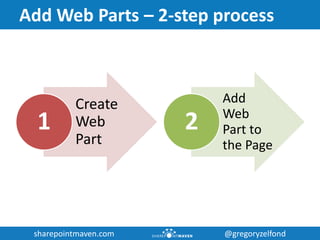
Add Web Parts – 2-step process
Create
Web
Part
1
Add
Web
Part to
the Page
2
sharepointmaven.com @gregoryzelfondsharepointmaven.com @gregoryzelfond
METADATA
sharepointmaven.com @gregoryzelfondsharepointmaven.com @gregoryzelfond
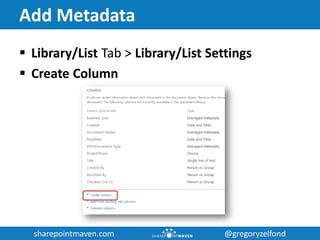
Add Metadata
 Library/List Tab > Library/List Settings
 Create Column
sharepointmaven.com @gregoryzelfondsharepointmaven.com @gregoryzelfond
VIEWS
sharepointmaven.com @gregoryzelfondsharepointmaven.com @gregoryzelfond
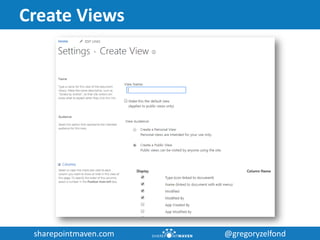
Create Views
sharepointmaven.com @gregoryzelfondsharepointmaven.com @gregoryzelfond
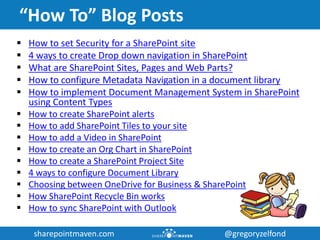
“How To” Blog Posts
 How to set Security for a SharePoint site
 4 ways to create Drop down navigation in SharePoint
 What are SharePoint Sites, Pages and Web Parts?
 How to configure Metadata Navigation in a document library
 How to implement Document Management System in SharePoint
using Content Types
 How to create SharePoint alerts
 How to add SharePoint Tiles to your site
 How to add a Video in SharePoint
 How to create an Org Chart in SharePoint
 How to create a SharePoint Project Site
 4 ways to configure Document Library
 Choosing between OneDrive for Business & SharePoint
 How SharePoint Recycle Bin works
 How to sync SharePoint with Outlook
sharepointmaven.com @gregoryzelfondsharepointmaven.com @gregoryzelfond
SharePoint Webinars
 How to manage projects in SharePoint using out of the box features
 How to build amazing Intranet Sites in SharePoint using out of the box features
 How to improve SharePoint User Adoption – practical tips and industry best
practices
 How to manage migration to SharePoint
 SharePoint hacks you can’t live without
 [NEW] Project and Portfolio Management with Project Online
 [NEW] Kick-Ass Project Collaboration with Office 365 Groups
LEARN MORE
sharepointmaven.com @gregoryzelfondsharepointmaven.com @gregoryzelfond
Need help with SharePoint?
 SharePoint Site Configuration and Customization
 Document Migration to SharePoint
 SharePoint Implementation Strategy
 SharePoint Training
 SharePoint User Adoption
 SharePoint Governance
 SharePoint Project Management
sharepointmaven.com @gregoryzelfondsharepointmaven.com @gregoryzelfond
THANK YOU!
Visit: sharepointmaven.com
Email: greg@sharepointmaven.com
Follow: @gregoryzelfond
Connect: linkedin.com/company/sharepoint-maven
View: www.slideshare.net/gzelfond
Watch: SharePoint Maven YouTube Channel
Get in touch if you have questions
sharepointmaven.com @gregoryzelfondsharepointmaven.com @gregoryzelfond
Q & A

SharePoint Power User (Site Owner) Training