…for the .NET Developer

Rob Wilson, MCT, SharePoint MCTS
Gene Merlin, MCPD, MCTS .NET/SharePoint
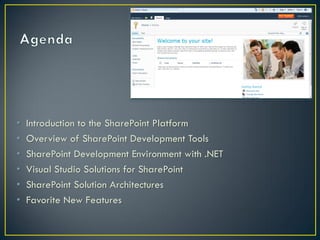
•   Introduction to the SharePoint Platform
•   Overview of SharePoint Development Tools
•   SharePoint Development Environment with .NET
•   Visual Studio Solutions for SharePoint
•   SharePoint Solution Architectures
•   Favorite New Features
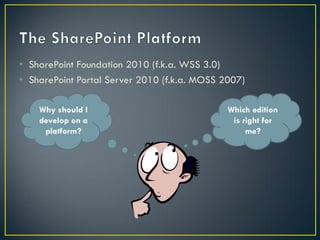
• SharePoint Foundation 2010 (f.k.a. WSS 3.0)
• SharePoint Portal Server 2010 (f.k.a. MOSS 2007)

    Why should I                              Which edition
    develop on a                               is right for
     platform?                                     me?
InfoPath 2010
• SharePoint no longer required on development machine, but is
  now supported
• Virtual environment
• 64-bit is a must
• RAM is your friend
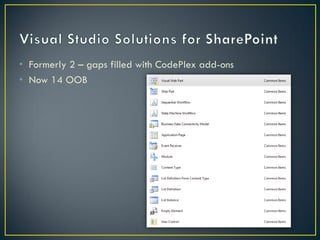
• Formerly 2 – gaps filled with CodePlex add-ons
• Now 14 OOB
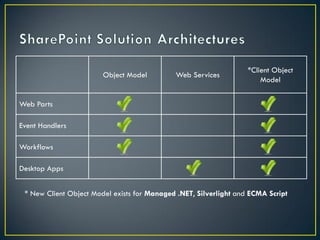
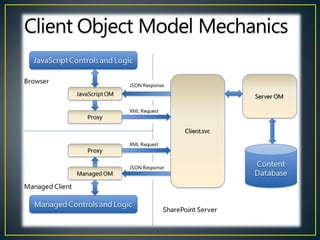
*Client Object
                        Object Model         Web Services
                                                                       Model


Web Parts

Event Handlers

Workflows

Desktop Apps


 * New Client Object Model exists for Managed .NET, Silverlight and ECMA Script
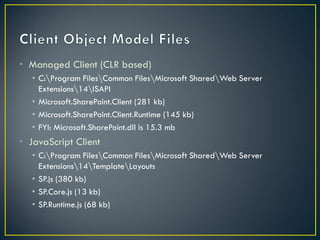
• Managed Client (CLR based)
   • C:Program FilesCommon FilesMicrosoft SharedWeb Server
     Extensions14ISAPI
   • Microsoft.SharePoint.Client (281 kb)
   • Microsoft.SharePoint.Client.Runtime (145 kb)
   • FYI: Microsoft.SharePoint.dll is 15.3 mb
• JavaScript Client
   • C:Program FilesCommon FilesMicrosoft SharedWeb Server
     Extensions14TemplateLayouts
   • SP.js (380 kb)
   • SP.Core.js (13 kb)
   • SP.Runtime.js (68 kb)
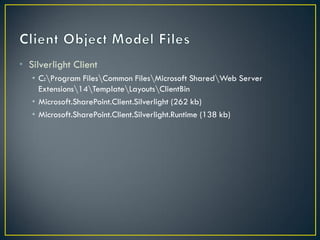
• Silverlight Client
   • C:Program FilesCommon FilesMicrosoft SharedWeb Server
     Extensions14TemplateLayoutsClientBin
   • Microsoft.SharePoint.Client.Silverlight (262 kb)
   • Microsoft.SharePoint.Client.Silverlight.Runtime (138 kb)
• SharePoint no longer required on dev machine
• Traditional .NET, Web/JavaScript and Silverlight developers
  can use familiar syntax
• Ease of deployment
  • Just publish and run if SharePoint on local host
  • Package and deploy if SharePoint remote
• Debugging
  • Step through code if SharePoint on local host
• Sandbox solutions
  • Allow applications to be deployed at the site collection level by a site
    collection administrator (as opposed to farm-level equivalent)
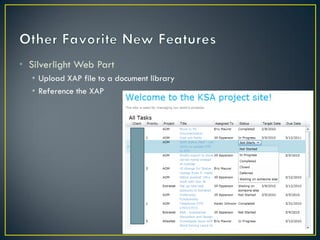
• Silverlight Web Part
  • Upload XAP file to a document library
  • Reference the XAP
• LINQ Support
  • No longer restricted to just CAML queries if writing server-based code
• Dialog framework
• External Lists
   • Looks and behaves like a SharePoint list
   • Stored in SQL Server or some other data source
Hands On Labs:
http://www.microsoft.com/downloads/details.aspx?FamilyID=c01
0fc68-b47f-4db6-b8a8-ad4ba33a35c5&displaylang=en
Or
http://bit.ly/sp2010hol (you’re welcome!)

Developer Training Kit
• http://bit.ly/sp2010devkit

MSDN Training Videos
• http://www.mssharepointdeveloper.com
• rwilson@kellerschroeder.com

• http://sharepointblog.kellerschroeder.com

• Twitter: @daretoshare

WKDNUG SP2010 Development Presentation

  • 1.
    …for the .NETDeveloper Rob Wilson, MCT, SharePoint MCTS Gene Merlin, MCPD, MCTS .NET/SharePoint
  • 2.
    Introduction to the SharePoint Platform • Overview of SharePoint Development Tools • SharePoint Development Environment with .NET • Visual Studio Solutions for SharePoint • SharePoint Solution Architectures • Favorite New Features
  • 3.
    • SharePoint Foundation2010 (f.k.a. WSS 3.0) • SharePoint Portal Server 2010 (f.k.a. MOSS 2007) Why should I Which edition develop on a is right for platform? me?
  • 4.
  • 5.
    • SharePoint nolonger required on development machine, but is now supported • Virtual environment • 64-bit is a must • RAM is your friend
  • 6.
    • Formerly 2– gaps filled with CodePlex add-ons • Now 14 OOB
  • 7.
    *Client Object Object Model Web Services Model Web Parts Event Handlers Workflows Desktop Apps * New Client Object Model exists for Managed .NET, Silverlight and ECMA Script
  • 9.
    • Managed Client(CLR based) • C:Program FilesCommon FilesMicrosoft SharedWeb Server Extensions14ISAPI • Microsoft.SharePoint.Client (281 kb) • Microsoft.SharePoint.Client.Runtime (145 kb) • FYI: Microsoft.SharePoint.dll is 15.3 mb • JavaScript Client • C:Program FilesCommon FilesMicrosoft SharedWeb Server Extensions14TemplateLayouts • SP.js (380 kb) • SP.Core.js (13 kb) • SP.Runtime.js (68 kb)
  • 10.
    • Silverlight Client • C:Program FilesCommon FilesMicrosoft SharedWeb Server Extensions14TemplateLayoutsClientBin • Microsoft.SharePoint.Client.Silverlight (262 kb) • Microsoft.SharePoint.Client.Silverlight.Runtime (138 kb)
  • 11.
    • SharePoint nolonger required on dev machine • Traditional .NET, Web/JavaScript and Silverlight developers can use familiar syntax
  • 12.
    • Ease ofdeployment • Just publish and run if SharePoint on local host • Package and deploy if SharePoint remote
  • 13.
    • Debugging • Step through code if SharePoint on local host
  • 14.
    • Sandbox solutions • Allow applications to be deployed at the site collection level by a site collection administrator (as opposed to farm-level equivalent)
  • 15.
    • Silverlight WebPart • Upload XAP file to a document library • Reference the XAP
  • 16.
    • LINQ Support • No longer restricted to just CAML queries if writing server-based code
  • 17.
  • 18.
    • External Lists • Looks and behaves like a SharePoint list • Stored in SQL Server or some other data source
  • 19.
    Hands On Labs: http://www.microsoft.com/downloads/details.aspx?FamilyID=c01 0fc68-b47f-4db6-b8a8-ad4ba33a35c5&displaylang=en Or http://bit.ly/sp2010hol(you’re welcome!) Developer Training Kit • http://bit.ly/sp2010devkit MSDN Training Videos • http://www.mssharepointdeveloper.com
  • 20.