Introduction to SharePoint
2013
Mohan
Consultant
Certification
Mohan Arumugam
Technologies Specialist
E-mail : moohanan@gmail.com
Phone : +91 99406 53876
Profile
Blogger
Trainer
Who Am I ?
Agenda
• New Features in SharePoint
2013
• Development
SharePoint 2013
Architecture
In general model has stayed same as in previous
version
Numerous platform level improvements and
new capabilities
 Shredded Storage
 SQL Improvements
 Cache Service
 Request Management
 Themes
 Sharing
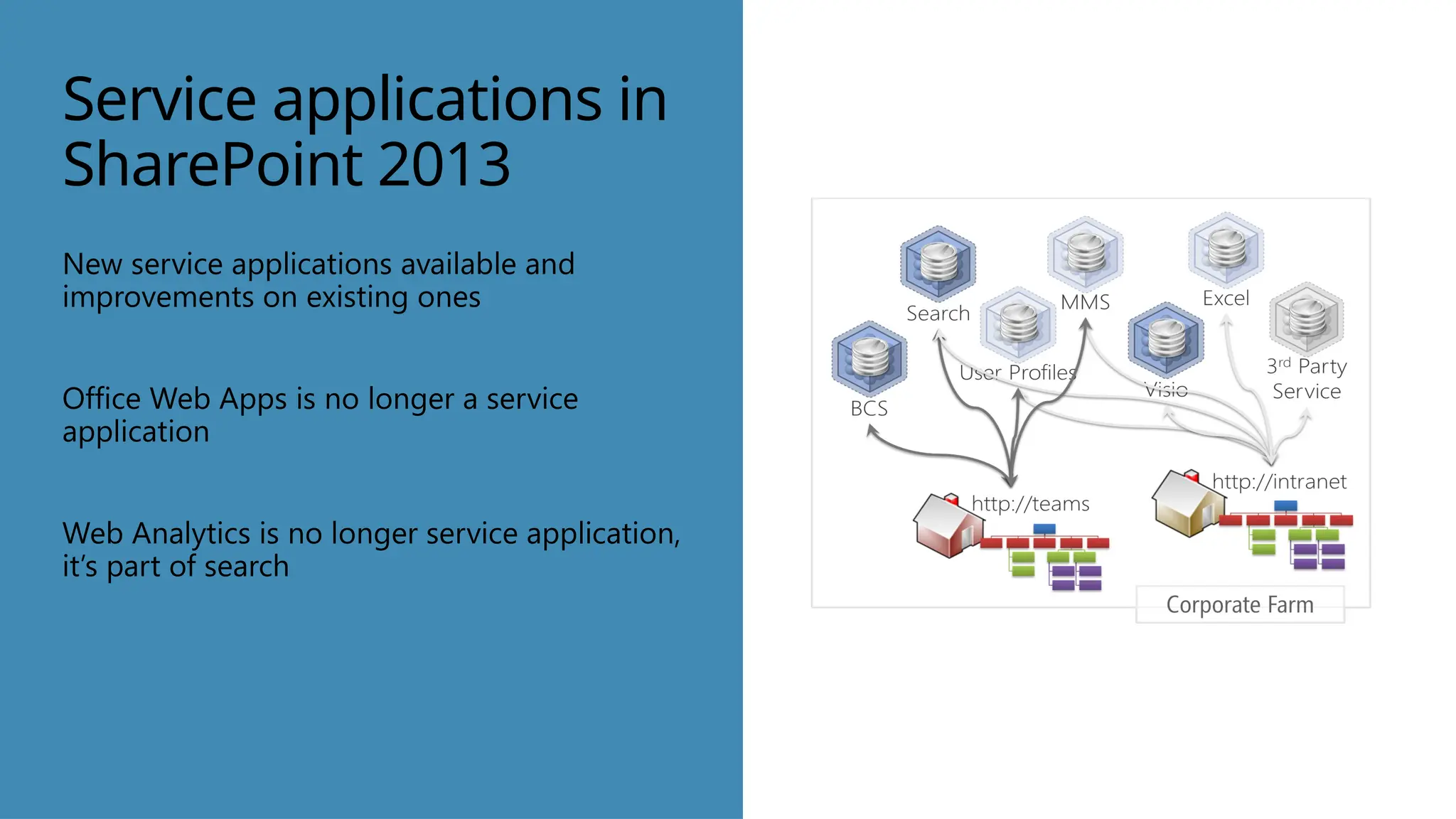
Service applications in
SharePoint 2013
New service applications available and
improvements on existing ones
Office Web Apps is no longer a service
application
Web Analytics is no longer service application,
it’s part of search
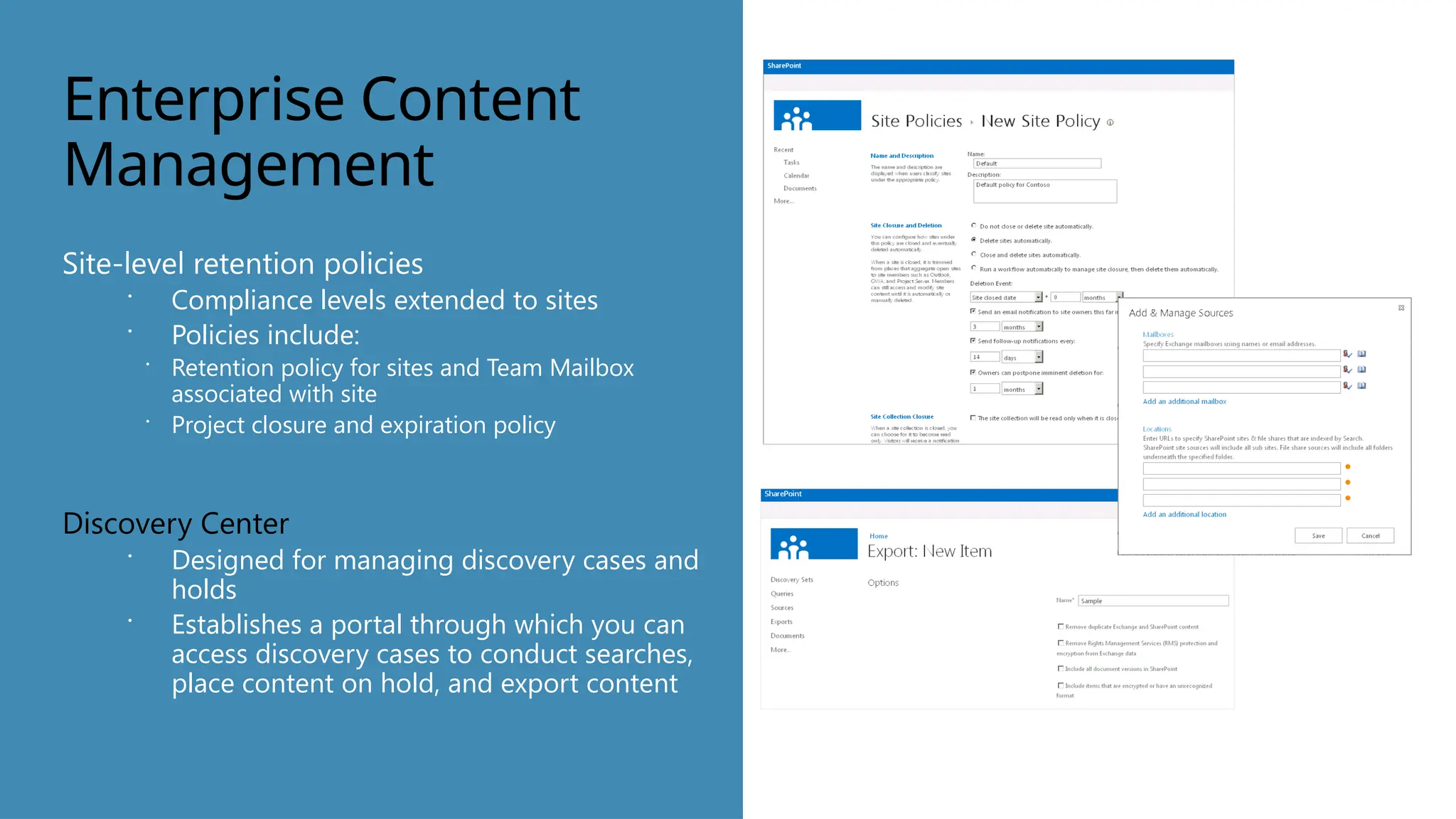
Enterprise Content
Management
Site-level retention policies
 Compliance levels extended to sites
 Policies include:
 Retention policy for sites and Team Mailbox
associated with site
 Project closure and expiration policy
Discovery Center
 Designed for managing discovery cases and
holds
 Establishes a portal through which you can
access discovery cases to conduct searches,
place content on hold, and export content
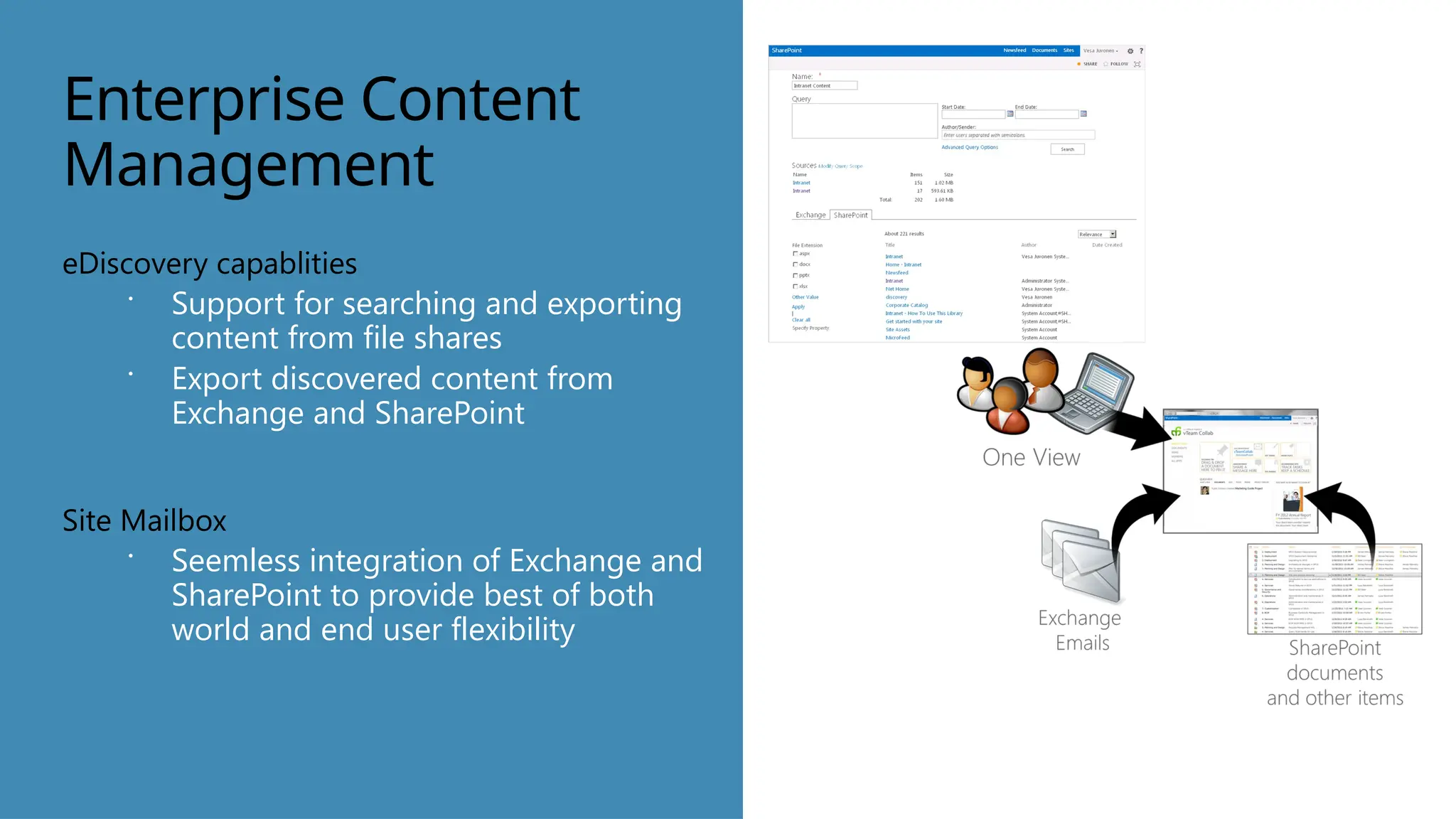
Enterprise Content
Management
eDiscovery capablities
 Support for searching and exporting
content from file shares
 Export discovered content from
Exchange and SharePoint
Site Mailbox
 Seemless integration of Exchange and
SharePoint to provide best of both
world and end user flexibility
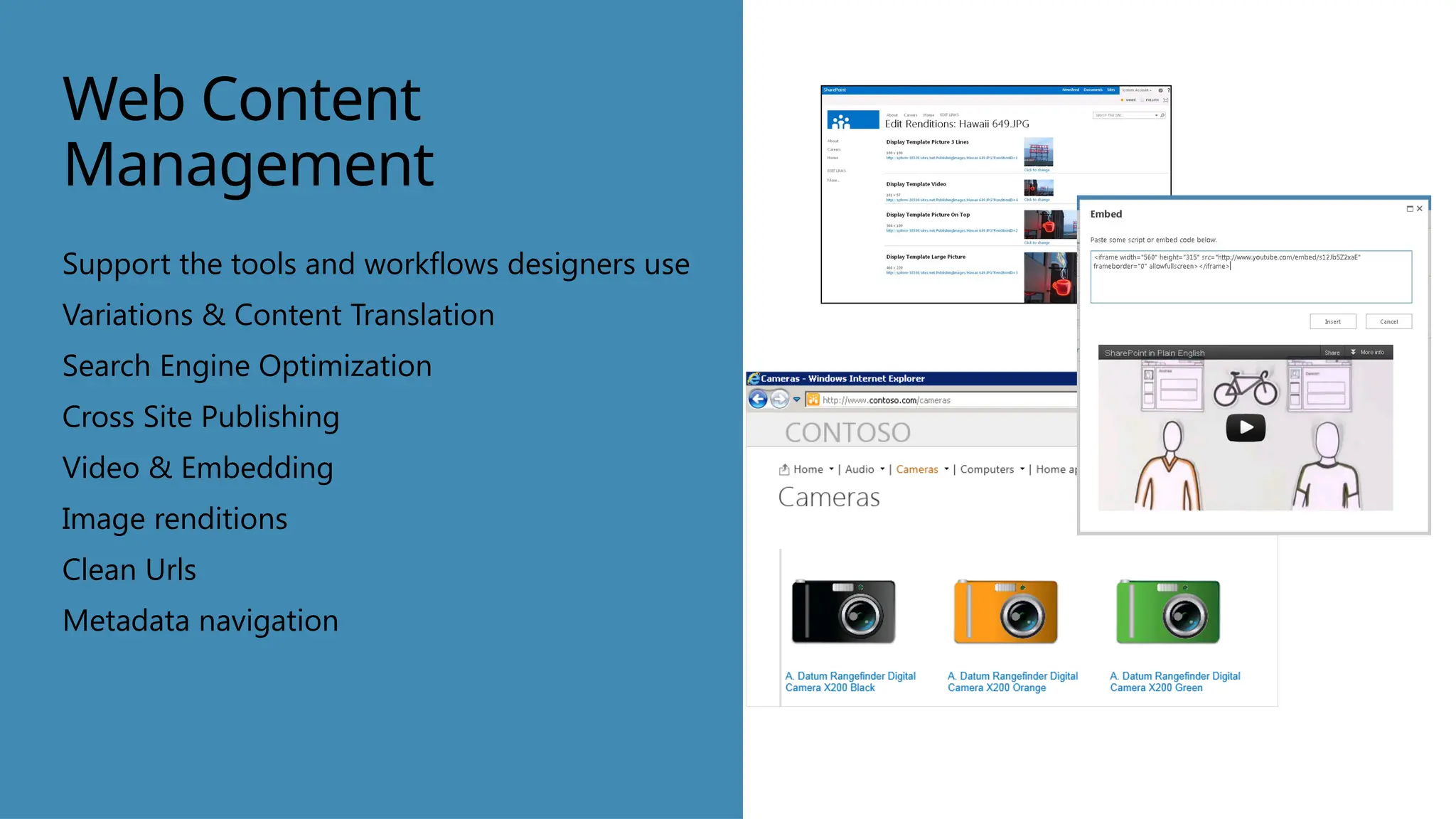
Web Content
Management
Support the tools and workflows designers use
Variations & Content Translation
Search Engine Optimization
Cross Site Publishing
Video & Embedding
Image renditions
Clean Urls
Metadata navigation
Click to insert photo.
Social
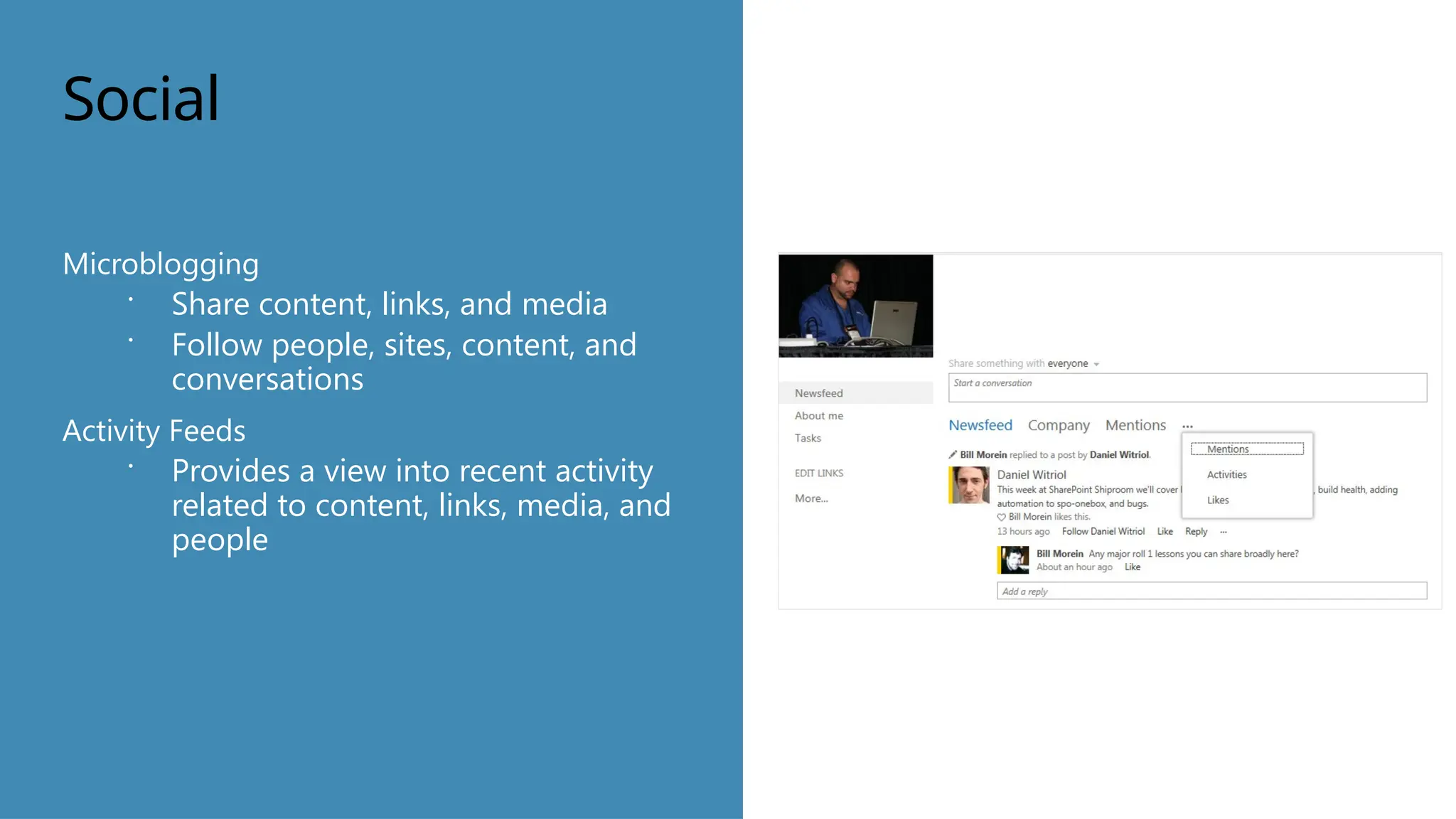
Microblogging
 Share content, links, and media
 Follow people, sites, content, and
conversations
Activity Feeds
 Provides a view into recent activity
related to content, links, media, and
people
Social
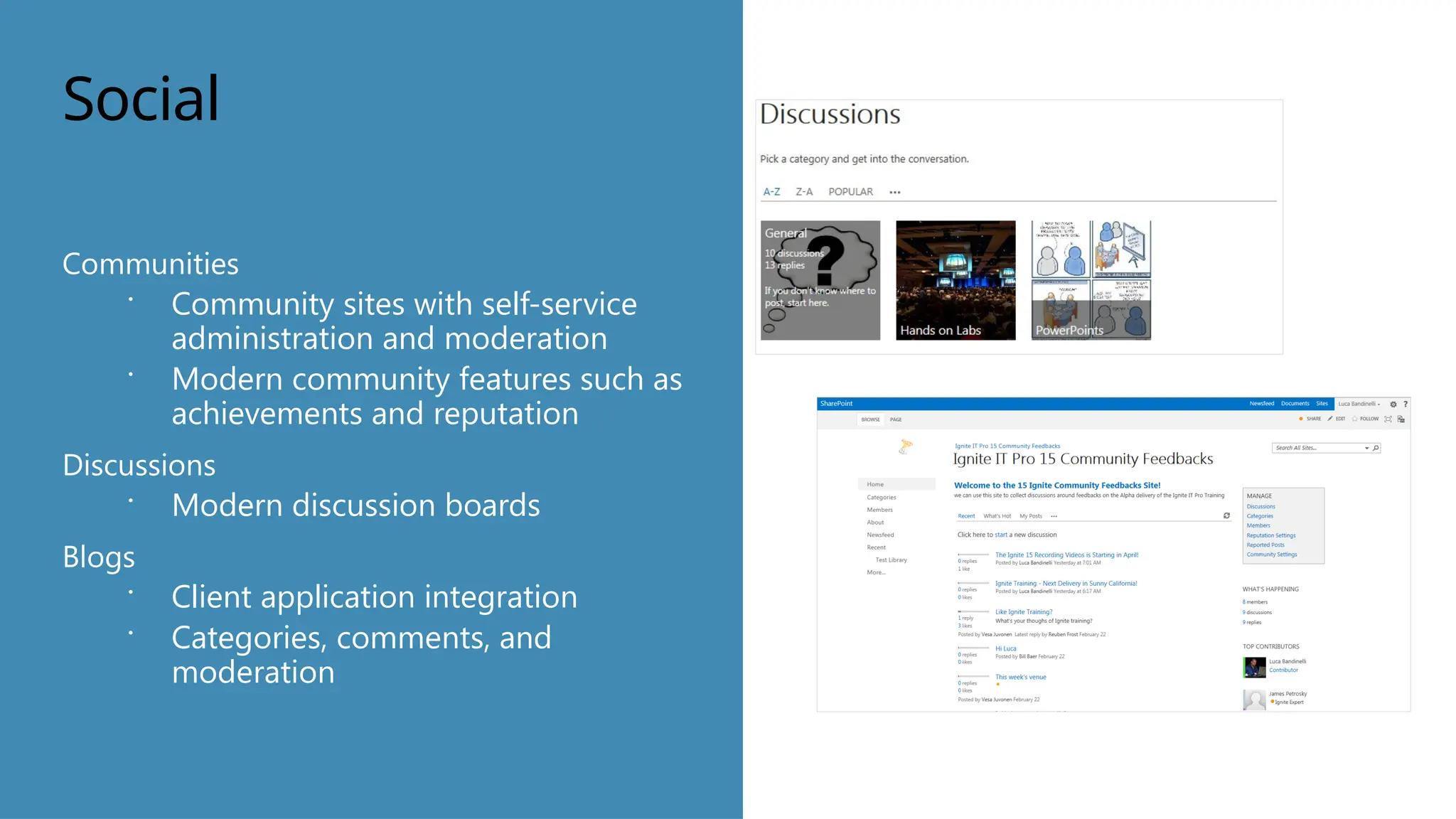
Communities
 Community sites with self-service
administration and moderation
 Modern community features such as
achievements and reputation
Discussions
 Modern discussion boards
Blogs
 Client application integration
 Categories, comments, and
moderation
Search
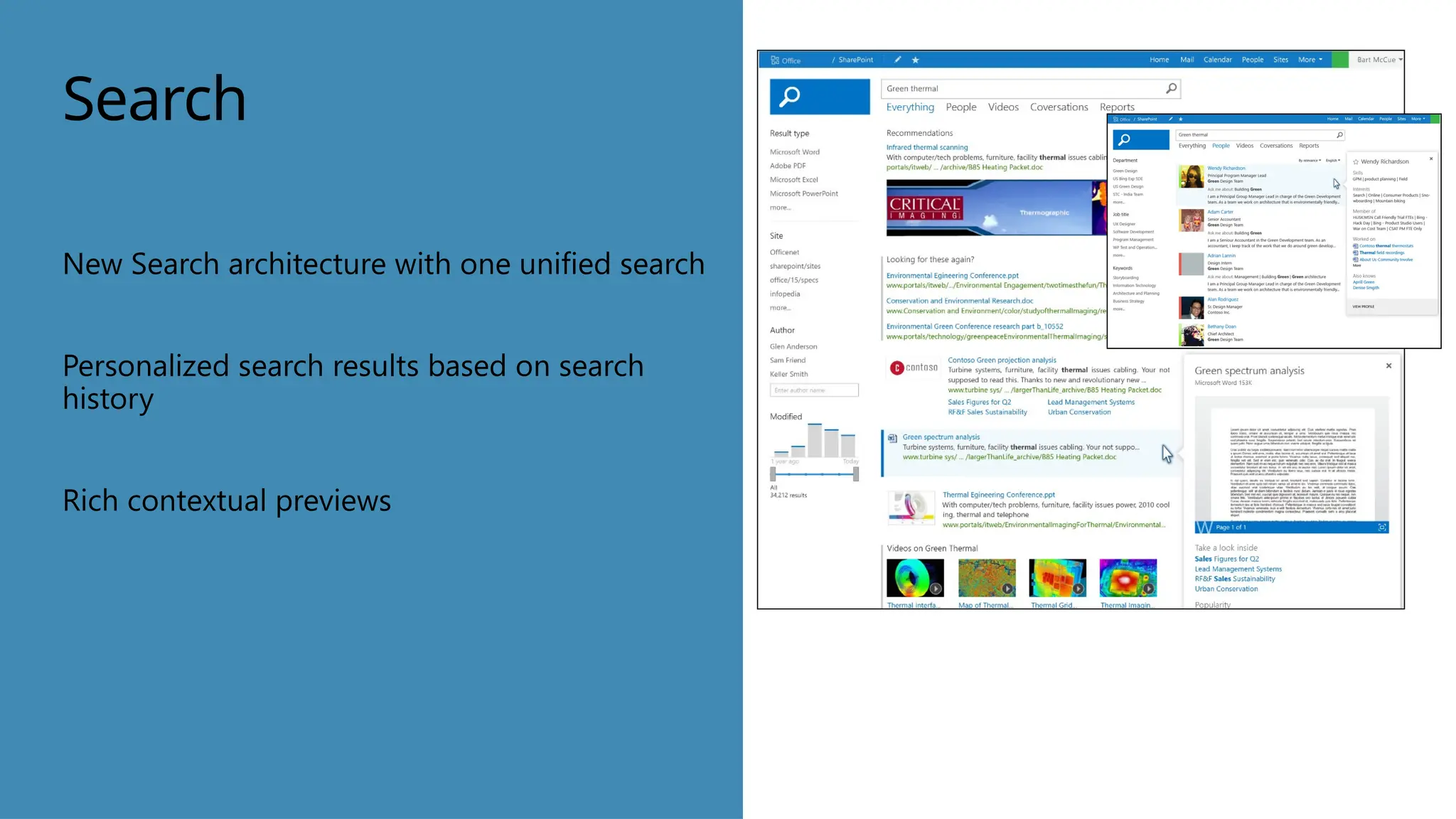
New Search architecture with one unified search
Personalized search results based on search
history
Rich contextual previews
Business Intelligence
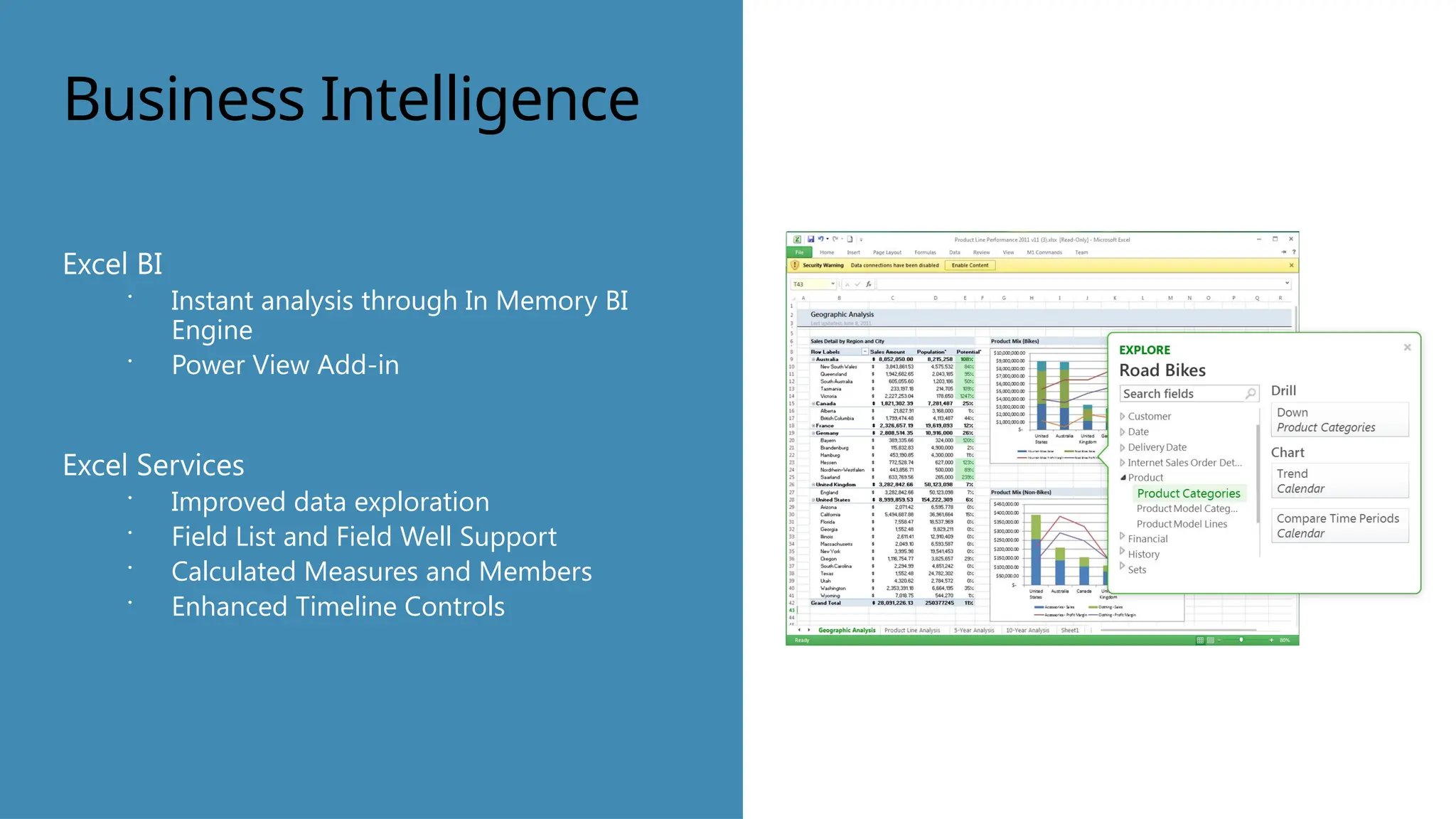
Excel BI
 Instant analysis through In Memory BI
Engine
 Power View Add-in
Excel Services
 Improved data exploration
 Field List and Field Well Support
 Calculated Measures and Members
 Enhanced Timeline Controls
Business Intelligence
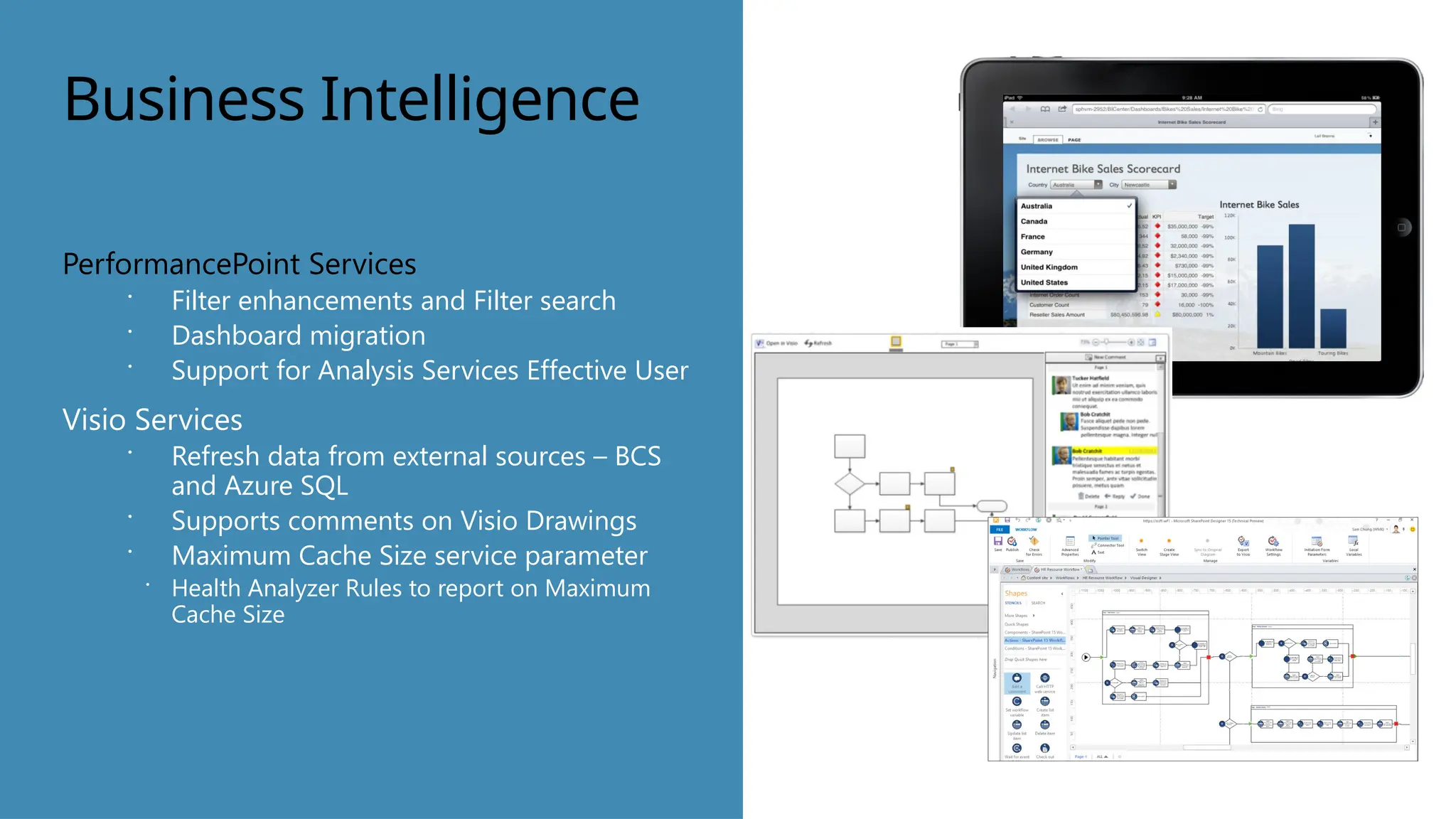
PerformancePoint Services
 Filter enhancements and Filter search
 Dashboard migration
 Support for Analysis Services Effective User
Visio Services
 Refresh data from external sources – BCS
and Azure SQL
 Supports comments on Visio Drawings
 Maximum Cache Size service parameter
 Health Analyzer Rules to report on Maximum
Cache Size
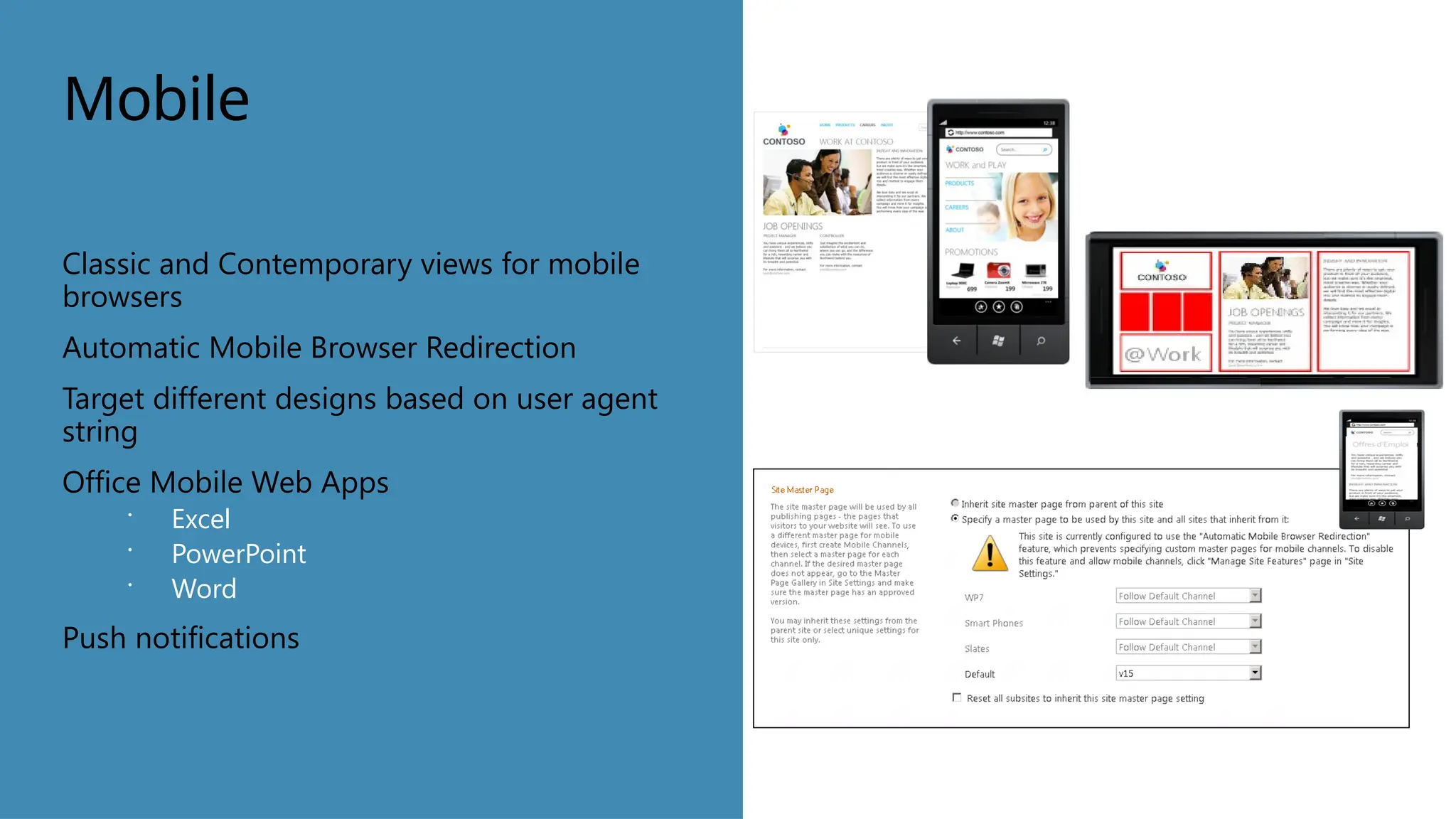
Mobile
Classic and Contemporary views for mobile
browsers
Automatic Mobile Browser Redirection
Target different designs based on user agent
string
Office Mobile Web Apps
 Excel
 PowerPoint
 Word
Push notifications
SharePoint
2007
SharePoint
2010
SP 2013
Services (IIS,
Apache,
Other, …)
Services (Azure,
IIS, Apache,
Other…)
Services
(Azure,
IIS,
Apache,
etc…)
SP2007 SP2010 SP2013
Declar. App &
Workflow
Events
Custom
Code
Custom
Code
CSOM
_vti_bin
_vti_bin
_api
_api
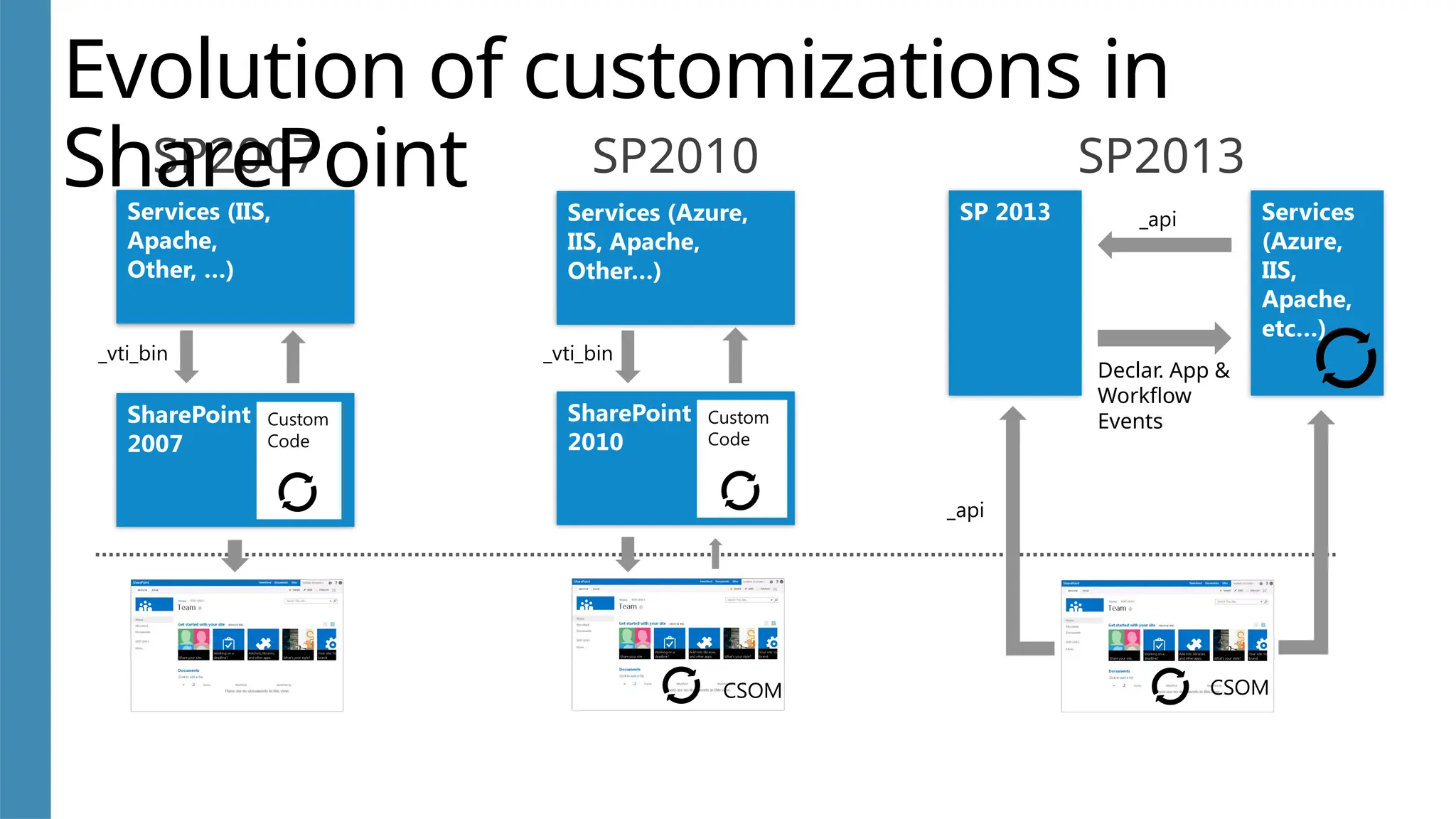
Evolution of customizations in
SharePoint
CSOM
Summary
SharePoint Server 2013 enhances the
workload experiences by enabling new
compelling scenarios that engage and work
with the user.
Mohan Arumugam
Technologies Specialist
E-mail : moohanan@gmail.com
Phone : +91 99406 53876
Profile
Thank You

Introduction to Sharepoint 2013 Devlopment

  • 1.
  • 2.
    Consultant Certification Mohan Arumugam Technologies Specialist E-mail: moohanan@gmail.com Phone : +91 99406 53876 Profile Blogger Trainer Who Am I ?
  • 3.
    Agenda • New Featuresin SharePoint 2013 • Development
  • 4.
    SharePoint 2013 Architecture In generalmodel has stayed same as in previous version Numerous platform level improvements and new capabilities  Shredded Storage  SQL Improvements  Cache Service  Request Management  Themes  Sharing
  • 5.
    Service applications in SharePoint2013 New service applications available and improvements on existing ones Office Web Apps is no longer a service application Web Analytics is no longer service application, it’s part of search
  • 6.
    Enterprise Content Management Site-level retentionpolicies  Compliance levels extended to sites  Policies include:  Retention policy for sites and Team Mailbox associated with site  Project closure and expiration policy Discovery Center  Designed for managing discovery cases and holds  Establishes a portal through which you can access discovery cases to conduct searches, place content on hold, and export content
  • 7.
    Enterprise Content Management eDiscovery capablities Support for searching and exporting content from file shares  Export discovered content from Exchange and SharePoint Site Mailbox  Seemless integration of Exchange and SharePoint to provide best of both world and end user flexibility
  • 8.
    Web Content Management Support thetools and workflows designers use Variations & Content Translation Search Engine Optimization Cross Site Publishing Video & Embedding Image renditions Clean Urls Metadata navigation
  • 9.
    Click to insertphoto. Social Microblogging  Share content, links, and media  Follow people, sites, content, and conversations Activity Feeds  Provides a view into recent activity related to content, links, media, and people
  • 10.
    Social Communities  Community siteswith self-service administration and moderation  Modern community features such as achievements and reputation Discussions  Modern discussion boards Blogs  Client application integration  Categories, comments, and moderation
  • 11.
    Search New Search architecturewith one unified search Personalized search results based on search history Rich contextual previews
  • 12.
    Business Intelligence Excel BI Instant analysis through In Memory BI Engine  Power View Add-in Excel Services  Improved data exploration  Field List and Field Well Support  Calculated Measures and Members  Enhanced Timeline Controls
  • 13.
    Business Intelligence PerformancePoint Services Filter enhancements and Filter search  Dashboard migration  Support for Analysis Services Effective User Visio Services  Refresh data from external sources – BCS and Azure SQL  Supports comments on Visio Drawings  Maximum Cache Size service parameter  Health Analyzer Rules to report on Maximum Cache Size
  • 14.
    Mobile Classic and Contemporaryviews for mobile browsers Automatic Mobile Browser Redirection Target different designs based on user agent string Office Mobile Web Apps  Excel  PowerPoint  Word Push notifications
  • 15.
    SharePoint 2007 SharePoint 2010 SP 2013 Services (IIS, Apache, Other,…) Services (Azure, IIS, Apache, Other…) Services (Azure, IIS, Apache, etc…) SP2007 SP2010 SP2013 Declar. App & Workflow Events Custom Code Custom Code CSOM _vti_bin _vti_bin _api _api Evolution of customizations in SharePoint CSOM
  • 16.
    Summary SharePoint Server 2013enhances the workload experiences by enabling new compelling scenarios that engage and work with the user.
  • 17.
    Mohan Arumugam Technologies Specialist E-mail: moohanan@gmail.com Phone : +91 99406 53876 Profile Thank You

Editor's Notes

  • #5 App Management Service – manage apps for SharePoint Machine Translation Service – manages translation services Work Management Service – aggregates tasks
  • #9 Speaker Notes In SharePoint Server 2013, the What’s New page in the My Site continues to provide an aggregated view of activities related to users’ interests. However, the feed is enhanced with new microblogging functionality that enables users to: Participate in conversations by posting comments and replies. Post pictures and links. Use hashtags (starting with the # symbol) to define keywords that users can follow and search for. Use mentions (starting with the @ symbol) to tag users in posts and replies. Indicate agreement with comments and replies by clicking Like. Follow people, documents, sites, and hashtags to tailor their feed. <Animation> In SharePoint Server 2010, My Sites provided a central place for users to store personal and shared documents, as well as promote their user information and expertise, tag content, and communicate with others by using the note board. Through people search, users were able to connect with one another and benefit from expertise of others in their organization. In SharePoint Server 2013, My Sites continue to provide the benefits from the previous release, but the user interface is completely redesigned and modernized to provide users with an inviting and intuitive experience. A key change to the UI includes a simplified and unified navigation experience for your own and others’ My Sites. Additionally, My Sites contain a new Tasks page to aggregate a user’s tasks from SharePoint Server, Microsoft Outlook, and Microsoft Project.
  • #10 Speaker Notes Community Sites offer a forum experience to categorize and cultivate discussions with a broad group of people across organizations within a company. They promote open communication and information exchange by fostering discussions among users who share their expertise and leverage expertise of others who have knowledge in specific areas of interest. <Animation> With Community Sites, you organize discussions in categories. Visitors can view the discussions and become members if they want to contribute to those discussions. Moderators tend to the community by setting rules, reviewing and addressing inappropriate posts, marking interesting content as featured discussions, and so on. Moderators can also assign gifted badges to specific members to visually indicate that the member is recognized as a specific kind of contributor in the Community Site, such as an expert or moderator. Each Community Site contains information about member and content reputation, which members earn when they actively post in discussions, and when their content is liked, replied to, or marked as a best answer. <Animation> Blogs become more personal and enable sharing of ideas and content as well as management of categories and moderation of comments. <Next Slide>
  • #11 Speaker Notes Search in SharePoint Server 2013 includes many new capabilities and enhancements, from a re-designed architecture that is highly scalable to a customizable end-user experience that provides targeted results. An all new Search Experience, from the engine to the UX designed to make it easier than ever to find what you’re looking by combining your personal history, highly relevant results, and rich graphical navigators in a single highly usable interface.   Personalized search results based on your search history: Make re-finding information easier than ever by promoting content that you’ve searched for in the past; making Search about more than finding documents, but as an aid to navigation. Rich contextual previews with meaningful actions:  Finding the right document is made simpler by providing a variety of previewing capabilities to ensure you’ve got the right document, combined with contextual actions to continue your journey and complete your task. Intelligent and customized search results experience: SharePoint 2013 enhances results relevance out-of-box with an ability to alter the layout and ranking based on what you’re looking for, and what you’ve found; taking relevance to a new level and giving administrators powerful tools for improving the Search Experience.
  • #12 Speaker Notes Excel BI Excel BI provides the capabilities to analyze and visually explore data of any size, and to integrate and show interactive solutions. In SharePoint Server 2013, Excel BI offers certain new features to support business intelligence applications. These include the following: In Memory BI Engine (IMBI): The In Memory multidimensional data analysis engine (IMBI), also known as the Vertipaq engine, allows for almost instant analysis of millions of rows and is a fully integrated feature in the Excel client. Power View Add-in for Excel: Power View (Crescent) is powered by the BI Semantic Model and the VertiPaq engine, and enables users to visualize and interact with modeled data by using highly interactive visualizations, animations and smart querying. Users will be able to present and share insights with others in the organization through rich storyboard presentation capabilities. Decoupled PivotChart and PivotTable reports: Users can now create PivotChart reports without having to include a PivotTable report on the same page. Trend analysis: Excel Services supports the ability to conduct trend analysis from cells in PivotTable reports that use OLAP data, such as Analysis Services cubes or PowerPivot data models. Excel Services Excel Services enables people to view and interact with Excel workbooks that have been published to SharePoint sites. Users are able to explore data and conduct analysis in a browser window just as they would by using the Excel client. In SharePoint Server 2013, Excel Services offers certain new features to support business intelligence applications. These include the following: Data exploration improvements: People can more easily explore data and conduct analysis in Excel Services reports that use SQL Server Analysis Services data or PowerPivot data models. For example, users can point to a value in a PivotChart or PivotTable report and see suggested ways to view additional information. Users can also use commands such as Drill Down To to conduct analysis. Users can also apply the Drill Down command by using a single mouse click. Field list and field well support: Excel Services enables people to easily view and change which items are displayed in rows, columns, values, and filters in PivotChart reports and PivotTable reports that have been published to Excel Services. Calculated measures and members: Excel Services supports calculated measures and calculated members that are created in Excel. Enhanced timeline controls: Excel Services supports timeline controls that render and behave as they do in the Excel client. Application BI Servers: Administrators can specify SQL Server Analysis Services servers to support more advanced analytic capabilities in Excel Services. Business Intelligence Center update: The Business Intelligence Center site template has been streamlined. It not only has a new look, it is easier to use.
  • #13 Speaker Notes PerformancePoint Services PerformancePoint Services enables users to create interactive dashboards that display key performance indicators (KPIs) and data visualizations in the form of scorecards, reports, and filters. For more information about PerformancePoint Services in SharePoint Server 2010, see In SharePoint Server 2013, PerformancePoint Services offers certain new features to support business intelligence applications. These include the following: Dashboard Migration: Users will be able to copy entire dashboards and dependencies, including the .aspx file, to other users, servers, or site collections. This feature also allows the ability to migrate single items to other environments and migrate content by using Windows PowerShell commands. Filter Enhancements & Filter Search: The UI has been enhanced to allow users to easily view and manage filters including giving users the ability to search for items within filters without having to navigate through the tree. BI Center Update: The new BI Center is cleaner, and easier to use with folders and libraries configured for easy use. Support for Analysis Services Effective User: This new feature eliminates the need for Kerberos delegation when per-user authentication is used for Analysis Services data sources. By supporting Analysis Services Effective User feature, authorization checks will be based on the user specified by the EffectiveUserName property instead of using the currently authenticated user. PerformancePoint Support on iPad: PerformancePoint dashboards can now be viewed and interacted with on iPad devices using the Safari web browser. Visio Services Visio Services is a service application that lets users share and view Microsoft Visio® Drawing (*.vsdx) and Visio 2010 Web drawing (*.vdw) files. The service also enables data-connected Visio Drawing (*.vsdx) and Visio 2010 Web drawing (*.vdw) files.to be refreshed and updated from various data sources. In SharePoint Server 2013, new features in Visio Services include the following: Maximum Cache Size: A new service parameter, it is located on the Central Admininstration Visio Graphics Service Application Global Settings page. The default value is 5120 MB. Health Analyzer rules: New corresponding Health Analyzer rules have been added to reflect the new Maximum Cache Size parameter. Updated PowerShell cmdlet “Set-SPVisioPerformance”: This cmdlet has been updated to include the new Maximum Cache Size parameter. Commenting on drawings supported: Users can add meaningful comments to a Visio Drawing (*.vsdx) collaboratively on the web via Visio Services in full page rendering mode.
  • #14 Speaker Notes Automatic Mobile Browser Redirection To access a site using the optimized mobile browser experience, a new feature called Automatic Mobile Browser Redirection must be activated on the site. When activated and a mobile browser is accessing the site, this feature checks the mobile browser to determine if it is capable of handling HTML5 or not. If the mobile browser supports HTML5, the contemporary view is rendered, else the classic view is rendered. This feature is activated by default when any of the following site templates are used: Collaboration templates: Team Site, Blank Site, Document Workspace, Blog, Group Work Site, Visio Process Repository Meetings templates: Basic Meeting Workspace, Blank Meeting Workspace, Decision Meeting Workspace, Social Meeting Workspace, Multipage Meeting Workspace Enterprise templates: Document Center, Records Center, Business Intelligence Center, My Site Host, Basic Search Center, FAST Search Center All other site templates require you to explicitly activate the feature. Office Mobile Web Apps In SharePoint Server 2010, Office Web Apps provides browser-based companions to Office Word, Excel, PowerPoint and OneNote. When Office Web Apps is installed on SharePoint Server 2010, Office Mobile Web Apps is also installed on the server. Office Mobile Web Apps enables users to open documents in the mobile web application using a mobile browser. With SharePoint Server 2013, Office Web Apps is no longer a companion product installed on a SharePoint Server. Instead, Office Web Apps Server is a new stand-alone server product that delivers Office Web Apps functionality on your private network. Although these are now separate products, Office Web Apps Server continues to enable Office Mobile Web Apps, making them available to mobile users who access SharePoint sites. Together, SharePoint Server 2013 and Office Mobile Web Apps offer a better user experience when interacting with documents on a mobile device. For instance, when both products are used together, a user opens a server-based version of the document in the mobile browser. Without Office Mobile Web Apps, the end user would first have to download the file and then open it in Office Mobile or an office document viewer. Push Notifications SharePoint Server 2013 supports applications on mobile devices (such as smartphones, tablets, and so on) that should receive notifications from a SharePoint site. Notifications can include events that happen in the site, such as when a user adds an item to a list or updates an item. For mobile devices to receive such notifications, device applications must register with a SharePoint site. Once the device is registered, you can write event handler code to interact with Microsoft Push Notification Service or notification services of other mobile device platforms. Notifications are sent from the server where the application is hosted to the registered mobile device application.