...Bringing Your IT Vision To Reality 
2010 
Building With SharePoint 2010 
Microsoft SharePoint 2010 is the Business Collaboration Platform for the 
Enterprise and Web. SharePoint 2010 focuses on three key areas: 
Connecting and empowering people to enhance productivity by offering improved and simplified tools to create and 
manage sites and associated content. Microsoft SharePoint 2010 integrates smoothly with Microsoft Office 2010 
which makes it possible for users to be more productive while using a more familiar set of tools to interact with 
SharePoint Server. 
Unifying infrastructure to cut maintenance and training costs by providing an integrated set of features and the ability 
for organizations to build their business productivity solutions on top of the SharePoint Server. 
Responding rapidly to business needs by providing the ability to quickly build and deploy dynamic solutions to end 
users, power users and professional developers. SharePoint 2010 provides the tools to easily create business 
solutions that can be integrated with existing data and process. 
1- 
2- 
3- 
SharePoint Sites Visionet’s Hands-on Expertise: 
SharePoint sites are websites that aim to be an entry point 
to the World-Wide Web. They typically offer search 
capability and links to useful pages, news, or other 
services. SharePoint sites can be organization-wide or 
global, e.g., MSN, Yahoo, and Google. 
SharePoint 2010 offers: a rich user experience, support for 
multiple browsers, mobile based interaction with people 
and content, MS Office integration, and collaboration 
across the internet, intranet, and extranet for creating, 
editing, and managing sites. 
Identifying and planning SharePoint site architecture 
Creating SharePoint sites 
Managing site structure 
Defining custom site templates 
Customizing site templates 
Managing site settings and features 
Creating custom themes
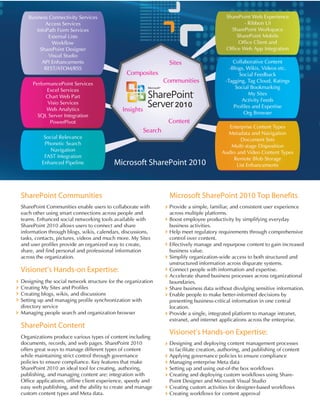
Microsoft SharePoint 2010 
SharePoint Web Experience 
- Ribbon UI 
SharePoint Workspace 
SharePoint Mobile 
Office Client and 
Office Web App Integration 
Microsoft SharePoint 2010 Top Benefits 
Provide a simple, familiar, and consistent user experience 
across multiple platforms. 
Boost employee productivity by simplifying everyday 
business activities. 
Help meet regulatory requirements through comprehensive 
control over content. 
Effectively manage and repurpose content to gain increased 
business value. 
Simplify organization-wide access to both structured and 
unstructured information across disparate systems. 
Connect people with information and expertise. 
Accelerate shared business processes across organizational 
boundaries. 
Share business data without divulging sensitive information. 
Enable people to make better-informed decisions by 
presenting business-critical information in one central 
location. 
Provide a single, integrated platform to manage intranet, 
extranet, and internet applications across the enterprise. 
Visionet’s Hands-on Expertise: 
SharePoint Communities 
SharePoint Communities enable users to collaborate with 
each other using smart connections across people and 
teams. Enhanced social networking tools available with 
SharePoint 2010 allows users to connect and share 
information through blogs, wikis, calendars, discussions, 
tasks, contacts, pictures, videos and much more. My Sites 
and user profiles provide an organized way to create, 
share, and find personal and professional information 
across the organization. 
Visionet’s Hands-on Expertise: 
Designing the social network structure for the organization 
Creating My Sites and Profiles 
Creating blogs, wikis, and discussions 
Setting up and managing profile synchronization with 
directory service 
Managing people search and organization browser 
SharePoint Content 
Organizations produce various types of content including 
documents, records, and web pages. SharePoint 2010 
offers great ways to manage different types of content 
while maintaining strict control through governance 
policies to ensure compliance. Key features that make 
SharePoint 2010 an ideal tool for creating, authoring, 
publishing, and managing content are: integration with 
Office applications, offline client experience, speedy and 
easy web publishing, and the ability to create and manage 
custom content types and Meta data. 
Designing and deploying content management processes 
to facilitate creation, authoring, and publishing of content 
Applying governance policies to ensure compliance 
Managing enterprise Meta data 
Setting up and using out-of-the box workflows 
Creating and deploying custom workflows using Share- 
Point Designer and Microsoft Visual Studio 
Creating custom activities for designer-based workflows 
Creating workflows for content approval 
PerformancePoint Services 
Excel Services 
Chart Web Part 
Visio Services 
Web Analytics 
SQL Server Integration 
PowerPivot 
Sites 
Communities 
Content 
Composites 
Insights 
Search 
Social Relevance 
Phonetic Search 
Navigation 
FAST Integration 
Enhanced Pipeline 
Collaborative Content 
-Blogs, Wikis, Videos etc. 
Social Feedback 
-Tagging, Tag Cloud, Ratings 
Social Bookmarking 
My Sites 
Activity Feeds 
Profiles and Expertise 
Org Browser 
Enterprise Content Types 
Metadata and Navigation 
Document Sets 
Multi-stage Disposition 
Audio and Video Content Types 
Remote Blob Storage 
List Enhancements 
Business Connectivity Services 
Access Services 
InfoPath Form Services 
External Lists 
Workflow 
SharePoint Designer 
Visual Studio 
API Enhancements 
REST/ATOM/RSS 
2010
SharePoint Search 
SharePoint 2010 makes it easier to find data including 
content and people. It does this by providing enhanced 
search capabilities, the ability to plug in “FAST” searches 
for SharePoint, connecting and indexing data from 
external sources, and phonetic search. 
Hands-on Expertise: 
SharePoint Insights 
SharePoint 2010 enables collaboration and analysis to 
help everyone in the organization get richer insights by 
offering excel services, new visualization, navigation, and 
BI features. These features greatly facilitate and speed up 
the business decision-making process. 
Hands-on Expertise: 
Integrating excel based data with SharePoint using excel 
services 
Creating Dashboards 
Creating Key Performance Indicators 
Integrating with SQL Server’s reporting services 
SharePoint Composites 
SharePoint 2010 serves as a platform to build and deploy 
business solutions for all types of users by providing 
powerful tools like SharePoint Designer, InfoPath Form, 
and Microsoft Access Services. Business connectivity 
services in SharePoint 2010 offer a nice way to create, 
read, update, delete and search line of business (LoB) 
data. 
Hands-on Expertise: 
SharePoint 2007 to 
SharePoint 2010 Migration 
As of today, SharePoint 2010 is the latest and the biggest 
release of SharePoint. It offers many enhancements, exciting 
new features, and powerful integration capabilities, and also 
serves as a platform for building and deploying business 
productivity solutions. All types of users can benefit from 
the new release. Organizations with an existing set up of the 
previous SharePoint release, also known as Microsoft Office 
SharePoint Server 2007, can upgrade/migrate their data to 
SharePoint 2010 and start taking advantage of the new 
powerful platform and its integrated features. 
Enhanced collaboration features: Blogs, Wikis, Discus-sions, 
Social tagging, rating and bookmarking etc. 
Visio and Access Services: Providing functionality of 
Visio and Access as web applications 
Multiple Browser Support: For extended set of web 
browsers 
Shiny New UI: Improved user interface including new 
Office style ribbon 
Web Editing: Easy and speedy site editing using online 
tools 
Rich Media Support: Including pictures, audio and 
videos 
SharePoint Designer 2010: New UI and improved 
workflow designing capabilities 
Business Connectivity Services: Evolution of Business 
Data Catalog 
SharePoint Workspace: Possibility to work offline and 
synchronize with online content later 
Usage Reporting & Logging: Consolidate and customiz-able 
usage logging and reporting facilities 
Server Health Monitoring: Identification of potential 
issues with servers and their possible solutions 
List enhancements: Support for large lists with millions 
of items 
FAST Search: Option to use FAST search capabilities 
Unattached DB recovery: Possibility of data recovery 
from unattached content databases 
Visual Upgrade: Easy migration from 2007 to 2010 
while retaining the 2007 themes and UI 
Visual Studio 2010: Visual Studio 2010 tools for 
SharePoint 2010 
LINQ: Language integrated query for SharePoint 
Developer Dashboard: Availability of advanced 
development tools 
Silver light Web Part: Possibility of using and customiz-ing 
Silver light web part 
BizTalk: Developers can seamlessly leverage BizTalk to 
access LoB through Business Connectivity Services 
1 
2 
3 
4 
5 
6 
7 
8 
9 
10 
11 
12 
13 
14 
15 
16 
17 
18 
19 
20 
Top Reasons for Migration from 
SharePoint 2007 to SharePoint 2010 
Planning searches by identifying data, rules, filters, and 
scopes 
Configuring searches and indexing content 
Defining, organizing, and managing Meta data 
Customizing advanced search capabilities of SharePoint 
Connecting to external sources to fetch search results 
using custom web parts 
Configuring and managing search scopes 
Creating and deploying solutions using SharePoint 
Designer and Visual Studio 
Importing and synchronizing LoB data. 
Using business connectivity services to give a web 
presence to LoB data 
Creating and Deploying web enabled InfoPath forms 
Managing and associating Form Templates as content 
types 
Using data connection libraries to change InfoPath data 
sources without deployment 
Creating and Managing InfoPath workflow to automate 
business processes 
Building and deploying custom solutions on top of basic 
SharePoint features
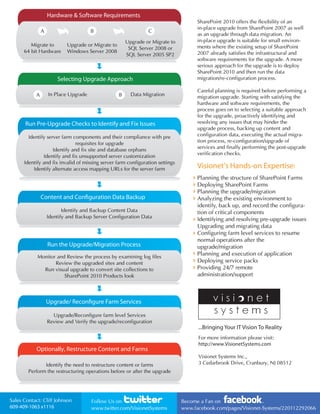
SharePoint 2010 offers the flexibility of an 
in-place upgrade from SharePoint 2007 as well 
as an upgrade through data migration. An 
in-place upgrade is suitable for small environ-ments 
where the existing setup of SharePoint 
2007 already satisfies the infrastructural and 
software requirements for the upgrade. A more 
serious approach for the upgrade is to deploy 
SharePoint 2010 and then run the data 
migration/re-configuration process. 
Careful planning is required before performing a 
migration upgrade. Starting with satisfying the 
hardware and software requirements, the 
process goes on to selecting a suitable approach 
for the upgrade, proactively identifying and 
resolving any issues that may hinder the 
upgrade process, backing up content and 
configuration data, executing the actual migra-tion 
process, re-configuration/upgrade of 
services and finally performing the post-upgrade 
verification checks. 
Visionet’s Hands-on Expertise: 
Planning the structure of SharePoint Farms 
Deploying SharePoint Farms 
Planning the upgrade/migration 
Analyzing the existing environment to 
identify, back up, and record the configura-tion 
of critical components 
Identifying and resolving pre-upgrade issues 
Upgrading and migrating data 
Configuring farm level services to resume 
normal operations after the 
upgrade/migration 
Planning and execution of application 
Deploying service packs 
Providing 24/7 remote 
administration/support 
Hardware & Software Requirements 
B C 
Upgrade or Migrate to 
Windows Server 2008 
Upgrade or Migrate to 
SQL Server 2008 or 
SQL Server 2005 SP2 
A 
64 bit Hardware 
Selecting Upgrade Approach 
Migrate to 
A In Place Upgrade B Data Migration 
Run Pre-Upgrade Checks to Identify and Fix Issues 
Identify server farm components and their compliance with pre 
requisites for upgrade 
Identify and fix site and database orphans 
Identify and fix unsupported server customization 
Identify and fix invalid of missing server farm configuration settings 
Identify alternate access mapping URLs for the server farm 
Content and Conguration Data Backup 
Identify and Backup Content Data 
Identify and Backup Server Configuration Data 
Run the Upgrade/Migration Process 
Monitor and Review the process by examining log files 
Review the upgraded sites and content 
Run visual upgrade to convert site collections to 
SharePoint 2010 Products look 
Upgrade/ Recongure Farm Services 
Upgrade/Reconfigure farm level Services 
Review and Verify the upgrade/reconfiguration 
Optionally, Restructure Content and Farms 
Identify the need to restructure content or farms 
Perform the restructuring operations before or after the upgrade 
For more information please visit: 
http://www.VisionetSystems.com 
Visionet Systems Inc., 
3 Cedarbrook Drive, Cranbury, NJ 08512 
Become a Fan on 
www.facebook.com/pages/Visionet-Systems/220112292066 
Sales Contact: Follow Us on 
609-409-1063 x1116 
www.twitter.com/VisionetSystems 
Cliff Johnson 
...Bringing Your IT Vision To Reality

Building With SharePoint Server 2010 - Visionet Systems

  • 1.
    ...Bringing Your ITVision To Reality 2010 Building With SharePoint 2010 Microsoft SharePoint 2010 is the Business Collaboration Platform for the Enterprise and Web. SharePoint 2010 focuses on three key areas: Connecting and empowering people to enhance productivity by offering improved and simplified tools to create and manage sites and associated content. Microsoft SharePoint 2010 integrates smoothly with Microsoft Office 2010 which makes it possible for users to be more productive while using a more familiar set of tools to interact with SharePoint Server. Unifying infrastructure to cut maintenance and training costs by providing an integrated set of features and the ability for organizations to build their business productivity solutions on top of the SharePoint Server. Responding rapidly to business needs by providing the ability to quickly build and deploy dynamic solutions to end users, power users and professional developers. SharePoint 2010 provides the tools to easily create business solutions that can be integrated with existing data and process. 1- 2- 3- SharePoint Sites Visionet’s Hands-on Expertise: SharePoint sites are websites that aim to be an entry point to the World-Wide Web. They typically offer search capability and links to useful pages, news, or other services. SharePoint sites can be organization-wide or global, e.g., MSN, Yahoo, and Google. SharePoint 2010 offers: a rich user experience, support for multiple browsers, mobile based interaction with people and content, MS Office integration, and collaboration across the internet, intranet, and extranet for creating, editing, and managing sites. Identifying and planning SharePoint site architecture Creating SharePoint sites Managing site structure Defining custom site templates Customizing site templates Managing site settings and features Creating custom themes
  • 2.
    Microsoft SharePoint 2010 SharePoint Web Experience - Ribbon UI SharePoint Workspace SharePoint Mobile Office Client and Office Web App Integration Microsoft SharePoint 2010 Top Benefits Provide a simple, familiar, and consistent user experience across multiple platforms. Boost employee productivity by simplifying everyday business activities. Help meet regulatory requirements through comprehensive control over content. Effectively manage and repurpose content to gain increased business value. Simplify organization-wide access to both structured and unstructured information across disparate systems. Connect people with information and expertise. Accelerate shared business processes across organizational boundaries. Share business data without divulging sensitive information. Enable people to make better-informed decisions by presenting business-critical information in one central location. Provide a single, integrated platform to manage intranet, extranet, and internet applications across the enterprise. Visionet’s Hands-on Expertise: SharePoint Communities SharePoint Communities enable users to collaborate with each other using smart connections across people and teams. Enhanced social networking tools available with SharePoint 2010 allows users to connect and share information through blogs, wikis, calendars, discussions, tasks, contacts, pictures, videos and much more. My Sites and user profiles provide an organized way to create, share, and find personal and professional information across the organization. Visionet’s Hands-on Expertise: Designing the social network structure for the organization Creating My Sites and Profiles Creating blogs, wikis, and discussions Setting up and managing profile synchronization with directory service Managing people search and organization browser SharePoint Content Organizations produce various types of content including documents, records, and web pages. SharePoint 2010 offers great ways to manage different types of content while maintaining strict control through governance policies to ensure compliance. Key features that make SharePoint 2010 an ideal tool for creating, authoring, publishing, and managing content are: integration with Office applications, offline client experience, speedy and easy web publishing, and the ability to create and manage custom content types and Meta data. Designing and deploying content management processes to facilitate creation, authoring, and publishing of content Applying governance policies to ensure compliance Managing enterprise Meta data Setting up and using out-of-the box workflows Creating and deploying custom workflows using Share- Point Designer and Microsoft Visual Studio Creating custom activities for designer-based workflows Creating workflows for content approval PerformancePoint Services Excel Services Chart Web Part Visio Services Web Analytics SQL Server Integration PowerPivot Sites Communities Content Composites Insights Search Social Relevance Phonetic Search Navigation FAST Integration Enhanced Pipeline Collaborative Content -Blogs, Wikis, Videos etc. Social Feedback -Tagging, Tag Cloud, Ratings Social Bookmarking My Sites Activity Feeds Profiles and Expertise Org Browser Enterprise Content Types Metadata and Navigation Document Sets Multi-stage Disposition Audio and Video Content Types Remote Blob Storage List Enhancements Business Connectivity Services Access Services InfoPath Form Services External Lists Workflow SharePoint Designer Visual Studio API Enhancements REST/ATOM/RSS 2010
  • 3.
    SharePoint Search SharePoint2010 makes it easier to find data including content and people. It does this by providing enhanced search capabilities, the ability to plug in “FAST” searches for SharePoint, connecting and indexing data from external sources, and phonetic search. Hands-on Expertise: SharePoint Insights SharePoint 2010 enables collaboration and analysis to help everyone in the organization get richer insights by offering excel services, new visualization, navigation, and BI features. These features greatly facilitate and speed up the business decision-making process. Hands-on Expertise: Integrating excel based data with SharePoint using excel services Creating Dashboards Creating Key Performance Indicators Integrating with SQL Server’s reporting services SharePoint Composites SharePoint 2010 serves as a platform to build and deploy business solutions for all types of users by providing powerful tools like SharePoint Designer, InfoPath Form, and Microsoft Access Services. Business connectivity services in SharePoint 2010 offer a nice way to create, read, update, delete and search line of business (LoB) data. Hands-on Expertise: SharePoint 2007 to SharePoint 2010 Migration As of today, SharePoint 2010 is the latest and the biggest release of SharePoint. It offers many enhancements, exciting new features, and powerful integration capabilities, and also serves as a platform for building and deploying business productivity solutions. All types of users can benefit from the new release. Organizations with an existing set up of the previous SharePoint release, also known as Microsoft Office SharePoint Server 2007, can upgrade/migrate their data to SharePoint 2010 and start taking advantage of the new powerful platform and its integrated features. Enhanced collaboration features: Blogs, Wikis, Discus-sions, Social tagging, rating and bookmarking etc. Visio and Access Services: Providing functionality of Visio and Access as web applications Multiple Browser Support: For extended set of web browsers Shiny New UI: Improved user interface including new Office style ribbon Web Editing: Easy and speedy site editing using online tools Rich Media Support: Including pictures, audio and videos SharePoint Designer 2010: New UI and improved workflow designing capabilities Business Connectivity Services: Evolution of Business Data Catalog SharePoint Workspace: Possibility to work offline and synchronize with online content later Usage Reporting & Logging: Consolidate and customiz-able usage logging and reporting facilities Server Health Monitoring: Identification of potential issues with servers and their possible solutions List enhancements: Support for large lists with millions of items FAST Search: Option to use FAST search capabilities Unattached DB recovery: Possibility of data recovery from unattached content databases Visual Upgrade: Easy migration from 2007 to 2010 while retaining the 2007 themes and UI Visual Studio 2010: Visual Studio 2010 tools for SharePoint 2010 LINQ: Language integrated query for SharePoint Developer Dashboard: Availability of advanced development tools Silver light Web Part: Possibility of using and customiz-ing Silver light web part BizTalk: Developers can seamlessly leverage BizTalk to access LoB through Business Connectivity Services 1 2 3 4 5 6 7 8 9 10 11 12 13 14 15 16 17 18 19 20 Top Reasons for Migration from SharePoint 2007 to SharePoint 2010 Planning searches by identifying data, rules, filters, and scopes Configuring searches and indexing content Defining, organizing, and managing Meta data Customizing advanced search capabilities of SharePoint Connecting to external sources to fetch search results using custom web parts Configuring and managing search scopes Creating and deploying solutions using SharePoint Designer and Visual Studio Importing and synchronizing LoB data. Using business connectivity services to give a web presence to LoB data Creating and Deploying web enabled InfoPath forms Managing and associating Form Templates as content types Using data connection libraries to change InfoPath data sources without deployment Creating and Managing InfoPath workflow to automate business processes Building and deploying custom solutions on top of basic SharePoint features
  • 4.
    SharePoint 2010 offersthe flexibility of an in-place upgrade from SharePoint 2007 as well as an upgrade through data migration. An in-place upgrade is suitable for small environ-ments where the existing setup of SharePoint 2007 already satisfies the infrastructural and software requirements for the upgrade. A more serious approach for the upgrade is to deploy SharePoint 2010 and then run the data migration/re-configuration process. Careful planning is required before performing a migration upgrade. Starting with satisfying the hardware and software requirements, the process goes on to selecting a suitable approach for the upgrade, proactively identifying and resolving any issues that may hinder the upgrade process, backing up content and configuration data, executing the actual migra-tion process, re-configuration/upgrade of services and finally performing the post-upgrade verification checks. Visionet’s Hands-on Expertise: Planning the structure of SharePoint Farms Deploying SharePoint Farms Planning the upgrade/migration Analyzing the existing environment to identify, back up, and record the configura-tion of critical components Identifying and resolving pre-upgrade issues Upgrading and migrating data Configuring farm level services to resume normal operations after the upgrade/migration Planning and execution of application Deploying service packs Providing 24/7 remote administration/support Hardware & Software Requirements B C Upgrade or Migrate to Windows Server 2008 Upgrade or Migrate to SQL Server 2008 or SQL Server 2005 SP2 A 64 bit Hardware Selecting Upgrade Approach Migrate to A In Place Upgrade B Data Migration Run Pre-Upgrade Checks to Identify and Fix Issues Identify server farm components and their compliance with pre requisites for upgrade Identify and fix site and database orphans Identify and fix unsupported server customization Identify and fix invalid of missing server farm configuration settings Identify alternate access mapping URLs for the server farm Content and Conguration Data Backup Identify and Backup Content Data Identify and Backup Server Configuration Data Run the Upgrade/Migration Process Monitor and Review the process by examining log files Review the upgraded sites and content Run visual upgrade to convert site collections to SharePoint 2010 Products look Upgrade/ Recongure Farm Services Upgrade/Reconfigure farm level Services Review and Verify the upgrade/reconfiguration Optionally, Restructure Content and Farms Identify the need to restructure content or farms Perform the restructuring operations before or after the upgrade For more information please visit: http://www.VisionetSystems.com Visionet Systems Inc., 3 Cedarbrook Drive, Cranbury, NJ 08512 Become a Fan on www.facebook.com/pages/Visionet-Systems/220112292066 Sales Contact: Follow Us on 609-409-1063 x1116 www.twitter.com/VisionetSystems Cliff Johnson ...Bringing Your IT Vision To Reality