

Top 10 in
SharePoint
2013                                Cory Peters


                                         Chief
                                       SharePoint
                                        Architect
       Eastridge Technology, Inc.
About Me
My Site
My Site Changes
• No longer branded “My Site” for end users
• Feels like multiple fragments rather than a single
  site but much more “mine” than 2010
• Now called
   •   About Me
   •   Newsfeed
   •   SkyDrive
   •   Tasks
   •   Sites
• Very confusing navigation
• We’ll probably still call it “My Site”
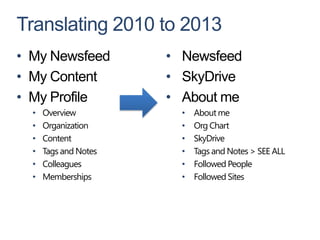
Translating 2010 to 2013
• My Newsfeed          • Newsfeed
• My Content           • SkyDrive
• My Profile           • About me
  •   Overview           •   About me
  •   Organization       •   Org Chart
  •   Content            •   SkyDrive
  •   Tags and Notes     •   Tags and Notes > SEE ALL
  •   Colleagues         •   Followed People
  •   Memberships        •   Followed Sites
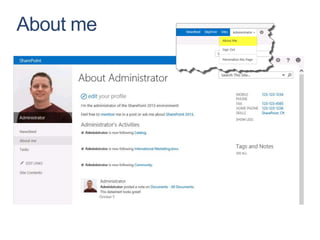
About me
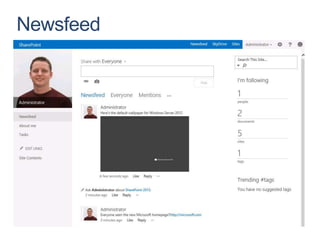
Newsfeed
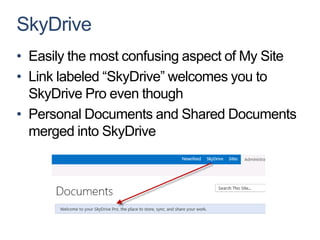
SkyDrive
• Easily the most confusing aspect of My Site
• Link labeled “SkyDrive” welcomes you to
  SkyDrive Pro even though
• Personal Documents and Shared Documents
  merged into SkyDrive
Tasks
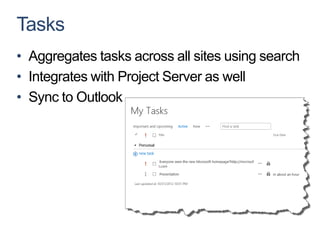
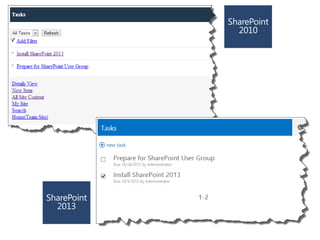
• Aggregates tasks across all sites using search
• Integrates with Project Server as well
• Sync to Outlook
Sites
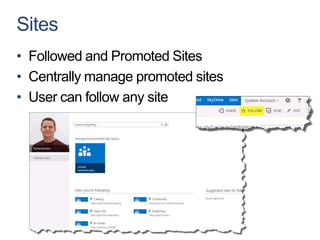
• Followed and Promoted Sites
• Centrally manage promoted sites
• User can follow any site
Social
Social in a Nutshell
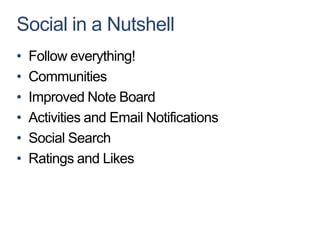
•   Follow everything!
•   Communities
•   Improved Note Board
•   Activities and Email Notifications
•   Social Search
•   Ratings and Likes
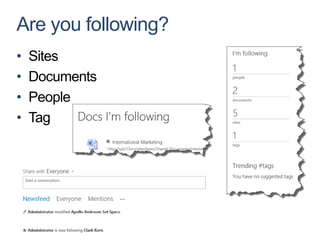
Are you following?
•   Sites
•   Documents
•   People
•   Tag
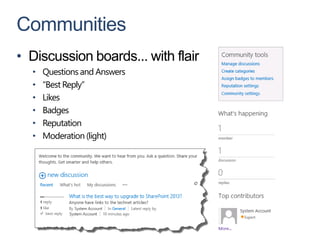
Communities
• Discussion boards... with flair
  •   Questions and Answers
  •   “Best Reply”
  •   Likes
  •   Badges
  •   Reputation
  •   Moderation (light)
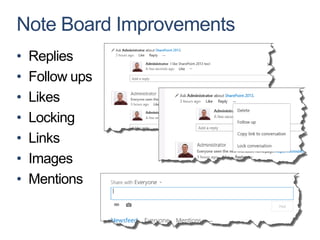
Note Board Improvements
•   Replies
•   Follow ups
•   Likes
•   Locking
•   Links
•   Images
•   Mentions
Activities and Email Notifications
• New Activities
  • Following tags, people, documents and sites
  • Community participation

• New Email Notifications
  • Someone follows you
  • Mentions
  • Replies to my conversations and community posts
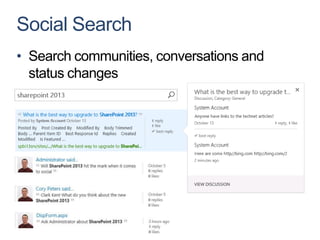
Social Search
• Search communities, conversations and
  status changes
Sharing


Better known as site permissions
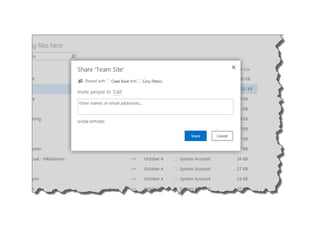
What is Sharing?
Redesign of site permissions to solve 5 main
problems
1. Users don’t understand “Contributor”, “Reader”,
   “Owner”
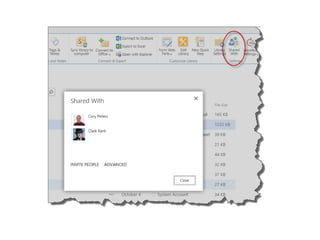
2. Users don’t know who has access to the content
   they are uploading
3. Users don’t know what will happen when they
   add another user to a SharePoint group
4. Hard to ask for additional access
5. Security is hard to manage
Mobile
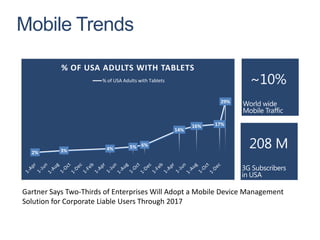
Mobile Trends

           % OF USA ADULTS WITH TABLETS
                       % of USA Adults with Tablets


                                                                   29%


                                                            16%   17%
                                                      14%


                        4%         5% 6%
  2%       3%


Gartner Says Two-Thirds of Enterprises Will Adopt a Mobile Device Management
Solution for Corporate Liable Users Through 2017
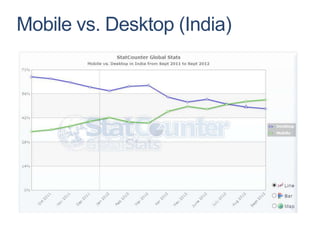
Mobile vs. Desktop (India)
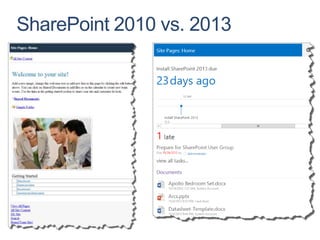
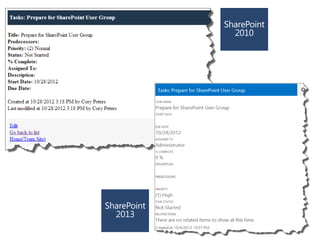
SharePoint 2010 vs. 2013
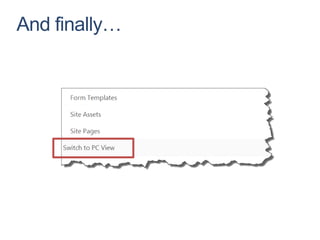
And finally…
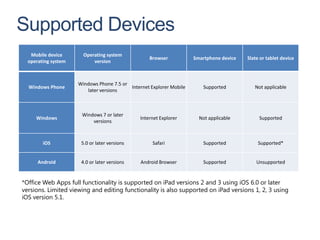
Supported Devices
   Mobile device       Operating system
                                                   Browser           Smartphone device   Slate or tablet device
  operating system         version


                     Windows Phone 7.5 or
  Windows Phone                           Internet Explorer Mobile      Supported           Not applicable
                        later versions


                      Windows 7 or later
     Windows                                   Internet Explorer       Not applicable         Supported
                          versions


        iOS           5.0 or later versions         Safari              Supported             Supported*


      Android         4.0 or later versions    Android Browser          Supported            Unsupported


*Office Web Apps full functionality is supported on iPad versions 2 and 3 using iOS 6.0 or later
versions. Limited viewing and editing functionality is also supported on iPad versions 1, 2, 3 using
iOS version 5.1.
Managed Navigation
Geolocation
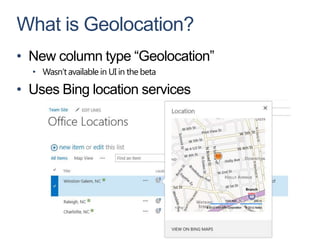
What is Geolocation?
• New column type “Geolocation”
  • Wasn’t available in UI in the beta

• Uses Bing location services
Demo
Content Search Web Part


Cross site collection queries
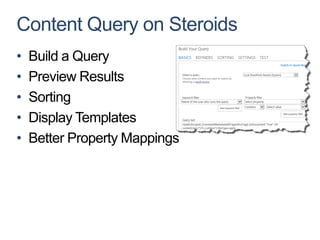
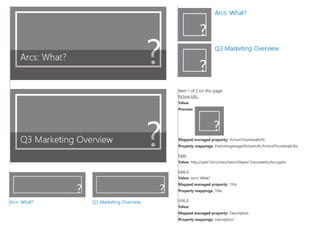
Content Query on Steroids
•   Build a Query
•   Preview Results
•   Sorting
•   Display Templates
•   Better Property Mappings
Demo
Apps for Office and
SharePoint
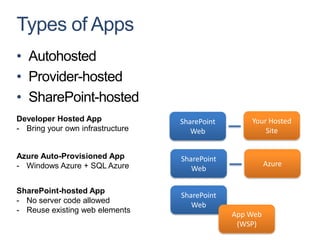
Types of Apps
• Autohosted
• Provider-hosted
• SharePoint-hosted
Developer Hosted App              SharePoint       Your Hosted
- Bring your own infrastructure      Web               Site


Azure Auto-Provisioned App        SharePoint
- Windows Azure + SQL Azure                              Azure
                                     Web

SharePoint-hosted App
                                  SharePoint
- No server code allowed
                                     Web
- Reuse existing web elements
                                               App Web
                                                (WSP)
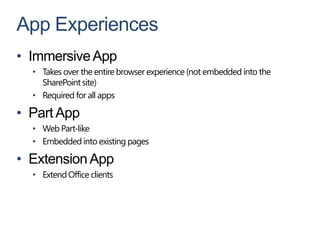
App Experiences
• Immersive App
  • Takes over the entire browser experience (not embedded into the
    SharePoint site)
  • Required for all apps

• Part App
  • Web Part-like
  • Embedded into existing pages

• Extension App
  • Extend Office clients
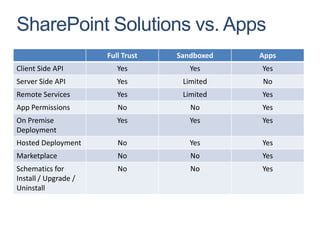
SharePoint Solutions vs. Apps
                      Full Trust   Sandboxed   Apps
Client Side API          Yes          Yes      Yes
Server Side API          Yes        Limited    No
Remote Services          Yes        Limited    Yes
App Permissions          No           No       Yes
On Premise               Yes          Yes      Yes
Deployment
Hosted Deployment        No           Yes      Yes
Marketplace              No           No       Yes
Schematics for           No           No       Yes
Install / Upgrade /
Uninstall
Offline
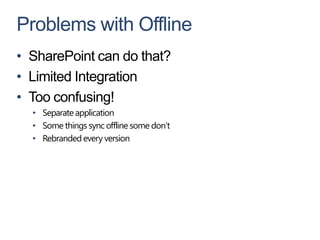
Problems with Offline
• SharePoint can do that?
• Limited Integration
• Too confusing!
  • Separate application
  • Some things sync offline some don’t
  • Rebranded every version
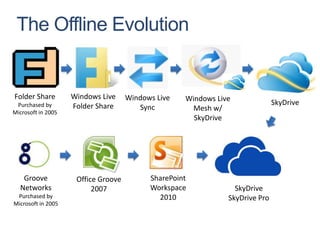
The Offline Evolution


Folder Share        Windows Live     Windows Live   Windows Live
 Purchased by       Folder Share                                              SkyDrive
                                        Sync          Mesh w/
Microsoft in 2005
                                                      SkyDrive


   Groove            Office Groove         SharePoint
  Networks                2007             Workspace             SkyDrive
 Purchased by                                2010              SkyDrive Pro
Microsoft in 2005
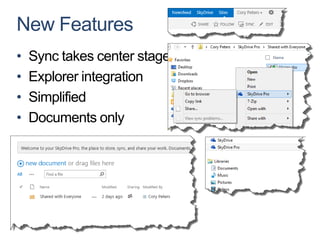
New Features
•   Sync takes center stage
•   Explorer integration
•   Simplified
•   Documents only
Search
What’s new in Search?
•   Document Previews*
•   Social Search
•   Personalized Query Suggestions
•   Continuous Crawl
•   Remote SharePoint Index
•   Improved Refiners
•   Scopes are now Result Sources
    • Can be managed on the site collection level
    • Exchange added
    • Support query transformations
Search Demo
Shredded Storage
Shredded Storage – What and
Why
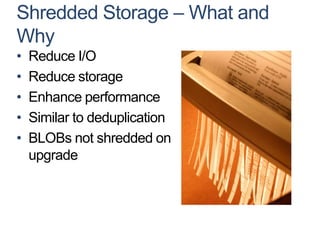
•   Reduce I/O
•   Reduce storage
•   Enhance performance
•   Similar to deduplication
•   BLOBs not shredded on
    upgrade
Document With Three Versions

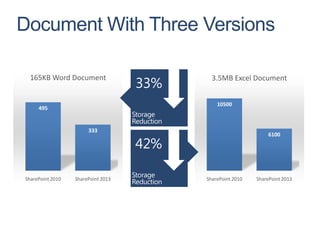
 165KB Word Document                  3.5MB Excel Document


                                        10500
     495


                       333
                                                          6100


SharePoint 2010   SharePoint 2013   SharePoint 2010   SharePoint 2013
Document With Three Versions
(Cont.)
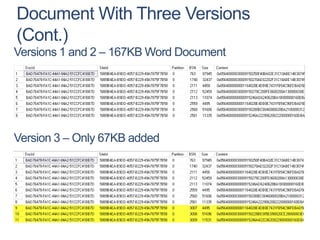
Versions 1 and 2 – 167KB Word Document


Version 3 – Only 67KB added
102 West Third Street


                                            ?
                                                              Suite 1250

      Questions                                               Winston-Salem, NC
                                                              27101

                                                              (336) 831-9800


                                       Eastridge Technology, Inc.
EastridgeTechnology   @EastridgeTech                www.eastridge.net

Top 10 in SharePoint 2013

  • 1.
    Top 10 in SharePoint 2013 Cory Peters Chief SharePoint Architect Eastridge Technology, Inc.
  • 2.
  • 3.
  • 4.
    My Site Changes •No longer branded “My Site” for end users • Feels like multiple fragments rather than a single site but much more “mine” than 2010 • Now called • About Me • Newsfeed • SkyDrive • Tasks • Sites • Very confusing navigation • We’ll probably still call it “My Site”
  • 5.
    Translating 2010 to2013 • My Newsfeed • Newsfeed • My Content • SkyDrive • My Profile • About me • Overview • About me • Organization • Org Chart • Content • SkyDrive • Tags and Notes • Tags and Notes > SEE ALL • Colleagues • Followed People • Memberships • Followed Sites
  • 6.
  • 7.
  • 8.
    SkyDrive • Easily themost confusing aspect of My Site • Link labeled “SkyDrive” welcomes you to SkyDrive Pro even though • Personal Documents and Shared Documents merged into SkyDrive
  • 9.
    Tasks • Aggregates tasksacross all sites using search • Integrates with Project Server as well • Sync to Outlook
  • 10.
    Sites • Followed andPromoted Sites • Centrally manage promoted sites • User can follow any site
  • 11.
  • 12.
    Social in aNutshell • Follow everything! • Communities • Improved Note Board • Activities and Email Notifications • Social Search • Ratings and Likes
  • 13.
    Are you following? • Sites • Documents • People • Tag
  • 14.
    Communities • Discussion boards...with flair • Questions and Answers • “Best Reply” • Likes • Badges • Reputation • Moderation (light)
  • 15.
    Note Board Improvements • Replies • Follow ups • Likes • Locking • Links • Images • Mentions
  • 16.
    Activities and EmailNotifications • New Activities • Following tags, people, documents and sites • Community participation • New Email Notifications • Someone follows you • Mentions • Replies to my conversations and community posts
  • 17.
    Social Search • Searchcommunities, conversations and status changes
  • 18.
    Sharing Better known assite permissions
  • 19.
    What is Sharing? Redesignof site permissions to solve 5 main problems 1. Users don’t understand “Contributor”, “Reader”, “Owner” 2. Users don’t know who has access to the content they are uploading 3. Users don’t know what will happen when they add another user to a SharePoint group 4. Hard to ask for additional access 5. Security is hard to manage
  • 22.
  • 23.
    Mobile Trends % OF USA ADULTS WITH TABLETS % of USA Adults with Tablets 29% 16% 17% 14% 4% 5% 6% 2% 3% Gartner Says Two-Thirds of Enterprises Will Adopt a Mobile Device Management Solution for Corporate Liable Users Through 2017
  • 24.
  • 25.
  • 28.
  • 29.
    Supported Devices Mobile device Operating system Browser Smartphone device Slate or tablet device operating system version Windows Phone 7.5 or Windows Phone Internet Explorer Mobile Supported Not applicable later versions Windows 7 or later Windows Internet Explorer Not applicable Supported versions iOS 5.0 or later versions Safari Supported Supported* Android 4.0 or later versions Android Browser Supported Unsupported *Office Web Apps full functionality is supported on iPad versions 2 and 3 using iOS 6.0 or later versions. Limited viewing and editing functionality is also supported on iPad versions 1, 2, 3 using iOS version 5.1.
  • 30.
  • 31.
    What is Geolocation? •New column type “Geolocation” • Wasn’t available in UI in the beta • Uses Bing location services
  • 32.
  • 33.
    Content Search WebPart Cross site collection queries
  • 34.
    Content Query onSteroids • Build a Query • Preview Results • Sorting • Display Templates • Better Property Mappings
  • 36.
  • 37.
    Apps for Officeand SharePoint
  • 38.
    Types of Apps •Autohosted • Provider-hosted • SharePoint-hosted Developer Hosted App SharePoint Your Hosted - Bring your own infrastructure Web Site Azure Auto-Provisioned App SharePoint - Windows Azure + SQL Azure Azure Web SharePoint-hosted App SharePoint - No server code allowed Web - Reuse existing web elements App Web (WSP)
  • 39.
    App Experiences • ImmersiveApp • Takes over the entire browser experience (not embedded into the SharePoint site) • Required for all apps • Part App • Web Part-like • Embedded into existing pages • Extension App • Extend Office clients
  • 40.
    SharePoint Solutions vs.Apps Full Trust Sandboxed Apps Client Side API Yes Yes Yes Server Side API Yes Limited No Remote Services Yes Limited Yes App Permissions No No Yes On Premise Yes Yes Yes Deployment Hosted Deployment No Yes Yes Marketplace No No Yes Schematics for No No Yes Install / Upgrade / Uninstall
  • 41.
  • 42.
    Problems with Offline •SharePoint can do that? • Limited Integration • Too confusing! • Separate application • Some things sync offline some don’t • Rebranded every version
  • 43.
    The Offline Evolution FolderShare Windows Live Windows Live Windows Live Purchased by Folder Share SkyDrive Sync Mesh w/ Microsoft in 2005 SkyDrive Groove Office Groove SharePoint Networks 2007 Workspace SkyDrive Purchased by 2010 SkyDrive Pro Microsoft in 2005
  • 44.
    New Features • Sync takes center stage • Explorer integration • Simplified • Documents only
  • 45.
  • 46.
    What’s new inSearch? • Document Previews* • Social Search • Personalized Query Suggestions • Continuous Crawl • Remote SharePoint Index • Improved Refiners • Scopes are now Result Sources • Can be managed on the site collection level • Exchange added • Support query transformations
  • 47.
  • 48.
  • 49.
    Shredded Storage –What and Why • Reduce I/O • Reduce storage • Enhance performance • Similar to deduplication • BLOBs not shredded on upgrade
  • 50.
    Document With ThreeVersions 165KB Word Document 3.5MB Excel Document 10500 495 333 6100 SharePoint 2010 SharePoint 2013 SharePoint 2010 SharePoint 2013
  • 51.
    Document With ThreeVersions (Cont.) Versions 1 and 2 – 167KB Word Document Version 3 – Only 67KB added
  • 52.
    102 West ThirdStreet ? Suite 1250 Questions Winston-Salem, NC 27101 (336) 831-9800 Eastridge Technology, Inc. EastridgeTechnology @EastridgeTech www.eastridge.net

Editor's Notes

  • #4 CloudShare
  • #9 Anytime you sync a SharePoint site for offline you use “SkyDrive Pro”Anytime you use your personal live account you use “SkyDrive”
  • #10 If SkyDrive is the most confusing then Tasks is the most awesome
  • #12 CloudShare
  • #20 1)What does “owner” mean?What can a owner do that a contributor can’t?2)Who can see these documents?How can I be sure?Can you run a report for me?3)As IT, we typically create groups and train the users where to put new users but they only do what they are told. They rarely understand why and almost never understand the underlying permission model.4)You can only request access if you have no access at allNot obvious way to ask for additional access
  • #23 CloudShare
  • #24 Population, 2011 estimate311,591,917
  • #34 Cloud Share
  • #42 CloudShare
  • #47 *Requires Office Web Apps which requires additional hardware now. Also must be using Claims Authentication, Windows Authentication not supported and deprecated in 2013.
  • #48 CloudShare
  • #49 ImpactSerious potential storage saving impact, we’ll discuss laterRatingWow, that’s coolAudienceIT
  • #50 What is shredded storage?Imagine running document through shredder.Split into 16 pieces (example)When a document is modified only store the shreds that changedWhy is it important?Reduce I/OReduce storageEnhance performanceSimilar to deduplicationBLOBs not shredded on upgrade