From SharePoint Foundation to SharePoint ServerDaniel Cohen-DumaniPortal SolutionsWelcome to SharePoint Saturday – Washington DC
Welcome to SharePoint Saturday – Washington DCThank you for being a part of the largest SharePoint Saturday ever!Please turn off all electronic devices or set them to vibrate.If you must take a phone call, please do so in the hall so as not to disturb others.Open wireless access will time out after 40 minutesFeel free to “tweet and blog” during the sessionThanks to our Platinum Sponsors:
AgendaLittle bit about me
Some history
Introduction to SharePoint Foundation
Introduction to SharePoint Server
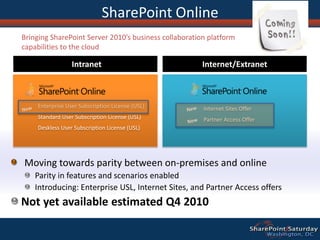
Introduction to SharePoint Online
What are the differences
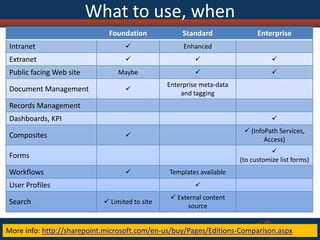
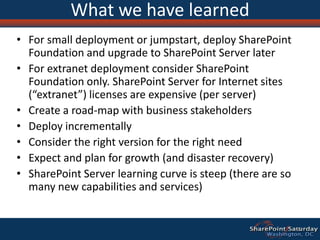
What to use and when
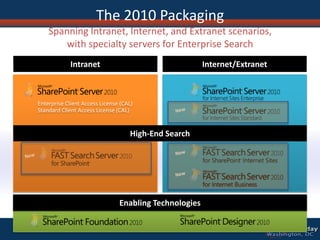
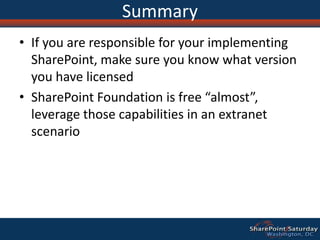
Packaging and Licensing
QuestionsLittle about meI was born and raised in Switzerland and move to the US in 1997
I have four kids
I founded my company in 2001 (right when SharePoint came out)
I love to educate customers and partners on what SharePoint an do for them
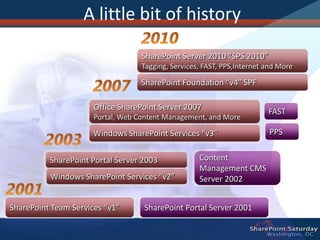
I have seen SharePoint grew from “nobody wanted to talk about it” to “I don’t think there is any other alternative” A little bit of historyContent Management CMS Server 2002FASTSharePoint Portal Server 2003Windows SharePoint Services “v2”PPSSharePoint Team Services “v1”SharePoint Portal Server 20012010SharePoint Server 2010 “SPS 2010”Tagging, Services, FAST, PPS,Internetand MoreSharePoint Foundation “v4” SPF2007Office SharePoint Server 2007Portal, Web Content Management, and MoreWindows SharePoint Services “v3”20032001
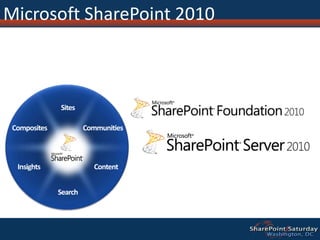
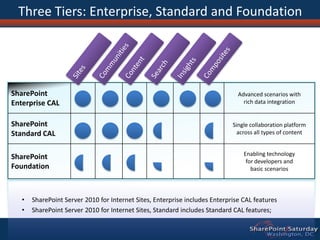
Microsoft SharePoint 2010SitesCommunitiesCompositesContentInsightsSearch
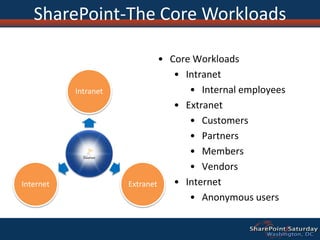
Core Workloads
Intranet
Internal employees
Extranet
Customers
Partners
Members
Vendors
Internet
Anonymous usersSharePoint-The Core Workloads
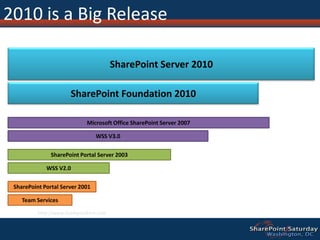
2010 is a Big ReleaseSharePoint Server 2010SharePoint Foundation 2010Microsoft Office SharePoint Server 2007WSS V3.0SharePoint Portal Server 2003WSS V2.0SharePoint Portal Server 2001Team Serviceshttp://www.sharepointmn.com
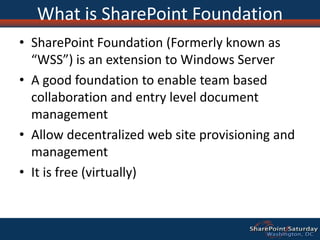
What is SharePoint FoundationSharePoint Foundation (Formerly known as “WSS”) is an extension to Windows Server A good foundation to enable team based collaboration and entry level document managementAllow decentralized web site provisioning and managementIt is free (virtually)
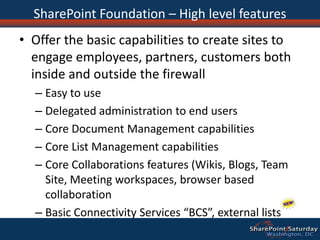
SharePoint Foundation – High level featuresOffer the basic capabilities to create sites to engage employees, partners, customers both inside and outside the firewallEasy to useDelegated administration to end usersCore Document Management capabilitiesCore List Management capabilitiesCore Collaborations features (Wikis, Blogs, Team Site, Meeting workspaces, browser based collaborationBasic Connectivity Services “BCS”, external lists
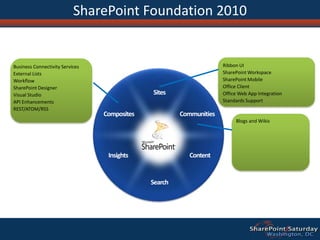
SharePoint Foundation 2010Ribbon UISharePoint WorkspaceSharePoint MobileOffice ClientOffice Web App IntegrationStandards SupportBusiness Connectivity ServicesExternal ListsWorkflowSharePoint DesignerVisual StudioAPI EnhancementsREST/ATOM/RSSSitesCommunitiesCompositesBlogs and WikisContentInsightsSearch
SharePoint FOUNDATION DEMORibbon UISite Editing Wikis/BlogsSilverlight Web PartTheming
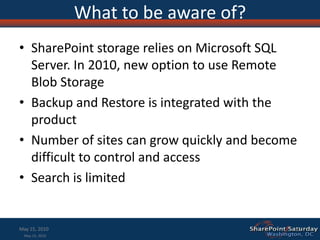
What to be aware of?SharePoint storage relies on Microsoft SQL Server. In 2010, new option to use Remote Blob StorageBackup and Restore is integrated with the productNumber of sites can grow quickly and become difficult to control and accessSearch is limitedMay 15, 2010May 15, 201013
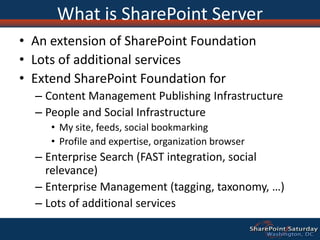
What is SharePoint ServerAn extension of SharePoint Foundation
Lots of additional services
Extend SharePoint Foundation for
Content Management Publishing Infrastructure
People and Social Infrastructure
My site, feeds, social bookmarking
Profile and expertise, organization browser
Enterprise Search (FAST integration, social relevance)
Enterprise Management (tagging, taxonomy, …)
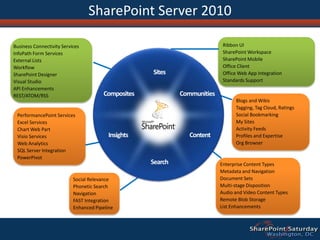
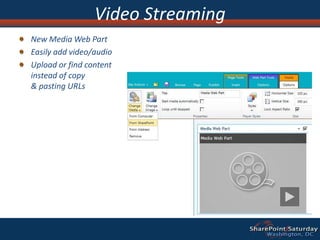
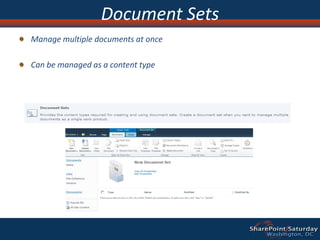
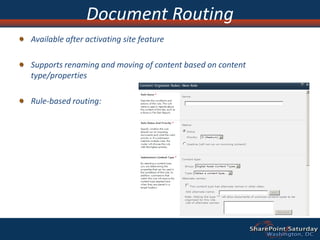
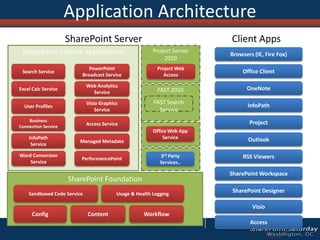
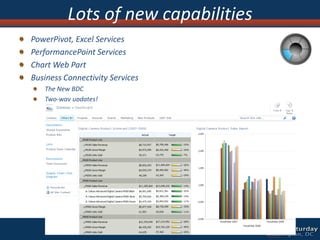
Lots of additional servicesSharePoint Server 2010Ribbon UISharePoint WorkspaceSharePoint MobileOffice ClientOffice Web App IntegrationStandards SupportBusiness Connectivity ServicesInfoPath Form ServicesExternal ListsWorkflowSharePoint DesignerVisual StudioAPI EnhancementsREST/ATOM/RSSSitesBlogs and WikisTagging, Tag Cloud, RatingsSocial BookmarkingMy SitesActivity FeedsProfiles and ExpertiseOrg BrowserCommunitiesCompositesPerformancePoint ServicesExcel ServicesChart Web PartVisio ServicesWeb AnalyticsSQL Server IntegrationPowerPivotContentInsightsEnterprise Content TypesMetadata and NavigationDocument SetsMulti-stage DispositionAudio and Video Content TypesRemote Blob StorageList EnhancementsSocial RelevancePhonetic SearchNavigationFAST IntegrationEnhanced PipelineSearch
The basic capabilities required to use SharePoint sites to engage employees, partners and customers in an effective manner, both inside and outside the firewallMost of the features found SharePoint FoundationWhat are Sites?
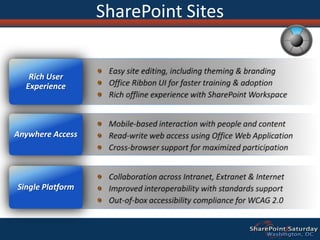
SharePoint SitesEasy site editing, including theming & brandingOffice Ribbon UI for faster training & adoptionRich offline experience with SharePoint WorkspaceRich User ExperienceAnywhere AccessMobile-based interaction with people and contentRead-write web access using Office Web ApplicationCross-browser support for maximized participationSingle PlatformCollaboration across Intranet, Extranet & InternetImproved interoperability with standards supportOut-of-box accessibility compliance for WCAG 2.0
Communities
The ability to easily access expertise and interact with other people in new and creative ways across the enterprise through both formal and informal networksIn previous version of SharePoint “Collaboration”What are Communities?
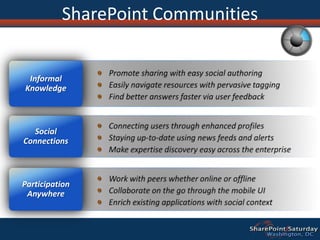
SharePoint CommunitiesPromote sharing with easy social authoringEasily navigate resources with pervasive taggingFind better answers faster via user feedbackInformal KnowledgeSocial ConnectionsConnecting users through enhanced profilesStaying up-to-date using news feeds and alertsMake expertise discovery easy across the enterpriseParticipation AnywhereWork with peers whether online or offlineCollaborate on the go through the mobile UIEnrich existing applications with social context
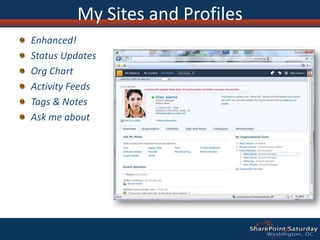
Enhanced!Status UpdatesOrg ChartActivity FeedsTags & NotesAsk me aboutMy Sites and Profiles
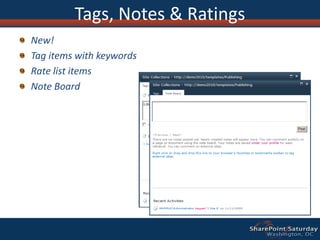
New! Tag items with keywordsRate list itemsNote BoardTags, Notes & Ratings
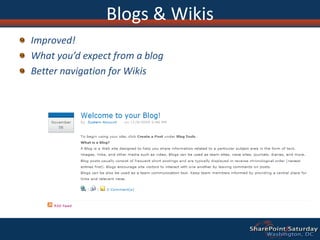
Improved!What you’d expect from a blogBetter navigation for WikisBlogs & Wikis
http://www.sharepointmn.comContent
The facilities for the creation, review, publication and disposal of content including conforming to defined compliance rules, whether the content exists as traditional documents or as Web pages.  SharePoint 2010’s content-management capabilities include document management, records management, and Web-content management.  In SharePoint 2007 “Content Management”What is Content?

SharePoint Saturday DC, From SharePoint Foundation to SharePoint Server

  • 1.
    From SharePoint Foundationto SharePoint ServerDaniel Cohen-DumaniPortal SolutionsWelcome to SharePoint Saturday – Washington DC
  • 2.
    Welcome to SharePointSaturday – Washington DCThank you for being a part of the largest SharePoint Saturday ever!Please turn off all electronic devices or set them to vibrate.If you must take a phone call, please do so in the hall so as not to disturb others.Open wireless access will time out after 40 minutesFeel free to “tweet and blog” during the sessionThanks to our Platinum Sponsors:
  • 3.
  • 4.
  • 5.
  • 6.
  • 7.
  • 8.
    What are thedifferences
  • 9.
    What to useand when
  • 10.
  • 11.
    QuestionsLittle about meIwas born and raised in Switzerland and move to the US in 1997
  • 12.
  • 13.
    I founded mycompany in 2001 (right when SharePoint came out)
  • 14.
    I love toeducate customers and partners on what SharePoint an do for them
  • 15.
    I have seenSharePoint grew from “nobody wanted to talk about it” to “I don’t think there is any other alternative” A little bit of historyContent Management CMS Server 2002FASTSharePoint Portal Server 2003Windows SharePoint Services “v2”PPSSharePoint Team Services “v1”SharePoint Portal Server 20012010SharePoint Server 2010 “SPS 2010”Tagging, Services, FAST, PPS,Internetand MoreSharePoint Foundation “v4” SPF2007Office SharePoint Server 2007Portal, Web Content Management, and MoreWindows SharePoint Services “v3”20032001
  • 16.
  • 17.
  • 18.
  • 19.
  • 20.
  • 21.
  • 22.
  • 23.
  • 24.
  • 25.
  • 26.
  • 27.
    2010 is aBig ReleaseSharePoint Server 2010SharePoint Foundation 2010Microsoft Office SharePoint Server 2007WSS V3.0SharePoint Portal Server 2003WSS V2.0SharePoint Portal Server 2001Team Serviceshttp://www.sharepointmn.com
  • 28.
    What is SharePointFoundationSharePoint Foundation (Formerly known as “WSS”) is an extension to Windows Server A good foundation to enable team based collaboration and entry level document managementAllow decentralized web site provisioning and managementIt is free (virtually)
  • 29.
    SharePoint Foundation –High level featuresOffer the basic capabilities to create sites to engage employees, partners, customers both inside and outside the firewallEasy to useDelegated administration to end usersCore Document Management capabilitiesCore List Management capabilitiesCore Collaborations features (Wikis, Blogs, Team Site, Meeting workspaces, browser based collaborationBasic Connectivity Services “BCS”, external lists
  • 30.
    SharePoint Foundation 2010RibbonUISharePoint WorkspaceSharePoint MobileOffice ClientOffice Web App IntegrationStandards SupportBusiness Connectivity ServicesExternal ListsWorkflowSharePoint DesignerVisual StudioAPI EnhancementsREST/ATOM/RSSSitesCommunitiesCompositesBlogs and WikisContentInsightsSearch
  • 31.
    SharePoint FOUNDATION DEMORibbonUISite Editing Wikis/BlogsSilverlight Web PartTheming
  • 32.
    What to beaware of?SharePoint storage relies on Microsoft SQL Server. In 2010, new option to use Remote Blob StorageBackup and Restore is integrated with the productNumber of sites can grow quickly and become difficult to control and accessSearch is limitedMay 15, 2010May 15, 201013
  • 33.
    What is SharePointServerAn extension of SharePoint Foundation
  • 34.
  • 35.
  • 36.
  • 37.
    People and SocialInfrastructure
  • 38.
    My site, feeds,social bookmarking
  • 39.
    Profile and expertise,organization browser
  • 40.
    Enterprise Search (FASTintegration, social relevance)
  • 41.
  • 42.
    Lots of additionalservicesSharePoint Server 2010Ribbon UISharePoint WorkspaceSharePoint MobileOffice ClientOffice Web App IntegrationStandards SupportBusiness Connectivity ServicesInfoPath Form ServicesExternal ListsWorkflowSharePoint DesignerVisual StudioAPI EnhancementsREST/ATOM/RSSSitesBlogs and WikisTagging, Tag Cloud, RatingsSocial BookmarkingMy SitesActivity FeedsProfiles and ExpertiseOrg BrowserCommunitiesCompositesPerformancePoint ServicesExcel ServicesChart Web PartVisio ServicesWeb AnalyticsSQL Server IntegrationPowerPivotContentInsightsEnterprise Content TypesMetadata and NavigationDocument SetsMulti-stage DispositionAudio and Video Content TypesRemote Blob StorageList EnhancementsSocial RelevancePhonetic SearchNavigationFAST IntegrationEnhanced PipelineSearch
  • 43.
    The basic capabilitiesrequired to use SharePoint sites to engage employees, partners and customers in an effective manner, both inside and outside the firewallMost of the features found SharePoint FoundationWhat are Sites?
  • 44.
    SharePoint SitesEasy siteediting, including theming & brandingOffice Ribbon UI for faster training & adoptionRich offline experience with SharePoint WorkspaceRich User ExperienceAnywhere AccessMobile-based interaction with people and contentRead-write web access using Office Web ApplicationCross-browser support for maximized participationSingle PlatformCollaboration across Intranet, Extranet & InternetImproved interoperability with standards supportOut-of-box accessibility compliance for WCAG 2.0
  • 45.
  • 46.
    The ability toeasily access expertise and interact with other people in new and creative ways across the enterprise through both formal and informal networksIn previous version of SharePoint “Collaboration”What are Communities?
  • 47.
    SharePoint CommunitiesPromote sharingwith easy social authoringEasily navigate resources with pervasive taggingFind better answers faster via user feedbackInformal KnowledgeSocial ConnectionsConnecting users through enhanced profilesStaying up-to-date using news feeds and alertsMake expertise discovery easy across the enterpriseParticipation AnywhereWork with peers whether online or offlineCollaborate on the go through the mobile UIEnrich existing applications with social context
  • 48.
    Enhanced!Status UpdatesOrg ChartActivityFeedsTags & NotesAsk me aboutMy Sites and Profiles
  • 49.
    New! Tag itemswith keywordsRate list itemsNote BoardTags, Notes & Ratings
  • 50.
    Improved!What you’d expectfrom a blogBetter navigation for WikisBlogs & Wikis
  • 51.
  • 52.
    The facilities forthe creation, review, publication and disposal of content including conforming to defined compliance rules, whether the content exists as traditional documents or as Web pages.  SharePoint 2010’s content-management capabilities include document management, records management, and Web-content management.  In SharePoint 2007 “Content Management”What is Content?

Editor's Notes

  • #8 2007’s big innovation was making Internet possible2010 allows you to do all of this on premise or in the cloud
  • #10 Think about building blocks
  • #35 They say it works... I’m not convinced?