CMT 04212: COMPUTER APPLICATIONS
Session 8
Microsoft Publisher
By: Ramadhani Chibwana
Victor Mwambije
1
2
©
 Describe concepts related to Ms Publisher
 Explain the purposes of Microsoft Publisher
 Identify the types of publications available in
Publisher
 Modify an existing publishing in Microsoft
Publisher
 Create a new, blank publication in Microsoft
Publisher
 Print publication, store, and back up publications in
Microsoft Publisher
14 July, 2024 3
Learning Objectives
 Desktop Publishing: Is the process of using the
computer and specific types of software to combine
text and graphics to produce documents such as
newsletters, brochures, books, etc.
Desktop publishing software: Is a tool for both
graphic designers and non-designers to create visual
communications for professional or desktop printing.
14 July, 2024 4
Microsoft Publisher
Microsoft Publisher: Is a desktop publishing program that
makes it easier to create many different publications
including newsletters, brochures, flyers, signs, business
cards, letterheads and other publication designs.
14 July, 2024 5
Microsoft Publisher
Purposes of MS Publisher allows you to:
Choose a template
Templates allow you to quickly create well-
designed publications.
There are many types of templates including
newsletters, brochures, flyers, greeting card
templates, and a variety of other publication types.
14 July, 2024 6
Purposes of Microsoft Publisher
Change templates while designing
Making changes in Publisher is easy. If you have Flyer
Template A, and then decide you don’t like it,
Publisher allows you to change a different Flyer
template.
Publisher will transfer the text and images from Flyer
Template A to the new flyer.
Simply choose ‘Publication Designs’ from the Task
Pane and apply another design to see the template
change instantly.
14 July, 2024 7
Purposes of Microsoft Publisher…
Customize a template
Templates can be customized for a specific use.
Preferred Font colors can be used instead of normal
black colour.
Use Color and Font Schemes options
A template’s color and/or font schemes can be changed
to have a dramatic impact on the publication’s look.
This can help to keep the same design layout, but choose
colors and fonts that work best in your publication.
14 July, 2024 8
Purposes of Microsoft Publisher…
Basic Templates
9
Greeting Cards / Party Invitations
Banners
Flyers / Handouts
Business Cards
Calendars
Brochures
Newsletters & Other Publicationsyou can
do with Publisher:
Microsoft Publisher Features
10
Quick Publications
Web Sites and E-mail
Clipart Gallery
Blank Publications
Other Various Features
Planning a Publication
As with any publication, when you are
creating a product, remember…
to Plan ahead
to Prepare your content
the Purpose of your product
11
Layout Options and Decisions
Consider the following decisions when creating the
layout for your Publisher publication:
Have a Plan – Make a Sketch
Who is my audience?
What Template will I use?
What fonts and graphics will work best with this
product?
12
Getting Started
13
Getting Started…
14
The initial screen in Publisher. You can choose blank
page sizes or pre-designed publications for a wide
range of publication types, including business cards,
postcards, flyers, gift certificates,
resumes, catalogs, and even Web sites.
Choose the Correct Paper Size
15
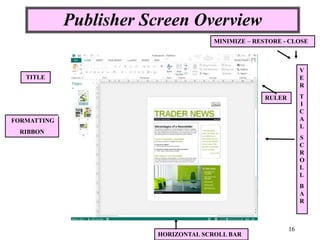
Publisher Screen Overview
16
TITLE
FORMATTING
RIBBON
HORIZONTAL SCROLL BAR
RULER
MINIMIZE – RESTORE - CLOSE
V
E
R
T
I
C
A
L
S
C
R
O
L
L
B
A
R
Print Publication
17
 Define Desktop Publishing
 What is Microsoft publisher?
 Explain the purposes of Microsoft Publisher
 Identify the types of publications available in
Microsoft Publisher
18
Evaluation
Joos, I. Whitman, N., Smith, M., et al. (2006).
Introduction to Computers for Healthcare
Professionals. (4th ed.). London: Barb Mews.
Morris, M. & Charles, M. (2003). Logol Computer
Designer Fundamentals. Prentice Hall.
O’leary, T. & O’leary, L. (2006). Computing
Essentials, Introductory Edition. Boston Burr Ridge:
Arizona State University
19
References

SESSION on Microsoft Publisher applications

  • 1.
    CMT 04212: COMPUTERAPPLICATIONS Session 8 Microsoft Publisher By: Ramadhani Chibwana Victor Mwambije 1
  • 2.
  • 3.
     Describe conceptsrelated to Ms Publisher  Explain the purposes of Microsoft Publisher  Identify the types of publications available in Publisher  Modify an existing publishing in Microsoft Publisher  Create a new, blank publication in Microsoft Publisher  Print publication, store, and back up publications in Microsoft Publisher 14 July, 2024 3 Learning Objectives
  • 4.
     Desktop Publishing:Is the process of using the computer and specific types of software to combine text and graphics to produce documents such as newsletters, brochures, books, etc. Desktop publishing software: Is a tool for both graphic designers and non-designers to create visual communications for professional or desktop printing. 14 July, 2024 4 Microsoft Publisher
  • 5.
    Microsoft Publisher: Isa desktop publishing program that makes it easier to create many different publications including newsletters, brochures, flyers, signs, business cards, letterheads and other publication designs. 14 July, 2024 5 Microsoft Publisher
  • 6.
    Purposes of MSPublisher allows you to: Choose a template Templates allow you to quickly create well- designed publications. There are many types of templates including newsletters, brochures, flyers, greeting card templates, and a variety of other publication types. 14 July, 2024 6 Purposes of Microsoft Publisher
  • 7.
    Change templates whiledesigning Making changes in Publisher is easy. If you have Flyer Template A, and then decide you don’t like it, Publisher allows you to change a different Flyer template. Publisher will transfer the text and images from Flyer Template A to the new flyer. Simply choose ‘Publication Designs’ from the Task Pane and apply another design to see the template change instantly. 14 July, 2024 7 Purposes of Microsoft Publisher…
  • 8.
    Customize a template Templatescan be customized for a specific use. Preferred Font colors can be used instead of normal black colour. Use Color and Font Schemes options A template’s color and/or font schemes can be changed to have a dramatic impact on the publication’s look. This can help to keep the same design layout, but choose colors and fonts that work best in your publication. 14 July, 2024 8 Purposes of Microsoft Publisher…
  • 9.
    Basic Templates 9 Greeting Cards/ Party Invitations Banners Flyers / Handouts Business Cards Calendars Brochures Newsletters & Other Publicationsyou can do with Publisher:
  • 10.
    Microsoft Publisher Features 10 QuickPublications Web Sites and E-mail Clipart Gallery Blank Publications Other Various Features
  • 11.
    Planning a Publication Aswith any publication, when you are creating a product, remember… to Plan ahead to Prepare your content the Purpose of your product 11
  • 12.
    Layout Options andDecisions Consider the following decisions when creating the layout for your Publisher publication: Have a Plan – Make a Sketch Who is my audience? What Template will I use? What fonts and graphics will work best with this product? 12
  • 13.
  • 14.
    Getting Started… 14 The initialscreen in Publisher. You can choose blank page sizes or pre-designed publications for a wide range of publication types, including business cards, postcards, flyers, gift certificates, resumes, catalogs, and even Web sites.
  • 15.
    Choose the CorrectPaper Size 15
  • 16.
    Publisher Screen Overview 16 TITLE FORMATTING RIBBON HORIZONTALSCROLL BAR RULER MINIMIZE – RESTORE - CLOSE V E R T I C A L S C R O L L B A R
  • 17.
  • 18.
     Define DesktopPublishing  What is Microsoft publisher?  Explain the purposes of Microsoft Publisher  Identify the types of publications available in Microsoft Publisher 18 Evaluation
  • 19.
    Joos, I. Whitman,N., Smith, M., et al. (2006). Introduction to Computers for Healthcare Professionals. (4th ed.). London: Barb Mews. Morris, M. & Charles, M. (2003). Logol Computer Designer Fundamentals. Prentice Hall. O’leary, T. & O’leary, L. (2006). Computing Essentials, Introductory Edition. Boston Burr Ridge: Arizona State University 19 References