Maya Dynamics Basics
Lab 11: Fluid Effect
Author: Khieu Van Bang
Email: tribang.nd@gmail.com
CONTENTS
 Overview Fluid Effect
 What is Fluid Effect ?
 What does fluid effects support ?
 Working with Fluid Pond
Learning contents: Create Pond; Fluid Attributes; Pond Wake; Emission Turbulence;
Shader Attributes; Match Object; Interactive; Simulation Quality; Make Collision;
InitialState; Keyframe Emission; Keyframe Object; Raytraced Water, ...
 Working with Fluid Ocean
Learning contents: Create Ocean; Customize Ocean; Control Render; Floating
Objects; Adjust Attribute; Motor Boats; Ocean Wake; Emitter from Object, ...
 Working with Visor Library
 Learn how to use templates.
 Create a virtual lab.
1) OVERVIEW FLUID EFFECT
Fluid Effect
What is Fluid Effect ?
OVERVIEW FLUID EFFECT
 Is a technology for realistically simulating and rendering fluid motion. Fluid Effects lets you create a
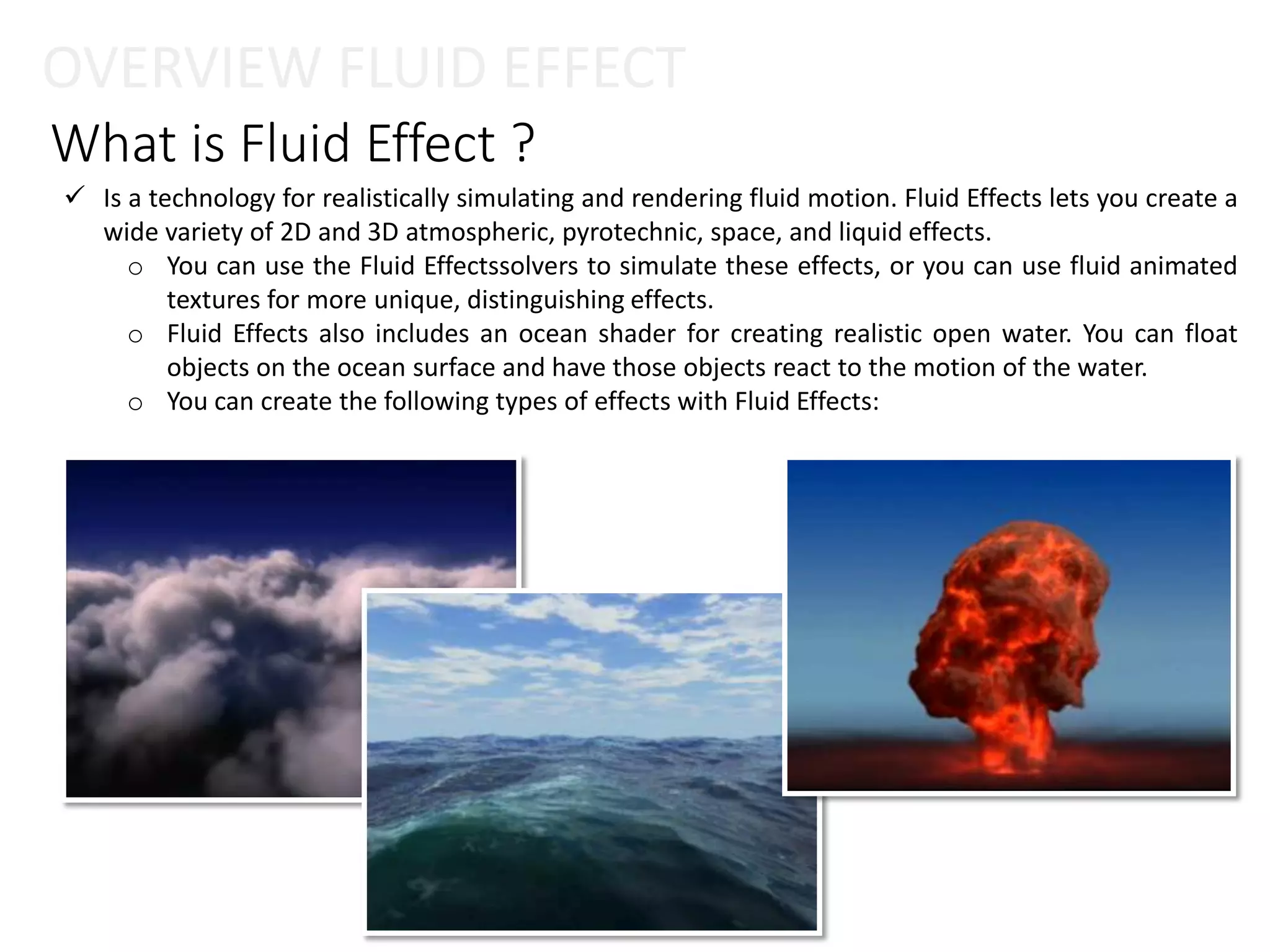
wide variety of 2D and 3D atmospheric, pyrotechnic, space, and liquid effects.
o You can use the Fluid Effectssolvers to simulate these effects, or you can use fluid animated
textures for more unique, distinguishing effects.
o Fluid Effects also includes an ocean shader for creating realistic open water. You can float
objects on the ocean surface and have those objects react to the motion of the water.
o You can create the following types of effects with Fluid Effects:
Types Fluid Effect
 Dynamic fluid effects
 Oceans and Ponds
 Non-dynamic fluid effects
OVERVIEW FLUID EFFECT
Behave according to the natural laws of fluid dynamics, a branch of physics that uses
mathematical equations to calculate how things flow. Maya simulates fluid motion by
solving the Navier-Stokes fluid dynamics equations at each time step.
3D fluids inherently require extra data to define them, which can make them very large.
This extra data can slow a dynamic simulation exponentially because more calculations
(solving) must be performed at every step of the simulation. For a less memory intensive
effect, you can use a 2D fluid (with less data), or you can create a non-dynamicfluid.
Create Ocean and Pond fluids to simulate large realistic water surfaces, such as stormy
oceans with foam and swimming pools. Oceans are NURBS planes with ocean shaders
assigned to them. Ponds are 2D fluids that use a spring mesh solver and a height field.
What does fluid effects support ?
 Naver Stokes based Fluids
o Smoke.
o Clouds.
o Explosions.
o Fire.
o “Goo” type-stuff.
 Ad-Hoc / Mass-Spring fluids
o Oceans.
o Ponds.
OVERVIEW FLUID EFFECT
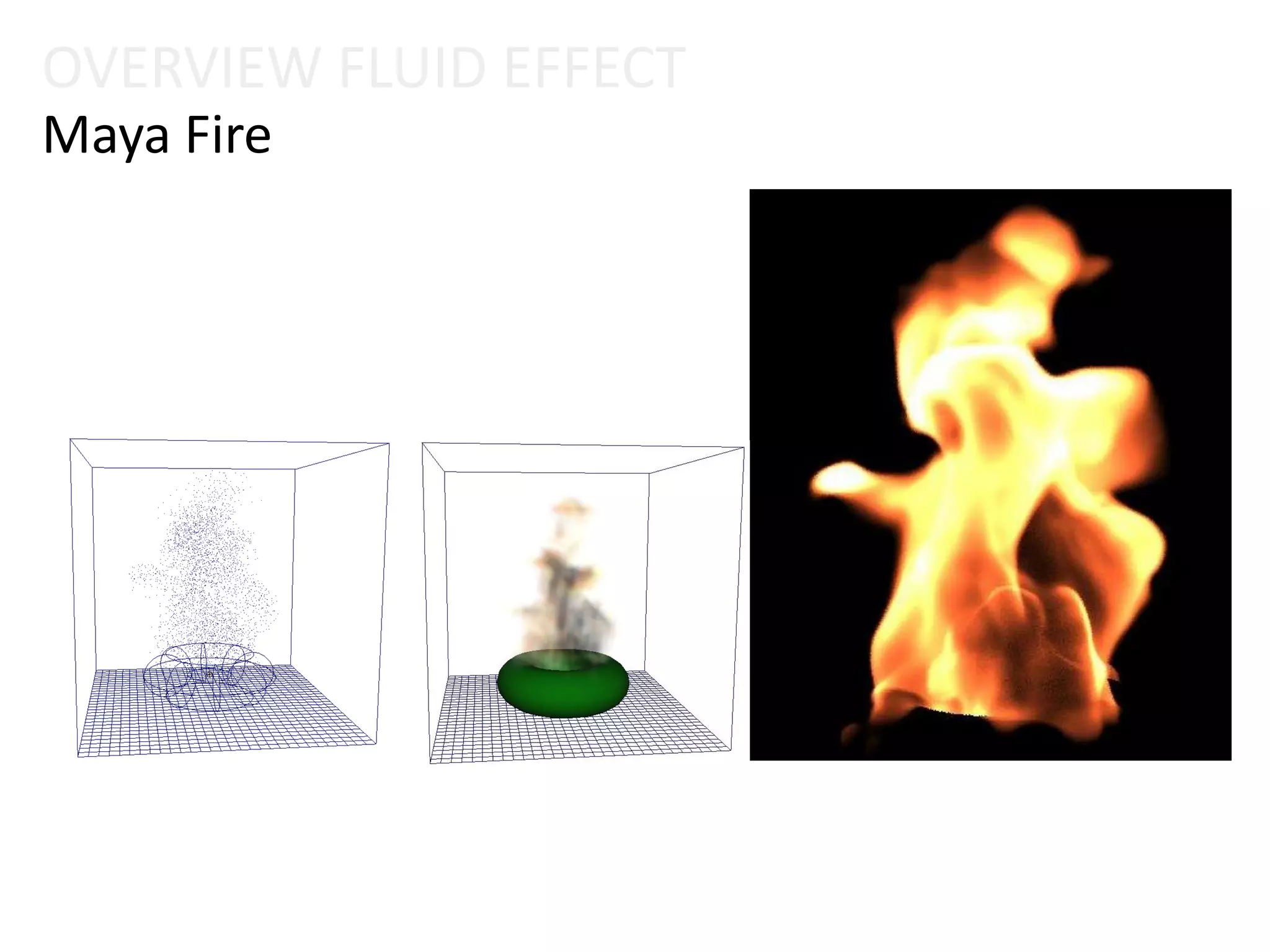
Maya Fire
OVERVIEW FLUID EFFECT
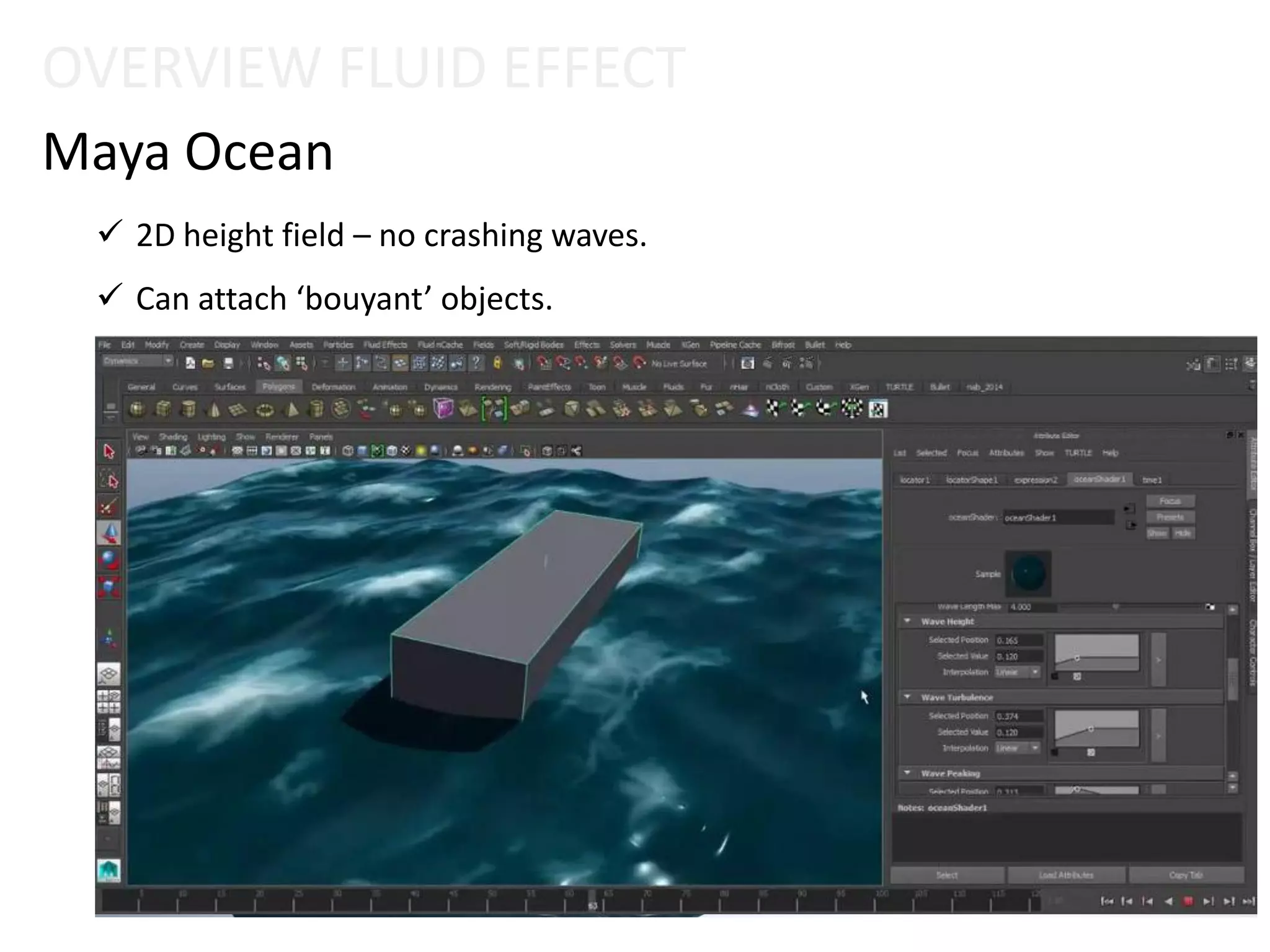
Maya Ocean
 2D height field – no crashing waves.
 Can attach ‘bouyant’ objects.
OVERVIEW FLUID EFFECT
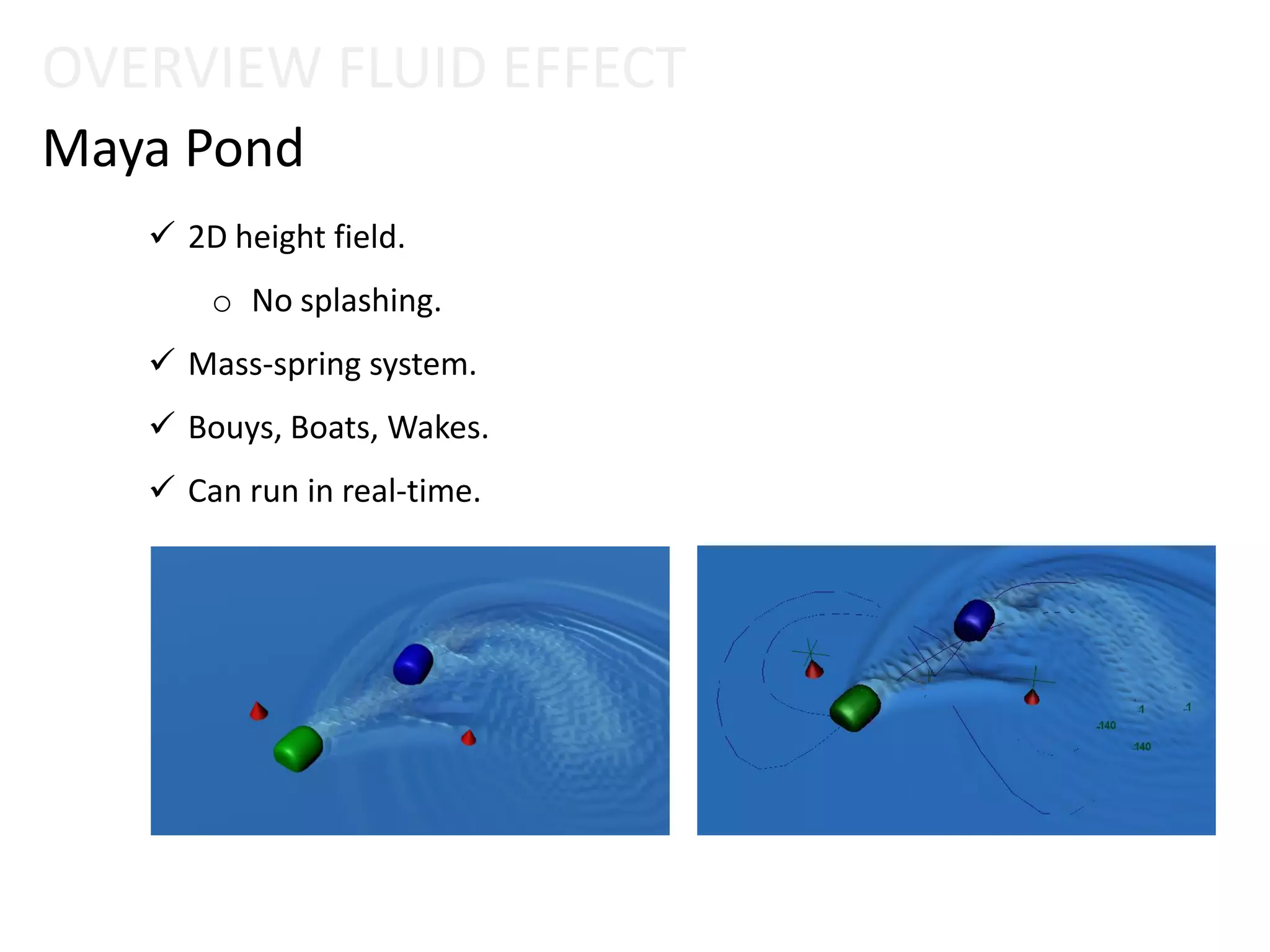
Maya Pond
 2D height field.
o No splashing.
 Mass-spring system.
 Bouys, Boats, Wakes.
 Can run in real-time.
2) WORKING WITH FLUID POND
Fluid Effect
2) PRACTICAL SITUATIONS – FLUID POND
Fluid Effect
2.1) Create Pond
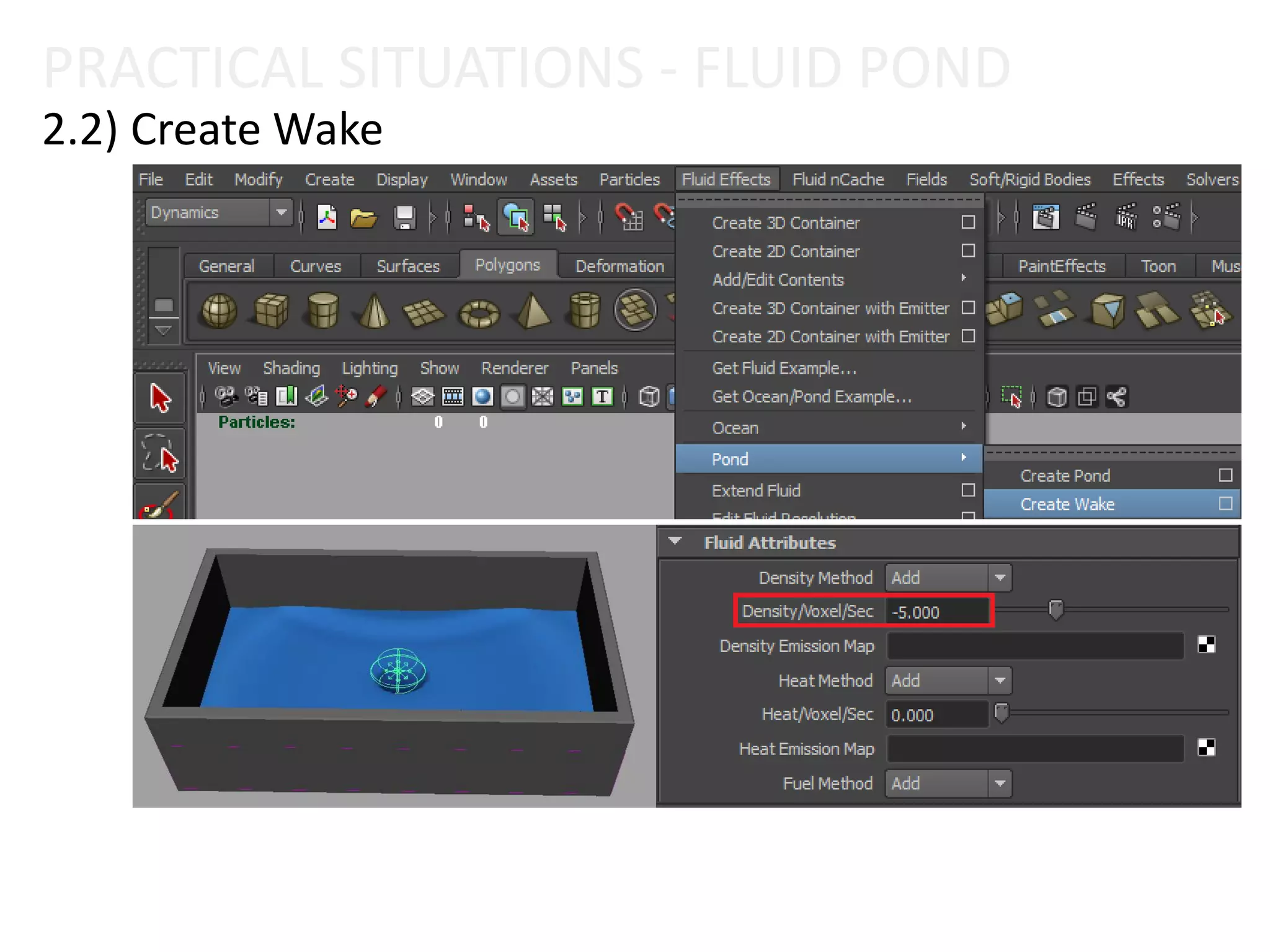
2.2) Create Wake
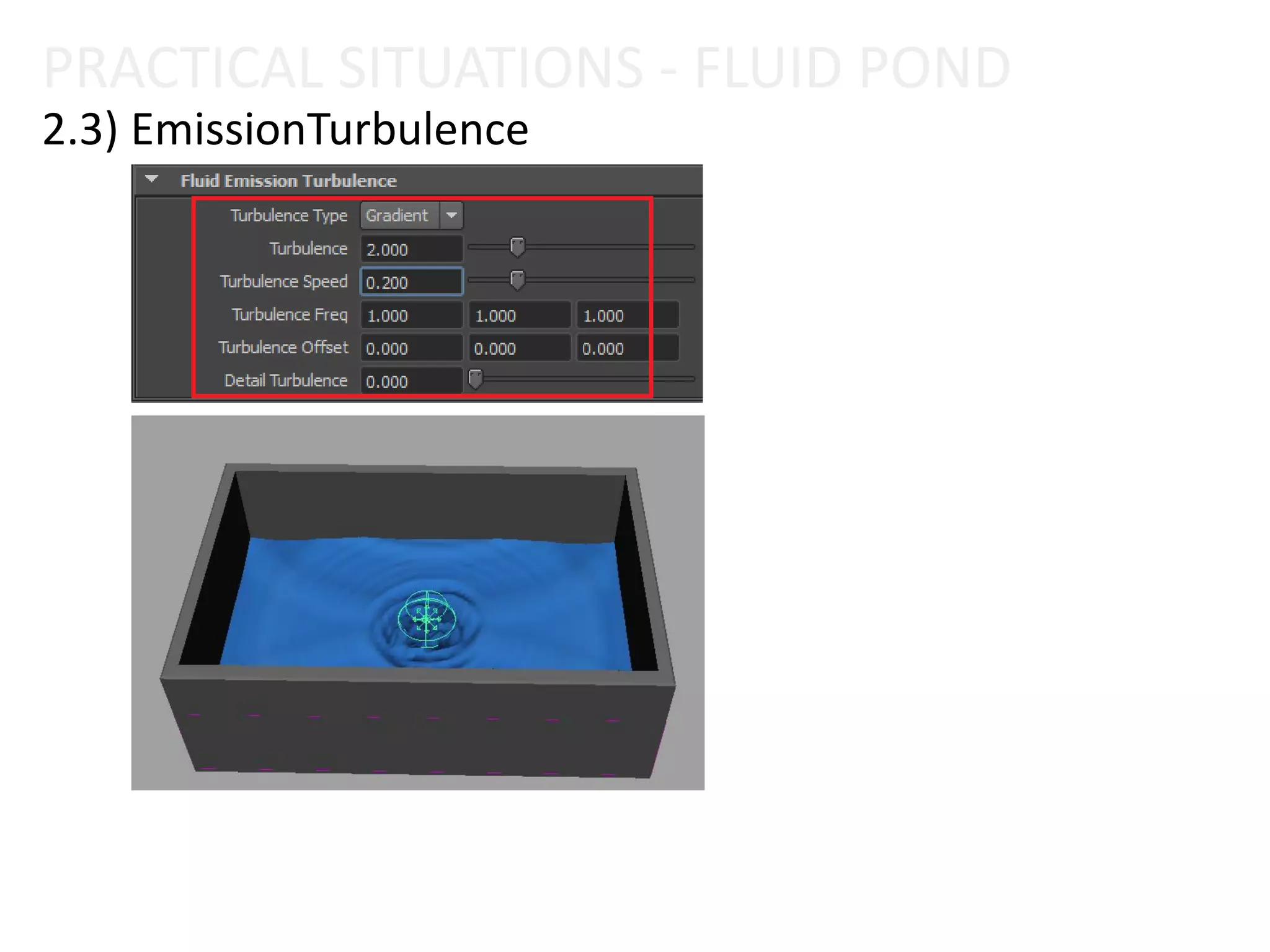
2.3) EmissionTurbulence
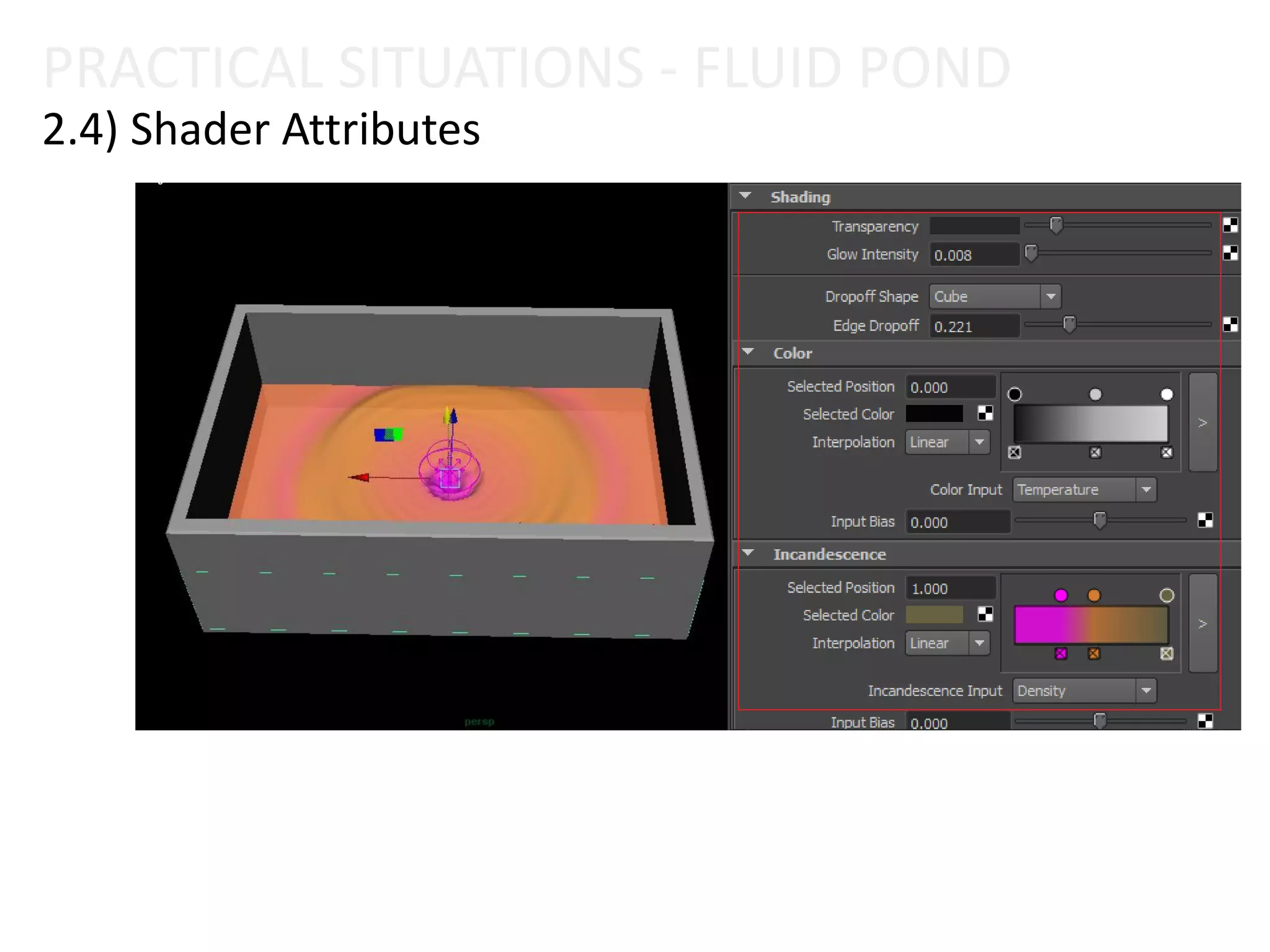
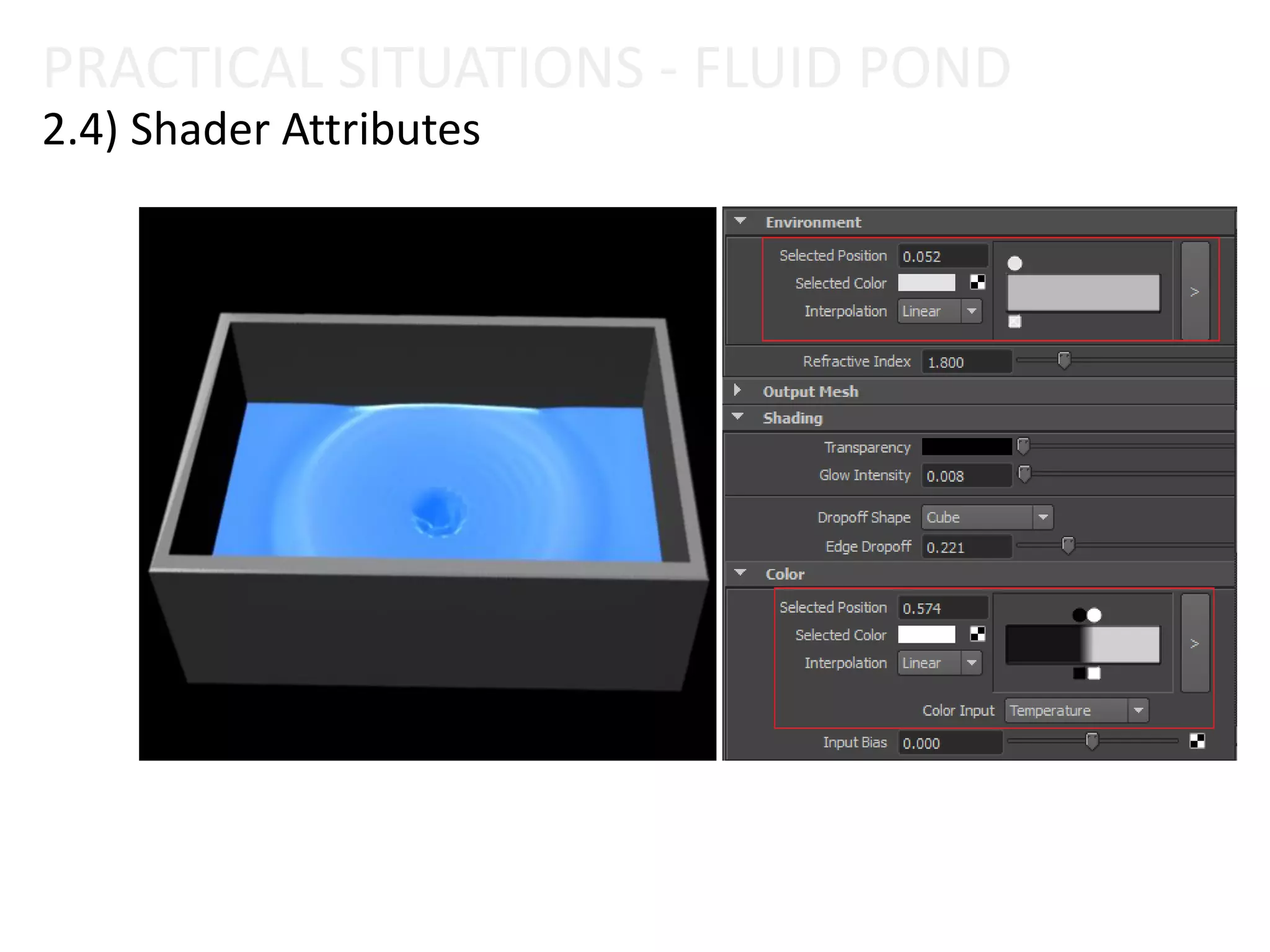
2.4) Shader Attributes
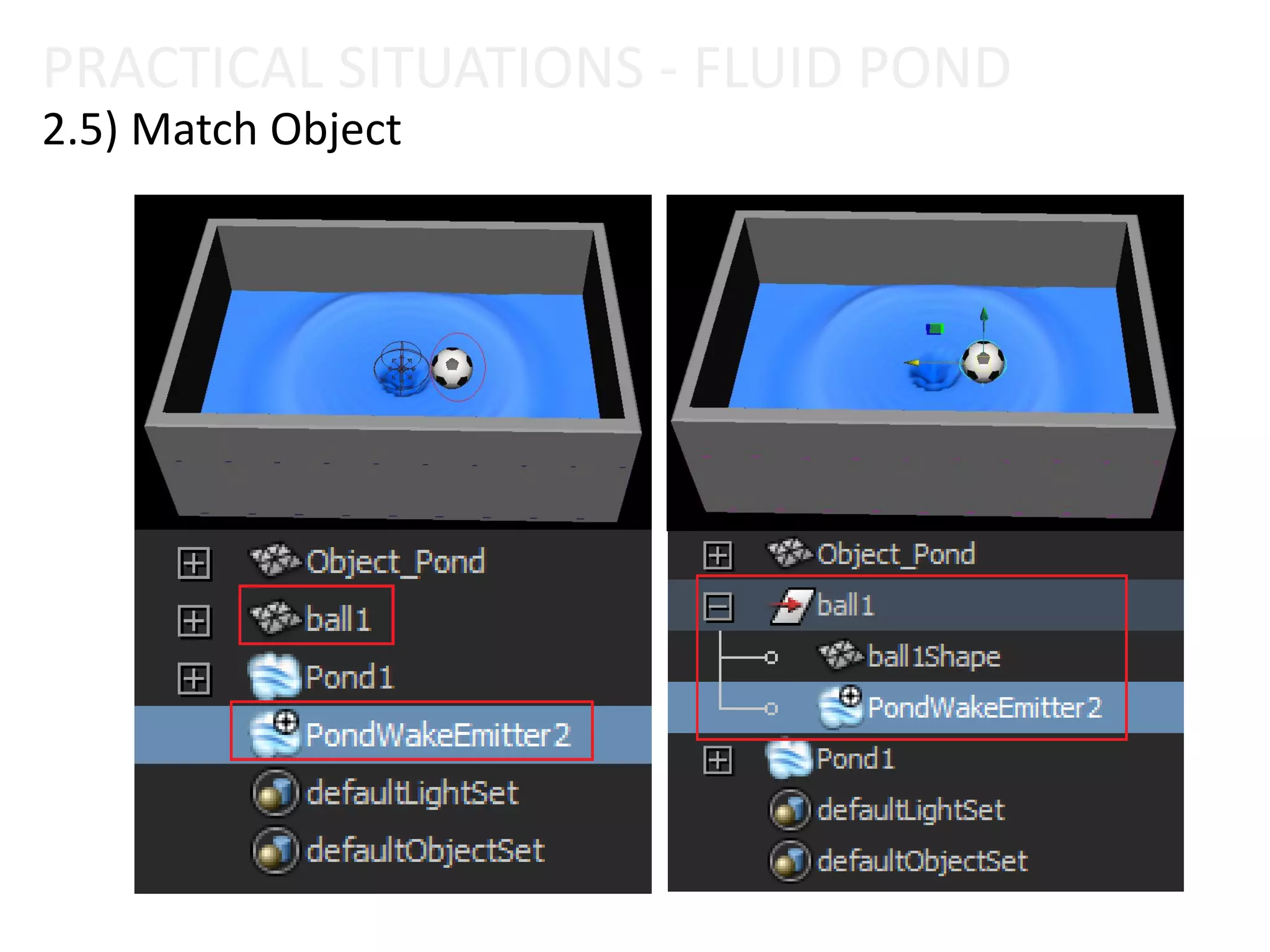
2.5) Match Object
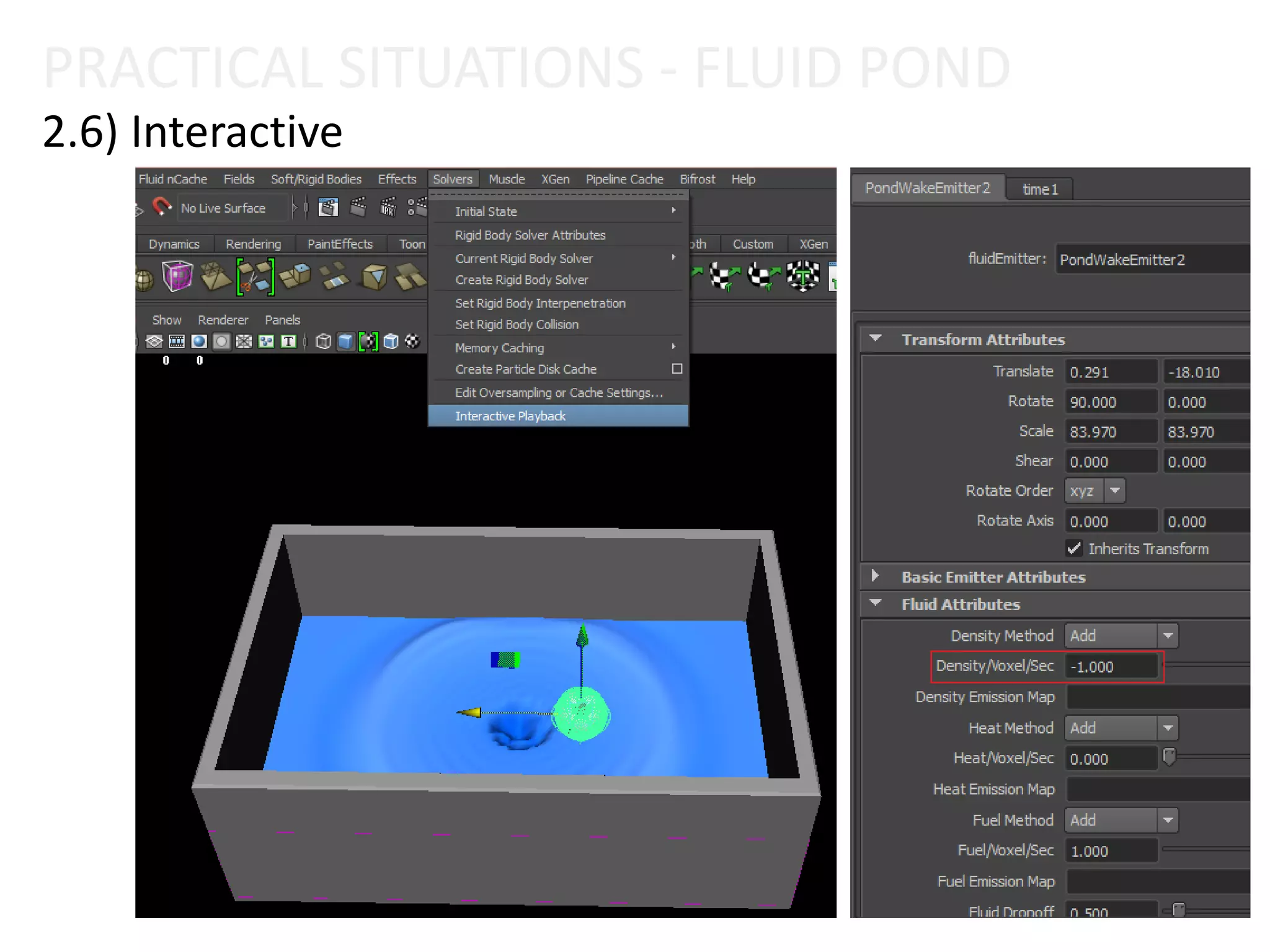
2.6) Interactive
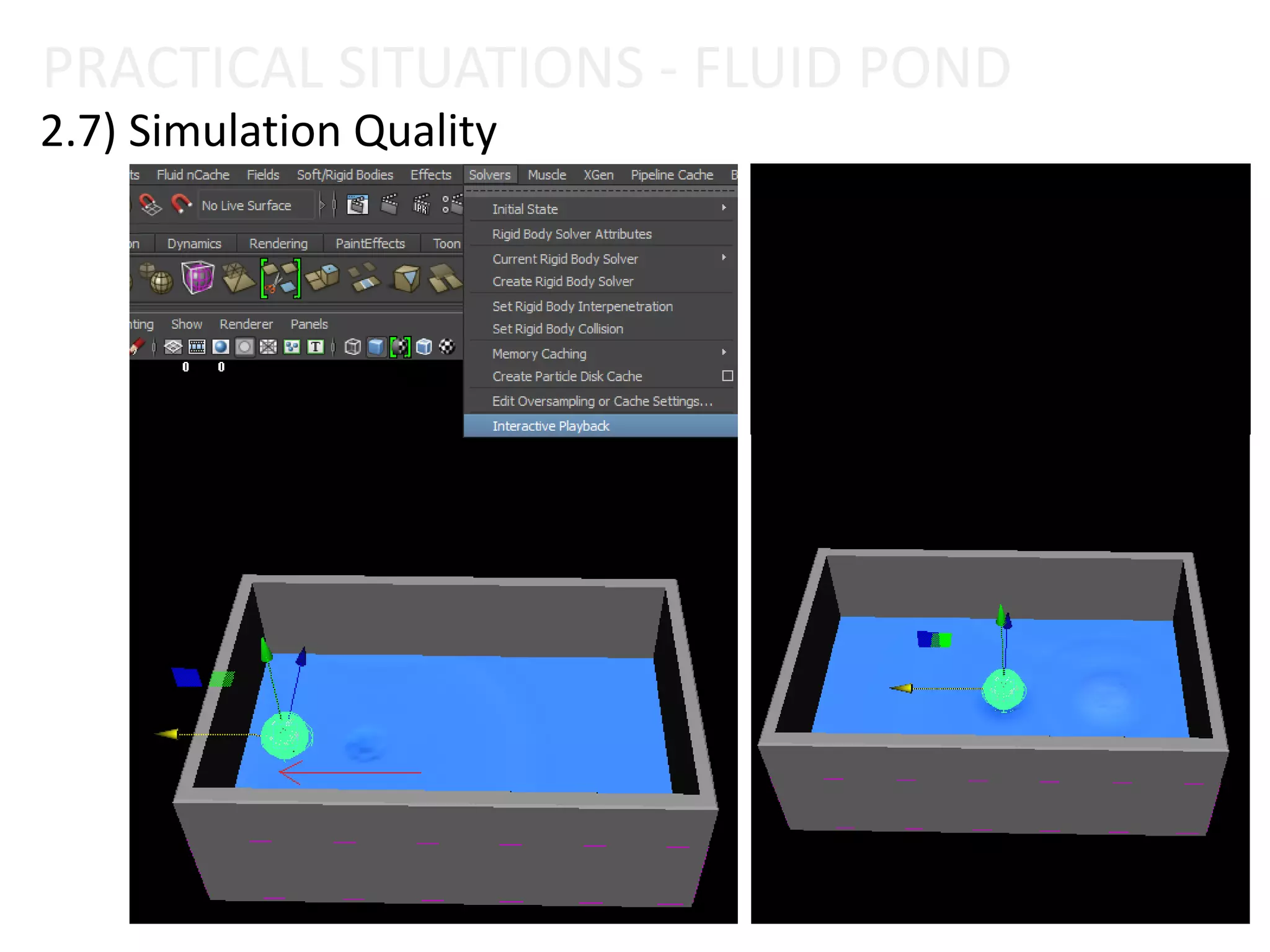
2.7) Simulation Quality
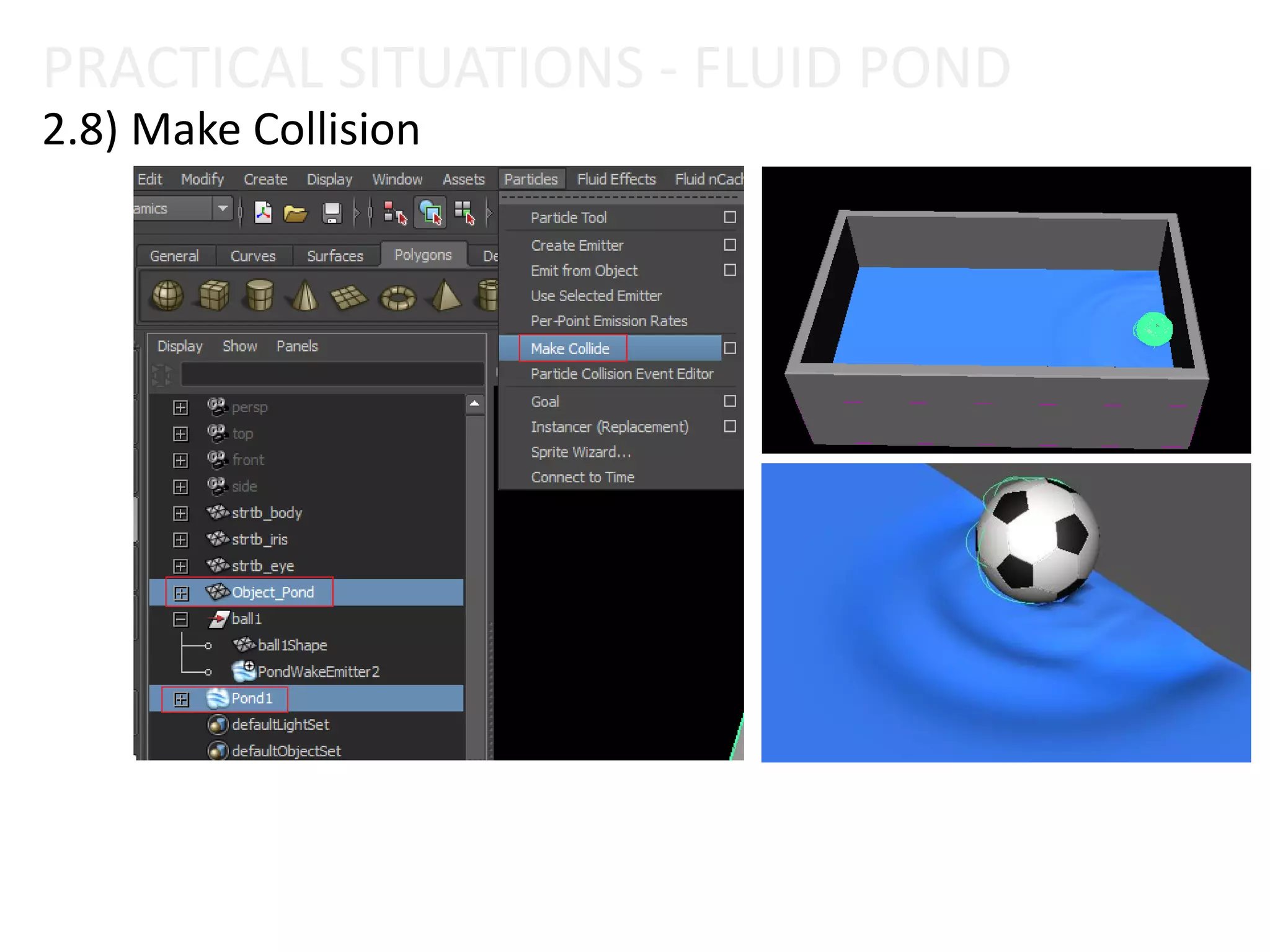
2.8) Make Collision
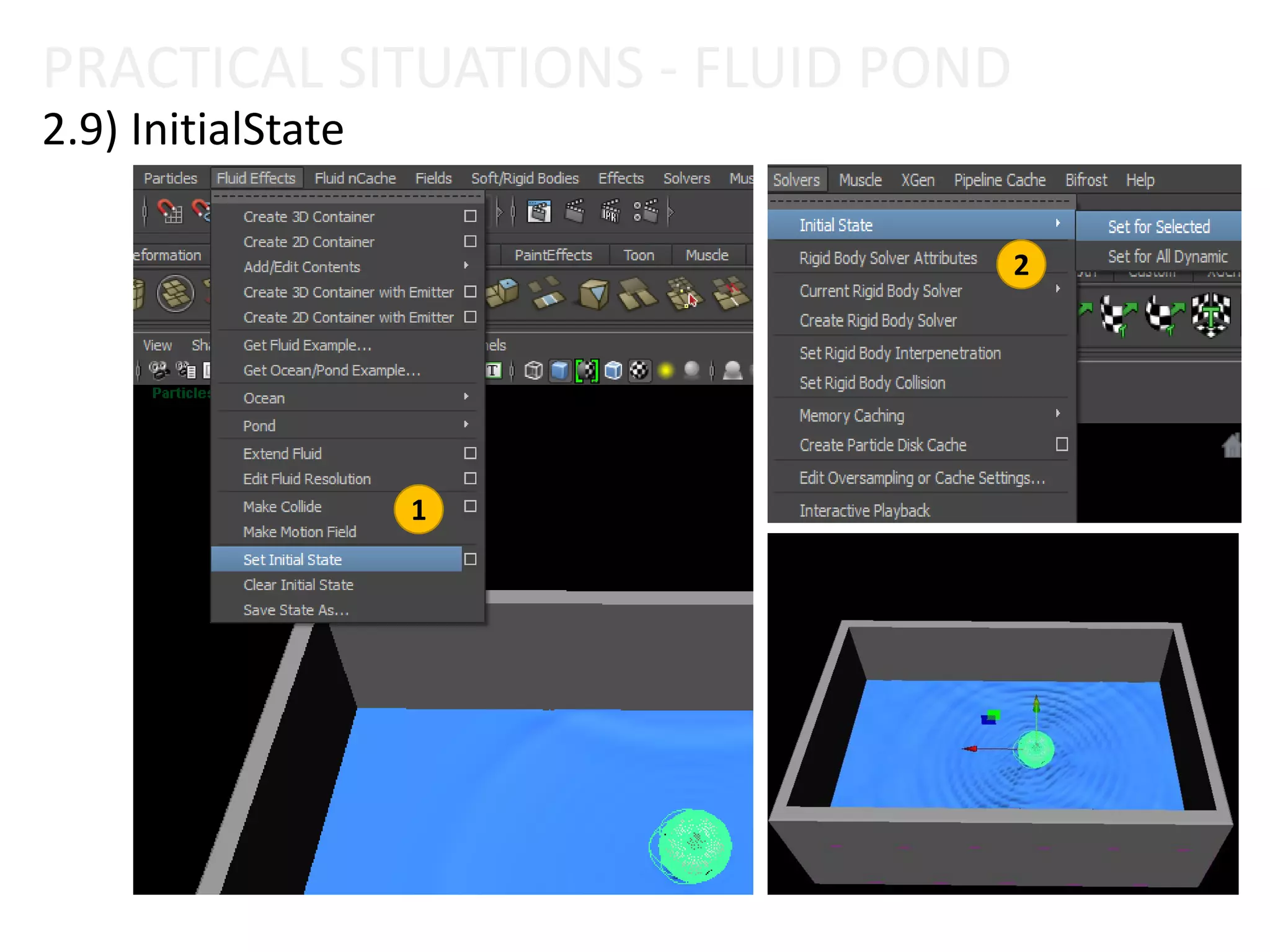
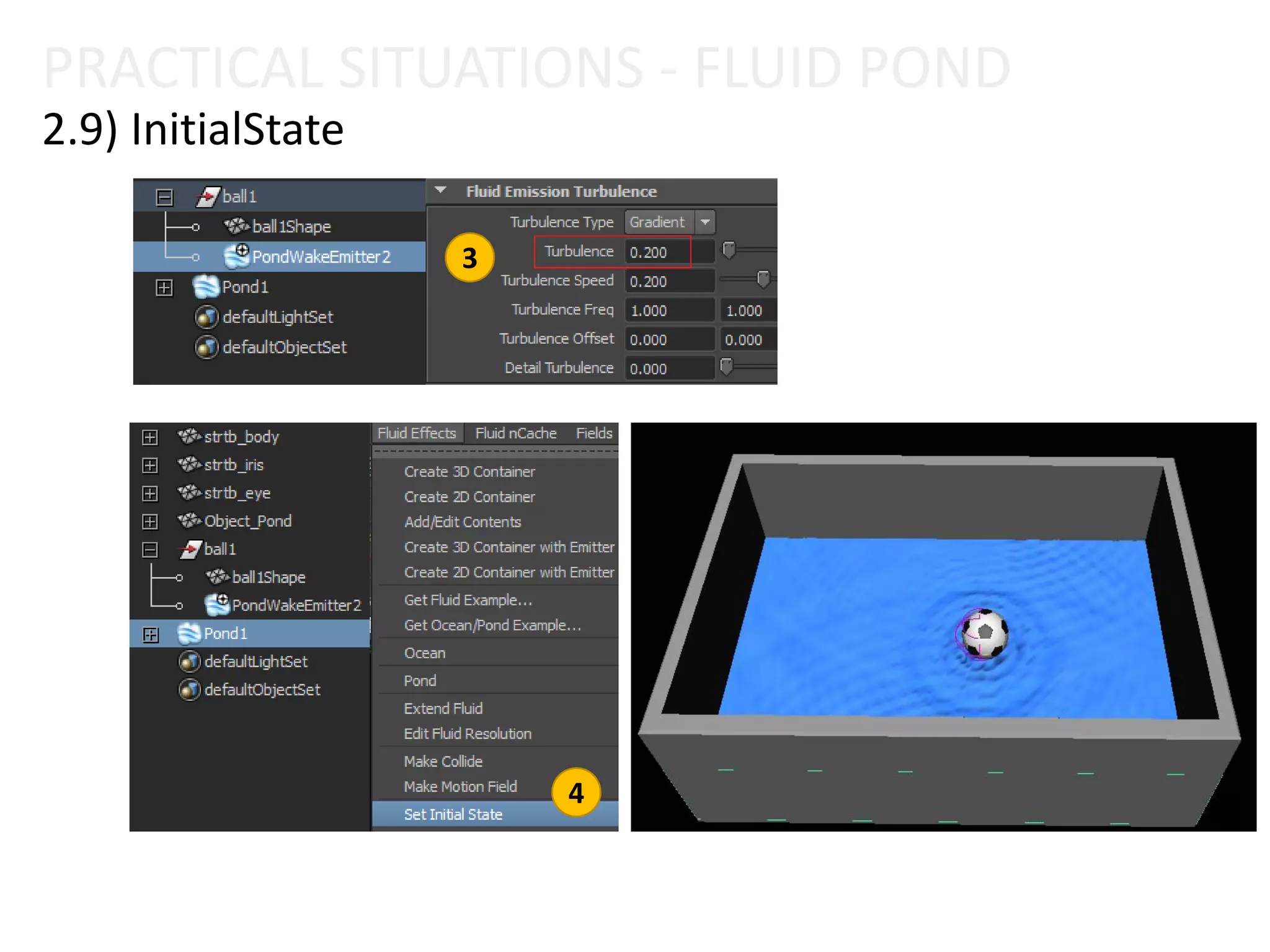
2.9) InitialState
2.11) Keyframe Object
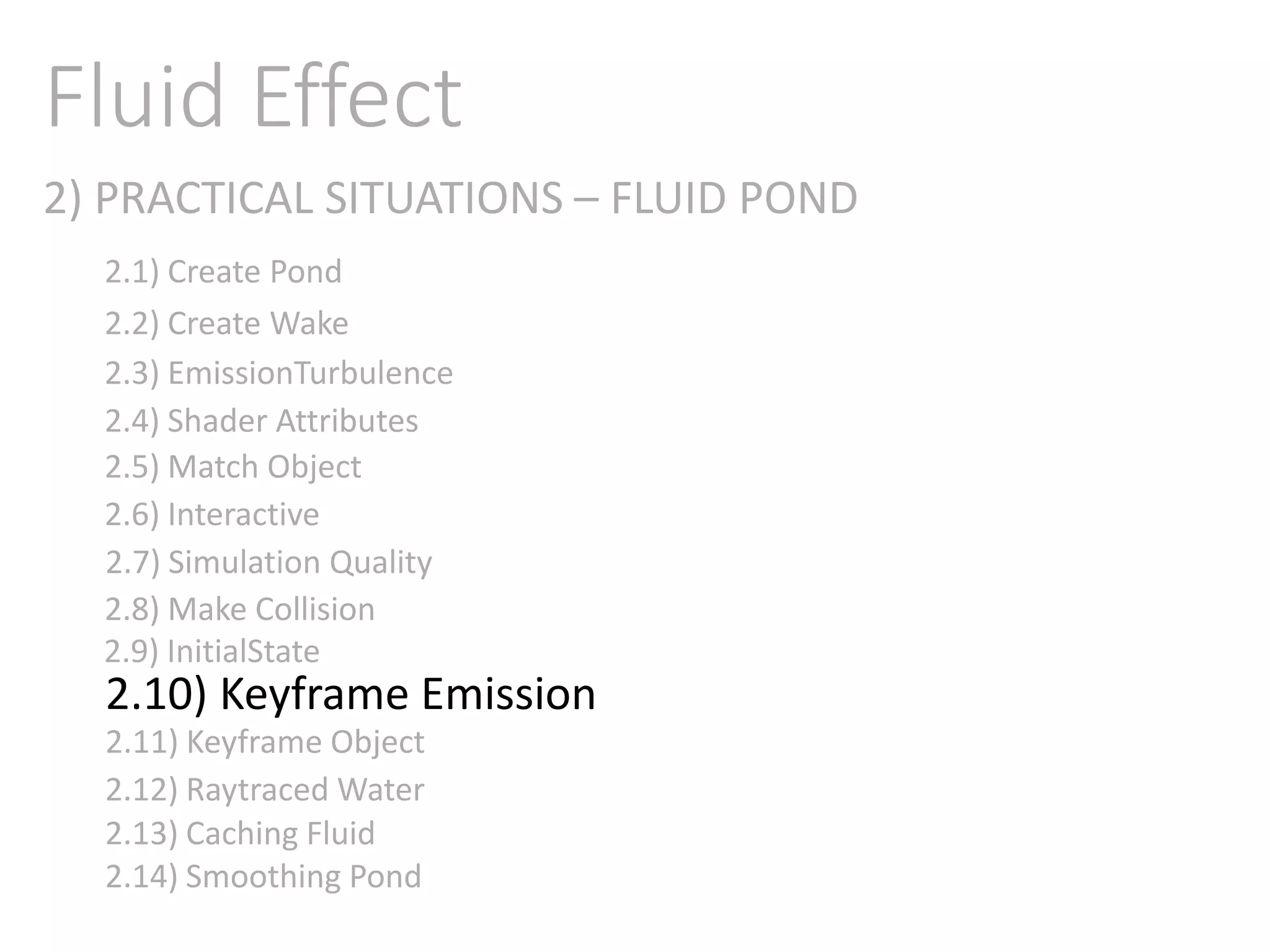
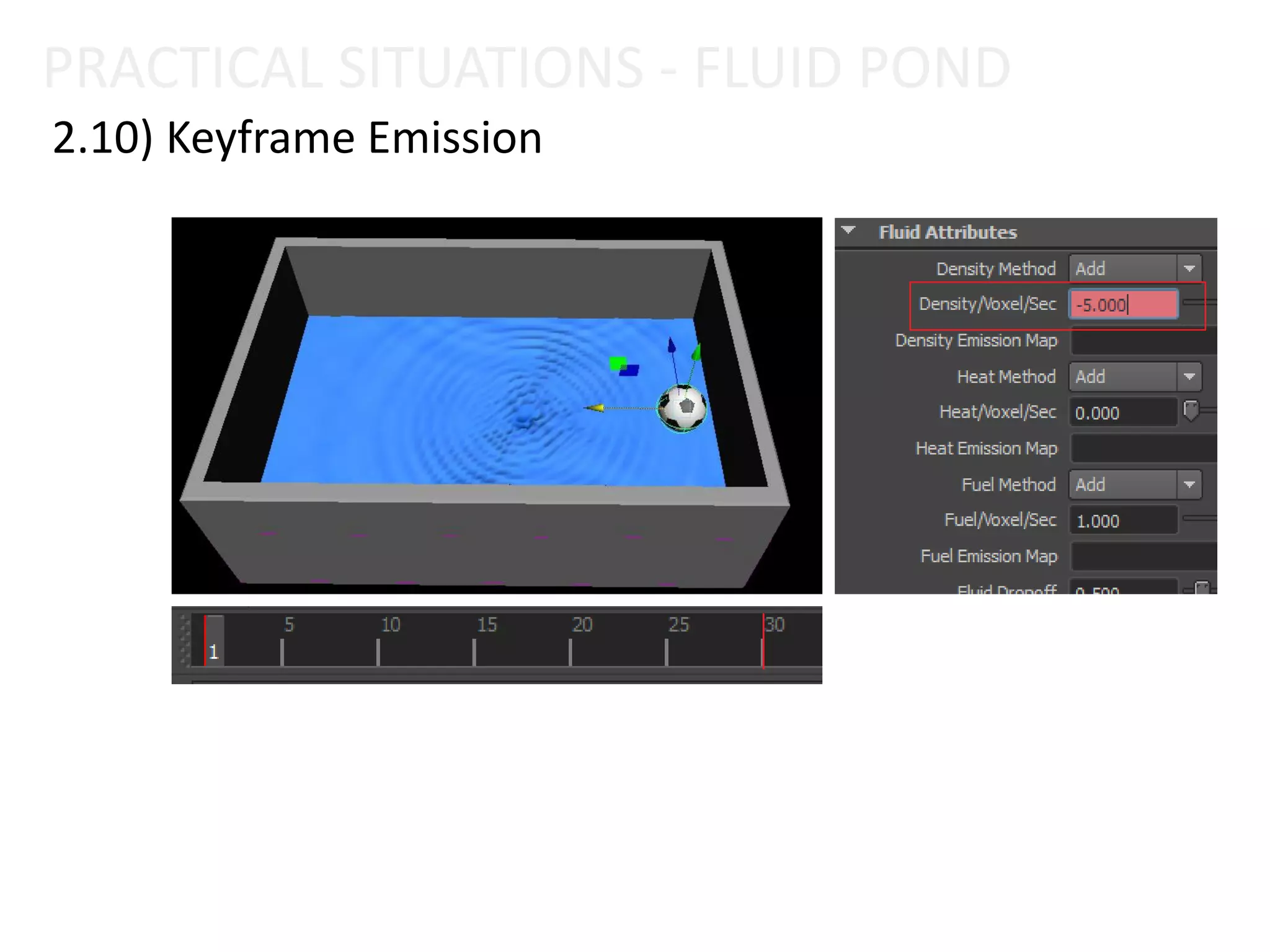
2.10) Keyframe Emission
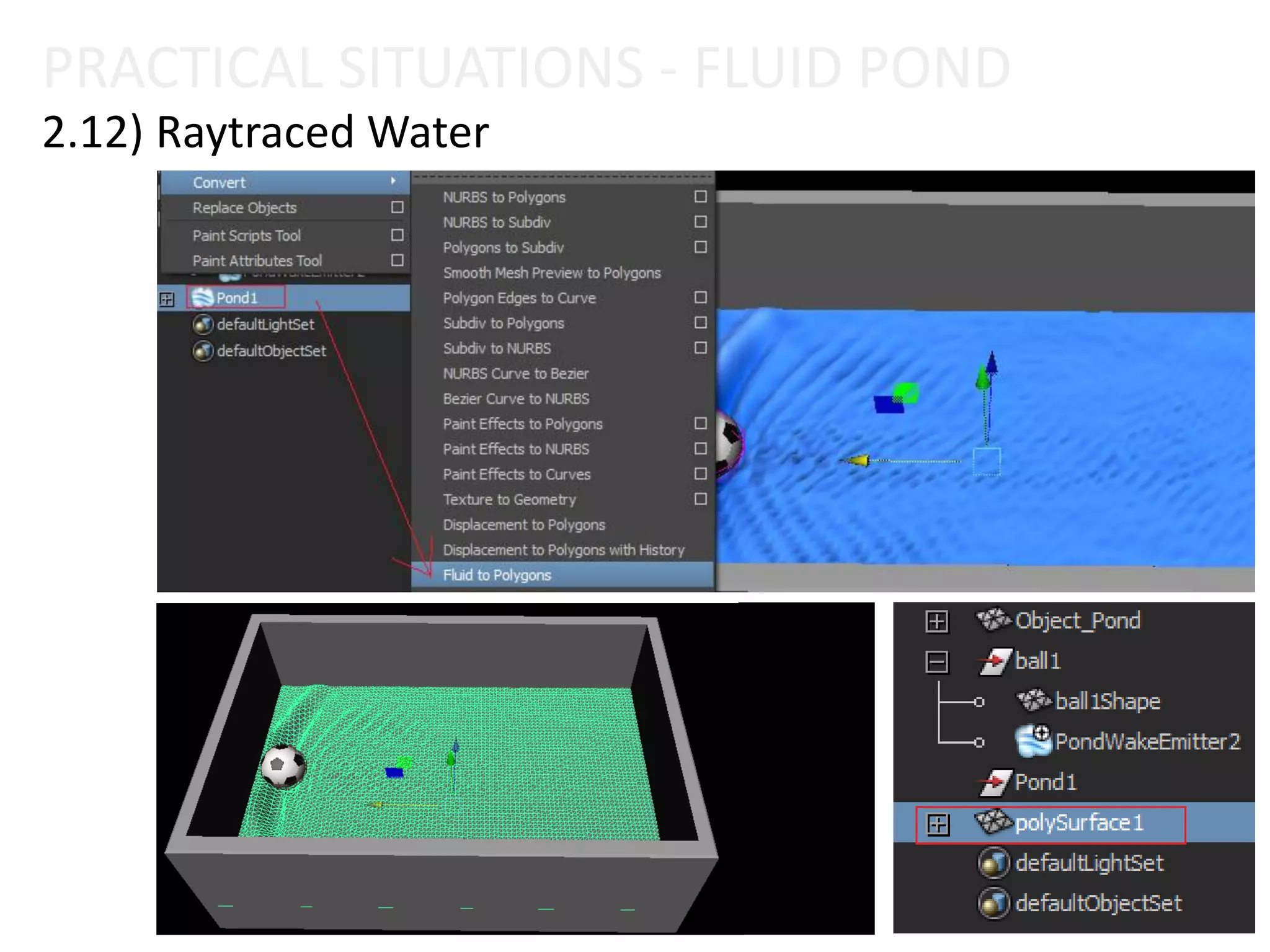
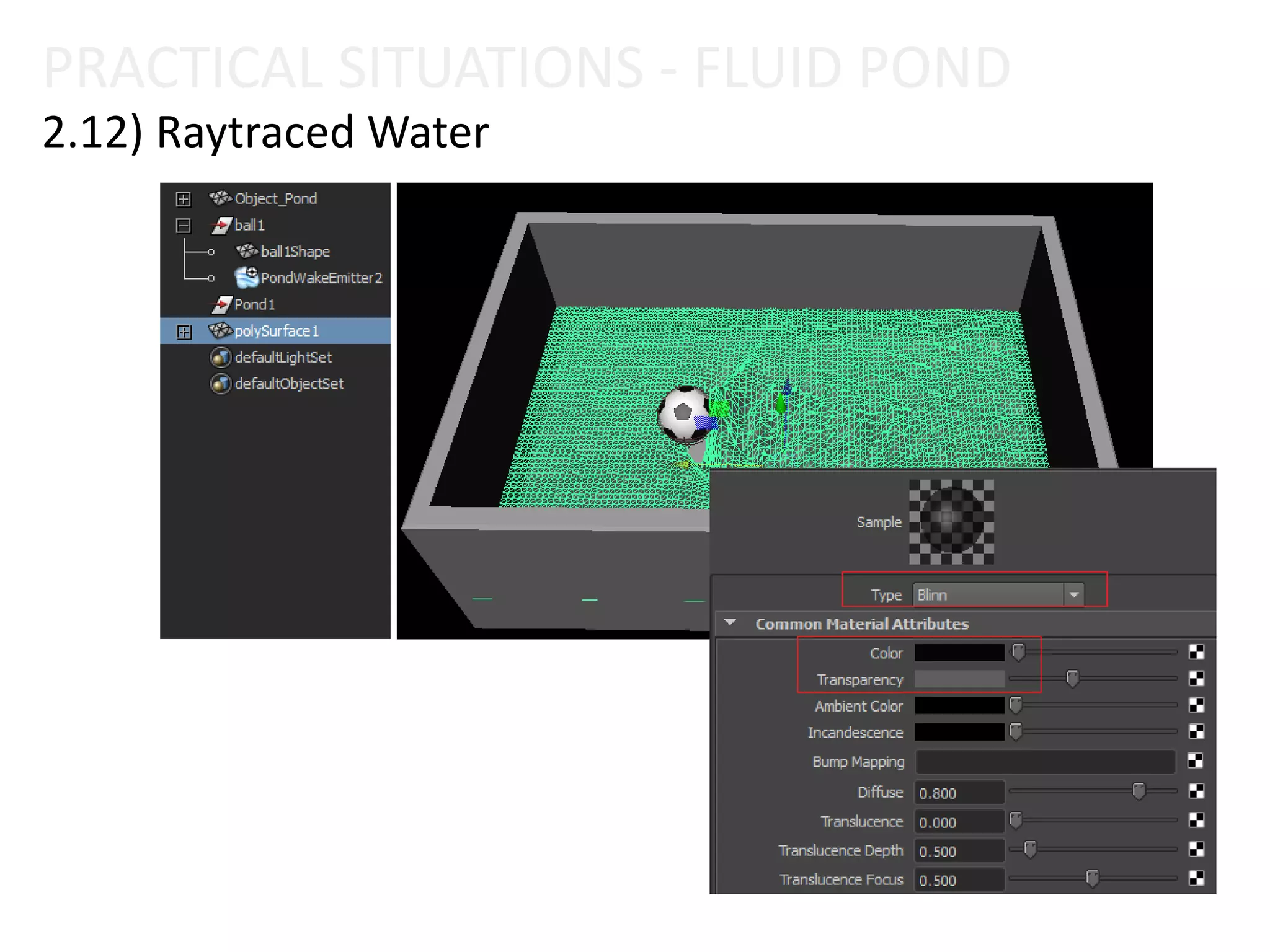
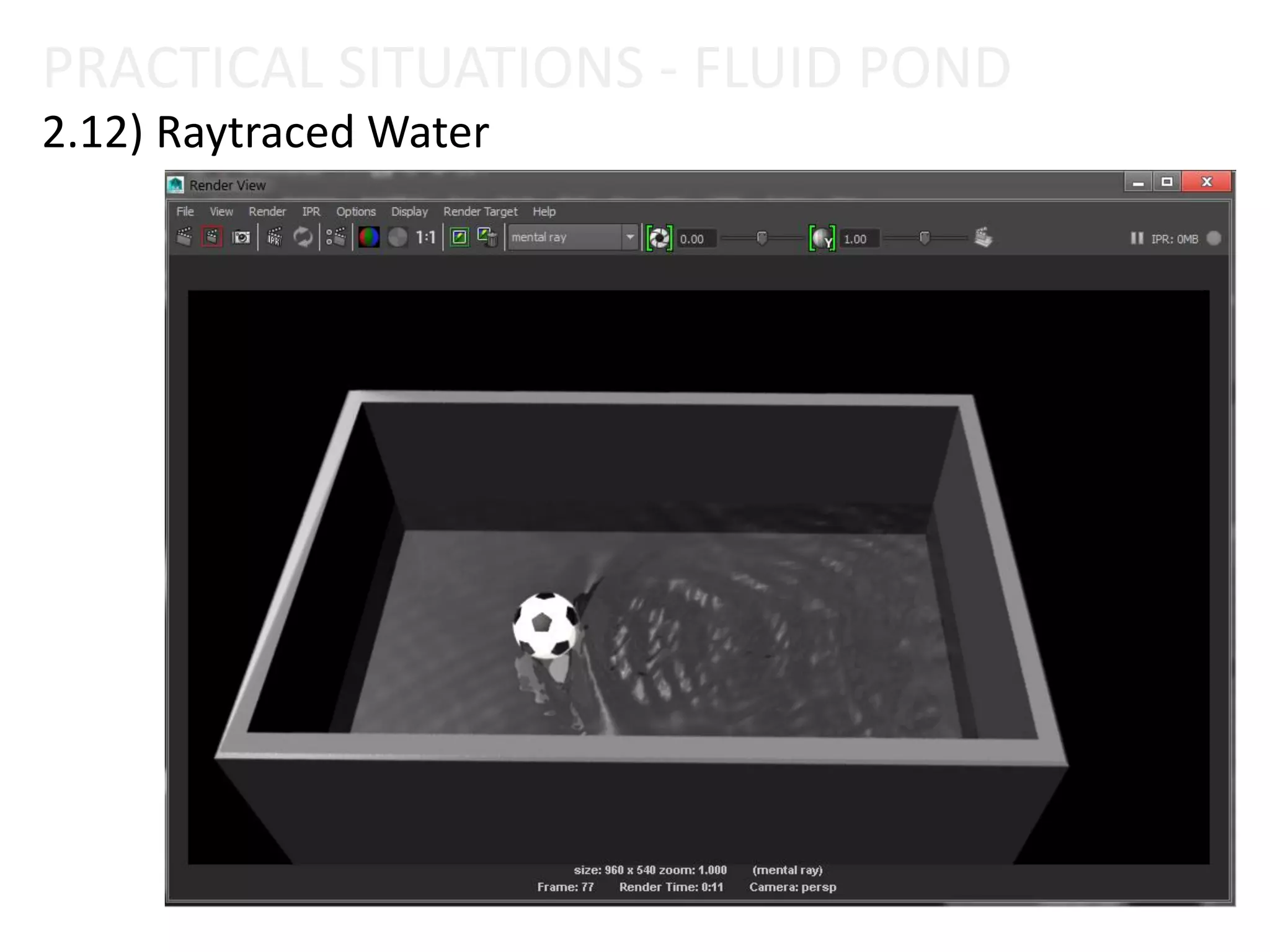
2.12) Raytraced Water
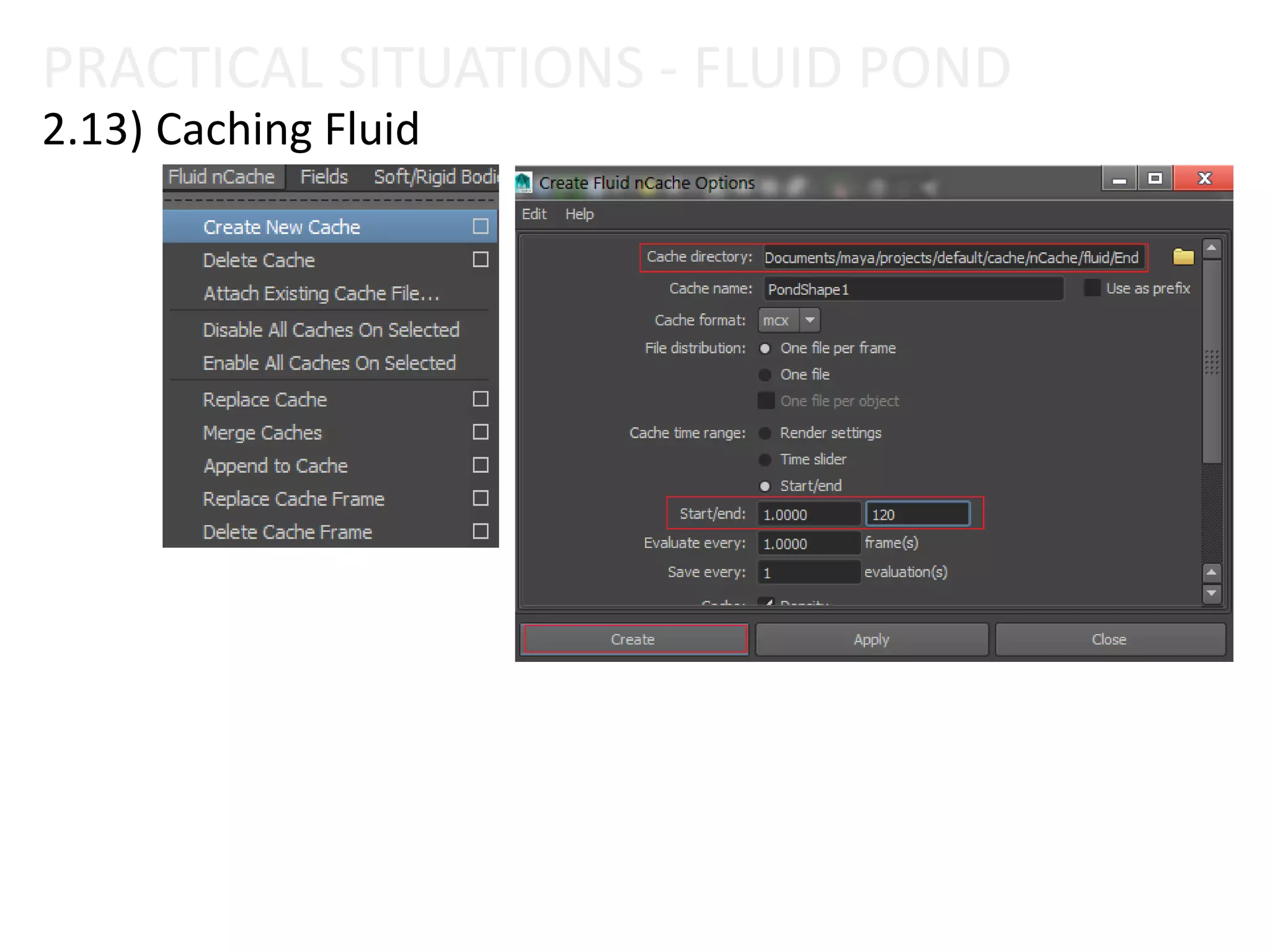
2.13) Caching Fluid
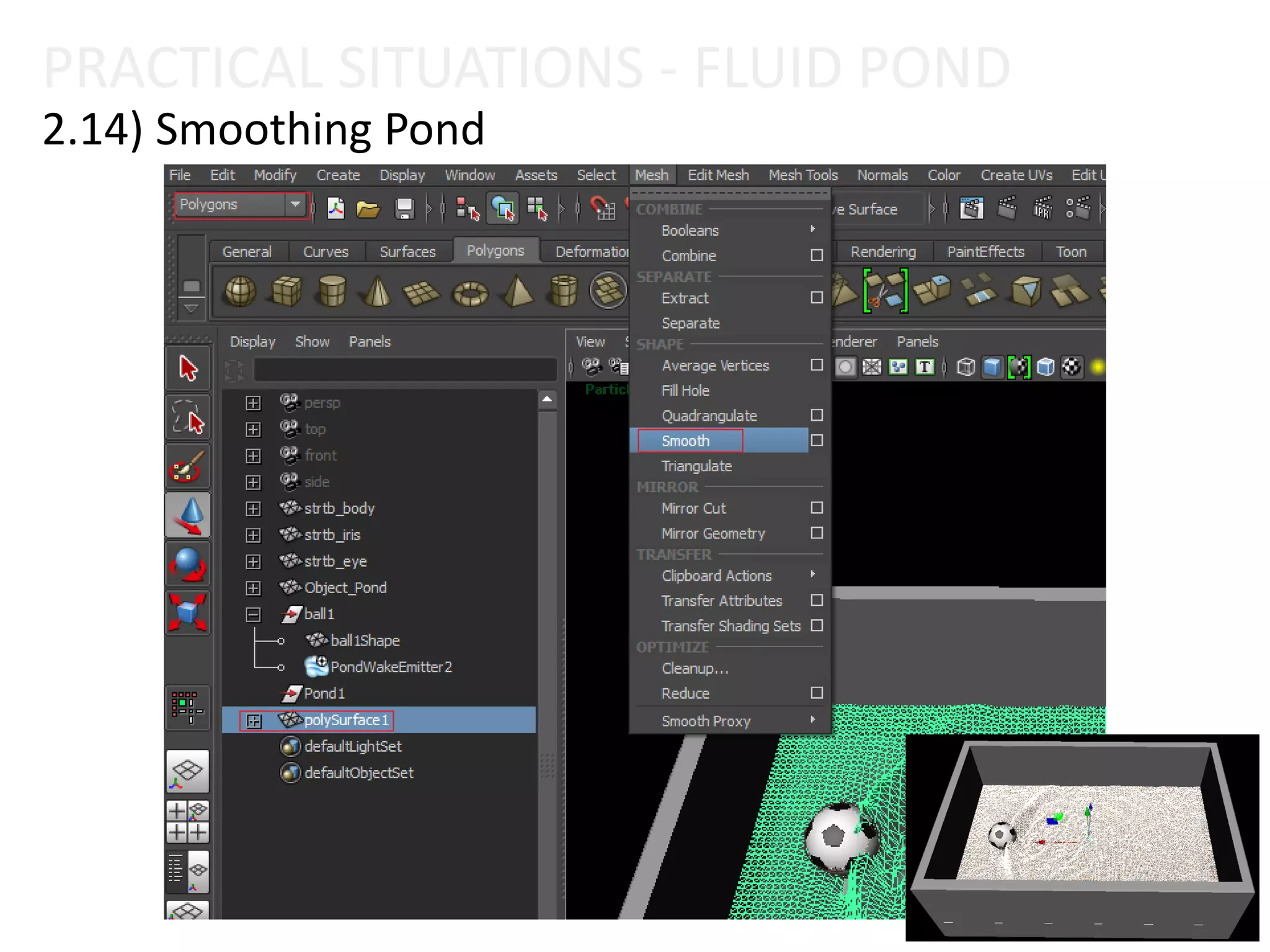
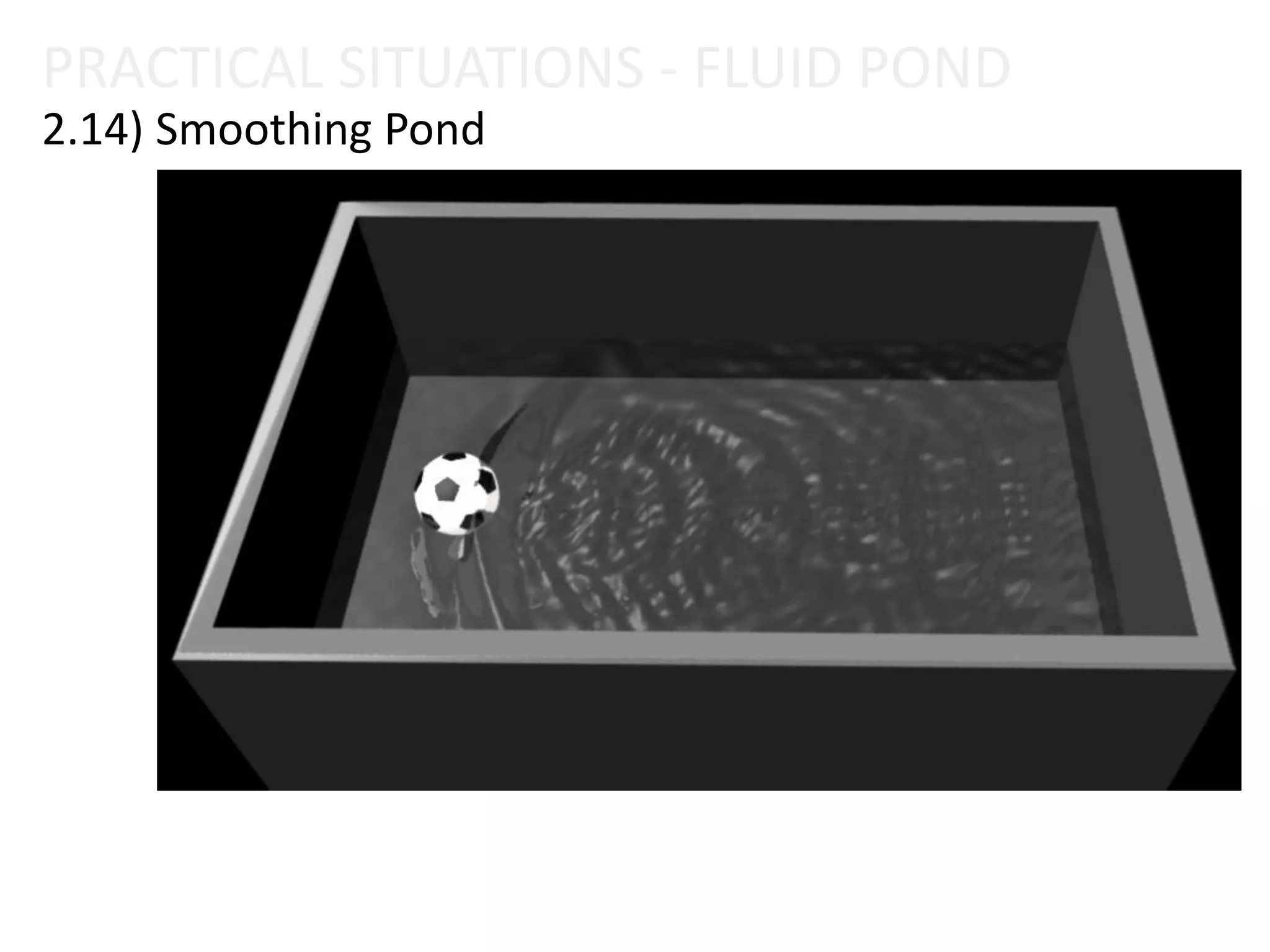
2.14) Smoothing Pond
2) PRACTICAL SITUATIONS – FLUID POND
Fluid Effect
2.1) Create Pond
2.2) Create Wake
2.3) EmissionTurbulence
2.4) Shader Attributes
2.5) Match Object
2.6) Interactive
2.7) Simulation Quality
2.8) Make Collision
2.9) InitialState
2.11) Keyframe Object
2.10) Keyframe Emission
2.12) Raytraced Water
2.13) Caching Fluid
2.14) Smoothing Pond
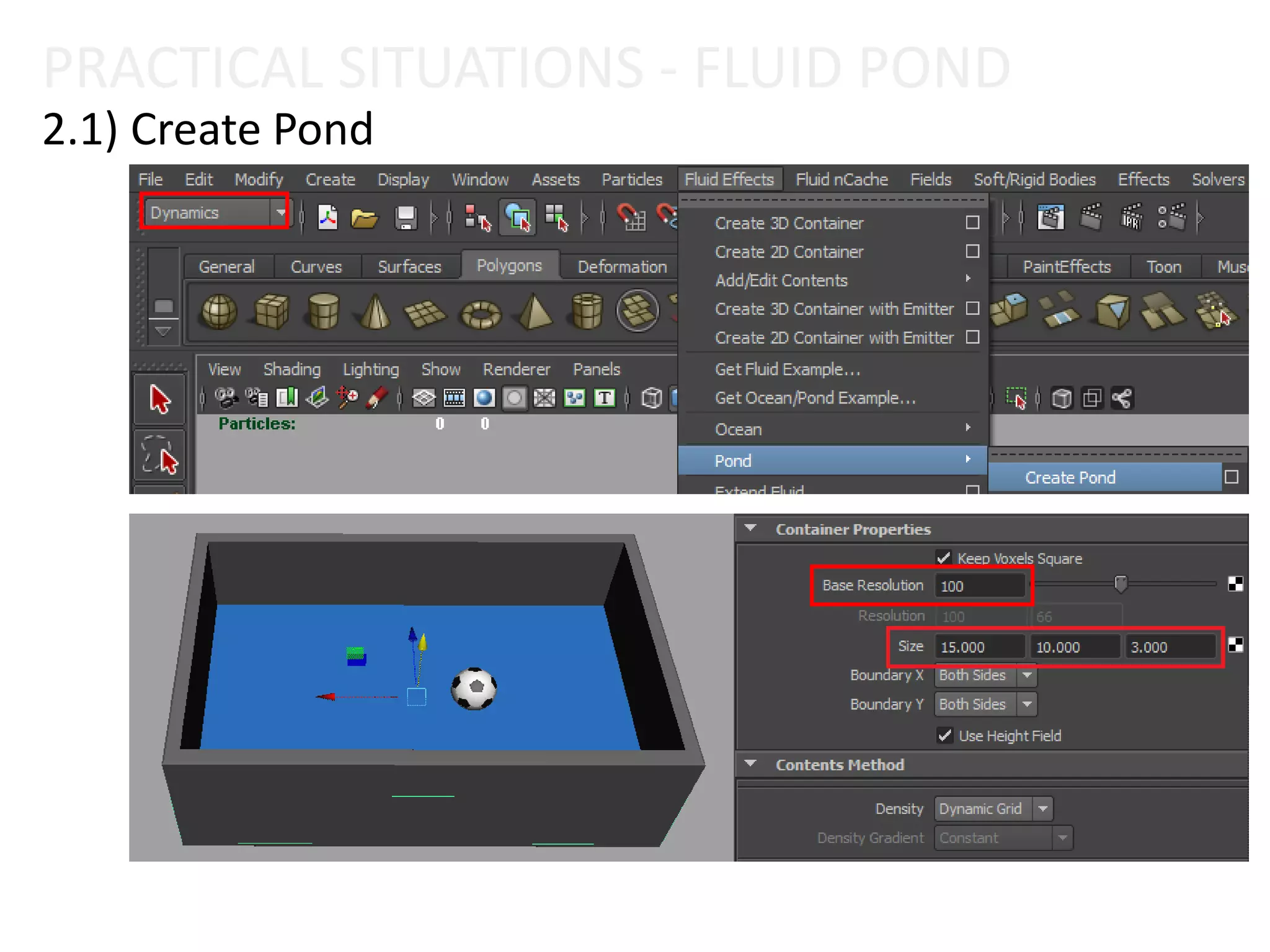
PRACTICAL SITUATIONS - FLUID POND
2.1) Create Pond
2) PRACTICAL SITUATIONS – FLUID POND
Fluid Effect
2.1) Create Pond
2.2) Create Wake
2.3) EmissionTurbulence
2.4) Shader Attributes
2.5) Match Object
2.6) Interactive
2.7) Simulation Quality
2.8) Make Collision
2.9) InitialState
2.11) Keyframe Object
2.10) Keyframe Emission
2.12) Raytraced Water
2.13) Caching Fluid
2.14) Smoothing Pond
PRACTICAL SITUATIONS - FLUID POND
2.2) Create Wake
2) PRACTICAL SITUATIONS – FLUID POND
Fluid Effect
2.1) Create Pond
2.2) Create Wake
2.3) EmissionTurbulence
2.4) Shader Attributes
2.5) Match Object
2.6) Interactive
2.7) Simulation Quality
2.8) Make Collision
2.9) InitialState
2.11) Keyframe Object
2.10) Keyframe Emission
2.12) Raytraced Water
2.13) Caching Fluid
2.14) Smoothing Pond
PRACTICAL SITUATIONS - FLUID POND
2.3) EmissionTurbulence
2) PRACTICAL SITUATIONS – FLUID POND
Fluid Effect
2.1) Create Pond
2.2) Create Wake
2.3) EmissionTurbulence
2.4) Shader Attributes
2.5) Match Object
2.6) Interactive
2.7) Simulation Quality
2.8) Make Collision
2.9) InitialState
2.11) Keyframe Object
2.10) Keyframe Emission
2.12) Raytraced Water
2.13) Caching Fluid
2.14) Smoothing Pond
PRACTICAL SITUATIONS - FLUID POND
2.4) Shader Attributes
PRACTICAL SITUATIONS - FLUID POND
2.4) Shader Attributes
2) PRACTICAL SITUATIONS – FLUID POND
Fluid Effect
2.1) Create Pond
2.2) Create Wake
2.3) EmissionTurbulence
2.4) Shader Attributes
2.5) Match Object
2.6) Interactive
2.7) Simulation Quality
2.8) Make Collision
2.9) InitialState
2.11) Keyframe Object
2.10) Keyframe Emission
2.12) Raytraced Water
2.13) Caching Fluid
2.14) Smoothing Pond
PRACTICAL SITUATIONS - FLUID POND
2.5) Match Object
2) PRACTICAL SITUATIONS – FLUID POND
Fluid Effect
2.1) Create Pond
2.2) Create Wake
2.3) EmissionTurbulence
2.4) Shader Attributes
2.5) Match Object
2.6) Interactive
2.7) Simulation Quality
2.8) Make Collision
2.9) InitialState
2.11) Keyframe Object
2.10) Keyframe Emission
2.12) Raytraced Water
2.13) Caching Fluid
2.14) Smoothing Pond
PRACTICAL SITUATIONS - FLUID POND
2.6) Interactive
2) PRACTICAL SITUATIONS – FLUID POND
Fluid Effect
2.1) Create Pond
2.2) Create Wake
2.3) EmissionTurbulence
2.4) Shader Attributes
2.5) Match Object
2.6) Interactive
2.7) Simulation Quality
2.8) Make Collision
2.9) InitialState
2.11) Keyframe Object
2.10) Keyframe Emission
2.12) Raytraced Water
2.13) Caching Fluid
2.14) Smoothing Pond
2.7) Simulation Quality
PRACTICAL SITUATIONS - FLUID POND
2) PRACTICAL SITUATIONS – FLUID POND
Fluid Effect
2.1) Create Pond
2.2) Create Wake
2.3) EmissionTurbulence
2.4) Shader Attributes
2.5) Match Object
2.6) Interactive
2.7) Simulation Quality
2.8) Make Collision
2.9) InitialState
2.11) Keyframe Object
2.10) Keyframe Emission
2.12) Raytraced Water
2.13) Caching Fluid
2.14) Smoothing Pond
PRACTICAL SITUATIONS - FLUID POND
2.8) Make Collision
2) PRACTICAL SITUATIONS – FLUID POND
Fluid Effect
2.1) Create Pond
2.2) Create Wake
2.3) EmissionTurbulence
2.4) Shader Attributes
2.5) Match Object
2.6) Interactive
2.7) Simulation Quality
2.8) Make Collision
2.9) InitialState
2.11) Keyframe Object
2.10) Keyframe Emission
2.12) Raytraced Water
2.13) Caching Fluid
2.14) Smoothing Pond
PRACTICAL SITUATIONS - FLUID POND
2.9) InitialState
1
2
PRACTICAL SITUATIONS - FLUID POND
2.9) InitialState
3
4
2) PRACTICAL SITUATIONS – FLUID POND
Fluid Effect
2.1) Create Pond
2.2) Create Wake
2.3) EmissionTurbulence
2.4) Shader Attributes
2.5) Match Object
2.6) Interactive
2.7) Simulation Quality
2.8) Make Collision
2.9) InitialState
2.11) Keyframe Object
2.10) Keyframe Emission
2.12) Raytraced Water
2.13) Caching Fluid
2.14) Smoothing Pond
2.10) Keyframe Emission
PRACTICAL SITUATIONS - FLUID POND
2) PRACTICAL SITUATIONS – FLUID POND
Fluid Effect
2.1) Create Pond
2.2) Create Wake
2.3) EmissionTurbulence
2.4) Shader Attributes
2.5) Match Object
2.6) Interactive
2.7) Simulation Quality
2.8) Make Collision
2.9) InitialState
2.11) Keyframe Object
2.10) Keyframe Emission
2.12) Raytraced Water
2.13) Caching Fluid
2.14) Smoothing Pond
PRACTICAL SITUATIONS - FLUID POND
2.11) Keyframe Object
2) PRACTICAL SITUATIONS – FLUID POND
Fluid Effect
2.1) Create Pond
2.2) Create Wake
2.3) EmissionTurbulence
2.4) Shader Attributes
2.5) Match Object
2.6) Interactive
2.7) Simulation Quality
2.8) Make Collision
2.9) InitialState
2.11) Keyframe Object
2.10) Keyframe Emission
2.12) Raytraced Water
2.13) Caching Fluid
2.14) Smoothing Pond
2.12) Raytraced Water
PRACTICAL SITUATIONS - FLUID POND
2.12) Raytraced Water
PRACTICAL SITUATIONS - FLUID POND
2.12) Raytraced Water
PRACTICAL SITUATIONS - FLUID POND
2) PRACTICAL SITUATIONS – FLUID POND
Fluid Effect
2.1) Create Pond
2.2) Create Wake
2.3) EmissionTurbulence
2.4) Shader Attributes
2.5) Match Object
2.6) Interactive
2.7) Simulation Quality
2.8) Make Collision
2.9) InitialState
2.11) Keyframe Object
2.10) Keyframe Emission
2.12) Raytraced Water
2.13) Caching Fluid
2.14) Smoothing Pond
PRACTICAL SITUATIONS - FLUID POND
2.13) Caching Fluid
2) PRACTICAL SITUATIONS – FLUID POND
Fluid Effect
2.1) Create Pond
2.2) Create Wake
2.3) EmissionTurbulence
2.4) Shader Attributes
2.5) Match Object
2.6) Interactive
2.7) Simulation Quality
2.8) Make Collision
2.9) InitialState
2.11) Keyframe Object
2.10) Keyframe Emission
2.12) Raytraced Water
2.13) Caching Fluid
2.14) Smoothing Pond
PRACTICAL SITUATIONS - FLUID POND
2.14) Smoothing Pond
PRACTICAL SITUATIONS - FLUID POND
2.14) Smoothing Pond
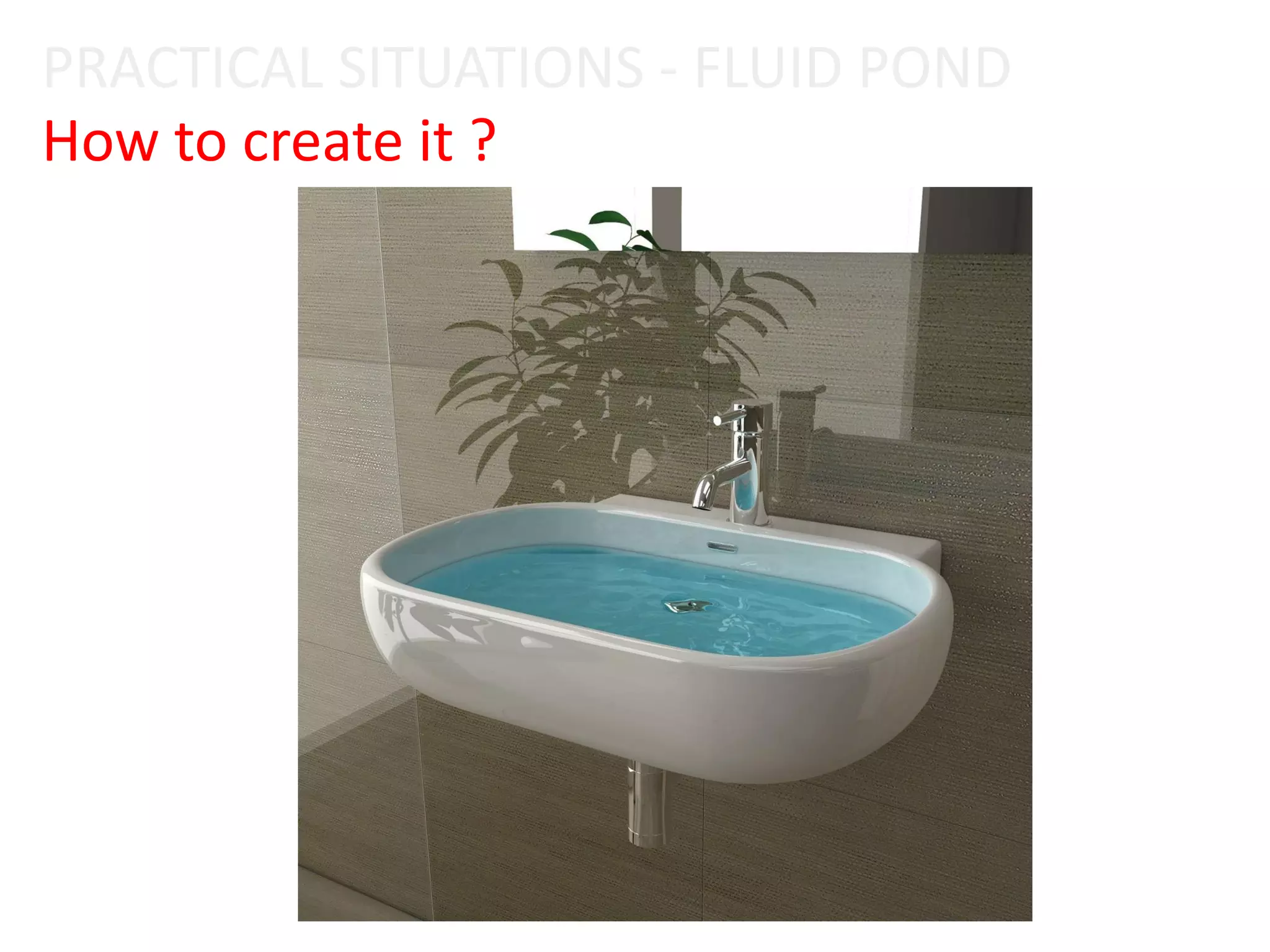
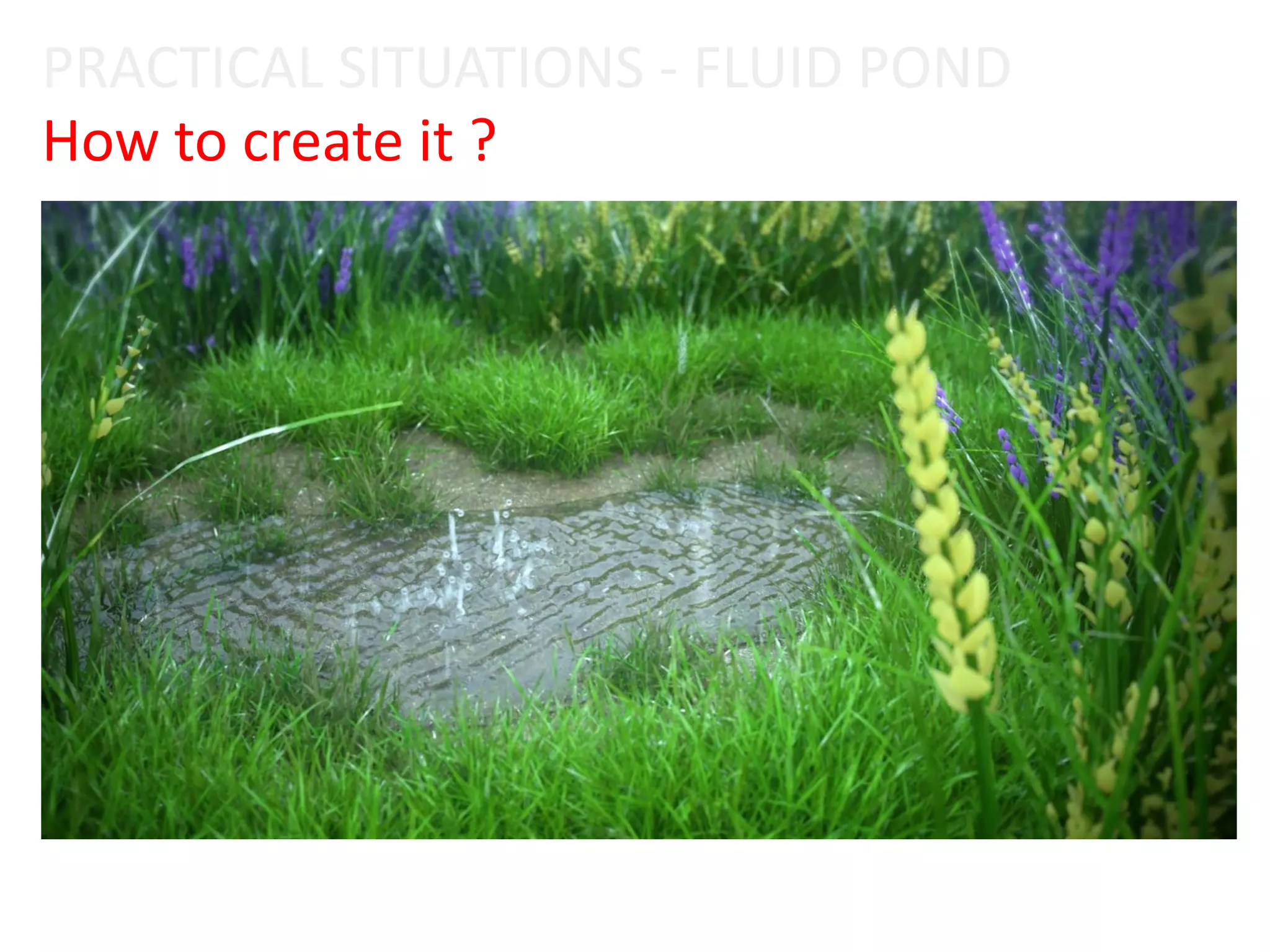
How to create it ?
PRACTICAL SITUATIONS - FLUID POND
How to create it ?
PRACTICAL SITUATIONS - FLUID POND
3) WORKING WITH FLUID OCEAN
Fluid Effect
3) PRACTICAL SITUATIONS - OCEAN
Fluid Effect
3.1) Create Ocean
3.2) Preview Plane
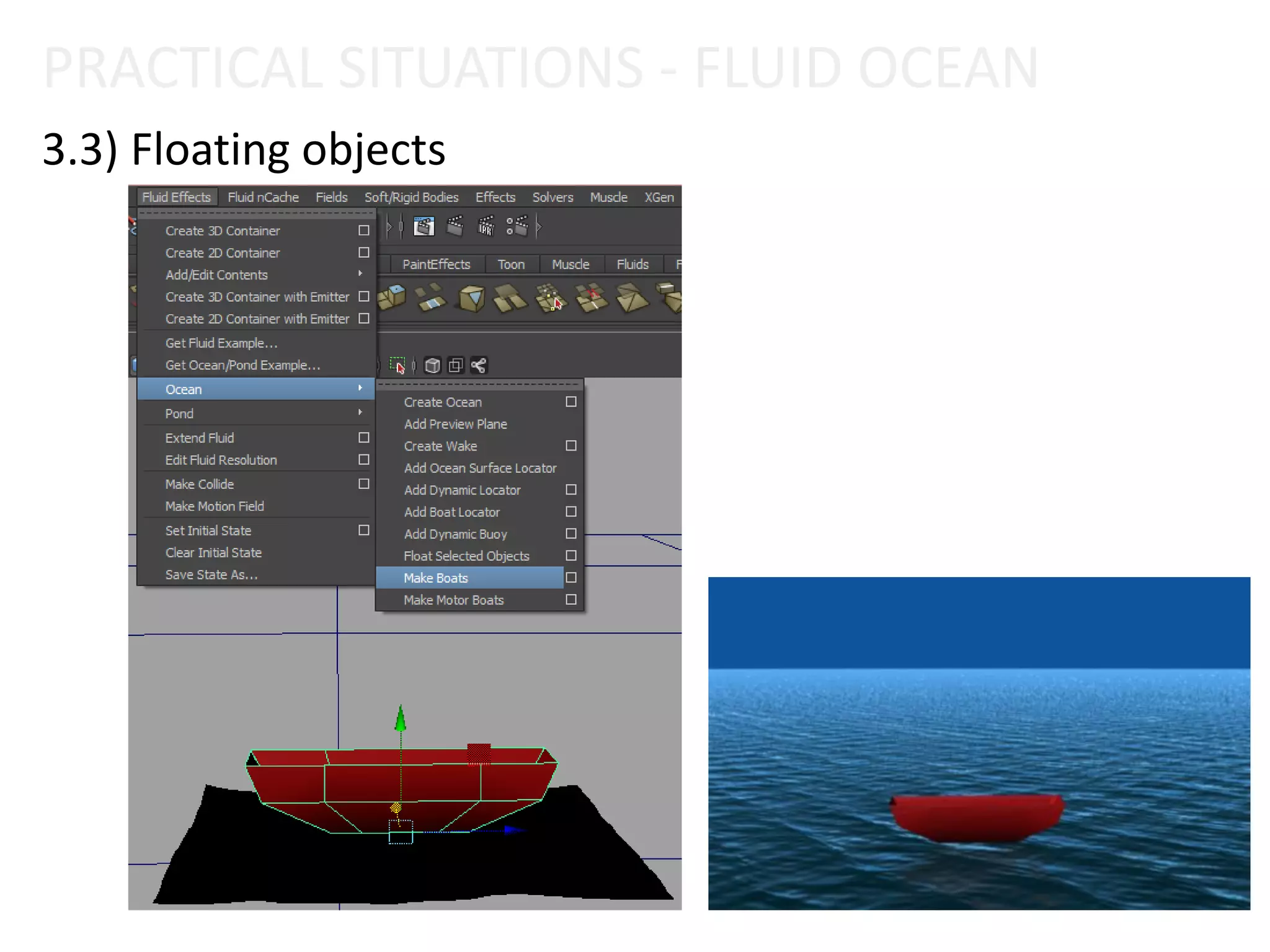
3.3) Floating objects
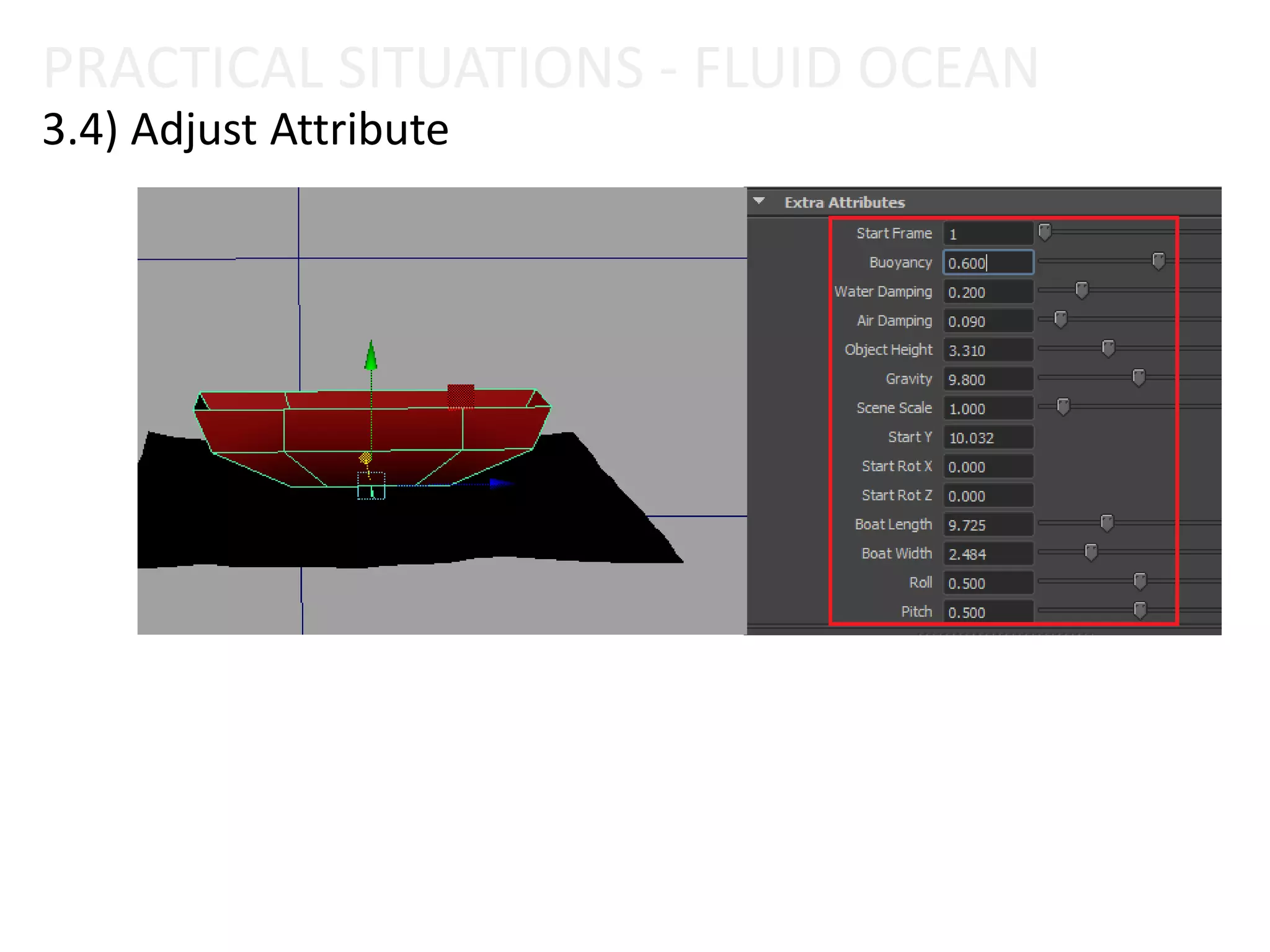
3.4) Adjust Attribute
3.5) Motor Boats
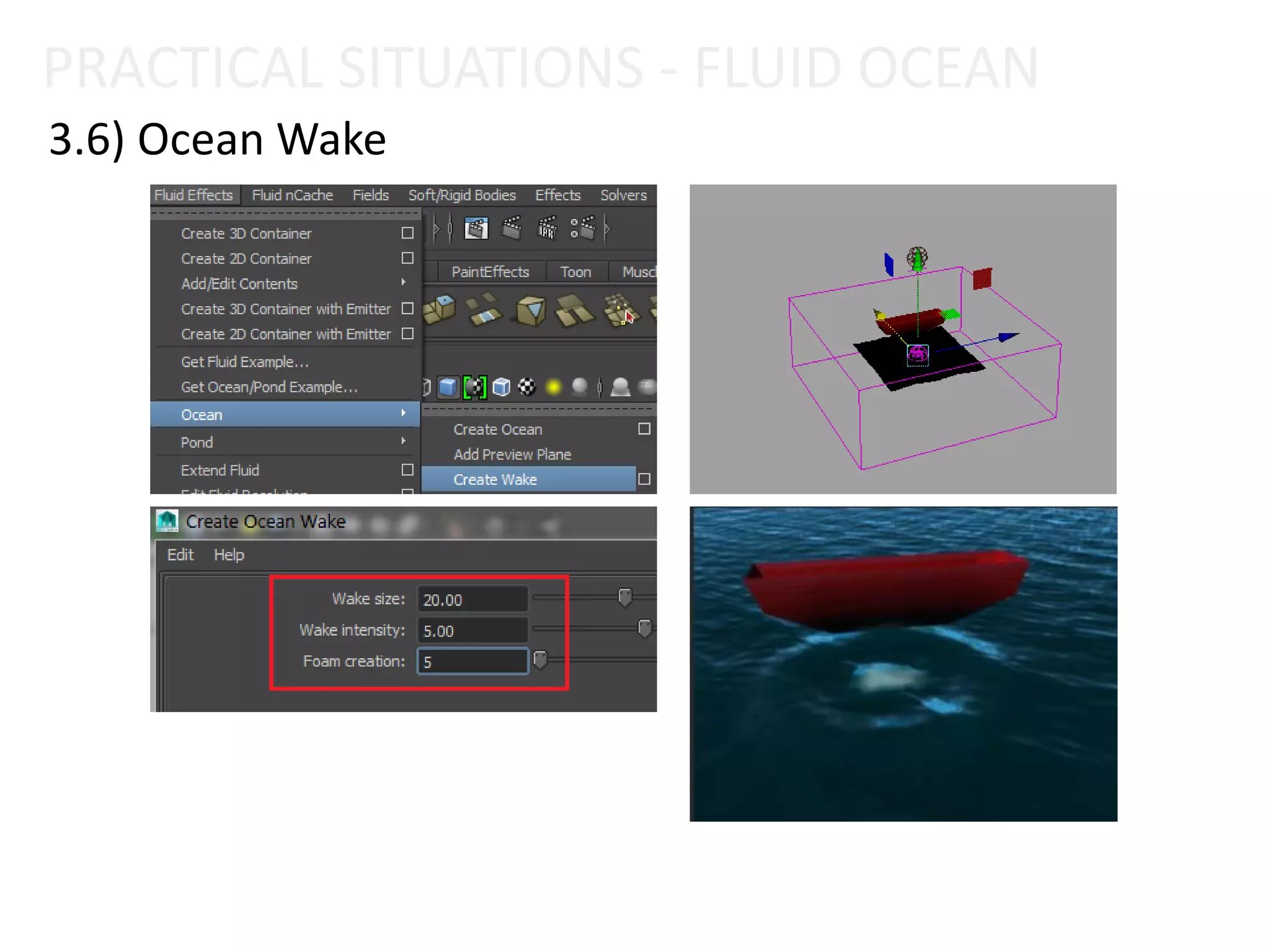
3.6) Ocean Wake
3) PRACTICAL SITUATIONS - OCEAN
Fluid Effect
3.1) Create Ocean
3.2) Preview Plane
3.3) Floating objects
3.4) Adjust Attribute
3.5) Motor Boats
3.6) Ocean Wake
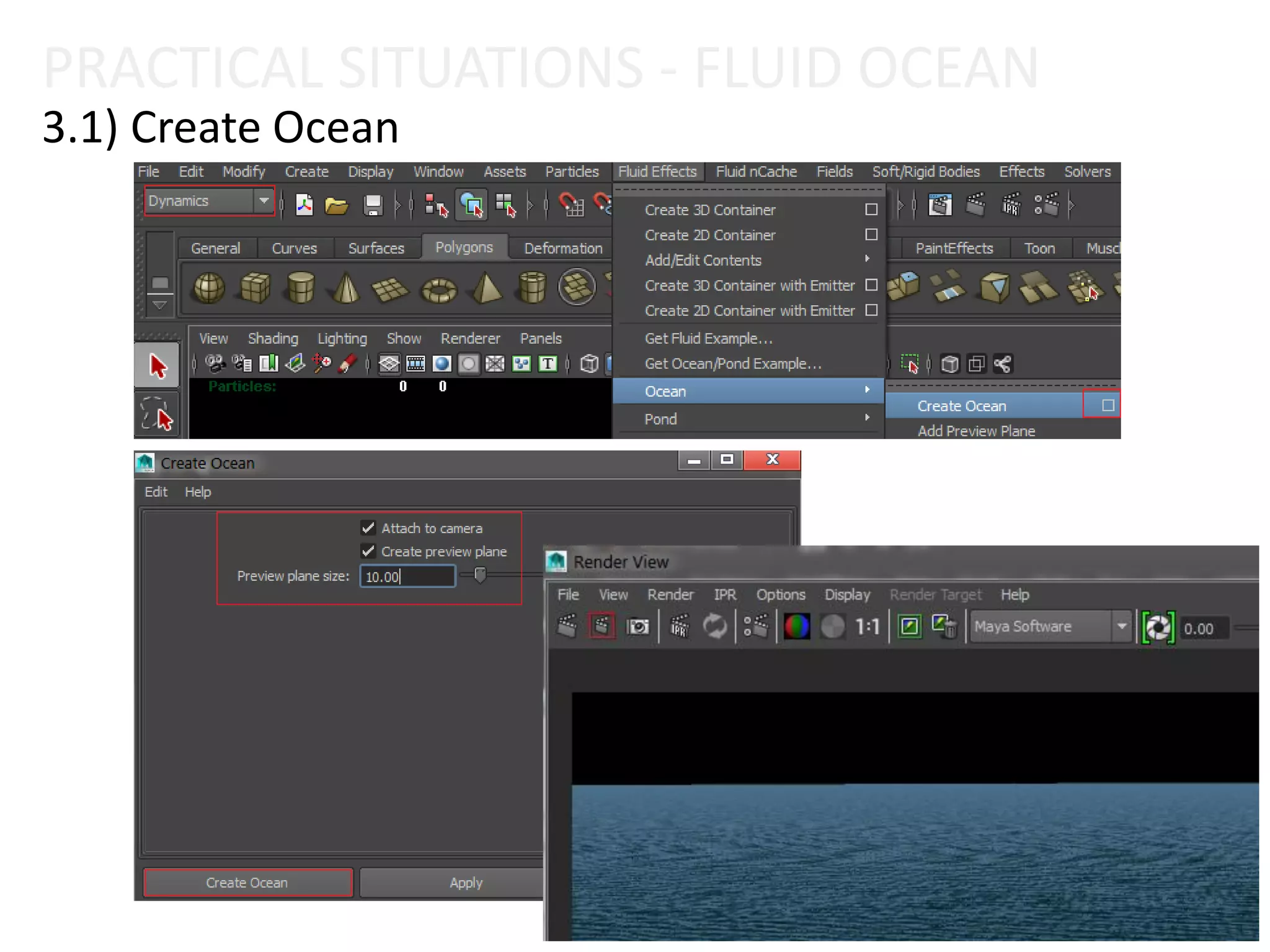
PRACTICAL SITUATIONS - FLUID OCEAN
3.1) Create Ocean
3) PRACTICAL SITUATIONS- OCEAN
Fluid Effect
3.1) Create Ocean
3.2) Preview Plane
3.3) Floating objects
3.4) Adjust Attribute
3.5) Motor Boats
3.6) Ocean Wake
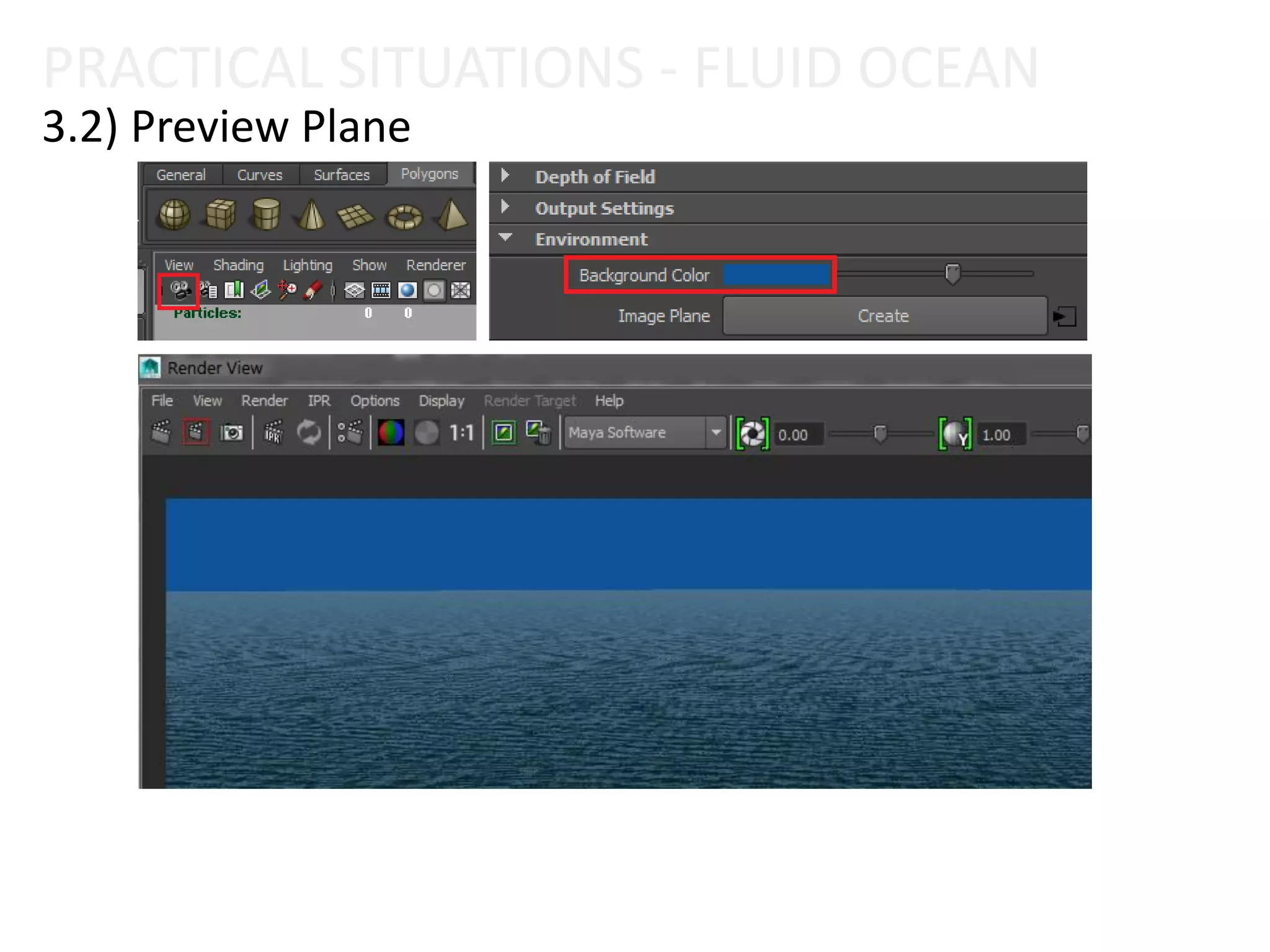
3.2) Preview Plane
PRACTICAL SITUATIONS - FLUID OCEAN
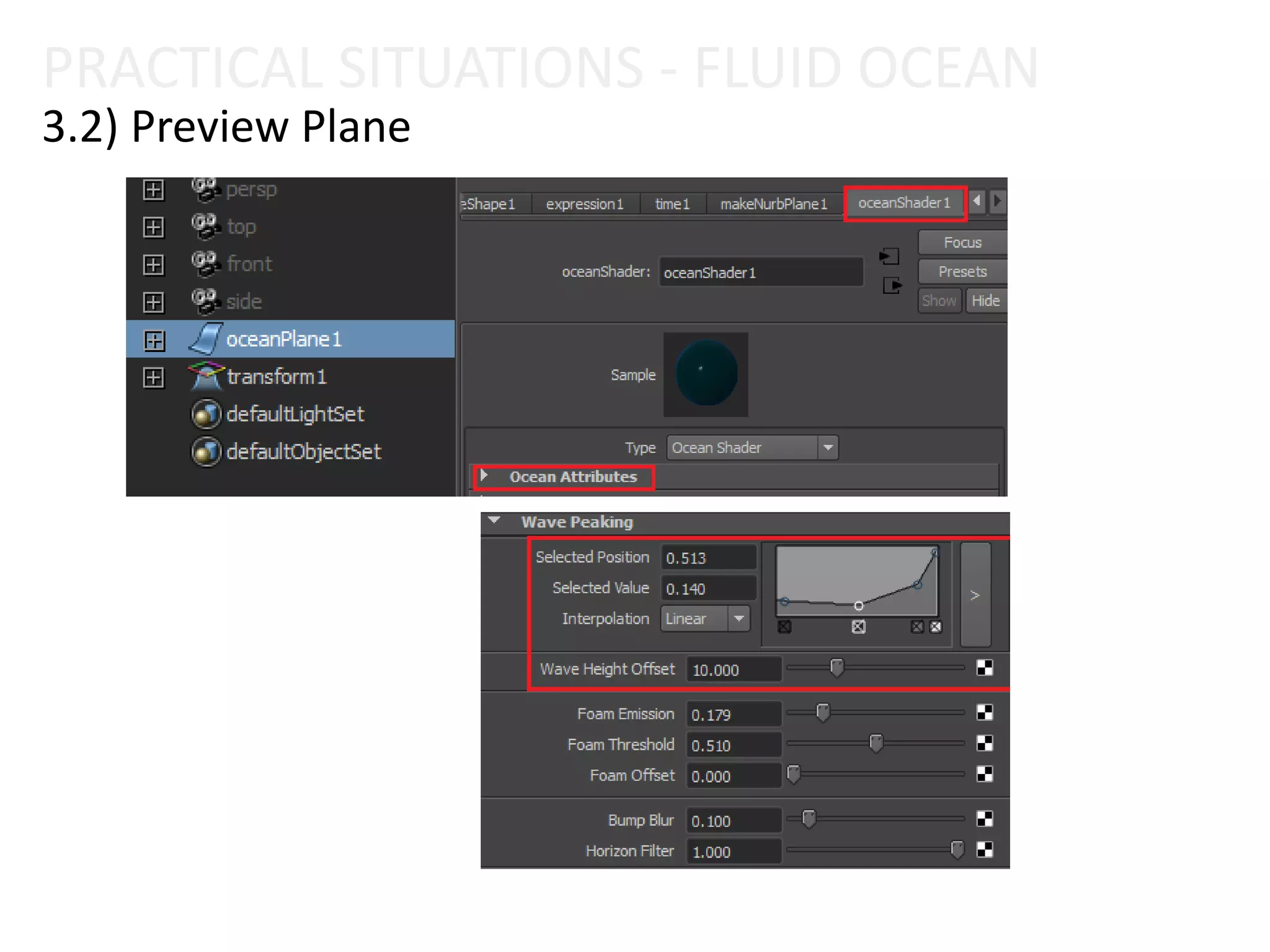
3.2) Preview Plane
PRACTICAL SITUATIONS - FLUID OCEAN
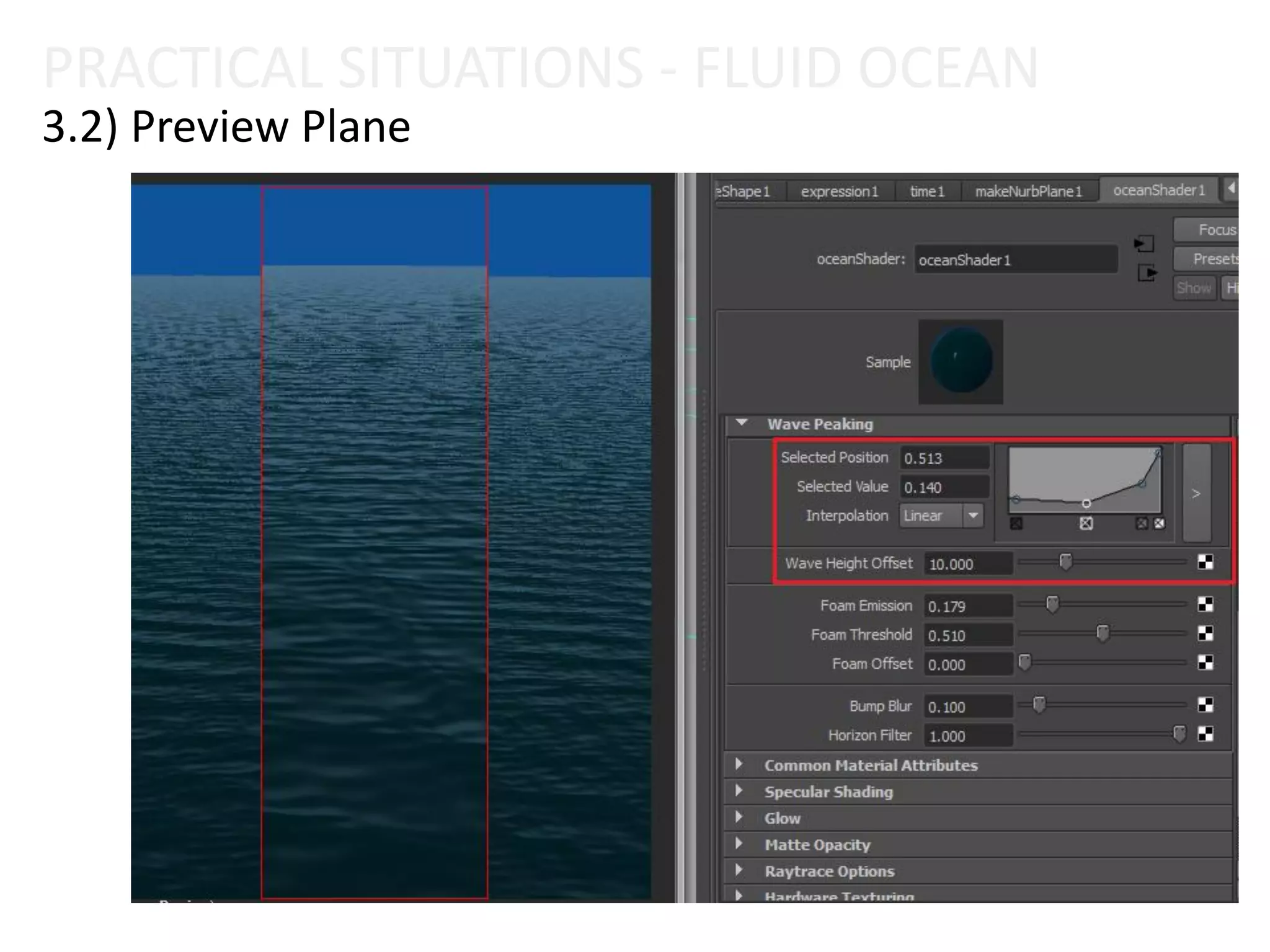
3.2) Preview Plane
PRACTICAL SITUATIONS - FLUID OCEAN
3) PRACTICAL SITUATIONS- OCEAN
Fluid Effect
3.1) Create Ocean
3.2) Preview Plane
3.3) Floating objects
3.4) Adjust Attribute
3.5) Motor Boats
3.6) Ocean Wake
3.3) Floating objects
PRACTICAL SITUATIONS - FLUID OCEAN
3) PRACTICAL SITUATIONS - OCEAN
Fluid Effect
3.1) Create Ocean
3.2) Preview Plane
3.3) Floating objects
3.4) Adjust Attribute
3.5) Motor Boats
3.6) Ocean Wake
3.4) Adjust Attribute
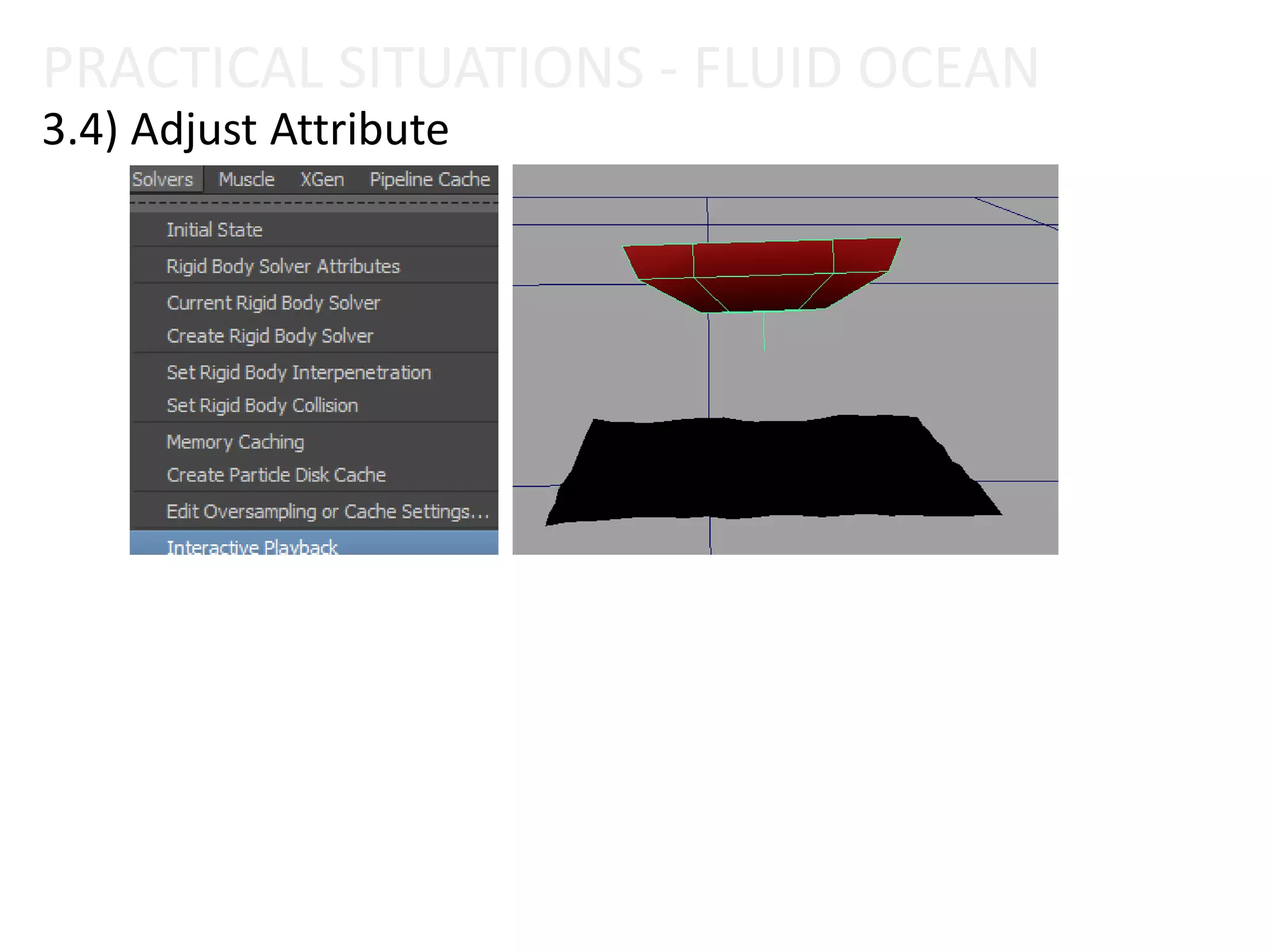
PRACTICAL SITUATIONS - FLUID OCEAN
3.4) Adjust Attribute
PRACTICAL SITUATIONS - FLUID OCEAN
3) PRACTICAL SITUATIONS - OCEAN
Fluid Effect
3.1) Create Ocean
3.2) Preview Plane
3.3) Floating objects
3.4) Adjust Attribute
3.5) Motor Boats
3.6) Ocean Wake
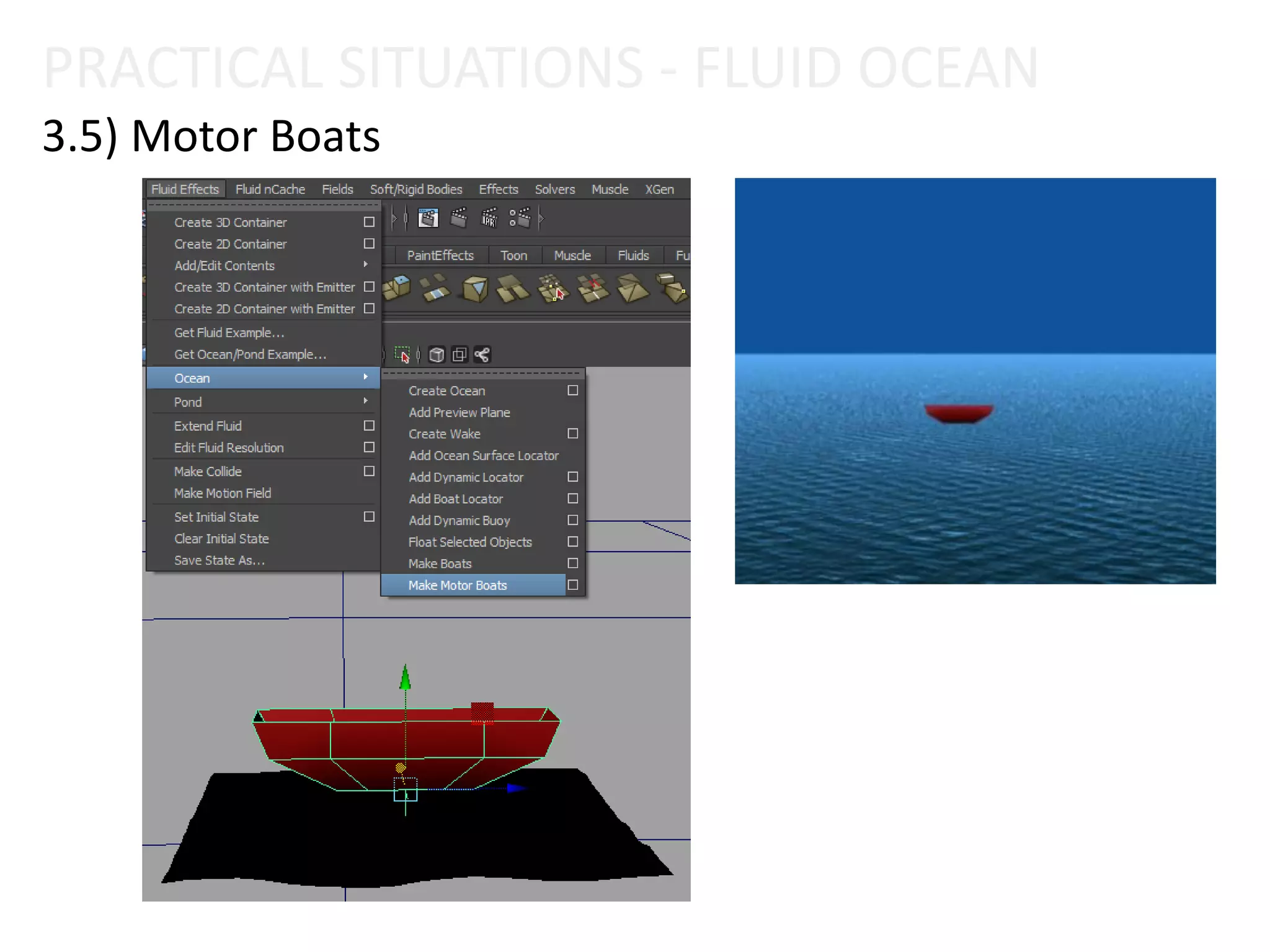
3.5) Motor Boats
PRACTICAL SITUATIONS - FLUID OCEAN
3) PRACTICAL SITUATIONS - OCEAN
Fluid Effect
3.1) Create Ocean
3.2) Preview Plane
3.3) Floating objects
3.4) Adjust Attribute
3.5) Motor Boats
3.6) Ocean Wake
3.6) Ocean Wake
PRACTICAL SITUATIONS - FLUID OCEAN
4) WORKING WITH VISOR LIBRARY
Fluid Effect
PRACTICAL SITUATIONS - FLUID OCEAN
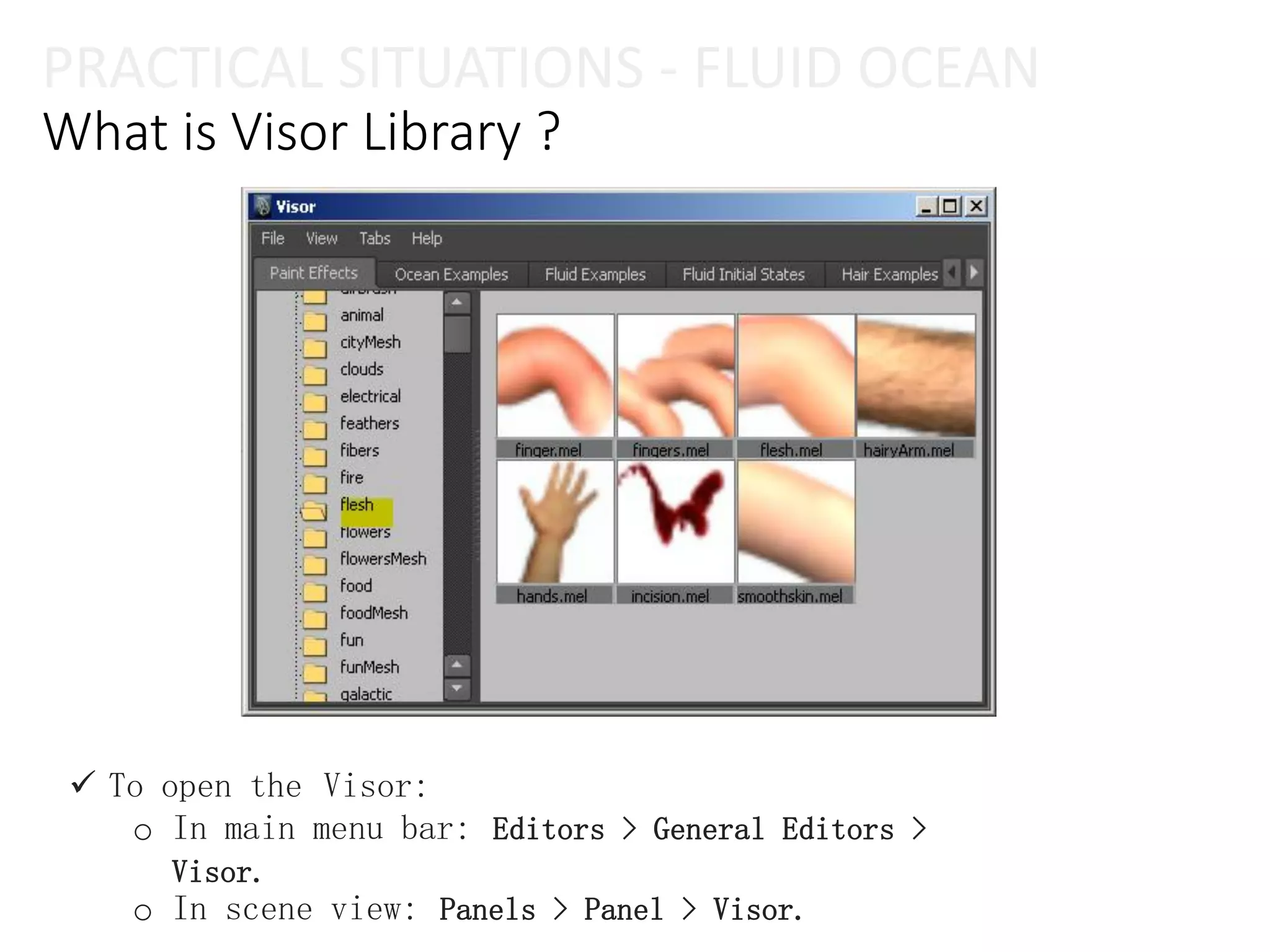
What is Visor Library ?
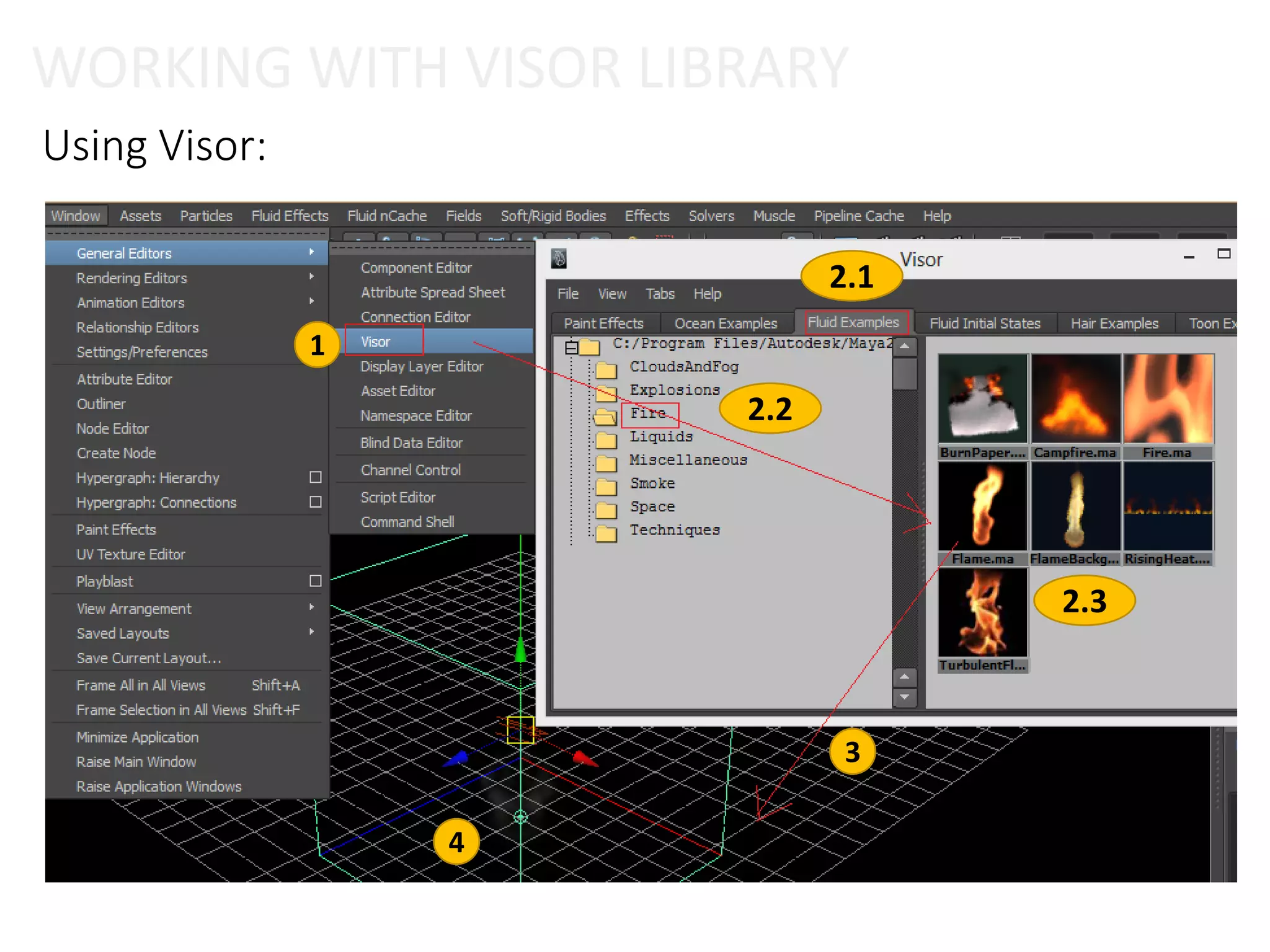
 To open the Visor:
o In main menu bar: Editors > General Editors >
Visor.
o In scene view: Panels > Panel > Visor.
Using Visor:
 Step 1: Open Visor.
 Step 2: Select type effect template.
 Step 3: Drag and drop to screen view.
 Step 4: Edit template.
WORKING WITH VISOR LIBRARY
Using Visor:
1
2.1
3
2.2
2.3
4
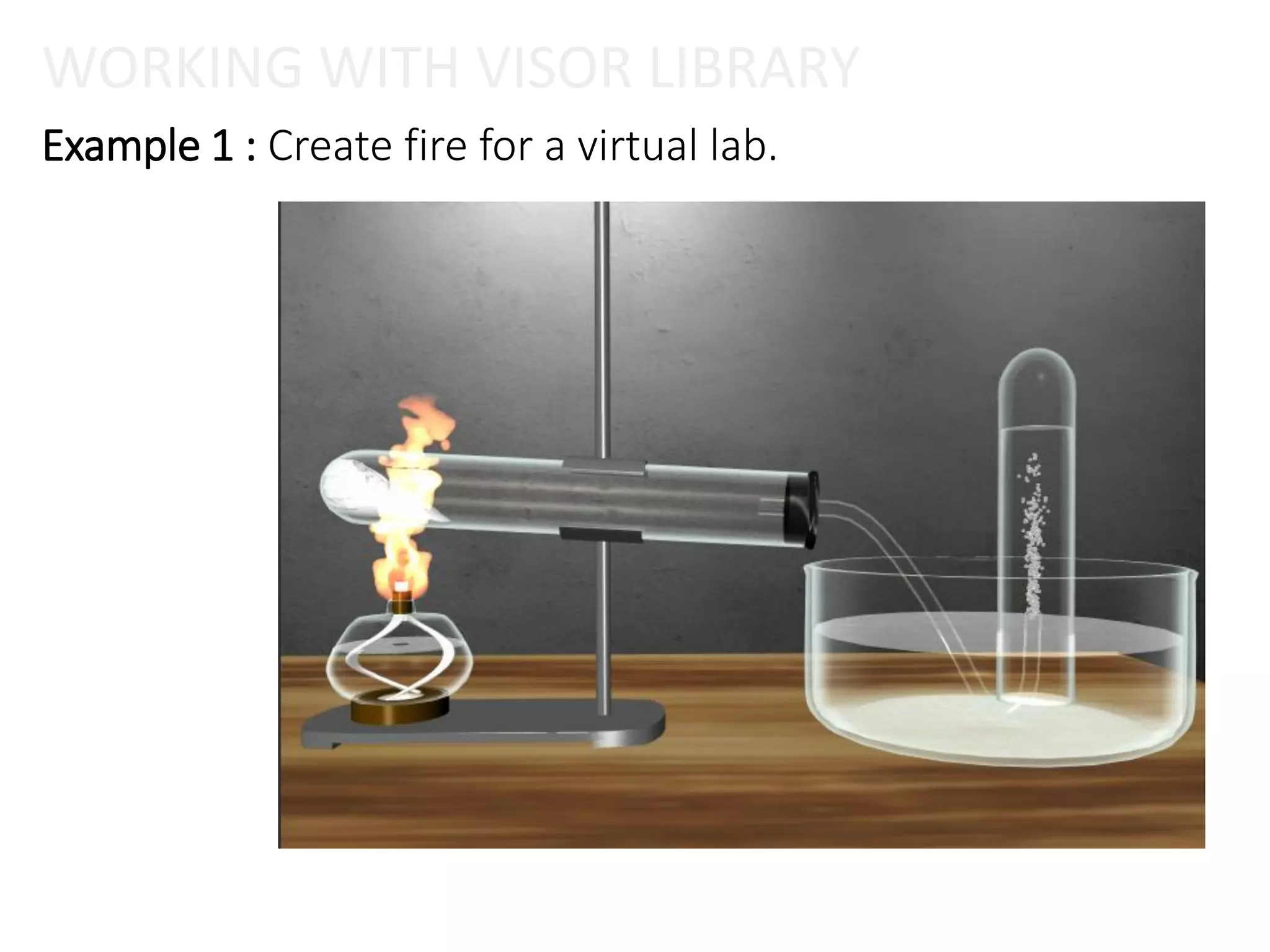
Example 1 : Create fire for a virtual lab.
WORKING WITH VISOR LIBRARY
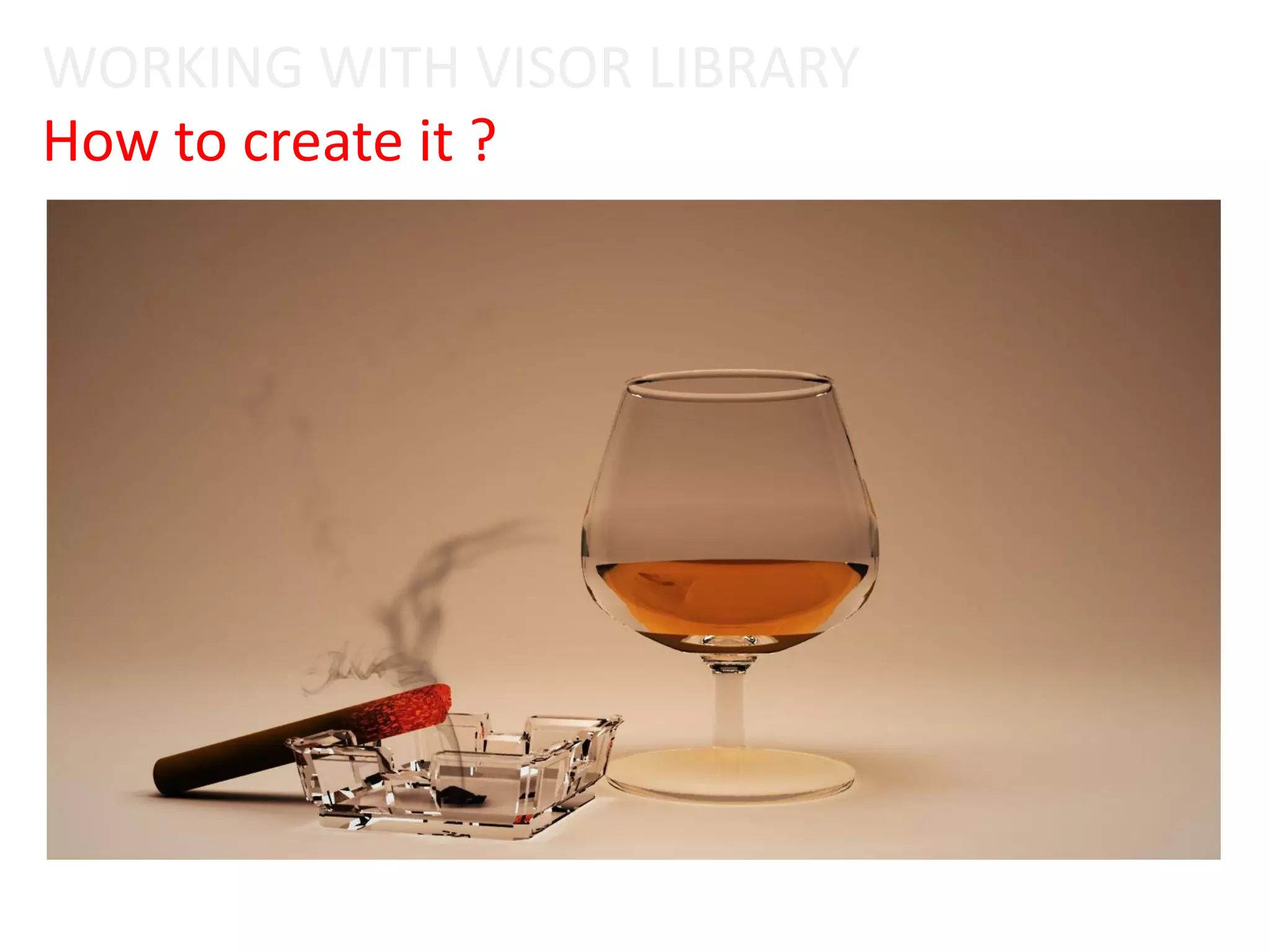
How to create it ?
WORKING WITH VISOR LIBRARY
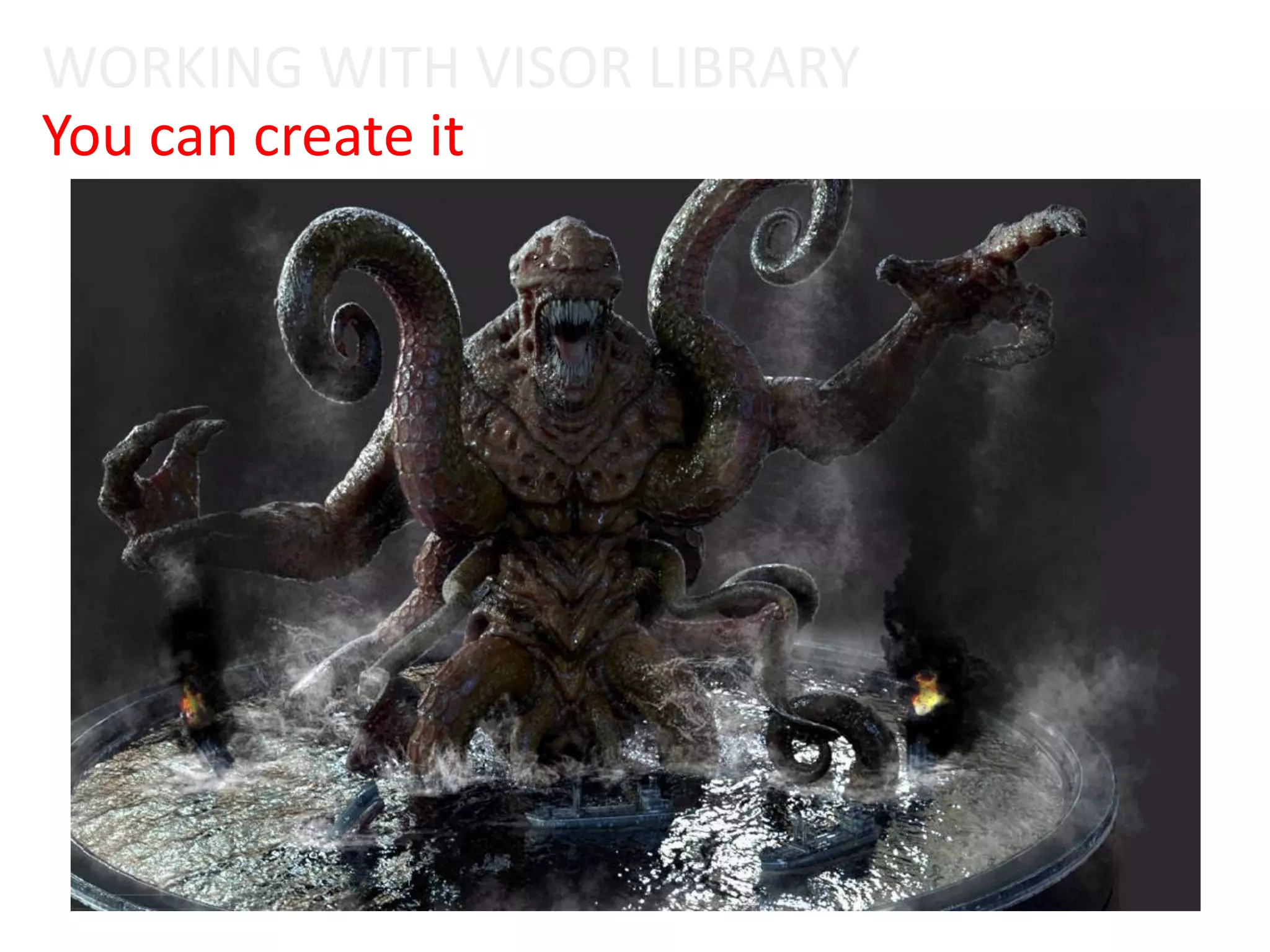
You can create it
WORKING WITH VISOR LIBRARY
Thanks!

Session 11 – fluid effects

  • 1.
    Maya Dynamics Basics Lab11: Fluid Effect Author: Khieu Van Bang Email: tribang.nd@gmail.com
  • 2.
    CONTENTS  Overview FluidEffect  What is Fluid Effect ?  What does fluid effects support ?  Working with Fluid Pond Learning contents: Create Pond; Fluid Attributes; Pond Wake; Emission Turbulence; Shader Attributes; Match Object; Interactive; Simulation Quality; Make Collision; InitialState; Keyframe Emission; Keyframe Object; Raytraced Water, ...  Working with Fluid Ocean Learning contents: Create Ocean; Customize Ocean; Control Render; Floating Objects; Adjust Attribute; Motor Boats; Ocean Wake; Emitter from Object, ...  Working with Visor Library  Learn how to use templates.  Create a virtual lab.
  • 3.
    1) OVERVIEW FLUIDEFFECT Fluid Effect
  • 4.
    What is FluidEffect ? OVERVIEW FLUID EFFECT  Is a technology for realistically simulating and rendering fluid motion. Fluid Effects lets you create a wide variety of 2D and 3D atmospheric, pyrotechnic, space, and liquid effects. o You can use the Fluid Effectssolvers to simulate these effects, or you can use fluid animated textures for more unique, distinguishing effects. o Fluid Effects also includes an ocean shader for creating realistic open water. You can float objects on the ocean surface and have those objects react to the motion of the water. o You can create the following types of effects with Fluid Effects:
  • 5.
    Types Fluid Effect Dynamic fluid effects  Oceans and Ponds  Non-dynamic fluid effects OVERVIEW FLUID EFFECT Behave according to the natural laws of fluid dynamics, a branch of physics that uses mathematical equations to calculate how things flow. Maya simulates fluid motion by solving the Navier-Stokes fluid dynamics equations at each time step. 3D fluids inherently require extra data to define them, which can make them very large. This extra data can slow a dynamic simulation exponentially because more calculations (solving) must be performed at every step of the simulation. For a less memory intensive effect, you can use a 2D fluid (with less data), or you can create a non-dynamicfluid. Create Ocean and Pond fluids to simulate large realistic water surfaces, such as stormy oceans with foam and swimming pools. Oceans are NURBS planes with ocean shaders assigned to them. Ponds are 2D fluids that use a spring mesh solver and a height field.
  • 6.
    What does fluideffects support ?  Naver Stokes based Fluids o Smoke. o Clouds. o Explosions. o Fire. o “Goo” type-stuff.  Ad-Hoc / Mass-Spring fluids o Oceans. o Ponds. OVERVIEW FLUID EFFECT
  • 7.
  • 8.
    OVERVIEW FLUID EFFECT MayaOcean  2D height field – no crashing waves.  Can attach ‘bouyant’ objects.
  • 9.
    OVERVIEW FLUID EFFECT MayaPond  2D height field. o No splashing.  Mass-spring system.  Bouys, Boats, Wakes.  Can run in real-time.
  • 10.
    2) WORKING WITHFLUID POND Fluid Effect
  • 11.
    2) PRACTICAL SITUATIONS– FLUID POND Fluid Effect 2.1) Create Pond 2.2) Create Wake 2.3) EmissionTurbulence 2.4) Shader Attributes 2.5) Match Object 2.6) Interactive 2.7) Simulation Quality 2.8) Make Collision 2.9) InitialState 2.11) Keyframe Object 2.10) Keyframe Emission 2.12) Raytraced Water 2.13) Caching Fluid 2.14) Smoothing Pond
  • 12.
    2) PRACTICAL SITUATIONS– FLUID POND Fluid Effect 2.1) Create Pond 2.2) Create Wake 2.3) EmissionTurbulence 2.4) Shader Attributes 2.5) Match Object 2.6) Interactive 2.7) Simulation Quality 2.8) Make Collision 2.9) InitialState 2.11) Keyframe Object 2.10) Keyframe Emission 2.12) Raytraced Water 2.13) Caching Fluid 2.14) Smoothing Pond
  • 13.
    PRACTICAL SITUATIONS -FLUID POND 2.1) Create Pond
  • 14.
    2) PRACTICAL SITUATIONS– FLUID POND Fluid Effect 2.1) Create Pond 2.2) Create Wake 2.3) EmissionTurbulence 2.4) Shader Attributes 2.5) Match Object 2.6) Interactive 2.7) Simulation Quality 2.8) Make Collision 2.9) InitialState 2.11) Keyframe Object 2.10) Keyframe Emission 2.12) Raytraced Water 2.13) Caching Fluid 2.14) Smoothing Pond PRACTICAL SITUATIONS - FLUID POND
  • 15.
    PRACTICAL SITUATIONS -FLUID POND 2.2) Create Wake
  • 16.
    2) PRACTICAL SITUATIONS– FLUID POND Fluid Effect 2.1) Create Pond 2.2) Create Wake 2.3) EmissionTurbulence 2.4) Shader Attributes 2.5) Match Object 2.6) Interactive 2.7) Simulation Quality 2.8) Make Collision 2.9) InitialState 2.11) Keyframe Object 2.10) Keyframe Emission 2.12) Raytraced Water 2.13) Caching Fluid 2.14) Smoothing Pond
  • 17.
    PRACTICAL SITUATIONS -FLUID POND 2.3) EmissionTurbulence
  • 18.
    2) PRACTICAL SITUATIONS– FLUID POND Fluid Effect 2.1) Create Pond 2.2) Create Wake 2.3) EmissionTurbulence 2.4) Shader Attributes 2.5) Match Object 2.6) Interactive 2.7) Simulation Quality 2.8) Make Collision 2.9) InitialState 2.11) Keyframe Object 2.10) Keyframe Emission 2.12) Raytraced Water 2.13) Caching Fluid 2.14) Smoothing Pond
  • 19.
    PRACTICAL SITUATIONS -FLUID POND 2.4) Shader Attributes
  • 20.
    PRACTICAL SITUATIONS -FLUID POND 2.4) Shader Attributes
  • 21.
    2) PRACTICAL SITUATIONS– FLUID POND Fluid Effect 2.1) Create Pond 2.2) Create Wake 2.3) EmissionTurbulence 2.4) Shader Attributes 2.5) Match Object 2.6) Interactive 2.7) Simulation Quality 2.8) Make Collision 2.9) InitialState 2.11) Keyframe Object 2.10) Keyframe Emission 2.12) Raytraced Water 2.13) Caching Fluid 2.14) Smoothing Pond
  • 22.
    PRACTICAL SITUATIONS -FLUID POND 2.5) Match Object
  • 23.
    2) PRACTICAL SITUATIONS– FLUID POND Fluid Effect 2.1) Create Pond 2.2) Create Wake 2.3) EmissionTurbulence 2.4) Shader Attributes 2.5) Match Object 2.6) Interactive 2.7) Simulation Quality 2.8) Make Collision 2.9) InitialState 2.11) Keyframe Object 2.10) Keyframe Emission 2.12) Raytraced Water 2.13) Caching Fluid 2.14) Smoothing Pond
  • 24.
    PRACTICAL SITUATIONS -FLUID POND 2.6) Interactive
  • 25.
    2) PRACTICAL SITUATIONS– FLUID POND Fluid Effect 2.1) Create Pond 2.2) Create Wake 2.3) EmissionTurbulence 2.4) Shader Attributes 2.5) Match Object 2.6) Interactive 2.7) Simulation Quality 2.8) Make Collision 2.9) InitialState 2.11) Keyframe Object 2.10) Keyframe Emission 2.12) Raytraced Water 2.13) Caching Fluid 2.14) Smoothing Pond
  • 26.
    2.7) Simulation Quality PRACTICALSITUATIONS - FLUID POND
  • 27.
    2) PRACTICAL SITUATIONS– FLUID POND Fluid Effect 2.1) Create Pond 2.2) Create Wake 2.3) EmissionTurbulence 2.4) Shader Attributes 2.5) Match Object 2.6) Interactive 2.7) Simulation Quality 2.8) Make Collision 2.9) InitialState 2.11) Keyframe Object 2.10) Keyframe Emission 2.12) Raytraced Water 2.13) Caching Fluid 2.14) Smoothing Pond
  • 28.
    PRACTICAL SITUATIONS -FLUID POND 2.8) Make Collision
  • 29.
    2) PRACTICAL SITUATIONS– FLUID POND Fluid Effect 2.1) Create Pond 2.2) Create Wake 2.3) EmissionTurbulence 2.4) Shader Attributes 2.5) Match Object 2.6) Interactive 2.7) Simulation Quality 2.8) Make Collision 2.9) InitialState 2.11) Keyframe Object 2.10) Keyframe Emission 2.12) Raytraced Water 2.13) Caching Fluid 2.14) Smoothing Pond
  • 30.
    PRACTICAL SITUATIONS -FLUID POND 2.9) InitialState 1 2
  • 31.
    PRACTICAL SITUATIONS -FLUID POND 2.9) InitialState 3 4
  • 32.
    2) PRACTICAL SITUATIONS– FLUID POND Fluid Effect 2.1) Create Pond 2.2) Create Wake 2.3) EmissionTurbulence 2.4) Shader Attributes 2.5) Match Object 2.6) Interactive 2.7) Simulation Quality 2.8) Make Collision 2.9) InitialState 2.11) Keyframe Object 2.10) Keyframe Emission 2.12) Raytraced Water 2.13) Caching Fluid 2.14) Smoothing Pond
  • 33.
    2.10) Keyframe Emission PRACTICALSITUATIONS - FLUID POND
  • 34.
    2) PRACTICAL SITUATIONS– FLUID POND Fluid Effect 2.1) Create Pond 2.2) Create Wake 2.3) EmissionTurbulence 2.4) Shader Attributes 2.5) Match Object 2.6) Interactive 2.7) Simulation Quality 2.8) Make Collision 2.9) InitialState 2.11) Keyframe Object 2.10) Keyframe Emission 2.12) Raytraced Water 2.13) Caching Fluid 2.14) Smoothing Pond
  • 35.
    PRACTICAL SITUATIONS -FLUID POND 2.11) Keyframe Object
  • 36.
    2) PRACTICAL SITUATIONS– FLUID POND Fluid Effect 2.1) Create Pond 2.2) Create Wake 2.3) EmissionTurbulence 2.4) Shader Attributes 2.5) Match Object 2.6) Interactive 2.7) Simulation Quality 2.8) Make Collision 2.9) InitialState 2.11) Keyframe Object 2.10) Keyframe Emission 2.12) Raytraced Water 2.13) Caching Fluid 2.14) Smoothing Pond
  • 37.
    2.12) Raytraced Water PRACTICALSITUATIONS - FLUID POND
  • 38.
    2.12) Raytraced Water PRACTICALSITUATIONS - FLUID POND
  • 39.
    2.12) Raytraced Water PRACTICALSITUATIONS - FLUID POND
  • 40.
    2) PRACTICAL SITUATIONS– FLUID POND Fluid Effect 2.1) Create Pond 2.2) Create Wake 2.3) EmissionTurbulence 2.4) Shader Attributes 2.5) Match Object 2.6) Interactive 2.7) Simulation Quality 2.8) Make Collision 2.9) InitialState 2.11) Keyframe Object 2.10) Keyframe Emission 2.12) Raytraced Water 2.13) Caching Fluid 2.14) Smoothing Pond
  • 41.
    PRACTICAL SITUATIONS -FLUID POND 2.13) Caching Fluid
  • 42.
    2) PRACTICAL SITUATIONS– FLUID POND Fluid Effect 2.1) Create Pond 2.2) Create Wake 2.3) EmissionTurbulence 2.4) Shader Attributes 2.5) Match Object 2.6) Interactive 2.7) Simulation Quality 2.8) Make Collision 2.9) InitialState 2.11) Keyframe Object 2.10) Keyframe Emission 2.12) Raytraced Water 2.13) Caching Fluid 2.14) Smoothing Pond
  • 43.
    PRACTICAL SITUATIONS -FLUID POND 2.14) Smoothing Pond
  • 44.
    PRACTICAL SITUATIONS -FLUID POND 2.14) Smoothing Pond
  • 45.
    How to createit ? PRACTICAL SITUATIONS - FLUID POND
  • 46.
    How to createit ? PRACTICAL SITUATIONS - FLUID POND
  • 47.
    3) WORKING WITHFLUID OCEAN Fluid Effect
  • 48.
    3) PRACTICAL SITUATIONS- OCEAN Fluid Effect 3.1) Create Ocean 3.2) Preview Plane 3.3) Floating objects 3.4) Adjust Attribute 3.5) Motor Boats 3.6) Ocean Wake
  • 49.
    3) PRACTICAL SITUATIONS- OCEAN Fluid Effect 3.1) Create Ocean 3.2) Preview Plane 3.3) Floating objects 3.4) Adjust Attribute 3.5) Motor Boats 3.6) Ocean Wake
  • 50.
    PRACTICAL SITUATIONS -FLUID OCEAN 3.1) Create Ocean
  • 51.
    3) PRACTICAL SITUATIONS-OCEAN Fluid Effect 3.1) Create Ocean 3.2) Preview Plane 3.3) Floating objects 3.4) Adjust Attribute 3.5) Motor Boats 3.6) Ocean Wake
  • 52.
    3.2) Preview Plane PRACTICALSITUATIONS - FLUID OCEAN
  • 53.
    3.2) Preview Plane PRACTICALSITUATIONS - FLUID OCEAN
  • 54.
    3.2) Preview Plane PRACTICALSITUATIONS - FLUID OCEAN
  • 55.
    3) PRACTICAL SITUATIONS-OCEAN Fluid Effect 3.1) Create Ocean 3.2) Preview Plane 3.3) Floating objects 3.4) Adjust Attribute 3.5) Motor Boats 3.6) Ocean Wake
  • 56.
    3.3) Floating objects PRACTICALSITUATIONS - FLUID OCEAN
  • 57.
    3) PRACTICAL SITUATIONS- OCEAN Fluid Effect 3.1) Create Ocean 3.2) Preview Plane 3.3) Floating objects 3.4) Adjust Attribute 3.5) Motor Boats 3.6) Ocean Wake
  • 58.
    3.4) Adjust Attribute PRACTICALSITUATIONS - FLUID OCEAN
  • 59.
    3.4) Adjust Attribute PRACTICALSITUATIONS - FLUID OCEAN
  • 60.
    3) PRACTICAL SITUATIONS- OCEAN Fluid Effect 3.1) Create Ocean 3.2) Preview Plane 3.3) Floating objects 3.4) Adjust Attribute 3.5) Motor Boats 3.6) Ocean Wake
  • 61.
    3.5) Motor Boats PRACTICALSITUATIONS - FLUID OCEAN
  • 62.
    3) PRACTICAL SITUATIONS- OCEAN Fluid Effect 3.1) Create Ocean 3.2) Preview Plane 3.3) Floating objects 3.4) Adjust Attribute 3.5) Motor Boats 3.6) Ocean Wake
  • 63.
    3.6) Ocean Wake PRACTICALSITUATIONS - FLUID OCEAN
  • 64.
    4) WORKING WITHVISOR LIBRARY Fluid Effect
  • 65.
    PRACTICAL SITUATIONS -FLUID OCEAN What is Visor Library ?  To open the Visor: o In main menu bar: Editors > General Editors > Visor. o In scene view: Panels > Panel > Visor.
  • 66.
    Using Visor:  Step1: Open Visor.  Step 2: Select type effect template.  Step 3: Drag and drop to screen view.  Step 4: Edit template. WORKING WITH VISOR LIBRARY
  • 67.
    WORKING WITH VISORLIBRARY Using Visor: 1 2.1 3 2.2 2.3 4
  • 68.
    Example 1 :Create fire for a virtual lab. WORKING WITH VISOR LIBRARY
  • 69.
    How to createit ? WORKING WITH VISOR LIBRARY
  • 70.
    You can createit WORKING WITH VISOR LIBRARY
  • 71.