Maya Dynamics Basics
Lab 8: The Particle Instanter
Author: Khieu Van Bang
Email: tribang.nd@gmail.com
CONTENTS
 The Particle Instanter :
 What is Particle Instanter ?
 What we can do with Particle Instanter ?
 How to create a Particle Instanter ?
 Integrated with Particle Instanter :
 Create Integrated with Particle Instanter.
 Practical situations.
 Exercise:
 Flying lanterns.
The Particle instanter
1) OVERVIEW PARTICLE INSTANTER
1.1) What is particle instanter?
THE PARTICLE INSTANTER
 Instancing?
o An instance is similar to a duplicated object but the difference is, it is not actual object.
Let's say you are in a room surrounded by 100 mirrors. If you lift one leg, many of you
in the mirror will lift one leg too. But it doesn't mean every you in 100 mirrors are
"actual" you.
o An instance contains no actual surface information, but is just a redrawn version of an
original object. The original object acts like a master to all of its instances like you in
the mirror room. Instances will be updated as the original is updated on all shading and
surface characteristics.
o Instances contain less information than duplicates so they can be handled and redrawn
faster.
 Particle Instancing
o Particle instancing is the process of using the position and behaviour of particles to
control the position and behaviour of instanced geometry. Although some complex
results can be obtained using particle instancing, it is important not to interpret it as a
full-featured behaviour animation system or flocking system. There are no behavioural
relationships between the individual instanced elements.
1.2) What we can do with Particle Instanter ?
THE PARTICLE INSTANTER
Instanter RobotsInstanter fish
Instanter object and FieldsSignature fly box falling leaves
Birds flock
1.3) Create a Particle Instanter
THE PARTICLE INSTANTER
 Step 1: Select the source geometry.
 Step 2: Select Particles > Instancer (Replacement).
1
2
THE PARTICLE INSTANTER
o Particle Instancer Name: Optional name of the instancer node.
o Rotation Units: value is interpreted as degrees or radians.
o Rotation Order: precedence order of rotation, for instance, XYZ, XZY, or ZXY.
o Level of Detail: source geometry appears at the particle locations or whether a
bounding box or boxes appear instead.
o Geometry: The source geometry appears at the particle locations.
o Bounding Box: Displays a single box for all the objects in the instanced
hierarchy.
o Bounding Boxes: Displays individual boxes for each object in the instanced
hierarchy.
o Cycle: Select from the following options:
o None: Instance a single object.
o Sequential: Cycle through the objects in the Instanced Objects list.
o Cycle Step Unit: frames or seconds are used for the Cycle Step Size value.
o Cycle Step Size: age interval at which the next object in the sequence appears.
1.3) Create a Particle Instanter
The Particle instanter
2) WORKING WITH PARTICLE INSTANTER ?
o Particles, Fields, collision events, Intanter, Expression.
o Soft Body, Rigid Body, and Instanter.
o …
 Create Integrated with Particle Instanter.
INTEGRATED WITH PARTICLE INSTANTER
Instanced lights
Mechs terrain
Planet rings
INTEGRATED WITH PARTICLE INSTANTER
o Particles, Fields, collision events, Intanter, Expression.
 Practical situations
Wall
Box
Bee 1
Bee2
Been
Particles
Fields
Intanter + Expression
collision events
Fragment 1
Fragment 2
Fragment n
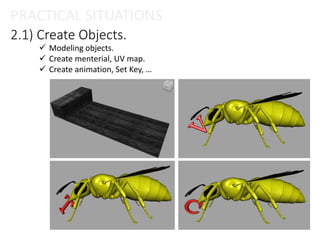
2.1) Create Objects.
PRACTICAL SITUATIONS
 Modeling objects.
 Create menterial, UV map.
 Create animation, Set Key, …
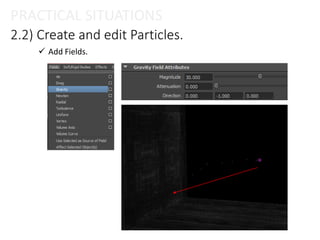
2.2) Create and edit Particles.
PRACTICAL SITUATIONS
 Create Emitter.
2.2) Create and edit Particles.
PRACTICAL SITUATIONS
 Add Fields.
2.2) Create and edit Particles.
PRACTICAL SITUATIONS
 Create Collide between Particles and objects.
2.2) Create and edit Particles.
PRACTICAL SITUATIONS
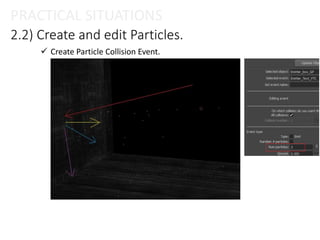
 Create Particle Collision Event.
2.3) Create Particle Instanter.
PRACTICAL SITUATIONS
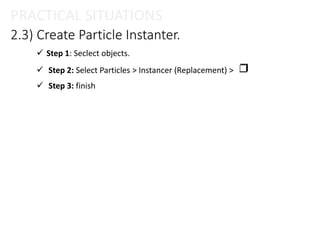
 Step 1: Seclect objects.
 Step 2: Select Particles > Instancer (Replacement) >
 Step 3: finish
2.3) Create Particle Instanter.
PRACTICAL SITUATIONS
2.3) Create Particle Instanter.
PRACTICAL SITUATIONS
2.4) Edit attributes.
PRACTICAL SITUATIONS
 Edit Attributes.
2.4) Edit attributes.
PRACTICAL SITUATIONS
 Control with expression.
 Edit menterials, …
2.4) Edit attributes.
PRACTICAL SITUATIONS
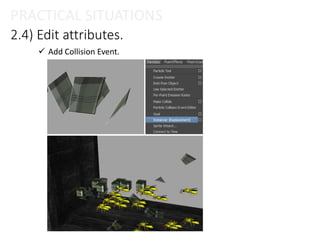
 Add Collision Event.
PRACTICAL SITUATIONS
Similar app
PRACTICAL SITUATIONS
Similar app
Particle Instanter
2) EXERCISE
2.1) Flying lanterns.
EXERCISE
Thanks!

Session 08 – particle instancer

  • 1.
    Maya Dynamics Basics Lab8: The Particle Instanter Author: Khieu Van Bang Email: tribang.nd@gmail.com
  • 2.
    CONTENTS  The ParticleInstanter :  What is Particle Instanter ?  What we can do with Particle Instanter ?  How to create a Particle Instanter ?  Integrated with Particle Instanter :  Create Integrated with Particle Instanter.  Practical situations.  Exercise:  Flying lanterns.
  • 3.
    The Particle instanter 1)OVERVIEW PARTICLE INSTANTER
  • 4.
    1.1) What isparticle instanter? THE PARTICLE INSTANTER  Instancing? o An instance is similar to a duplicated object but the difference is, it is not actual object. Let's say you are in a room surrounded by 100 mirrors. If you lift one leg, many of you in the mirror will lift one leg too. But it doesn't mean every you in 100 mirrors are "actual" you. o An instance contains no actual surface information, but is just a redrawn version of an original object. The original object acts like a master to all of its instances like you in the mirror room. Instances will be updated as the original is updated on all shading and surface characteristics. o Instances contain less information than duplicates so they can be handled and redrawn faster.  Particle Instancing o Particle instancing is the process of using the position and behaviour of particles to control the position and behaviour of instanced geometry. Although some complex results can be obtained using particle instancing, it is important not to interpret it as a full-featured behaviour animation system or flocking system. There are no behavioural relationships between the individual instanced elements.
  • 5.
    1.2) What wecan do with Particle Instanter ? THE PARTICLE INSTANTER Instanter RobotsInstanter fish Instanter object and FieldsSignature fly box falling leaves Birds flock
  • 6.
    1.3) Create aParticle Instanter THE PARTICLE INSTANTER  Step 1: Select the source geometry.  Step 2: Select Particles > Instancer (Replacement). 1 2
  • 7.
    THE PARTICLE INSTANTER oParticle Instancer Name: Optional name of the instancer node. o Rotation Units: value is interpreted as degrees or radians. o Rotation Order: precedence order of rotation, for instance, XYZ, XZY, or ZXY. o Level of Detail: source geometry appears at the particle locations or whether a bounding box or boxes appear instead. o Geometry: The source geometry appears at the particle locations. o Bounding Box: Displays a single box for all the objects in the instanced hierarchy. o Bounding Boxes: Displays individual boxes for each object in the instanced hierarchy. o Cycle: Select from the following options: o None: Instance a single object. o Sequential: Cycle through the objects in the Instanced Objects list. o Cycle Step Unit: frames or seconds are used for the Cycle Step Size value. o Cycle Step Size: age interval at which the next object in the sequence appears. 1.3) Create a Particle Instanter
  • 8.
    The Particle instanter 2)WORKING WITH PARTICLE INSTANTER ?
  • 9.
    o Particles, Fields,collision events, Intanter, Expression. o Soft Body, Rigid Body, and Instanter. o …  Create Integrated with Particle Instanter. INTEGRATED WITH PARTICLE INSTANTER Instanced lights Mechs terrain Planet rings
  • 10.
    INTEGRATED WITH PARTICLEINSTANTER o Particles, Fields, collision events, Intanter, Expression.  Practical situations Wall Box Bee 1 Bee2 Been Particles Fields Intanter + Expression collision events Fragment 1 Fragment 2 Fragment n
  • 11.
    2.1) Create Objects. PRACTICALSITUATIONS  Modeling objects.  Create menterial, UV map.  Create animation, Set Key, …
  • 12.
    2.2) Create andedit Particles. PRACTICAL SITUATIONS  Create Emitter.
  • 13.
    2.2) Create andedit Particles. PRACTICAL SITUATIONS  Add Fields.
  • 14.
    2.2) Create andedit Particles. PRACTICAL SITUATIONS  Create Collide between Particles and objects.
  • 15.
    2.2) Create andedit Particles. PRACTICAL SITUATIONS  Create Particle Collision Event.
  • 16.
    2.3) Create ParticleInstanter. PRACTICAL SITUATIONS  Step 1: Seclect objects.  Step 2: Select Particles > Instancer (Replacement) >  Step 3: finish
  • 17.
    2.3) Create ParticleInstanter. PRACTICAL SITUATIONS
  • 18.
    2.3) Create ParticleInstanter. PRACTICAL SITUATIONS
  • 19.
    2.4) Edit attributes. PRACTICALSITUATIONS  Edit Attributes.
  • 20.
    2.4) Edit attributes. PRACTICALSITUATIONS  Control with expression.  Edit menterials, …
  • 21.
    2.4) Edit attributes. PRACTICALSITUATIONS  Add Collision Event.
  • 22.
  • 23.
  • 24.
  • 25.
  • 26.