Chaper 0 Servlets / JSP Course Introduction
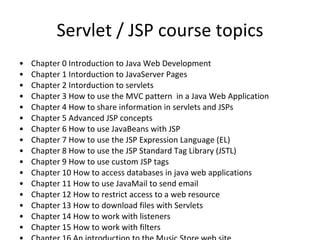
Servlet / JSP course topics Chapter 0 Introduction to Java Web Development Chapter 1 Introduction to servlets Chapter 2 Introduction to JavaServer Pages Chapter 3 How to use the MVC pattern  in a Java Web Application Chapter 4 How to share information in servlets and JSPs Chapter 5 Advanced JSP concepts Chapter 6 How to use JavaBeans with JSP Chapter 7 How to use the JSP Expression Language (EL) Chapter 8 How to use the JSP Standard Tag Library (JSTL) Chapter 9 How to use custom JSP tags Chapter 10 How to access databases in java web applications Chapter 11 How to use JavaMail to send email Chapter 12 How to secure java web applications Chapter 13 How to download files with Servlets  Chapter 14 How to work with listeners Chapter 15 How to work with filters
Introduction to  Java Web Development
Introduction to Java Web Development Java Enterprise Edition  Java Web Development Structure of a web project Introduction to Web Applications The first project
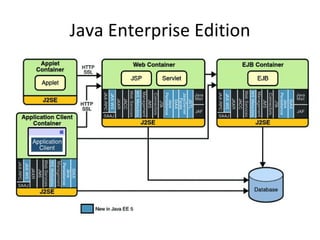
Java Enterprise Edition
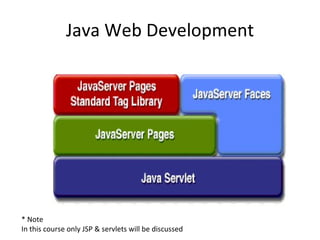
Java Web Development * Note In this course only JSP & servlets will be discussed
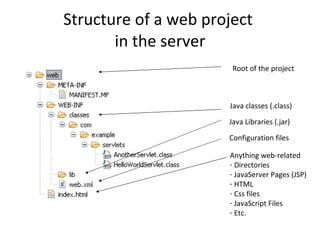
Structure of a web project There are two kind of structures The structure of the web application in a server The structure of the IDE A web project have three main elements The JSPs files The java classes The Configuration file web.xml
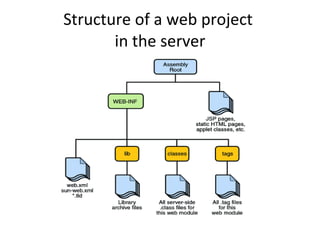
Structure of a web project  in the server
Structure of a web project  in the server Anything web-related Directories JavaServer Pages (JSP) HTML Css files JavaScript Files Etc. Java Libraries (.jar) Java classes (.class) Configuration files Root of the project
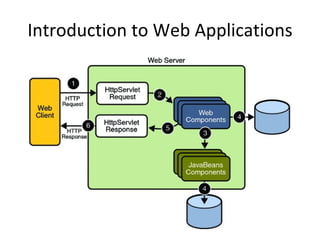
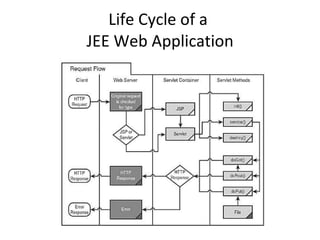
Introduction to Web Applications In a Web Application, web components provide the dynamic extension capabilities for a web server.  Web components can be Java servlets, JSP pages, or web service endpoints.  The interaction between a web client and a web application is explained and illustrated in the next slide figure.  The client sends an HTTP request to the web server.  A web server that implements Java Servlet and JavaServer Pages technology converts the request into an HTTPServletRequest object.  This object is delivered to a web component, which can interact with JavaBeans components or a database to generate dynamic content.  The web component can then generate an HTTPServletResponse or it can pass the request to another web component.  Eventually a web component generates a HTTPServletResponse object. The web server converts this object to an HTTP response and returns it to the client.
Introduction to Web Applications
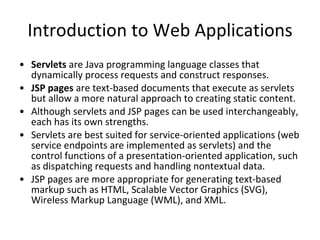
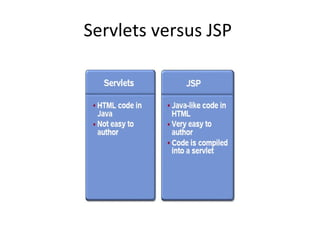
Introduction to Web Applications Servlets  are Java programming language classes that dynamically process requests and construct responses.  JSP pages  are text-based documents that execute as servlets but allow a more natural approach to creating static content. Although servlets and JSP pages can be used interchangeably, each has its own strengths.  Servlets are best suited for service-oriented applications (web service endpoints are implemented as servlets) and the control functions of a presentation-oriented application, such as dispatching requests and handling nontextual data.  JSP pages are more appropriate for generating text-based markup such as HTML, Scalable Vector Graphics (SVG), Wireless Markup Language (WML), and XML.
Servlets versus JSP
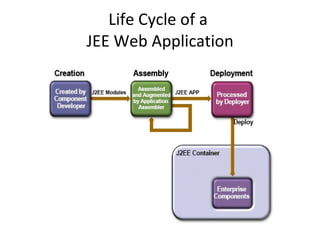
Life Cycle of a  JEE Web Application
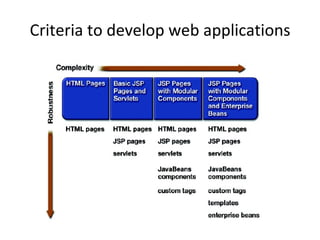
Criteria to develop web applications
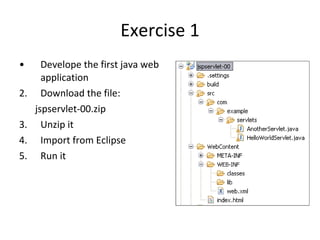
Exercise 1 Develope the first java web application Download the file: jspservlet-00.zip Unzip it Import from Eclipse Run it
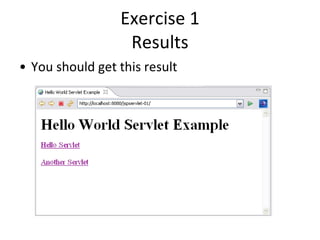
Exercise 1 Results You should get this result
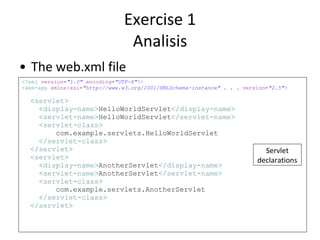
Exercise 1 Analisis The web.xml file <? xml   version = &quot;1.0&quot;   encoding = &quot;UTF-8&quot; ?> < web-app   xmlns:xsi = &quot;http://www.w3.org/2001/XMLSchema-instance&quot;  . . .  version = &quot;2.5&quot; > < servlet > < display-name > HelloWorldServlet </ display-name > < servlet-name > HelloWorldServlet </ servlet-name > < servlet-class > com.example.servlets.HelloWorldServlet </ servlet-class > </ servlet > < servlet > < display-name > AnotherServlet </ display-name > < servlet-name > AnotherServlet </ servlet-name > < servlet-class > com.example.servlets.AnotherServlet </ servlet-class > </ servlet > Servlet declarations
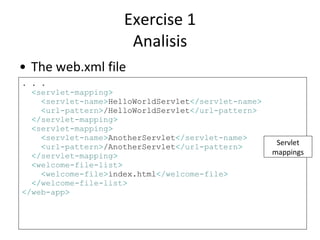
Exercise 1 Analisis The web.xml file . . . < servlet-mapping > < servlet-name > HelloWorldServlet </ servlet-name > < url-pattern > /HelloWorldServlet </ url-pattern > </ servlet-mapping > < servlet-mapping > < servlet-name > AnotherServlet </ servlet-name > < url-pattern > /AnotherServlet </ url-pattern > </ servlet-mapping > < welcome-file-list > < welcome-file > index.html </ welcome-file > </ welcome-file-list > </ web-app > Servlet mappings
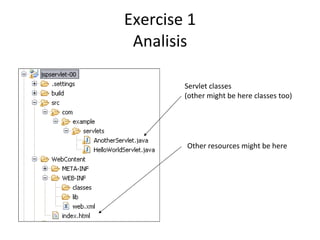
Exercise 1 Analisis Servlet classes (other might be here classes too) Other resources might be here
Resources To download example code for this chapter go to: http://www.jeetrainers.com

Introduction to the Servlet / JSP course

  • 1.
    Chaper 0 Servlets/ JSP Course Introduction
  • 2.
    Servlet / JSPcourse topics Chapter 0 Introduction to Java Web Development Chapter 1 Introduction to servlets Chapter 2 Introduction to JavaServer Pages Chapter 3 How to use the MVC pattern in a Java Web Application Chapter 4 How to share information in servlets and JSPs Chapter 5 Advanced JSP concepts Chapter 6 How to use JavaBeans with JSP Chapter 7 How to use the JSP Expression Language (EL) Chapter 8 How to use the JSP Standard Tag Library (JSTL) Chapter 9 How to use custom JSP tags Chapter 10 How to access databases in java web applications Chapter 11 How to use JavaMail to send email Chapter 12 How to secure java web applications Chapter 13 How to download files with Servlets Chapter 14 How to work with listeners Chapter 15 How to work with filters
  • 3.
    Introduction to Java Web Development
  • 4.
    Introduction to JavaWeb Development Java Enterprise Edition Java Web Development Structure of a web project Introduction to Web Applications The first project
  • 5.
  • 6.
    Java Web Development* Note In this course only JSP & servlets will be discussed
  • 7.
    Structure of aweb project There are two kind of structures The structure of the web application in a server The structure of the IDE A web project have three main elements The JSPs files The java classes The Configuration file web.xml
  • 8.
    Structure of aweb project in the server
  • 9.
    Structure of aweb project in the server Anything web-related Directories JavaServer Pages (JSP) HTML Css files JavaScript Files Etc. Java Libraries (.jar) Java classes (.class) Configuration files Root of the project
  • 10.
    Introduction to WebApplications In a Web Application, web components provide the dynamic extension capabilities for a web server. Web components can be Java servlets, JSP pages, or web service endpoints. The interaction between a web client and a web application is explained and illustrated in the next slide figure. The client sends an HTTP request to the web server. A web server that implements Java Servlet and JavaServer Pages technology converts the request into an HTTPServletRequest object. This object is delivered to a web component, which can interact with JavaBeans components or a database to generate dynamic content. The web component can then generate an HTTPServletResponse or it can pass the request to another web component. Eventually a web component generates a HTTPServletResponse object. The web server converts this object to an HTTP response and returns it to the client.
  • 11.
    Introduction to WebApplications
  • 12.
    Introduction to WebApplications Servlets  are Java programming language classes that dynamically process requests and construct responses.  JSP pages  are text-based documents that execute as servlets but allow a more natural approach to creating static content. Although servlets and JSP pages can be used interchangeably, each has its own strengths. Servlets are best suited for service-oriented applications (web service endpoints are implemented as servlets) and the control functions of a presentation-oriented application, such as dispatching requests and handling nontextual data. JSP pages are more appropriate for generating text-based markup such as HTML, Scalable Vector Graphics (SVG), Wireless Markup Language (WML), and XML.
  • 13.
  • 14.
    Life Cycle ofa JEE Web Application
  • 15.
    Life Cycle ofa JEE Web Application
  • 16.
    Criteria to developweb applications
  • 17.
    Exercise 1 Developethe first java web application Download the file: jspservlet-00.zip Unzip it Import from Eclipse Run it
  • 18.
    Exercise 1 ResultsYou should get this result
  • 19.
    Exercise 1 AnalisisThe web.xml file <? xml version = &quot;1.0&quot; encoding = &quot;UTF-8&quot; ?> < web-app xmlns:xsi = &quot;http://www.w3.org/2001/XMLSchema-instance&quot; . . . version = &quot;2.5&quot; > < servlet > < display-name > HelloWorldServlet </ display-name > < servlet-name > HelloWorldServlet </ servlet-name > < servlet-class > com.example.servlets.HelloWorldServlet </ servlet-class > </ servlet > < servlet > < display-name > AnotherServlet </ display-name > < servlet-name > AnotherServlet </ servlet-name > < servlet-class > com.example.servlets.AnotherServlet </ servlet-class > </ servlet > Servlet declarations
  • 20.
    Exercise 1 AnalisisThe web.xml file . . . < servlet-mapping > < servlet-name > HelloWorldServlet </ servlet-name > < url-pattern > /HelloWorldServlet </ url-pattern > </ servlet-mapping > < servlet-mapping > < servlet-name > AnotherServlet </ servlet-name > < url-pattern > /AnotherServlet </ url-pattern > </ servlet-mapping > < welcome-file-list > < welcome-file > index.html </ welcome-file > </ welcome-file-list > </ web-app > Servlet mappings
  • 21.
    Exercise 1 AnalisisServlet classes (other might be here classes too) Other resources might be here
  • 22.
    Resources To downloadexample code for this chapter go to: http://www.jeetrainers.com

Editor's Notes

  • #23 &lt;div align=&amp;quot;center&amp;quot;&gt; &lt;table&gt; &lt;tr&gt; &lt;td valign=&amp;quot;top&amp;quot;&gt;Excellent book for beginners&lt;br/&gt; and practical examples&lt;/td&gt; &lt;td valign=&amp;quot;top&amp;quot;&gt;Excellent book for&lt;br/&gt; theory / certification&lt;/td&gt; &lt;/tr&gt; &lt;tr&gt; &lt;td align=&amp;quot;center&amp;quot;&gt; &lt;iframe src=&amp;quot;http://rcm.amazon.com/e/cm?t=marcelblog-20&amp;o=1&amp;p=8&amp;l=as1&amp;asins=1890774448&amp;fc1=000000&amp;IS2=1&amp;lt1=_blank&amp;m=amazon&amp;lc1=0000FF&amp;bc1=000000&amp;bg1=FFFFFF&amp;f=ifr&amp;quot; style=&amp;quot;width:120px;height:240px;&amp;quot; scrolling=&amp;quot;no&amp;quot; marginwidth=&amp;quot;0&amp;quot; marginheight=&amp;quot;0&amp;quot; frameborder=&amp;quot;0&amp;quot;&gt;&lt;/iframe&gt; &lt;/td&gt; &lt;td align=&amp;quot;center&amp;quot;&gt; &lt;iframe src=&amp;quot;http://rcm.amazon.com/e/cm?t=marcelblog-20&amp;o=1&amp;p=8&amp;l=as1&amp;asins=1932394389&amp;fc1=000000&amp;IS2=1&amp;lt1=_blank&amp;m=amazon&amp;lc1=0000FF&amp;bc1=000000&amp;bg1=FFFFFF&amp;f=ifr&amp;quot; style=&amp;quot;width:120px;height:240px;&amp;quot; scrolling=&amp;quot;no&amp;quot; marginwidth=&amp;quot;0&amp;quot; marginheight=&amp;quot;0&amp;quot; frameborder=&amp;quot;0&amp;quot;&gt;&lt;/iframe&gt; &lt;/td&gt; &lt;/tr&gt; &lt;/table&gt; &lt;/div&gt;