CS3002
Lecture 1 / Slide 1


                             CS3002
                      Software Technologies
                            Lecture 9
CS3002
Lecture 1 / Slide 2


   Agenda
    Servlets - Server Side Java
    Using Tomcat
    Deploying a Web Application using Deployment
     Descriptor (web.xml)
    Writing Thread Safe Servlets
CS3002
Lecture 1 / Slide 3


   How the internet works
    Internet uses Client/Server technology for its working
    The world wide web uses the Browser as the client
     software and Web Server as the server software
    The user types the required URL in the browser
    The IP Address of the Server is found from the URL
CS3002
Lecture 1 / Slide 4


   How the internet works
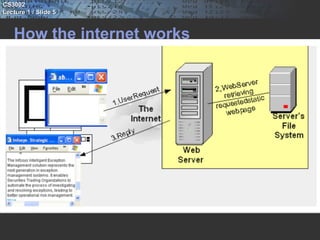
    The Web Server will be listening in that Server at Port
     No 80
    The browser connects to Port No 80 of the specified
     Server
    Based on the request, the Web Server will deliver the
     appropriate page to the browser
CS3002
Lecture 1 / Slide 5


   How the internet works
CS3002
Lecture 1 / Slide 6


   HTTP Protocol
    This kind of Client/Server communication should
     follow a Protocol for its smooth functioning
    Hyper Text Transfer Protocol or HTTP is the protocol
     used by the Web
    According to the HTTP protocol, the client should send
     a Request to the server in a special format
    Based on the Request, the server will send back a
     Response, which again is in a special format
CS3002
Lecture 1 / Slide 7


   HTTP Request
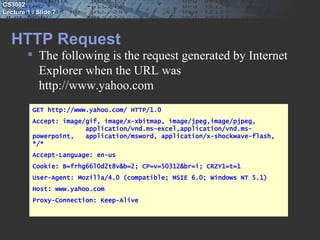
         The following is the request generated by Internet
          Explorer when the URL was
          http://www.yahoo.com
          GET http://www.yahoo.com/ HTTP/1.0
          Accept: image/gif, image/x-xbitmap, image/jpeg,image/pjpeg,
                        application/vnd.ms-excel,application/vnd.ms-
          powerpoint,   application/msword, application/x-shockwave-flash,
          */*
          Accept-Language: en-us
          Cookie: B=frhg66l0d2t8v&b=2; CP=v=50312&br=i; CRZY1=t=1
          User-Agent: Mozilla/4.0 (compatible; MSIE 6.0; Windows NT 5.1)
          Host: www.yahoo.com
          Proxy-Connection: Keep-Alive
CS3002
Lecture 1 / Slide 8


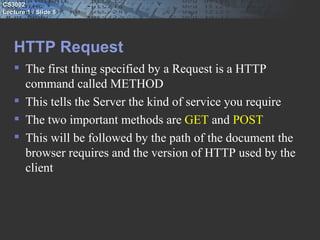
   HTTP Request
    The first thing specified by a Request is a HTTP
     command called METHOD
    This tells the Server the kind of service you require
    The two important methods are GET and POST
    This will be followed by the path of the document the
     browser requires and the version of HTTP used by the
     client
CS3002
Lecture 1 / Slide 9


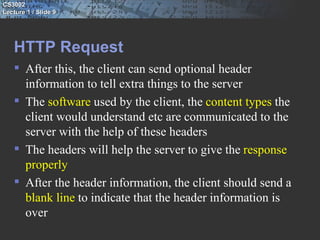
   HTTP Request
    After this, the client can send optional header
     information to tell extra things to the server
    The software used by the client, the content types the
     client would understand etc are communicated to the
     server with the help of these headers
    The headers will help the server to give the response
     properly
    After the header information, the client should send a
     blank line to indicate that the header information is
     over
CS3002
Lecture 1 / Slide 10


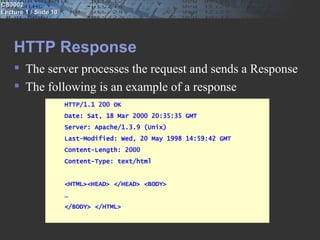
    HTTP Response
     The server processes the request and sends a Response
     The following is an example of a response
                       HTTP/1.1 200 OK
                       Date: Sat, 18 Mar 2000 20:35:35 GMT
                       Server: Apache/1.3.9 (Unix)
                       Last-Modified: Wed, 20 May 1998 14:59:42 GMT
                       Content-Length: 2000
                       Content-Type: text/html


                       <HTML><HEAD> </HEAD> <BODY>
                       …
                       </BODY> </HTML>
CS3002
Lecture 1 / Slide 11


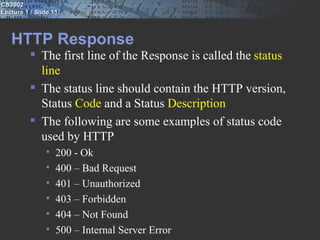
   HTTP Response
           The first line of the Response is called the status
            line
           The status line should contain the HTTP version,
            Status Code and a Status Description
           The following are some examples of status code
            used by HTTP
                  200 - Ok
                  400 – Bad Request
                  401 – Unauthorized
                  403 – Forbidden
                  404 – Not Found
                  500 – Internal Server Error
CS3002
Lecture 1 / Slide 12


    HTTP Response
     After the status line comes the Response headers
     The software used by the server, content type of the
      response etc will be communicated to the browser
      using these headers
     There should be a blank line to show that the header
      information is over
     After the headers, the server sends the data on success
      or an error description on failure
CS3002
Lecture 1 / Slide 13


    Dynamic Pages
     From the web, we get static pages as well as dynamic
      pages
     Static page is a page that does not change with user
      and/or time
     Dynamic page is a page that changes with user and/or
      time
     For delivering a static page, all we require at the server
      side is the Web Server and the HTML file
CS3002
Lecture 1 / Slide 14


    Dynamic Pages
     But a dynamic page cannot be created in advance and
      kept as an HTML file
     So, to have a dynamic page, apart from the Web
      Server, we require a program to generate the dynamic
      content
     In some cases, the Web Server itself will be able to
      execute this program
     In some other cases, we may require an extra software
      component that can execute this program
CS3002
Lecture 1 / Slide 15


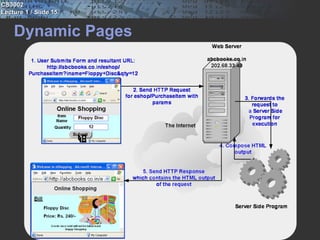
    Dynamic Pages
CS3002
Lecture 1 / Slide 16


    Server Side Java
     CGI technology was first used to generate dynamic
      content
     In CGI, the server should start a new process to run a
      CGI program for each client request
     This requires significant time and resources
     So, CGI programs were not scalable
CS3002
Lecture 1 / Slide 17


    Server Side Java
     Servlet was introduced by Sun Microsystems as an
      effective alternative for CGI programs
     Servlet is a Java program that is executed at the server
     The output of the Servlet can be HTML
     Thus, Servlets can be used to generate dynamic pages
CS3002
Lecture 1 / Slide 18


    Server Side Java
     For executing the Servlets, the Web Server requires the
      help of another piece of software called the Servlet
      Container
     The terms Application Server, Servlet Engine and
      Servlet Runner are also used instead of Container
     The Servlet Container may be built into the Web
      Server or can be implemented as a separate module
     Tomcat is a Servlet Container that is popularly used
CS3002
Lecture 1 / Slide 19


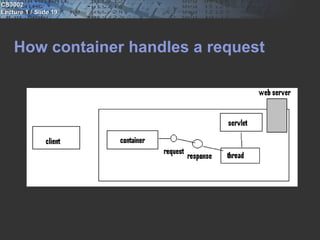
    How container handles a request
CS3002
Lecture 1 / Slide 20


    container
     Communication support:- servlets communicate with
      webserver efficiently.
     Lifecycle management:- controls life and death of servlets
     MultiThreading support:- Automatically creates new java
      thread for every servlet request it receives.
     Declarative security:- configure security in Deployment
      descriptor and need not hard-code in servlet class code.
     JSP support:- translating JSP code to java.
CS3002
Lecture 1 / Slide 21


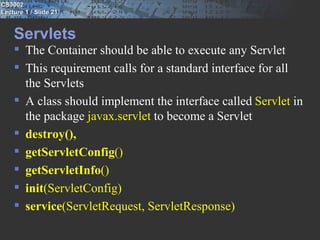
    Servlets
     The Container should be able to execute any Servlet
     This requirement calls for a standard interface for all
      the Servlets
     A class should implement the interface called Servlet in
      the package javax.servlet to become a Servlet
     destroy(),
     getServletConfig()
     getServletInfo()
     init(ServletConfig)
     service(ServletRequest, ServletResponse)
CS3002
Lecture 1 / Slide 22


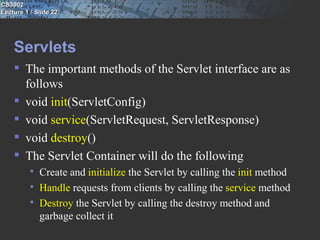
    Servlets
     The important methods of the Servlet interface are as
      follows
     void init(ServletConfig)
     void service(ServletRequest, ServletResponse)
     void destroy()
     The Servlet Container will do the following
             Create and initialize the Servlet by calling the init method
             Handle requests from clients by calling the service method
             Destroy the Servlet by calling the destroy method and
              garbage collect it
CS3002
Lecture 1 / Slide 23


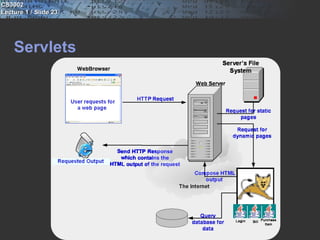
    Servlets
CS3002
Lecture 1 / Slide 24


    The Servlet Lifecycle
     The Servlet Container creates a Servlet object, when it
      receives the very first request for the Servlet
     The Servlet Container will call the init method of this
      Servlet object
     The Servlet Container will then call the service method
      of the Servlet object
     The service method will generate the dynamic page and
      deliver it to the client
CS3002
Lecture 1 / Slide 25


    The Servlet Lifecycle
     A new Servlet object is not instantiated for each
      subsequent request
     The Servlet Container will spawn a thread for each
      request to call the service method of the same Servlet
      object
     This makes the Servlet technology faster and scalable
     The destroy method is called and the Servlet object is
      garbage collected when the Servlet Container decides
      to unload the Servlet from the memory
CS3002
Lecture 1 / Slide 26


    Installation, configuration and running servlets
     Installation of Tomcat Server and JDK
     Configuring Tomcat Server (port no: 8080)
     Run Tomcat Server
             Control panel -> Administrative tools -> services -> Apache
              Tomcat ->start
     Open your browser ( http://localhost:8080/ )
CS3002
Lecture 1 / Slide 27


    The GenericServlet
     For implementing the Servlet interface, the
      programmer has to implement all the methods of the
      Servlet interface
     Most often, the programmer will be interested in the
      service method only
     The class GenericServlet of javax.servlet package
      implements the Servlet interface
CS3002
Lecture 1 / Slide 28


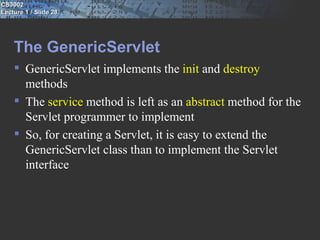
    The GenericServlet
     GenericServlet implements the init and destroy
      methods
     The service method is left as an abstract method for the
      Servlet programmer to implement
     So, for creating a Servlet, it is easy to extend the
      GenericServlet class than to implement the Servlet
      interface
CS3002
Lecture 1 / Slide 29

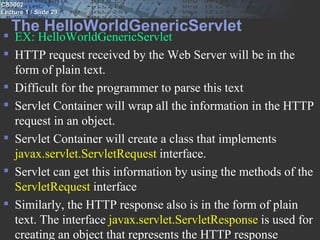
   The HelloWorldGenericServlet
 EX: HelloWorldGenericServlet
 HTTP request received by the Web Server will be in the
  form of plain text.
 Difficult for the programmer to parse this text
 Servlet Container will wrap all the information in the HTTP
  request in an object.
 Servlet Container will create a class that implements
  javax.servlet.ServletRequest interface.
 Servlet can get this information by using the methods of the
  ServletRequest interface
 Similarly, the HTTP response also is in the form of plain
  text. The interface javax.servlet.ServletResponse is used for
  creating an object that represents the HTTP response
CS3002
Lecture 1 / Slide 30


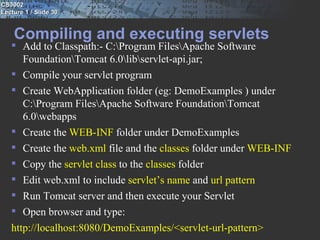
    Compiling and executing servlets
    Add to Classpath:- C:Program FilesApache Software
      FoundationTomcat 6.0libservlet-api.jar;
    Compile your servlet program
    Create WebApplication folder (eg: DemoExamples ) under
      C:Program FilesApache Software FoundationTomcat
      6.0webapps
    Create the WEB-INF folder under DemoExamples
    Create the web.xml file and the classes folder under WEB-INF
    Copy the servlet class to the classes folder
    Edit web.xml to include servlet’s name and url pattern
    Run Tomcat server and then execute your Servlet
    Open browser and type:
   http://localhost:8080/DemoExamples/<servlet-url-pattern>
CS3002
Lecture 1 / Slide 31

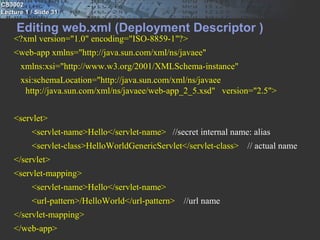
     Editing web.xml (Deployment Descriptor )
    <?xml version="1.0" encoding="ISO-8859-1"?>
    <web-app xmlns="http://java.sun.com/xml/ns/javaee"
      xmlns:xsi="http://www.w3.org/2001/XMLSchema-instance"
      xsi:schemaLocation="http://java.sun.com/xml/ns/javaee
       http://java.sun.com/xml/ns/javaee/web-app_2_5.xsd" version="2.5">


    <servlet>
          <servlet-name>Hello</servlet-name> //secret internal name: alias
          <servlet-class>HelloWorldGenericServlet</servlet-class> // actual name
    </servlet>
    <servlet-mapping>
          <servlet-name>Hello</servlet-name>
          <url-pattern>/HelloWorld</url-pattern> //url name
    </servlet-mapping>
    </web-app>
CS3002
Lecture 1 / Slide 32


    Deployment descriptor
     Minimizes touching source code
     Tune your application capabilities even if you don’t
      have the source code.
     Adapt to different resources without recompiling code
     Maintain dynamic security issues like access control
      lists and security roles.
     Non-programmers can modify and deploy your web
      applications
CS3002
Lecture 1 / Slide 33


    URL
     Eg: http://localhost:8080/DemoExamples/<servlet-url-
      pattern>

     Eg:
      http://www.wickedlysmart.com:80/beeradvice/select/be
      er1.html

     Protocol:// server ip address : server application port /
      the path to the location on the server on which resource
      is being requested /name of the content being requested
      ? Optional query string
CS3002
Lecture 1 / Slide 34


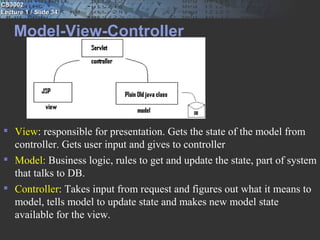
    Model-View-Controller


 View: responsible for presentation. Gets the state of the model from
  controller. Gets user input and gives to controller
 Model: Business logic, rules to get and update the state, part of system
  that talks to DB.
 Controller: Takes input from request and figures out what it means to
  model, tells model to update state and makes new model state
  available for the view.
CS3002
Lecture 1 / Slide 35


    The HelloUserGenericServlet
     Ex: HelloUserGenericServletForm.html
     HelloUserGenericServlet
     Form
    <form method="GET" action=“HelloUserGenericServlet”>
    Username  <input type="text" name=“UserName" size="20">
    <input type="submit" value="Submit" name="B1"> </form>
     Servlet
    String name = request.getParameter("UserName");
    In the servlet which will work as a controller here picks the value
       from the html page by using the method getParameter().
    request.getParameterValues() which returns the array of String.
       (eg: checkbox)
CS3002
Lecture 1 / Slide 36


    GET and POST
 The two most common HTTP methods are GET and POST
 Very often we supply some data to a web application to get
  more data
 For example, we supply the Item Code of a product to a web
  application to collect all the details of the product
 GET method is used in such situations
CS3002
Lecture 1 / Slide 37


    GET and POST
     Some times, we post a lot of data to a web application
     For example, we supply our name, address, hobbies
      and other details to ourselves registered with a group
     POST method is used in such situations
CS3002
Lecture 1 / Slide 38


    GET and POST
     When we use the GET method for sending some data
      to the Server, the data will be send as a Query String
      attached at the end of the URL after a “?”
     http://localhost:8080/myapp/HelloUserServlet?
      UserName=abc
     So, if there is a password field, GET method will make
      it visible on the address bar of the browser!
     POST method will send the data as a part of the
      request, after the header information
     So, the passing of data is not visible to the user
CS3002
Lecture 1 / Slide 39


    GET and POST
     Since GET method is meant for passing some data to
      get more data, some servers limit the quantity of data
      you can pass using the GET method whereas, POST
      method can send large quantity of data
     URLs with POST method cannot be book marked
      where as GET method can be
     GET method is faster than POST method
CS3002
Lecture 1 / Slide 40


   The HttpServlet is not designed for any
    The class GenericServlet
        particular protocol
       But mostly Servlets are used for creating Web
        Applications that follow HTTP protocol
       While following HTTP protocol, the programmer may
        want to do different things based on the HTTP method
        used by the client – GET or POST
       In such cases, using the class javax.http.HttpServlet
        will be easier then using GenericServlet
       HttpServletRequest  and HttpServletResponse  objects
        are created by the container
       getServerName(), getServerPort(), getProtocol(),
        getHeaderNames() -> request methods
CS3002
Lecture 1 / Slide 41


    The HttpServlet
     The HttpServlet class is inherited from GenericServlet
      and contains two important methods, doGet and doPost
     HttpServlet overrides the service method and calls the
      methods doGet or doPost based on the HTTP method
      used by the client
     The Servlets that create Web Applications will be
      extending HttpServlet and overriding the doGet and/or
      doPost methods instead of the service method
CS3002
Lecture 1 / Slide 42


    HelloWorldServlet and HelloUserServlet using
    HttpServlet
     Ex:HelloWorldHttpServlet
     HelloUserHttpServletGetForm.htm
     HelloUserHttpServlet
CS3002
Lecture 1 / Slide 43


    More examples
    In case the HttpServlet wants to execute the same
     statements for both GET and POST method, the user
     can implement either doGet or doPost and the other
     method can simply call the implemented method
    Ex: HelloUserAdvancedHttpServlet
CS3002
Lecture 1 / Slide 44


    More about service
     Most of the containers will create only one instance of
      a Servlet
     The same instance is used for servicing all the clients
     For each client request, the container may execute the
      service method in a thread
     So for multiple client requests, only multiple threads
      are created and not multiple objects
     This model requires lesser memory and lesser time
      compared to the multiple object model
     This model also enables persistence, for example, a
      database connection can be opened once and used by
      many requests
CS3002
Lecture 1 / Slide 45


    Thread Safe Servlets
     Many threads running the service method at the same
      time can create problems in some cases
     Ex: CounterServlet
CS3002
Lecture 1 / Slide 46


    Synchronized
     A Servlet can be made thread safe in several ways
     A Servlet can be made thread safe by making the doGet
      or doPost method synchronized
     Since only one client can use the doGet or doPost
      method at a time this may lead to performance issues
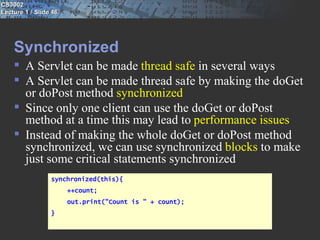
     Instead of making the whole doGet or doPost method
      synchronized, we can use synchronized blocks to make
      just some critical statements synchronized
                 synchronized(this){
                       ++count;
                       out.print("Count is " + count);
                 }
CS3002
Lecture 1 / Slide 47


    Synchronized
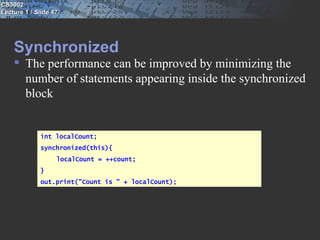
     The performance can be improved by minimizing the
      number of statements appearing inside the synchronized
      block


             int localCount;
             synchronized(this){
                   localCount = ++count;
             }
             out.print("Count is " + localCount);
CS3002
Lecture 1 / Slide 48


    SingleThreadModel interface
     A Servlet can implement the interface
      SingleThreadModel to tell the container that the service
      method should not be accessed by more than one
      thread at a time
     This interface does not contain any method and acts
      just as a flag
     Since only one client can use the service at a time,
      performance will be deteriorated
CS3002
Lecture 1 / Slide 49


    SingleThreadModel interface
    To avoid performance issues, some servers may create a
     number of such Servlet objects and keep them in a pool
    Instead of one instance handling all the requests one
     after the other, each request will be handled by a
     different instance and hence there will not be any
     synchronization issues
    Generally, it is not a good idea to implement the
     SingleThreadModel interface and hence it is deprecated
     as of Servlet API 2.4 with no direct replacement
CS3002
Lecture 1 / Slide 50


    Use of local variables
    The problems with multiple threads accessing the service
     of the Servlet is applicable to the class variables as only
     one instance of the Servlet is created for all requests
    Any how, the local variables are not affected by this
     problem as each thread will have a separate copy of these
    Do a thorough code review to ensure that we are not
     unnecessarily using a class variable in a situation that can
     be managed by a local variable
CS3002
Lecture 1 / Slide 51


    More about init
 Any Web Application requires a deployment descriptor file
  called web.xml
 The contents of this file is used to configure an application
 Some initialization parameters specified in web.xml can be
  passed to the init method with the help of ServletConfig
  object
 The web server will read this file on start up
 The ServletConfig object will be created by the web sever
  with all the init parameters in it
CS3002
Lecture 1 / Slide 52


    More about init
     The Servlet container will pass the ServletConfig object
      as a parameter to the init method
     Even though it is the init method that gets the
      ServletConfig object, most often it is used by doGet
      and/or doPost
     The init method should save this object in a class variable,
      so that doGet, doPost and all other methods of the Servlet
      can access it
CS3002
Lecture 1 / Slide 53


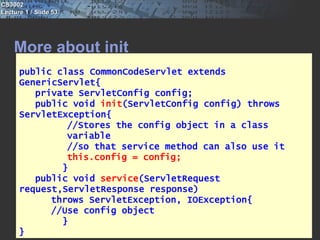
    More about init
      public class CommonCodeServlet extends
      GenericServlet{
         private ServletConfig config;
         public void init(ServletConfig config) throws
      ServletException{
               //Stores the config object in a class
               variable
               //so that service method can also use it
               this.config = config;
              }
         public void service(ServletRequest
      request,ServletResponse response)
            throws ServletException, IOException{
            //Use config object
              }
      }
CS3002
Lecture 1 / Slide 54


    More about init
     The code shown in the previous slide is the most
      common code we write in the init method
     The init method of the class GenericServlet contains
      similar statements and hence classes that are inherited
      from GenericServlet need not override this method just
      for storing the ServletConfig object in a class variable
CS3002
Lecture 1 / Slide 55


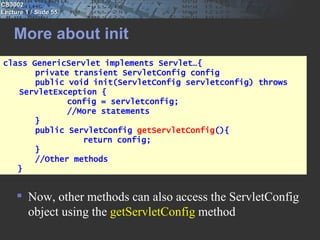
    More about init
class GenericServlet implements Servlet…{
       private transient ServletConfig config
       public void init(ServletConfig servletconfig) throws
   ServletException {
              config = servletconfig;
              //More statements
       }
       public ServletConfig getServletConfig(){
                 return config;
       }
       //Other methods
   }


      Now, other methods can also access the ServletConfig
       object using the getServletConfig method
CS3002
Lecture 1 / Slide 56


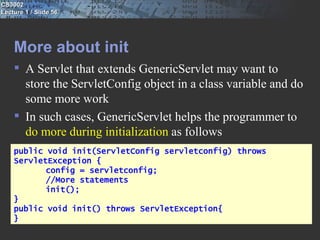
    More about init
     A Servlet that extends GenericServlet may want to
      store the ServletConfig object in a class variable and do
      some more work
     In such cases, GenericServlet helps the programmer to
      do more during initialization as follows
    public void init(ServletConfig servletconfig) throws
    ServletException {
           config = servletconfig;
           //More statements
           init();
    }
    public void init() throws ServletException{
    }
CS3002
Lecture 1 / Slide 57


    More about init
     The init(ServletConfig) method of GenericServlet calls
      another method called init() and a blank
      implementation of init() is provided in GenericServlet
     The programmer can override the init() method to do
      more in the init(ServletConfig) method
     The programmers who are extending GenericServlet
      need not bother about init(ServletConfig) and instead,
      they can override init()
CS3002
Lecture 1 / Slide 58


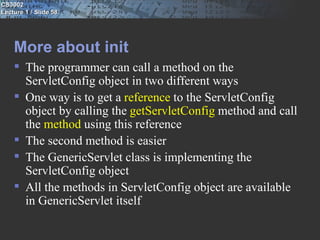
    More about init
     The programmer can call a method on the
      ServletConfig object in two different ways
     One way is to get a reference to the ServletConfig
      object by calling the getServletConfig method and call
      the method using this reference
     The second method is easier
     The GenericServlet class is implementing the
      ServletConfig object
     All the methods in ServletConfig object are available
      in GenericServlet itself
CS3002
Lecture 1 / Slide 59


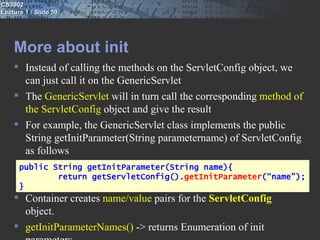
    More about init
     Instead of calling the methods on the ServletConfig object, we
      can just call it on the GenericServlet
     The GenericServlet will in turn call the corresponding method of
      the ServletConfig object and give the result
     For example, the GenericServlet class implements the public
      String getInitParameter(String parametername) of ServletConfig
      as follows
      public String getInitParameter(String name){
              return getServletConfig().getInitParameter(“name”);
      }
     Container creates name/value pairs for the ServletConfig
      object.
     getInitParameterNames() -> returns Enumeration of init
CS3002
Lecture 1 / Slide 60


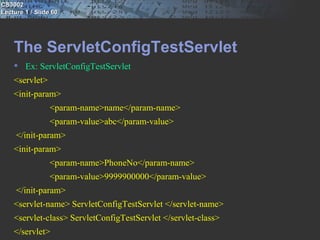
    The ServletConfigTestServlet
     Ex: ServletConfigTestServlet
    <servlet>
    <init-param>
                 <param-name>name</param-name>
                 <param-value>abc</param-value>
     </init-param>
    <init-param>
                 <param-name>PhoneNo</param-name>
                 <param-value>9999900000</param-value>
     </init-param>
    <servlet-name> ServletConfigTestServlet </servlet-name>
    <servlet-class> ServletConfigTestServlet </servlet-class>
    </servlet>
CS3002
Lecture 1 / Slide 61


    Summary
     Writing a Servlet
     Lifecycle of a Servlet
     Using Tomcat
     Deploying a Web Application using Deployment
      Descriptor (web.xml)
     GenericServlet and HttpServlet
     Writing Thread Safe Servlets

Servlets lecture1

  • 1.
    CS3002 Lecture 1 /Slide 1 CS3002 Software Technologies Lecture 9
  • 2.
    CS3002 Lecture 1 /Slide 2 Agenda  Servlets - Server Side Java  Using Tomcat  Deploying a Web Application using Deployment Descriptor (web.xml)  Writing Thread Safe Servlets
  • 3.
    CS3002 Lecture 1 /Slide 3 How the internet works  Internet uses Client/Server technology for its working  The world wide web uses the Browser as the client software and Web Server as the server software  The user types the required URL in the browser  The IP Address of the Server is found from the URL
  • 4.
    CS3002 Lecture 1 /Slide 4 How the internet works  The Web Server will be listening in that Server at Port No 80  The browser connects to Port No 80 of the specified Server  Based on the request, the Web Server will deliver the appropriate page to the browser
  • 5.
    CS3002 Lecture 1 /Slide 5 How the internet works
  • 6.
    CS3002 Lecture 1 /Slide 6 HTTP Protocol  This kind of Client/Server communication should follow a Protocol for its smooth functioning  Hyper Text Transfer Protocol or HTTP is the protocol used by the Web  According to the HTTP protocol, the client should send a Request to the server in a special format  Based on the Request, the server will send back a Response, which again is in a special format
  • 7.
    CS3002 Lecture 1 /Slide 7 HTTP Request  The following is the request generated by Internet Explorer when the URL was http://www.yahoo.com GET http://www.yahoo.com/ HTTP/1.0 Accept: image/gif, image/x-xbitmap, image/jpeg,image/pjpeg, application/vnd.ms-excel,application/vnd.ms- powerpoint, application/msword, application/x-shockwave-flash, */* Accept-Language: en-us Cookie: B=frhg66l0d2t8v&b=2; CP=v=50312&br=i; CRZY1=t=1 User-Agent: Mozilla/4.0 (compatible; MSIE 6.0; Windows NT 5.1) Host: www.yahoo.com Proxy-Connection: Keep-Alive
  • 8.
    CS3002 Lecture 1 /Slide 8 HTTP Request  The first thing specified by a Request is a HTTP command called METHOD  This tells the Server the kind of service you require  The two important methods are GET and POST  This will be followed by the path of the document the browser requires and the version of HTTP used by the client
  • 9.
    CS3002 Lecture 1 /Slide 9 HTTP Request  After this, the client can send optional header information to tell extra things to the server  The software used by the client, the content types the client would understand etc are communicated to the server with the help of these headers  The headers will help the server to give the response properly  After the header information, the client should send a blank line to indicate that the header information is over
  • 10.
    CS3002 Lecture 1 /Slide 10 HTTP Response  The server processes the request and sends a Response  The following is an example of a response HTTP/1.1 200 OK Date: Sat, 18 Mar 2000 20:35:35 GMT Server: Apache/1.3.9 (Unix) Last-Modified: Wed, 20 May 1998 14:59:42 GMT Content-Length: 2000 Content-Type: text/html <HTML><HEAD> </HEAD> <BODY> … </BODY> </HTML>
  • 11.
    CS3002 Lecture 1 /Slide 11 HTTP Response  The first line of the Response is called the status line  The status line should contain the HTTP version, Status Code and a Status Description  The following are some examples of status code used by HTTP  200 - Ok  400 – Bad Request  401 – Unauthorized  403 – Forbidden  404 – Not Found  500 – Internal Server Error
  • 12.
    CS3002 Lecture 1 /Slide 12 HTTP Response  After the status line comes the Response headers  The software used by the server, content type of the response etc will be communicated to the browser using these headers  There should be a blank line to show that the header information is over  After the headers, the server sends the data on success or an error description on failure
  • 13.
    CS3002 Lecture 1 /Slide 13 Dynamic Pages  From the web, we get static pages as well as dynamic pages  Static page is a page that does not change with user and/or time  Dynamic page is a page that changes with user and/or time  For delivering a static page, all we require at the server side is the Web Server and the HTML file
  • 14.
    CS3002 Lecture 1 /Slide 14 Dynamic Pages  But a dynamic page cannot be created in advance and kept as an HTML file  So, to have a dynamic page, apart from the Web Server, we require a program to generate the dynamic content  In some cases, the Web Server itself will be able to execute this program  In some other cases, we may require an extra software component that can execute this program
  • 15.
    CS3002 Lecture 1 /Slide 15 Dynamic Pages
  • 16.
    CS3002 Lecture 1 /Slide 16 Server Side Java  CGI technology was first used to generate dynamic content  In CGI, the server should start a new process to run a CGI program for each client request  This requires significant time and resources  So, CGI programs were not scalable
  • 17.
    CS3002 Lecture 1 /Slide 17 Server Side Java  Servlet was introduced by Sun Microsystems as an effective alternative for CGI programs  Servlet is a Java program that is executed at the server  The output of the Servlet can be HTML  Thus, Servlets can be used to generate dynamic pages
  • 18.
    CS3002 Lecture 1 /Slide 18 Server Side Java  For executing the Servlets, the Web Server requires the help of another piece of software called the Servlet Container  The terms Application Server, Servlet Engine and Servlet Runner are also used instead of Container  The Servlet Container may be built into the Web Server or can be implemented as a separate module  Tomcat is a Servlet Container that is popularly used
  • 19.
    CS3002 Lecture 1 /Slide 19 How container handles a request
  • 20.
    CS3002 Lecture 1 /Slide 20 container  Communication support:- servlets communicate with webserver efficiently.  Lifecycle management:- controls life and death of servlets  MultiThreading support:- Automatically creates new java thread for every servlet request it receives.  Declarative security:- configure security in Deployment descriptor and need not hard-code in servlet class code.  JSP support:- translating JSP code to java.
  • 21.
    CS3002 Lecture 1 /Slide 21 Servlets  The Container should be able to execute any Servlet  This requirement calls for a standard interface for all the Servlets  A class should implement the interface called Servlet in the package javax.servlet to become a Servlet  destroy(),  getServletConfig()  getServletInfo()  init(ServletConfig)  service(ServletRequest, ServletResponse)
  • 22.
    CS3002 Lecture 1 /Slide 22 Servlets  The important methods of the Servlet interface are as follows  void init(ServletConfig)  void service(ServletRequest, ServletResponse)  void destroy()  The Servlet Container will do the following  Create and initialize the Servlet by calling the init method  Handle requests from clients by calling the service method  Destroy the Servlet by calling the destroy method and garbage collect it
  • 23.
    CS3002 Lecture 1 /Slide 23 Servlets
  • 24.
    CS3002 Lecture 1 /Slide 24 The Servlet Lifecycle  The Servlet Container creates a Servlet object, when it receives the very first request for the Servlet  The Servlet Container will call the init method of this Servlet object  The Servlet Container will then call the service method of the Servlet object  The service method will generate the dynamic page and deliver it to the client
  • 25.
    CS3002 Lecture 1 /Slide 25 The Servlet Lifecycle  A new Servlet object is not instantiated for each subsequent request  The Servlet Container will spawn a thread for each request to call the service method of the same Servlet object  This makes the Servlet technology faster and scalable  The destroy method is called and the Servlet object is garbage collected when the Servlet Container decides to unload the Servlet from the memory
  • 26.
    CS3002 Lecture 1 /Slide 26 Installation, configuration and running servlets  Installation of Tomcat Server and JDK  Configuring Tomcat Server (port no: 8080)  Run Tomcat Server  Control panel -> Administrative tools -> services -> Apache Tomcat ->start  Open your browser ( http://localhost:8080/ )
  • 27.
    CS3002 Lecture 1 /Slide 27 The GenericServlet  For implementing the Servlet interface, the programmer has to implement all the methods of the Servlet interface  Most often, the programmer will be interested in the service method only  The class GenericServlet of javax.servlet package implements the Servlet interface
  • 28.
    CS3002 Lecture 1 /Slide 28 The GenericServlet  GenericServlet implements the init and destroy methods  The service method is left as an abstract method for the Servlet programmer to implement  So, for creating a Servlet, it is easy to extend the GenericServlet class than to implement the Servlet interface
  • 29.
    CS3002 Lecture 1 /Slide 29 The HelloWorldGenericServlet  EX: HelloWorldGenericServlet  HTTP request received by the Web Server will be in the form of plain text.  Difficult for the programmer to parse this text  Servlet Container will wrap all the information in the HTTP request in an object.  Servlet Container will create a class that implements javax.servlet.ServletRequest interface.  Servlet can get this information by using the methods of the ServletRequest interface  Similarly, the HTTP response also is in the form of plain text. The interface javax.servlet.ServletResponse is used for creating an object that represents the HTTP response
  • 30.
    CS3002 Lecture 1 /Slide 30 Compiling and executing servlets  Add to Classpath:- C:Program FilesApache Software FoundationTomcat 6.0libservlet-api.jar;  Compile your servlet program  Create WebApplication folder (eg: DemoExamples ) under C:Program FilesApache Software FoundationTomcat 6.0webapps  Create the WEB-INF folder under DemoExamples  Create the web.xml file and the classes folder under WEB-INF  Copy the servlet class to the classes folder  Edit web.xml to include servlet’s name and url pattern  Run Tomcat server and then execute your Servlet  Open browser and type: http://localhost:8080/DemoExamples/<servlet-url-pattern>
  • 31.
    CS3002 Lecture 1 /Slide 31 Editing web.xml (Deployment Descriptor ) <?xml version="1.0" encoding="ISO-8859-1"?> <web-app xmlns="http://java.sun.com/xml/ns/javaee" xmlns:xsi="http://www.w3.org/2001/XMLSchema-instance" xsi:schemaLocation="http://java.sun.com/xml/ns/javaee http://java.sun.com/xml/ns/javaee/web-app_2_5.xsd" version="2.5"> <servlet> <servlet-name>Hello</servlet-name> //secret internal name: alias <servlet-class>HelloWorldGenericServlet</servlet-class> // actual name </servlet> <servlet-mapping> <servlet-name>Hello</servlet-name> <url-pattern>/HelloWorld</url-pattern> //url name </servlet-mapping> </web-app>
  • 32.
    CS3002 Lecture 1 /Slide 32 Deployment descriptor  Minimizes touching source code  Tune your application capabilities even if you don’t have the source code.  Adapt to different resources without recompiling code  Maintain dynamic security issues like access control lists and security roles.  Non-programmers can modify and deploy your web applications
  • 33.
    CS3002 Lecture 1 /Slide 33 URL  Eg: http://localhost:8080/DemoExamples/<servlet-url- pattern>  Eg: http://www.wickedlysmart.com:80/beeradvice/select/be er1.html  Protocol:// server ip address : server application port / the path to the location on the server on which resource is being requested /name of the content being requested ? Optional query string
  • 34.
    CS3002 Lecture 1 /Slide 34 Model-View-Controller  View: responsible for presentation. Gets the state of the model from controller. Gets user input and gives to controller  Model: Business logic, rules to get and update the state, part of system that talks to DB.  Controller: Takes input from request and figures out what it means to model, tells model to update state and makes new model state available for the view.
  • 35.
    CS3002 Lecture 1 /Slide 35 The HelloUserGenericServlet  Ex: HelloUserGenericServletForm.html  HelloUserGenericServlet  Form <form method="GET" action=“HelloUserGenericServlet”> Username  <input type="text" name=“UserName" size="20"> <input type="submit" value="Submit" name="B1"> </form>  Servlet String name = request.getParameter("UserName"); In the servlet which will work as a controller here picks the value from the html page by using the method getParameter(). request.getParameterValues() which returns the array of String. (eg: checkbox)
  • 36.
    CS3002 Lecture 1 /Slide 36 GET and POST  The two most common HTTP methods are GET and POST  Very often we supply some data to a web application to get more data  For example, we supply the Item Code of a product to a web application to collect all the details of the product  GET method is used in such situations
  • 37.
    CS3002 Lecture 1 /Slide 37 GET and POST  Some times, we post a lot of data to a web application  For example, we supply our name, address, hobbies and other details to ourselves registered with a group  POST method is used in such situations
  • 38.
    CS3002 Lecture 1 /Slide 38 GET and POST  When we use the GET method for sending some data to the Server, the data will be send as a Query String attached at the end of the URL after a “?”  http://localhost:8080/myapp/HelloUserServlet? UserName=abc  So, if there is a password field, GET method will make it visible on the address bar of the browser!  POST method will send the data as a part of the request, after the header information  So, the passing of data is not visible to the user
  • 39.
    CS3002 Lecture 1 /Slide 39 GET and POST  Since GET method is meant for passing some data to get more data, some servers limit the quantity of data you can pass using the GET method whereas, POST method can send large quantity of data  URLs with POST method cannot be book marked where as GET method can be  GET method is faster than POST method
  • 40.
    CS3002 Lecture 1 /Slide 40 The HttpServlet is not designed for any  The class GenericServlet particular protocol  But mostly Servlets are used for creating Web Applications that follow HTTP protocol  While following HTTP protocol, the programmer may want to do different things based on the HTTP method used by the client – GET or POST  In such cases, using the class javax.http.HttpServlet will be easier then using GenericServlet  HttpServletRequest  and HttpServletResponse  objects are created by the container  getServerName(), getServerPort(), getProtocol(), getHeaderNames() -> request methods
  • 41.
    CS3002 Lecture 1 /Slide 41 The HttpServlet  The HttpServlet class is inherited from GenericServlet and contains two important methods, doGet and doPost  HttpServlet overrides the service method and calls the methods doGet or doPost based on the HTTP method used by the client  The Servlets that create Web Applications will be extending HttpServlet and overriding the doGet and/or doPost methods instead of the service method
  • 42.
    CS3002 Lecture 1 /Slide 42 HelloWorldServlet and HelloUserServlet using HttpServlet  Ex:HelloWorldHttpServlet  HelloUserHttpServletGetForm.htm  HelloUserHttpServlet
  • 43.
    CS3002 Lecture 1 /Slide 43 More examples  In case the HttpServlet wants to execute the same statements for both GET and POST method, the user can implement either doGet or doPost and the other method can simply call the implemented method  Ex: HelloUserAdvancedHttpServlet
  • 44.
    CS3002 Lecture 1 /Slide 44 More about service  Most of the containers will create only one instance of a Servlet  The same instance is used for servicing all the clients  For each client request, the container may execute the service method in a thread  So for multiple client requests, only multiple threads are created and not multiple objects  This model requires lesser memory and lesser time compared to the multiple object model  This model also enables persistence, for example, a database connection can be opened once and used by many requests
  • 45.
    CS3002 Lecture 1 /Slide 45 Thread Safe Servlets  Many threads running the service method at the same time can create problems in some cases  Ex: CounterServlet
  • 46.
    CS3002 Lecture 1 /Slide 46 Synchronized  A Servlet can be made thread safe in several ways  A Servlet can be made thread safe by making the doGet or doPost method synchronized  Since only one client can use the doGet or doPost method at a time this may lead to performance issues  Instead of making the whole doGet or doPost method synchronized, we can use synchronized blocks to make just some critical statements synchronized synchronized(this){ ++count; out.print("Count is " + count); }
  • 47.
    CS3002 Lecture 1 /Slide 47 Synchronized  The performance can be improved by minimizing the number of statements appearing inside the synchronized block int localCount; synchronized(this){ localCount = ++count; } out.print("Count is " + localCount);
  • 48.
    CS3002 Lecture 1 /Slide 48 SingleThreadModel interface  A Servlet can implement the interface SingleThreadModel to tell the container that the service method should not be accessed by more than one thread at a time  This interface does not contain any method and acts just as a flag  Since only one client can use the service at a time, performance will be deteriorated
  • 49.
    CS3002 Lecture 1 /Slide 49 SingleThreadModel interface  To avoid performance issues, some servers may create a number of such Servlet objects and keep them in a pool  Instead of one instance handling all the requests one after the other, each request will be handled by a different instance and hence there will not be any synchronization issues  Generally, it is not a good idea to implement the SingleThreadModel interface and hence it is deprecated as of Servlet API 2.4 with no direct replacement
  • 50.
    CS3002 Lecture 1 /Slide 50 Use of local variables  The problems with multiple threads accessing the service of the Servlet is applicable to the class variables as only one instance of the Servlet is created for all requests  Any how, the local variables are not affected by this problem as each thread will have a separate copy of these  Do a thorough code review to ensure that we are not unnecessarily using a class variable in a situation that can be managed by a local variable
  • 51.
    CS3002 Lecture 1 /Slide 51 More about init  Any Web Application requires a deployment descriptor file called web.xml  The contents of this file is used to configure an application  Some initialization parameters specified in web.xml can be passed to the init method with the help of ServletConfig object  The web server will read this file on start up  The ServletConfig object will be created by the web sever with all the init parameters in it
  • 52.
    CS3002 Lecture 1 /Slide 52 More about init  The Servlet container will pass the ServletConfig object as a parameter to the init method  Even though it is the init method that gets the ServletConfig object, most often it is used by doGet and/or doPost  The init method should save this object in a class variable, so that doGet, doPost and all other methods of the Servlet can access it
  • 53.
    CS3002 Lecture 1 /Slide 53 More about init public class CommonCodeServlet extends GenericServlet{ private ServletConfig config; public void init(ServletConfig config) throws ServletException{ //Stores the config object in a class variable //so that service method can also use it this.config = config; } public void service(ServletRequest request,ServletResponse response) throws ServletException, IOException{ //Use config object } }
  • 54.
    CS3002 Lecture 1 /Slide 54 More about init  The code shown in the previous slide is the most common code we write in the init method  The init method of the class GenericServlet contains similar statements and hence classes that are inherited from GenericServlet need not override this method just for storing the ServletConfig object in a class variable
  • 55.
    CS3002 Lecture 1 /Slide 55 More about init class GenericServlet implements Servlet…{ private transient ServletConfig config public void init(ServletConfig servletconfig) throws ServletException { config = servletconfig; //More statements } public ServletConfig getServletConfig(){ return config; } //Other methods }  Now, other methods can also access the ServletConfig object using the getServletConfig method
  • 56.
    CS3002 Lecture 1 /Slide 56 More about init  A Servlet that extends GenericServlet may want to store the ServletConfig object in a class variable and do some more work  In such cases, GenericServlet helps the programmer to do more during initialization as follows public void init(ServletConfig servletconfig) throws ServletException { config = servletconfig; //More statements init(); } public void init() throws ServletException{ }
  • 57.
    CS3002 Lecture 1 /Slide 57 More about init  The init(ServletConfig) method of GenericServlet calls another method called init() and a blank implementation of init() is provided in GenericServlet  The programmer can override the init() method to do more in the init(ServletConfig) method  The programmers who are extending GenericServlet need not bother about init(ServletConfig) and instead, they can override init()
  • 58.
    CS3002 Lecture 1 /Slide 58 More about init  The programmer can call a method on the ServletConfig object in two different ways  One way is to get a reference to the ServletConfig object by calling the getServletConfig method and call the method using this reference  The second method is easier  The GenericServlet class is implementing the ServletConfig object  All the methods in ServletConfig object are available in GenericServlet itself
  • 59.
    CS3002 Lecture 1 /Slide 59 More about init  Instead of calling the methods on the ServletConfig object, we can just call it on the GenericServlet  The GenericServlet will in turn call the corresponding method of the ServletConfig object and give the result  For example, the GenericServlet class implements the public String getInitParameter(String parametername) of ServletConfig as follows public String getInitParameter(String name){ return getServletConfig().getInitParameter(“name”); }  Container creates name/value pairs for the ServletConfig object.  getInitParameterNames() -> returns Enumeration of init
  • 60.
    CS3002 Lecture 1 /Slide 60 The ServletConfigTestServlet  Ex: ServletConfigTestServlet <servlet> <init-param> <param-name>name</param-name> <param-value>abc</param-value> </init-param> <init-param> <param-name>PhoneNo</param-name> <param-value>9999900000</param-value> </init-param> <servlet-name> ServletConfigTestServlet </servlet-name> <servlet-class> ServletConfigTestServlet </servlet-class> </servlet>
  • 61.
    CS3002 Lecture 1 /Slide 61 Summary  Writing a Servlet  Lifecycle of a Servlet  Using Tomcat  Deploying a Web Application using Deployment Descriptor (web.xml)  GenericServlet and HttpServlet  Writing Thread Safe Servlets