Java Persistence API
    (JPA)


              Based on the slides of Mike Keith, Oracle Corp.


   About JPA
• Persistence API for operating on Plain Old Java
  Objects (POJO).
• Merger of expertise from TopLink, Hibernate,
  JDO, EJB vendors and individuals
• Created as part of EJB 3.0 within JSR 220
• Released May 2006 as part of Java EE 5
• Integration with Java EE web and EJB containers
  provides enterprise “ease of use” features
• “Bootstrap API” can also be used in Java SE
• Pluggable Container-Provider SPI
Reference Implementation

•   Part of “Glassfish” project on java.net
    •   RI for entire Java EE platform
•   Sun and Oracle partnership
    •   Sun Application Server + Oracle persistence
•   JPA impl called “TopLink Essentials”
    •   Donated by Oracle, derived from Oracle
        TopLink
•   All open source (under CDDL license)
    •   Anyone can download/use source code or
        binary code in development or production


    Anatomy of an Entity
• Abstract or concrete top level Java class
    • Non-final fields/properties, no-arg constructor
• No required interfaces
    • No required business or callback interfaces (but you
    may use them if you want to)
• Direct field or property-based access
    • Getter/setter can contain logic (e.g. for validation)
• May be Serializable, but not required
    • Only needed if passed by value (in a remote call)
The Minimal Entity

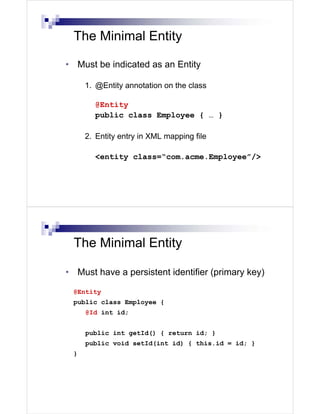
• Must be indicated as an Entity

     1. @Entity annotation on the class

       @Entity
       public class Employee { … }

     2. Entity entry in XML mapping file

       <entity class=“com.acme.Employee”/>


 The Minimal Entity

• Must have a persistent identifier (primary key)

 @Entity
 public class Employee {
     @Id int id;


     public int getId() { return id; }
     public void setId(int id) { this.id = id; }
 }
Persistent Identity

    • Identifier (id) in entity, primary key in database
    • Uniquely identifies entity in memory and in db

          1.   Simple id – single field/property
               @Id int id;

          2.   Compound id – multiple fields/properties
Uses           @Id int id;
 PK            @Id String name;
class
          3.   Embedded id – single field of PK class type
               @EmbeddedId EmployeePK id;


        Identifier Generation
    • Identifiers can be generated in the database
      by specifying @GeneratedValue on the
      identifier

           @Id @GeneratedValue
           int id;
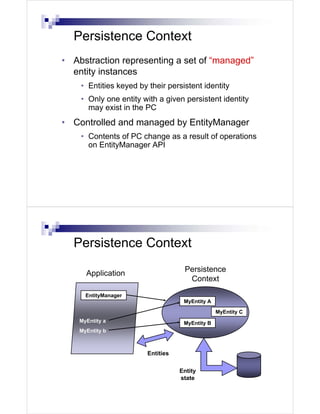
Persistence Context
• Abstraction representing a set of “managed”
  entity instances
    • Entities keyed by their persistent identity
    • Only one entity with a given persistent identity
      may exist in the PC
• Controlled and managed by EntityManager
    • Contents of PC change as a result of operations
      on EntityManager API


  Persistence Context
                                    Persistence
      Application
                                     Context

      EntityManager
                                    MyEntity A
                                                 MyEntity C
    MyEntity a                      MyEntity B
    MyEntity b


                        Entities

                                   Entity
                                   state
Entity Manager
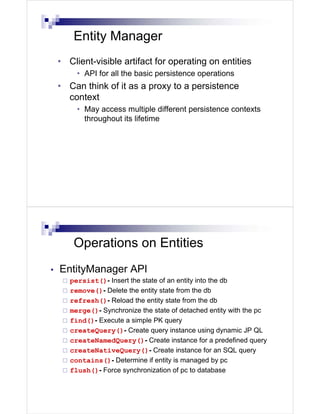
    • Client-visible artifact for operating on entities
         • API for all the basic persistence operations
    • Can think of it as a proxy to a persistence
      context
         • May access multiple different persistence contexts
           throughout its lifetime


        Operations on Entities
•   EntityManager API
       persist()- Insert the state of an entity into the db
       remove()- Delete the entity state from the db
       refresh()- Reload the entity state from the db
       merge()- Synchronize the state of detached entity with the pc
       find()- Execute a simple PK query
       createQuery()- Create query instance using dynamic JP QL
       createNamedQuery()- Create instance for a predefined query
       createNativeQuery()- Create instance for an SQL query
       contains()- Determine if entity is managed by pc
       flush()- Force synchronization of pc to database
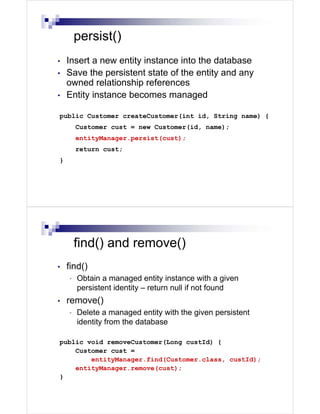
persist()
•   Insert a new entity instance into the database
•   Save the persistent state of the entity and any
    owned relationship references
•   Entity instance becomes managed

public Customer createCustomer(int id, String name) {
        Customer cust = new Customer(id, name);
        entityManager.persist(cust);
        return cust;
}


        find() and remove()
•   find()
    •   Obtain a managed entity instance with a given
        persistent identity – return null if not found
•   remove()
    •   Delete a managed entity with the given persistent
        identity from the database

public void removeCustomer(Long custId) {
    Customer cust =
        entityManager.find(Customer.class, custId);
    entityManager.remove(cust);
}
Queries
•   Dynamic or statically defined (named queries)
•   Criteria using JP QL (extension of EJB QL)
•   Native SQL support (when required)
•   Named parameters bound at execution time
•   Pagination and ability to restrict size of result
•   Single/multiple-entity results, data projections
•   Bulk update and delete operation on an entity
•   Standard hooks for vendor-specific hints


      Queries
•   Query instances are obtained from factory
    methods on EntityManager
•   Query API:
    getResultList() – execute query returning multiple results
    getSingleResult() – execute query returning single result
    executeUpdate() – execute bulk update or delete
    setFirstResult() – set the first result to retrieve
    setMaxResults() – set the maximum number of results to retrieve
    setParameter() – bind a value to a named or positional parameter
    setHint() – apply a vendor-specific hint to the query
    setFlushMode()– apply a flush mode to the query when it gets run
Dynamic Queries

•   Use createQuery() factory method at runtime
    and pass in the JP QL query string
•   Use correct execution method
       getResultList(), getSingleResult(), executeUpdate()
•   Query may be compiled/checked at creation
    time or when executed
•   Maximal flexibility for query definition and
    execution


      Dynamic Queries
    public List findAll(String entityName){
        return entityManager.createQuery(
          "select e from " + entityName + " e")
            .setMaxResults(100)
            .getResultList();
      }


       •   Return all instances of the given entity type
       •   JP QL string composed from entity type. For
           example, if “Account” was passed in then JP QL
           string would be: “select e from Account e”
Named Queries
•    Use createNamedQuery() factory method at
     runtime and pass in the query name
•    Query must have already been statically defined
     either in an annotation or XML
•    Query names are “globally” scoped
•    Provider has opportunity to precompile the
     queries and return errors at deployment time
•    Can include parameters and hints in static query
     definition


       Named Queries
    @NamedQuery(name="Sale.findByCustId",
        query="select s from Sale s
               where s.customer.id = :custId
               order by s.salesDate")

    public List findSalesByCustomer(Customer cust) {
      return
        entityManager.createNamedQuery(
                               "Sale.findByCustId")
             .setParameter("custId", cust.getId())
             .getResultList();
    }
       •   Return all sales for a given customer
Object/Relational Mapping
•   Map persistent object state to relational database
•   Map relationships to other entities
•   Metadata may be annotations or XML (or both)
•   Annotations
        Logical—object model (e.g. @OneToMany)
        Physical—DB tables and columns (e.g. @Table)
•   XML
    •   Can additionally specify scoped settings or defaults
•   Standard rules for default db table/column names


        Object/Relational Mapping
•   State or relationships may be loaded or “fetched”
    as EAGER or LAZY
        LAZY - hint to the Container to defer loading until the
        field or property is accessed
        EAGER - requires that the field or relationship be
        loaded when the referencing entity is loaded
•   Cascading of entity operations to related entities
    •   Setting may be defined per relationship
    •   Configurable globally in mapping file for
        persistence-by-reachability
Simple Mappings
•   Direct mappings of fields/properties to columns
        @Basic - optional annotation to indicate simple
        mapped attribute
•   Maps any of the common simple Java types
        Primitives, wrappers, enumerated, serializable, etc.
•   Used in conjunction with @Column
•   Defaults to the type deemed most appropriate
    if no mapping annotation is present
•   Can override any of the defaults


        Simple Mappings


    @Entity
    public class Customer {
                                            CUSTOMER
        @Id                          ID   NAME   CREDIT   PHOTO
        int id;

         String name;
         @Column(name=“CREDIT”)
         int c_rating;
         @Lob
         Image photo;
    }
Simple Mappings

     <entity class=“com.acme.Customer”>
       <attributes>
         <id name=“id”/>
         <basic name=“c_rating”>
           <column name=“CREDIT”/>
         </basic>
         <basic name=“photo”><lob/></basic>
       </attributes>
     </entity>


     Relationship Mappings
•   Common relationship mappings supported
      @ManyToOne, @OneToOne—single entity
      @OneToMany, @ManyToMany—collection of entities
•   Unidirectional or bidirectional
•   Owning and inverse sides of every bidirectional
    relationship
•   Owning side specifies the physical mapping
      @JoinColumn to specify foreign key column
ManyToOne Mapping


@Entity
public class Sale {
                                      SALE
    @Id
    int id;                      ID   . . . CUST_ID


    ...
    @ManyToOne                    CUSTOMER
    Customer cust;
}                                ID       ...
}


ManyToOne Mapping

<entity class=“com.acme.Sale”>
  <attributes>
    <id name=“id”/>
    ...
    <many-to-one name=“cust”/>
  </attributes>
</entity>
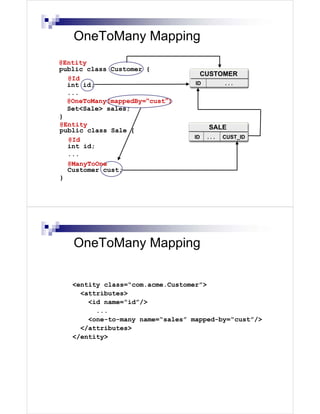
OneToMany Mapping
@Entity
public class Customer {
                                   CUSTOMER
  @Id
  int id;                         ID         ...
  ...
  @OneToMany(mappedBy=“cust”)
  Set<Sale> sales;
}
@Entity                                SALE
public class Sale {
                                 ID    ...   CUST_ID
  @Id
  int id;
  ...
  @ManyToOne
  Customer cust;
}


   OneToMany Mapping

   <entity class=“com.acme.Customer”>
     <attributes>
       <id name=“id”/>
         ...
       <one-to-many name=“sales” mapped-by=“cust”/>
     </attributes>
   </entity>
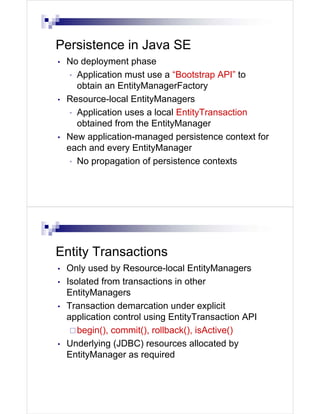
Persistence in Java SE
•   No deployment phase
     • Application must use a “Bootstrap API” to
       obtain an EntityManagerFactory
•   Resource-local EntityManagers
     • Application uses a local EntityTransaction
       obtained from the EntityManager
•   New application-managed persistence context for
    each and every EntityManager
     • No propagation of persistence contexts


Entity Transactions
•   Only used by Resource-local EntityManagers
•   Isolated from transactions in other
    EntityManagers
•   Transaction demarcation under explicit
    application control using EntityTransaction API
       begin(), commit(), rollback(), isActive()
•   Underlying (JDBC) resources allocated by
    EntityManager as required
Bootstrap Classes
javax.persistence.Persistence
•   Root class for bootstrapping an EntityManager
•   Locates provider service for a named persistence unit
•   Invokes on the provider to obtain an
    EntityManagerFactory
javax.persistence.EntityManagerFactory

•   Creates EntityManagers for a named
    persistence unit or configuration


Example
public class PersistenceProgram {
  public static void main(String[] args) {
    EntityManagerFactory emf = Persistence
        .createEntityManagerFactory(“SomePUnit”);
    EntityManager em = emf.createEntityManager();
    em.getTransaction().begin();
    // Perform finds, execute queries,
    // update entities, etc.
    em.getTransaction().commit();
    em.close();
    emf.close();
  }
}
Summary
JPA emerged from best practices of existing best
of breed ORM products
Lightweight persistent POJOs, no extra baggage
Simple, compact and powerful API
Standardized object-relational mapping
metadata specified using annotations or XML
Feature-rich query language
Java EE integration, additional API for Java SE
“Industrial strength” Reference Implementation

Jpa

  • 1.
    Java Persistence API (JPA) Based on the slides of Mike Keith, Oracle Corp. About JPA • Persistence API for operating on Plain Old Java Objects (POJO). • Merger of expertise from TopLink, Hibernate, JDO, EJB vendors and individuals • Created as part of EJB 3.0 within JSR 220 • Released May 2006 as part of Java EE 5 • Integration with Java EE web and EJB containers provides enterprise “ease of use” features • “Bootstrap API” can also be used in Java SE • Pluggable Container-Provider SPI
  • 2.
    Reference Implementation • Part of “Glassfish” project on java.net • RI for entire Java EE platform • Sun and Oracle partnership • Sun Application Server + Oracle persistence • JPA impl called “TopLink Essentials” • Donated by Oracle, derived from Oracle TopLink • All open source (under CDDL license) • Anyone can download/use source code or binary code in development or production Anatomy of an Entity • Abstract or concrete top level Java class • Non-final fields/properties, no-arg constructor • No required interfaces • No required business or callback interfaces (but you may use them if you want to) • Direct field or property-based access • Getter/setter can contain logic (e.g. for validation) • May be Serializable, but not required • Only needed if passed by value (in a remote call)
  • 3.
    The Minimal Entity •Must be indicated as an Entity 1. @Entity annotation on the class @Entity public class Employee { … } 2. Entity entry in XML mapping file <entity class=“com.acme.Employee”/> The Minimal Entity • Must have a persistent identifier (primary key) @Entity public class Employee { @Id int id; public int getId() { return id; } public void setId(int id) { this.id = id; } }
  • 4.
    Persistent Identity • Identifier (id) in entity, primary key in database • Uniquely identifies entity in memory and in db 1. Simple id – single field/property @Id int id; 2. Compound id – multiple fields/properties Uses @Id int id; PK @Id String name; class 3. Embedded id – single field of PK class type @EmbeddedId EmployeePK id; Identifier Generation • Identifiers can be generated in the database by specifying @GeneratedValue on the identifier @Id @GeneratedValue int id;
  • 5.
    Persistence Context • Abstractionrepresenting a set of “managed” entity instances • Entities keyed by their persistent identity • Only one entity with a given persistent identity may exist in the PC • Controlled and managed by EntityManager • Contents of PC change as a result of operations on EntityManager API Persistence Context Persistence Application Context EntityManager MyEntity A MyEntity C MyEntity a MyEntity B MyEntity b Entities Entity state
  • 6.
    Entity Manager • Client-visible artifact for operating on entities • API for all the basic persistence operations • Can think of it as a proxy to a persistence context • May access multiple different persistence contexts throughout its lifetime Operations on Entities • EntityManager API persist()- Insert the state of an entity into the db remove()- Delete the entity state from the db refresh()- Reload the entity state from the db merge()- Synchronize the state of detached entity with the pc find()- Execute a simple PK query createQuery()- Create query instance using dynamic JP QL createNamedQuery()- Create instance for a predefined query createNativeQuery()- Create instance for an SQL query contains()- Determine if entity is managed by pc flush()- Force synchronization of pc to database
  • 7.
    persist() • Insert a new entity instance into the database • Save the persistent state of the entity and any owned relationship references • Entity instance becomes managed public Customer createCustomer(int id, String name) { Customer cust = new Customer(id, name); entityManager.persist(cust); return cust; } find() and remove() • find() • Obtain a managed entity instance with a given persistent identity – return null if not found • remove() • Delete a managed entity with the given persistent identity from the database public void removeCustomer(Long custId) { Customer cust = entityManager.find(Customer.class, custId); entityManager.remove(cust); }
  • 8.
    Queries • Dynamic or statically defined (named queries) • Criteria using JP QL (extension of EJB QL) • Native SQL support (when required) • Named parameters bound at execution time • Pagination and ability to restrict size of result • Single/multiple-entity results, data projections • Bulk update and delete operation on an entity • Standard hooks for vendor-specific hints Queries • Query instances are obtained from factory methods on EntityManager • Query API: getResultList() – execute query returning multiple results getSingleResult() – execute query returning single result executeUpdate() – execute bulk update or delete setFirstResult() – set the first result to retrieve setMaxResults() – set the maximum number of results to retrieve setParameter() – bind a value to a named or positional parameter setHint() – apply a vendor-specific hint to the query setFlushMode()– apply a flush mode to the query when it gets run
  • 9.
    Dynamic Queries • Use createQuery() factory method at runtime and pass in the JP QL query string • Use correct execution method getResultList(), getSingleResult(), executeUpdate() • Query may be compiled/checked at creation time or when executed • Maximal flexibility for query definition and execution Dynamic Queries public List findAll(String entityName){ return entityManager.createQuery( "select e from " + entityName + " e") .setMaxResults(100) .getResultList(); } • Return all instances of the given entity type • JP QL string composed from entity type. For example, if “Account” was passed in then JP QL string would be: “select e from Account e”
  • 10.
    Named Queries • Use createNamedQuery() factory method at runtime and pass in the query name • Query must have already been statically defined either in an annotation or XML • Query names are “globally” scoped • Provider has opportunity to precompile the queries and return errors at deployment time • Can include parameters and hints in static query definition Named Queries @NamedQuery(name="Sale.findByCustId", query="select s from Sale s where s.customer.id = :custId order by s.salesDate") public List findSalesByCustomer(Customer cust) { return entityManager.createNamedQuery( "Sale.findByCustId") .setParameter("custId", cust.getId()) .getResultList(); } • Return all sales for a given customer
  • 11.
    Object/Relational Mapping • Map persistent object state to relational database • Map relationships to other entities • Metadata may be annotations or XML (or both) • Annotations Logical—object model (e.g. @OneToMany) Physical—DB tables and columns (e.g. @Table) • XML • Can additionally specify scoped settings or defaults • Standard rules for default db table/column names Object/Relational Mapping • State or relationships may be loaded or “fetched” as EAGER or LAZY LAZY - hint to the Container to defer loading until the field or property is accessed EAGER - requires that the field or relationship be loaded when the referencing entity is loaded • Cascading of entity operations to related entities • Setting may be defined per relationship • Configurable globally in mapping file for persistence-by-reachability
  • 12.
    Simple Mappings • Direct mappings of fields/properties to columns @Basic - optional annotation to indicate simple mapped attribute • Maps any of the common simple Java types Primitives, wrappers, enumerated, serializable, etc. • Used in conjunction with @Column • Defaults to the type deemed most appropriate if no mapping annotation is present • Can override any of the defaults Simple Mappings @Entity public class Customer { CUSTOMER @Id ID NAME CREDIT PHOTO int id; String name; @Column(name=“CREDIT”) int c_rating; @Lob Image photo; }
  • 13.
    Simple Mappings <entity class=“com.acme.Customer”> <attributes> <id name=“id”/> <basic name=“c_rating”> <column name=“CREDIT”/> </basic> <basic name=“photo”><lob/></basic> </attributes> </entity> Relationship Mappings • Common relationship mappings supported @ManyToOne, @OneToOne—single entity @OneToMany, @ManyToMany—collection of entities • Unidirectional or bidirectional • Owning and inverse sides of every bidirectional relationship • Owning side specifies the physical mapping @JoinColumn to specify foreign key column
  • 14.
    ManyToOne Mapping @Entity public classSale { SALE @Id int id; ID . . . CUST_ID ... @ManyToOne CUSTOMER Customer cust; } ID ... } ManyToOne Mapping <entity class=“com.acme.Sale”> <attributes> <id name=“id”/> ... <many-to-one name=“cust”/> </attributes> </entity>
  • 15.
    OneToMany Mapping @Entity public classCustomer { CUSTOMER @Id int id; ID ... ... @OneToMany(mappedBy=“cust”) Set<Sale> sales; } @Entity SALE public class Sale { ID ... CUST_ID @Id int id; ... @ManyToOne Customer cust; } OneToMany Mapping <entity class=“com.acme.Customer”> <attributes> <id name=“id”/> ... <one-to-many name=“sales” mapped-by=“cust”/> </attributes> </entity>
  • 16.
    Persistence in JavaSE • No deployment phase • Application must use a “Bootstrap API” to obtain an EntityManagerFactory • Resource-local EntityManagers • Application uses a local EntityTransaction obtained from the EntityManager • New application-managed persistence context for each and every EntityManager • No propagation of persistence contexts Entity Transactions • Only used by Resource-local EntityManagers • Isolated from transactions in other EntityManagers • Transaction demarcation under explicit application control using EntityTransaction API begin(), commit(), rollback(), isActive() • Underlying (JDBC) resources allocated by EntityManager as required
  • 17.
    Bootstrap Classes javax.persistence.Persistence • Root class for bootstrapping an EntityManager • Locates provider service for a named persistence unit • Invokes on the provider to obtain an EntityManagerFactory javax.persistence.EntityManagerFactory • Creates EntityManagers for a named persistence unit or configuration Example public class PersistenceProgram { public static void main(String[] args) { EntityManagerFactory emf = Persistence .createEntityManagerFactory(“SomePUnit”); EntityManager em = emf.createEntityManager(); em.getTransaction().begin(); // Perform finds, execute queries, // update entities, etc. em.getTransaction().commit(); em.close(); emf.close(); } }
  • 18.
    Summary JPA emerged frombest practices of existing best of breed ORM products Lightweight persistent POJOs, no extra baggage Simple, compact and powerful API Standardized object-relational mapping metadata specified using annotations or XML Feature-rich query language Java EE integration, additional API for Java SE “Industrial strength” Reference Implementation