Submitted To:- Submitted By:-
Suneel Kumar Jawhar Ali
(HOD CSE Dept.) Enroll No .:-
15ESFCS200
Trade:-B.tech. 7th
CSE(4th
Year)
SHEKHAWATI GROUP OF INSTITUTE
AND TECHNOLOGY
1 Introduction
2 What is cloud
3 What is Cloud Computing
4 Cloud Computing Architecture
5 Basic Concepts
6 Deployment Models
7 Service Models
8 Advantages
9 Disadvantages
INTRODUCTIONINTRODUCTION
Cloud Computing provides us a means by which we can
access the applications as utilities, over the Internet. It
allows us to create, configure, and customize
applications online.
WHAT IS CLOUD?WHAT IS CLOUD?
The term Cloud refers to a Network or Internet.
In other words, we can say that Cloud is something,
which is present at remote location.
Cloud can provide services over network, i.e.,
on public networks or on private networks.
WHAT IS CLOUD COMPUTING?WHAT IS CLOUD COMPUTING?
Cloud Computing refers to manipulating,
configuring, and accessing the applications online.
It offers online data storage, infrastructure and application.
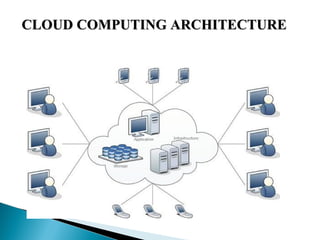
CLOUD COMPUTING ARCHITECTURECLOUD COMPUTING ARCHITECTURE
BASIC CONCEPTSBASIC CONCEPTS
There are certain services and models working behind the
scene making the cloud computing feasible and accessible to
end users. Following are the working models for cloud
computing:
1. Deployment Models1. Deployment Models
 
2. Service Models2. Service Models
 
DEPLOYMENT MODELSDEPLOYMENT MODELS
 
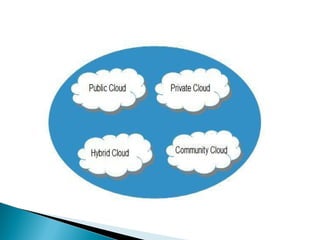
Deployment models define the type of access to the
cloud, i.e., how the cloud is located? Cloud can have any
of the four types of access: Public, Private, Hybrid and
Community.
PUBLIC CLOUDPUBLIC CLOUD : The Public Cloud allows systems and
services to be easily accessible to the general public.
PRIVATE CLOUDPRIVATE CLOUD : The Private Cloud allows systems and
services to be accessible within an organization.
COMMUNITY CLOUDCOMMUNITY CLOUD : The Community Cloud allows
systems and services to be accessible by group of organizations.
HYBRID CLOUDHYBRID CLOUD : The Hybrid Cloud is mixture of public and
private cloud.
SERVICE MODELSSERVICE MODELS
 
Service Models are the reference models on which the
Cloud Computing is based. These can be categorized
into three basic service models as listed below:
1.1.Infrastructure as a Service (IaaS)Infrastructure as a Service (IaaS)
2. Platform as a Service (PaaS)2. Platform as a Service (PaaS)
3. Software as a Service (SaaS)3. Software as a Service (SaaS)
INFRASTRUCTURE AS A SERVICE (IaaS)INFRASTRUCTURE AS A SERVICE (IaaS)
IaaS is the delivery of technology infrastructure as an on
demand scalable service.
IaaS provides access to fundamental resources such as
physical machines, virtual machines, virtual storage, etc.
IaaS EXAMPLESIaaS EXAMPLES
PLATFORM AS A SERVICE (PAAS)PLATFORM AS A SERVICE (PAAS)
PaaS provides the runtime environment for applications,
development & deployment tools, etc.
PaaS provides all of the facilities required to support the
complete life cycle of building and delivering web
applications and services entirely from the Internet.
PaaS EXAMPLESPaaS EXAMPLES
SOFTWARE AS A SERVICE (SaaS)SOFTWARE AS A SERVICE (SaaS)
SaaS model allows to use software applications as a service
to end users.
SaaS is a software delivery methodology that provides
licensed multi-tenant access to software and its functions
remotely as a Web-based service.
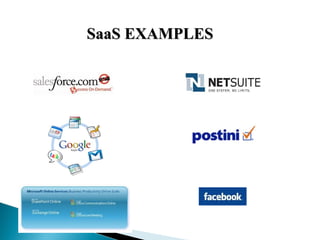
SaaS EXAMPLESSaaS EXAMPLES
DO YOU USE THE CLOUD?DO YOU USE THE CLOUD?
ADVANTAGESADVANTAGES
• Lower computer costs
• Improved performances
• Instant software updates
• Unlimited storage capacity
• Universal document access
DISADVANTAGESDISADVANTAGES
• Requires a constant Internet connection
• Does not work well with low-speed connections
• Features might be limited
• Can be slow
• Stored data can be lost
• Stored data might not be secure
ThankThank
you…you…
Question…?Question…?

Cloud computing ppt

  • 1.
    Submitted To:- SubmittedBy:- Suneel Kumar Jawhar Ali (HOD CSE Dept.) Enroll No .:- 15ESFCS200 Trade:-B.tech. 7th CSE(4th Year) SHEKHAWATI GROUP OF INSTITUTE AND TECHNOLOGY
  • 2.
    1 Introduction 2 Whatis cloud 3 What is Cloud Computing 4 Cloud Computing Architecture 5 Basic Concepts 6 Deployment Models 7 Service Models 8 Advantages 9 Disadvantages
  • 3.
    INTRODUCTIONINTRODUCTION Cloud Computing providesus a means by which we can access the applications as utilities, over the Internet. It allows us to create, configure, and customize applications online.
  • 4.
    WHAT IS CLOUD?WHATIS CLOUD? The term Cloud refers to a Network or Internet. In other words, we can say that Cloud is something, which is present at remote location. Cloud can provide services over network, i.e., on public networks or on private networks.
  • 5.
    WHAT IS CLOUDCOMPUTING?WHAT IS CLOUD COMPUTING? Cloud Computing refers to manipulating, configuring, and accessing the applications online. It offers online data storage, infrastructure and application.
  • 6.
    CLOUD COMPUTING ARCHITECTURECLOUDCOMPUTING ARCHITECTURE
  • 7.
    BASIC CONCEPTSBASIC CONCEPTS Thereare certain services and models working behind the scene making the cloud computing feasible and accessible to end users. Following are the working models for cloud computing: 1. Deployment Models1. Deployment Models   2. Service Models2. Service Models  
  • 8.
    DEPLOYMENT MODELSDEPLOYMENT MODELS   Deploymentmodels define the type of access to the cloud, i.e., how the cloud is located? Cloud can have any of the four types of access: Public, Private, Hybrid and Community.
  • 10.
    PUBLIC CLOUDPUBLIC CLOUD: The Public Cloud allows systems and services to be easily accessible to the general public. PRIVATE CLOUDPRIVATE CLOUD : The Private Cloud allows systems and services to be accessible within an organization. COMMUNITY CLOUDCOMMUNITY CLOUD : The Community Cloud allows systems and services to be accessible by group of organizations. HYBRID CLOUDHYBRID CLOUD : The Hybrid Cloud is mixture of public and private cloud.
  • 11.
    SERVICE MODELSSERVICE MODELS   ServiceModels are the reference models on which the Cloud Computing is based. These can be categorized into three basic service models as listed below:
  • 12.
    1.1.Infrastructure as aService (IaaS)Infrastructure as a Service (IaaS) 2. Platform as a Service (PaaS)2. Platform as a Service (PaaS) 3. Software as a Service (SaaS)3. Software as a Service (SaaS)
  • 13.
    INFRASTRUCTURE AS ASERVICE (IaaS)INFRASTRUCTURE AS A SERVICE (IaaS) IaaS is the delivery of technology infrastructure as an on demand scalable service. IaaS provides access to fundamental resources such as physical machines, virtual machines, virtual storage, etc.
  • 14.
  • 15.
    PLATFORM AS ASERVICE (PAAS)PLATFORM AS A SERVICE (PAAS) PaaS provides the runtime environment for applications, development & deployment tools, etc. PaaS provides all of the facilities required to support the complete life cycle of building and delivering web applications and services entirely from the Internet.
  • 16.
  • 17.
    SOFTWARE AS ASERVICE (SaaS)SOFTWARE AS A SERVICE (SaaS) SaaS model allows to use software applications as a service to end users. SaaS is a software delivery methodology that provides licensed multi-tenant access to software and its functions remotely as a Web-based service.
  • 18.
  • 19.
    DO YOU USETHE CLOUD?DO YOU USE THE CLOUD?
  • 20.
    ADVANTAGESADVANTAGES • Lower computercosts • Improved performances • Instant software updates • Unlimited storage capacity • Universal document access
  • 21.
    DISADVANTAGESDISADVANTAGES • Requires aconstant Internet connection • Does not work well with low-speed connections • Features might be limited • Can be slow • Stored data can be lost • Stored data might not be secure
  • 22.