Removing The Bait From
Phishing Attacks
Presented By:
Who We Are
Michael Green, Just-Tech
Mike is a Technical Consultant & Engineer at Just-Tech with over 18 years of
experience in the field of Information Technology, and works with clients on
project planning and systems implementation. He also works as an engineer
behind the scenes.
Mary O’Shaughnessy, Her Justice
Mary has long experience in for-profit and nonprofit technology services,
including technology audit. She has been Director, Information Services at Her
Justice since 2012.
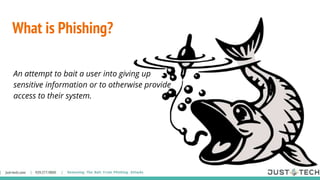
What is Phishing?
An attempt to bait a user into giving up
sensitive information or to otherwise provide
access to their system.
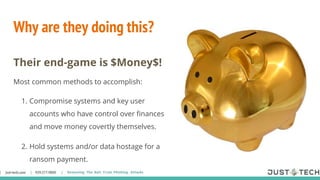
Why are they doing this?
Their end-game is $Money$!
Most common methods to accomplish:
1. Compromise systems and key user
accounts who have control over finances
and move money covertly themselves.
2. Hold systems and/or data hostage for a
ransom payment.
Impact
● Access to CMS- client information & disclosure rules
● Access to internal files- ID theft & personal info
● Damage to reputation/community relationship
● Increased recovery cost if unprepared
● System downtime
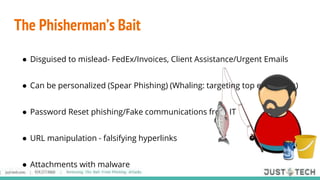
The Phisherman’s Bait
● Disguised to mislead- FedEx/Invoices, Client Assistance/Urgent Emails
● Can be personalized (Spear Phishing) (Whaling: targeting top executives)
● Password Reset phishing/Fake communications from IT
● URL manipulation - falsifying hyperlinks
● Attachments with malware
How to recognize it?
Though the Phishers are deceptive in their tactics, there are tell-tale signs of
fake information.
1. The email is threatening, provoking, or pretends to be authentic
correspondence, in an effort to get you to open attachments or click links
on impulse. Phishers need you to “take the bait” and allow them in.
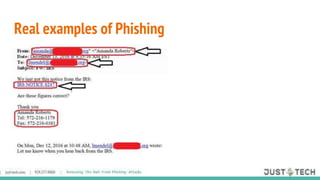
2. The actual sender’s email address does not match who they claim to be.
3. Mouse-over hyperlinks reveal sketchy website destination.
4. Porr sppelling or errors grammatical.
5. Sender claims to be internal, popular, or reputable source.
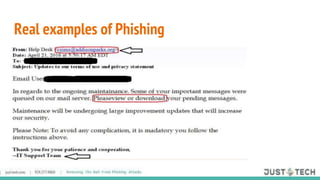
Real examples of Phishing
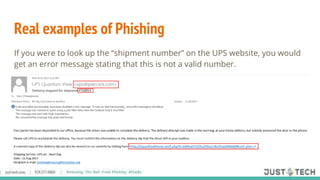
If you were to look up the “shipment number” on the UPS website, you would
get an error message stating that this is not a valid number.
What to copy from Outlook
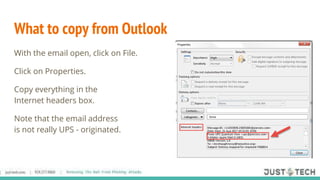
With the email open, click on File.
Click on Properties.
Copy everything in the
Internet headers box.
Note that the email address
is not really UPS - originated.
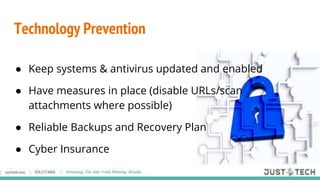
Technology Prevention
● Keep systems & antivirus updated and enabled
● Have measures in place (disable URLs/scan
attachments where possible)
● Reliable Backups and Recovery Plan
● Cyber Insurance
Human Prevention
● Check with IT for verification before action
● Ignore unsolicited email links & attachments
● Continual Training & “Cheat Sheets” for staff
● When in doubt, Ask about
● Add to Junk Mail list
Policies - Acceptable Use, Mobile Device, Guest Use, & Email policies are just a
few
New Staff/Veterans/Volunteers - Whether they started yesterday or 20 years
ago, continual training and coaching is a necessary component to prevention.
Viruses and Malware continue to evolve, we need to adapt as well
Training Practice
https://www.phishingbox.com/
US Computer Emergency Response Team tips
https://www.us-cert.gov/ncas/tips/ST04-014
Policies/Training
Helpful Resources
● LSNTAP-lsntap.org
● Idealware- www.idealware.org
● Security Awareness Training-www.travelingcoaches.com
● You Tube Videos- While not tailored, can provide self-help
● Resources on corporate identity theft-
just-tech.com
929.277.9800 CHANGE EVENT OR PRESENTATION TITLE ON MASTER – 1ST SLIDE
just-tech.com
929.277.9800
Michael Green 929-277-0610
mgreen@just-tech.com
Mary O’Shaughnessy 646-442-1179
moshaughnessy@herjustice.org
Contact Us
just-tech.com
929.277.9800 CHANGE EVENT OR PRESENTATION TITLE ON MASTER – 1ST SLIDE
just-tech.com
929.277.9800
Thanks!
just-tech.com
929.277.9800 CHANGE EVENT OR PRESENTATION TITLE ON MASTER – 1ST SLIDE
just-tech.com
929.277.9800

Teaching Your Staff About Phishing

  • 1.
    Removing The BaitFrom Phishing Attacks Presented By:
  • 2.
    Who We Are MichaelGreen, Just-Tech Mike is a Technical Consultant & Engineer at Just-Tech with over 18 years of experience in the field of Information Technology, and works with clients on project planning and systems implementation. He also works as an engineer behind the scenes. Mary O’Shaughnessy, Her Justice Mary has long experience in for-profit and nonprofit technology services, including technology audit. She has been Director, Information Services at Her Justice since 2012.
  • 3.
    What is Phishing? Anattempt to bait a user into giving up sensitive information or to otherwise provide access to their system.
  • 4.
    Why are theydoing this? Their end-game is $Money$! Most common methods to accomplish: 1. Compromise systems and key user accounts who have control over finances and move money covertly themselves. 2. Hold systems and/or data hostage for a ransom payment.
  • 5.
    Impact ● Access toCMS- client information & disclosure rules ● Access to internal files- ID theft & personal info ● Damage to reputation/community relationship ● Increased recovery cost if unprepared ● System downtime
  • 6.
    The Phisherman’s Bait ●Disguised to mislead- FedEx/Invoices, Client Assistance/Urgent Emails ● Can be personalized (Spear Phishing) (Whaling: targeting top executives) ● Password Reset phishing/Fake communications from IT ● URL manipulation - falsifying hyperlinks ● Attachments with malware
  • 7.
    How to recognizeit? Though the Phishers are deceptive in their tactics, there are tell-tale signs of fake information. 1. The email is threatening, provoking, or pretends to be authentic correspondence, in an effort to get you to open attachments or click links on impulse. Phishers need you to “take the bait” and allow them in. 2. The actual sender’s email address does not match who they claim to be. 3. Mouse-over hyperlinks reveal sketchy website destination. 4. Porr sppelling or errors grammatical. 5. Sender claims to be internal, popular, or reputable source.
  • 8.
  • 9.
  • 10.
  • 11.
    Real examples ofPhishing If you were to look up the “shipment number” on the UPS website, you would get an error message stating that this is not a valid number.
  • 12.
    What to copyfrom Outlook With the email open, click on File. Click on Properties. Copy everything in the Internet headers box. Note that the email address is not really UPS - originated.
  • 13.
    Technology Prevention ● Keepsystems & antivirus updated and enabled ● Have measures in place (disable URLs/scan attachments where possible) ● Reliable Backups and Recovery Plan ● Cyber Insurance
  • 14.
    Human Prevention ● Checkwith IT for verification before action ● Ignore unsolicited email links & attachments ● Continual Training & “Cheat Sheets” for staff ● When in doubt, Ask about ● Add to Junk Mail list
  • 15.
    Policies - AcceptableUse, Mobile Device, Guest Use, & Email policies are just a few New Staff/Veterans/Volunteers - Whether they started yesterday or 20 years ago, continual training and coaching is a necessary component to prevention. Viruses and Malware continue to evolve, we need to adapt as well Training Practice https://www.phishingbox.com/ US Computer Emergency Response Team tips https://www.us-cert.gov/ncas/tips/ST04-014 Policies/Training
  • 16.
    Helpful Resources ● LSNTAP-lsntap.org ●Idealware- www.idealware.org ● Security Awareness Training-www.travelingcoaches.com ● You Tube Videos- While not tailored, can provide self-help ● Resources on corporate identity theft-
  • 17.
    just-tech.com 929.277.9800 CHANGE EVENTOR PRESENTATION TITLE ON MASTER – 1ST SLIDE just-tech.com 929.277.9800 Michael Green 929-277-0610 mgreen@just-tech.com Mary O’Shaughnessy 646-442-1179 moshaughnessy@herjustice.org Contact Us
  • 18.
    just-tech.com 929.277.9800 CHANGE EVENTOR PRESENTATION TITLE ON MASTER – 1ST SLIDE just-tech.com 929.277.9800 Thanks!
  • 19.
    just-tech.com 929.277.9800 CHANGE EVENTOR PRESENTATION TITLE ON MASTER – 1ST SLIDE just-tech.com 929.277.9800

Editor's Notes

  • #2 Sart
  • #3 Mike Start. Mary Intro herself
  • #4 Mike
  • #5 Mike
  • #6 Mary to start What can go wrong with getting phished? Client information can be disclosed, as can employee data. Bogus communications that look like they are from your organization (or actually from hacked valid email accounts) can damage your reputation. Talk about Petya ransomware
  • #7 Mary to take this -- “bait” gets your attention and move you to click or enter data, without being over-the-top in subject or action. Password resets are particularly invidious. If you get something that claims to be from IT, call an actual organization IT person known to you. URLs can be off by a domain ending, or a couple of switched letters. Hover over the link in the email to see what it really is. Attachments can look like they have innocent extensions, but hide additional ones past the first dot-three-letters.
  • #8 Mary to describe signs and symptoms :) Common fakes: IRS, Microsoft, Apple, Homeland Security. The email address is misspelled or has a nonsense domain. The mouse-over is a safe way of examining a hyperlink.
  • #9 Mary to point out the misspellings and disconnect between email address and alleged sender. See bad sentence structure. csims@addisonpark.org is real but it doesn’t make any sense that you would be getting an IT email from that person.
  • #10 Mike to discuss apparently valid email addresses.
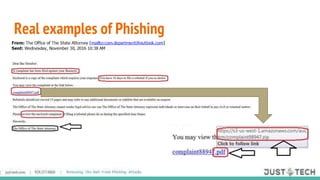
  • #11 Mike to discuss sense of urgency and “state attorney.” Bogus attachment claiming to be a legitimate .pdf
  • #12 Mary to discuss invalid UPS information and bad link. If you get information about a shipment, go directly to the shipper’s website and do not rely on links.
  • #13 Mary: You don’t have to read every line of the detail--just look at that From:
  • #14 Mike Intro https://www.bankinfosecurity.com/nhs-denies-widespread-windows-xp-use-a-9915 It’s ok to not update Microsoft patches the day they are released. Test your backups regularly--at least monthly. Multiple backups from different points in time are good, in case an infected/hacked system gets backed up accidentally.
  • #15 Mike Intro. https://www.bankinfosecurity.com/nhs-denies-widespread-windows-xp-use-a-9915 It’s ok to not update Microsoft patches the day they are released, but patch updates should not be postponed for months. Pass no judgments on anyone who asks you to look at an email. Be encouraging, especially of their asking before clicking. If it sounds fake, it probably is. 5 minutes to verify -vs- hours, days, potentially weeks, and $$$ to clean up and “recover”
  • #16 Mike Intro. Acceptable use--there is no expectation of privacy on work assets--computers and accounts (e.g. email) If you plan to do a phishing test, you should tell your Executive Director before sending it.
  • #17 Mary Intro. http://forums.techsoup.org/cs/community/b/tsblog/archive/2016/03/10/the-greatest-security-threat-is-already-inside-your-office.aspx
  • #18 Contact info
  • #19 Thank you and Q & A