

Guide to Office 365
OFFI
CE
GRAPH - Connects Activities Done by an Individual on OFFICE 365OFFICE GROUPS - Connects the Right People to The Rig
htOFFICE365Products
ONENOTE
Note Taking Made Easy
SWAY
Storytelling Tool
POWER BI
Business
Intelligence
Dashboards
SHAREPOINT
Collaboration
Platform
YAMMER
Enterprise
Social
Network
CALENDAR
Collaborative
Calendar &
Meeting
Planner
DELVE
Personal
Search &
Discovery
of Content for
Individuals
OUTLOOK
Email Client
SKYPE
FOR
BUSINESS
Instant
Messaging &
Audio/Video
Conferencing
OFFICE
Productivity Software
ONEDRIVE
FOR BUSINESS
Store, Sync, and
Share Work Files
PLANNER
Card-Based Task
Management
Video Streaming
for Organizations
VIDEO PORTAL
POWER
APPS
Build Mobile Apps
and Logic Flows
with your data
Infographic crafted by Sharegate
Office Graph connects activities performed by individuals in
the entire Office 365 Suite, and goes a step further by
learning from them. Delve, a tool that leverages Office Graph,
for example, can predict what files you may be looking for,
and display them, before you even search for them.
OFFICE GRAPH
Additionally, we can go beyond individual products, using
Office Graph to create apps, or to give us different ways of
looking at our digital workplace as a whole. Your “Recent
Documents”, for example, wouldn’t just be your SharePoint
recent documents, but all of them in the Office Suite.
These are displayed much like your old security groups, but
will be much more powerful and connected. Office 365
Groups is a way of grouping individuals logically, much like
any other group you may have used before – but the
difference lies in how it integrates with Office 365. When a
group is created, Office 365 Products are automatically
attributed to that group in a way that makes the most sense.
OFFICE 365 GROUPS
It acknowledges that not everyone in an organization works
the same way, and that every team or project don’t always fit
in a specific product. This way, when you create a team or
“Group”, products will be attributed, and that team can
choose what to use for their particular needs. They might
choose to start with an Outlook calendar and Yammer, and
eventually incorporate Planner, as well. The combinations are
vast, and the major benefit is that these products are all
linked to the group.
OFFICE
The usual Office Suite you are familiar with, open and
edit documents you want to work on. Most Office 365
plans include the Office client in their subscription.
OUTLOOK
Needs no introduction, but as we move forward it’s
important to split the Mail functionality and the
Calendar into two.
ONENOTE
Renowned note taking app that facilitates working as
a team within a notebook.
SKYPE FOR BUSINESS
Originally called Lync, this is an instant messaging
and audio/video conferencing tool. Great for
PowerPoint presentations to people not at the office
with you, online meetings, as well as regular phone
calls. Has also recently added a broadcast feature to
allow up to 10,000 attendees to be viewing the feed.
SHAREPOINT
A platform for you to build what you need to work
with your content. Generally used to build Intranets,
Extranets and Collaboration Team Sites for people to
work together more intelligently. It includes
Workflows and many more features that makes it
great for planned ECM deployments.
YAMMER
An Enterprise Social Network to help businesses have
open conversations. Allows you to create groups and,
within them, threaded conversations.
CALENDAR
The outlook calendar to organize events and meetings
ONEDRIVE
The place individuals go to see, and work with, their files.
OneDrive for Business includes a personal document
library for every user to store their files, much like the old
My Documents folder or Home Drive previously used. It
also allows individuals to see all recent Group Files from
one location. Lastly, it includes a Sync Offline tool, which
allows users to continue working when a connection
isn’t possible.
POWER BI
An easy way to connect your data and create beautiful
and interactive dashboards. Whether you have
information in SQL, SharePoint or even an Excel file,
Power BI will help you see more from them.
DELVE
Built on Office Graph, it is meant for Personal Search
and Discovery of content for individuals using Office
365. It includes new People Profiles, and information
such as the org chart. It uses Office Graph and machine
learning to show you content in a card-based feed
intelligently, as well as allows you to group them into
boards. Delve is also where the new Office 365 Blogging
feature is located, providing individuals with a
responsive and easy-to-use interface to tell stories.
POWER APPS
Not necessarily a part of Office 365, but plays a good
part in it. Power Apps helps you create Workflows on
your content stored in various data sources including
SharePoint and OneDrive for Business. It also helps you
create mobile apps easily that connect and talk to
SharePoint and other Office 365 products.
VIDEO PORTAL
A place for the organization to store video content and
automatically stream it on all devices and browsers. The
Video Portal leverages Azure Media Services to do all
the hard work for you, all you have to do is create
channels and upload your videos. The mobile apps also
allow you to record and send your videos directly to the
right channel.
PLANNER
A card-based task manager, Planner allows you to
organize your tasks into cards, and show their progress,
by moving them from left to right into appropriate
columns. For example, you could have columns titled 

“To-Do”, “Doing”, “Blocked”, and “Done”. Then, using cards
to represent your tasks and linking content within them,
as well as assigning people to them, you move them from
“To-Do” to “Done” as they progress.
About Sharegate
Sharegate helps thousands of IT professionals worldwide manage,
migrate and secure their SharePoint & Office 365 environments.
A product made with love by Montreal-based software development
firm GSOFT, where we truly believe that simplicity and happiness
are key to success!
Want to learn more?
Connect with us on twitter and visit share-gate.com for more 

SharePoint related content.
@sharegatetools
www.share-gate.com

Guide to Office 365

  • 1.
  • 2.
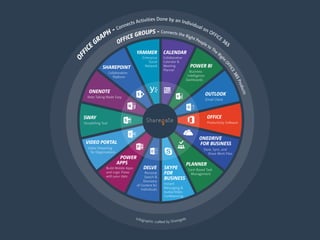
    OFFI CE GRAPH - ConnectsActivities Done by an Individual on OFFICE 365OFFICE GROUPS - Connects the Right People to The Rig htOFFICE365Products ONENOTE Note Taking Made Easy SWAY Storytelling Tool POWER BI Business Intelligence Dashboards SHAREPOINT Collaboration Platform YAMMER Enterprise Social Network CALENDAR Collaborative Calendar & Meeting Planner DELVE Personal Search & Discovery of Content for Individuals OUTLOOK Email Client SKYPE FOR BUSINESS Instant Messaging & Audio/Video Conferencing OFFICE Productivity Software ONEDRIVE FOR BUSINESS Store, Sync, and Share Work Files PLANNER Card-Based Task Management Video Streaming for Organizations VIDEO PORTAL POWER APPS Build Mobile Apps and Logic Flows with your data Infographic crafted by Sharegate
  • 3.
    Office Graph connectsactivities performed by individuals in the entire Office 365 Suite, and goes a step further by learning from them. Delve, a tool that leverages Office Graph, for example, can predict what files you may be looking for, and display them, before you even search for them. OFFICE GRAPH
  • 4.
    Additionally, we cango beyond individual products, using Office Graph to create apps, or to give us different ways of looking at our digital workplace as a whole. Your “Recent Documents”, for example, wouldn’t just be your SharePoint recent documents, but all of them in the Office Suite.
  • 5.
    These are displayedmuch like your old security groups, but will be much more powerful and connected. Office 365 Groups is a way of grouping individuals logically, much like any other group you may have used before – but the difference lies in how it integrates with Office 365. When a group is created, Office 365 Products are automatically attributed to that group in a way that makes the most sense. OFFICE 365 GROUPS
  • 6.
    It acknowledges thatnot everyone in an organization works the same way, and that every team or project don’t always fit in a specific product. This way, when you create a team or “Group”, products will be attributed, and that team can choose what to use for their particular needs. They might choose to start with an Outlook calendar and Yammer, and eventually incorporate Planner, as well. The combinations are vast, and the major benefit is that these products are all linked to the group.
  • 7.
    OFFICE The usual OfficeSuite you are familiar with, open and edit documents you want to work on. Most Office 365 plans include the Office client in their subscription.
  • 8.
    OUTLOOK Needs no introduction,but as we move forward it’s important to split the Mail functionality and the Calendar into two.
  • 9.
    ONENOTE Renowned note takingapp that facilitates working as a team within a notebook.
  • 10.
    SKYPE FOR BUSINESS Originallycalled Lync, this is an instant messaging and audio/video conferencing tool. Great for PowerPoint presentations to people not at the office with you, online meetings, as well as regular phone calls. Has also recently added a broadcast feature to allow up to 10,000 attendees to be viewing the feed.
  • 11.
    SHAREPOINT A platform foryou to build what you need to work with your content. Generally used to build Intranets, Extranets and Collaboration Team Sites for people to work together more intelligently. It includes Workflows and many more features that makes it great for planned ECM deployments.
  • 12.
    YAMMER An Enterprise SocialNetwork to help businesses have open conversations. Allows you to create groups and, within them, threaded conversations.
  • 13.
    CALENDAR The outlook calendarto organize events and meetings
  • 14.
    ONEDRIVE The place individualsgo to see, and work with, their files. OneDrive for Business includes a personal document library for every user to store their files, much like the old My Documents folder or Home Drive previously used. It also allows individuals to see all recent Group Files from one location. Lastly, it includes a Sync Offline tool, which allows users to continue working when a connection isn’t possible.
  • 15.
    POWER BI An easyway to connect your data and create beautiful and interactive dashboards. Whether you have information in SQL, SharePoint or even an Excel file, Power BI will help you see more from them.
  • 16.
    DELVE Built on OfficeGraph, it is meant for Personal Search and Discovery of content for individuals using Office 365. It includes new People Profiles, and information such as the org chart. It uses Office Graph and machine learning to show you content in a card-based feed intelligently, as well as allows you to group them into boards. Delve is also where the new Office 365 Blogging feature is located, providing individuals with a responsive and easy-to-use interface to tell stories.
  • 17.
    POWER APPS Not necessarilya part of Office 365, but plays a good part in it. Power Apps helps you create Workflows on your content stored in various data sources including SharePoint and OneDrive for Business. It also helps you create mobile apps easily that connect and talk to SharePoint and other Office 365 products.
  • 18.
    VIDEO PORTAL A placefor the organization to store video content and automatically stream it on all devices and browsers. The Video Portal leverages Azure Media Services to do all the hard work for you, all you have to do is create channels and upload your videos. The mobile apps also allow you to record and send your videos directly to the right channel.
  • 19.
    PLANNER A card-based taskmanager, Planner allows you to organize your tasks into cards, and show their progress, by moving them from left to right into appropriate columns. For example, you could have columns titled 
 “To-Do”, “Doing”, “Blocked”, and “Done”. Then, using cards to represent your tasks and linking content within them, as well as assigning people to them, you move them from “To-Do” to “Done” as they progress.
  • 20.
    About Sharegate Sharegate helpsthousands of IT professionals worldwide manage, migrate and secure their SharePoint & Office 365 environments. A product made with love by Montreal-based software development firm GSOFT, where we truly believe that simplicity and happiness are key to success! Want to learn more? Connect with us on twitter and visit share-gate.com for more 
 SharePoint related content. @sharegatetools www.share-gate.com