Securing Public Web
                                 Servers
                                 Klaus-Peter Kossakowski
                                 Julia Allen

                                 April 2000


SECURITY IMPROVEMENT MODULE
               CMU/SEI-SIM-011
Pittsburgh, PA 15213-3890


Securing Public Web
Servers
CMU/SEI-SIM-011


Klaus-Peter Kossakowski
Julia Allen


April 2000

Networked Systems Survivability Program


Unlimited distribution subject to the copyright.
This report was prepared for the

SEI Joint Program Office
HQ ESC/AXS
5 Eglin Street
Hanscom AFB, MA 01731-2116

The ideas and findings in this report should not be construed as an official DoD position. It is published in
the interest of scientific and technical information exchange.

FOR THE COMMANDER


Norton L. Compton, Lt Col., USAF
SEI Joint Program Office

This work is sponsored by the SEI primary sponsor and the US Air Force Computer Resources Support
Improvement Program.
The Software Engineering Institute is a federally funded research and development center
sponsored by the U.S. Department of Defense.
“CERT” and “CERT Coordination Center” are registered in the U.S. Patent and Trademark Office.
Copyright © 2000 by Carnegie Mellon University.
Requests for permission to reproduce this document or to prepare derivative works of this
document should be addressed to the SEI Licensing Agent.

NO WARRANTY

THIS CARNEGIE MELLON UNIVERSITY AND SOFTWARE ENGINEERING INSTITUTE
MATERIAL IS FURNISHED ON AN “AS-IS” BASIS. CARNEGIE MELLON UNIVERSITY MAKES
NO WARRANTIES OF ANY KIND, EITHER EXPRESSED OR IMPLIED, AS TO ANY MATTER
INCLUDING, BUT NOT LIMITED TO, WARRANTY OF FITNESS FOR PURPOSE OR
MERCHANTABILITY, EXCLUSIVITY, OR RESULTS OBTAINED FROM USE OF THE
MATERIAL. CARNEGIE MELLON UNIVERSITY DOES NOT MAKE ANY WARRANTY OF ANY
KIND WITH RESPECT TO FREEDOM FROM PATENT, TRADEMARK, OR COPYRIGHT
INFRINGEMENT.

This work was created in the performance of Federal Government Contract Number F19628-95-C-0003
with Carnegie Mellon University for the operation of the Software Engineering Institute, a federally funded
research and development center. The Government of the United States has a royalty-free government-
purpose license to use, duplicate, or disclose the work, in whole or in part and in any manner, and to have
or permit others to do so, for government purposes pursuant to the copyright license under the clause at
52.227-7013.

Use of any trademarks in this report is not intended in any way to infringe on the rights of the trademark
holder.

For information about purchasing paper copies of SEI reports, please visit the publications portion of our
Web site (http://www.sei.cmu.edu/publications/pubweb.html).
Table of Contents


                  Preface                                                  iii


                  Securing Public Web Servers                              1


                  1.   Isolate the Web server from public networks and
                       your organization’s internal networks.                7
                  2.   Configure the Web server with appropriate
                       object, device, and file access controls.           13
                  3.   Identify and enable Web-server-specific logging
                       mechanisms.                                         17
                  4.   Consider security implications before selecting
                       programs, scripts, and plug-ins for your Web
                       server.                                             21
                  5.   Configure the Web server to minimize the
                       functionality of programs, scripts, and plug-ins.   25
                  6.   Configure the Web server to use authentication
                       and encryption technologies, where required.        31
                  7.   Maintain the authoritative copy of your Web site
                       content on a secure host.                           39
                  8.   Protect your Web server against common
                       attacks.                                            43


CMU/SEI-SIM-011                                                                  i
ii   CMU/SEI-SIM-011
Preface


                         This document is one of a series of publications of the Software Engineering Institute at
                         Carnegie Mellon University called security improvement modules. They are intended to
                         provide practical guidance to help organizations improve the security of their networked
                         computer systems.


Module structure         Each module addresses an important but relatively narrowly defined problem in network
                         and system security. The first section of the module describes the problem and outlines a
                         set of security improvement practices to help solve it. Each practice is a recommended
                         way of performing common tasks related to the secure operation of networked computer
                         systems.

                         The remaining sections of the module are detailed descriptions of the practices. Each
                         includes a rationale for the recommended actions and a description of how to perform
                         them.


Intended audience        The practices are primarily written for system and network administrators whose day-to-
                         day activities include installation, configuration, and maintenance of the computers and
                         networks. Occasionally, practices are written to assist the managers responsible for
                         network and system administration.


Revised versions         Network and system technologies continue to evolve rapidly, leading to new security
                         problems and solutions. Modules and practices need to be revised occasionally, so to
                         permit more timely publication of new versions, we also publish them on the World Wide
                         Web. At the end of each section of this document is the URL of its Web version.


Implementation details   How an organization adopts and implements the practices often depends on the
                         networking and computing technologies it uses. For some practices, technology-specific
                         implementation details are published on the World Wide Web. The Web version of each
                         practice contains links to the implementation details.


CMU/SEI-SIM-011                                                                                                      iii
Acknowledgments


     Updates to this report and the effort to produce it were sponsored by the US Air Force
     Computer Resources Support Improvement Program (CRSIP) in collaboration with the
     Air Force Information Warfare Center (AFIWC). The original version (August 1997) of
     this report and the effort to produce it were sponsored by the Department of Defense.


     The authors acknowledge contributions made to this report by the additional authors of
     version 1:
         •   Robert Firth
         •   Gary Ford
         •   Barbara Fraser
         •   John Kochmar
         •   Suresh Konda
         •   John Richael
         •   Derek Simmel
         •   Lisa Cunningham

     and by the reviewers of this report:
         •   Jose Linero, AFIWC
         •   Greg Gravenstreter, SEI
         •   Jeff Havrilla, SEI
         •   Eric Hayes, SEI
         •   Cliff Huff, SEI


iv                                                                         CMU/SEI-SIM-011
Securing Public Web Servers


                        The World Wide Web is one of the most important ways for your organization to publish
                        information, interact with Internet users, and establish an e-commerce business presence.
                        However, if you are not rigorous in securely configuring and operating a public Web site,
                        you leave yourself and your organization vulnerable to a variety of security problems. You
                        could find yourself in an embarrassing situation because malicious intruders have changed
                        the content of your Web pages.

                        Compromised Web sites have served as the entry point for intrusions into an
                        organization’s internal networks for the purpose of accessing confidential information.
                        Your organization can face business losses or legal action if an intruder successfully
                        violates the confidentiality of customer data. Denial-of-service attacks can make it
                        difficult, if not impossible, for users to access your Web site. This is especially critical if
                        you are using your site to conduct business.

                        The practices recommended below are designed to help you mitigate the risks associated
                        with these and several other known security problems. They build upon and assume the
                        implementation of all practices described in the security improvement module Securing
                        Network Servers [Allen 00]. You need to ensure that you first configure a secure general
                        purpose server before tailoring its configuration to operate as a public Web server.


Who should read these   These practices are applicable to your organization if you intend to operate your own
                                                                                                                1
practices               public Web site to conduct business with the Internet community and share information.
                        Practices in this module are written for system and Web server administrators and their
                        managers.
                        We assume that you have these security requirements for your Web site:
                        • You want to maintain the integrity of all information resident on and accessible by
                          your Web site.


                        1. Some of these practices may also be useful in securing an Intranet-based enterprise Web server
                           against insider attacks.


CMU/SEI-SIM-011                                                                                                             1
• You want to prevent the use of your Web host2 as a staging area for intrusions into your
                            organization’s network that could result in breaches of confidentiality, integrity, or
                            availability of information resources.
                          • You want to prevent the use of the Web host as a staging area for intrusions into
                            external sites, which could result in your organization being held liable for damages.


What these practices do   These practices do not cover all aspects of using Web technology. In particular, they do
not cover                 not address
                          • securing a general purpose network server. Practices to accomplish this are described
                            in Securing Network Servers [Allen 00].
                          • firewalls and routers used to protect Web servers. Some of the practices necessary to
                            accomplish this are described in Deploying Firewalls [Fithen 99].
                          • security considerations related to Web client (browser) software
                          • commercial transactions via the Web (with the exception of a brief description of
                            Secure Electronic Transaction [SET])
                          • special considerations for very large Web sites with multiple hosts
                          • contracting for or offering Web-hosting services (such as those provided by a
                            commercial Internet service provider)
                          • other public information services, such as those based on the file transfer protocol
                            (FTP)
                          • privacy protection and anonymity, specifically protecting personal identify and
                            preferences that are available to Web servers (such as name, location, computer used,
                            browser used, last URL visited)
                          • protection of intellectual property


Security issues           There are three main security issues related to the operation of a public Web site:

                          1. Improper configuration or operation of the Web server can result in the inadvertent
                             disclosure or alteration of confidential information. This can include
                              • information assets of your organization
                              • information about the configuration of the server or network that could be exploited
                                for subsequent attacks
                              • information about who requested which documents from the server
                              • sensitive customer or user information

                          2. The host used for your Web server might be compromised. This could allow intruders
                             to
                              • change the information stored on the Web server host machine, particularly the
                                information you intend to publish
                              • execute unauthorized commands or programs on the server host machine including
                                ones that the intruder has installed


                          2. Throughout these practices, we use terms such as host and host machine to refer to the hardware
                             and operating system that will support a Web site. The term server software refers to the
                             application software that implements the http protocol and any associated security layers. The
                             term server generally means the combined hardware, operating system, and server software.


2                                                                                                       CMU/SEI-SIM-011
• gain unauthorized access to resources elsewhere in your organization’s computer
                              network
                            • launch attacks on external sites from your server host machine, thus concealing the
                              intruders’ identities, and perhaps making your organization liable for damages

                        3. Users can be unable to access your Web site if all of its resources are consumed by a
                           denial-of-service attack.


Security improvement    To improve the security of your public Web site, we recommend a three-step approach. It
approach                requires implementing security practices in these areas:

                        1. installing a secure server. Refer to the module Securing Network Servers [Allen 00].

                        2. configuring Web server software and the underlying Web server host operating system

                        3. maintaining the Web server’s integrity


Summary of               Area                 Recommended Practice
recommended practices
                         Configuring            1. Isolate the Web server from public networks and your
                         server technology         organization’s internal networks.
                                                2. Configure the Web server with appropriate object, device, and
                                                   file access controls.
                                                3. Identify and enable Web-server-specific logging mechanisms.
                                                4. Consider security implications before selecting programs,
                                                   scripts, and plug-ins for your Web server.
                                                5. Configure the Web server to minimize the functionality of
                                                   programs, scripts, and plug-ins.
                                                6. Configure the Web server to use authentication and encryption
                                                   technologies, where required.
                         Maintaining            7. Maintain the authoritative copy of your Web site content on a
                         server integrity          secure host.
                                                8. Protect your Web server against common attacks.


Abbreviations used in
these practices         ASCII               American Standard Code for Information Interchange
                        CA                  Certificate Authority
                        CGI                 Common Gateway Interface
                        CLF                 Common Log Format
                        DDOS                Distributed Denial Of Service
                        DoS                 Denial of Service
                        ELF                 Extended Log Format
                        FTP                 File Transfer Protocol
                        HTML                HyperText Markup Language
                        HTTP                HyperText Transfer Protocol
                        IETF                Internet Engineering Task Force


CMU/SEI-SIM-011                                                                                                    3
IP           Internet Protocol
                 LDAP         Lightweight Directory Access Protocol
                 MD5          Message Digest 5
                 PERL         Practical Extraction and Report Language
                 PGP          Pretty Good Privacy
                 PKI          Public Key Infrastructure
                 RFC          Request For Comment
                 SET          Secure Electronic Transaction
                 SH           SHell
                 S/HTTP       Secure HyperText Transport Protocol
                 SMTP         Simple Mail Transport Protocol
                 SQL          Standard Query Language
                 SSL          Secure Socket Layer
                 TCL          Tool Command Language
                 TCP/IP       Transmission Control Protocol/Internet Protocol
                 TLS          Transport Level Security
                 URL          Uniform Resource Locator
                 VPN          Virtual Private Network
                 WORM         Write Once Read Many
                 WWW          World Wide Web


References   [Allen 00]        Allen, Julia, et al. Securing Network Servers (CMU/SEI-SIM-010).
                               Pittsburgh, Pa.: Software Engineering Institute, Carnegie Mellon
                               University, 2000. Will be available at http://www.cert.org
                              /security-improvement/modules/m10.html.

             [Firth 97]       Firth, Robert, et al. Detecting Signs of Intrusion (CMU/SEI-SIM-001).
                              Pittsburgh, Pa.: Software Engineering Institute, Carnegie Mellon
                              University, 1997. Available at http://www.cert.org/
                              security-improvement/modules/m01.html.

             [Fithen 99]      Fithen, William, et al. Deploying Firewalls (CMU/SEI-SIM-008).
                              Pittsburgh, Pa.: Software Engineering Institute, Carnegie Mellon
                              University, 1999. Available at http://www.cert.org/
                              security-improvement/modules/m08.html.

             [Ford 97]        Ford, Warwick & Baum, Michael. Secure Electronic Commerce.
                              Englewood Cliffs, New Jersey: Prentice-Hall, 1997.

             [Garfinkel 97]   Garfinkel, Simon & Spafford, Gene. Web Security & Commerce.
                              Sebastopol, California: O’Reilly, 1997.

             [Kessler 00]     Kessler, Gary C. “Web of Worries.” (April 2000). Available at
                              http://infosecuritymag.com.


4                                                                                CMU/SEI-SIM-011
[Kochmar 98]          Kochmar, John, et al. Preparing to Detect Signs of Intrusion
                                              (CMU/SEI-SIM-005). Pittsburgh, Pa.: Software Engineering Institute,
                                              Carnegie Mellon University, 1998. Available at http://www.cert.org/
                                              security-improvement/modules/m05.html.

                        [Kossakowski 99]      Kossakowski, Klaus-Peter, et al. Responding to Intrusions
                                              (CMU/SEI-SIM-006). Pittsburgh, Pa.: Software Engineering Institute,
                                              Carnegie Mellon University, 1999. Available at http://www.cert.org/
                                              security-improvement/modules/m06.html.

                        [Larson 00]           Larson, Eric & Stephens, Brian. Web Servers, Security & Maintenance.
                                              Upper Saddle River, New Jersey: Prentice Hall, 2000.

                        [Laurie 97]           Laurie, Ben & Laurie, Peter. Apache—The Definitive Guide.
                                              Sebastopol, California: O’Reilly, 1997.

                        [McCarthy 97]         McCarthy, Vance. “Web security: How much is enough?” Datamation.
                                              (January 1997). Available at http://www.datamation.com/
                                              secur/01secur.html.

                        [Rubin 97]            Rubin, Aviel; Geer, Daniel; & Ranum, Marcus. Web Security Source
                                              book. New York, New York: John Wiley & Sons, 1997.

                        [Rubin 98]            Rubin, Aviel & Geer, Daniel. “A Survey of Web Security.” IEEE
                                              Computer. (September 1998): pp. 34.

                        [Soriano 99]          Soriano, Ray & Bahadur, Gary. “Securing Your Web Server.” Sys
                                              Admin. (May 1999): pp. 45-52.

                        [Spainhour 96]        Spainhour, Stephen & Quercia, Valerie. Webmaster in a Nutshell.
                                              Sebastopol, California: O'Reilly, 1996.

                        [Stein 98]            Stein, Lincoln. Web Security: A Step-by-Step Reference Guide.
                                              Redding, Massachusetts, Addison-Wesley, 1998.

                        [Stein 99]            Stein, Lincoln. “The World Wide Web Security FAQ.” Available at
                                              http://www.w3.org/Security/Faq (1999).


Where to find updates       The latest version of this module is available on the Web at URL
                            http://www.cert.org/security-improvement/modules/m11.html


CMU/SEI-SIM-011                                                                                                     5
6   CMU/SEI-SIM-011
1                Isolate the Web server from public networks and your
                            organization’s internal networks.


                            You have several choices for placing a public Web server on your organization’s network.
                            We recommend that you place it on a separate, protected subnetwork. This will ensure that
                            traffic between the Internet and the server does not traverse any part of your private
                            internal network and that no internal network traffic is visible to the server.


Why this is important       A public Web server host is a computer intended for public access. This means that there
                            will be many people who will access the host (and its stored information) from locations
                            all over the world. Regardless of how well the host computer and its application software
                            are configured, there is always the chance that someone will discover a new vulnerability,
                            exploit it, and gain unauthorized access to the Web server host (e.g., via a user account or
                            a privileged account on a host with a multiuser operating system). If that occurs, you need
                            to prevent these subsequent events, if possible:
                             • The intruder is able to observe or capture network traffic that is flowing between
                               internal hosts. Such traffic might include authentication information, proprietary
                               business information, personnel data, and many other kinds of sensitive data.
                             • The intruder is able to get to internal hosts, or to obtain detailed information about
                               them.

                            To guard against these two threats, the public Web server host must be isolated from your
                            internal network and its traffic, as well as from any public network.


How to do it            ➤ Place the Web server on a subnet isolated from public and internal networks.

                            By doing so, network traffic destined for the Web server subnet can be better monitored
                            and controlled. This aids in configuring any firewall or router used to protect access to the
                            subnet as well as detecting attacks and attempted intrusions. It also precludes the capture
                            of internal traffic (accessible to all connected computers when using broadcast media such
                            as Ethernet) by any intruder who gains access to your Web server.

                        ➤ Use firewall technology to restrict traffic between a public network and the Web server,
                          and between the Web server and internal networks.
                            The use of firewall technology1 (including packet filtering implemented by a router)
                            effectively restricts the traffic between all computers connected to the firewall in
                            accordance with your security policy. Setting up firewall technology precludes many
                            possible attacks but still allows anyone to access your public Web server content.

                            1. Refer to the module Deploying Firewalls [Fithen 99].


CMU/SEI-SIM-011                                                                                                         7
A Web server typically accepts TCP connections on port 80/tcp (http), the standard port.
        In general, no other connections from the public network to the Web server should be
                                                            2
        permitted. However, if the Web server supports SSL - protected connections, port 443/tcp
        (https) should be permitted.

        You need to establish filtering rules that block TCP connections originating from the Web
        server, as a Web server typically does not depend on other services on the public network.
        In general, all UDP and ICMP traffic should be blocked. However, depending on the Web
        server configuration, you may need to permit limited connections to UDP-based services
                                                                 3
        such as DNS for host name lookup (permit port 53/udp).

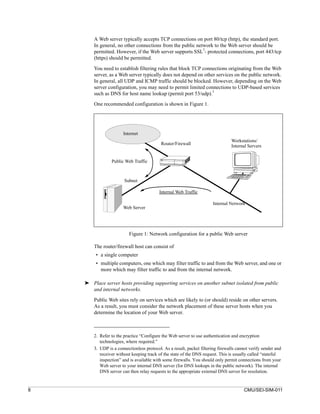
        One recommended configuration is shown in Figure 1.


                       Internet
                                                                                  Workstations/
                                            Router/Firewall                       Internal Servers


                 Public Web Traffic


                        Subnet

                                           Internal Web Traffic

                                                                        Internal Network
                       Web Server


                          Figure 1: Network configuration for a public Web server

        The router/firewall host can consist of
         • a single computer
         • multiple computers, one which may filter traffic to and from the Web server, and one or
           more which may filter traffic to and from the internal network.

    ➤ Place server hosts providing supporting services on another subnet isolated from public
      and internal networks.

        Public Web sites rely on services which are likely to (or should) reside on other servers.
        As a result, you must consider the network placement of these server hosts when you
        determine the location of your Web server.


        2. Refer to the practice “Configure the Web server to use authentication and encryption
           technologies, where required.”
        3. UDP is a connectionless protocol. As a result, packet filtering firewalls cannot verify sender and
           receiver without keeping track of the state of the DNS request. This is usually called “stateful
           inspection” and is available with some firewalls. You should only permit connections from your
           Web server to your internal DNS server (for DNS lookups in the public network). The internal
           DNS server can then relay requests to the appropriate external DNS server for resolution.


8                                                                                       CMU/SEI-SIM-011
Your Web site may use the following services:
                  • email services (SMTP) to send data submitted by users using an HTML form to an
                    internal address via a CGI script or program.

                     The configuration (network, SMTP, firewall) should prohibit
                      • the sending of email to addresses outside of your internal network, given that the
                        email was generated as a result of a user filling out a form. The user’s information,
                        as well as your organization’s identity, need to be protected.
                      • receiving email on the Web server itself, which may allow the SMTP server
                        software to be compromised. This could then affect the Web server.
                  • directory services (such as LDAP) to retrieve previously stored user information (this
                    provides customized information back to the user) or to provide information such as
                    X.509 certificates used to authenticate users as they are accessing specific content
                    services
                  • database services (such as SQL) to retrieve up-to-date content information to support
                    the generation of dynamic Web pages and user-specified searches

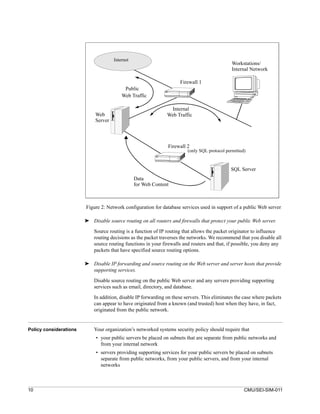
                  Place servers providing email, directory, and database services in support of a public Web
                  site on protected subnetworks.

                  Use firewall technology to
                  • block any traffic between the Internet and these servers
                  • prohibit traffic between the Web server and these other servers from traversing any part
                    of your private internal network
                  • prohibit any user from connecting directly to any of these servers. Permitting such a
                    connection may allow specific attacks against the software residing on these servers.
                  Restrict communication between these servers to only that which is required to support
                  your public Web site.

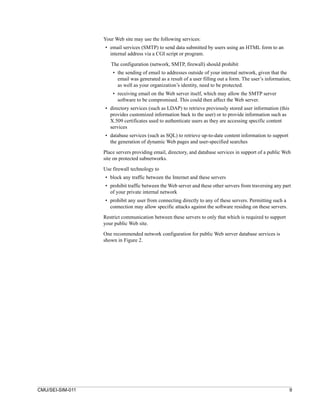
                  One recommended network configuration for public Web server database services is
                  shown in Figure 2.


CMU/SEI-SIM-011                                                                                              9
Internet
                                                                                               Workstations/
                                                                                               Internal Network

                                                                     Firewall 1
                                           Public
                                          Web Traffic

                                                                Internal
                             Web                               Web Traffic
                             Server


                                                               Firewall 2
                                                                         (only SQL protocol permitted)


                                                                                              SQL Server
                                                 Data
                                                 for Web Content


                        Figure 2: Network configuration for database services used in support of a public Web server

                        ➤ Disable source routing on all routers and firewalls that protect your public Web server.

                            Source routing is a function of IP routing that allows the packet originator to influence
                            routing decisions as the packet traverses the networks. We recommend that you disable all
                            source routing functions in your firewalls and routers and that, if possible, you deny any
                            packets that have specified source routing options.

                        ➤ Disable IP forwarding and source routing on the Web server and server hosts that provide
                          supporting services.

                            Disable source routing on the public Web server and any servers providing supporting
                            services such as email, directory, and database.

                            In addition, disable IP forwarding on these servers. This eliminates the case where packets
                            can appear to have originated from a known (and trusted) host when they have, in fact,
                            originated from the public network.


Policy considerations       Your organization’s networked systems security policy should require that
                             • your public servers be placed on subnets that are separate from public networks and
                               from your internal network
                             • servers providing supporting services for your public servers be placed on subnets
                               separate from public networks, from your public servers, and from your internal
                               networks


10                                                                                                   CMU/SEI-SIM-011
• routers and firewalls be configured to restrict traffic between public networks and your
                          public servers, and between your public servers and internal networks
                        • routers and firewalls be configured to restrict traffic between servers providing
                          supporting services for your public server and public networks, your public server, and
                          your internal networks


Other information       Alternative public Web server architecture approaches may mitigate the security risks
                        mentioned above, but these approaches generate other issues that you need to address.

                        1. You may choose to place the Web server on an internal network and then use smart
                           hubs or switches to separate it from internal network traffic. You could also choose to
                           encrypt all internal traffic, so that even if the server is compromised, any traffic it sees
                           will not be readable. However, neither of these approaches would prevent traffic from
                           being sent from the Web server host to other hosts on your internal network.

                        2. You may choose to have your public Web server hosted by an external organization
                           (such as an ISP) to accomplish the separation of your public Web site from your
                           internal network, and to take advantage of external expertise. If you take this approach,
                           require that your ISP establish a protected subnet for your Web server and any other
                           services (e.g. email, directory, or database) if these are also provided.

                           Servers that host these services should be co-located with the Web server. If you
                           choose to keep, for example, the database server within your internal network, you
                           may need to consider such technologies as virtual private networks (VPNs) to more
                           securely transfer information between your externally-hosted public Web server and
                           your internal database server. The details of this approach are beyond the scope of this
                           practice.

                           In addition, require the use of strong authentication and encryption techniques to
                           protect the connection from your internal hosts to your externally-hosted public Web
                           server. This is necessary when transferring Web server content as well as when
                           performing any server administration not done by the ISP.


Where to find updates   The latest version of this practice, plus implementation details for selected technologies, is
                        available on the Web at URL
                        http://www.cert.org/security-improvement/practices/p075.html


CMU/SEI-SIM-011                                                                                                      11
12   CMU/SEI-SIM-011
2                Configure the Web server with appropriate object,
                            device, and file access controls.


                            Most Web server host operating systems provide the capability to specify access privileges
                                                                                                                1
                            individually for files, devices, and other data or code objects stored on that host . Any
                            information that your Web server can access using these controls can potentially be
                            distributed to all users accessing your public Web site. Your Web server software is likely
                            to provide additional object, device, and file access controls specific to its operation. You
                            need to consider how best to configure these access controls to protect information stored
                            on your public Web server from two perspectives:
                             • to limit the access of your Web server software
                             • to apply access controls specific to the Web server where more detailed levels of access
                               control are required

                            The proper setting of access controls can help prevent the disclosure of sensitive or
                            restricted information that is not intended for public dissemination. In addition, access
                            controls can be used to limit resource use in the event of a denial-of-service (DoS) attack
                            against your public Web site.


Why this is important       A public Web server typically stores information intended for widespread publication. It
                            may also store information requiring restricted access such as
                             • server log files
                             • system software and configuration files
                             • applications software and configuration files
                             • password files

                            Using the access controls provided by both the server operating system and by the Web
                            server software can reduce the likelihood of inadvertent information disclosure or
                            corruption, and violations of confidentiality and integrity.

                            In addition, using access controls to limit resource use can reduce the impact of a DoS
                            attack, a violation of availability.


How to do it            ➤ Configure the Web server to execute only under a unique individual user and group
                          identity.

                            Establish new user and group identities to be used exclusively by the Web server software.


                            1. Refer to the practice “Configure computer operating systems with appropriate object, device, and
                               files access controls” within the module Securing Network Servers [Allen 00].


CMU/SEI-SIM-011                                                                                                             13
Make this new user and new group independent and unique from all other users and
         groups. This is a prerequisite for implementing the access controls described in the
         following steps.

         Although the server may have to run as root (UNIX) or administrator (Windows NT)
         initially to bind to port 80, do not allow the server to continue to run in this mode.

     ➤ Identify the protection needed for files, devices, and objects specific to the Web server.

         The general approach for identifying required access controls for files, devices, and
         objects specific to Web servers is outlined in the practice “Configure computer operating
         systems with appropriate object, device, and file access controls” within the module
         Securing Network Servers [Allen 00].

         In addition, determine if your Web server’s operating system provides the capability to
         limit files accessed by the Web services’ processes. These processes should have read-
         only access to those files necessary to perform the service and should have no access to
         other files (such as server log files). If this capability is not available, you can skip some of
         the following steps. In this event, you need to implement other security controls
         (described below) to limit your exposure.

         Use Web server host operating system access controls to enforce the following:
          • Public Web content files can be read but not written by Web service processes.
          • The directories where public Web content is stored cannot be written by Web service
            processes.
          • Public Web content files can be written only by processes authorized for Web server
            administration.
          • Web server log files can be written by service processes but log files cannot be read or
            served as Web content. Web server log files can be read only by administration
            processes.
          • Any temporary files created by Web service processes (such as those that might be
            generated in the creation of dynamic Web pages) are restricted to a specified and
            appropriately protected subdirectory.
          • Access to any temporary files created by Web service processes are limited to the
            service processes that created these files.

         Some of these controls are reiterated below when they can be achieved using alternate
         methods.

     ➤ Limit the use of resources by the Web server host operating system to mitigate the effects
       of DoS attacks.

         Resource-intensive DoS attacks against a Web server host operating system include:
          • filling file systems with extraneous and incorrect information. Some systems will not
            function if specific resources (such as file systems) are unavailable.
          • filling primary memory with unnecessary processes to slow down the system and limit
            Web service availability

         Logging information generated by the Web server host operating system may help in
         recognizing such attacks.


14                                                                                    CMU/SEI-SIM-011
Provide the following controls to mitigate the effects of such attacks:
                       • Separate directories for log files and other information from system directories and
                         user information. You can establish effective boundaries between these information
                         objects by specifying separate partitions and/or disk locations.
                       • Assigning priorities to Web service processes can help to ensure that high priority
                         processes obtain sufficient resources, even while under attack. Note, however, that
                         doing so may create the potential for a denial of service on the lower priority services.
                      These controls will not fully protect your Web server against DoS attacks. However, by
                      reducing the impact of these attacks, the Web server may be able to “survive” during the
                      time period when the DoS attacks are occurring.

                  ➤ Configure time-outs and other controls to mitigate the effects of DoS attacks.

                      Another type of DoS attack takes advantage of the number of simultaneous network
                      connections by quickly establishing connections up to the maximum permitted such that
                      no new, legitimate users can gain access.

                      Network connection time-outs (time after which an inactive connection is dropped) should
                      be set to a minimum acceptable time setting. Established connections will then timeout as
                      quickly as possible, opening up new connections to legitimate users. This only mitigates
                      the effects; it does not defeat the attack.

                      If the maximum number of open connections (or connections that are half-open, i.e., the
                      first part of the TCP handshake was successful) is set to a low number, an attacker can
                      easily consume the available connections with bogus requests. By setting the maximum to
                      a much higher number, the impact of such attacks may be reduced, but additional
                      resources will be consumed.

                      As above, it is worth noting that these controls will not fully protect your Web server
                      against DoS attacks. However, by reducing the impact of these attacks, the Web server
                      may be able to “survive” during the time period when the DoS attacks are occurring.

                  ➤ Configure the public Web server so it cannot serve files that are outside of the specified
                    file directory tree for public Web content.

                      This may be a configuration choice in the server software or it may be a choice in how the
                      server process is controlled by the operating system. Ensure that such files (outside of the
                      specified directory tree) cannot be served, even if users know the names (URLs) of those
                      files.

                      Avoid the use of links or aliases in your public Web content file directory tree that point to
                      files elsewhere on your server host or your network file system. If possible, disable the
                      ability for Web server software to follow links and aliases. As stated earlier, Web server
                      log files and configuration files should reside outside of the specified file directory tree for
                      public Web content.
                      In the event that you do need to access files via your public Web server that are sensitive
                      or restricted, refer to the practice “Configure the Web server to use authentication and
                      encryption technologies, where required.”

                  ➤ Configure Web server software access controls.

                      Perform the following steps:


CMU/SEI-SIM-011                                                                                                    15
• Define a single directory and establish related sub-directories exclusively for Web
                               server content files, including graphics but excluding CGI scripts and other programs.
                             • Define a single directory exclusively for all external programs executed as part of Web
                               server content.
                             • Disable the execution of CGI scripts that are not exclusively under the control of
                               administrative accounts. This is accomplished by creating and controlling access to a
                               separate directory intended to contain authorized CGI scripts.
                             • Disable the use of hard or symbolic links as ordinary files and directories.
                             • Define a complete Web content access matrix. Identify which pages are restricted and
                               which pages are accessible (and by whom).

                            Most Web server software vendors provide directives or commands that allow you to
                            restrict user access to public Web server content files. For example, the Apache Web
                            server software provides a Limit directive, which allows you to restrict which optional
                            access features (such as New, Delete, Connect, Head, and Get) are associated with each
                            Web content file. The Apache Require directive allows you to restrict available content to
                                                           2
                            authenticated users or groups .

                            Many of the directives or commands can be overridden on a per directory basis. The
                            convenience of being able to make local exceptions to global policy is offset by the threat
                            of a security hole being introduced in a distant subdirectory — which could be controlled
                            by a hostile user. You should disable a subdirectory’s ability to override top-level security
                            directives unless that override is required.

                        ➤ Disable the serving of Web server file directory listings.

                            The Web protocol (HTTP) specifies that a URL ending in a slash character is treated as a
                            request for a listing of the files in the directory with that name. As a general rule, you
                            should prohibit your server from responding to such requests, even if all of the files in the
                            directory can be read by the general public.

                            Such requests may indicate an attempt to locate information by means other than that
                            intended by your Web site. Users may attempt this if they are having difficulty navigating
                            through your site or if a link appears to be broken. Intruders may attempt this to locate
                            information hidden by your Web site’s interface. You may want to investigate requests of
                            this type found in your server log files.


Policy considerations       Your organization’s networked systems security policy should require that public servers
                            be configured to take maximum advantage of all available object, device, and file access
                            controls to protect information as identified elsewhere in your security policy.Your
                            organization’s information access control policy should address information residing on
                            any public server including Web servers.


Where to find updates       The latest version of this practice, plus implementation details for selected technologies, is
                            available on the Web at URL http://www.cert.org/security-improvement/practices/
                            p076.html


                            2. Refer to the practice “Configure the Web server to use authentication and encryption
                               technologies, where required.”


16                                                                                                        CMU/SEI-SIM-011
3            Identify and enable Web-server-specific logging
                        mechanisms.


                        Collecting data generated by the Web server provides you with critical information that is
                        essential for analyzing the security of the Web server and detecting signs of intrusion.
                        When you install Web server software, you are normally presented with a number of
                        choices for logging configuration options or preferences. Different systems provide
                        various types of logging information; some systems do not collect adequate information in
                        their default configuration. You need to make choices based on your security policy and
                        requirements.

                        While the server host operating system may provide some basic logging mechanisms and
                            1
                        data , these mechanisms typically cannot provide sufficient data that is relevant to the
                        performance of your public Web server, such as Web pages retrieved or attacks intended to
                        probe your Web server for specific vulnerabilities. You should identify the types of logs
                        available, identify the data recorded within each log, and then enable the collection of the
                        desired data.


Why this is important   Log files are often the only record of suspicious behavior. Failure to enable the
                        mechanisms to record this information and use them to initiate alert mechanisms will
                        greatly weaken or eliminate your ability to detect intrusion attempts and to determine
                        whether or not they succeeded. Similar problems can result from not having the necessary
                        procedures and tools in place to process and analyze your log files.

                        As a general case, system and network logs can alert you that a suspicious event has
                        occurred that requires further investigation. Web server software can provide additional
                        log data relevant to Web-specific events. If you do not take advantage of these capabilities,
                        Web-relevant log data may not be visible or may require a great deal of effort to access.
                        You may need Web server logs to
                        • alert you to suspicious activity that requires further investigation
                        • determine the extent of an intruder’s activity
                        • help you to recover your systems
                        • help you to conduct an investigation
                        • provide information required for legal proceedings


                        1. Refer to the practice “Identify and enable system and network logging mechanisms” within the
                           security improvement module Securing Network Servers [Allen 00].


CMU/SEI-SIM-011                                                                                                       17
How to do it       The selection and implementation of specific Web server software will determine which
                   set of detailed instructions you should follow to establish logging configurations. Logging
                   capabilities can be similar across several implementations. With this said, some of the
                   guidance contained in the steps below may not be fully applicable to all vendors’ Web
                   server software products.

               ➤ Identify the Web server software information to be logged.

                   Four different logs may exist:
                    • Transfer Log: Each transfer is represented as one entry showing the main information
                      related to the transfer (see below).
                    • Error Log: Each error is represented as one entry including some explanation of the
                      reason for this error report.
                    • Agent Log: If this log is available, it contains information about the user client
                      software used in accessing your Web content.
                    • Referer Log: If this log is available, it collects information relevant to HTTP access.
                      This includes the URL of the page that contained the link that the user client software
                      followed to initiate the access to your Web page.

                   Several log formats are available for Transfer Log entries. Typically, the information is
                   presented in plain ASCII without special delimiters to separate the different fields:
                    • Common Log Format (CLF):

                      This format stores the following information related to one transfer (Transfer Log) in
                      the indicated order:

                      1. Remote Host
                                                                                   2
                      2. Remote User Identity in accordance with RFC 1413
                                                                                                         3
                      3. Authenticated User in accordance with the Basic Authentication Scheme
                      4. Date

                      5. URL requested

                      6. Status of the request
                      7. Number of bytes actually transferred

                    • Combined Log Format:
                      The Combined Log Format contains the same seven fields above. It also provides
                      information normally stored in the Agent Log and the Referer Log, along with the
                      actual transfer. Keeping this information in a consolidated log format may support
                      more effective administration.


                   2. Refer to http://www.ietf.org
                   3. Refer to the practice “Configure the Web server to use authentication and encryption
                      technologies, where required.”


18                                                                                               CMU/SEI-SIM-011
• Extended Log Format (ELF):

                         This format provides a way to describe all items that should be collected within the log
                         file. The first two lines of the log file contain the version and the fields to be collected.

                         It appears in the log file as follows:

                         #Version: 1.0
                         #Fields: date time c-ip sc-bytes time-taken cs-version
                         1999-08-01 02:10:57 192.0.0.2 6340 3 HTTP/1.0

                         This example contains the date, time, originating IP address, number of bytes
                         transmitted, time taken for transmission, and the HTTP version.

                       • Other log file formats:

                         Some server software provides log information in different file formats such as
                         database formats or delimiter-separated formats. Other server software provides the
                         capability for an administrator to define specific log file formats in the Web server
                         configuration file using a particular syntax (if the default CLF format is insufficient).

                  ➤ Determine if additional logging mechanisms are required for program, scripts,
                    and plug-ins.

                      If your public Web server supports the execution of programs, scripts, or plug-ins, you
                      need to determine whether specific logging data needs to be captured regarding the
                      performance of these features. If you develop your own programs, scripts, or plug-ins, we
                      strongly recommend that you define and implement a comprehensive and easy-to-
                      understand logging approach based on the logging mechanisms provided by the Web
                      server hosting operating system. Log information associated with programs, scripts, and
                      plug-ins can add significantly to the typical information logged by the Web server.

                  ➤ Enable Web server logging.

                      We recommend the following:
                       • Use the Combined Log Format for storing the Transfer Log or manually configure the
                         information described by the Combined Log Format to be the standard format for the
                         Transfer Log.
                       • Enable the Referer Log or Agent Log if the Combined Log Format is not available.
                       • Establish different log file names for different virtual hosts that may be implemented as
                         part of a single Web server.
                       • Use the Remote User Identity as specified in RFC 1413.
                       • Some Web server software provides the capability to enforce or disable the checking of
                         specified access controls during program startup. This level of control may be helpful
                         to, for example, avoid inadvertent alteration of log files as a result of errors in file
                         access administration. You should determine the circumstances under which you may
                         want to enable such checks if your Web server software supports this feature.


CMU/SEI-SIM-011                                                                                                    19
➤ Select and configure Web server log file analysis tools.
                                                                    4
                            Many commercial and public-domain tools are available to support regular analysis of
                            Transfer Logs. Most operate on either the Common or the Combined Log Formats.

                            These tools can identify IP addresses that are the source of high numbers of connections,
                            transfers, etc.
                            Error Log tools indicate not only errors that may exist within publicly available Web
                            content (such as missing files) but also attempts to access non-existing URLs. Such
                            attempts could indicate
                             • probes for the existence of vulnerabilities to be used later in launching an attack
                             • information gathering
                             • interest in specific content such as databases

                            Any suspicious log file events should be forwarded to the responsible administrator or
                            security incident response team as soon as possible for follow-up investigation.


Other information           Refer to the modules Detecting Signs of Intrusion [Firth 97], Preparing to Detect Signs of
                            Intrusion [Kochmar 98], and Responding to Intrusions [Kossakowski 99].


Where to find updates       The latest version of this practice, plus implementation details for selected technologies, is
                            available on the Web at URL
                            http://www.cert.org/security-improvement/practices/p077.html


                            4. Refer to the implementation “Installing, configuring, and using swatch 2.2 to analyze log
                               messages on systems running Solaris 2.x” available at http://www.cert.org/security-
                               improvement/implementations/i042.01.html, and to the implementation “Installing, configuring,
                               and using logsurfer 1.5 to analyze log messages on systems running Solaris 2.x” available at
                               http://www.cert.org/security-improvement/implementations/i042.02.html.


20                                                                                                      CMU/SEI-SIM-011
4            Consider security implications before selecting
                        programs, scripts, and plug-ins for your Web server.


                        In its most basic form, a Web server listens for a request and responds by transmitting the
                        specified file to the requestor. A Web server may invoke additional mechanisms to execute
                        programs or process user-supplied data, producing customized information in response to
                        a request. Examples of these mechanisms include Common Gateway Interface (CGI)
                        scripts and server plug-ins. You need to consider security implications when selecting
                        these mechanisms.

                        CGI is an accepted standard that supports the extension of Web server software by adding
                        external programs that are invoked by requesting a specific URL. CGI programs or scripts
                        (see below) run as subtasks of the Web server. Arguments are supplied in the environment
                        or via standard inputs. Outputs of a CGI script are returned to the requesting Web browser.
                        CGI scripts can be used to interface to search engines and databases, create dynamic Web
                        pages, and respond to user input.

                        A script is a program written in a scripting language and executed by an interpreter.
                        Examples of such languages include SH (shell), PERL, TCL, Python, JavaScript, and
                        VBScript.
                                  1
                        A plug-in serves as an extension of another program. Plug-ins provide additional
                                                                        2
                        functionality (such as Secure Socket Layer (SSL) ) or improved server performance (such
                        as PERL). In the case of a PERL CGI script, no external program needs to be started each
                        time such a script is invoked.

                        Another commonly used term is servlet. Servlet programs are typically written in Java
                        and are either invoked as CGI scripts or may accept a TCP connection and interact with
                        the Web browser directly.


Why this is important   Security vulnerabilities can be easily introduced in the acquisition, installation,
                        configuration, deployment, and operation of programs, scripts, and plug-ins (collectively
                        referred to as external programs in this practice). As a Web server administrator, you may
                        install a specific set of external programs that result in a unique configuration—one that
                        has likely not been tested by the developers of your Web server software or the external
                        programs. Vulnerabilities may include poorly written programs never intended for wide-
                        scale use or unexpected side effects that are created when two or more programs are
                        installed that were not intended to operate together. For example, many successful attacks
                        on Web sites have exploited known vulnerabilities in commonly available CGI scripts.


                        1. Plug-ins can be used with Web browsers to add multimedia features such as video viewing.
                        2. Refer to the practice “Configure the Web server to use authentication and encryption
                           technologies, where required.”


CMU/SEI-SIM-011                                                                                                       21
How to do it   ➤ Perform necessary cost/benefit trade-offs before selecting external programs.

                   Consider
                    • the functionality that each external program provides. Decide if it is important to have
                      this functionality, or if it would just be nice to have but not essential.
                    • the external program’s ease of installation, configuration, testing, and maintenance
                    • the potential security vulnerabilities introduced by the external program and the
                      inherent risks to your public Web site
                    • the potential security vulnerabilities introduced by two or more external programs
                      when used in combination

               ➤ Select programs, scripts, and plug-ins from trustworthy sources.

                   To the extent possible, assess the trustworthiness of various sources for external programs.
                   If there are several programs that provide the required functionality, choose one from a
                   trustworthy source. Avoid external programs produced by unknown authors or
                   downloaded from unknown, untrusted Internet sites.

               ➤ Make sure that you understand all of the functionality that an external program provides.

                   Some types of external programs (in particular CGI scripts) are distributed in source code
                   form. If you have any doubts about the trustworthiness of the source or the authenticity of
                   the code, conduct a thorough source code review.
                                                                                     3
                   When you examine a script, consider the following questions:
                    • How complex is the script? The longer it is, the more likely it is to have problems.
                    • Does it read or write files on the host system? Programs that read files may
                      inadvertently violate access restrictions or pass sensitive system information. Programs
                      that write files may modify or damage documents or introduce Trojan horses.
                    • Does it interact with other programs? For example, many CGI scripts send email in
                      response to form input by opening up a connection with the sendmail program. Is it
                      doing this in a secure way?
                    • Does it run with suid (set-user-id) privileges? In general, this is not recommended and
                      should not be permitted if at all possible.
                    • Does the author validate user inputs from forms? This demonstrates that the author is
                      thinking about security.
                    • Does the author use explicit path names when invoking external programs? Relying on
                      the PATH environment variable to resolve partial path names is not recommended.

               ➤ Review publicly available information to identify vulnerabilities in the external programs
                 you are considering.
                   Various organizations research network and system security topics and periodically
                   publish information concerning recently discovered vulnerabilities in service software.
                   This includes Web server software and supporting technologies such as scripting
                   languages and external programs. External programs that are in widescale use are
                   regularly analyzed by researchers, users, and security incident response teams as well as
                   by members of the intruder community.


                   3. This list is taken from “The World Wide Web Security FAQ” [Stein 99], specifically Q34.


22                                                                                             CMU/SEI-SIM-011
Intruders will often publish exploit scripts that take advantage of known vulnerabilities in
                        Web service software and external programs commonly used by public Web servers. You
                        need to review public information sources frequently and be aware of all relevant security
                        information about any external programs that you are considering.


Policy considerations   Your organization’s networked systems security policy should require a security
                        evaluation as part of your Web server software selection process.


Other information       CERT/CC advisories, summaries, vulnerability notes, and incident notes4 occasionally
                        include information on new vulnerabilities, recent attacks, tools, and trends relevant to
                        Web server software.

                        Refer to the practice “Keep operating systems and applications software up to date” within
                        the module Securing Network Servers [Allen 00], and to the implementation “Maintaining
                        currency by periodically reviewing public and vendor information sources” available at
                        http://www.cert.org/security-improvement/implementations/i040.01.html.

                        Refer to “The World Wide Web Security FAQ” [Stein 99], specifically Q35, and CERT
                                  4
                        advisories for information about CGI scripts that are known to contain security holes.


Where to find updates   The latest version of this practice, plus implementation details for selected technologies, is
                        available on the Web at URL
                        http://www.cert.org/security-improvement/practices/p078.html


                        4. http://www.cert.org.


CMU/SEI-SIM-011                                                                                                     23
24   CMU/SEI-SIM-011
5                Configure the Web server to minimize the
                            functionality of programs, scripts, and plug-ins.


                            Programs, scripts, and plug-ins (collectively referred to as external programs in this
                            practice) can add valuable and useful functionality to your public Web service. They are
                            widely available from many different sources. You can add them to the Web server at any
                            time without having to modify the server code. If your Web service requirements can only
                            be met through the use of external programs, you need to thoroughly review and
                            determine how these external programs will be configured, used, and administered. Your
                            goal should be to restrict their functionality to the greatest extent possible to keep potential
                                                           1
                            security risks to a minimum.


Why this is important       Security vulnerabilities can be easily introduced in the acquisition, installation,
                            configuration, deployment, and operation of external programs. Vulnerabilities may
                            include poorly written programs never intended for wide-scale use, or unexpected side
                            effects that are created when two or more programs are installed that were not intended to
                            operate together. For example, many successful attacks on Web sites have exploited
                            known vulnerabilities in commonly available CGI scripts. However, your organization
                            may choose to use such programs to provide a needed capability.

                            As a Web server administrator, you need to make sure that you limit the access rights,
                            functionality, and potential for damage by such programs to reduce the likelihood of a
                            security compromise.


How to do it            ➤ Verify that the acquired copy of an external program is an authentic copy.

                            Typically, the authenticity of a copy can be verified using cryptographic checksums,
                            digital signatures, or similar technologies provided by the external program’s distributor.

                            Scan all external programs for computer viruses and Trojan horses.

                        ➤ Exercise all acquired external programs on a test machine isolated from your internal
                          network prior to operational use.
                            Some types of external programs, in particular CGI scripts, are distributed in source code
                            form. If you have any reservations about the features of the external program, you can
                            additionally conduct a source code review.1


                            1. See also the practice “Consider security implications before installing programs, scripts, and
                               plug-ins for your Web server.”


CMU/SEI-SIM-011                                                                                                                 25
➤ Execute tools and include mechanisms that limit your exposure to vulnerabilities in
       external programs.

         Many of the known vulnerabilities in external programs are a result of poor programming
         practices and the use of such programs in environments that are not designed for secure
                                                   2                          3            4
         operation. These include buffer overflows , misuse of character input , and others . Tools
         are available that
          • scan for and identify the presence of problematic input characters
          • serve as a “wrapper” around a potentially vulnerable external program, limiting
                                                      5
            possible inputs to avoid buffer overflows

         You should execute these in your test environment and review their results prior to
         deploying any external programs on your public Web site (and also on a regular basis once
         external programs are deployed).

         Mechanisms such as the PERL interpreter’s “tainting” feature allow you to restrict
                                                                               4
         operations (open files, system calls) when using user-supplied input.

     ➤ Mitigate the risk of distributing malicious code.

         Even if the Web server does not contain any vulnerabilities, it may inadvertently distribute
         malicious code to an unaware user. This is not necessarily a “server” problem as the
         results will almost always impact the user receiving the malicious or manipulated Web
         pages. However, attacks6 are possible that may reveal information to unauthorized users
         such as embedding references to other Web sites.

         The problem, as described in CA-2000-02, Malicious HTML Tags Embedded in Client
                      7
         Web Requests, stems from the user sending a request from an untrustworthy source to a
         Web server. The source may be
          • a Web page
          • an email message
          • a netnews message
          • a Web page previously stored on disk or distributed via other media such as CD-ROM


         2. Input data exceeds the size of its allocated program memory buffer because checks are lacking to
            ensure that the input data is not written beyond the buffer boundary. For examples, refer to CERT
            Advisory CA-99-07 (http://www.cert.org/advisories/CA-99-07-IIS-Buffer-Overflow.html) or
            CERT Advisory CA-97.24 (http://www.cert.org/advisories/CA-97.24.Count_cgi.html).
         3. Input characters change the way input data is interpreted or cause the execution of an unexpected
            function within the external program. Examples include “meta” characters that invoke a specific
            function instead of being used as input and “escape” characters that change the interpretation of
            the character which follows them. Quotation of character strings can also be a problem. For an
            example, refer to CERT Advisory CA-97.25 (http://www.cert.org/advisories/CA-
            97.25.CGI_metachar.html).
         4. Refer to the chapter “Secure CGI/API Programming,” pp. 293-310 in Web Security & Commerce
            [Garfinkel 97].
         5. One example of such a program is CGIwrap, available at http://www.unixtools.org/cgiwrap.
         6. These are often called cross site scripting attacks although this name does not correctly describe
            this problem.
         7. Available at http://www.cert.org/advisories/CA-2000-02.html.


26                                                                                       CMU/SEI-SIM-011
The user’s request may contain malicious data that is modified and sent back to the user's
                      browser, where it can cause damage, execute programs, or present the requested page with
                      missing or manipulated information.
                                                                                                        8
                      There are controls which can help prevent the insertion of malicious code when they are
                      built into the Web server. These controls can
                       • facilitate the appropriate encoding of all output elements
                       • filter content sent to the server
                       • check cookies

                  ➤ Disable or restrict the use of server side include functionality.

                      Server side include functionality is used to reference dynamic information that is
                      determined at the time a Web page is generated. Examples of functions that can be
                      invoked through the use of server side includes are adding the timestamp of the last
                      modification to the Web page and executing arbitrary external programs to produce text
                      which is incorporated into the Web page. We recommend disabling all server side include
                      functionality, where possible, to reduce the risk of intruders being able to access external
                      programs or to place programs they created into your Web content for later execution.

                      If you need to selectively deploy some functions associated with server side includes, we
                      recommend that you do not deploy those functions that enable the execution of external
                      programs.

                  ➤ Disable the execution of external programs present in your Web server configuration.

                      The execution of specific external programs is often called out in your default Web server
                      configuration. You need to locate and disable any of these that are not essential. This
                      includes disabling “example” scripts which may be useful for demonstration purposes but
                      are not required for your operational configuration.

                  ➤ Configure Web server host operating system and Web server software access controls to
                    restrict access to external programs.9

                      Severely restrict access to all external program files that reside on your public Web server.
                      None of these should be accessible by internal or external users requesting Web site
                      content.

                      Typically, all external programs are located in the configured CGI-BIN directory. They
                      can be directly invoked from that directory even if they are not referenced in one of your
                      HTML pages. All the attacker needs to know is the name of the program or how to obtain
                      responses that indicate whether or not the name guessing is successful.


                      8. Refer to http://www.cert.org/tech_tips/malicious_code_mitigation.html.
                      9. See also the practices “Configure the Web server with appropriate object, device, and file access
                         controls” and “Configure computer operating systems with appropriate object, device, and file
                         access controls” within the module Securing Network Servers [Allen 00].


CMU/SEI-SIM-011                                                                                                        27
Often, interpreters such as PERL are also placed in the CGI-BIN directory. While this may
                            make installation easier, it is neither necessary nor recommended. Interpreters, shells,
                            scripting engines, and other extensible programs should never reside in a CGI-BIN
                            directory. In addition, you need to establish access controls that prohibit interpreters from
                                                                                     10
                            being executed indirectly via CGI programs or scripts.

                        ➤ Ensure that only authorized users can access external programs.

                            All external programs should reside in directories that are tightly controlled and protected.
                            Such directories should only be accessible by administrators who are responsible for
                            installing, configuring, and maintaining these programs. The one exception to this is if
                            your public Web site is designed for the purpose of supporting users who are authorized to
                            provide their own functionality using such programs such as the generation and
                            maintenance of private home pages for access by internal users.

                        ➤ Configure the Web server to execute external programs under unique individual user and
                          group IDs.

                            Assign separate and unique individual user and group IDs and access permissions for the
                            execution of external programs. These IDs and permissions should not be the same as
                            those assigned for normal Web server software execution. Doing so will aid in restricting
                            external programs from performing unauthorized actions against the Web server or its
                            content.

                            If this capability is not provided by your Web server host operating system or Web server
                            software, other tools are available to support this, such as the use of chrootuid on Unix
                            systems.

                        ➤ Restrict the access of external programs to only essential files.

                            In addition to the execution access controls described above, you may need to further
                            restrict the access of external programs to only those files that are required for such
                            programs to perform their functions. These may include files within Web content
                            directories and other external programs but should not include system files such as log
                            files. You need to carefully review what files each external program can access to ensure
                            that such access cannot be abused by an intruder.

                        ➤ Create cryptographic checksums or other integrity-checking information for all external
                          programs.
                                                         11
                            Use a tool (such as Tripwire ) which checks the integrity of the system by tracking
                            changes made when you install updates. By monitoring the changes made to external
                            programs, you can determine if the changes were as you intended.

                            Refer to the modules Detecting Signs of Intrusion [Firth 97] and Preparing to Detect Signs
                            of Intrusion [Kochmar 98] for additional information on the role of establishing a trusted
                            baseline and checking the integrity of that baseline to support intrusion detection.


Policy considerations       Your organization’s networked systems security policy should require a security
                            evaluation as part of your Web server software selection and/or implementation processes.

                            10.See CERT Advisory CA-96.11 at http://www.cert.org/advisories
                               /CA-96.11.interpreters_in_cgi_bin_dir.html.
                            11.Refer to http://www.cert.org/security-improvement/implementations/i002.02.html.


28                                                                                                      CMU/SEI-SIM-011
Other information       CERT/CC advisories, summaries, vulnerability notes, and incident notes12 may
                        occasionally include information on new vulnerabilities in Web server software, including
                        external programs.


Where to find updates   The latest version of this practice, plus implementation details for selected technologies, is
                        available on the Web at URL
                        http://www.cert.org/security-improvement/practices/p079.html


                        12.See http://www.cert.org.


CMU/SEI-SIM-011                                                                                                    29
30   CMU/SEI-SIM-011
6            Configure the Web server to use authentication and
                        encryption technologies, where required.


                        Your public Web server may need to support a range of technologies for identifying and
                        authenticating users with differing privileges for accessing information. Some of these
                        technologies are based on cryptographic functions which, in addition, can provide an
                        encrypted channel between a Web browser client and a Web server that supports
                        encryption. Candidate technologies include SSL (Secure Socket Layer), S/HTTP (Secure
                                                                                                   1
                        Hypertext Transport Protocol), and SET (Secure Electronic Transaction).

                        Before placing any sensitive or restricted (i.e., not for public consumption) information on
                        your public Web server, you need to determine the specific security and protection
                        requirements and confirm that the available technologies can meet these requirements.

                        You may need to install additional cryptographic enhancements or choose alternate Web
                        server software depending on your requirements.


Why this is important   Without strong user authentication, you will not be able to restrict access to specific
                        information by authorized users. All information that resides on your public Web server
                        will be accessible by anyone who accesses that server.

                        Without strong server authentication, users of your public Web server are not able to
                        determine if they have connected to an authentic Web server or a bogus version operated
                        by an intruder. In such cases, the user may receive false information and act upon it based
                        on the assumption that it originated from your Web server. The user may also provide
                        sensitive information such as a credit card number.
                        Encryption can be used to protect information traversing the connection between a Web
                        browser client and a public Web server. Without encryption, anyone with access to
                        network traffic (accomplished via the use of a sniffer) can determine, and possibly alter,
                        the content of sensitive and restricted information, even if the user accessing the
                        information has been carefully authenticated. This may violate the confidentiality and
                        integrity of critical information.


                        1. Refer to Secure Electronic Commerce [Ford 97] for a more detailed discussion of the various
                           protocols and related topics, such as Public Key Infrastructure (PKI) and certificates.


CMU/SEI-SIM-011                                                                                                          31
How to do it   ➤ Determine the access requirements for sensitive or restricted information that needs to be
                                                       2
                 available via your public Web server.

                   Review all information objects accessible via your public Web server and determine their
                   specific security requirements. In the process of doing so, identify information objects that
                   share the same security and protection requirements. For sensitive or restricted
                   information objects, determine the users or user groups that have a legitimate need to
                   access each set of objects.
                   Implement one or more of the steps described below to meet your security requirements.

                   If you are planning a new Web site or an enhancement to an existing site, you may want to
                   anticipate the need for providing limited access to specific information (by specific users,
                   user groups, or by subscription). This requires implementing one or more of the
                   technologies described in the following steps.

               ➤ Understand the importance of establishing trust between clients (users) and Web servers.

                   External users (clients) need to be sure that:3
                    • they are communicating with the correct server
                    • what they send is delivered unmodified
                    • they can prove that they sent the message
                    • only the intended receiver can read the message
                    • delivery is guaranteed

                   The Web server needs to be sure that:
                    • it is communicating with the right client
                    • the content of the received message is correct
                    • the identity of the author is unmistakable
                    • only the real author could have written the message
                    • it acknowledges receipt of the message

               ➤ Understand the limitations of address-based authentication.

                   Most server software supports access controls based on IP addresses or hostnames.
                   However, IP spoofing and DNS spoofing limit the effectiveness of these controls.
                   Authentication and encryption should be used in addition to or in place of IP address or
                   hostname access checking whenever possible.


                   2. See also the practices “Configure the Web server with appropriate object, device, and file access
                      controls” in this module, and “Configure computer operating systems with appropriate object,
                      device, and file access controls” available in the module Securing Network Servers [Allen 00].
                   3. This material is taken from the article “Web of Worries” [Kessler 00].


32                                                                                                 CMU/SEI-SIM-011
➤ Understand authentication and encryption technologies and when each should be used.

                      Based on the well-established standards, there are a limited number of technologies
                      available to restrict access to information residing on a public Web site. These are:

                      1. Basic Authentication

                          This technology utilizes the Web server content’s directory structure. Typically, all
                          files in the same directory are configured with the same access privileges. A requesting
                          user provides a recognized user ID and password for access to files in a given
                          directory. More restrictive access control can be enforced at the level of a single file
                          within in a directory, given that the Web server software provides this capability. Each
                          vendor’s Web server software has its own method and syntax for defining and using
                          this basic authentication mechanism.

                          From a security perspective, the main drawback of this technology is that all password
                          information is transferred in an encoded form rather than an encrypted form. Anyone
                                                                         4
                          who knows the standardized encoding scheme can decode the password after
                          capturing it with a network sniffer. Furthermore, any Web content is transmitted as
                          unencrypted plaintext, so this content can be captured as well, violating
                          confidentiality.

                          Basic Authentication is supported by any standard-compliant Web browser.
                                                        5
                      2. Secure Socket Layer (SSL)

                          SSL is composed of two sub-protocols called SSL record protocol and SSL handshake
                          protocol. The handshake protocol is used to exchange any information about
                          cryptographic capabilities and keys used. The record protocol is used to exchange the
                          actual data.
                          SSL provides a range of security services:
                           • server authentication
                           • client authentication (optional)
                           • integrity
                           • confidentiality
                          SSL uses public key cryptography. Certificate authorities can be used to verify the
                          relationship between users and organizations. CAs can also be used to verify a specific
                          user's relationship to specific server keys. Both of these verification actions allow
                          users of the CA to have a higher level of trust in the relationships and the keys based
                          on the user’s trust in the CA and the CA’s compliance with regulations directing their
                                   6
                          actions.

                          The SSL protocol resides at the transport layer, effectively being “plugged” between
                          the Web server/browser and TCP/IP. As a result, it also has the potential to protect
                          other TCP services such as FTP, SMTP, and telnet.


                      4. Known as base64, described in RFC 2167 HTTP Authentication: Basic and Digest Access
                         Authentication available at http://www.ietf.org/rfc.html.
                      5. Indicated by the use of URLs beginning “https://www.xyz.net”
                      6. Browsers often come with a pre-installed list of CAs. Based on the pre-installed configuration,
                         the browser accepts SSL certificates as “trusted” without alerting the user. Users therefore need
                         to manually remove any CA key which they do not want to accept as “trusted”.


CMU/SEI-SIM-011                                                                                                         33
SSL is in the process of becoming an IETF7 (Internet Engineering Task Force)
         standard under the name TLS (Transport Level Security). SSL is supported by most of
         the well-known Web browsers.
                                    8
     3. Secure HTTP (S/HTTP)

         Secure HTTP is an alternative approach to SSL, developed in 1993-94 (earlier than
         SSL). It was designed to be an security enhancement of the HTTP protocol and
         includes the following features:
          • authentication
          • encryption
          • cryptographic checksums
          • digital signatures
         Secure HTTP has greater functionality than SSL because it is integrated into the HTTP
         protocol, but users need to install a specific Web browser to use S/HTTP.

         As reference implementations became available, SSL became the preferred choice of
         major vendors, resulting in S/HTTP receding into the background.

     4. Secure Electronic Transaction (SET)
         Developed by two major credit card companies, SET provides a protocol and
         infrastructure specification that supports bank payments which can be integrated into
                                                               9
         any Web site. SET provides the following capabilities :
          • encrypts payment instructions that precludes exposure of a user’s credit card
            number (on the network and on the merchant’s system)
          • authenticates merchants to users to protect against imposters
          • optionally provides authentication of users to protect against unauthorized persons
            who attempt to initiate a bank payment

         SET depends on the infrastructure elements which certify the use of keys and the
         relationship between users, merchants, banks, etc. and the appropriate keys.

         To use SET, the user needs to obtain a software tool (often called a wallet) and other
         supporting information from his credit card organization.

     The technologies described above can be used to meet a range of security requirements.
     They can be deployed individually or in conjunction with one another.


     7. Refer to http://www.ietf.org
     8. Indicated by the use of URLs beginning “shttp://www.xyz.net”
     9. The infrastructure necessary to support SET is complex; the details are not included here.


34                                                                                   CMU/SEI-SIM-011
Table 1 provides an indication of the requirements that can be satisfied by technology
                      currently in use.

                     Table 1: Security requirements supported by authentication and encryption technologies

                              Technology/         Basic
                                                                      SSL                 SET
                              Requirement         Authentication

                              User                yes (cleartext      optional            optional
                              Authentication      passwords)          (certificates)      (certificates)

                              Server              no                  yes                 yes
                              Authentication                          (certificates)      (certificates)

                              Confidentiality     no                  yes                 yes (for credit
                                                                                          card
                                                                                          information)

                              Integrity           no                  yes (with Server    yes
                                                                      Authentication)


                      In selecting authentication and encryption technologies, consider the following guidelines:
                       • Basic Authentication can be used to authenticate users. SSL encryption needs to be
                         added to protect against sniffers and intruders posing as authorized users.
                       • SSL User Authentication provides a “stronger” solution than Basic Authentication.
                         This technology provides a more secure and complete description of a user’s attributes
                         and it does not rely on users remembering their passwords. It does, however, require
                         some form of PKI for verifying certificates and managing keys.
                       • Choose SET if only credit card information needs to be protected. The use of SET
                         requires cooperation with the banking industry. SSL provides a much simpler solution
                         if you only need to protect the transfer of credit card information against sniffers.
                       • To protect users against bogus Web sites (posing as a site that they are not), use SSL
                         server authentication in conjunction with a SSL server certificate from a trusted CA.
                       • Use SSL to protect against network sniffers and the unauthorized alteration of Web
                         content during transmission.

                  ➤ Install and configure the Web server software to support the use of SSL if confidentiality is
                    needed.
                      SSL is typically not included with most Web server software. Therefore, you will need to
                      add an available plug-in or extension or replace your Web server software with another
                      product that includes SSL. You may want to consider implementing the SSL-enabled
                      version of your Web server software on another host. This is consistent with a previous
                      guideline to have separate services reside on different hosts10; however, it might not be
                      practical to maintain your public Web site’s content on two different machines.

                      If you do choose to install and deploy SSL-enabled Web server software, all practices
                      contained in this module apply and need to be followed.


                      10.See also the practice “Isolate the Web server from public networks and your organization’s
                         internal networks.”


CMU/SEI-SIM-011                                                                                                       35
➤ Create a SSL server key and the related certificate request. Arrange for a CA to provide a
       certificate for your public SSL server key.

         An SSL-enabled Web server encrypts the data that is exchanged between browser and
         server. This encryption does not by itself ensure the authenticity of the connection. Other
         parties could intercept the connection and pretend to be your organization’s SSL Web
         server, providing false information when service is requested.
         Verifying the authenticity of a SSL Web server depends on either distributing the public
         SSL server key in a secure manner to all users or requesting a certificate from a trusted
         third party (certificate authority) where the CA verifies that the public key does indeed
         belong to the specified Web server.11

         Typically, SSL-enabled Web browsers come with a list of recognized CAs. By arranging
         with one of these authorities to sign your public SSL Web server key, you can allow users
         to verify that the connection they have established is truly with your Web server.

     ➤ Configure your Web server software to support the use of SSL and basic authentication if
       users need to be authenticated.

         Assuming that you have deployed SSL to encrypt the connection between a browser and
         your public Web server and that you have deployed the use of certificates to authenticate
         the server side of any connection, you can now use basic authentication to further
         authenticate the user to the Web server. The user ID and password12 are passed in a SSL-
         encrypted form (therefore protected) and any request can then be granted or denied based
         on their legitimacy.

     ➤ Configure your Web server software to support the use of SSL client certificates if stronger
       authentication is needed.

         If a stronger authentication mechanism is needed (given that user passwords can be easily
         broken), consider using SSL client certificates.

         The use of client certificates requires that all users have a personal SSL client key which is
         then signed by a CA. The CA can be internal to your organization (requires resources,
         personal, expertise) or a trusted third party.

         SSL client certificates are best used in conjunction with smart cards. This provides
         effective protection of the user’s keys. At the same time they support the use of these keys
         on all workstations (as opposed to only the user’s personal workstation if the key is stored
         on the workstation’s hard disk).

     ➤ Configure the Web server to support the use of SSL or SET if credit card information needs
       to be transmitted.

         The transmission of credit card information must be done in a very secure manner. This
         can be done using either SSL or SET.


         11.The details of this certification process are covered under the broader topic of operating a public
            key infrastructure (PKI). This topic is complex, controversial, and considered out of scope for
            this practice.
         12.Password policies such as login limits, minimum password length, diverse character set, and
            password expiration time apply here (although such policies must be explicitly set because they
            are not supported by default).


36                                                                                        CMU/SEI-SIM-011
SSL may be the most straightforward technology to apply, especially if you already have a
                        SSL-enabled Web server. Credit card information can be safely transmitted between the
                        Web browser and the Web server based on the SSL server certificate and the use of
                        encryption.

                        Unencrypted credit card information may reside on the Web server during a transaction.
                        We strongly recommend that you transfer this information to a more secure system for any
                        further processing and remove this information from your public Web server as soon as
                        possible. If you intend to keep and process credit card information on your public Web
                        server, it must be encrypted to ensure its confidentiality. Use public key technology to
                        avoid compromising private/secret keys, which are required when using private key
                        technology.

                        SET provides additional benefits when compared to SSL. Public Web sites do not receive
                        the credit card information; it is passed directly and electronically to the SET
                        infrastructure (banks, etc.). The payment is handled automatically via credit card. This
                        minimizes the effort required to transfer credit card information from one system (SSL) to
                        another. We recommend the use of SET for e-commerce sites that have large numbers of
                        credit card transactions.


Policy considerations   Your organization’s networked systems security policy should require
                        • a procedure for ensuring that all information is reviewed prior to posting on your
                          public Web site
                        • access to sensitive or restricted information via your public Web site is protected at the
                          level required (using, for example, the encryption and authentication technologies
                          described above)


Other information       User training is required to ensure that sensitive or restricted information is not
                        inadvertently placed on your public Web site in a directory that provides broad public
                        access. You will likely want to establish procedures that require at least two people to
                        review all material on a “preview” server prior to public posting.

                        This practice does not discuss the strength of cryptographic algorithms used in SSL and
                        SET. Up until fairly recently, encryption software exported from the US was restricted to
                        keys of no more than 40 bits (later this became 56 bits). This restriction will be lifted
                        shortly for public domain products and products for the mass market as a result of new
                        legislation.

                        Both SSL and SET protocols provide strong security against attacks on confidentiality and
                        authenticity. This conclusion is based on the standards for SSL and SET as well as expert
                        consensus regarding the underlying cryptographic algorithms. In the past, several SSL-
                        related vulnerabilities were discovered. These were based on implementation errors and
                        do not indicate weaknesses in the underlying protocol.


CMU/SEI-SIM-011                                                                                                    37
Other cryptographic approaches are available, but they lack wide public acceptance and
                        use:
                        • Digest Authentication was introduced with Apache 1.1 for HTTP/1.1 to complement
                          Basic Authentication. It is based on the MD5 message digest algorithm (henceforth the
                          name) and a shared secret. Technically, it is a challenge response approach which
                          solves the problem of cleartext transmission. However, MD5 is falling into disfavor
                          due to the reduced effort necessary to find collisions (two text strings having the same
                          MD5 message digest).

                           Depending on the implementation, Digest Authentication may provide protection
                           against replay attacks—or it may not. For example, if the server does not keep track of
                           distributed challenges, no protection is provided.
                                                13
                        • Pretty Good Privacy (as well as other software producing ASCII digital signatures)
                          can be used to authenticate Web pages. To do so, the PGP-specific lines containing
                          delimiters as well as the digital signature can be “hidden” from the Web browser by
                          surrounding them with HTML comment statements. In order to check the authenticity
                          of the Web page, the user has to run PGP after saving the Web page on his computer.
                        • Digital watermarking is a software method used to mark graphic and sound files for
                          later verification of origin and ownership. It is performed in a manner such that the
                          marking is not noticeable to the user. Accompanying software at the browser end can
                          be executed to verify the author or owner of a graphic or sound file. This permits the
                          distribution of these files types while protecting the interests of the owner.


Where to find updates   The latest version of this practice, plus implementation details for selected technologies, is
                        available on the Web at URL
                        http://www.cert.org/security-improvement/practices/p080.html


                        13.http://www.pgp.com


38                                                                                                 CMU/SEI-SIM-011
7                Maintain the authoritative copy of your Web site
                            content on a secure host.


                            The authoritative (i.e., verified, correct, trusted) copy of your public Web site content
                            needs to be stored on a host that is separate from (and more secure than) your public Web
                            server. The more secure host will likely be one that is on your internal network and
                            protected behind one or more firewalls.

                            If the integrity of the information on your public Web server is ever compromised, you can
                            restore it from the authoritative copy using a secure transfer procedure.


Why this is important       News reports regularly describe intruder attacks on well-known, commercial Web sites,
                            causing them, at the very least, to be defaced, and possibly causing them to present
                            erroneous information that appears to be accurate. Organizations that rely on their Web
                            sites to transact business must be able to quickly restore them to their authentic version;
                            otherwise, they run the risk of losing business and customer confidence.

                            The authoritative copy of your public Web site content is less likely to be compromised by
                            an intruder if it is stored in a more secure location. As a result, it will likely be correct and
                            available when you need to restore the publicly-accessible version.


How to do it            ➤ Restrict the number of users with access to the authoritative version of your public Web
                          site’s content.

                            This should include only those users authorized to create and update Web content and
                            perform whatever administration tasks are necessary to ensure the secure operation of the
                            server where the content resides.

                            All authorized users should receive adequate training in the secure creation and
                            maintenance of Web site content and have the opportunity to safely work with Web
                            content to gain experience (perhaps with a partner or mentor).
                            The list of authorized users should be reviewed and updated on a regular basis,
                            particularly when an authorized user leaves your organization.

                        ➤ Implement and enforce access controls at the level of Web content subdirectories.

                            Your public Web server content will likely be divided into different subdirectories, such as
                            those containing home page information, project-related materials, and CGI scripts and
                            programs. Implementing individual user and group access controls at the level of these
                            subdirectories (and below if necessary) will further protect your Web content.


CMU/SEI-SIM-011                                                                                                           39
➤ Enforce the use of strong user authentication before granting access to the authoritative
                          version.

                            Once users gain access to your authoritative version, there will likely be no further
                            attempts to authenticate those users. Therefore, you need to ensure this has been
                            accomplished prior to granting access. Strong authentication technologies include smart
                            cards or some other form of token, one-time passwords, and biometrics.

                        ➤ Configure your public Web server to accept an authenticated and encrypted connection
                          initiated by the secure host where the authoritative copy is stored.

                            If you choose to transfer the authoritative copy of your public Web server content via a
                            network, you need to implement the following security measures:
                             • Initiate all connections to the public Web server by the secure host (not by the public
                               Web server). This prevents the public Web server from being used to launch an attack
                               directed towards the secure host.
                             • Implement firewall technology to limit the connectivity between the secure host and
                               the public Web server to allow only the transfer of authoritative Web server content.
                               You can use filtering proxies that are protocol-aware (such as those available for FTP)
                               to accomplish this.
                             • Use cryptographic measures to encrypt and authenticate the transferred content. We
                               recommend the use of virtual private networks or similar technologies.
                             • Additional measures such as restricting transfer time can further improve security for
                               this type of transaction.

                        ➤ Establish manual procedures to transfer the authoritative copy of the Web server content if
                          you are unable to use a network.

                            You need to develop alternative procedures for transferring Web content from the secure
                            host where the authoritative copy resides to your public Web server whenever the use of a
                            network is not possible. This may be due to higher priority or overriding security
                            requirements or technical problems such as the unavailability of appropriate virtual
                            private network technology.

                            Such procedures may include:
                             • storing an encrypted ZIP archive on disk or CD-ROM and uploading the files directly
                               at the public Web server’s console (with appropriate authentication and access
                               controls)
                             • transferring an encrypted ZIP archive on disk or CD-ROM to another workstation
                               within the internal network, using the workstation’s connectivity to upload the files to
                               the public Web server.

                            Using write-once read-many (WORM) media (such as CD-ROM) is preferred over media
                            that can be re-written.


Policy considerations       Your organization’s networked systems security policy should require that
                             • identical, authoritative copies are securely maintained for all information residing on
                               public servers. This includes the current version of public server content as well as
                                                                                    1
                               previous versions and their update/transfer history.


                            1. Include the transfer date, time, user id, reason for the transfer, and any related observations.


40                                                                                                             CMU/SEI-SIM-011
• the transfer of authoritative content to public servers uses strong authentication and
                          encryption


Other information       We strongly recommend against the use of remote authoring tools for content directly
                        residing on your public Web site. However, you may be able to securely deploy these tools
                        for use within the more protected environment where the authoritative copy resides if
                        appropriate authentication and access control mechanisms are enforced.


Where to find updates   The latest version of this practice, plus implementation details for selected technologies, is
                        available on the Web at URL
                        http://www.cert.org/security-improvement/practices/p081.html


CMU/SEI-SIM-011                                                                                                    41
42   CMU/SEI-SIM-011
8                Protect your Web server against common attacks.


                            Your public Web site not only gives high visibility to your organization — it also serves as
                            an attractive target for attackers. Attackers can target
                             • the Web server host operating system
                             • Web server software
                             • programs, scripts, or plug-ins used by Web server software
                             • firewalls and routers that protect your public Web site and your internal network. This
                               includes Internet Service Providers and other organizations providing network
                               services.

                            Attacker objectives may include:
                             • gaining direct access to your Web server
                             • changing Web site contents
                             • denying user access to your Web server1
                                                                                                      2
                            Other modules describe, in general, how to detect signs of intrusion and how to respond
                                                           3
                            when such signs are detected. This practice provides additional guidance in dealing with
                            attacks specifically against public Web servers.


Why this is important       Your organization must anticipate the occurrence of attacks and be prepared to deal with
                            those directed against your public Web site. If these attacks are successful and you are not
                            prepared, your organization may suffer the consequences of a defaced, inaccurate, or
                            unavailable Web site. These could include being unable to conduct business and result in a
                            loss of customer confidence and reputation.


How to do it            ➤ Regularly review publicly available information on recent security vulnerabilities and
                          incidents.

                            Various organizations research network and system security topics and periodically
                            publish information concerning recently-discovered vulnerabilities in service software.
                            This includes Web server software and supporting technologies such as scripting
                            languages and external programs.


                            1. See also the practice “Configure the Web server with appropriate object, device, and file access
                               controls.”
                            2. See Preparing to Detect Signs of Intrusion [Kochmar 98], and Detecting Signs of Intrusion [Firth
                               97].
                            3. See Responding to Intrusions [Kossakowski 99].


CMU/SEI-SIM-011                                                                                                             43
External programs that are in wide scale use are regularly analyzed by researchers, users,
         and security incident response teams as well as by members of the intruder community.
         Intruders often publish exploit scripts that take advantage of known vulnerabilities in Web
         service software and external programs commonly used by public Web servers. You need
         to review public information sources frequently and be aware of all relevant security
         information that will aid you in configuring and updating your public Web server.

     ➤ Update your security controls to mitigate against new attacks and vulnerabilities.

         In addition to previously described guidelines4, you will likely need to take some or all of
         the following actions as a result of new vulnerability and attack information:
          • update your detection tools to detect new attack patterns or events (resulting from new
            or updated attacks taking advantage of new vulnerabilities)
          • mitigate attacks by updating firewall filtering mechanisms to deny new attacks
          • temporarily disable specific services that might be vulnerable to attack

     ➤ Augment your alerting procedures.

         In addition to the guidelines contained in Responding to Intrusions [Kossakowski 99],
         ensure that your public Web server administrators and firewall administrators are involved
         and in close communication during the investigation of an attack.

     ➤ Work with your network provider to determine how your organization can mitigate
                                                             5
       damages due to distributed denial of service attacks.
         Recent Distributed Denial of Service (DDOS) attacks show that organizations can easily
         become victims of DDOS attacks regardless of the protective measures they take or the
         resources they expend on them. Even if you implement all possible measures, the lack of
         adequate protective measures taken by others may allow DDOS attacks to reach your
         organization.

         DDOS attack tools often take advantage of IP spoofing (forging source addresses in IP
         packets). Protecting against IP spoofing at all network interconnection points can help
         mitigate against these attacks.6 This includes routers used to connect to any public
         network as well as routers used by your organization’s ISP or the backbone provider of the
         ISP.

         If many distributed nodes (sites, hosts) are sending their spoofed packets to attack your
         network, these packets, upon arrival, can consume a significant portion (or all) of your
         available network bandwidth.


         4. Refer to the practice “Keep operating systems and applications software up to date” within the
            module Securing Network Servers [Allen 00].
         5. Refer to “Results of the Distributed-Systems Intruder Tools Workshop,” available at http://
            www.cert.org/reports/dsit_workshop-final.html.
         6. IP addresses recognized as spoofed usually fall into the range of the IP addresses registered to the
            attacked organization. (For an individual organization as well as an ISP, IP addresses outside this
            controlled address space cannot be recognized without the cooperation of others.) Applying
            appropriate incoming packet filters on IP source address reduces the means for attack that depend
            on spoofed IP addresses. Using reverse (outgoing packet) filters can help reduce spoofing attacks
            originating from your site against other sites. If you detect an attack, be careful in accusing
            another organization of attacking you. Further analysis may show that addresses from their IP
            address range were misused by an attacker.


44                                                                                         CMU/SEI-SIM-011
Even if your public Web server is resistant to the direct attack, users will be unable to
                        connect to your Web server due to the lack of an available connection.

                        It is important to work with your ISP or internal network provider to understand what
                        precautions have been taken to
                        • protect against DDOS attacks, including disabling IP spoofing attacks and denying
                          traffic from broadcast/multicast addresses
                        • detect DDOS attacks
                        • respond to DDOS attacks
                        If many customers can convince their network providers to apply protective measures, all
                        organizations will benefit from a considerably lower number of potential attacks than
                        exists today.

                        Your network provider may be able to provide you with a specific configuration that uses
                        multiple connections built from different network backbones. In the event of a DDOS
                        attack, you can switch your public Web server to another connection. This feature, along
                        with appropriate network management support, may reduce the damage caused by a
                        DDOS attack.


Policy considerations   Follow your site-specific policies related to detecting signs of intrusion and attack. If you
                        detect any, report them to your organization’s designated point of contact and follow any
                        policies on responding to such events.

                        Refer to the modules Detecting Signs of Intrusion [Firth 97], Preparing to Detect Signs of
                        Intrusion [Kochmar 98], and Responding to Intrusions [Kossakowski 99].


                                                                                                    7
Other information       CERT/CC advisories, summaries, vulnerability notes, and incident notes may
                        occasionally include information on new vulnerabilities, recent attacks, tools, and trends
                        relevant to Web server software.

                        Refer to the practice “Keep operating systems and applications software up to date” within
                        the module Securing Network Servers [Allen 00], and to the implementation “Maintaining
                        currency by periodically reviewing public and vendor information sources” available at
                        http://www.cert.org/security-improvement/implementations/i040.01.html.


Where to find updates   The latest version of this practice, plus implementation details for selected technologies, is
                        available on the Web at URL
                        http://www.cert.org/security-improvement/practices/p082.html


                        7. See http://www.cert.org.


CMU/SEI-SIM-011                                                                                                     45
46   CMU/SEI-SIM-011
ll


                                                                                                                                                    Form Approved
                      REPORT DOCUMENTATION PAGE                                                                                                     OMB No. 0704-0188
     Public reporting burden for this collection of information is estimated to average 1 hour per response, including the time for reviewing instructions, searching existing data sources, gathering
     and maintaining the data needed, and completing and reviewing the collection of information. Send comments regarding this burden estimate or any other aspect of this collection of
     information, including suggestions for reducing this burden, to Washington Headquarters Services, Directorate for information Operations and Reports, 1215 Jefferson Davis Highway, Suite
     1204, Arlington, VA 22202-4302, and to the Office of Management and Budget, Paperwork Reduction Project (0704-0188), Washington, DC 20503.

     1.      AGENCY USE ONLY          (leave blank)                                              2.       REPORT DATE                        3.       REPORT TYPE AND DATES COVERED
                                                                                                                                                      Final
                                                                                                          April 2000
     4.      TITLE AND SUBTITLE                                                                                                              5.       FUNDING NUMBERS
                                                                                                                                                      C — F19628-95-C-0003
             Securing Public Web Servers
     6.      AUTHOR(S)

               Klaus-Peter Kossakowski, Julia Allen
     7.      PERFORMING ORGANIZATION NAME(S) AND ADDRESS(ES)                                                                                 8.       PERFORMING ORGANIZATION
                                                                                                                                                      REPORT NUMBER
             Software Engineering Institute
             Carnegie Mellon University
             Pittsburgh, PA 15213                                                                                                                     CMU/SEI-SIM-011
     9.      SPONSORING/MONITORING AGENCY NAME(S) AND ADDRESS(ES)                                                                            10.      SPONSORING/MONITORING
                                                                                                                                                      AGENCY REPORT NUMBER
             HQ ESC/XPK
             5 Eglin Street
             Hanscom AFB, MA 01731-2116
     11.     SUPPLEMENTARY NOTES


     12.a DISTRIBUTION/AVAILABILITY STATEMENT                                                                                                12.b DISTRIBUTION CODE
             Unclassified/Unlimited, DTIC, NTIS
     13.     ABSTRACT      (maximum 200 words)

             The World Wide Web is one of the most important ways for your organization to publish information, interact
             with Internet users, and establish an e-commerce business presence. However, if you are not rigorous in
             securely configuring and operating a public Web site, you leave yourself and your organization vulnerable to
             a variety of security problems. You could find yourself in an embarrassing situation because malicious
             intruders have changed the content of your Web pages.

             Compromised Web sites have served as the entry point for intrusions into an organization’s internal networks
             for the purpose of accessing confidential information. Your organization can face business losses or legal
             action if an intruder successfully violates the confidentiality of customer data. Denial-of-service attacks can
             make it difficult, if not impossible, for users to access your Web site. This is especially critical if you are using
             your site to conduct business.

             The practices recommended here are designed to help you mitigate the risks associated with these and
             several other known security problems. They build upon and assume the implementation of all practices
             described in the security module Securing Network Servers [Allen 00]. You need to ensure that you first
             configure a secure general purpose server before tailoring its configuration to operate as a public Web
             server.
     14.     SUBJECT TERMS                                                                                                                   15.      NUMBER OF PAGES


             securing Web servers, computer security, Web security, servers, server                                                                   46
             configuration, configuring servers, secure information transfer,                                                                16.      PRICE CODE
             confidentiality
     17.     SECURITY CLASSIFICATION               18.     SECURITY CLASSIFICATION               19.      SECURITY                           20.      LIMITATION OF ABSTRACT
             OF REPORT                                     OF THIS PAGE                                   CLASSIFICATION
                                                                                                          OF ABSTRACT
             UNCLASSIFIED                                  UNCLASSIFIED                                                                               UL
                                                                                                          UNCLASSIFIED
     NSN 7540-01-280-5500                                                                                                                    Standard Form 298 (Rev. 2-89)
                                                                                                                                             Prescribed by ANSI Std. Z39-18
                                                                                                                                             298-102
Securing Public Web Servers

Securing Public Web Servers

  • 1.
    Securing Public Web Servers Klaus-Peter Kossakowski Julia Allen April 2000 SECURITY IMPROVEMENT MODULE CMU/SEI-SIM-011
  • 3.
    Pittsburgh, PA 15213-3890 SecuringPublic Web Servers CMU/SEI-SIM-011 Klaus-Peter Kossakowski Julia Allen April 2000 Networked Systems Survivability Program Unlimited distribution subject to the copyright.
  • 4.
    This report wasprepared for the SEI Joint Program Office HQ ESC/AXS 5 Eglin Street Hanscom AFB, MA 01731-2116 The ideas and findings in this report should not be construed as an official DoD position. It is published in the interest of scientific and technical information exchange. FOR THE COMMANDER Norton L. Compton, Lt Col., USAF SEI Joint Program Office This work is sponsored by the SEI primary sponsor and the US Air Force Computer Resources Support Improvement Program. The Software Engineering Institute is a federally funded research and development center sponsored by the U.S. Department of Defense. “CERT” and “CERT Coordination Center” are registered in the U.S. Patent and Trademark Office. Copyright © 2000 by Carnegie Mellon University. Requests for permission to reproduce this document or to prepare derivative works of this document should be addressed to the SEI Licensing Agent. NO WARRANTY THIS CARNEGIE MELLON UNIVERSITY AND SOFTWARE ENGINEERING INSTITUTE MATERIAL IS FURNISHED ON AN “AS-IS” BASIS. CARNEGIE MELLON UNIVERSITY MAKES NO WARRANTIES OF ANY KIND, EITHER EXPRESSED OR IMPLIED, AS TO ANY MATTER INCLUDING, BUT NOT LIMITED TO, WARRANTY OF FITNESS FOR PURPOSE OR MERCHANTABILITY, EXCLUSIVITY, OR RESULTS OBTAINED FROM USE OF THE MATERIAL. CARNEGIE MELLON UNIVERSITY DOES NOT MAKE ANY WARRANTY OF ANY KIND WITH RESPECT TO FREEDOM FROM PATENT, TRADEMARK, OR COPYRIGHT INFRINGEMENT. This work was created in the performance of Federal Government Contract Number F19628-95-C-0003 with Carnegie Mellon University for the operation of the Software Engineering Institute, a federally funded research and development center. The Government of the United States has a royalty-free government- purpose license to use, duplicate, or disclose the work, in whole or in part and in any manner, and to have or permit others to do so, for government purposes pursuant to the copyright license under the clause at 52.227-7013. Use of any trademarks in this report is not intended in any way to infringe on the rights of the trademark holder. For information about purchasing paper copies of SEI reports, please visit the publications portion of our Web site (http://www.sei.cmu.edu/publications/pubweb.html).
  • 5.
    Table of Contents Preface iii Securing Public Web Servers 1 1. Isolate the Web server from public networks and your organization’s internal networks. 7 2. Configure the Web server with appropriate object, device, and file access controls. 13 3. Identify and enable Web-server-specific logging mechanisms. 17 4. Consider security implications before selecting programs, scripts, and plug-ins for your Web server. 21 5. Configure the Web server to minimize the functionality of programs, scripts, and plug-ins. 25 6. Configure the Web server to use authentication and encryption technologies, where required. 31 7. Maintain the authoritative copy of your Web site content on a secure host. 39 8. Protect your Web server against common attacks. 43 CMU/SEI-SIM-011 i
  • 6.
    ii CMU/SEI-SIM-011
  • 7.
    Preface This document is one of a series of publications of the Software Engineering Institute at Carnegie Mellon University called security improvement modules. They are intended to provide practical guidance to help organizations improve the security of their networked computer systems. Module structure Each module addresses an important but relatively narrowly defined problem in network and system security. The first section of the module describes the problem and outlines a set of security improvement practices to help solve it. Each practice is a recommended way of performing common tasks related to the secure operation of networked computer systems. The remaining sections of the module are detailed descriptions of the practices. Each includes a rationale for the recommended actions and a description of how to perform them. Intended audience The practices are primarily written for system and network administrators whose day-to- day activities include installation, configuration, and maintenance of the computers and networks. Occasionally, practices are written to assist the managers responsible for network and system administration. Revised versions Network and system technologies continue to evolve rapidly, leading to new security problems and solutions. Modules and practices need to be revised occasionally, so to permit more timely publication of new versions, we also publish them on the World Wide Web. At the end of each section of this document is the URL of its Web version. Implementation details How an organization adopts and implements the practices often depends on the networking and computing technologies it uses. For some practices, technology-specific implementation details are published on the World Wide Web. The Web version of each practice contains links to the implementation details. CMU/SEI-SIM-011 iii
  • 8.
    Acknowledgments Updates to this report and the effort to produce it were sponsored by the US Air Force Computer Resources Support Improvement Program (CRSIP) in collaboration with the Air Force Information Warfare Center (AFIWC). The original version (August 1997) of this report and the effort to produce it were sponsored by the Department of Defense. The authors acknowledge contributions made to this report by the additional authors of version 1: • Robert Firth • Gary Ford • Barbara Fraser • John Kochmar • Suresh Konda • John Richael • Derek Simmel • Lisa Cunningham and by the reviewers of this report: • Jose Linero, AFIWC • Greg Gravenstreter, SEI • Jeff Havrilla, SEI • Eric Hayes, SEI • Cliff Huff, SEI iv CMU/SEI-SIM-011
  • 9.
    Securing Public WebServers The World Wide Web is one of the most important ways for your organization to publish information, interact with Internet users, and establish an e-commerce business presence. However, if you are not rigorous in securely configuring and operating a public Web site, you leave yourself and your organization vulnerable to a variety of security problems. You could find yourself in an embarrassing situation because malicious intruders have changed the content of your Web pages. Compromised Web sites have served as the entry point for intrusions into an organization’s internal networks for the purpose of accessing confidential information. Your organization can face business losses or legal action if an intruder successfully violates the confidentiality of customer data. Denial-of-service attacks can make it difficult, if not impossible, for users to access your Web site. This is especially critical if you are using your site to conduct business. The practices recommended below are designed to help you mitigate the risks associated with these and several other known security problems. They build upon and assume the implementation of all practices described in the security improvement module Securing Network Servers [Allen 00]. You need to ensure that you first configure a secure general purpose server before tailoring its configuration to operate as a public Web server. Who should read these These practices are applicable to your organization if you intend to operate your own 1 practices public Web site to conduct business with the Internet community and share information. Practices in this module are written for system and Web server administrators and their managers. We assume that you have these security requirements for your Web site: • You want to maintain the integrity of all information resident on and accessible by your Web site. 1. Some of these practices may also be useful in securing an Intranet-based enterprise Web server against insider attacks. CMU/SEI-SIM-011 1
  • 10.
    • You wantto prevent the use of your Web host2 as a staging area for intrusions into your organization’s network that could result in breaches of confidentiality, integrity, or availability of information resources. • You want to prevent the use of the Web host as a staging area for intrusions into external sites, which could result in your organization being held liable for damages. What these practices do These practices do not cover all aspects of using Web technology. In particular, they do not cover not address • securing a general purpose network server. Practices to accomplish this are described in Securing Network Servers [Allen 00]. • firewalls and routers used to protect Web servers. Some of the practices necessary to accomplish this are described in Deploying Firewalls [Fithen 99]. • security considerations related to Web client (browser) software • commercial transactions via the Web (with the exception of a brief description of Secure Electronic Transaction [SET]) • special considerations for very large Web sites with multiple hosts • contracting for or offering Web-hosting services (such as those provided by a commercial Internet service provider) • other public information services, such as those based on the file transfer protocol (FTP) • privacy protection and anonymity, specifically protecting personal identify and preferences that are available to Web servers (such as name, location, computer used, browser used, last URL visited) • protection of intellectual property Security issues There are three main security issues related to the operation of a public Web site: 1. Improper configuration or operation of the Web server can result in the inadvertent disclosure or alteration of confidential information. This can include • information assets of your organization • information about the configuration of the server or network that could be exploited for subsequent attacks • information about who requested which documents from the server • sensitive customer or user information 2. The host used for your Web server might be compromised. This could allow intruders to • change the information stored on the Web server host machine, particularly the information you intend to publish • execute unauthorized commands or programs on the server host machine including ones that the intruder has installed 2. Throughout these practices, we use terms such as host and host machine to refer to the hardware and operating system that will support a Web site. The term server software refers to the application software that implements the http protocol and any associated security layers. The term server generally means the combined hardware, operating system, and server software. 2 CMU/SEI-SIM-011
  • 11.
    • gain unauthorizedaccess to resources elsewhere in your organization’s computer network • launch attacks on external sites from your server host machine, thus concealing the intruders’ identities, and perhaps making your organization liable for damages 3. Users can be unable to access your Web site if all of its resources are consumed by a denial-of-service attack. Security improvement To improve the security of your public Web site, we recommend a three-step approach. It approach requires implementing security practices in these areas: 1. installing a secure server. Refer to the module Securing Network Servers [Allen 00]. 2. configuring Web server software and the underlying Web server host operating system 3. maintaining the Web server’s integrity Summary of Area Recommended Practice recommended practices Configuring 1. Isolate the Web server from public networks and your server technology organization’s internal networks. 2. Configure the Web server with appropriate object, device, and file access controls. 3. Identify and enable Web-server-specific logging mechanisms. 4. Consider security implications before selecting programs, scripts, and plug-ins for your Web server. 5. Configure the Web server to minimize the functionality of programs, scripts, and plug-ins. 6. Configure the Web server to use authentication and encryption technologies, where required. Maintaining 7. Maintain the authoritative copy of your Web site content on a server integrity secure host. 8. Protect your Web server against common attacks. Abbreviations used in these practices ASCII American Standard Code for Information Interchange CA Certificate Authority CGI Common Gateway Interface CLF Common Log Format DDOS Distributed Denial Of Service DoS Denial of Service ELF Extended Log Format FTP File Transfer Protocol HTML HyperText Markup Language HTTP HyperText Transfer Protocol IETF Internet Engineering Task Force CMU/SEI-SIM-011 3
  • 12.
    IP Internet Protocol LDAP Lightweight Directory Access Protocol MD5 Message Digest 5 PERL Practical Extraction and Report Language PGP Pretty Good Privacy PKI Public Key Infrastructure RFC Request For Comment SET Secure Electronic Transaction SH SHell S/HTTP Secure HyperText Transport Protocol SMTP Simple Mail Transport Protocol SQL Standard Query Language SSL Secure Socket Layer TCL Tool Command Language TCP/IP Transmission Control Protocol/Internet Protocol TLS Transport Level Security URL Uniform Resource Locator VPN Virtual Private Network WORM Write Once Read Many WWW World Wide Web References [Allen 00] Allen, Julia, et al. Securing Network Servers (CMU/SEI-SIM-010). Pittsburgh, Pa.: Software Engineering Institute, Carnegie Mellon University, 2000. Will be available at http://www.cert.org /security-improvement/modules/m10.html. [Firth 97] Firth, Robert, et al. Detecting Signs of Intrusion (CMU/SEI-SIM-001). Pittsburgh, Pa.: Software Engineering Institute, Carnegie Mellon University, 1997. Available at http://www.cert.org/ security-improvement/modules/m01.html. [Fithen 99] Fithen, William, et al. Deploying Firewalls (CMU/SEI-SIM-008). Pittsburgh, Pa.: Software Engineering Institute, Carnegie Mellon University, 1999. Available at http://www.cert.org/ security-improvement/modules/m08.html. [Ford 97] Ford, Warwick & Baum, Michael. Secure Electronic Commerce. Englewood Cliffs, New Jersey: Prentice-Hall, 1997. [Garfinkel 97] Garfinkel, Simon & Spafford, Gene. Web Security & Commerce. Sebastopol, California: O’Reilly, 1997. [Kessler 00] Kessler, Gary C. “Web of Worries.” (April 2000). Available at http://infosecuritymag.com. 4 CMU/SEI-SIM-011
  • 13.
    [Kochmar 98] Kochmar, John, et al. Preparing to Detect Signs of Intrusion (CMU/SEI-SIM-005). Pittsburgh, Pa.: Software Engineering Institute, Carnegie Mellon University, 1998. Available at http://www.cert.org/ security-improvement/modules/m05.html. [Kossakowski 99] Kossakowski, Klaus-Peter, et al. Responding to Intrusions (CMU/SEI-SIM-006). Pittsburgh, Pa.: Software Engineering Institute, Carnegie Mellon University, 1999. Available at http://www.cert.org/ security-improvement/modules/m06.html. [Larson 00] Larson, Eric & Stephens, Brian. Web Servers, Security & Maintenance. Upper Saddle River, New Jersey: Prentice Hall, 2000. [Laurie 97] Laurie, Ben & Laurie, Peter. Apache—The Definitive Guide. Sebastopol, California: O’Reilly, 1997. [McCarthy 97] McCarthy, Vance. “Web security: How much is enough?” Datamation. (January 1997). Available at http://www.datamation.com/ secur/01secur.html. [Rubin 97] Rubin, Aviel; Geer, Daniel; & Ranum, Marcus. Web Security Source book. New York, New York: John Wiley & Sons, 1997. [Rubin 98] Rubin, Aviel & Geer, Daniel. “A Survey of Web Security.” IEEE Computer. (September 1998): pp. 34. [Soriano 99] Soriano, Ray & Bahadur, Gary. “Securing Your Web Server.” Sys Admin. (May 1999): pp. 45-52. [Spainhour 96] Spainhour, Stephen & Quercia, Valerie. Webmaster in a Nutshell. Sebastopol, California: O'Reilly, 1996. [Stein 98] Stein, Lincoln. Web Security: A Step-by-Step Reference Guide. Redding, Massachusetts, Addison-Wesley, 1998. [Stein 99] Stein, Lincoln. “The World Wide Web Security FAQ.” Available at http://www.w3.org/Security/Faq (1999). Where to find updates The latest version of this module is available on the Web at URL http://www.cert.org/security-improvement/modules/m11.html CMU/SEI-SIM-011 5
  • 14.
    6 CMU/SEI-SIM-011
  • 15.
    1 Isolate the Web server from public networks and your organization’s internal networks. You have several choices for placing a public Web server on your organization’s network. We recommend that you place it on a separate, protected subnetwork. This will ensure that traffic between the Internet and the server does not traverse any part of your private internal network and that no internal network traffic is visible to the server. Why this is important A public Web server host is a computer intended for public access. This means that there will be many people who will access the host (and its stored information) from locations all over the world. Regardless of how well the host computer and its application software are configured, there is always the chance that someone will discover a new vulnerability, exploit it, and gain unauthorized access to the Web server host (e.g., via a user account or a privileged account on a host with a multiuser operating system). If that occurs, you need to prevent these subsequent events, if possible: • The intruder is able to observe or capture network traffic that is flowing between internal hosts. Such traffic might include authentication information, proprietary business information, personnel data, and many other kinds of sensitive data. • The intruder is able to get to internal hosts, or to obtain detailed information about them. To guard against these two threats, the public Web server host must be isolated from your internal network and its traffic, as well as from any public network. How to do it ➤ Place the Web server on a subnet isolated from public and internal networks. By doing so, network traffic destined for the Web server subnet can be better monitored and controlled. This aids in configuring any firewall or router used to protect access to the subnet as well as detecting attacks and attempted intrusions. It also precludes the capture of internal traffic (accessible to all connected computers when using broadcast media such as Ethernet) by any intruder who gains access to your Web server. ➤ Use firewall technology to restrict traffic between a public network and the Web server, and between the Web server and internal networks. The use of firewall technology1 (including packet filtering implemented by a router) effectively restricts the traffic between all computers connected to the firewall in accordance with your security policy. Setting up firewall technology precludes many possible attacks but still allows anyone to access your public Web server content. 1. Refer to the module Deploying Firewalls [Fithen 99]. CMU/SEI-SIM-011 7
  • 16.
    A Web servertypically accepts TCP connections on port 80/tcp (http), the standard port. In general, no other connections from the public network to the Web server should be 2 permitted. However, if the Web server supports SSL - protected connections, port 443/tcp (https) should be permitted. You need to establish filtering rules that block TCP connections originating from the Web server, as a Web server typically does not depend on other services on the public network. In general, all UDP and ICMP traffic should be blocked. However, depending on the Web server configuration, you may need to permit limited connections to UDP-based services 3 such as DNS for host name lookup (permit port 53/udp). One recommended configuration is shown in Figure 1. Internet Workstations/ Router/Firewall Internal Servers Public Web Traffic Subnet Internal Web Traffic Internal Network Web Server Figure 1: Network configuration for a public Web server The router/firewall host can consist of • a single computer • multiple computers, one which may filter traffic to and from the Web server, and one or more which may filter traffic to and from the internal network. ➤ Place server hosts providing supporting services on another subnet isolated from public and internal networks. Public Web sites rely on services which are likely to (or should) reside on other servers. As a result, you must consider the network placement of these server hosts when you determine the location of your Web server. 2. Refer to the practice “Configure the Web server to use authentication and encryption technologies, where required.” 3. UDP is a connectionless protocol. As a result, packet filtering firewalls cannot verify sender and receiver without keeping track of the state of the DNS request. This is usually called “stateful inspection” and is available with some firewalls. You should only permit connections from your Web server to your internal DNS server (for DNS lookups in the public network). The internal DNS server can then relay requests to the appropriate external DNS server for resolution. 8 CMU/SEI-SIM-011
  • 17.
    Your Web sitemay use the following services: • email services (SMTP) to send data submitted by users using an HTML form to an internal address via a CGI script or program. The configuration (network, SMTP, firewall) should prohibit • the sending of email to addresses outside of your internal network, given that the email was generated as a result of a user filling out a form. The user’s information, as well as your organization’s identity, need to be protected. • receiving email on the Web server itself, which may allow the SMTP server software to be compromised. This could then affect the Web server. • directory services (such as LDAP) to retrieve previously stored user information (this provides customized information back to the user) or to provide information such as X.509 certificates used to authenticate users as they are accessing specific content services • database services (such as SQL) to retrieve up-to-date content information to support the generation of dynamic Web pages and user-specified searches Place servers providing email, directory, and database services in support of a public Web site on protected subnetworks. Use firewall technology to • block any traffic between the Internet and these servers • prohibit traffic between the Web server and these other servers from traversing any part of your private internal network • prohibit any user from connecting directly to any of these servers. Permitting such a connection may allow specific attacks against the software residing on these servers. Restrict communication between these servers to only that which is required to support your public Web site. One recommended network configuration for public Web server database services is shown in Figure 2. CMU/SEI-SIM-011 9
  • 18.
    Internet Workstations/ Internal Network Firewall 1 Public Web Traffic Internal Web Web Traffic Server Firewall 2 (only SQL protocol permitted) SQL Server Data for Web Content Figure 2: Network configuration for database services used in support of a public Web server ➤ Disable source routing on all routers and firewalls that protect your public Web server. Source routing is a function of IP routing that allows the packet originator to influence routing decisions as the packet traverses the networks. We recommend that you disable all source routing functions in your firewalls and routers and that, if possible, you deny any packets that have specified source routing options. ➤ Disable IP forwarding and source routing on the Web server and server hosts that provide supporting services. Disable source routing on the public Web server and any servers providing supporting services such as email, directory, and database. In addition, disable IP forwarding on these servers. This eliminates the case where packets can appear to have originated from a known (and trusted) host when they have, in fact, originated from the public network. Policy considerations Your organization’s networked systems security policy should require that • your public servers be placed on subnets that are separate from public networks and from your internal network • servers providing supporting services for your public servers be placed on subnets separate from public networks, from your public servers, and from your internal networks 10 CMU/SEI-SIM-011
  • 19.
    • routers andfirewalls be configured to restrict traffic between public networks and your public servers, and between your public servers and internal networks • routers and firewalls be configured to restrict traffic between servers providing supporting services for your public server and public networks, your public server, and your internal networks Other information Alternative public Web server architecture approaches may mitigate the security risks mentioned above, but these approaches generate other issues that you need to address. 1. You may choose to place the Web server on an internal network and then use smart hubs or switches to separate it from internal network traffic. You could also choose to encrypt all internal traffic, so that even if the server is compromised, any traffic it sees will not be readable. However, neither of these approaches would prevent traffic from being sent from the Web server host to other hosts on your internal network. 2. You may choose to have your public Web server hosted by an external organization (such as an ISP) to accomplish the separation of your public Web site from your internal network, and to take advantage of external expertise. If you take this approach, require that your ISP establish a protected subnet for your Web server and any other services (e.g. email, directory, or database) if these are also provided. Servers that host these services should be co-located with the Web server. If you choose to keep, for example, the database server within your internal network, you may need to consider such technologies as virtual private networks (VPNs) to more securely transfer information between your externally-hosted public Web server and your internal database server. The details of this approach are beyond the scope of this practice. In addition, require the use of strong authentication and encryption techniques to protect the connection from your internal hosts to your externally-hosted public Web server. This is necessary when transferring Web server content as well as when performing any server administration not done by the ISP. Where to find updates The latest version of this practice, plus implementation details for selected technologies, is available on the Web at URL http://www.cert.org/security-improvement/practices/p075.html CMU/SEI-SIM-011 11
  • 20.
    12 CMU/SEI-SIM-011
  • 21.
    2 Configure the Web server with appropriate object, device, and file access controls. Most Web server host operating systems provide the capability to specify access privileges 1 individually for files, devices, and other data or code objects stored on that host . Any information that your Web server can access using these controls can potentially be distributed to all users accessing your public Web site. Your Web server software is likely to provide additional object, device, and file access controls specific to its operation. You need to consider how best to configure these access controls to protect information stored on your public Web server from two perspectives: • to limit the access of your Web server software • to apply access controls specific to the Web server where more detailed levels of access control are required The proper setting of access controls can help prevent the disclosure of sensitive or restricted information that is not intended for public dissemination. In addition, access controls can be used to limit resource use in the event of a denial-of-service (DoS) attack against your public Web site. Why this is important A public Web server typically stores information intended for widespread publication. It may also store information requiring restricted access such as • server log files • system software and configuration files • applications software and configuration files • password files Using the access controls provided by both the server operating system and by the Web server software can reduce the likelihood of inadvertent information disclosure or corruption, and violations of confidentiality and integrity. In addition, using access controls to limit resource use can reduce the impact of a DoS attack, a violation of availability. How to do it ➤ Configure the Web server to execute only under a unique individual user and group identity. Establish new user and group identities to be used exclusively by the Web server software. 1. Refer to the practice “Configure computer operating systems with appropriate object, device, and files access controls” within the module Securing Network Servers [Allen 00]. CMU/SEI-SIM-011 13
  • 22.
    Make this newuser and new group independent and unique from all other users and groups. This is a prerequisite for implementing the access controls described in the following steps. Although the server may have to run as root (UNIX) or administrator (Windows NT) initially to bind to port 80, do not allow the server to continue to run in this mode. ➤ Identify the protection needed for files, devices, and objects specific to the Web server. The general approach for identifying required access controls for files, devices, and objects specific to Web servers is outlined in the practice “Configure computer operating systems with appropriate object, device, and file access controls” within the module Securing Network Servers [Allen 00]. In addition, determine if your Web server’s operating system provides the capability to limit files accessed by the Web services’ processes. These processes should have read- only access to those files necessary to perform the service and should have no access to other files (such as server log files). If this capability is not available, you can skip some of the following steps. In this event, you need to implement other security controls (described below) to limit your exposure. Use Web server host operating system access controls to enforce the following: • Public Web content files can be read but not written by Web service processes. • The directories where public Web content is stored cannot be written by Web service processes. • Public Web content files can be written only by processes authorized for Web server administration. • Web server log files can be written by service processes but log files cannot be read or served as Web content. Web server log files can be read only by administration processes. • Any temporary files created by Web service processes (such as those that might be generated in the creation of dynamic Web pages) are restricted to a specified and appropriately protected subdirectory. • Access to any temporary files created by Web service processes are limited to the service processes that created these files. Some of these controls are reiterated below when they can be achieved using alternate methods. ➤ Limit the use of resources by the Web server host operating system to mitigate the effects of DoS attacks. Resource-intensive DoS attacks against a Web server host operating system include: • filling file systems with extraneous and incorrect information. Some systems will not function if specific resources (such as file systems) are unavailable. • filling primary memory with unnecessary processes to slow down the system and limit Web service availability Logging information generated by the Web server host operating system may help in recognizing such attacks. 14 CMU/SEI-SIM-011
  • 23.
    Provide the followingcontrols to mitigate the effects of such attacks: • Separate directories for log files and other information from system directories and user information. You can establish effective boundaries between these information objects by specifying separate partitions and/or disk locations. • Assigning priorities to Web service processes can help to ensure that high priority processes obtain sufficient resources, even while under attack. Note, however, that doing so may create the potential for a denial of service on the lower priority services. These controls will not fully protect your Web server against DoS attacks. However, by reducing the impact of these attacks, the Web server may be able to “survive” during the time period when the DoS attacks are occurring. ➤ Configure time-outs and other controls to mitigate the effects of DoS attacks. Another type of DoS attack takes advantage of the number of simultaneous network connections by quickly establishing connections up to the maximum permitted such that no new, legitimate users can gain access. Network connection time-outs (time after which an inactive connection is dropped) should be set to a minimum acceptable time setting. Established connections will then timeout as quickly as possible, opening up new connections to legitimate users. This only mitigates the effects; it does not defeat the attack. If the maximum number of open connections (or connections that are half-open, i.e., the first part of the TCP handshake was successful) is set to a low number, an attacker can easily consume the available connections with bogus requests. By setting the maximum to a much higher number, the impact of such attacks may be reduced, but additional resources will be consumed. As above, it is worth noting that these controls will not fully protect your Web server against DoS attacks. However, by reducing the impact of these attacks, the Web server may be able to “survive” during the time period when the DoS attacks are occurring. ➤ Configure the public Web server so it cannot serve files that are outside of the specified file directory tree for public Web content. This may be a configuration choice in the server software or it may be a choice in how the server process is controlled by the operating system. Ensure that such files (outside of the specified directory tree) cannot be served, even if users know the names (URLs) of those files. Avoid the use of links or aliases in your public Web content file directory tree that point to files elsewhere on your server host or your network file system. If possible, disable the ability for Web server software to follow links and aliases. As stated earlier, Web server log files and configuration files should reside outside of the specified file directory tree for public Web content. In the event that you do need to access files via your public Web server that are sensitive or restricted, refer to the practice “Configure the Web server to use authentication and encryption technologies, where required.” ➤ Configure Web server software access controls. Perform the following steps: CMU/SEI-SIM-011 15
  • 24.
    • Define asingle directory and establish related sub-directories exclusively for Web server content files, including graphics but excluding CGI scripts and other programs. • Define a single directory exclusively for all external programs executed as part of Web server content. • Disable the execution of CGI scripts that are not exclusively under the control of administrative accounts. This is accomplished by creating and controlling access to a separate directory intended to contain authorized CGI scripts. • Disable the use of hard or symbolic links as ordinary files and directories. • Define a complete Web content access matrix. Identify which pages are restricted and which pages are accessible (and by whom). Most Web server software vendors provide directives or commands that allow you to restrict user access to public Web server content files. For example, the Apache Web server software provides a Limit directive, which allows you to restrict which optional access features (such as New, Delete, Connect, Head, and Get) are associated with each Web content file. The Apache Require directive allows you to restrict available content to 2 authenticated users or groups . Many of the directives or commands can be overridden on a per directory basis. The convenience of being able to make local exceptions to global policy is offset by the threat of a security hole being introduced in a distant subdirectory — which could be controlled by a hostile user. You should disable a subdirectory’s ability to override top-level security directives unless that override is required. ➤ Disable the serving of Web server file directory listings. The Web protocol (HTTP) specifies that a URL ending in a slash character is treated as a request for a listing of the files in the directory with that name. As a general rule, you should prohibit your server from responding to such requests, even if all of the files in the directory can be read by the general public. Such requests may indicate an attempt to locate information by means other than that intended by your Web site. Users may attempt this if they are having difficulty navigating through your site or if a link appears to be broken. Intruders may attempt this to locate information hidden by your Web site’s interface. You may want to investigate requests of this type found in your server log files. Policy considerations Your organization’s networked systems security policy should require that public servers be configured to take maximum advantage of all available object, device, and file access controls to protect information as identified elsewhere in your security policy.Your organization’s information access control policy should address information residing on any public server including Web servers. Where to find updates The latest version of this practice, plus implementation details for selected technologies, is available on the Web at URL http://www.cert.org/security-improvement/practices/ p076.html 2. Refer to the practice “Configure the Web server to use authentication and encryption technologies, where required.” 16 CMU/SEI-SIM-011
  • 25.
    3 Identify and enable Web-server-specific logging mechanisms. Collecting data generated by the Web server provides you with critical information that is essential for analyzing the security of the Web server and detecting signs of intrusion. When you install Web server software, you are normally presented with a number of choices for logging configuration options or preferences. Different systems provide various types of logging information; some systems do not collect adequate information in their default configuration. You need to make choices based on your security policy and requirements. While the server host operating system may provide some basic logging mechanisms and 1 data , these mechanisms typically cannot provide sufficient data that is relevant to the performance of your public Web server, such as Web pages retrieved or attacks intended to probe your Web server for specific vulnerabilities. You should identify the types of logs available, identify the data recorded within each log, and then enable the collection of the desired data. Why this is important Log files are often the only record of suspicious behavior. Failure to enable the mechanisms to record this information and use them to initiate alert mechanisms will greatly weaken or eliminate your ability to detect intrusion attempts and to determine whether or not they succeeded. Similar problems can result from not having the necessary procedures and tools in place to process and analyze your log files. As a general case, system and network logs can alert you that a suspicious event has occurred that requires further investigation. Web server software can provide additional log data relevant to Web-specific events. If you do not take advantage of these capabilities, Web-relevant log data may not be visible or may require a great deal of effort to access. You may need Web server logs to • alert you to suspicious activity that requires further investigation • determine the extent of an intruder’s activity • help you to recover your systems • help you to conduct an investigation • provide information required for legal proceedings 1. Refer to the practice “Identify and enable system and network logging mechanisms” within the security improvement module Securing Network Servers [Allen 00]. CMU/SEI-SIM-011 17
  • 26.
    How to doit The selection and implementation of specific Web server software will determine which set of detailed instructions you should follow to establish logging configurations. Logging capabilities can be similar across several implementations. With this said, some of the guidance contained in the steps below may not be fully applicable to all vendors’ Web server software products. ➤ Identify the Web server software information to be logged. Four different logs may exist: • Transfer Log: Each transfer is represented as one entry showing the main information related to the transfer (see below). • Error Log: Each error is represented as one entry including some explanation of the reason for this error report. • Agent Log: If this log is available, it contains information about the user client software used in accessing your Web content. • Referer Log: If this log is available, it collects information relevant to HTTP access. This includes the URL of the page that contained the link that the user client software followed to initiate the access to your Web page. Several log formats are available for Transfer Log entries. Typically, the information is presented in plain ASCII without special delimiters to separate the different fields: • Common Log Format (CLF): This format stores the following information related to one transfer (Transfer Log) in the indicated order: 1. Remote Host 2 2. Remote User Identity in accordance with RFC 1413 3 3. Authenticated User in accordance with the Basic Authentication Scheme 4. Date 5. URL requested 6. Status of the request 7. Number of bytes actually transferred • Combined Log Format: The Combined Log Format contains the same seven fields above. It also provides information normally stored in the Agent Log and the Referer Log, along with the actual transfer. Keeping this information in a consolidated log format may support more effective administration. 2. Refer to http://www.ietf.org 3. Refer to the practice “Configure the Web server to use authentication and encryption technologies, where required.” 18 CMU/SEI-SIM-011
  • 27.
    • Extended LogFormat (ELF): This format provides a way to describe all items that should be collected within the log file. The first two lines of the log file contain the version and the fields to be collected. It appears in the log file as follows: #Version: 1.0 #Fields: date time c-ip sc-bytes time-taken cs-version 1999-08-01 02:10:57 192.0.0.2 6340 3 HTTP/1.0 This example contains the date, time, originating IP address, number of bytes transmitted, time taken for transmission, and the HTTP version. • Other log file formats: Some server software provides log information in different file formats such as database formats or delimiter-separated formats. Other server software provides the capability for an administrator to define specific log file formats in the Web server configuration file using a particular syntax (if the default CLF format is insufficient). ➤ Determine if additional logging mechanisms are required for program, scripts, and plug-ins. If your public Web server supports the execution of programs, scripts, or plug-ins, you need to determine whether specific logging data needs to be captured regarding the performance of these features. If you develop your own programs, scripts, or plug-ins, we strongly recommend that you define and implement a comprehensive and easy-to- understand logging approach based on the logging mechanisms provided by the Web server hosting operating system. Log information associated with programs, scripts, and plug-ins can add significantly to the typical information logged by the Web server. ➤ Enable Web server logging. We recommend the following: • Use the Combined Log Format for storing the Transfer Log or manually configure the information described by the Combined Log Format to be the standard format for the Transfer Log. • Enable the Referer Log or Agent Log if the Combined Log Format is not available. • Establish different log file names for different virtual hosts that may be implemented as part of a single Web server. • Use the Remote User Identity as specified in RFC 1413. • Some Web server software provides the capability to enforce or disable the checking of specified access controls during program startup. This level of control may be helpful to, for example, avoid inadvertent alteration of log files as a result of errors in file access administration. You should determine the circumstances under which you may want to enable such checks if your Web server software supports this feature. CMU/SEI-SIM-011 19
  • 28.
    ➤ Select andconfigure Web server log file analysis tools. 4 Many commercial and public-domain tools are available to support regular analysis of Transfer Logs. Most operate on either the Common or the Combined Log Formats. These tools can identify IP addresses that are the source of high numbers of connections, transfers, etc. Error Log tools indicate not only errors that may exist within publicly available Web content (such as missing files) but also attempts to access non-existing URLs. Such attempts could indicate • probes for the existence of vulnerabilities to be used later in launching an attack • information gathering • interest in specific content such as databases Any suspicious log file events should be forwarded to the responsible administrator or security incident response team as soon as possible for follow-up investigation. Other information Refer to the modules Detecting Signs of Intrusion [Firth 97], Preparing to Detect Signs of Intrusion [Kochmar 98], and Responding to Intrusions [Kossakowski 99]. Where to find updates The latest version of this practice, plus implementation details for selected technologies, is available on the Web at URL http://www.cert.org/security-improvement/practices/p077.html 4. Refer to the implementation “Installing, configuring, and using swatch 2.2 to analyze log messages on systems running Solaris 2.x” available at http://www.cert.org/security- improvement/implementations/i042.01.html, and to the implementation “Installing, configuring, and using logsurfer 1.5 to analyze log messages on systems running Solaris 2.x” available at http://www.cert.org/security-improvement/implementations/i042.02.html. 20 CMU/SEI-SIM-011
  • 29.
    4 Consider security implications before selecting programs, scripts, and plug-ins for your Web server. In its most basic form, a Web server listens for a request and responds by transmitting the specified file to the requestor. A Web server may invoke additional mechanisms to execute programs or process user-supplied data, producing customized information in response to a request. Examples of these mechanisms include Common Gateway Interface (CGI) scripts and server plug-ins. You need to consider security implications when selecting these mechanisms. CGI is an accepted standard that supports the extension of Web server software by adding external programs that are invoked by requesting a specific URL. CGI programs or scripts (see below) run as subtasks of the Web server. Arguments are supplied in the environment or via standard inputs. Outputs of a CGI script are returned to the requesting Web browser. CGI scripts can be used to interface to search engines and databases, create dynamic Web pages, and respond to user input. A script is a program written in a scripting language and executed by an interpreter. Examples of such languages include SH (shell), PERL, TCL, Python, JavaScript, and VBScript. 1 A plug-in serves as an extension of another program. Plug-ins provide additional 2 functionality (such as Secure Socket Layer (SSL) ) or improved server performance (such as PERL). In the case of a PERL CGI script, no external program needs to be started each time such a script is invoked. Another commonly used term is servlet. Servlet programs are typically written in Java and are either invoked as CGI scripts or may accept a TCP connection and interact with the Web browser directly. Why this is important Security vulnerabilities can be easily introduced in the acquisition, installation, configuration, deployment, and operation of programs, scripts, and plug-ins (collectively referred to as external programs in this practice). As a Web server administrator, you may install a specific set of external programs that result in a unique configuration—one that has likely not been tested by the developers of your Web server software or the external programs. Vulnerabilities may include poorly written programs never intended for wide- scale use or unexpected side effects that are created when two or more programs are installed that were not intended to operate together. For example, many successful attacks on Web sites have exploited known vulnerabilities in commonly available CGI scripts. 1. Plug-ins can be used with Web browsers to add multimedia features such as video viewing. 2. Refer to the practice “Configure the Web server to use authentication and encryption technologies, where required.” CMU/SEI-SIM-011 21
  • 30.
    How to doit ➤ Perform necessary cost/benefit trade-offs before selecting external programs. Consider • the functionality that each external program provides. Decide if it is important to have this functionality, or if it would just be nice to have but not essential. • the external program’s ease of installation, configuration, testing, and maintenance • the potential security vulnerabilities introduced by the external program and the inherent risks to your public Web site • the potential security vulnerabilities introduced by two or more external programs when used in combination ➤ Select programs, scripts, and plug-ins from trustworthy sources. To the extent possible, assess the trustworthiness of various sources for external programs. If there are several programs that provide the required functionality, choose one from a trustworthy source. Avoid external programs produced by unknown authors or downloaded from unknown, untrusted Internet sites. ➤ Make sure that you understand all of the functionality that an external program provides. Some types of external programs (in particular CGI scripts) are distributed in source code form. If you have any doubts about the trustworthiness of the source or the authenticity of the code, conduct a thorough source code review. 3 When you examine a script, consider the following questions: • How complex is the script? The longer it is, the more likely it is to have problems. • Does it read or write files on the host system? Programs that read files may inadvertently violate access restrictions or pass sensitive system information. Programs that write files may modify or damage documents or introduce Trojan horses. • Does it interact with other programs? For example, many CGI scripts send email in response to form input by opening up a connection with the sendmail program. Is it doing this in a secure way? • Does it run with suid (set-user-id) privileges? In general, this is not recommended and should not be permitted if at all possible. • Does the author validate user inputs from forms? This demonstrates that the author is thinking about security. • Does the author use explicit path names when invoking external programs? Relying on the PATH environment variable to resolve partial path names is not recommended. ➤ Review publicly available information to identify vulnerabilities in the external programs you are considering. Various organizations research network and system security topics and periodically publish information concerning recently discovered vulnerabilities in service software. This includes Web server software and supporting technologies such as scripting languages and external programs. External programs that are in widescale use are regularly analyzed by researchers, users, and security incident response teams as well as by members of the intruder community. 3. This list is taken from “The World Wide Web Security FAQ” [Stein 99], specifically Q34. 22 CMU/SEI-SIM-011
  • 31.
    Intruders will oftenpublish exploit scripts that take advantage of known vulnerabilities in Web service software and external programs commonly used by public Web servers. You need to review public information sources frequently and be aware of all relevant security information about any external programs that you are considering. Policy considerations Your organization’s networked systems security policy should require a security evaluation as part of your Web server software selection process. Other information CERT/CC advisories, summaries, vulnerability notes, and incident notes4 occasionally include information on new vulnerabilities, recent attacks, tools, and trends relevant to Web server software. Refer to the practice “Keep operating systems and applications software up to date” within the module Securing Network Servers [Allen 00], and to the implementation “Maintaining currency by periodically reviewing public and vendor information sources” available at http://www.cert.org/security-improvement/implementations/i040.01.html. Refer to “The World Wide Web Security FAQ” [Stein 99], specifically Q35, and CERT 4 advisories for information about CGI scripts that are known to contain security holes. Where to find updates The latest version of this practice, plus implementation details for selected technologies, is available on the Web at URL http://www.cert.org/security-improvement/practices/p078.html 4. http://www.cert.org. CMU/SEI-SIM-011 23
  • 32.
    24 CMU/SEI-SIM-011
  • 33.
    5 Configure the Web server to minimize the functionality of programs, scripts, and plug-ins. Programs, scripts, and plug-ins (collectively referred to as external programs in this practice) can add valuable and useful functionality to your public Web service. They are widely available from many different sources. You can add them to the Web server at any time without having to modify the server code. If your Web service requirements can only be met through the use of external programs, you need to thoroughly review and determine how these external programs will be configured, used, and administered. Your goal should be to restrict their functionality to the greatest extent possible to keep potential 1 security risks to a minimum. Why this is important Security vulnerabilities can be easily introduced in the acquisition, installation, configuration, deployment, and operation of external programs. Vulnerabilities may include poorly written programs never intended for wide-scale use, or unexpected side effects that are created when two or more programs are installed that were not intended to operate together. For example, many successful attacks on Web sites have exploited known vulnerabilities in commonly available CGI scripts. However, your organization may choose to use such programs to provide a needed capability. As a Web server administrator, you need to make sure that you limit the access rights, functionality, and potential for damage by such programs to reduce the likelihood of a security compromise. How to do it ➤ Verify that the acquired copy of an external program is an authentic copy. Typically, the authenticity of a copy can be verified using cryptographic checksums, digital signatures, or similar technologies provided by the external program’s distributor. Scan all external programs for computer viruses and Trojan horses. ➤ Exercise all acquired external programs on a test machine isolated from your internal network prior to operational use. Some types of external programs, in particular CGI scripts, are distributed in source code form. If you have any reservations about the features of the external program, you can additionally conduct a source code review.1 1. See also the practice “Consider security implications before installing programs, scripts, and plug-ins for your Web server.” CMU/SEI-SIM-011 25
  • 34.
    ➤ Execute toolsand include mechanisms that limit your exposure to vulnerabilities in external programs. Many of the known vulnerabilities in external programs are a result of poor programming practices and the use of such programs in environments that are not designed for secure 2 3 4 operation. These include buffer overflows , misuse of character input , and others . Tools are available that • scan for and identify the presence of problematic input characters • serve as a “wrapper” around a potentially vulnerable external program, limiting 5 possible inputs to avoid buffer overflows You should execute these in your test environment and review their results prior to deploying any external programs on your public Web site (and also on a regular basis once external programs are deployed). Mechanisms such as the PERL interpreter’s “tainting” feature allow you to restrict 4 operations (open files, system calls) when using user-supplied input. ➤ Mitigate the risk of distributing malicious code. Even if the Web server does not contain any vulnerabilities, it may inadvertently distribute malicious code to an unaware user. This is not necessarily a “server” problem as the results will almost always impact the user receiving the malicious or manipulated Web pages. However, attacks6 are possible that may reveal information to unauthorized users such as embedding references to other Web sites. The problem, as described in CA-2000-02, Malicious HTML Tags Embedded in Client 7 Web Requests, stems from the user sending a request from an untrustworthy source to a Web server. The source may be • a Web page • an email message • a netnews message • a Web page previously stored on disk or distributed via other media such as CD-ROM 2. Input data exceeds the size of its allocated program memory buffer because checks are lacking to ensure that the input data is not written beyond the buffer boundary. For examples, refer to CERT Advisory CA-99-07 (http://www.cert.org/advisories/CA-99-07-IIS-Buffer-Overflow.html) or CERT Advisory CA-97.24 (http://www.cert.org/advisories/CA-97.24.Count_cgi.html). 3. Input characters change the way input data is interpreted or cause the execution of an unexpected function within the external program. Examples include “meta” characters that invoke a specific function instead of being used as input and “escape” characters that change the interpretation of the character which follows them. Quotation of character strings can also be a problem. For an example, refer to CERT Advisory CA-97.25 (http://www.cert.org/advisories/CA- 97.25.CGI_metachar.html). 4. Refer to the chapter “Secure CGI/API Programming,” pp. 293-310 in Web Security & Commerce [Garfinkel 97]. 5. One example of such a program is CGIwrap, available at http://www.unixtools.org/cgiwrap. 6. These are often called cross site scripting attacks although this name does not correctly describe this problem. 7. Available at http://www.cert.org/advisories/CA-2000-02.html. 26 CMU/SEI-SIM-011
  • 35.
    The user’s requestmay contain malicious data that is modified and sent back to the user's browser, where it can cause damage, execute programs, or present the requested page with missing or manipulated information. 8 There are controls which can help prevent the insertion of malicious code when they are built into the Web server. These controls can • facilitate the appropriate encoding of all output elements • filter content sent to the server • check cookies ➤ Disable or restrict the use of server side include functionality. Server side include functionality is used to reference dynamic information that is determined at the time a Web page is generated. Examples of functions that can be invoked through the use of server side includes are adding the timestamp of the last modification to the Web page and executing arbitrary external programs to produce text which is incorporated into the Web page. We recommend disabling all server side include functionality, where possible, to reduce the risk of intruders being able to access external programs or to place programs they created into your Web content for later execution. If you need to selectively deploy some functions associated with server side includes, we recommend that you do not deploy those functions that enable the execution of external programs. ➤ Disable the execution of external programs present in your Web server configuration. The execution of specific external programs is often called out in your default Web server configuration. You need to locate and disable any of these that are not essential. This includes disabling “example” scripts which may be useful for demonstration purposes but are not required for your operational configuration. ➤ Configure Web server host operating system and Web server software access controls to restrict access to external programs.9 Severely restrict access to all external program files that reside on your public Web server. None of these should be accessible by internal or external users requesting Web site content. Typically, all external programs are located in the configured CGI-BIN directory. They can be directly invoked from that directory even if they are not referenced in one of your HTML pages. All the attacker needs to know is the name of the program or how to obtain responses that indicate whether or not the name guessing is successful. 8. Refer to http://www.cert.org/tech_tips/malicious_code_mitigation.html. 9. See also the practices “Configure the Web server with appropriate object, device, and file access controls” and “Configure computer operating systems with appropriate object, device, and file access controls” within the module Securing Network Servers [Allen 00]. CMU/SEI-SIM-011 27
  • 36.
    Often, interpreters suchas PERL are also placed in the CGI-BIN directory. While this may make installation easier, it is neither necessary nor recommended. Interpreters, shells, scripting engines, and other extensible programs should never reside in a CGI-BIN directory. In addition, you need to establish access controls that prohibit interpreters from 10 being executed indirectly via CGI programs or scripts. ➤ Ensure that only authorized users can access external programs. All external programs should reside in directories that are tightly controlled and protected. Such directories should only be accessible by administrators who are responsible for installing, configuring, and maintaining these programs. The one exception to this is if your public Web site is designed for the purpose of supporting users who are authorized to provide their own functionality using such programs such as the generation and maintenance of private home pages for access by internal users. ➤ Configure the Web server to execute external programs under unique individual user and group IDs. Assign separate and unique individual user and group IDs and access permissions for the execution of external programs. These IDs and permissions should not be the same as those assigned for normal Web server software execution. Doing so will aid in restricting external programs from performing unauthorized actions against the Web server or its content. If this capability is not provided by your Web server host operating system or Web server software, other tools are available to support this, such as the use of chrootuid on Unix systems. ➤ Restrict the access of external programs to only essential files. In addition to the execution access controls described above, you may need to further restrict the access of external programs to only those files that are required for such programs to perform their functions. These may include files within Web content directories and other external programs but should not include system files such as log files. You need to carefully review what files each external program can access to ensure that such access cannot be abused by an intruder. ➤ Create cryptographic checksums or other integrity-checking information for all external programs. 11 Use a tool (such as Tripwire ) which checks the integrity of the system by tracking changes made when you install updates. By monitoring the changes made to external programs, you can determine if the changes were as you intended. Refer to the modules Detecting Signs of Intrusion [Firth 97] and Preparing to Detect Signs of Intrusion [Kochmar 98] for additional information on the role of establishing a trusted baseline and checking the integrity of that baseline to support intrusion detection. Policy considerations Your organization’s networked systems security policy should require a security evaluation as part of your Web server software selection and/or implementation processes. 10.See CERT Advisory CA-96.11 at http://www.cert.org/advisories /CA-96.11.interpreters_in_cgi_bin_dir.html. 11.Refer to http://www.cert.org/security-improvement/implementations/i002.02.html. 28 CMU/SEI-SIM-011
  • 37.
    Other information CERT/CC advisories, summaries, vulnerability notes, and incident notes12 may occasionally include information on new vulnerabilities in Web server software, including external programs. Where to find updates The latest version of this practice, plus implementation details for selected technologies, is available on the Web at URL http://www.cert.org/security-improvement/practices/p079.html 12.See http://www.cert.org. CMU/SEI-SIM-011 29
  • 38.
    30 CMU/SEI-SIM-011
  • 39.
    6 Configure the Web server to use authentication and encryption technologies, where required. Your public Web server may need to support a range of technologies for identifying and authenticating users with differing privileges for accessing information. Some of these technologies are based on cryptographic functions which, in addition, can provide an encrypted channel between a Web browser client and a Web server that supports encryption. Candidate technologies include SSL (Secure Socket Layer), S/HTTP (Secure 1 Hypertext Transport Protocol), and SET (Secure Electronic Transaction). Before placing any sensitive or restricted (i.e., not for public consumption) information on your public Web server, you need to determine the specific security and protection requirements and confirm that the available technologies can meet these requirements. You may need to install additional cryptographic enhancements or choose alternate Web server software depending on your requirements. Why this is important Without strong user authentication, you will not be able to restrict access to specific information by authorized users. All information that resides on your public Web server will be accessible by anyone who accesses that server. Without strong server authentication, users of your public Web server are not able to determine if they have connected to an authentic Web server or a bogus version operated by an intruder. In such cases, the user may receive false information and act upon it based on the assumption that it originated from your Web server. The user may also provide sensitive information such as a credit card number. Encryption can be used to protect information traversing the connection between a Web browser client and a public Web server. Without encryption, anyone with access to network traffic (accomplished via the use of a sniffer) can determine, and possibly alter, the content of sensitive and restricted information, even if the user accessing the information has been carefully authenticated. This may violate the confidentiality and integrity of critical information. 1. Refer to Secure Electronic Commerce [Ford 97] for a more detailed discussion of the various protocols and related topics, such as Public Key Infrastructure (PKI) and certificates. CMU/SEI-SIM-011 31
  • 40.
    How to doit ➤ Determine the access requirements for sensitive or restricted information that needs to be 2 available via your public Web server. Review all information objects accessible via your public Web server and determine their specific security requirements. In the process of doing so, identify information objects that share the same security and protection requirements. For sensitive or restricted information objects, determine the users or user groups that have a legitimate need to access each set of objects. Implement one or more of the steps described below to meet your security requirements. If you are planning a new Web site or an enhancement to an existing site, you may want to anticipate the need for providing limited access to specific information (by specific users, user groups, or by subscription). This requires implementing one or more of the technologies described in the following steps. ➤ Understand the importance of establishing trust between clients (users) and Web servers. External users (clients) need to be sure that:3 • they are communicating with the correct server • what they send is delivered unmodified • they can prove that they sent the message • only the intended receiver can read the message • delivery is guaranteed The Web server needs to be sure that: • it is communicating with the right client • the content of the received message is correct • the identity of the author is unmistakable • only the real author could have written the message • it acknowledges receipt of the message ➤ Understand the limitations of address-based authentication. Most server software supports access controls based on IP addresses or hostnames. However, IP spoofing and DNS spoofing limit the effectiveness of these controls. Authentication and encryption should be used in addition to or in place of IP address or hostname access checking whenever possible. 2. See also the practices “Configure the Web server with appropriate object, device, and file access controls” in this module, and “Configure computer operating systems with appropriate object, device, and file access controls” available in the module Securing Network Servers [Allen 00]. 3. This material is taken from the article “Web of Worries” [Kessler 00]. 32 CMU/SEI-SIM-011
  • 41.
    ➤ Understand authenticationand encryption technologies and when each should be used. Based on the well-established standards, there are a limited number of technologies available to restrict access to information residing on a public Web site. These are: 1. Basic Authentication This technology utilizes the Web server content’s directory structure. Typically, all files in the same directory are configured with the same access privileges. A requesting user provides a recognized user ID and password for access to files in a given directory. More restrictive access control can be enforced at the level of a single file within in a directory, given that the Web server software provides this capability. Each vendor’s Web server software has its own method and syntax for defining and using this basic authentication mechanism. From a security perspective, the main drawback of this technology is that all password information is transferred in an encoded form rather than an encrypted form. Anyone 4 who knows the standardized encoding scheme can decode the password after capturing it with a network sniffer. Furthermore, any Web content is transmitted as unencrypted plaintext, so this content can be captured as well, violating confidentiality. Basic Authentication is supported by any standard-compliant Web browser. 5 2. Secure Socket Layer (SSL) SSL is composed of two sub-protocols called SSL record protocol and SSL handshake protocol. The handshake protocol is used to exchange any information about cryptographic capabilities and keys used. The record protocol is used to exchange the actual data. SSL provides a range of security services: • server authentication • client authentication (optional) • integrity • confidentiality SSL uses public key cryptography. Certificate authorities can be used to verify the relationship between users and organizations. CAs can also be used to verify a specific user's relationship to specific server keys. Both of these verification actions allow users of the CA to have a higher level of trust in the relationships and the keys based on the user’s trust in the CA and the CA’s compliance with regulations directing their 6 actions. The SSL protocol resides at the transport layer, effectively being “plugged” between the Web server/browser and TCP/IP. As a result, it also has the potential to protect other TCP services such as FTP, SMTP, and telnet. 4. Known as base64, described in RFC 2167 HTTP Authentication: Basic and Digest Access Authentication available at http://www.ietf.org/rfc.html. 5. Indicated by the use of URLs beginning “https://www.xyz.net” 6. Browsers often come with a pre-installed list of CAs. Based on the pre-installed configuration, the browser accepts SSL certificates as “trusted” without alerting the user. Users therefore need to manually remove any CA key which they do not want to accept as “trusted”. CMU/SEI-SIM-011 33
  • 42.
    SSL is inthe process of becoming an IETF7 (Internet Engineering Task Force) standard under the name TLS (Transport Level Security). SSL is supported by most of the well-known Web browsers. 8 3. Secure HTTP (S/HTTP) Secure HTTP is an alternative approach to SSL, developed in 1993-94 (earlier than SSL). It was designed to be an security enhancement of the HTTP protocol and includes the following features: • authentication • encryption • cryptographic checksums • digital signatures Secure HTTP has greater functionality than SSL because it is integrated into the HTTP protocol, but users need to install a specific Web browser to use S/HTTP. As reference implementations became available, SSL became the preferred choice of major vendors, resulting in S/HTTP receding into the background. 4. Secure Electronic Transaction (SET) Developed by two major credit card companies, SET provides a protocol and infrastructure specification that supports bank payments which can be integrated into 9 any Web site. SET provides the following capabilities : • encrypts payment instructions that precludes exposure of a user’s credit card number (on the network and on the merchant’s system) • authenticates merchants to users to protect against imposters • optionally provides authentication of users to protect against unauthorized persons who attempt to initiate a bank payment SET depends on the infrastructure elements which certify the use of keys and the relationship between users, merchants, banks, etc. and the appropriate keys. To use SET, the user needs to obtain a software tool (often called a wallet) and other supporting information from his credit card organization. The technologies described above can be used to meet a range of security requirements. They can be deployed individually or in conjunction with one another. 7. Refer to http://www.ietf.org 8. Indicated by the use of URLs beginning “shttp://www.xyz.net” 9. The infrastructure necessary to support SET is complex; the details are not included here. 34 CMU/SEI-SIM-011
  • 43.
    Table 1 providesan indication of the requirements that can be satisfied by technology currently in use. Table 1: Security requirements supported by authentication and encryption technologies Technology/ Basic SSL SET Requirement Authentication User yes (cleartext optional optional Authentication passwords) (certificates) (certificates) Server no yes yes Authentication (certificates) (certificates) Confidentiality no yes yes (for credit card information) Integrity no yes (with Server yes Authentication) In selecting authentication and encryption technologies, consider the following guidelines: • Basic Authentication can be used to authenticate users. SSL encryption needs to be added to protect against sniffers and intruders posing as authorized users. • SSL User Authentication provides a “stronger” solution than Basic Authentication. This technology provides a more secure and complete description of a user’s attributes and it does not rely on users remembering their passwords. It does, however, require some form of PKI for verifying certificates and managing keys. • Choose SET if only credit card information needs to be protected. The use of SET requires cooperation with the banking industry. SSL provides a much simpler solution if you only need to protect the transfer of credit card information against sniffers. • To protect users against bogus Web sites (posing as a site that they are not), use SSL server authentication in conjunction with a SSL server certificate from a trusted CA. • Use SSL to protect against network sniffers and the unauthorized alteration of Web content during transmission. ➤ Install and configure the Web server software to support the use of SSL if confidentiality is needed. SSL is typically not included with most Web server software. Therefore, you will need to add an available plug-in or extension or replace your Web server software with another product that includes SSL. You may want to consider implementing the SSL-enabled version of your Web server software on another host. This is consistent with a previous guideline to have separate services reside on different hosts10; however, it might not be practical to maintain your public Web site’s content on two different machines. If you do choose to install and deploy SSL-enabled Web server software, all practices contained in this module apply and need to be followed. 10.See also the practice “Isolate the Web server from public networks and your organization’s internal networks.” CMU/SEI-SIM-011 35
  • 44.
    ➤ Create aSSL server key and the related certificate request. Arrange for a CA to provide a certificate for your public SSL server key. An SSL-enabled Web server encrypts the data that is exchanged between browser and server. This encryption does not by itself ensure the authenticity of the connection. Other parties could intercept the connection and pretend to be your organization’s SSL Web server, providing false information when service is requested. Verifying the authenticity of a SSL Web server depends on either distributing the public SSL server key in a secure manner to all users or requesting a certificate from a trusted third party (certificate authority) where the CA verifies that the public key does indeed belong to the specified Web server.11 Typically, SSL-enabled Web browsers come with a list of recognized CAs. By arranging with one of these authorities to sign your public SSL Web server key, you can allow users to verify that the connection they have established is truly with your Web server. ➤ Configure your Web server software to support the use of SSL and basic authentication if users need to be authenticated. Assuming that you have deployed SSL to encrypt the connection between a browser and your public Web server and that you have deployed the use of certificates to authenticate the server side of any connection, you can now use basic authentication to further authenticate the user to the Web server. The user ID and password12 are passed in a SSL- encrypted form (therefore protected) and any request can then be granted or denied based on their legitimacy. ➤ Configure your Web server software to support the use of SSL client certificates if stronger authentication is needed. If a stronger authentication mechanism is needed (given that user passwords can be easily broken), consider using SSL client certificates. The use of client certificates requires that all users have a personal SSL client key which is then signed by a CA. The CA can be internal to your organization (requires resources, personal, expertise) or a trusted third party. SSL client certificates are best used in conjunction with smart cards. This provides effective protection of the user’s keys. At the same time they support the use of these keys on all workstations (as opposed to only the user’s personal workstation if the key is stored on the workstation’s hard disk). ➤ Configure the Web server to support the use of SSL or SET if credit card information needs to be transmitted. The transmission of credit card information must be done in a very secure manner. This can be done using either SSL or SET. 11.The details of this certification process are covered under the broader topic of operating a public key infrastructure (PKI). This topic is complex, controversial, and considered out of scope for this practice. 12.Password policies such as login limits, minimum password length, diverse character set, and password expiration time apply here (although such policies must be explicitly set because they are not supported by default). 36 CMU/SEI-SIM-011
  • 45.
    SSL may bethe most straightforward technology to apply, especially if you already have a SSL-enabled Web server. Credit card information can be safely transmitted between the Web browser and the Web server based on the SSL server certificate and the use of encryption. Unencrypted credit card information may reside on the Web server during a transaction. We strongly recommend that you transfer this information to a more secure system for any further processing and remove this information from your public Web server as soon as possible. If you intend to keep and process credit card information on your public Web server, it must be encrypted to ensure its confidentiality. Use public key technology to avoid compromising private/secret keys, which are required when using private key technology. SET provides additional benefits when compared to SSL. Public Web sites do not receive the credit card information; it is passed directly and electronically to the SET infrastructure (banks, etc.). The payment is handled automatically via credit card. This minimizes the effort required to transfer credit card information from one system (SSL) to another. We recommend the use of SET for e-commerce sites that have large numbers of credit card transactions. Policy considerations Your organization’s networked systems security policy should require • a procedure for ensuring that all information is reviewed prior to posting on your public Web site • access to sensitive or restricted information via your public Web site is protected at the level required (using, for example, the encryption and authentication technologies described above) Other information User training is required to ensure that sensitive or restricted information is not inadvertently placed on your public Web site in a directory that provides broad public access. You will likely want to establish procedures that require at least two people to review all material on a “preview” server prior to public posting. This practice does not discuss the strength of cryptographic algorithms used in SSL and SET. Up until fairly recently, encryption software exported from the US was restricted to keys of no more than 40 bits (later this became 56 bits). This restriction will be lifted shortly for public domain products and products for the mass market as a result of new legislation. Both SSL and SET protocols provide strong security against attacks on confidentiality and authenticity. This conclusion is based on the standards for SSL and SET as well as expert consensus regarding the underlying cryptographic algorithms. In the past, several SSL- related vulnerabilities were discovered. These were based on implementation errors and do not indicate weaknesses in the underlying protocol. CMU/SEI-SIM-011 37
  • 46.
    Other cryptographic approachesare available, but they lack wide public acceptance and use: • Digest Authentication was introduced with Apache 1.1 for HTTP/1.1 to complement Basic Authentication. It is based on the MD5 message digest algorithm (henceforth the name) and a shared secret. Technically, it is a challenge response approach which solves the problem of cleartext transmission. However, MD5 is falling into disfavor due to the reduced effort necessary to find collisions (two text strings having the same MD5 message digest). Depending on the implementation, Digest Authentication may provide protection against replay attacks—or it may not. For example, if the server does not keep track of distributed challenges, no protection is provided. 13 • Pretty Good Privacy (as well as other software producing ASCII digital signatures) can be used to authenticate Web pages. To do so, the PGP-specific lines containing delimiters as well as the digital signature can be “hidden” from the Web browser by surrounding them with HTML comment statements. In order to check the authenticity of the Web page, the user has to run PGP after saving the Web page on his computer. • Digital watermarking is a software method used to mark graphic and sound files for later verification of origin and ownership. It is performed in a manner such that the marking is not noticeable to the user. Accompanying software at the browser end can be executed to verify the author or owner of a graphic or sound file. This permits the distribution of these files types while protecting the interests of the owner. Where to find updates The latest version of this practice, plus implementation details for selected technologies, is available on the Web at URL http://www.cert.org/security-improvement/practices/p080.html 13.http://www.pgp.com 38 CMU/SEI-SIM-011
  • 47.
    7 Maintain the authoritative copy of your Web site content on a secure host. The authoritative (i.e., verified, correct, trusted) copy of your public Web site content needs to be stored on a host that is separate from (and more secure than) your public Web server. The more secure host will likely be one that is on your internal network and protected behind one or more firewalls. If the integrity of the information on your public Web server is ever compromised, you can restore it from the authoritative copy using a secure transfer procedure. Why this is important News reports regularly describe intruder attacks on well-known, commercial Web sites, causing them, at the very least, to be defaced, and possibly causing them to present erroneous information that appears to be accurate. Organizations that rely on their Web sites to transact business must be able to quickly restore them to their authentic version; otherwise, they run the risk of losing business and customer confidence. The authoritative copy of your public Web site content is less likely to be compromised by an intruder if it is stored in a more secure location. As a result, it will likely be correct and available when you need to restore the publicly-accessible version. How to do it ➤ Restrict the number of users with access to the authoritative version of your public Web site’s content. This should include only those users authorized to create and update Web content and perform whatever administration tasks are necessary to ensure the secure operation of the server where the content resides. All authorized users should receive adequate training in the secure creation and maintenance of Web site content and have the opportunity to safely work with Web content to gain experience (perhaps with a partner or mentor). The list of authorized users should be reviewed and updated on a regular basis, particularly when an authorized user leaves your organization. ➤ Implement and enforce access controls at the level of Web content subdirectories. Your public Web server content will likely be divided into different subdirectories, such as those containing home page information, project-related materials, and CGI scripts and programs. Implementing individual user and group access controls at the level of these subdirectories (and below if necessary) will further protect your Web content. CMU/SEI-SIM-011 39
  • 48.
    ➤ Enforce theuse of strong user authentication before granting access to the authoritative version. Once users gain access to your authoritative version, there will likely be no further attempts to authenticate those users. Therefore, you need to ensure this has been accomplished prior to granting access. Strong authentication technologies include smart cards or some other form of token, one-time passwords, and biometrics. ➤ Configure your public Web server to accept an authenticated and encrypted connection initiated by the secure host where the authoritative copy is stored. If you choose to transfer the authoritative copy of your public Web server content via a network, you need to implement the following security measures: • Initiate all connections to the public Web server by the secure host (not by the public Web server). This prevents the public Web server from being used to launch an attack directed towards the secure host. • Implement firewall technology to limit the connectivity between the secure host and the public Web server to allow only the transfer of authoritative Web server content. You can use filtering proxies that are protocol-aware (such as those available for FTP) to accomplish this. • Use cryptographic measures to encrypt and authenticate the transferred content. We recommend the use of virtual private networks or similar technologies. • Additional measures such as restricting transfer time can further improve security for this type of transaction. ➤ Establish manual procedures to transfer the authoritative copy of the Web server content if you are unable to use a network. You need to develop alternative procedures for transferring Web content from the secure host where the authoritative copy resides to your public Web server whenever the use of a network is not possible. This may be due to higher priority or overriding security requirements or technical problems such as the unavailability of appropriate virtual private network technology. Such procedures may include: • storing an encrypted ZIP archive on disk or CD-ROM and uploading the files directly at the public Web server’s console (with appropriate authentication and access controls) • transferring an encrypted ZIP archive on disk or CD-ROM to another workstation within the internal network, using the workstation’s connectivity to upload the files to the public Web server. Using write-once read-many (WORM) media (such as CD-ROM) is preferred over media that can be re-written. Policy considerations Your organization’s networked systems security policy should require that • identical, authoritative copies are securely maintained for all information residing on public servers. This includes the current version of public server content as well as 1 previous versions and their update/transfer history. 1. Include the transfer date, time, user id, reason for the transfer, and any related observations. 40 CMU/SEI-SIM-011
  • 49.
    • the transferof authoritative content to public servers uses strong authentication and encryption Other information We strongly recommend against the use of remote authoring tools for content directly residing on your public Web site. However, you may be able to securely deploy these tools for use within the more protected environment where the authoritative copy resides if appropriate authentication and access control mechanisms are enforced. Where to find updates The latest version of this practice, plus implementation details for selected technologies, is available on the Web at URL http://www.cert.org/security-improvement/practices/p081.html CMU/SEI-SIM-011 41
  • 50.
    42 CMU/SEI-SIM-011
  • 51.
    8 Protect your Web server against common attacks. Your public Web site not only gives high visibility to your organization — it also serves as an attractive target for attackers. Attackers can target • the Web server host operating system • Web server software • programs, scripts, or plug-ins used by Web server software • firewalls and routers that protect your public Web site and your internal network. This includes Internet Service Providers and other organizations providing network services. Attacker objectives may include: • gaining direct access to your Web server • changing Web site contents • denying user access to your Web server1 2 Other modules describe, in general, how to detect signs of intrusion and how to respond 3 when such signs are detected. This practice provides additional guidance in dealing with attacks specifically against public Web servers. Why this is important Your organization must anticipate the occurrence of attacks and be prepared to deal with those directed against your public Web site. If these attacks are successful and you are not prepared, your organization may suffer the consequences of a defaced, inaccurate, or unavailable Web site. These could include being unable to conduct business and result in a loss of customer confidence and reputation. How to do it ➤ Regularly review publicly available information on recent security vulnerabilities and incidents. Various organizations research network and system security topics and periodically publish information concerning recently-discovered vulnerabilities in service software. This includes Web server software and supporting technologies such as scripting languages and external programs. 1. See also the practice “Configure the Web server with appropriate object, device, and file access controls.” 2. See Preparing to Detect Signs of Intrusion [Kochmar 98], and Detecting Signs of Intrusion [Firth 97]. 3. See Responding to Intrusions [Kossakowski 99]. CMU/SEI-SIM-011 43
  • 52.
    External programs thatare in wide scale use are regularly analyzed by researchers, users, and security incident response teams as well as by members of the intruder community. Intruders often publish exploit scripts that take advantage of known vulnerabilities in Web service software and external programs commonly used by public Web servers. You need to review public information sources frequently and be aware of all relevant security information that will aid you in configuring and updating your public Web server. ➤ Update your security controls to mitigate against new attacks and vulnerabilities. In addition to previously described guidelines4, you will likely need to take some or all of the following actions as a result of new vulnerability and attack information: • update your detection tools to detect new attack patterns or events (resulting from new or updated attacks taking advantage of new vulnerabilities) • mitigate attacks by updating firewall filtering mechanisms to deny new attacks • temporarily disable specific services that might be vulnerable to attack ➤ Augment your alerting procedures. In addition to the guidelines contained in Responding to Intrusions [Kossakowski 99], ensure that your public Web server administrators and firewall administrators are involved and in close communication during the investigation of an attack. ➤ Work with your network provider to determine how your organization can mitigate 5 damages due to distributed denial of service attacks. Recent Distributed Denial of Service (DDOS) attacks show that organizations can easily become victims of DDOS attacks regardless of the protective measures they take or the resources they expend on them. Even if you implement all possible measures, the lack of adequate protective measures taken by others may allow DDOS attacks to reach your organization. DDOS attack tools often take advantage of IP spoofing (forging source addresses in IP packets). Protecting against IP spoofing at all network interconnection points can help mitigate against these attacks.6 This includes routers used to connect to any public network as well as routers used by your organization’s ISP or the backbone provider of the ISP. If many distributed nodes (sites, hosts) are sending their spoofed packets to attack your network, these packets, upon arrival, can consume a significant portion (or all) of your available network bandwidth. 4. Refer to the practice “Keep operating systems and applications software up to date” within the module Securing Network Servers [Allen 00]. 5. Refer to “Results of the Distributed-Systems Intruder Tools Workshop,” available at http:// www.cert.org/reports/dsit_workshop-final.html. 6. IP addresses recognized as spoofed usually fall into the range of the IP addresses registered to the attacked organization. (For an individual organization as well as an ISP, IP addresses outside this controlled address space cannot be recognized without the cooperation of others.) Applying appropriate incoming packet filters on IP source address reduces the means for attack that depend on spoofed IP addresses. Using reverse (outgoing packet) filters can help reduce spoofing attacks originating from your site against other sites. If you detect an attack, be careful in accusing another organization of attacking you. Further analysis may show that addresses from their IP address range were misused by an attacker. 44 CMU/SEI-SIM-011
  • 53.
    Even if yourpublic Web server is resistant to the direct attack, users will be unable to connect to your Web server due to the lack of an available connection. It is important to work with your ISP or internal network provider to understand what precautions have been taken to • protect against DDOS attacks, including disabling IP spoofing attacks and denying traffic from broadcast/multicast addresses • detect DDOS attacks • respond to DDOS attacks If many customers can convince their network providers to apply protective measures, all organizations will benefit from a considerably lower number of potential attacks than exists today. Your network provider may be able to provide you with a specific configuration that uses multiple connections built from different network backbones. In the event of a DDOS attack, you can switch your public Web server to another connection. This feature, along with appropriate network management support, may reduce the damage caused by a DDOS attack. Policy considerations Follow your site-specific policies related to detecting signs of intrusion and attack. If you detect any, report them to your organization’s designated point of contact and follow any policies on responding to such events. Refer to the modules Detecting Signs of Intrusion [Firth 97], Preparing to Detect Signs of Intrusion [Kochmar 98], and Responding to Intrusions [Kossakowski 99]. 7 Other information CERT/CC advisories, summaries, vulnerability notes, and incident notes may occasionally include information on new vulnerabilities, recent attacks, tools, and trends relevant to Web server software. Refer to the practice “Keep operating systems and applications software up to date” within the module Securing Network Servers [Allen 00], and to the implementation “Maintaining currency by periodically reviewing public and vendor information sources” available at http://www.cert.org/security-improvement/implementations/i040.01.html. Where to find updates The latest version of this practice, plus implementation details for selected technologies, is available on the Web at URL http://www.cert.org/security-improvement/practices/p082.html 7. See http://www.cert.org. CMU/SEI-SIM-011 45
  • 54.
    46 CMU/SEI-SIM-011
  • 55.
    ll Form Approved REPORT DOCUMENTATION PAGE OMB No. 0704-0188 Public reporting burden for this collection of information is estimated to average 1 hour per response, including the time for reviewing instructions, searching existing data sources, gathering and maintaining the data needed, and completing and reviewing the collection of information. Send comments regarding this burden estimate or any other aspect of this collection of information, including suggestions for reducing this burden, to Washington Headquarters Services, Directorate for information Operations and Reports, 1215 Jefferson Davis Highway, Suite 1204, Arlington, VA 22202-4302, and to the Office of Management and Budget, Paperwork Reduction Project (0704-0188), Washington, DC 20503. 1. AGENCY USE ONLY (leave blank) 2. REPORT DATE 3. REPORT TYPE AND DATES COVERED Final April 2000 4. TITLE AND SUBTITLE 5. FUNDING NUMBERS C — F19628-95-C-0003 Securing Public Web Servers 6. AUTHOR(S) Klaus-Peter Kossakowski, Julia Allen 7. PERFORMING ORGANIZATION NAME(S) AND ADDRESS(ES) 8. PERFORMING ORGANIZATION REPORT NUMBER Software Engineering Institute Carnegie Mellon University Pittsburgh, PA 15213 CMU/SEI-SIM-011 9. SPONSORING/MONITORING AGENCY NAME(S) AND ADDRESS(ES) 10. SPONSORING/MONITORING AGENCY REPORT NUMBER HQ ESC/XPK 5 Eglin Street Hanscom AFB, MA 01731-2116 11. SUPPLEMENTARY NOTES 12.a DISTRIBUTION/AVAILABILITY STATEMENT 12.b DISTRIBUTION CODE Unclassified/Unlimited, DTIC, NTIS 13. ABSTRACT (maximum 200 words) The World Wide Web is one of the most important ways for your organization to publish information, interact with Internet users, and establish an e-commerce business presence. However, if you are not rigorous in securely configuring and operating a public Web site, you leave yourself and your organization vulnerable to a variety of security problems. You could find yourself in an embarrassing situation because malicious intruders have changed the content of your Web pages. Compromised Web sites have served as the entry point for intrusions into an organization’s internal networks for the purpose of accessing confidential information. Your organization can face business losses or legal action if an intruder successfully violates the confidentiality of customer data. Denial-of-service attacks can make it difficult, if not impossible, for users to access your Web site. This is especially critical if you are using your site to conduct business. The practices recommended here are designed to help you mitigate the risks associated with these and several other known security problems. They build upon and assume the implementation of all practices described in the security module Securing Network Servers [Allen 00]. You need to ensure that you first configure a secure general purpose server before tailoring its configuration to operate as a public Web server. 14. SUBJECT TERMS 15. NUMBER OF PAGES securing Web servers, computer security, Web security, servers, server 46 configuration, configuring servers, secure information transfer, 16. PRICE CODE confidentiality 17. SECURITY CLASSIFICATION 18. SECURITY CLASSIFICATION 19. SECURITY 20. LIMITATION OF ABSTRACT OF REPORT OF THIS PAGE CLASSIFICATION OF ABSTRACT UNCLASSIFIED UNCLASSIFIED UL UNCLASSIFIED NSN 7540-01-280-5500 Standard Form 298 (Rev. 2-89) Prescribed by ANSI Std. Z39-18 298-102