Home About Learn Careers Knowledgebase Blog
Contact
| | | | | |  View Cart  Register  LOGIN Global
How to Find and Fix Broken Authentication
Vulnerability
 Published November 22, 2023  Author: Ash Khan
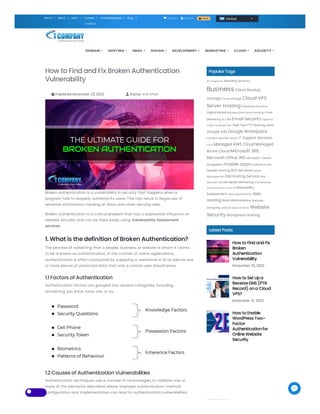
Broken authentication is a vulnerability in security that happens when a
program fails to properly authorize its users. This can result in illegal use of
sensitive information, hacking of data, and other security risks.
Broken authentication is a critical problem that has a substantial influence on
website Security and can be fixed easily using Vulnerability Assessment
services.
1. What is the definition of Broken Authentication?
The process of validating that a people, business, or website is whom it claims
to be is known as authentication. In the context of online applications,
authentication is often conducted by supplying a username or ID as well as one
or more pieces of protected data that only a certain user should know.
1.1 Factors of Authentication
Authentication factors are grouped into several categories, including
something you know, have, are, or do.
1.2 Causes of Authentication Vulnerabilities
Authentication techniques use a number of technologies to validate one or
more of the elements described above. Improper authentication method
configuration and implementation can lead to authentication vulnerabilities.
PopularTags
API Integration Branding Services
Business Cloud Backup
storage cloud storage Cloud VPS
Server Hosting Database Services
Digital Marketing eBay Store Email Hosting Email
Marketing & CRM Email security Explainer
Video Facebook Ads Fast Vpn FTP hosting GMAIL
Google Ads Google Workspace
hacked website repair IT Support Services
Linux Managed AWS Cloud Managed
Azure Cloud Microsoft 365
Microsoft Office 365 Microsoft Teams
Integration mobile apps Outlook email
Reseller Hosting SEO Services Server
Management SIM Hosting Service SMS
Services Social Media Marketing SQL Services
Transfer Domain Name Vulnerability
Assessment web applications Web
Hosting Web Maintenance Website
Designing website repair services Website
Security Wordpress Hosting
Latest Posts
How to Find and Fix
Broken
Authentication
Vulnerability
November 22, 2023
How to Set Upa
Reverse DNS (PTR
Record) ona Cloud
VPS?
November 21, 2023
How to Enable
WordPress Two-
Factor
Authenticationfor
Online Website
Security
DOMAIN HOSTING EMAIL DESIGN DEVELOPMENT MARKETING CLOUD SECURITY
There are primarily two causes of authentication vulnerabilities:
The authentication process is poor due to insufficient protection against brute-force
attacks and the absence of a rate-limit.
In the authentication system, poor code and logic problems allow attackers to
circumvent the entire authentication procedure. “Broken Authentication” is precisely
what it is.
2. Real-Life Examples
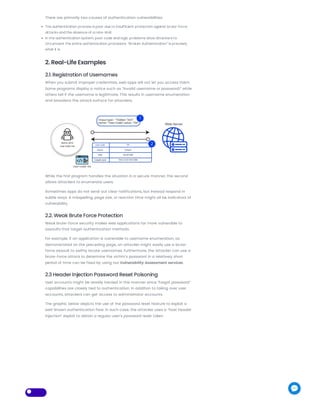
2.1. Registration of Usernames
When you submit improper credentials, web apps will not let you access them.
Some programs display a notice such as “Invalid username or password!” while
others tell if the username is legitimate. This results in username enumeration
and broadens the attack surface for attackers.
While the first program handles the situation in a secure manner, the second
allows attackers to enumerate users.
Sometimes apps do not send out clear notifications, but instead respond in
subtle ways. A misspelling, page size, or reaction time might all be indicators of
vulnerability.
2.2. Weak Brute Force Protection
Weak brute-force security makes web applications far more vulnerable to
assaults that target authentication methods.
For example, if an application is vulnerable to username enumeration, as
demonstrated on the preceding page, an attacker might easily use a brute-
force assault to swiftly locate usernames. Furthermore, the attacker can use a
brute-force attack to determine the victim’s password in a relatively short
period of time can be fixed by using our Vulnerability Assessment services.
2.3 Header Injection Password Reset Poisoning
User accounts might be readily hacked in this manner since “forgot password”
capabilities are closely tied to authentication. In addition to taking over user
accounts, attackers can get access to administrator accounts.
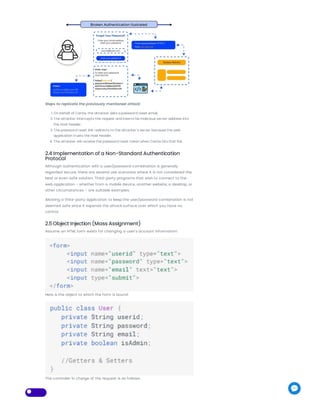
The graphic below depicts the use of the password reset feature to exploit a
well-known authentication flaw. In such case, the attacker uses a “host header
injection” exploit to obtain a regular user’s password reset token.
Steps to replicate the previously mentioned attack:
1. On behalf of Carlos, the attacker asks a password reset email.
2. The attacker intercepts the request and inserts his malicious server address into
the Host header.
3. The password reset link redirects to the attacker’s server because the web
application trusts the Host header.
4. The attacker will receive the password reset token when Carlos hits that link.
2.4 Implementation of a Non-Standard Authentication
Protocol
Although authentication with a user/password combination is generally
regarded secure, there are several use scenarios where it is not considered the
best or even safe solution. Third-party programs that wish to connect to the
web application – whether from a mobile device, another website, a desktop, or
other circumstances – are suitable examples.
Allowing a third-party application to keep the user/password combination is not
deemed safe since it expands the attack surface over which you have no
control.
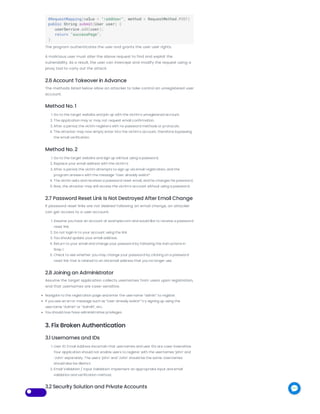
2.5 Object Injection (Mass Assignment)
Assume an HTML form exists for changing a user’s account information:
Here is the object to which the form is bound:
The controller in charge of the request is as follows:
The program authenticates the user and grants the user user rights.
A malicious user must alter the above request to find and exploit the
vulnerability. As a result, the user can intercept and modify the request using a
proxy tool to carry out the attack.
2.6 Account Takeover in Advance
The methods listed below allow an attacker to take control an unregistered user
account.
Method No. 1
1. Go to the target website and join up with the victim’s unregistered account.
2. The application may or may not request email confirmation.
3. After a period, the victim registers with no password methods or protocols.
4. The attacker may now simply enter into the victim’s account, therefore bypassing
the email verification.
Method No. 2
1. Go to the target website and sign up without using a password.
2. Replace your email address with the victim’s.
3. After a period, the victim attempts to sign up via email registration, and the
program answers with the message “User already exists!”
4. The victim asks and receives a password reset email, and he changes his password.
5. Now, the attacker may still access the victim’s account without using a password.
2.7 Password Reset Link Is Not Destroyed After Email Change
If password reset links are not deleted following an email change, an attacker
can get access to a user account.
1. Assume you have an account at example.com and would like to receive a password
reset link.
2. Do not login in to your account using the link.
3. You should update your email address.
4. Return to your email and change your password by following the instructions in
Step 1.
5. Check to see whether you may change your password by clicking on a password
reset link that is related to an old email address that you no longer use.
2.8 Joining an Administrator
Assume the target application collects usernames from users upon registration,
and that usernames are case-sensitive.
Navigate to the registration page and enter the username “admin” to register.
If you see an error message such as “User already exists!” try signing up using the
username “Admin” or “AdmiN”, etc.
You should now have administrative privileges.
3. Fix Broken Authentication
3.1 Usernames and IDs
1. User ID: Email Address Ascertain that usernames and user IDs are case-insensitive.
Your application should not enable users to register with the usernames ‘john’ and
‘John’ separately. The users ‘john’ and ‘John’ should be the same. Usernames
should also be distinct.
2. Email Validation / Input Validation: Implement an appropriate input and email
validation and verification method.
3.2 Security Solution and Private Accounts
1. Allowing sensitive accounts (DB, back-end, or any internal account…) to
authenticate to the front-end user interfaces is strictly prohibited.
2. Do NOT utilize the same authentication method (e.g. IDP / AD) used internally for
unsafe access.
3.3 Policy on Password Strength Controls
Password strength is the primary problem in password-based authentication
systems.
1. Password Length: A “strong” password policy makes it difficult, if not impossible, for
attackers to guess the password manually or automatically.
2. Allow All Characters: Allow the use of all characters, including Unicode and spaces.
There should be no password creation requirements that limit the sort of
characters allowed.
3. Credential Rotation: Ensure credential rotation when a password leaks or during a
compromised identity.
3.4 Mechanism for Secure Password Recovery
1. To avoid user enumeration, send consistent messages.
2. Lockout accounts to avoid DoS attacks if there are too many failed login attempts.
3. Boost token safety and unpredictability.
4. Requiring a re-login following a password reset.
5. After a password reset, invalidate previously established sessions.
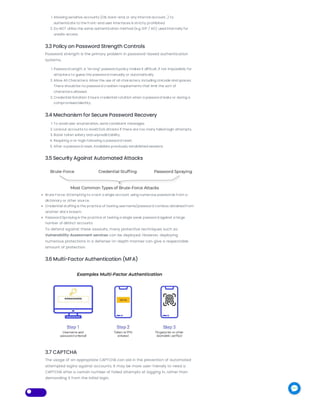
3.5 Security Against Automated Attacks
Brute Force: Attempting to crack a single account using numerous passwords from a
dictionary or other source.
Credential stuffing is the practice of testing username/password combos obtained from
another site’s breach.
Password Spraying is the practice of testing a single weak password against a large
number of distinct accounts.
To defend against these assaults, many protective techniques such as
Vulnerability Assessment services can be deployed. However, deploying
numerous protections in a defense-in-depth manner can give a respectable
amount of protection.
3.6 Multi-Factor Authentication (MFA)
3.7 CAPTCHA
The usage of an appropriate CAPTCHA can aid in the prevention of automated
attempted logins against accounts. It may be more user-friendly to need a
CAPTCHA after a certain number of failed attempts at logging in, rather than
demanding it from the initial login.
3.8 Make use of industry-standard authentication and
authorization protocols
Use standard authentication techniques to avoid exposing your users’ info to
attackers.
OAuth (Open Authorization)
SAML (Security Assertion Markup Language) for OpenID
The Alliance for Fast Identity Online (FIDO)
3.9 Session Management
A robust and safe session management system requires careful design of
session identification properties.
The session ID or token connects the user login credentials to the user HTTP
traffic and the necessary web application access restrictions.
Conclusion
In today’s ever-changing digital world, protecting your online presence against
vulnerabilities such as failed authentication is critical. IT company provides
professional Vulnerability Assessment services that detect and handle such
security threats, strengthening the defenses of your website.
Our team of professionals navigates through complex authentication
vulnerabilities with accuracy and knowledge, giving personalized solutions that
protect your digital assets. Our Vulnerability Assessment provides full security
against unauthorized access, data breaches, and possible hacking threats,
from resolving defective authentication procedures to deploying effective
multi-factor authentication.
Partnering with us means committing your online security to experts who are
dedicated to reinforcing your digital firewall. Secure the strength of your
website and protect important information by utilizing our cutting-edge
Vulnerability Assessment services now!
 0
FOLLOW US ON SOCIAL MEDIA
Since 2007 we have assisted so many
businesses to get organized online. Our
servers, support, and data centers are
DOMAIN
Register Domain
Name
Transfer Domain
Name
Corporate Services
HOSTING
Web Hosting
Managed WordPress
Hosting
FTP Hosting
VPS Hosting
EMAIL
Business Email
Hosting
Microsoft Office 365
Google Workspace
DESIGN
Website Designing
Branding Services
eBay Store Design
Explainer Video
networked in Sydney (Australia), London
(UK) and Los Angeles (USA).
ACCEPTED PAYMENT METHODS:
Free DNS Service
Domain name
Resellers
SIM Hosting Service
Reseller Hosting
Email Marketing &
CRM
Microsoft Teams
Integration
Website
Maintenance
DEVELOPMENT
Web Applications
Mobile Apps
Database Services
SQL DBA Services
API Integration
Service
SMS Services
MARKETING
Digital Marketing
SEO Services
Social Media
Marketing
Email Marketing &
CRM
Google Ads
Facebook Ads
CLOUD
Managed Azure
Cloud
Managed AWS Cloud
Server Management
Cloud Backup
Storage
SECURITY
SSL Certificates
Website Security &
Protection
Email Security &
Protection
Hacked Website
Repair
Vulnerability Scan
Service
Cyber Insurance
Copyright © 2007 - 2023. All Rights Reserved
Home Terms of Use Privacy Policy Learn Blog
Contact Us
| | | | |

How to Find and Fix Broken Authentication Vulnerability

  • 1.
    Home About LearnCareers Knowledgebase Blog Contact | | | | | |  View Cart  Register  LOGIN Global How to Find and Fix Broken Authentication Vulnerability  Published November 22, 2023  Author: Ash Khan Broken authentication is a vulnerability in security that happens when a program fails to properly authorize its users. This can result in illegal use of sensitive information, hacking of data, and other security risks. Broken authentication is a critical problem that has a substantial influence on website Security and can be fixed easily using Vulnerability Assessment services. 1. What is the definition of Broken Authentication? The process of validating that a people, business, or website is whom it claims to be is known as authentication. In the context of online applications, authentication is often conducted by supplying a username or ID as well as one or more pieces of protected data that only a certain user should know. 1.1 Factors of Authentication Authentication factors are grouped into several categories, including something you know, have, are, or do. 1.2 Causes of Authentication Vulnerabilities Authentication techniques use a number of technologies to validate one or more of the elements described above. Improper authentication method configuration and implementation can lead to authentication vulnerabilities. PopularTags API Integration Branding Services Business Cloud Backup storage cloud storage Cloud VPS Server Hosting Database Services Digital Marketing eBay Store Email Hosting Email Marketing & CRM Email security Explainer Video Facebook Ads Fast Vpn FTP hosting GMAIL Google Ads Google Workspace hacked website repair IT Support Services Linux Managed AWS Cloud Managed Azure Cloud Microsoft 365 Microsoft Office 365 Microsoft Teams Integration mobile apps Outlook email Reseller Hosting SEO Services Server Management SIM Hosting Service SMS Services Social Media Marketing SQL Services Transfer Domain Name Vulnerability Assessment web applications Web Hosting Web Maintenance Website Designing website repair services Website Security Wordpress Hosting Latest Posts How to Find and Fix Broken Authentication Vulnerability November 22, 2023 How to Set Upa Reverse DNS (PTR Record) ona Cloud VPS? November 21, 2023 How to Enable WordPress Two- Factor Authenticationfor Online Website Security DOMAIN HOSTING EMAIL DESIGN DEVELOPMENT MARKETING CLOUD SECURITY
  • 2.
    There are primarilytwo causes of authentication vulnerabilities: The authentication process is poor due to insufficient protection against brute-force attacks and the absence of a rate-limit. In the authentication system, poor code and logic problems allow attackers to circumvent the entire authentication procedure. “Broken Authentication” is precisely what it is. 2. Real-Life Examples 2.1. Registration of Usernames When you submit improper credentials, web apps will not let you access them. Some programs display a notice such as “Invalid username or password!” while others tell if the username is legitimate. This results in username enumeration and broadens the attack surface for attackers. While the first program handles the situation in a secure manner, the second allows attackers to enumerate users. Sometimes apps do not send out clear notifications, but instead respond in subtle ways. A misspelling, page size, or reaction time might all be indicators of vulnerability. 2.2. Weak Brute Force Protection Weak brute-force security makes web applications far more vulnerable to assaults that target authentication methods. For example, if an application is vulnerable to username enumeration, as demonstrated on the preceding page, an attacker might easily use a brute- force assault to swiftly locate usernames. Furthermore, the attacker can use a brute-force attack to determine the victim’s password in a relatively short period of time can be fixed by using our Vulnerability Assessment services. 2.3 Header Injection Password Reset Poisoning User accounts might be readily hacked in this manner since “forgot password” capabilities are closely tied to authentication. In addition to taking over user accounts, attackers can get access to administrator accounts. The graphic below depicts the use of the password reset feature to exploit a well-known authentication flaw. In such case, the attacker uses a “host header injection” exploit to obtain a regular user’s password reset token.
  • 3.
    Steps to replicatethe previously mentioned attack: 1. On behalf of Carlos, the attacker asks a password reset email. 2. The attacker intercepts the request and inserts his malicious server address into the Host header. 3. The password reset link redirects to the attacker’s server because the web application trusts the Host header. 4. The attacker will receive the password reset token when Carlos hits that link. 2.4 Implementation of a Non-Standard Authentication Protocol Although authentication with a user/password combination is generally regarded secure, there are several use scenarios where it is not considered the best or even safe solution. Third-party programs that wish to connect to the web application – whether from a mobile device, another website, a desktop, or other circumstances – are suitable examples. Allowing a third-party application to keep the user/password combination is not deemed safe since it expands the attack surface over which you have no control. 2.5 Object Injection (Mass Assignment) Assume an HTML form exists for changing a user’s account information: Here is the object to which the form is bound: The controller in charge of the request is as follows:
  • 4.
    The program authenticatesthe user and grants the user user rights. A malicious user must alter the above request to find and exploit the vulnerability. As a result, the user can intercept and modify the request using a proxy tool to carry out the attack. 2.6 Account Takeover in Advance The methods listed below allow an attacker to take control an unregistered user account. Method No. 1 1. Go to the target website and join up with the victim’s unregistered account. 2. The application may or may not request email confirmation. 3. After a period, the victim registers with no password methods or protocols. 4. The attacker may now simply enter into the victim’s account, therefore bypassing the email verification. Method No. 2 1. Go to the target website and sign up without using a password. 2. Replace your email address with the victim’s. 3. After a period, the victim attempts to sign up via email registration, and the program answers with the message “User already exists!” 4. The victim asks and receives a password reset email, and he changes his password. 5. Now, the attacker may still access the victim’s account without using a password. 2.7 Password Reset Link Is Not Destroyed After Email Change If password reset links are not deleted following an email change, an attacker can get access to a user account. 1. Assume you have an account at example.com and would like to receive a password reset link. 2. Do not login in to your account using the link. 3. You should update your email address. 4. Return to your email and change your password by following the instructions in Step 1. 5. Check to see whether you may change your password by clicking on a password reset link that is related to an old email address that you no longer use. 2.8 Joining an Administrator Assume the target application collects usernames from users upon registration, and that usernames are case-sensitive. Navigate to the registration page and enter the username “admin” to register. If you see an error message such as “User already exists!” try signing up using the username “Admin” or “AdmiN”, etc. You should now have administrative privileges. 3. Fix Broken Authentication 3.1 Usernames and IDs 1. User ID: Email Address Ascertain that usernames and user IDs are case-insensitive. Your application should not enable users to register with the usernames ‘john’ and ‘John’ separately. The users ‘john’ and ‘John’ should be the same. Usernames should also be distinct. 2. Email Validation / Input Validation: Implement an appropriate input and email validation and verification method. 3.2 Security Solution and Private Accounts
  • 5.
    1. Allowing sensitiveaccounts (DB, back-end, or any internal account…) to authenticate to the front-end user interfaces is strictly prohibited. 2. Do NOT utilize the same authentication method (e.g. IDP / AD) used internally for unsafe access. 3.3 Policy on Password Strength Controls Password strength is the primary problem in password-based authentication systems. 1. Password Length: A “strong” password policy makes it difficult, if not impossible, for attackers to guess the password manually or automatically. 2. Allow All Characters: Allow the use of all characters, including Unicode and spaces. There should be no password creation requirements that limit the sort of characters allowed. 3. Credential Rotation: Ensure credential rotation when a password leaks or during a compromised identity. 3.4 Mechanism for Secure Password Recovery 1. To avoid user enumeration, send consistent messages. 2. Lockout accounts to avoid DoS attacks if there are too many failed login attempts. 3. Boost token safety and unpredictability. 4. Requiring a re-login following a password reset. 5. After a password reset, invalidate previously established sessions. 3.5 Security Against Automated Attacks Brute Force: Attempting to crack a single account using numerous passwords from a dictionary or other source. Credential stuffing is the practice of testing username/password combos obtained from another site’s breach. Password Spraying is the practice of testing a single weak password against a large number of distinct accounts. To defend against these assaults, many protective techniques such as Vulnerability Assessment services can be deployed. However, deploying numerous protections in a defense-in-depth manner can give a respectable amount of protection. 3.6 Multi-Factor Authentication (MFA) 3.7 CAPTCHA The usage of an appropriate CAPTCHA can aid in the prevention of automated attempted logins against accounts. It may be more user-friendly to need a CAPTCHA after a certain number of failed attempts at logging in, rather than demanding it from the initial login.
  • 6.
    3.8 Make useof industry-standard authentication and authorization protocols Use standard authentication techniques to avoid exposing your users’ info to attackers. OAuth (Open Authorization) SAML (Security Assertion Markup Language) for OpenID The Alliance for Fast Identity Online (FIDO) 3.9 Session Management A robust and safe session management system requires careful design of session identification properties. The session ID or token connects the user login credentials to the user HTTP traffic and the necessary web application access restrictions. Conclusion In today’s ever-changing digital world, protecting your online presence against vulnerabilities such as failed authentication is critical. IT company provides professional Vulnerability Assessment services that detect and handle such security threats, strengthening the defenses of your website. Our team of professionals navigates through complex authentication vulnerabilities with accuracy and knowledge, giving personalized solutions that protect your digital assets. Our Vulnerability Assessment provides full security against unauthorized access, data breaches, and possible hacking threats, from resolving defective authentication procedures to deploying effective multi-factor authentication. Partnering with us means committing your online security to experts who are dedicated to reinforcing your digital firewall. Secure the strength of your website and protect important information by utilizing our cutting-edge Vulnerability Assessment services now!  0 FOLLOW US ON SOCIAL MEDIA Since 2007 we have assisted so many businesses to get organized online. Our servers, support, and data centers are DOMAIN Register Domain Name Transfer Domain Name Corporate Services HOSTING Web Hosting Managed WordPress Hosting FTP Hosting VPS Hosting EMAIL Business Email Hosting Microsoft Office 365 Google Workspace DESIGN Website Designing Branding Services eBay Store Design Explainer Video
  • 7.
    networked in Sydney(Australia), London (UK) and Los Angeles (USA). ACCEPTED PAYMENT METHODS: Free DNS Service Domain name Resellers SIM Hosting Service Reseller Hosting Email Marketing & CRM Microsoft Teams Integration Website Maintenance DEVELOPMENT Web Applications Mobile Apps Database Services SQL DBA Services API Integration Service SMS Services MARKETING Digital Marketing SEO Services Social Media Marketing Email Marketing & CRM Google Ads Facebook Ads CLOUD Managed Azure Cloud Managed AWS Cloud Server Management Cloud Backup Storage SECURITY SSL Certificates Website Security & Protection Email Security & Protection Hacked Website Repair Vulnerability Scan Service Cyber Insurance Copyright © 2007 - 2023. All Rights Reserved Home Terms of Use Privacy Policy Learn Blog Contact Us | | | | |