Web Application Security (PHP)
Zakieh Alizadeh
zakiehalizadeh@gmail.com
APA Laboratory – Ferdowsi University of Mashhad
Session 4
Authentication
Authentication
 Scenarios :
 Providing An Appropriate Authentication for CollegeAuthentication Library Website
Table of Content
 Common Web Authentication Threats
 Common Weak Web Authentication Strategies
 Strategies For Strong Authentication
Authentication
Common Web Authentication Threats
Common Weak Web Authentication Strategies
Strategies For Strong Authentication
Authentication
Defenition
 Authentication and authorization are required for a Web page that should be
limited to certain users.
 Authentication is the process of determining whether someone or something
is, in fact, who or what it is declared to be.
o the ownership factors: ID card,phone
o the knowledge factors: password, personal identification number (PIN)
o the inherence factors: Something the user is or does (e.g., fingerprint,
DNA
Authentication
Forms based authentication
 Forms based authentication provides the web application designer the
most control over theuser interface, and thus it is widely used.
 Forms based authentication suffers from:
o Clear text credentials
o Weak password controls
o Man in the middle attacks
Authentication
 Threat Categorization
STRIDE ::adversarial perspectiev
Spoofing Tampering Repudition Information
disclosure
Elevation of
privilage
Denial
of service
ASF :: defensive perspective
Data
Protection in
Storage and
Transit
Exception
Management
Data
Validation
Configuration
Management
Authorization Authentication Auditing &
Logging
Authentication
Attacker Testing Autentication
Threats Desc
Testing for Credentials
transport over an
encrypted channel
 using secure protocols that protect them from an attacker or not
Testing for user
enumeration
there are default user accounts
Testing for bypassing
authentication schema
 by recognizing that not all of the application‘s resources are
adequately protected.
(-Session ID Prediction—sql injection )
Authentication
Attacker Testing Autentication
Threats Desc
Testing for vulnerable
Remember Password &
pwd reset
 best security is achieved if the password reset is done via an email
how the application manages those process shows you the password
Testing for CAPTCHA  questions have a very limited set of possible answers
Testing for LOGOUT &
Browser Cache
Management
 logout button is present and well visible
 destroys all session token, or at least renders them unusable
 A timeout is enforced and it is properly checked by the server
Authentication
Weak Authentication Functionality
 Failure to drop privileges when reasonable
 Weak Passwords and password functionality
 Using referer field for authentication or authorization
 Using single-factor authentication in important systems
 Transactions to be replayed or authorization tokens to be reused
Authentication
UserName Management Vulnerability
 Predictable Usernames : attackers can perform a denial of service
o Firstname.Lastname
o Any monotonically increasing number
o E-mail address (unless the users are random enough)
o Semi-public data, such as employee number, or simila
 Don’t validate for HTML, SQL and LDAP Injection
Authentication
Password Management Vulnerability
 Weak Passwords
 Empty String Password
 Allowing password aging
 Not allowing password aging
 Weak Password Storage Strategies
 Allows previous passwords to be chosen
 Weak Cryptography-- Reversible password encryption
Authentication
 Weak Passwords and password functionality
 Passwords should be complex in composition
 checks should be done on the backend/server side of the application
 Simply checking that a password is not NULL is not sufficient:
 Tip : operator == casts between two different types if they are different, while the === operator
performs a 'typesafe comparison'.
$pass=$_GET[‘pass’]
If($pass===null)
// echo error
1 === 1: true
1 == 1: true
1 === "1": false // 1 is an integer, "1" is a string
1 == "1": true // "1" gets casted to an integer, which is
Authentication
Good Passwords
Rules Reg ExP
at least: 1 Uppercase character (A-Z) ^[a-z]$
at least: 1 Lowercase character (a-z) ^[A-Z]$
at least: 1 digit (0-9) ^[0-9]$
at least one special character (!"£$%&...) [!"£$%^&*()]
a defined minimum length (8 chars) ^[a-z]{3,5}$
a defined maximum length (as with all external input) ^[a-z]{3,5}$
no contiguous characters (123abcd)
not more than 2 identical characters in a row (1111) ^(([a-z0-9])2?(?!2))+$
Authentication
Weak Password Storage Strategies
 Passwords should be stored using a one-way hash algorithm.
 Once passwords are persisted, there is not reason why they should be
human-readable. The
 Storing a hash of a password, which can not be reversed, makes it more
difficult to recover the plain text passwords.
 ensures that administration staff for an application does not have access
to other users’ passwords.
Authentication
Weak Password Storage Strategies
 Salting:
o A salt is a random number of a fixed length.
o Storing simply hashed passwords has its issues
o stored as clear text next to the hashed password:
Authentication
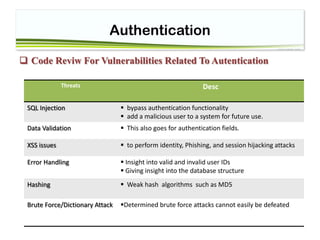
 Code Reviw For Vulnerabilities Related To Autentication
Threats Desc
SQL Injection  bypass authentication functionality
 add a malicious user to a system for future use.
Data Validation  This also goes for authentication fields.
XSS issues  to perform identity, Phishing, and session hijacking attacks
Error Handling  Insight into valid and invalid user IDs
 Giving insight into the database structure
Hashing  Weak hash algorithms such as MD5
Brute Force/Dictionary Attack Determined brute force attacks cannot easily be defeated
Authentication
Best Practices :
 Passwords are trivially broken and are unsuitable for high value systems.
 Re-authenticate the user for high value transactions and access to protected areas
 Authentication is only as strong as your user management processes
o non-repudiation, the more expensive the process.
Authentication
 Passwords Best Practices :
 Train your users as to suitable password construction
 Encourage users to use pass phrases instead of passwords
 Allow your users to write down their passwords as long as they keep them safe
 passwords between 8 and 16 that cannot be easily cracked(expiry no less than 30 days
 pass phrases above 16 characters probably do not need a hard expiry limit, but a
gentle reminder after (say) 90 days instead.
Authentication
 Change passwords :
 Ensure your application has a change password function.
 Use AUTOCOMPLETE=off to prevent browsers from caching the password locally
 The form must include the old password, the new password and a confirmation of the
new password
 If the user gets the old password wrong too many times, lock the account and kill the
session
Authentication
Brute Force
 Applications should be robust in the face of determined automated brute
force and dictionary attack, such as from Brutus or custom scripts.
Determined brute force attacks cannot easily be defeated, only delayed.
 If the application allows more than five attempts from a single IP address,
or a collection rate in excess of 10 requests a second, it’s likely that the
application will fall to determined brute force attack.
Authentication
 Brute Force Countermeasure
 logs failed authentication attempts
 A delay of three seconds can make automated brute force attacks almost infeasible.
 Error message that does not disclose which part of the application credentials are
incorrect.
 for applications requiring stronger controls, blocking access from abusive IP addresses
(accessing more than three accounts from the same IP address, or attempting to lock
outmore than one account)
Authentication
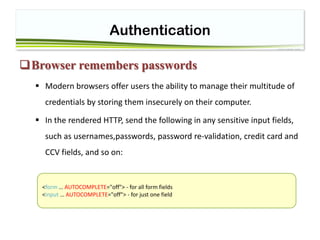
Browser remembers passwords
 Modern browsers offer users the ability to manage their multitude of
credentials by storing them insecurely on their computer.
 In the rendered HTTP, send the following in any sensitive input fields,
such as usernames,passwords, password re-validation, credit card and
CCV fields, and so on:
<form … AUTOCOMPLETE="off"> - for all form fields
<input … AUTOCOMPLETE="off"> - for just one field
Authentication

Session4-Authentication

  • 1.
    Web Application Security(PHP) Zakieh Alizadeh zakiehalizadeh@gmail.com APA Laboratory – Ferdowsi University of Mashhad
  • 2.
  • 3.
    Authentication  Scenarios : Providing An Appropriate Authentication for CollegeAuthentication Library Website Table of Content  Common Web Authentication Threats  Common Weak Web Authentication Strategies  Strategies For Strong Authentication
  • 4.
    Authentication Common Web AuthenticationThreats Common Weak Web Authentication Strategies Strategies For Strong Authentication
  • 5.
    Authentication Defenition  Authentication andauthorization are required for a Web page that should be limited to certain users.  Authentication is the process of determining whether someone or something is, in fact, who or what it is declared to be. o the ownership factors: ID card,phone o the knowledge factors: password, personal identification number (PIN) o the inherence factors: Something the user is or does (e.g., fingerprint, DNA
  • 6.
    Authentication Forms based authentication Forms based authentication provides the web application designer the most control over theuser interface, and thus it is widely used.  Forms based authentication suffers from: o Clear text credentials o Weak password controls o Man in the middle attacks
  • 7.
    Authentication  Threat Categorization STRIDE::adversarial perspectiev Spoofing Tampering Repudition Information disclosure Elevation of privilage Denial of service ASF :: defensive perspective Data Protection in Storage and Transit Exception Management Data Validation Configuration Management Authorization Authentication Auditing & Logging
  • 8.
    Authentication Attacker Testing Autentication ThreatsDesc Testing for Credentials transport over an encrypted channel  using secure protocols that protect them from an attacker or not Testing for user enumeration there are default user accounts Testing for bypassing authentication schema  by recognizing that not all of the application‘s resources are adequately protected. (-Session ID Prediction—sql injection )
  • 9.
    Authentication Attacker Testing Autentication ThreatsDesc Testing for vulnerable Remember Password & pwd reset  best security is achieved if the password reset is done via an email how the application manages those process shows you the password Testing for CAPTCHA  questions have a very limited set of possible answers Testing for LOGOUT & Browser Cache Management  logout button is present and well visible  destroys all session token, or at least renders them unusable  A timeout is enforced and it is properly checked by the server
  • 10.
    Authentication Weak Authentication Functionality Failure to drop privileges when reasonable  Weak Passwords and password functionality  Using referer field for authentication or authorization  Using single-factor authentication in important systems  Transactions to be replayed or authorization tokens to be reused
  • 11.
    Authentication UserName Management Vulnerability Predictable Usernames : attackers can perform a denial of service o Firstname.Lastname o Any monotonically increasing number o E-mail address (unless the users are random enough) o Semi-public data, such as employee number, or simila  Don’t validate for HTML, SQL and LDAP Injection
  • 12.
    Authentication Password Management Vulnerability Weak Passwords  Empty String Password  Allowing password aging  Not allowing password aging  Weak Password Storage Strategies  Allows previous passwords to be chosen  Weak Cryptography-- Reversible password encryption
  • 13.
    Authentication  Weak Passwordsand password functionality  Passwords should be complex in composition  checks should be done on the backend/server side of the application  Simply checking that a password is not NULL is not sufficient:  Tip : operator == casts between two different types if they are different, while the === operator performs a 'typesafe comparison'. $pass=$_GET[‘pass’] If($pass===null) // echo error 1 === 1: true 1 == 1: true 1 === "1": false // 1 is an integer, "1" is a string 1 == "1": true // "1" gets casted to an integer, which is
  • 14.
    Authentication Good Passwords Rules RegExP at least: 1 Uppercase character (A-Z) ^[a-z]$ at least: 1 Lowercase character (a-z) ^[A-Z]$ at least: 1 digit (0-9) ^[0-9]$ at least one special character (!"£$%&...) [!"£$%^&*()] a defined minimum length (8 chars) ^[a-z]{3,5}$ a defined maximum length (as with all external input) ^[a-z]{3,5}$ no contiguous characters (123abcd) not more than 2 identical characters in a row (1111) ^(([a-z0-9])2?(?!2))+$
  • 15.
    Authentication Weak Password StorageStrategies  Passwords should be stored using a one-way hash algorithm.  Once passwords are persisted, there is not reason why they should be human-readable. The  Storing a hash of a password, which can not be reversed, makes it more difficult to recover the plain text passwords.  ensures that administration staff for an application does not have access to other users’ passwords.
  • 16.
    Authentication Weak Password StorageStrategies  Salting: o A salt is a random number of a fixed length. o Storing simply hashed passwords has its issues o stored as clear text next to the hashed password:
  • 17.
    Authentication  Code ReviwFor Vulnerabilities Related To Autentication Threats Desc SQL Injection  bypass authentication functionality  add a malicious user to a system for future use. Data Validation  This also goes for authentication fields. XSS issues  to perform identity, Phishing, and session hijacking attacks Error Handling  Insight into valid and invalid user IDs  Giving insight into the database structure Hashing  Weak hash algorithms such as MD5 Brute Force/Dictionary Attack Determined brute force attacks cannot easily be defeated
  • 18.
    Authentication Best Practices : Passwords are trivially broken and are unsuitable for high value systems.  Re-authenticate the user for high value transactions and access to protected areas  Authentication is only as strong as your user management processes o non-repudiation, the more expensive the process.
  • 19.
    Authentication  Passwords BestPractices :  Train your users as to suitable password construction  Encourage users to use pass phrases instead of passwords  Allow your users to write down their passwords as long as they keep them safe  passwords between 8 and 16 that cannot be easily cracked(expiry no less than 30 days  pass phrases above 16 characters probably do not need a hard expiry limit, but a gentle reminder after (say) 90 days instead.
  • 20.
    Authentication  Change passwords:  Ensure your application has a change password function.  Use AUTOCOMPLETE=off to prevent browsers from caching the password locally  The form must include the old password, the new password and a confirmation of the new password  If the user gets the old password wrong too many times, lock the account and kill the session
  • 21.
    Authentication Brute Force  Applicationsshould be robust in the face of determined automated brute force and dictionary attack, such as from Brutus or custom scripts. Determined brute force attacks cannot easily be defeated, only delayed.  If the application allows more than five attempts from a single IP address, or a collection rate in excess of 10 requests a second, it’s likely that the application will fall to determined brute force attack.
  • 22.
    Authentication  Brute ForceCountermeasure  logs failed authentication attempts  A delay of three seconds can make automated brute force attacks almost infeasible.  Error message that does not disclose which part of the application credentials are incorrect.  for applications requiring stronger controls, blocking access from abusive IP addresses (accessing more than three accounts from the same IP address, or attempting to lock outmore than one account)
  • 23.
    Authentication Browser remembers passwords Modern browsers offer users the ability to manage their multitude of credentials by storing them insecurely on their computer.  In the rendered HTTP, send the following in any sensitive input fields, such as usernames,passwords, password re-validation, credit card and CCV fields, and so on: <form … AUTOCOMPLETE="off"> - for all form fields <input … AUTOCOMPLETE="off"> - for just one field
  • 24.