SECURE CLOUD STORAGE
Guided by
Mrs. Soja Salim
Assistant Professor,
Department of Computer Science and Engineering.
Sree Chitra Thirunal College of Engineering
Presented by
Alin Babu
R7
Roll No : SCT15CS007 (67)
Sree Chitra Thirunal College of Engineering
Date of Seminar : 2 November 2019
Table of Contents
 Overview – Cloud computing
 Introduction
 Mandatory Access Control
 Secure Data Storage using AES
 Disintegration Protocol (DIP)
 Access Control Implementation on DIP
 Proxy Re-Encryption Scheme (PRE)
 Advantages of Using PRE for Secure Sharing
 Conclusion
 References
2 November 2019 Secure Cloud Storage 2
Overview – Cloud Computing
 Cloud computing is the delivery of computing services over a network .
 Central data storage is the key facility of the cloud computing
 Provides a shared pool of configurable computing resources.
 Three types of cloud computing deployment models :
 Private Cloud
 Public Cloud
 Hybrid Cloud
 Different forms of services over the cloud computing are :
 Infrastructure as a service (IaaS)
 Platform as a service (PaaS)
 Software as a service (SaaS)
2 November 2019 Secure Cloud Storage 3
Overview – Cloud Computing (Cont.)
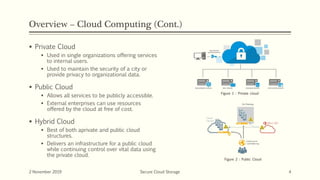
 Private Cloud
 Used in single organizations offering services
to internal users.
 Used to maintain the security of a city or
provide privacy to organizational data.
 Public Cloud
 Allows all services to be publicly accessible.
 External enterprises can use resources
offered by the cloud at free of cost.
 Hybrid Cloud
 Best of both aprivate and public cloud
structures.
 Delivers an infrastructure for a public cloud
while continuing control over vital data using
the private cloud.
2 November 2019 Secure Cloud Storage 4
Figure 1 : Private cloud
Figure 2 : Public Cloud
Overview – Cloud Computing (Cont.)
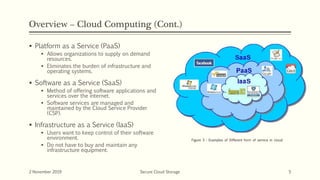
 Platform as a Service (PaaS)
 Allows organizations to supply on demand
resources.
 Eliminates the burden of infrastructure and
operating systems.
 Software as a Service (SaaS)
 Method of offering software applications and
services over the internet.
 Software services are managed and
maintained by the Cloud Service Provider
(CSP).
 Infrastructure as a Service (IaaS)
 Users want to keep control of their software
environment.
 Do not have to buy and maintain any
infrastructure equipment.
2 November 2019 Secure Cloud Storage 5
Figure 3 : Examples of Different form of service in cloud
Introduction
Cloud storage
 Made up of many distributed resources, but still acts as one - often referred to as federated storage
 Highly fault tolerant through redundancy and distribution of data
 Highly durable through the creation of versioned copies
 Eventually consistent with regard to data replicas
Data Security
 Users store their data in the cloud and no longer possess the data locally.
 Cloud computing moves the application software and databases to the large data centers where the data security
is not trustworthy.
 Data security of such cloud service includes :
 Secure channels
 Access controls
 Encryption
 For the security of data , we must consider the Confidentiality , Integrity and Availability of data
2 November 2019 Secure Cloud Storage 6
Mandatory Access Control (MAC)
 System controlled approach limiting access to source entities, constructed on the level of approval
or permission of the accessing entity, be it a person, a process, or a device.
 MAC norms are defined by the system administrator, strictly enforced by the operating system
(OS) or security kernel, and are unable to be altered by end users.

 Discretionary access control:
 Role-based access – assigns which files are accessible to different groups of users.
 Access control list - assigns specific permits to subject for a given object
 Different methods of authentication based on:
 Something known (ex. Password)
 Something possessed (ex. ID card)
 Something a person (ex. Fingerprint)
2 November 2019 Secure Cloud Storage 7
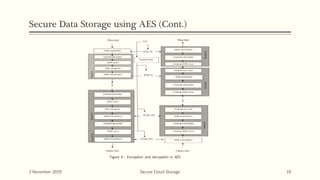
Secure Data Storage using AES
 Encrypt a confidential data into a decryptable format, for example when we need to
send sensitive data in e-mail.
 The decryption of the encrypted data is possible only if we know the right password.
 AES is a block cipher with a block length of 128 bits.
 AES allows for three different key lengths: 128, 192, or 256 bits. Most of our
discussion will assume that the key length is 128 bits
 Encryption consists of 10 rounds of processing for 128-bit keys, 12 rounds for 192-
bit keys, and 14 rounds for 256-bit keys.
2 November 2019 Secure Cloud Storage 8
Secure Data Storage using AES (Cont.)
 AES is an iterative rather than Feistel cipher.
 Based on ‘substitution–permutation network’.
 AES is most frequently used encryption algorithm.
 AES remains the preferred encryption standard.
2 November 2019 Secure Cloud Storage 9
Secure Data Storage using AES (Cont.)
2 November 2019 Secure Cloud Storage 10
Figure 4 : Encryption and decryption in AES
Secure Data Storage using AES (Cont.)
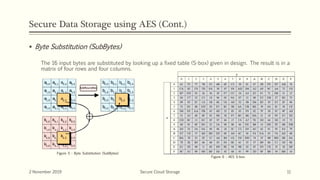
 Byte Substitution (SubBytes)
The 16 input bytes are substituted by looking up a fixed table (S-box) given in design. The result is in a
matrix of four rows and four columns.
2 November 2019 Secure Cloud Storage 11
Figure 5 : Byte Substitution (SubBytes)
Figure 6 : AES S-box
Secure Data Storage using AES (Cont.)
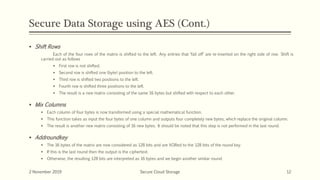
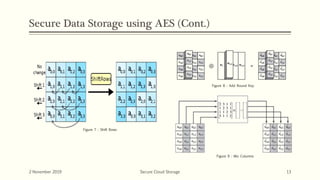
 Shift Rows
Each of the four rows of the matrix is shifted to the left. Any entries that ‘fall off’ are re-inserted on the right side of row. Shift is
carried out as follows
 First row is not shifted.
 Second row is shifted one (byte) position to the left.
 Third row is shifted two positions to the left.
 Fourth row is shifted three positions to the left.
 The result is a new matrix consisting of the same 16 bytes but shifted with respect to each other.
 Mix Columns
 Each column of four bytes is now transformed using a special mathematical function.
 This function takes as input the four bytes of one column and outputs four completely new bytes, which replace the original column.
 The result is another new matrix consisting of 16 new bytes. It should be noted that this step is not performed in the last round.
 Addroundkey
 The 16 bytes of the matrix are now considered as 128 bits and are XORed to the 128 bits of the round key.
 If this is the last round then the output is the ciphertext.
 Otherwise, the resulting 128 bits are interpreted as 16 bytes and we begin another similar round.
2 November 2019 Secure Cloud Storage 12
Secure Data Storage using AES (Cont.)
2 November 2019 Secure Cloud Storage 13
Figure 7 : Shift Rows
Figure 8 : Add Round Key
Figure 9 : Mix Columns
Disintegration Protocol (DIP)
 Protocol used to store data to be securely in the cloud
 Unidirectional, closed and disintegrated protocol.
 Disintegrate N various services from one server.
 Distribute them among M homogeneous different servers.
 Encoding mechanism to increase the integrity.
 Reduce the size of data onbased on power series.
2 November 2019 Secure Cloud Storage 14
Disintegration Protocol (DIP) Cont.
2 November 2019 Secure Cloud Storage 15
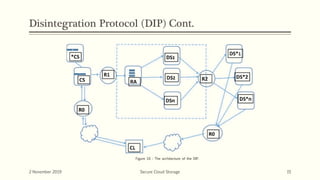
Figure 10 : The architecture of the DIP.
Disintegration Protocol (DIP) Cont.
2 November 2019 Secure Cloud Storage 16
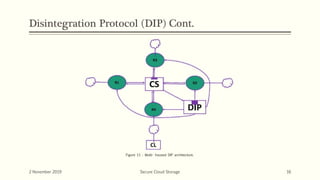
Figure 11 : Multi- housed DIP architecture.
Disintegration Protocol (DIP) Cont.
2 November 2019 Secure Cloud Storage 17
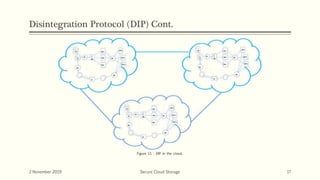
Figure 11 : DIP in the cloud.
Access Control Implementation on DIP
 Cloud service consists of three servers:
 User input (CSs)
 Data storage (DSs)
 User output (DSs*)
 Each of servers has their own security mechanisms.
 Three modes of Access Control :
 Regular option
 Advanced option
 Security token authentication
2 November 2019 Secure Cloud Storage 18
Access Control Implementation on DIP (Cont.)
Regular option
 Communication with user input server would start with login information.
 The user can request to enter login and password.
 To prevent brute force, limiting the user to five attempts per fifteen minutes.
 To ensure additional safety, the system forwards a message to the registered phone number and
email address stating that someone is trying to access the account.
 There is a link provided to give the user an opportunity to lock the account, in case if there is a
suspicion of unauthorized action.
2 November 2019 Secure Cloud Storage 19
Access Control Implementation on DIP (Cont.)
 In this case, the account will freeze until the user communicates with support center,
prove identity, and account ownership.
 In the case of the correct login and password entered, the system will generate a
random entrance code that is provided to the users through email or text.
 While setting up an account, the user is prompted to enter security answers to security
questions.
 Every time that user enters from the unrecognized device the system will require
answering two randomly selected questions out of seven.
 Failing to answer them would lock the account.
2 November 2019 Secure Cloud Storage 20
Access Control Implementation on DIP (Cont.)
Advanced Option
 Everything regular option provides.
 Plus additional options :
 Biometrics – if user’s device provides fingerprints function, it can be used.
 Additional possible application - makes the user read the randomly generated paragraph.
 Image Verification
2 November 2019 Secure Cloud Storage 21
Access Control Implementation on DIP (Cont.)
Security token authentication
 Each user is provided by an organization with the unique security token.
 The device is connected to the device that is trying to access the database.
 Serve as additional protection.
 Highly recommended for financial institutions and government contractors.
2 November 2019 Secure Cloud Storage 22
Access Control Implementation on DIP (Cont.)
 Inner server communications have a different structure.
 Security will start at the point that limit servers communications to a one-way channel.
 The receiving server can limit to respond only with a packet acceptance message.
 All packets are encrypted with Advanced Encryption Standard.
 Each pair of communicating servers has a private large set of randomly generated
numbers.
2 November 2019 Secure Cloud Storage 23
Access Control Implementation on DIP (Cont.)
 Index number is going to be a single nonencrypted data that is transmitted on the
network.
 To ensure safety, pairs of sets are updated according to computational powers of
computers that are available at the current time.
 Every communication is based on the following assumptions:
 MAC addresses are the same for both servers.
 The server will send information to the input server to provide the list of user’s storage information
to the output server.
 The user will see it as a list on the same web page.
 Once a user selects to download anything, this request is forwarded to the input server.
2 November 2019 Secure Cloud Storage 24
Access Control Implementation on DIP (Cont.)
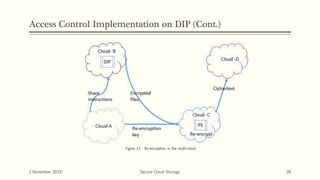
Re-encryption scenario for implementation of DIP protocol among multiple clouds.
 Client-A is located on Cloud-A keeping their secure data on special storage Cloud-B.
 If the Client-A wants to share their data with Client-D on Cloud-D.
 Client on Cloud-A will send the encryption key to Proxy re-encryption server, which is located at
Cloud-C.
 Re-encryption server will re-encrypt data and send to Cloud-D.
 Client-A can seamlessly share its data with Client-D.
2 November 2019 Secure Cloud Storage 25
Access Control Implementation on DIP (Cont.)
2 November 2019 Secure Cloud Storage 26
Figure 12 : Re-encryption in the multi-cloud
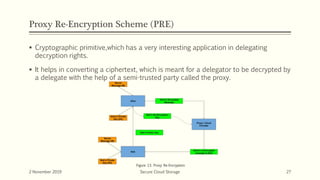
Proxy Re-Encryption Scheme (PRE)
 Cryptographic primitive,which has a very interesting application in delegating
decryption rights.
 It helps in converting a ciphertext, which is meant for a delegator to be decrypted by
a delegate with the help of a semi-trusted party called the proxy.
2 November 2019 Secure Cloud Storage 27
Figure 13. Proxy Re-Encryption
Advantages of Using PRE for Secure Sharing
 The owner of the file has the sole responsibility for providing and revoking access to the
files.
 Sharing is straightforward with no overhead for the fileowner.
 Offers end-to-end security for files while sharing them.
 Military grade security could be achieved using the state of the art encryption
mechanism like AES-256.
 Uses advanced proxy re-encryption with multi hop so that consecutive sharing is
possible
2 November 2019 Secure Cloud Storage 28
Conclusion
 Cloud storage is the storage service provided over a network.
 Data security is an important aspect of data security.
 Access control mechanism can be used to limit the access to the cloud by unauthorised persons.
 DIP is very useful for secure storage and other cloud services.
 AES can be used to encrypt the data securely.
 PRE can be used for secure file sharing.
2 November 2019 Secure Cloud Storage 29
References
2 November 2019 Secure Cloud Storage 30
2 November 2019 Secure Cloud Storage 31

Secure cloud storage

  • 1.
    SECURE CLOUD STORAGE Guidedby Mrs. Soja Salim Assistant Professor, Department of Computer Science and Engineering. Sree Chitra Thirunal College of Engineering Presented by Alin Babu R7 Roll No : SCT15CS007 (67) Sree Chitra Thirunal College of Engineering Date of Seminar : 2 November 2019
  • 2.
    Table of Contents Overview – Cloud computing  Introduction  Mandatory Access Control  Secure Data Storage using AES  Disintegration Protocol (DIP)  Access Control Implementation on DIP  Proxy Re-Encryption Scheme (PRE)  Advantages of Using PRE for Secure Sharing  Conclusion  References 2 November 2019 Secure Cloud Storage 2
  • 3.
    Overview – CloudComputing  Cloud computing is the delivery of computing services over a network .  Central data storage is the key facility of the cloud computing  Provides a shared pool of configurable computing resources.  Three types of cloud computing deployment models :  Private Cloud  Public Cloud  Hybrid Cloud  Different forms of services over the cloud computing are :  Infrastructure as a service (IaaS)  Platform as a service (PaaS)  Software as a service (SaaS) 2 November 2019 Secure Cloud Storage 3
  • 4.
    Overview – CloudComputing (Cont.)  Private Cloud  Used in single organizations offering services to internal users.  Used to maintain the security of a city or provide privacy to organizational data.  Public Cloud  Allows all services to be publicly accessible.  External enterprises can use resources offered by the cloud at free of cost.  Hybrid Cloud  Best of both aprivate and public cloud structures.  Delivers an infrastructure for a public cloud while continuing control over vital data using the private cloud. 2 November 2019 Secure Cloud Storage 4 Figure 1 : Private cloud Figure 2 : Public Cloud
  • 5.
    Overview – CloudComputing (Cont.)  Platform as a Service (PaaS)  Allows organizations to supply on demand resources.  Eliminates the burden of infrastructure and operating systems.  Software as a Service (SaaS)  Method of offering software applications and services over the internet.  Software services are managed and maintained by the Cloud Service Provider (CSP).  Infrastructure as a Service (IaaS)  Users want to keep control of their software environment.  Do not have to buy and maintain any infrastructure equipment. 2 November 2019 Secure Cloud Storage 5 Figure 3 : Examples of Different form of service in cloud
  • 6.
    Introduction Cloud storage  Madeup of many distributed resources, but still acts as one - often referred to as federated storage  Highly fault tolerant through redundancy and distribution of data  Highly durable through the creation of versioned copies  Eventually consistent with regard to data replicas Data Security  Users store their data in the cloud and no longer possess the data locally.  Cloud computing moves the application software and databases to the large data centers where the data security is not trustworthy.  Data security of such cloud service includes :  Secure channels  Access controls  Encryption  For the security of data , we must consider the Confidentiality , Integrity and Availability of data 2 November 2019 Secure Cloud Storage 6
  • 7.
    Mandatory Access Control(MAC)  System controlled approach limiting access to source entities, constructed on the level of approval or permission of the accessing entity, be it a person, a process, or a device.  MAC norms are defined by the system administrator, strictly enforced by the operating system (OS) or security kernel, and are unable to be altered by end users.  Discretionary access control:  Role-based access – assigns which files are accessible to different groups of users.  Access control list - assigns specific permits to subject for a given object  Different methods of authentication based on:  Something known (ex. Password)  Something possessed (ex. ID card)  Something a person (ex. Fingerprint) 2 November 2019 Secure Cloud Storage 7
  • 8.
    Secure Data Storageusing AES  Encrypt a confidential data into a decryptable format, for example when we need to send sensitive data in e-mail.  The decryption of the encrypted data is possible only if we know the right password.  AES is a block cipher with a block length of 128 bits.  AES allows for three different key lengths: 128, 192, or 256 bits. Most of our discussion will assume that the key length is 128 bits  Encryption consists of 10 rounds of processing for 128-bit keys, 12 rounds for 192- bit keys, and 14 rounds for 256-bit keys. 2 November 2019 Secure Cloud Storage 8
  • 9.
    Secure Data Storageusing AES (Cont.)  AES is an iterative rather than Feistel cipher.  Based on ‘substitution–permutation network’.  AES is most frequently used encryption algorithm.  AES remains the preferred encryption standard. 2 November 2019 Secure Cloud Storage 9
  • 10.
    Secure Data Storageusing AES (Cont.) 2 November 2019 Secure Cloud Storage 10 Figure 4 : Encryption and decryption in AES
  • 11.
    Secure Data Storageusing AES (Cont.)  Byte Substitution (SubBytes) The 16 input bytes are substituted by looking up a fixed table (S-box) given in design. The result is in a matrix of four rows and four columns. 2 November 2019 Secure Cloud Storage 11 Figure 5 : Byte Substitution (SubBytes) Figure 6 : AES S-box
  • 12.
    Secure Data Storageusing AES (Cont.)  Shift Rows Each of the four rows of the matrix is shifted to the left. Any entries that ‘fall off’ are re-inserted on the right side of row. Shift is carried out as follows  First row is not shifted.  Second row is shifted one (byte) position to the left.  Third row is shifted two positions to the left.  Fourth row is shifted three positions to the left.  The result is a new matrix consisting of the same 16 bytes but shifted with respect to each other.  Mix Columns  Each column of four bytes is now transformed using a special mathematical function.  This function takes as input the four bytes of one column and outputs four completely new bytes, which replace the original column.  The result is another new matrix consisting of 16 new bytes. It should be noted that this step is not performed in the last round.  Addroundkey  The 16 bytes of the matrix are now considered as 128 bits and are XORed to the 128 bits of the round key.  If this is the last round then the output is the ciphertext.  Otherwise, the resulting 128 bits are interpreted as 16 bytes and we begin another similar round. 2 November 2019 Secure Cloud Storage 12
  • 13.
    Secure Data Storageusing AES (Cont.) 2 November 2019 Secure Cloud Storage 13 Figure 7 : Shift Rows Figure 8 : Add Round Key Figure 9 : Mix Columns
  • 14.
    Disintegration Protocol (DIP) Protocol used to store data to be securely in the cloud  Unidirectional, closed and disintegrated protocol.  Disintegrate N various services from one server.  Distribute them among M homogeneous different servers.  Encoding mechanism to increase the integrity.  Reduce the size of data onbased on power series. 2 November 2019 Secure Cloud Storage 14
  • 15.
    Disintegration Protocol (DIP)Cont. 2 November 2019 Secure Cloud Storage 15 Figure 10 : The architecture of the DIP.
  • 16.
    Disintegration Protocol (DIP)Cont. 2 November 2019 Secure Cloud Storage 16 Figure 11 : Multi- housed DIP architecture.
  • 17.
    Disintegration Protocol (DIP)Cont. 2 November 2019 Secure Cloud Storage 17 Figure 11 : DIP in the cloud.
  • 18.
    Access Control Implementationon DIP  Cloud service consists of three servers:  User input (CSs)  Data storage (DSs)  User output (DSs*)  Each of servers has their own security mechanisms.  Three modes of Access Control :  Regular option  Advanced option  Security token authentication 2 November 2019 Secure Cloud Storage 18
  • 19.
    Access Control Implementationon DIP (Cont.) Regular option  Communication with user input server would start with login information.  The user can request to enter login and password.  To prevent brute force, limiting the user to five attempts per fifteen minutes.  To ensure additional safety, the system forwards a message to the registered phone number and email address stating that someone is trying to access the account.  There is a link provided to give the user an opportunity to lock the account, in case if there is a suspicion of unauthorized action. 2 November 2019 Secure Cloud Storage 19
  • 20.
    Access Control Implementationon DIP (Cont.)  In this case, the account will freeze until the user communicates with support center, prove identity, and account ownership.  In the case of the correct login and password entered, the system will generate a random entrance code that is provided to the users through email or text.  While setting up an account, the user is prompted to enter security answers to security questions.  Every time that user enters from the unrecognized device the system will require answering two randomly selected questions out of seven.  Failing to answer them would lock the account. 2 November 2019 Secure Cloud Storage 20
  • 21.
    Access Control Implementationon DIP (Cont.) Advanced Option  Everything regular option provides.  Plus additional options :  Biometrics – if user’s device provides fingerprints function, it can be used.  Additional possible application - makes the user read the randomly generated paragraph.  Image Verification 2 November 2019 Secure Cloud Storage 21
  • 22.
    Access Control Implementationon DIP (Cont.) Security token authentication  Each user is provided by an organization with the unique security token.  The device is connected to the device that is trying to access the database.  Serve as additional protection.  Highly recommended for financial institutions and government contractors. 2 November 2019 Secure Cloud Storage 22
  • 23.
    Access Control Implementationon DIP (Cont.)  Inner server communications have a different structure.  Security will start at the point that limit servers communications to a one-way channel.  The receiving server can limit to respond only with a packet acceptance message.  All packets are encrypted with Advanced Encryption Standard.  Each pair of communicating servers has a private large set of randomly generated numbers. 2 November 2019 Secure Cloud Storage 23
  • 24.
    Access Control Implementationon DIP (Cont.)  Index number is going to be a single nonencrypted data that is transmitted on the network.  To ensure safety, pairs of sets are updated according to computational powers of computers that are available at the current time.  Every communication is based on the following assumptions:  MAC addresses are the same for both servers.  The server will send information to the input server to provide the list of user’s storage information to the output server.  The user will see it as a list on the same web page.  Once a user selects to download anything, this request is forwarded to the input server. 2 November 2019 Secure Cloud Storage 24
  • 25.
    Access Control Implementationon DIP (Cont.) Re-encryption scenario for implementation of DIP protocol among multiple clouds.  Client-A is located on Cloud-A keeping their secure data on special storage Cloud-B.  If the Client-A wants to share their data with Client-D on Cloud-D.  Client on Cloud-A will send the encryption key to Proxy re-encryption server, which is located at Cloud-C.  Re-encryption server will re-encrypt data and send to Cloud-D.  Client-A can seamlessly share its data with Client-D. 2 November 2019 Secure Cloud Storage 25
  • 26.
    Access Control Implementationon DIP (Cont.) 2 November 2019 Secure Cloud Storage 26 Figure 12 : Re-encryption in the multi-cloud
  • 27.
    Proxy Re-Encryption Scheme(PRE)  Cryptographic primitive,which has a very interesting application in delegating decryption rights.  It helps in converting a ciphertext, which is meant for a delegator to be decrypted by a delegate with the help of a semi-trusted party called the proxy. 2 November 2019 Secure Cloud Storage 27 Figure 13. Proxy Re-Encryption
  • 28.
    Advantages of UsingPRE for Secure Sharing  The owner of the file has the sole responsibility for providing and revoking access to the files.  Sharing is straightforward with no overhead for the fileowner.  Offers end-to-end security for files while sharing them.  Military grade security could be achieved using the state of the art encryption mechanism like AES-256.  Uses advanced proxy re-encryption with multi hop so that consecutive sharing is possible 2 November 2019 Secure Cloud Storage 28
  • 29.
    Conclusion  Cloud storageis the storage service provided over a network.  Data security is an important aspect of data security.  Access control mechanism can be used to limit the access to the cloud by unauthorised persons.  DIP is very useful for secure storage and other cloud services.  AES can be used to encrypt the data securely.  PRE can be used for secure file sharing. 2 November 2019 Secure Cloud Storage 29
  • 30.
    References 2 November 2019Secure Cloud Storage 30
  • 31.
    2 November 2019Secure Cloud Storage 31

Editor's Notes

  • #8 Discretionary access control (DAC) is a type of access control defined by the Trusted Computer System Evaluation Criteria[1] "as a means of restricting access to objects based on the identity of subjects and/or groups to which they belong. The controls are discretionary in the sense that a subject with a certain access permission is capable of passing that permission (perhaps indirectly) on to any other subject (unless restrained by mandatory access control)". Discretionary access control is commonly discussed in contrast to mandatory access control (MAC). Occasionally a system as a whole is said to have "discretionary" or "purely discretionary" access control as a way of saying that the system lacks mandatory access control. On the other hand, systems can be said to implement both MAC and DAC simultaneously, where DAC refers to one category of access controls that subjects can transfer among each other, and MAC refers to a second category of access controls that imposes constraints upon the first.
  • #16 R0 is a regular firewall that prevents specific types of information from moving between an untrusted network and a trusted network. TLS/SSL or other software service are running on existing router or server. DIP components i.e. connection server (CS), resource allocator (RA) and data servers (DSs, DSs*) and internal packet filter routers R1 and R2. The clients send requests to a connection server CS, CS sends SYN-ACK, and keep track current request until it receives (HTTP) GET and sends GET ACK to the client. Moreover, at the same time, CS will send an inter-server packet (ISP) of 168 bytes to RA. CS uses two NIC cards on- board transceivers NIC1 and external transceivers NIC2 with two different IP address. NIC1 is used for communicating with Client, and NIC2 is used to send packets to RA. Furthermore, router R1 (eth0) only accept packet coming from CS and drops all other packets coming from other IP address even from RA through interface eth1. Similar flow control mechanism is enforced for a transmission from DSs to DSs*. After receiving the packet from CS, RA determines to forward the given request (packet) to appropriate data servers DSs. Data are fragmented in a various block on different DSs on the same cloud or geographically distributed clouds. RA will keep TCB records of all connection until it receives FIN-ACK from CS. All ACKs after the GET-ACK are forwarded to RA, and RA will respond all ACKs and Data requests though different DSs. When DS sends the last data packet (with FIN) of data to Client, it also sends one inter server packet to CS (via Ro) telling that it is done with transmitting all data. CS forwards this information to RA. For the sake of convenience and role changeover functionality [23], we have kept CSs, DSs and RA identical servers they have the same hardware and same software, but perform different tasks. CS* is the backup server for CS if CS fails immediately in few millisecond CS* resumes the role of CS, detail migration and position change over process is describe in our earlier paper a split protocol technique for web server migration [23]. DS*s are data transmission servers, which receives data from DSs, they do not store any information or data, practically they are empty servers In the event of a server compromise, a hacker will only be able to get the last piece of data transmitted from the DS as if the connection is still in the active state.
  • #17 DIP architecture is capable of handling massive traffic, and the only bottleneck we have observed is the router. We have kept DIP server configuration as a multi-homed structure. In addition to maintaining a reliable connection, multihoming allows performing load-balancing by lowering the number of client/server connecting to the Internet through any single connection. It also permits the load through multiple connections, enhances the performance and can considerably decrease wait times. In Multi-homing, if a router fails, all data will be rerouted through the other routers with the help of Network address translation (NAT), by remapping one IP address into a different address by revising network address. Router RO and RA maintain all standard security protocols.