SEARCHING IN 
SHAREPOINT 
Thomas Duff 
09/19/2014
Agenda 
• Making Sure Your Site Is Searchable 
• Search Keywords 
• Property Keywords 
• Refiners 
• Best Bets 
• Resources
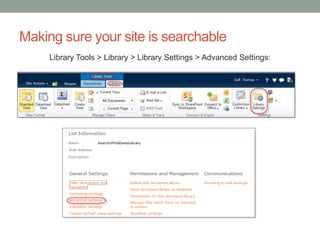
Making sure your site is searchable 
Library Tools > Library > Library Settings > Advanced Settings:
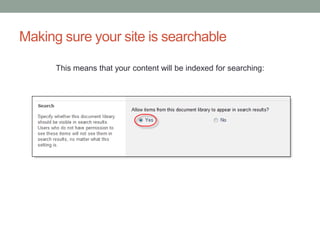
Making sure your site is searchable 
This means that your content will be indexed for searching:
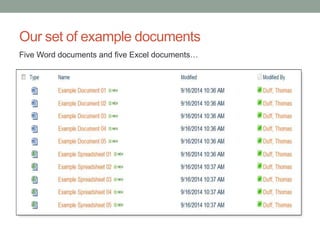
Our set of example documents 
Five Word documents and five Excel documents…
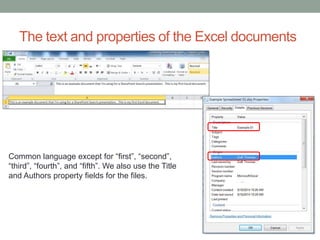
The text and properties of the Excel documents 
Common language except for “first”, “second”, 
“third”, “fourth”, and “fifth”. We also use the Title 
and Authors property fields for the files.
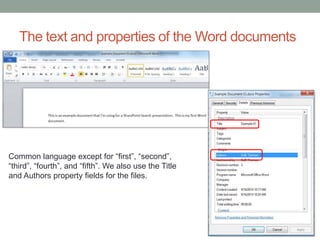
The text and properties of the Word documents 
Common language except for “first”, “second”, 
“third”, “fourth”, and “fifth”. We also use the Title 
and Authors property fields for the files.
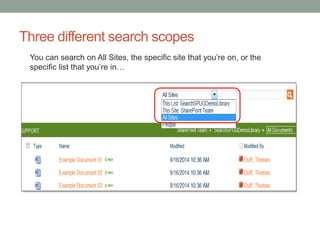
Three different search scopes 
You can search on All Sites, the specific site that you’re on, or the 
specific list that you’re in…
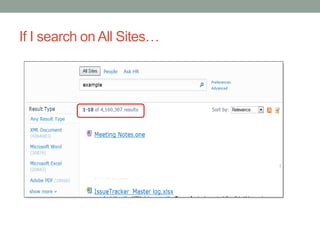
If I search on All Sites…
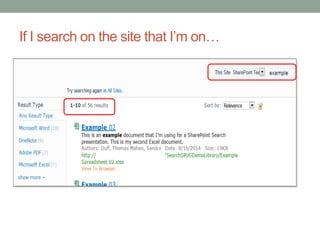
If I search on the site that I’m on…
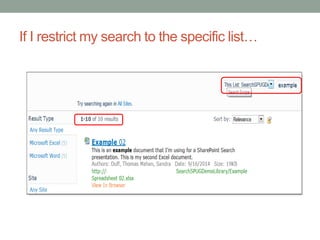
If I restrict my search to the specific list…
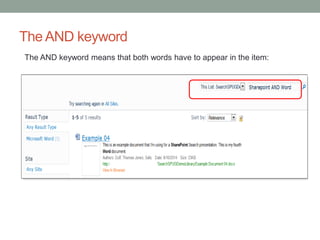
The AND keyword 
The AND keyword means that both words have to appear in the item:
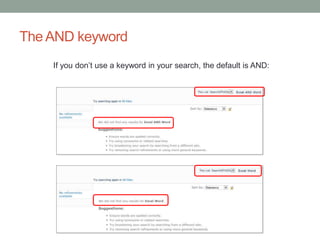
The AND keyword 
If you don’t use a keyword in your search, the default is AND:
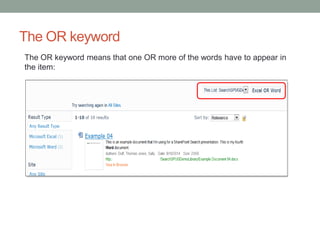
The OR keyword 
The OR keyword means that one OR more of the words have to appear in 
the item:
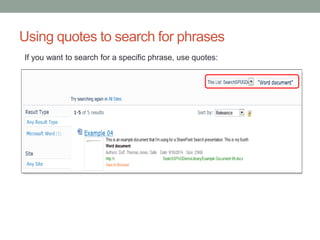
Using quotes to search for phrases 
If you want to search for a specific phrase, use quotes:
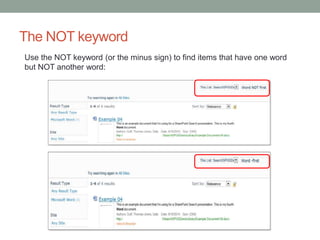
The NOT keyword 
Use the NOT keyword (or the minus sign) to find items that have one word 
but NOT another word:
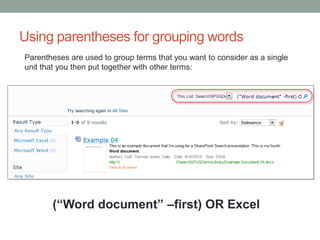
Using parentheses for grouping words 
Parentheses are used to group terms that you want to consider as a single 
unit that you then put together with other terms: 
(“Word document” –first) OR Excel
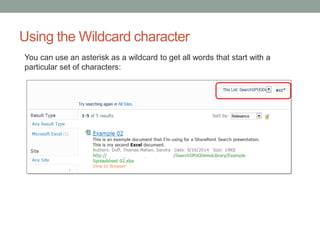
Using the Wildcard character 
You can use an asterisk as a wildcard to get all words that start with a 
particular set of characters:
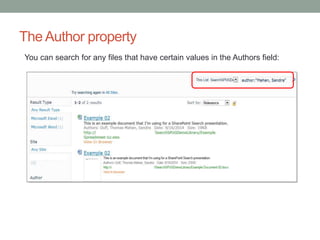
The Author property 
You can search for any files that have certain values in the Authors field:
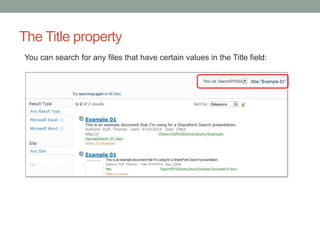
The Title property 
You can search for any files that have certain values in the Title field:
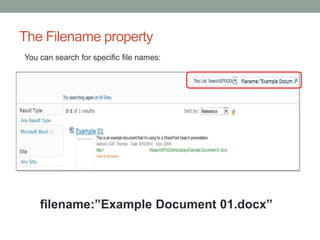
The Filename property 
You can search for specific file names: 
filename:”Example Document 01.docx”
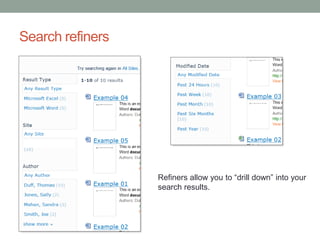
Search refiners 
Refiners allow you to “drill down” into your 
search results.
Refiner example 
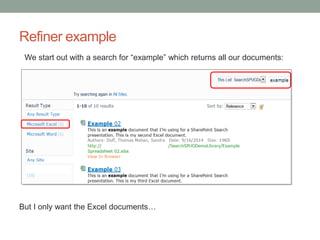
We start out with a search for “example” which returns all our documents: 
But I only want the Excel documents…
Refiner example 
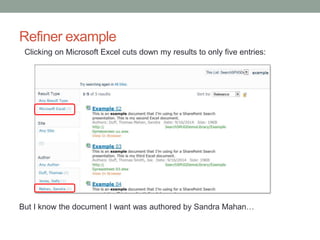
Clicking on Microsoft Excel cuts down my results to only five entries: 
But I know the document I want was authored by Sandra Mahan…
Refiner example 
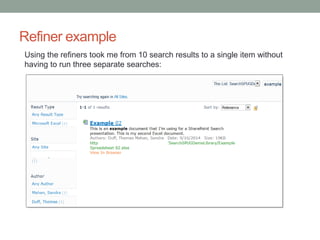
Using the refiners took me from 10 search results to a single item without 
having to run three separate searches:
To make your site more findable… Best Bets 
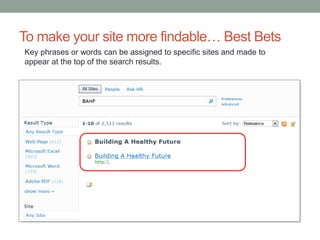
Key phrases or words can be assigned to specific sites and made to 
appear at the top of the search results.
Additional Resources 
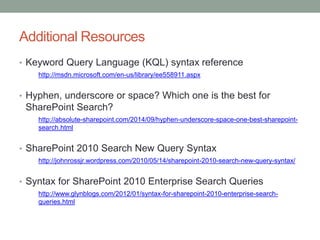
• Keyword Query Language (KQL) syntax reference 
http://msdn.microsoft.com/en-us/library/ee558911.aspx 
• Hyphen, underscore or space? Which one is the best for 
SharePoint Search? 
http://absolute-sharepoint.com/2014/09/hyphen-underscore-space-one-best-sharepoint-search. 
html 
• SharePoint 2010 Search New Query Syntax 
http://johnrossjr.wordpress.com/2010/05/14/sharepoint-2010-search-new-query-syntax/ 
• Syntax for SharePoint 2010 Enterprise Search Queries 
http://www.glynblogs.com/2012/01/syntax-for-sharepoint-2010-enterprise-search-queries. 
html
Questions? 
• Email: 
• thomas.duff@gmail.com 
• This presentation will be posted for all to use.

Searching In SharePoint

  • 1.
    SEARCHING IN SHAREPOINT Thomas Duff 09/19/2014
  • 2.
    Agenda • MakingSure Your Site Is Searchable • Search Keywords • Property Keywords • Refiners • Best Bets • Resources
  • 3.
    Making sure yoursite is searchable Library Tools > Library > Library Settings > Advanced Settings:
  • 4.
    Making sure yoursite is searchable This means that your content will be indexed for searching:
  • 5.
    Our set ofexample documents Five Word documents and five Excel documents…
  • 6.
    The text andproperties of the Excel documents Common language except for “first”, “second”, “third”, “fourth”, and “fifth”. We also use the Title and Authors property fields for the files.
  • 7.
    The text andproperties of the Word documents Common language except for “first”, “second”, “third”, “fourth”, and “fifth”. We also use the Title and Authors property fields for the files.
  • 8.
    Three different searchscopes You can search on All Sites, the specific site that you’re on, or the specific list that you’re in…
  • 9.
    If I searchon All Sites…
  • 10.
    If I searchon the site that I’m on…
  • 11.
    If I restrictmy search to the specific list…
  • 12.
    The AND keyword The AND keyword means that both words have to appear in the item:
  • 13.
    The AND keyword If you don’t use a keyword in your search, the default is AND:
  • 14.
    The OR keyword The OR keyword means that one OR more of the words have to appear in the item:
  • 15.
    Using quotes tosearch for phrases If you want to search for a specific phrase, use quotes:
  • 16.
    The NOT keyword Use the NOT keyword (or the minus sign) to find items that have one word but NOT another word:
  • 17.
    Using parentheses forgrouping words Parentheses are used to group terms that you want to consider as a single unit that you then put together with other terms: (“Word document” –first) OR Excel
  • 18.
    Using the Wildcardcharacter You can use an asterisk as a wildcard to get all words that start with a particular set of characters:
  • 19.
    The Author property You can search for any files that have certain values in the Authors field:
  • 20.
    The Title property You can search for any files that have certain values in the Title field:
  • 21.
    The Filename property You can search for specific file names: filename:”Example Document 01.docx”
  • 22.
    Search refiners Refinersallow you to “drill down” into your search results.
  • 23.
    Refiner example Westart out with a search for “example” which returns all our documents: But I only want the Excel documents…
  • 24.
    Refiner example Clickingon Microsoft Excel cuts down my results to only five entries: But I know the document I want was authored by Sandra Mahan…
  • 25.
    Refiner example Usingthe refiners took me from 10 search results to a single item without having to run three separate searches:
  • 26.
    To make yoursite more findable… Best Bets Key phrases or words can be assigned to specific sites and made to appear at the top of the search results.
  • 27.
    Additional Resources •Keyword Query Language (KQL) syntax reference http://msdn.microsoft.com/en-us/library/ee558911.aspx • Hyphen, underscore or space? Which one is the best for SharePoint Search? http://absolute-sharepoint.com/2014/09/hyphen-underscore-space-one-best-sharepoint-search. html • SharePoint 2010 Search New Query Syntax http://johnrossjr.wordpress.com/2010/05/14/sharepoint-2010-search-new-query-syntax/ • Syntax for SharePoint 2010 Enterprise Search Queries http://www.glynblogs.com/2012/01/syntax-for-sharepoint-2010-enterprise-search-queries. html
  • 28.
    Questions? • Email: • thomas.duff@gmail.com • This presentation will be posted for all to use.