Advanced Search Tools
 Truncation & Wildcard Symbols
 Boolean Operators
 Searching in Specific Fields
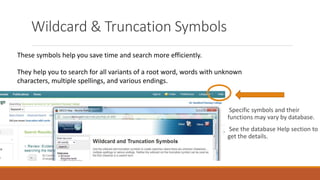
Wildcard & Truncation Symbols
These symbols help you save time and search more efficiently.
They help you to search for all variants of a root word, words with unknown
characters, multiple spellings, and various endings.
Specific symbols and their
functions may vary by database.
See the database Help section to
get the details.
Truncation Symbols
 go at the end of a root word
 will find all endings of that word
Example: pollut*
finds pollute, pollutes, pollution, polluter, polluted,
polluting, pollutant, pollutants
Wildcard Symbols
 go in the middle of a word
 can represent any number of characters
 will find variants of that word
Examples: wom?n finds woman, women, womyn
col?or finds color, colour
What are Boolean Operators ?
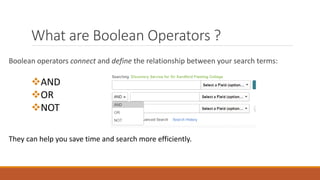
Boolean operators connect and define the relationship between your search terms:
AND
OR
NOT
They can help you save time and search more efficiently.
Boolean Operators
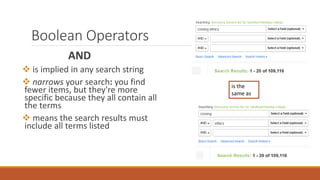
AND
 is implied in any search string
 narrows your search: you find
fewer items, but they're more
specific because they all contain all
the terms
 means the search results must
include all terms listed
is the
same as
Boolean Operators
OR
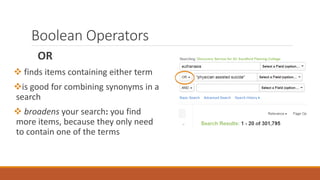
 finds items containing either term
is good for combining synonyms in a
search
 broadens your search: you find
more items, because they only need
to contain one of the terms
Boolean Operators
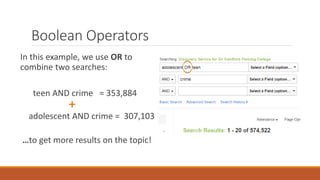
In this example, we use OR to
combine two searches:
teen AND crime = 353,884
+
adolescent AND crime = 307,103
…to get more results on the topic!
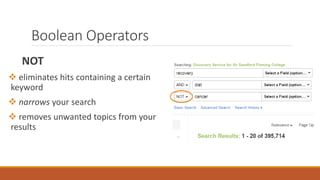
Boolean Operators
NOT
 eliminates hits containing a certain
keyword
 narrows your search
 removes unwanted topics from your
results
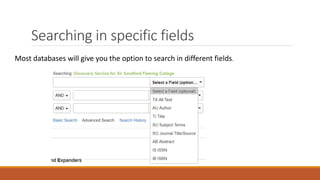
Searching in specific fields
Most databases will give you the option to search in different fields.
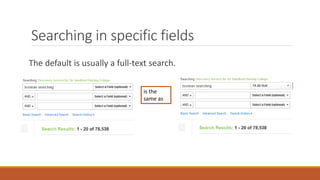
Searching in specific fields
The default is usually a full-text search.
is the
same as
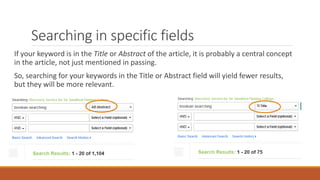
Searching in specific fields
If your keyword is in the Title or Abstract of the article, it is probably a central concept
in the article, not just mentioned in passing.
So, searching for your keywords in the Title or Abstract field will yield fewer results,
but they will be more relevant.
Searching in specific fields
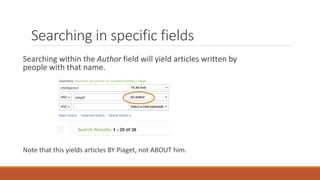
Searching within the Author field will yield articles written by
people with that name.
Note that this yields articles BY Piaget, not ABOUT him.

Advanced Search Tools

  • 1.
    Advanced Search Tools Truncation & Wildcard Symbols  Boolean Operators  Searching in Specific Fields
  • 2.
    Wildcard & TruncationSymbols These symbols help you save time and search more efficiently. They help you to search for all variants of a root word, words with unknown characters, multiple spellings, and various endings. Specific symbols and their functions may vary by database. See the database Help section to get the details.
  • 3.
    Truncation Symbols  goat the end of a root word  will find all endings of that word Example: pollut* finds pollute, pollutes, pollution, polluter, polluted, polluting, pollutant, pollutants
  • 4.
    Wildcard Symbols  goin the middle of a word  can represent any number of characters  will find variants of that word Examples: wom?n finds woman, women, womyn col?or finds color, colour
  • 5.
    What are BooleanOperators ? Boolean operators connect and define the relationship between your search terms: AND OR NOT They can help you save time and search more efficiently.
  • 6.
    Boolean Operators AND  isimplied in any search string  narrows your search: you find fewer items, but they're more specific because they all contain all the terms  means the search results must include all terms listed is the same as
  • 7.
    Boolean Operators OR  findsitems containing either term is good for combining synonyms in a search  broadens your search: you find more items, because they only need to contain one of the terms
  • 8.
    Boolean Operators In thisexample, we use OR to combine two searches: teen AND crime = 353,884 + adolescent AND crime = 307,103 …to get more results on the topic!
  • 9.
    Boolean Operators NOT  eliminateshits containing a certain keyword  narrows your search  removes unwanted topics from your results
  • 10.
    Searching in specificfields Most databases will give you the option to search in different fields.
  • 11.
    Searching in specificfields The default is usually a full-text search. is the same as
  • 12.
    Searching in specificfields If your keyword is in the Title or Abstract of the article, it is probably a central concept in the article, not just mentioned in passing. So, searching for your keywords in the Title or Abstract field will yield fewer results, but they will be more relevant.
  • 13.
    Searching in specificfields Searching within the Author field will yield articles written by people with that name. Note that this yields articles BY Piaget, not ABOUT him.