Advanced Search Tools
 Truncation & Wildcard Symbols
 Boolean Operators
 Searching in Specific Fields
Wildcard & Truncation Symbols
• These symbols help you save time and search more efficiently
• They are used to search for word variants, words with unknown characters, etc.
• Specific symbols and their functions may vary by database (check the Help feature for details)
Wildcard Symbol
? (question mark) represents a single character
• can go in the middle of a word
• will find variants of that word
Examples: advi?e finds advice, advise
col?or finds color, colour
Truncation Symbol
* (asterisk) can represent multiple characters
• can go at the end of a root word
• will find all endings of that word
Example: pollut* finds
pollute, pollutes, pollution, polluter, polluted,
polluting, pollutant, pollutants
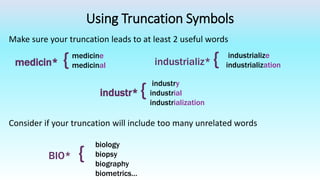
Using Truncation Symbols
Make sure your truncation leads to at least 2 useful words
medicin* { industrializ* {
industr* {
BIO* {
medicine
medicinal
industrialize
industrialization
industry
industrial
industrialization
biology
biopsy
biography
biometrics…
Consider if your truncation will include too many unrelated words​
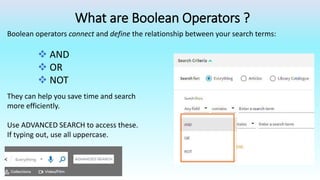
What are Boolean Operators ?
Boolean operators connect and define the relationship between your search terms:
 AND
 OR
 NOT
They can help you save time and search
more efficiently.
Use ADVANCED SEARCH to access these.​
If typing out, use all uppercase.​
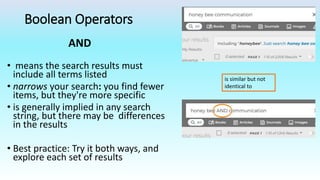
Boolean Operators
• means the search results must
include all terms listed
• narrows your search: you find fewer
items, but they're more specific
• is generally implied in any search
string, but there may be differences
in the results
• Best practice: Try it both ways, and
explore each set of results
is similar but not
identical to
AND
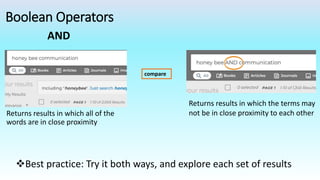
Boolean Operators
Returns results in which all of the
words are in close proximity
compare
Returns results in which the terms may
not be in close proximity to each other
Best practice: Try it both ways, and explore each set of results
AND
Boolean Operators
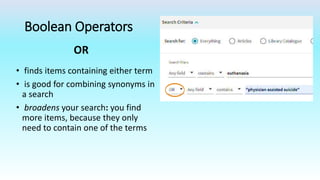
• finds items containing either term
• is good for combining synonyms in
a search
• broadens your search: you find
more items, because they only
need to contain one of the terms
OR
Boolean Operators
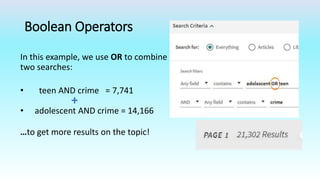
In this example, we use OR to combine
two searches:
• teen AND crime = 7,741
+
• adolescent AND crime = 14,166
…to get more results on the topic!
Boolean Operators
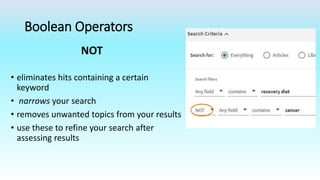
• eliminates hits containing a certain
keyword
• narrows your search
• removes unwanted topics from your results
• use these to refine your search after
assessing results
NOT
Searching in Specific Fields
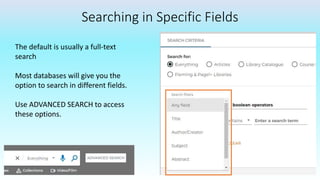
The default is usually a full-text
search
Most databases will give you the
option to search in different fields.
Use ADVANCED SEARCH to access
these options.​
Searching in specific fields
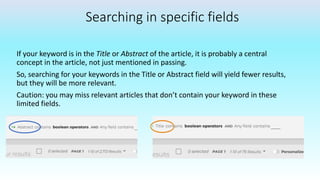
If your keyword is in the Title or Abstract of the article, it is probably a central
concept in the article, not just mentioned in passing.
So, searching for your keywords in the Title or Abstract field will yield fewer results,
but they will be more relevant.
Caution: you may miss relevant articles that don’t contain your keyword in these
limited fields.
Searching in specific fields
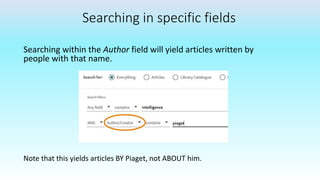
Searching within the Author field will yield articles written by
people with that name.
Note that this yields articles BY Piaget, not ABOUT him.
See Also: Troubleshooting Your Search Strategy
Contact us for more help: Library.flemingcollege.ca

Advanced Search Tools

  • 1.
    Advanced Search Tools Truncation & Wildcard Symbols  Boolean Operators  Searching in Specific Fields
  • 2.
    Wildcard & TruncationSymbols • These symbols help you save time and search more efficiently • They are used to search for word variants, words with unknown characters, etc. • Specific symbols and their functions may vary by database (check the Help feature for details)
  • 3.
    Wildcard Symbol ? (questionmark) represents a single character • can go in the middle of a word • will find variants of that word Examples: advi?e finds advice, advise col?or finds color, colour
  • 4.
    Truncation Symbol * (asterisk)can represent multiple characters • can go at the end of a root word • will find all endings of that word Example: pollut* finds pollute, pollutes, pollution, polluter, polluted, polluting, pollutant, pollutants
  • 5.
    Using Truncation Symbols Makesure your truncation leads to at least 2 useful words medicin* { industrializ* { industr* { BIO* { medicine medicinal industrialize industrialization industry industrial industrialization biology biopsy biography biometrics… Consider if your truncation will include too many unrelated words​
  • 6.
    What are BooleanOperators ? Boolean operators connect and define the relationship between your search terms:  AND  OR  NOT They can help you save time and search more efficiently. Use ADVANCED SEARCH to access these.​ If typing out, use all uppercase.​
  • 7.
    Boolean Operators • meansthe search results must include all terms listed • narrows your search: you find fewer items, but they're more specific • is generally implied in any search string, but there may be differences in the results • Best practice: Try it both ways, and explore each set of results is similar but not identical to AND
  • 8.
    Boolean Operators Returns resultsin which all of the words are in close proximity compare Returns results in which the terms may not be in close proximity to each other Best practice: Try it both ways, and explore each set of results AND
  • 9.
    Boolean Operators • findsitems containing either term • is good for combining synonyms in a search • broadens your search: you find more items, because they only need to contain one of the terms OR
  • 10.
    Boolean Operators In thisexample, we use OR to combine two searches: • teen AND crime = 7,741 + • adolescent AND crime = 14,166 …to get more results on the topic!
  • 11.
    Boolean Operators • eliminateshits containing a certain keyword • narrows your search • removes unwanted topics from your results • use these to refine your search after assessing results NOT
  • 12.
    Searching in SpecificFields The default is usually a full-text search Most databases will give you the option to search in different fields. Use ADVANCED SEARCH to access these options.​
  • 13.
    Searching in specificfields If your keyword is in the Title or Abstract of the article, it is probably a central concept in the article, not just mentioned in passing. So, searching for your keywords in the Title or Abstract field will yield fewer results, but they will be more relevant. Caution: you may miss relevant articles that don’t contain your keyword in these limited fields.
  • 14.
    Searching in specificfields Searching within the Author field will yield articles written by people with that name. Note that this yields articles BY Piaget, not ABOUT him.
  • 15.
    See Also: TroubleshootingYour Search Strategy Contact us for more help: Library.flemingcollege.ca