PART 1: INTRODUCTION
PART 2: ACCESSING AND LOGIN
PART 3: SEARCHING
PART 4: SEARCH RESULTS & RECORDS
LIBRARY INFORMATION LITERACY
USING THE DATABASES
LIMIT SEARCH
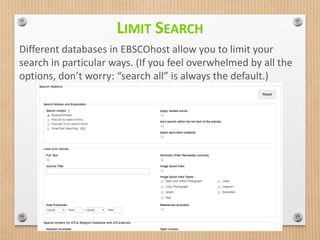
Different databases in EBSCOhost allow you to limit your
search in particular ways. (If you feel overwhelmed by all the
options, don’t worry: “search all” is always the default.)
ADVANCED SEARCHING
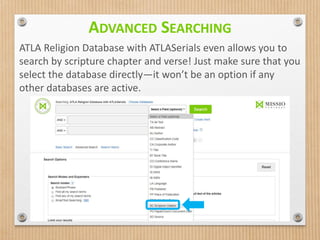
ATLA Religion Database with ATLASerials even allows you to
search by scripture chapter and verse! Just make sure that you
select the database directly—it won’t be an option if any
other databases are active.
SEARCH FIELDS
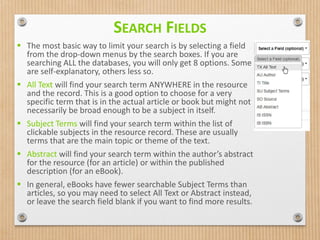
 The most basic way to limit your search is by selecting a field
from the drop-down menus by the search boxes. If you are
searching ALL the databases, you will only get 8 options. Some
are self-explanatory, others less so.
 All Text will find your search term ANYWHERE in the resource
and the record. This is a good option to choose for a very
specific term that is in the actual article or book but might not
necessarily be broad enough to be a subject in itself.
 Subject Terms will find your search term within the list of
clickable subjects in the resource record. These are usually
terms that are the main topic or theme of the text.
 Abstract will find your search term within the author’s abstract
for the resource (for an article) or within the published
description (for an eBook).
 In general, eBooks have fewer searchable Subject Terms than
articles, so you may need to select All Text or Abstract instead,
or leave the search field blank if you want to find more results.
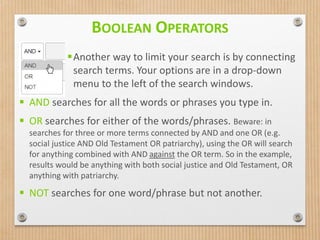
Another way to limit your search is by connecting
search terms. Your options are in a drop-down
menu to the left of the search windows.
 AND searches for all the words or phrases you type in.
 OR searches for either of the words/phrases. Beware: in
searches for three or more terms connected by AND and one OR (e.g.
social justice AND Old Testament OR patriarchy), using the OR will search
for anything combined with AND against the OR term. So in the example,
results would be anything with both social justice and Old Testament, OR
anything with patriarchy.
 NOT searches for one word/phrase but not another.
BOOLEAN OPERATORS
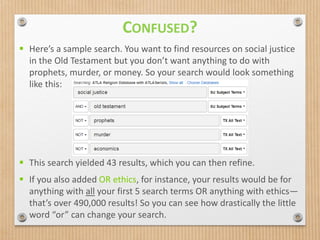
 Here’s a sample search. You want to find resources on social justice
in the Old Testament but you don’t want anything to do with
prophets, murder, or money. So your search would look something
like this:
 This search yielded 43 results, which you can then refine.
 If you also added OR ethics, for instance, your results would be for
anything with all your first 5 search terms OR anything with ethics—
that’s over 490,000 results! So you can see how drastically the little
word “or” can change your search.
CONFUSED?
QUESTIONS?
FIND MORE INFORMATION ON OUR E-CAMPUS
COURSE, LIB101.
Please contact us if you’re still wondering how to
find what you need!
Call: 215.368.5000 x123
Email: library@biblical.edu
LIBRARY INFORMATION LITERACY

Using the Databases - Part 3

  • 1.
    PART 1: INTRODUCTION PART2: ACCESSING AND LOGIN PART 3: SEARCHING PART 4: SEARCH RESULTS & RECORDS LIBRARY INFORMATION LITERACY USING THE DATABASES
  • 2.
    LIMIT SEARCH Different databasesin EBSCOhost allow you to limit your search in particular ways. (If you feel overwhelmed by all the options, don’t worry: “search all” is always the default.)
  • 3.
    ADVANCED SEARCHING ATLA ReligionDatabase with ATLASerials even allows you to search by scripture chapter and verse! Just make sure that you select the database directly—it won’t be an option if any other databases are active.
  • 4.
    SEARCH FIELDS  Themost basic way to limit your search is by selecting a field from the drop-down menus by the search boxes. If you are searching ALL the databases, you will only get 8 options. Some are self-explanatory, others less so.  All Text will find your search term ANYWHERE in the resource and the record. This is a good option to choose for a very specific term that is in the actual article or book but might not necessarily be broad enough to be a subject in itself.  Subject Terms will find your search term within the list of clickable subjects in the resource record. These are usually terms that are the main topic or theme of the text.  Abstract will find your search term within the author’s abstract for the resource (for an article) or within the published description (for an eBook).  In general, eBooks have fewer searchable Subject Terms than articles, so you may need to select All Text or Abstract instead, or leave the search field blank if you want to find more results.
  • 5.
    Another way tolimit your search is by connecting search terms. Your options are in a drop-down menu to the left of the search windows.  AND searches for all the words or phrases you type in.  OR searches for either of the words/phrases. Beware: in searches for three or more terms connected by AND and one OR (e.g. social justice AND Old Testament OR patriarchy), using the OR will search for anything combined with AND against the OR term. So in the example, results would be anything with both social justice and Old Testament, OR anything with patriarchy.  NOT searches for one word/phrase but not another. BOOLEAN OPERATORS
  • 6.
     Here’s asample search. You want to find resources on social justice in the Old Testament but you don’t want anything to do with prophets, murder, or money. So your search would look something like this:  This search yielded 43 results, which you can then refine.  If you also added OR ethics, for instance, your results would be for anything with all your first 5 search terms OR anything with ethics— that’s over 490,000 results! So you can see how drastically the little word “or” can change your search. CONFUSED?
  • 7.
    QUESTIONS? FIND MORE INFORMATIONON OUR E-CAMPUS COURSE, LIB101. Please contact us if you’re still wondering how to find what you need! Call: 215.368.5000 x123 Email: library@biblical.edu LIBRARY INFORMATION LITERACY