This project has received funding from
the European Union’s Horizon 20 20
research and innovation programme
under grant agreement No 688403
www.tulipp.eu
TULIPP
Title :
Place :
Date :
Tulipp Workshop @ HIPEAC
Towards Ubiquitous Low-power Image
Processing Platforms – tutorial RTOS
HiPEAC, Valencia, Spain
22nd
of January 2019
Antonio Paolillo, Paul Rodriguez
Shortcomings:
● Hard to debug
● Hard to control
● Libraries?
● Threads? Timers? Devices?
● MMU? Security? Multi-task?
● Multi-core?
● FPGA? Real-time? IRQ<->ISR?
Standalone build
The Reference Platform
Processor
IO
Memory
Component
tools
Operating
System
Toolchain
CPU
What is TULIPP?
(the concept)
What is TULIPP?
(the concept)
Operating
System
HI gh
P erformance
P arallel
E mbedded
R eal-time
O perating
S ystems
HI gh
P erformance
P arallel
E mbedded
R eal-time
O perating
S ystems
HI gh
P erformance
P arallel
E mbedded
R eal-time
O perating
S ystems
HI gh
P erformance
P arallel
E mbedded
R eal-time
O perating
S ystems
HI gh
P erformance
P arallel
E mbedded
R eal-time
O perating
S ystems
HI gh
P erformance
P arallel
E mbedded
R eal-time
O perating
S ystems
This project has received funding from
the European Union’s Horizon 20 20
research and innovation programme
under grant agreement No 688403
Maestro
RTOS
Multi-core made easy
Computing power →
multi-core architecture
Native support
Multi-threaded
applications.
Theoretical guarantees,
practical reliability
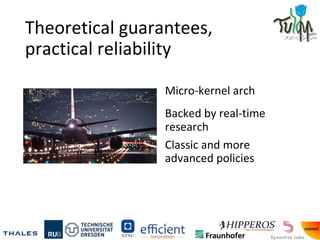
Micro-kernel arch
Backed by real-time
research
Classic and more
advanced policies
A familiar environment
Full language support for
C and C++
Posix compliant API
Automated tools to build,
deploy & debug
Emulator support
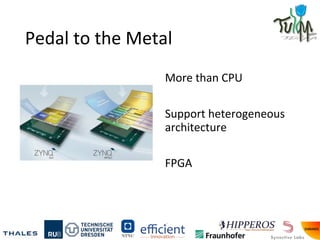
Pedal to the Metal
More than CPU
Support heterogeneous
architecture
FPGA
Ready for the industry
Philosophy aligned to
industrial standards
e.g. Adaptive AUTOSAR
High performance,
flexible application for
embedded
Main architecture and design
choices
- Hard real-time operating system
- Embedded targets: ARMv7, ARMv8, PowerPC, IA32
- A new micro-kernel written from scratch
- Built for user needs, i.e. small footprint and adapted policies
- Multi-core architecture based on asymmetric kernel
- Real-time model for user applications
- MMU support and virtual address space
- Resource sharing & IPC protocols (mutexes, semaphores,
message passing, etc.)
- Usual OS services (timers, etc.)
Real-time
- User processes have real-time requirements
- Determinism and bounded guarantees
- Being on-time is more important than being fast
- Real-time scheduling policies
- Resource usage is bounded and checked
New micro-kernel
- No “Linux legacy” or other previous mono-core design
- Design for SMP platform
- Asymmetric kernel design
- One core for heavy scheduling operations
- Other cores working to service tasks
- Most services & drivers in user space
- Multi-core IPC protocol to manage it
OS Modules
USER
SPACE
KERNEL
SPACE
HARDWARE
Memory &
resources
Scheduler IPC
System
calls
Processes Interrupts
Process 1 Process 2 Driver 1
Process 3 Process 4 Driver 2
Process 5 Service 1 Service 2
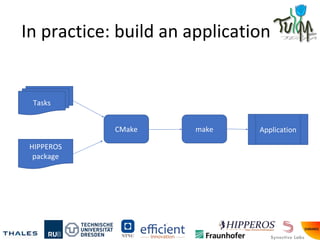
In practice: build an application
Tasks
HIPPEROS
package
CMake make Application
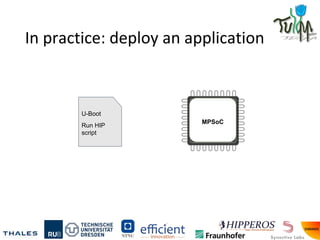
In practice: deploy an application
MPSoC
U-Boot
Run HIP
script
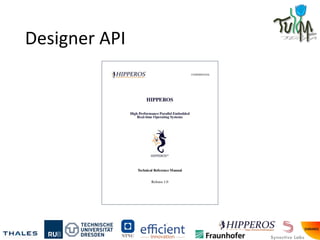
Designer API
Operating System API
● How to design tasks ?
● How to configure the system real-time run-time
behaviour ?
● How to build an HIPPEROS application ?
● How to configure the RTOS ?
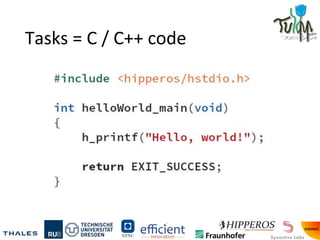
Tasks = C / C++ code
HIPPEROS application
= set of pre-defined tasks
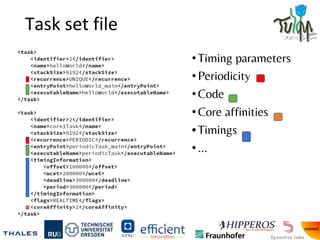
Task set file
•Timing parameters
•Periodicity
•Code
•Core affinities
•Timings
•...
CMakelists.txt: Build configuration
In practice: build an application
Tasks
CMakeLists.txt
Taskset.xml
HIPPEROS
package
CMake make Application
OS configuration
● Memory model: single address space / virtual (MMU)
● Task file format: statically linked / ELF format
● Kernel architecture: mono-core / multi-core / many-core
● Scheduling policies: Rate Monotonic / EDF, Partitioned /
Global, ...
● Activate power management features
Let’s play
Lab 1: How to Maestro
Lesson: use an OS
Benefits:
● easier resource management
● robustness
● multitasking
● modularity
● and so on
Activities during this lab
● Develop an example image processing application
for Maestro
● Use the Maestro build system and task
configuration
● Compile, deploy and run with Maestro tools
Develop an application
1. Go to
workspace/maestroLabs/lab1/workspace
2. Open src/main.cpp
3. Fill the main function in using image processing
calls from include/filters.h
STHEM
In STHEM, open the custom project in the
maestro_lab1 directory.
Click cmake, make to compile the project, then
profile it.
Deploying files and running app
$ ./run.py
What happened?
We used the Maestro build system to help us
through the whole development process of a pure
software application.
We used CMake and make through STHEM to
compile, deploy, run and analyse our application.
Going further
You can add tasks with the taskSet.ats file.
Using POSIX and Maestro APIs, tasks can interact
with devices, the kernel and each other.
Lab 2: Maestro and OpenMP
Lesson: use parallelism, use tools to help
Benefits:
● better performance
● low energy
● better scalability
● Maestro and OpenMP make this accessible
What is OpenMP?
OpenMP is a library providing functions and pragmas
to parallelize code easily between multiple threads.
Maestro is packaged with an OpenMP
implementation which we are going to use in this
lab.
Activities during this lab
● Take the example application from Lab 1 and add
OpenMP pragmas
● Compile with OpenMP activated
● Deploy and run
● Measure the performance delta
Develop an application
1. Go to lab2
2. Open src/main.cpp
3. Fill in the main function using image processing
calls from filters.h
Use OpenMP pragmas to run your code on multiple
threads in parallel
STHEM
In STHEM, open the custom project in the
maestro_lab2 directory.
Click cmake, make to compile the project, then
profile it.
Getting serial output
$ ./run.py -l
What happened?
We used the Maestro implementation of OpenMP to
accelerate our image processing application using
parallelism without manually managing threads.
Under the hood, the CMakeLists.txt file defines that
the toolchain to use is Clang and that the application
has to be linked against the OpenMP library.
Going further
Adapt the filters of the image processing library to
use OpenMP
Vary the number of cores and measure the results
Lab 3: Maestro and SDSoC
Lesson: use automatic hardware acceleration
Benefits:
● huge gains in performance
● tools make this accessible
SDSoC
Here we will use the Maestro integration of SDSoC
hardware acceleration tools.
To toggle acceleration of a function, we make
changes in the project definition file.
Activities during this lab
● Take the example application from lab 1, make
sure you are using the predefined filter functions
● Ask SDSoC (through CMake) to accelerate the
hwSobelX filter
● Activate SDSoC in CMakeLists:
○ set(HIPPEROS_TOOLCHAIN "SDSCC")
● Compile, deploy and run
● Measure the performance delta
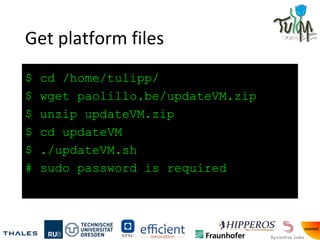
Get platform files
$ cd /home/tulipp/
$ wget paolillo.be/updateVM.zip
$ unzip updateVM.zip
$ cd updateVM
$ ./updateVM.sh
# sudo password is required
Adapt the application
1. Go to lab1
2. Open CMakeLists.txt
3. Call SDSoC toolchain, in the beginning of the file:
set(HIPPEROS_TOOLCHAIN "SDSCC")
4. Call sdaccel modules:
sdscc_accel(
"${PROJECT_NAME}"
"${APP_DIR}/src/filters.cpp"
"hwSobelX" "0")
Compile for Maestro
$ cd /home/tulipp/workspace/maestroLabs/lab1/solution/
$ mkdir maestro_lab3
$ cd maestro_lab3
$ source /opt/Xilinx/SDx/default/settings64.sh
$ /usr/bin/cmake ..
$ make
# Takes forever...
Deploy and run!
$ ./run.py
Taking forever...
In the interest of time, we’ll do it in front of you with
the pre-built solution.
What happened?
The filter has been accelerated, synthesized, with the
drivers generated, and moved to the FPGA fabric.
The performance gain is huge, like 52x (from debug)
the software version.
Much better than OpenMP multi-core parallelisation,
but requires FPGA to work.
Thank you for
attending!

HiPEAC 2019 Tutorial - Maestro RTOS

  • 1.
    This project hasreceived funding from the European Union’s Horizon 20 20 research and innovation programme under grant agreement No 688403 www.tulipp.eu TULIPP Title : Place : Date : Tulipp Workshop @ HIPEAC Towards Ubiquitous Low-power Image Processing Platforms – tutorial RTOS HiPEAC, Valencia, Spain 22nd of January 2019 Antonio Paolillo, Paul Rodriguez
  • 2.
    Shortcomings: ● Hard todebug ● Hard to control ● Libraries? ● Threads? Timers? Devices? ● MMU? Security? Multi-task? ● Multi-core? ● FPGA? Real-time? IRQ<->ISR? Standalone build
  • 3.
  • 4.
    What is TULIPP? (theconcept) Operating System
  • 6.
    HI gh P erformance Parallel E mbedded R eal-time O perating S ystems
  • 7.
    HI gh P erformance Parallel E mbedded R eal-time O perating S ystems
  • 8.
    HI gh P erformance Parallel E mbedded R eal-time O perating S ystems
  • 9.
    HI gh P erformance Parallel E mbedded R eal-time O perating S ystems
  • 10.
    HI gh P erformance Parallel E mbedded R eal-time O perating S ystems
  • 11.
    HI gh P erformance Parallel E mbedded R eal-time O perating S ystems
  • 12.
    This project hasreceived funding from the European Union’s Horizon 20 20 research and innovation programme under grant agreement No 688403 Maestro RTOS
  • 13.
    Multi-core made easy Computingpower → multi-core architecture Native support Multi-threaded applications.
  • 14.
    Theoretical guarantees, practical reliability Micro-kernelarch Backed by real-time research Classic and more advanced policies
  • 15.
    A familiar environment Fulllanguage support for C and C++ Posix compliant API Automated tools to build, deploy & debug Emulator support
  • 16.
    Pedal to theMetal More than CPU Support heterogeneous architecture FPGA
  • 17.
    Ready for theindustry Philosophy aligned to industrial standards e.g. Adaptive AUTOSAR High performance, flexible application for embedded
  • 19.
    Main architecture anddesign choices - Hard real-time operating system - Embedded targets: ARMv7, ARMv8, PowerPC, IA32 - A new micro-kernel written from scratch - Built for user needs, i.e. small footprint and adapted policies - Multi-core architecture based on asymmetric kernel - Real-time model for user applications - MMU support and virtual address space - Resource sharing & IPC protocols (mutexes, semaphores, message passing, etc.) - Usual OS services (timers, etc.)
  • 20.
    Real-time - User processeshave real-time requirements - Determinism and bounded guarantees - Being on-time is more important than being fast - Real-time scheduling policies - Resource usage is bounded and checked
  • 21.
    New micro-kernel - No“Linux legacy” or other previous mono-core design - Design for SMP platform - Asymmetric kernel design - One core for heavy scheduling operations - Other cores working to service tasks - Most services & drivers in user space - Multi-core IPC protocol to manage it
  • 22.
    OS Modules USER SPACE KERNEL SPACE HARDWARE Memory & resources SchedulerIPC System calls Processes Interrupts Process 1 Process 2 Driver 1 Process 3 Process 4 Driver 2 Process 5 Service 1 Service 2
  • 23.
    In practice: buildan application Tasks HIPPEROS package CMake make Application
  • 24.
    In practice: deployan application MPSoC U-Boot Run HIP script
  • 25.
  • 26.
    Operating System API ●How to design tasks ? ● How to configure the system real-time run-time behaviour ? ● How to build an HIPPEROS application ? ● How to configure the RTOS ?
  • 27.
    Tasks = C/ C++ code
  • 28.
    HIPPEROS application = setof pre-defined tasks
  • 29.
    Task set file •Timingparameters •Periodicity •Code •Core affinities •Timings •...
  • 30.
  • 31.
    In practice: buildan application Tasks CMakeLists.txt Taskset.xml HIPPEROS package CMake make Application
  • 32.
    OS configuration ● Memorymodel: single address space / virtual (MMU) ● Task file format: statically linked / ELF format ● Kernel architecture: mono-core / multi-core / many-core ● Scheduling policies: Rate Monotonic / EDF, Partitioned / Global, ... ● Activate power management features
  • 33.
  • 34.
    Lab 1: Howto Maestro Lesson: use an OS Benefits: ● easier resource management ● robustness ● multitasking ● modularity ● and so on
  • 35.
    Activities during thislab ● Develop an example image processing application for Maestro ● Use the Maestro build system and task configuration ● Compile, deploy and run with Maestro tools
  • 36.
    Develop an application 1.Go to workspace/maestroLabs/lab1/workspace 2. Open src/main.cpp 3. Fill the main function in using image processing calls from include/filters.h
  • 37.
    STHEM In STHEM, openthe custom project in the maestro_lab1 directory. Click cmake, make to compile the project, then profile it.
  • 38.
    Deploying files andrunning app $ ./run.py
  • 39.
    What happened? We usedthe Maestro build system to help us through the whole development process of a pure software application. We used CMake and make through STHEM to compile, deploy, run and analyse our application.
  • 40.
    Going further You canadd tasks with the taskSet.ats file. Using POSIX and Maestro APIs, tasks can interact with devices, the kernel and each other.
  • 41.
    Lab 2: Maestroand OpenMP Lesson: use parallelism, use tools to help Benefits: ● better performance ● low energy ● better scalability ● Maestro and OpenMP make this accessible
  • 42.
    What is OpenMP? OpenMPis a library providing functions and pragmas to parallelize code easily between multiple threads. Maestro is packaged with an OpenMP implementation which we are going to use in this lab.
  • 44.
    Activities during thislab ● Take the example application from Lab 1 and add OpenMP pragmas ● Compile with OpenMP activated ● Deploy and run ● Measure the performance delta
  • 45.
    Develop an application 1.Go to lab2 2. Open src/main.cpp 3. Fill in the main function using image processing calls from filters.h Use OpenMP pragmas to run your code on multiple threads in parallel
  • 46.
    STHEM In STHEM, openthe custom project in the maestro_lab2 directory. Click cmake, make to compile the project, then profile it.
  • 47.
  • 48.
    What happened? We usedthe Maestro implementation of OpenMP to accelerate our image processing application using parallelism without manually managing threads. Under the hood, the CMakeLists.txt file defines that the toolchain to use is Clang and that the application has to be linked against the OpenMP library.
  • 49.
    Going further Adapt thefilters of the image processing library to use OpenMP Vary the number of cores and measure the results
  • 50.
    Lab 3: Maestroand SDSoC Lesson: use automatic hardware acceleration Benefits: ● huge gains in performance ● tools make this accessible
  • 51.
    SDSoC Here we willuse the Maestro integration of SDSoC hardware acceleration tools. To toggle acceleration of a function, we make changes in the project definition file.
  • 52.
    Activities during thislab ● Take the example application from lab 1, make sure you are using the predefined filter functions ● Ask SDSoC (through CMake) to accelerate the hwSobelX filter ● Activate SDSoC in CMakeLists: ○ set(HIPPEROS_TOOLCHAIN "SDSCC") ● Compile, deploy and run ● Measure the performance delta
  • 53.
    Get platform files $cd /home/tulipp/ $ wget paolillo.be/updateVM.zip $ unzip updateVM.zip $ cd updateVM $ ./updateVM.sh # sudo password is required
  • 54.
    Adapt the application 1.Go to lab1 2. Open CMakeLists.txt 3. Call SDSoC toolchain, in the beginning of the file: set(HIPPEROS_TOOLCHAIN "SDSCC") 4. Call sdaccel modules: sdscc_accel( "${PROJECT_NAME}" "${APP_DIR}/src/filters.cpp" "hwSobelX" "0")
  • 55.
    Compile for Maestro $cd /home/tulipp/workspace/maestroLabs/lab1/solution/ $ mkdir maestro_lab3 $ cd maestro_lab3 $ source /opt/Xilinx/SDx/default/settings64.sh $ /usr/bin/cmake .. $ make # Takes forever...
  • 56.
  • 57.
    Taking forever... In theinterest of time, we’ll do it in front of you with the pre-built solution.
  • 58.
    What happened? The filterhas been accelerated, synthesized, with the drivers generated, and moved to the FPGA fabric. The performance gain is huge, like 52x (from debug) the software version. Much better than OpenMP multi-core parallelisation, but requires FPGA to work.
  • 59.