IGA Workflow
Alessandro Gervaso   Vittorio Zamboni
Introduction
IGA Workflow is a web-based tool created
using the Django Framework.
It is intended as a management tool for the IGA
wet-lab.

We use it to track the lifecycle of biological
samples, from vial to file.
Overview
● Laboratory management, from sample to
  flowcell
● Bioinformatic analyses
● Pipelines management
● Technology
● Other applications and future developments
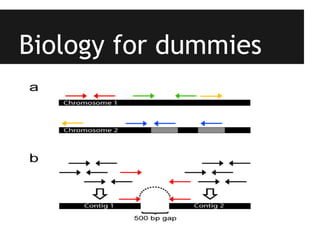
Biology for dummies
Technology - Basics
Database server
● Postgresql
● Redis
Workers
● Celery
Web server
● nginx + uWSGI
Overview - Lab
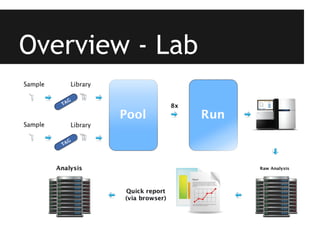
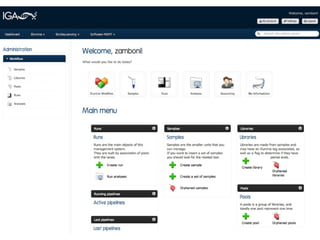
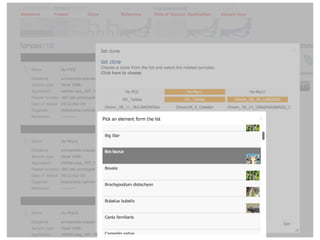
● SAMPLE: The basic unit in the lab

● LIBRARY: a treated sample with an attached
  chemical TAG.

● POOL: a set of libraries, ready to be placed
  on a flowcell's lane.
Overview - Lab
Overview - Lab
The main challenge was to replace notebooks
with a tool that allows to:
● insert samples, libraries, pools, and edit
   them;
● create lanes and runs and the configuration
   files for the physical sequencer;
● collect the sequencer results and map them
   in a easy way
Almost done!
Overview - Lab
We started using the basic Django admin
                     BUT

● the page loading was slow
● due to the admin's nature we lacked
  flexibility
● we were forcing the lab people procedures
● management was cumbersome
Overview - Analyses
After the physical sequencing the raw data
(basecalls) must be converted in FASTQ files.

The FASTQ files are FASTA files with some
embedded quality stats.

They are the starting point for almost every
genomic analysis.
Overview - Analyses
To optimize time and resources we use a
cluster of Celery workers.

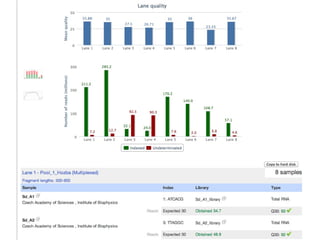
● we track the software packages used
● we track their parameters
● we create a set of useful stats
Technology
Additions:

● Informational celery tasks (list directories
  content, copy files between devices with
  dbus plugin and UDisks instead of ugly
  hacks, ...)
Overview - Pipelines
FASTQ files     alignments and assemblies

Each analysis use different software in
sequence or in parallel.
Using hundreds of samples, the analyses can't
be handled manually.
Pipelines
The results of each pipelines (like previous
analyses) must be tracked.

Since CLI based software is not user-friendly,
we develop a graphical pipeline builder.

Users are able to choose and combine different
softwares to perform their own analyses.
Pipeline
● Workers have different queues in order to
  satisfy different tasks

● Worker's tasks talk each other with Redis to
  avoid inconsistencies and to improve
  performances
Pipelines
Different queues (stored in Redis dbs):

  ○   available
  ○   queued
  ○   active
  ○   completed
  ○   error
Pipelines
Video demonstration of a working pipeline with
use of different kind of steps.
(1 video: 1 minute)
Under development
● simple interface that allow customers to:
  ○ insert their samples directly
  ○ watch the results of their pipeline in a genome
      browser - also made with Django (see below)!

● barcodes

● genome browser (like GMOD GBrowse, but
  with the greatness of Python instead of the
  confusion of Perl)
Genome browser
An application that allows browsing a genome's
annotations (like genes, or where reads are
aligned).

Actually, the best web genome browser is
GMOD Gbrowse.
Genome browser
The challenge is to develop a genome browser
that has a set of basic features and could
accept plugins for particular type of data - like
GMOD Gbrowse.

In addition, it must be quick and easy to
manage - NOT like GMOD Gbrowse.
Genome browser
Video demonstration of the genome browser.
(2 videos: 1 minute + 1 minute)
Acknowledgments
● The wet-lab     Teams that developed:
  ladies at IGA   ● Django
                  ● JQuery
                  ● nginx
● WEBdeBS         ● uWSGI
                  ● Celery
                  ● Redis
                  ● pip and virtualenv
                  ● PostgreSQL
                  ● All the open source projects involved

Iga workflow

  • 1.
  • 2.
    Introduction IGA Workflow isa web-based tool created using the Django Framework. It is intended as a management tool for the IGA wet-lab. We use it to track the lifecycle of biological samples, from vial to file.
  • 3.
    Overview ● Laboratory management,from sample to flowcell ● Bioinformatic analyses ● Pipelines management ● Technology ● Other applications and future developments
  • 4.
  • 5.
    Technology - Basics Databaseserver ● Postgresql ● Redis Workers ● Celery Web server ● nginx + uWSGI
  • 6.
    Overview - Lab ●SAMPLE: The basic unit in the lab ● LIBRARY: a treated sample with an attached chemical TAG. ● POOL: a set of libraries, ready to be placed on a flowcell's lane.
  • 7.
  • 8.
    Overview - Lab Themain challenge was to replace notebooks with a tool that allows to: ● insert samples, libraries, pools, and edit them; ● create lanes and runs and the configuration files for the physical sequencer; ● collect the sequencer results and map them in a easy way Almost done!
  • 9.
    Overview - Lab Westarted using the basic Django admin BUT ● the page loading was slow ● due to the admin's nature we lacked flexibility ● we were forcing the lab people procedures ● management was cumbersome
  • 12.
    Overview - Analyses Afterthe physical sequencing the raw data (basecalls) must be converted in FASTQ files. The FASTQ files are FASTA files with some embedded quality stats. They are the starting point for almost every genomic analysis.
  • 13.
    Overview - Analyses Tooptimize time and resources we use a cluster of Celery workers. ● we track the software packages used ● we track their parameters ● we create a set of useful stats
  • 15.
    Technology Additions: ● Informational celerytasks (list directories content, copy files between devices with dbus plugin and UDisks instead of ugly hacks, ...)
  • 16.
    Overview - Pipelines FASTQfiles alignments and assemblies Each analysis use different software in sequence or in parallel. Using hundreds of samples, the analyses can't be handled manually.
  • 17.
    Pipelines The results ofeach pipelines (like previous analyses) must be tracked. Since CLI based software is not user-friendly, we develop a graphical pipeline builder. Users are able to choose and combine different softwares to perform their own analyses.
  • 18.
    Pipeline ● Workers havedifferent queues in order to satisfy different tasks ● Worker's tasks talk each other with Redis to avoid inconsistencies and to improve performances
  • 19.
    Pipelines Different queues (storedin Redis dbs): ○ available ○ queued ○ active ○ completed ○ error
  • 20.
    Pipelines Video demonstration ofa working pipeline with use of different kind of steps. (1 video: 1 minute)
  • 21.
    Under development ● simpleinterface that allow customers to: ○ insert their samples directly ○ watch the results of their pipeline in a genome browser - also made with Django (see below)! ● barcodes ● genome browser (like GMOD GBrowse, but with the greatness of Python instead of the confusion of Perl)
  • 22.
    Genome browser An applicationthat allows browsing a genome's annotations (like genes, or where reads are aligned). Actually, the best web genome browser is GMOD Gbrowse.
  • 23.
    Genome browser The challengeis to develop a genome browser that has a set of basic features and could accept plugins for particular type of data - like GMOD Gbrowse. In addition, it must be quick and easy to manage - NOT like GMOD Gbrowse.
  • 24.
    Genome browser Video demonstrationof the genome browser. (2 videos: 1 minute + 1 minute)
  • 25.
    Acknowledgments ● The wet-lab Teams that developed: ladies at IGA ● Django ● JQuery ● nginx ● WEBdeBS ● uWSGI ● Celery ● Redis ● pip and virtualenv ● PostgreSQL ● All the open source projects involved