
SCADA AND HMI SECURITY IN
INDUSOFT WEB STUDIO
July 16, 2014
AGENDA
Agenda
Enhancing Cybersecurity on InduSoft Projects
– Sundar Krishnan, Cybersecurity and Counter Terrorism
– Sundar.Krishnan@InduSoft.com
Firewalls and other SCADA Security Considerations
– Chuck Adams, President, Capstone Works
– Chuck.Adams@CapstoneWorks.com
ENHANCING CYBERSECURITY ON
INDUSOFT PROJECTS
Agenda
Cybersecurity in SCADA world – a background
Guidelines to improve security on Indusoft projects
to thwart cyber-attacks
Trainings, further readings, and certifications
Summary
CYBERSECURITY IN SCADA WORLD
SCADA CYBERSECURITY Overview
SCADA (Industrial Control Systems)- Key to nation's
critical infrastructure
SCADA world- Consists of Electronic components,
computers, applications
Threats from Cyberspace on SCADA infrastructure
416 days before Advanced Hackers are detected
(Mandiant)
Cost of cyber-attacks within the USA at $8.9 billion in
2012 (Ponemon Institute)
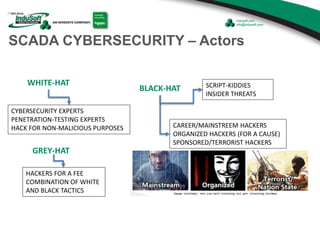
SCADA CYBERSECURITY – Actors
WHITE-HAT
BLACK-HAT
CAREER/MAINSTREEM HACKERS
ORGANIZED HACKERS (FOR A CAUSE)
SPONSORED/TERRORIST HACKERS
SCRIPT-KIDDIES
INSIDER THREATS
CYBERSECURITY EXPERTS
PENETRATION-TESTING EXPERTS
HACK FOR NON-MALICIOUS PURPOSES
GREY-HAT
HACKERS FOR A FEE
COMBINATION OF WHITE
AND BLACK TACTICS
SCADA CYBERSECURITY STANDARDS & GUIDELINES –
Highlights
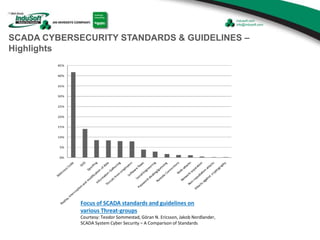
Focus of SCADA standards and guidelines on
various Threat-groups
Courtesy: Teodor Sommestad, Göran N. Ericsson, Jakob Nordlander,
SCADA System Cyber Security – A Comparison of Standards
SCADA CYBERSECURITY STANDARDS & GUIDELINES –
Highlights contd.
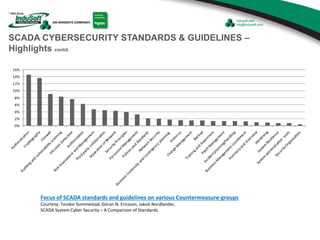
Focus of SCADA standards and guidelines on various Countermeasure-groups
Courtesy: Teodor Sommestad, Göran N. Ericsson, Jakob Nordlander,
SCADA System Cyber Security – A Comparison of Standards
GUIDELINES ON IMPLEMENTING
CYBERSECURITY MEASURES
RISK MANAGEMENT
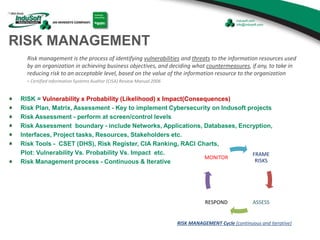
RISK = Vulnerability x Probability (Likelihood) x Impact(Consequences)
Risk Plan, Matrix, Assessment - Key to implement Cybersecurity on Indusoft projects
Risk Assessment - perform at screen/control levels
Risk Assessment boundary - include Networks, Applications, Databases, Encryption,
Interfaces, Project tasks, Resources, Stakeholders etc.
Risk Tools - CSET (DHS), Risk Register, CIA Ranking, RACI Charts,
Plot: Vulnerability Vs. Probability Vs. Impact etc.
Risk Management process - Continuous & Iterative
Risk management is the process of identifying vulnerabilities and threats to the information resources used
by an organization in achieving business objectives, and deciding what countermeasures, if any, to take in
reducing risk to an acceptable level, based on the value of the information resource to the organization
- Certified Information Systems Auditor (CISA) Review Manual 2006
FRAME
RISKS
ASSESSRESPOND
MONITOR
RISK MANAGEMENT Cycle (continuous and iterative)
RISK MANAGEMENT– cont.
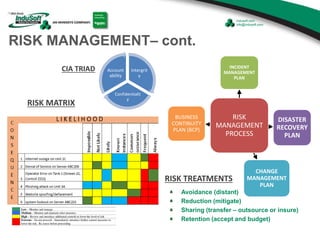
Intergrit
y
Confidentialit
y
Account
ability
CIA TRIAD
RISK MATRIX
RISK
MANAGEMENT
PROCESS
INCIDENT
MANAGEMENT
PLAN
DISASTER
RECOVERY
PLAN
CHANGE
MANAGEMENT
PLAN
BUSINESS
CONTINUITY
PLAN (BCP)
RISK TREATMENTS
Avoidance (distant)
Reduction (mitigate)
Sharing (transfer – outsource or insure)
Retention (accept and budget)
RISK MANAGEMENT– cont.
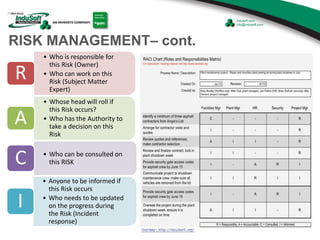
• Who is responsible for
this Risk (Owner)
• Who can work on this
Risk (Subject Matter
Expert)
R
• Whose head will roll if
this Risk occurs?
• Who has the Authority to
take a decision on this
Risk
A
• Who can be consulted on
this RISKC
• Anyone to be informed if
this Risk occurs
• Who needs to be updated
on the progress during
the Risk (Incident
response)
I
PROJECT SECURITY DESIGN
Security Design/Architecture - a secure project artifact on all Indusoft projects
Completed before the start of the project
Periodically revisited for change
Address threats identified in the Risk assessment
Address all interfaces to the project/solution
Outline owners of components
Passwords, encryption keys, sensitive information – Secure storage
Contain details of Network Topology and Security, Application Security,
Database Security, Operating System security, Encryptions, Protocols, Web
Certificates, Patches, Firmware, Hardware etc.
STRONG PASSWORDS
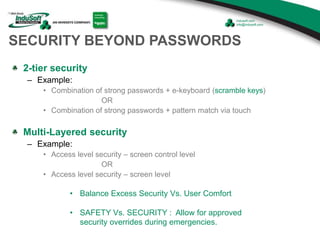
STRONG = minimum of 8 alpha-numeric characters long (combination
of upper, lower, numbers and special characters)
Configure to periodically change
Reset all passwords post go-live of project (hand-off)
NO blank passwords
NO default passwords (from 3rd party applications)
NO scribble/scrawl of credentials
at workplace for easy recollection
NO sharing
NO reuse
SECURITY BEYOND PASSWORDS
2-tier security
– Example:
• Combination of strong passwords + e-keyboard (scramble keys)
OR
• Combination of strong passwords + pattern match via touch
Multi-Layered security
– Example:
• Access level security – screen control level
OR
• Access level security – screen level
• Balance Excess Security Vs. User Comfort
• SAFETY Vs. SECURITY : Allow for approved
security overrides during emergencies.
SECURITY BEYOND PASSWORDS - contd
Project Security design
should address:
– Runtime Security
– Engineering Access
– Auto Log-Off options
– Account Lockup (after 3 tries)
[to be strictly enforced]
– Password options enforcement
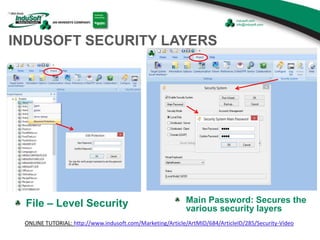
INDUSOFT SECURITY LAYERS
File – Level Security Main Password: Secures the
various security layers
ONLINE TUTORIAL: http://www.indusoft.com/Marketing/Article/ArtMID/684/ArticleID/285/Security-Video
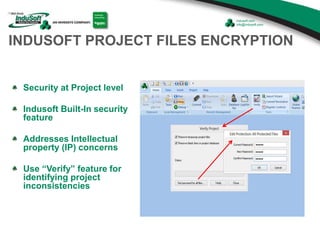
INDUSOFT PROJECT FILES ENCRYPTION
Security at Project level
Indusoft Built-In security
feature
Addresses Intellectual
property (IP) concerns
Use “Verify” feature for
identifying project
inconsistencies
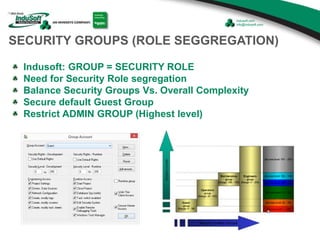
SECURITY GROUPS (ROLE SEGGREGATION)
Indusoft: GROUP = SECURITY ROLE
Need for Security Role segregation
Balance Security Groups Vs. Overall Complexity
Secure default Guest Group
Restrict ADMIN GROUP (Highest level)
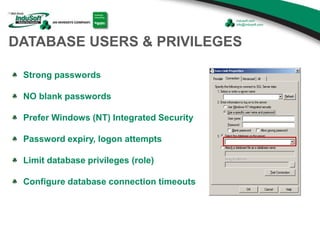
DATABASE USERS & PRIVILEGES
Strong passwords
NO blank passwords
Prefer Windows (NT) Integrated Security
Password expiry, logon attempts
Limit database privileges (role)
Configure database connection timeouts
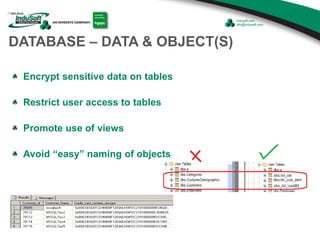
DATABASE – DATA & OBJECT(S)
Encrypt sensitive data on tables
Restrict user access to tables
Promote use of views
Avoid “easy” naming of objects
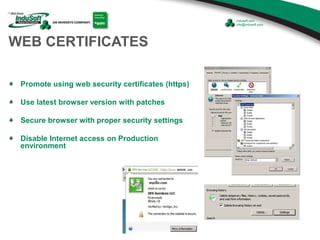
WEB CERTIFICATES
Promote using web security certificates (https)
Use latest browser version with patches
Secure browser with proper security settings
Disable Internet access on Production
environment
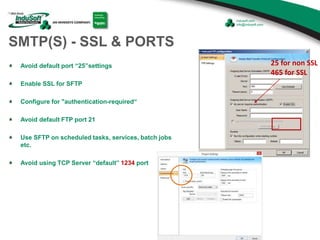
SMTP(S) - SSL & PORTS
Avoid default port “25”settings
Enable SSL for SFTP
Configure for "authentication-required“
Avoid default FTP port 21
Use SFTP on scheduled tasks, services, batch jobs
etc.
Avoid using TCP Server “default” 1234 port
25 for non SSL
465 for SSL
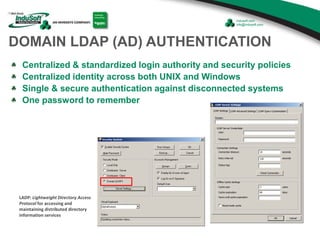
DOMAIN LDAP (AD) AUTHENTICATION
Centralized & standardized login authority and security policies
Centralized identity across both UNIX and Windows
Single & secure authentication against disconnected systems
One password to remember
LADP: Lightweight Directory Access
Protocol for accessing and
maintaining distributed directory
information services
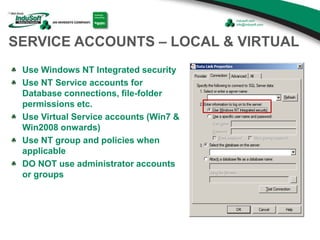
SERVICE ACCOUNTS – LOCAL & VIRTUAL
Use Windows NT Integrated security
Use NT Service accounts for
Database connections, file-folder
permissions etc.
Use Virtual Service accounts (Win7 &
Win2008 onwards)
Use NT group and policies when
applicable
DO NOT use administrator accounts
or groups
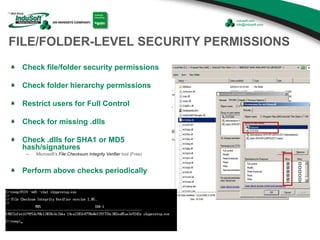
FILE/FOLDER-LEVEL SECURITY PERMISSIONS
Check file/folder security permissions
Check folder hierarchy permissions
Restrict users for Full Control
Check for missing .dlls
Check .dlls for SHA1 or MD5
hash/signatures
– Microsoft’s File Checksum Integrity Verifier tool (Free)
Perform above checks periodically
NETWORK SECURITY
Need for firewalls, IDS, IPS, Routers
Block unused ports (free-port management)
Segregate business networks from corporate network via
firewalls.
Understand communication protocols used
Implement tools to continuously monitor and manage
networks
Evaluate SSL, VPN, Encryption, Malware defenses on
Indusoft projects
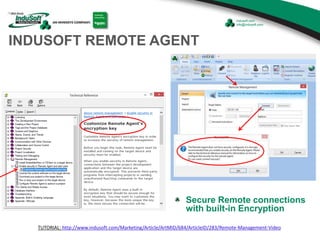
INDUSOFT REMOTE AGENT
Secure Remote connections
with built-in Encryption
TUTORIAL: http://www.indusoft.com/Marketing/Article/ArtMID/684/ArticleID/283/Remote-Management-Video
MOBILE SECURITY
Evaluate Risk with mobile devices (Use a risk-based approach
such as the NIST Cybersecurity Framework)
Identify and catalog mobile devices on network
Assign proper content and functionality to each device specific
to user
Ensure passphrase or password lock feature with periodically
change.
Use of encryption
Deliver only location-based content to the device via fencing
restrictions (based on GPS coordinates or Wi-Fi triangulation of
their portal)
Follow other security best practices
InduSoft delivers a HMI application’s Smart Device Content securely to
HTML5 compliant mobile browsers
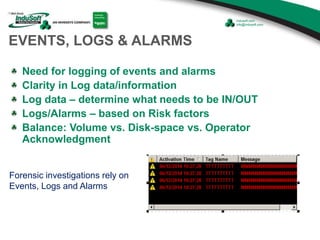
Forensic investigations rely on
Events, Logs and Alarms
EVENTS, LOGS & ALARMS
Need for logging of events and alarms
Clarity in Log data/information
Log data – determine what needs to be IN/OUT
Logs/Alarms – based on Risk factors
Balance: Volume vs. Disk-space vs. Operator
Acknowledgment
FORENSIC TIP: DO NOT POWER-OFF A
COMPROMISED COMPUTER UNTIL
INCIDENT/FORENSIC TEAM RESPONDS. YOU
MAY ONLY UNPLUG THE COMPUTER FROM
THE NETWORK WHILE WAITING.
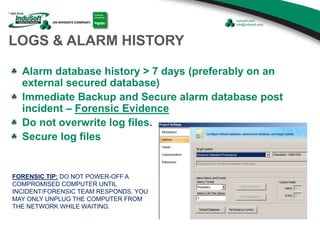
LOGS & ALARM HISTORY
Alarm database history > 7 days (preferably on an
external secured database)
Immediate Backup and Secure alarm database post
incident – Forensic Evidence
Do not overwrite log files.
Secure log files
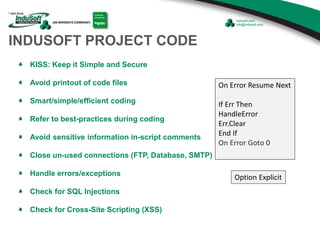
INDUSOFT PROJECT CODE
KISS: Keep it Simple and Secure
Avoid printout of code files
Smart/simple/efficient coding
Refer to best-practices during coding
Avoid sensitive information in-script comments
Close un-used connections (FTP, Database, SMTP)
Handle errors/exceptions
Check for SQL Injections
Check for Cross-Site Scripting (XSS)
Option Explicit
On Error Resume Next
If Err Then
HandleError
Err.Clear
End If
On Error Goto 0
PROJECT DOCUMENTATION
Safeguard project documentation
Destroy sensitive documents
Privacy Concerns
Use Configuration Management
process
Promote TFS Integration
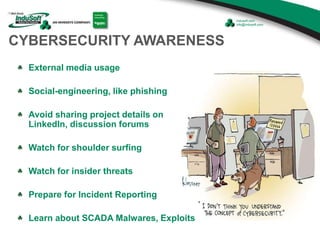
CYBERSECURITY AWARENESS
External media usage
Social-engineering, like phishing
Avoid sharing project details on
LinkedIn, discussion forums
Watch for shoulder surfing
Watch for insider threats
Prepare for Incident Reporting
Learn about SCADA Malwares, Exploits
TRAININGS, FURTHER READINGS,
AND CERTIFICATIONS
TRAININGS , FURTHER READING & CERTIFICATIONS
• NIST Framework - http://www.nist.gov/cyberframework/upload/cybersecurity-framework-021214.pdf
• ICS-CERT – Industrial Control Systems Cybersecurity Online trainings – FREE
• ICS-CERT – Industrial Control Systems Cybersecurity Certifications – FREE
• OWSAP - Open Web Application Security Project – FREE membership @ local chapters
• National SCADA Test Bed Program Online security trainings (http://www.inl.gov/scada/training/) – FREE
• Cyber Terrorism Defense Initiative (FEMA - http://www.cyberterrorismcenter.org/registration.html) – FREE
• Infraguard- Security awareness trainings ( https://www.infragardawareness.com/ ) – FREE
• SANS Institute Webcasts (https://www.sans.org/webcasts/ ) – FREE
SUMMARY
SUMMARY
Cybersecurity Threats in the SCADA world are for real
Volume and complexity of Cyber-threats grow each day
Project Goals to incorporate “Security”
Implement project’s Risk Management process in essence
Incorporate Security alongside Safety in all levels of designs
All project stakeholders need to be Cybersecurity Evangelists
SECURE SCADA WORLD = SECURE NATIONAL INFRASTRUCTURE
FIREWALLS AND OTHER SCADA
SECURITY CONSIDERATIONS
Firewalls, and other
SCADA Security
considerations
WHAT YOU DON’T KNOW CAN HURT YOU!
Threats abound
Control systems have become the target of actors
seeking to damage national infrastructure.
Many control systems are “too vulnerable” and can
be exploited as SPAM bots or much worse
Lets talk about two examples…
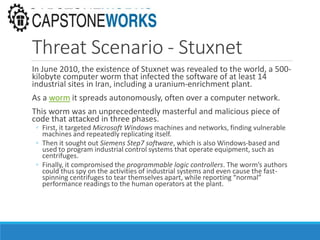
Threat Scenario – Harrisburg, PA
The water supply system in Harrisburg,
Pennsylvania was attacked in 2006.
◦ An employee has a company laptop on the internet at his
home office, connected to the control network through a
VPN (Virtual Private Network)
◦ A hacker from overseas infects the laptop with a virus
over the Internet
◦ The virus then propagates over the VPN connection into
the control network and infects another Windows PC
located right in the heart of the control system
◦ The infected systems were used to distribute SPAM email
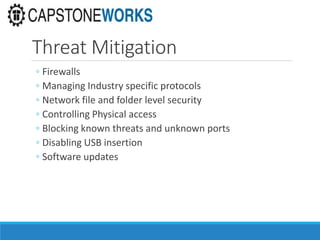
Threat Scenario - Stuxnet
In June 2010, the existence of Stuxnet was revealed to the world, a 500-
kilobyte computer worm that infected the software of at least 14
industrial sites in Iran, including a uranium-enrichment plant.
As a worm it spreads autonomously, often over a computer network.
This worm was an unprecedentedly masterful and malicious piece of
code that attacked in three phases.
◦ First, it targeted Microsoft Windows machines and networks, finding vulnerable
machines and repeatedly replicating itself.
◦ Then it sought out Siemens Step7 software, which is also Windows-based and
used to program industrial control systems that operate equipment, such as
centrifuges.
◦ Finally, it compromised the programmable logic controllers. The worm’s authors
could thus spy on the activities of industrial systems and even cause the fast-
spinning centrifuges to tear themselves apart, while reporting “normal”
performance readings to the human operators at the plant.
Threat Mitigation
◦ Firewalls
◦ Managing Industry specific protocols
◦ Network file and folder level security
◦ Controlling Physical access
◦ Blocking known threats and unknown ports
◦ Disabling USB insertion
◦ Software updates
Firewalls – what are they, anyway?
◦ Perimeter Security
◦ Stands between you and the “bad guys”
◦ Works at a fairly low level – data and network layers
◦ (OSI Layer 2 and OSI Layer 3)
◦ Inspects packets, dropping those matching its “threat”
rules
◦ Typically requires specific IT expertise to “get it right”
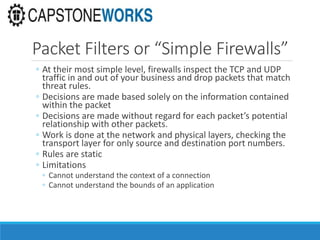
Basic types of Firewalls
◦Three broad categories of firewalls
◦ Packet Filters
◦ Stateful Packet Filters
◦ Application Aware Packet Filters
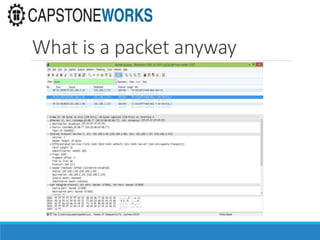
What is a packet anyway
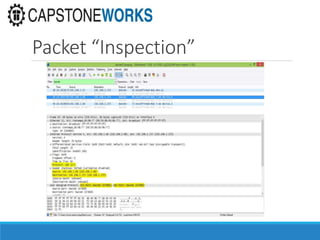
Packet Filters or “Simple Firewalls”
◦ At their most simple level, firewalls inspect the TCP and UDP
traffic in and out of your business and drop packets that match
threat rules.
◦ Decisions are made based solely on the information contained
within the packet
◦ Decisions are made without regard for each packet’s potential
relationship with other packets.
◦ Work is done at the network and physical layers, checking the
transport layer for only source and destination port numbers.
◦ Rules are static
◦ Limitations
◦ Cannot understand the context of a connection
◦ Cannot understand the bounds of an application
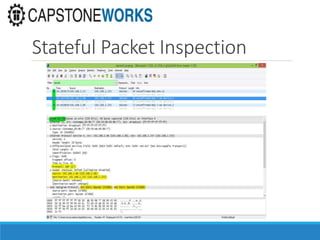
Packet “Inspection”
Stateful or Second Generation Firewalls
◦ These preform all the functions of the simple firewall,
plus:
◦ They retain the packet long enough to know if the packet is
◦ the start of a new connection
◦ part of an existing connection
◦ not part of any connection
◦ Rules are still static, but can now make decisions based on
connection state
◦ Limitations
◦ Cannot detect events that would be out of bounds for a particular
application protocol
Stateful Packet Inspection
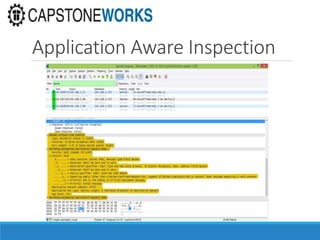
Next Generation Firewalls
Application aware
◦ Operates at TCP/UDP protocols and below - OSI Layer 2,3
and 4
◦ “Understands” FTP (21), SMTP (25), DNS (53), HTTP (80),
HTTPS (443), and certain firewall industry specific
protocols
◦ Can detect attempts to gain access through misuse of
standard or known application ports
◦ Performs their work through deep packet inspection
◦ Delving into the contents and message contained within the
TCP/UDP packets.
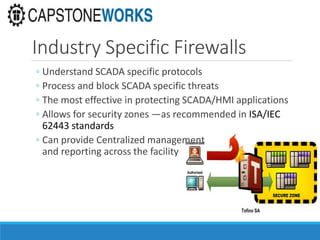
Industry Specific Firewalls
◦ Understand SCADA specific protocols
◦ Process and block SCADA specific threats
◦ The most effective in protecting SCADA/HMI applications
◦ Allows for security zones —as recommended in ISA/IEC
62443 standards
◦ Can provide Centralized management
and reporting across the facility
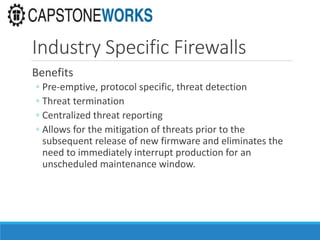
Industry Specific Firewalls
Benefits
◦ Pre-emptive, protocol specific, threat detection
◦ Threat termination
◦ Centralized threat reporting
◦ Allows for the mitigation of threats prior to the
subsequent release of new firmware and eliminates the
need to immediately interrupt production for an
unscheduled maintenance window.
Application Aware Inspection
Network and File Level Security
File Level Encryption
Windows NTFS Permissions
◦ Security Groups
◦ Share Permissions
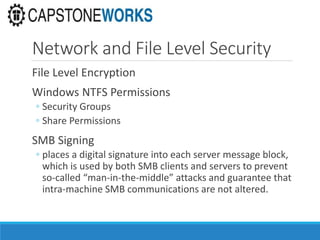
SMB Signing
◦ places a digital signature into each server message block,
which is used by both SMB clients and servers to prevent
so-called “man-in-the-middle” attacks and guarantee that
intra-machine SMB communications are not altered.
Network and File Level Security
Remote Desktop Limitations
◦ Restrict access to only known IP Addresses/Subnets
Caveats
◦ Given users with access to the Indusoft project folder,
security must be managed
◦ Secure critical areas using file & folder level security
◦ Windows Domain level security is best
◦ Workgroup security is much less granular and not centrally
managed
Physical Access Controls
◦ Physical Room Access
◦ Password/Keypad
◦ Biometric Access – Fingerprint/Retina Scans
◦ GOFL – Good Old Fashioned Locks
◦ Compartmentalized Machine Access
◦ Locked Racks within locked rooms
◦ Limit USB Keys
◦ Disable USB Key Drivers to prevent USB Key insertion
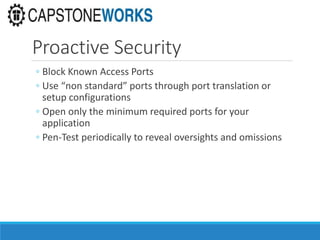
Proactive Security
◦ Block Known Access Ports
◦ Use “non standard” ports through port translation or
setup configurations
◦ Open only the minimum required ports for your
application
◦ Pen-Test periodically to reveal oversights and omissions
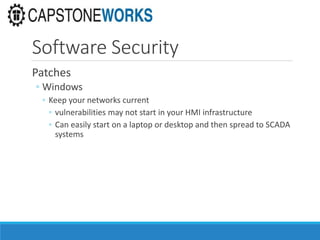
Software Security
Patches
◦ Windows
◦ Keep your networks current
◦ vulnerabilities may not start in your HMI infrastructure
◦ Can easily start on a laptop or desktop and then spread to SCADA
systems
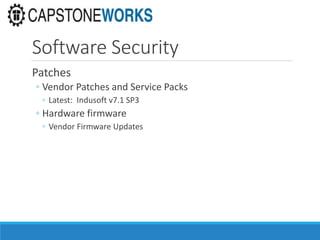
Software Security
Patches
◦ Vendor Patches and Service Packs
◦ Latest: Indusoft v7.1 SP3
◦ Hardware firmware
◦ Vendor Firmware Updates
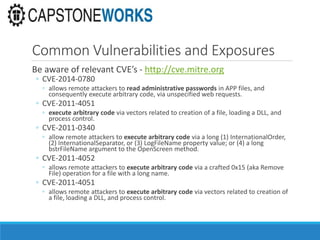
Common Vulnerabilities and Exposures
Be aware of relevant CVE’s - http://cve.mitre.org
◦ CVE-2014-0780
◦ allows remote attackers to read administrative passwords in APP files, and
consequently execute arbitrary code, via unspecified web requests.
◦ CVE-2011-4051
◦ execute arbitrary code via vectors related to creation of a file, loading a DLL, and
process control.
◦ CVE-2011-0340
◦ allow remote attackers to execute arbitrary code via a long (1) InternationalOrder,
(2) InternationalSeparator, or (3) LogFileName property value; or (4) a long
bstrFileName argument to the OpenScreen method.
◦ CVE-2011-4052
◦ allows remote attackers to execute arbitrary code via a crafted 0x15 (aka Remove
File) operation for a file with a long name.
◦ CVE-2011-4051
◦ allows remote attackers to execute arbitrary code via vectors related to creation of
a file, loading a DLL, and process control.
References
http://en.wikipedia.org/wiki/Cyber_security_standards
http://www.popularmechanics.com/technology/military/4307528
http://www.ethicalhacker.net
http://www.watchguard.com
https://www.tofinosecurity.com/products/overview
http://www.automation.com/automation-news/project/belden-supplies-tofino-
firewall-software-to-schneider-electric
https://www.tofinosecurity.com/products/tofino-xenon-security-appliance
http://cve.mitre.org
http://www.networkworld.com/article/2229737/microsoft-subnet/smb-signing-
and-security.html
Q & A
HOW TO CONTACT INDUSOFT
Email
(US) info@indusoft.com
(Brazil) info@indusoft.com.br
(Germany) info@indusoft.com.de
Support support@indusoft.com
Web site
(English) www.indusoft.com
(Portuguese) www.indusoft.com.br
(German) www.indusoft.com.de
Phone (512) 349-0334 (US)
+55-11-3293-9139 (Brazil)
+49 (0) 6227-732510 (Germany)
Toll-Free 877-INDUSOFT (877-463-8763)
Fax (512) 349-0375
Germany
USA
Brazil
Contact InduSoft Today

SCADA and HMI Security in InduSoft Web Studio

  • 1.
    SCADA AND HMISECURITY IN INDUSOFT WEB STUDIO July 16, 2014
  • 2.
  • 3.
    Agenda Enhancing Cybersecurity onInduSoft Projects – Sundar Krishnan, Cybersecurity and Counter Terrorism – Sundar.Krishnan@InduSoft.com Firewalls and other SCADA Security Considerations – Chuck Adams, President, Capstone Works – Chuck.Adams@CapstoneWorks.com
  • 4.
  • 5.
    Agenda Cybersecurity in SCADAworld – a background Guidelines to improve security on Indusoft projects to thwart cyber-attacks Trainings, further readings, and certifications Summary
  • 6.
  • 7.
    SCADA CYBERSECURITY Overview SCADA(Industrial Control Systems)- Key to nation's critical infrastructure SCADA world- Consists of Electronic components, computers, applications Threats from Cyberspace on SCADA infrastructure 416 days before Advanced Hackers are detected (Mandiant) Cost of cyber-attacks within the USA at $8.9 billion in 2012 (Ponemon Institute)
  • 8.
    SCADA CYBERSECURITY –Actors WHITE-HAT BLACK-HAT CAREER/MAINSTREEM HACKERS ORGANIZED HACKERS (FOR A CAUSE) SPONSORED/TERRORIST HACKERS SCRIPT-KIDDIES INSIDER THREATS CYBERSECURITY EXPERTS PENETRATION-TESTING EXPERTS HACK FOR NON-MALICIOUS PURPOSES GREY-HAT HACKERS FOR A FEE COMBINATION OF WHITE AND BLACK TACTICS
  • 9.
    SCADA CYBERSECURITY STANDARDS& GUIDELINES – Highlights Focus of SCADA standards and guidelines on various Threat-groups Courtesy: Teodor Sommestad, Göran N. Ericsson, Jakob Nordlander, SCADA System Cyber Security – A Comparison of Standards
  • 10.
    SCADA CYBERSECURITY STANDARDS& GUIDELINES – Highlights contd. Focus of SCADA standards and guidelines on various Countermeasure-groups Courtesy: Teodor Sommestad, Göran N. Ericsson, Jakob Nordlander, SCADA System Cyber Security – A Comparison of Standards
  • 11.
  • 12.
    RISK MANAGEMENT RISK =Vulnerability x Probability (Likelihood) x Impact(Consequences) Risk Plan, Matrix, Assessment - Key to implement Cybersecurity on Indusoft projects Risk Assessment - perform at screen/control levels Risk Assessment boundary - include Networks, Applications, Databases, Encryption, Interfaces, Project tasks, Resources, Stakeholders etc. Risk Tools - CSET (DHS), Risk Register, CIA Ranking, RACI Charts, Plot: Vulnerability Vs. Probability Vs. Impact etc. Risk Management process - Continuous & Iterative Risk management is the process of identifying vulnerabilities and threats to the information resources used by an organization in achieving business objectives, and deciding what countermeasures, if any, to take in reducing risk to an acceptable level, based on the value of the information resource to the organization - Certified Information Systems Auditor (CISA) Review Manual 2006 FRAME RISKS ASSESSRESPOND MONITOR RISK MANAGEMENT Cycle (continuous and iterative)
  • 13.
    RISK MANAGEMENT– cont. Intergrit y Confidentialit y Account ability CIATRIAD RISK MATRIX RISK MANAGEMENT PROCESS INCIDENT MANAGEMENT PLAN DISASTER RECOVERY PLAN CHANGE MANAGEMENT PLAN BUSINESS CONTINUITY PLAN (BCP) RISK TREATMENTS Avoidance (distant) Reduction (mitigate) Sharing (transfer – outsource or insure) Retention (accept and budget)
  • 14.
    RISK MANAGEMENT– cont. •Who is responsible for this Risk (Owner) • Who can work on this Risk (Subject Matter Expert) R • Whose head will roll if this Risk occurs? • Who has the Authority to take a decision on this Risk A • Who can be consulted on this RISKC • Anyone to be informed if this Risk occurs • Who needs to be updated on the progress during the Risk (Incident response) I
  • 15.
    PROJECT SECURITY DESIGN SecurityDesign/Architecture - a secure project artifact on all Indusoft projects Completed before the start of the project Periodically revisited for change Address threats identified in the Risk assessment Address all interfaces to the project/solution Outline owners of components Passwords, encryption keys, sensitive information – Secure storage Contain details of Network Topology and Security, Application Security, Database Security, Operating System security, Encryptions, Protocols, Web Certificates, Patches, Firmware, Hardware etc.
  • 16.
    STRONG PASSWORDS STRONG =minimum of 8 alpha-numeric characters long (combination of upper, lower, numbers and special characters) Configure to periodically change Reset all passwords post go-live of project (hand-off) NO blank passwords NO default passwords (from 3rd party applications) NO scribble/scrawl of credentials at workplace for easy recollection NO sharing NO reuse
  • 17.
    SECURITY BEYOND PASSWORDS 2-tiersecurity – Example: • Combination of strong passwords + e-keyboard (scramble keys) OR • Combination of strong passwords + pattern match via touch Multi-Layered security – Example: • Access level security – screen control level OR • Access level security – screen level • Balance Excess Security Vs. User Comfort • SAFETY Vs. SECURITY : Allow for approved security overrides during emergencies.
  • 18.
    SECURITY BEYOND PASSWORDS- contd Project Security design should address: – Runtime Security – Engineering Access – Auto Log-Off options – Account Lockup (after 3 tries) [to be strictly enforced] – Password options enforcement
  • 19.
    INDUSOFT SECURITY LAYERS File– Level Security Main Password: Secures the various security layers ONLINE TUTORIAL: http://www.indusoft.com/Marketing/Article/ArtMID/684/ArticleID/285/Security-Video
  • 20.
    INDUSOFT PROJECT FILESENCRYPTION Security at Project level Indusoft Built-In security feature Addresses Intellectual property (IP) concerns Use “Verify” feature for identifying project inconsistencies
  • 21.
    SECURITY GROUPS (ROLESEGGREGATION) Indusoft: GROUP = SECURITY ROLE Need for Security Role segregation Balance Security Groups Vs. Overall Complexity Secure default Guest Group Restrict ADMIN GROUP (Highest level)
  • 22.
    DATABASE USERS &PRIVILEGES Strong passwords NO blank passwords Prefer Windows (NT) Integrated Security Password expiry, logon attempts Limit database privileges (role) Configure database connection timeouts
  • 23.
    DATABASE – DATA& OBJECT(S) Encrypt sensitive data on tables Restrict user access to tables Promote use of views Avoid “easy” naming of objects
  • 24.
    WEB CERTIFICATES Promote usingweb security certificates (https) Use latest browser version with patches Secure browser with proper security settings Disable Internet access on Production environment
  • 25.
    SMTP(S) - SSL& PORTS Avoid default port “25”settings Enable SSL for SFTP Configure for "authentication-required“ Avoid default FTP port 21 Use SFTP on scheduled tasks, services, batch jobs etc. Avoid using TCP Server “default” 1234 port 25 for non SSL 465 for SSL
  • 26.
    DOMAIN LDAP (AD)AUTHENTICATION Centralized & standardized login authority and security policies Centralized identity across both UNIX and Windows Single & secure authentication against disconnected systems One password to remember LADP: Lightweight Directory Access Protocol for accessing and maintaining distributed directory information services
  • 27.
    SERVICE ACCOUNTS –LOCAL & VIRTUAL Use Windows NT Integrated security Use NT Service accounts for Database connections, file-folder permissions etc. Use Virtual Service accounts (Win7 & Win2008 onwards) Use NT group and policies when applicable DO NOT use administrator accounts or groups
  • 28.
    FILE/FOLDER-LEVEL SECURITY PERMISSIONS Checkfile/folder security permissions Check folder hierarchy permissions Restrict users for Full Control Check for missing .dlls Check .dlls for SHA1 or MD5 hash/signatures – Microsoft’s File Checksum Integrity Verifier tool (Free) Perform above checks periodically
  • 29.
    NETWORK SECURITY Need forfirewalls, IDS, IPS, Routers Block unused ports (free-port management) Segregate business networks from corporate network via firewalls. Understand communication protocols used Implement tools to continuously monitor and manage networks Evaluate SSL, VPN, Encryption, Malware defenses on Indusoft projects
  • 30.
    INDUSOFT REMOTE AGENT SecureRemote connections with built-in Encryption TUTORIAL: http://www.indusoft.com/Marketing/Article/ArtMID/684/ArticleID/283/Remote-Management-Video
  • 31.
    MOBILE SECURITY Evaluate Riskwith mobile devices (Use a risk-based approach such as the NIST Cybersecurity Framework) Identify and catalog mobile devices on network Assign proper content and functionality to each device specific to user Ensure passphrase or password lock feature with periodically change. Use of encryption Deliver only location-based content to the device via fencing restrictions (based on GPS coordinates or Wi-Fi triangulation of their portal) Follow other security best practices InduSoft delivers a HMI application’s Smart Device Content securely to HTML5 compliant mobile browsers
  • 32.
    Forensic investigations relyon Events, Logs and Alarms EVENTS, LOGS & ALARMS Need for logging of events and alarms Clarity in Log data/information Log data – determine what needs to be IN/OUT Logs/Alarms – based on Risk factors Balance: Volume vs. Disk-space vs. Operator Acknowledgment
  • 33.
    FORENSIC TIP: DONOT POWER-OFF A COMPROMISED COMPUTER UNTIL INCIDENT/FORENSIC TEAM RESPONDS. YOU MAY ONLY UNPLUG THE COMPUTER FROM THE NETWORK WHILE WAITING. LOGS & ALARM HISTORY Alarm database history > 7 days (preferably on an external secured database) Immediate Backup and Secure alarm database post incident – Forensic Evidence Do not overwrite log files. Secure log files
  • 34.
    INDUSOFT PROJECT CODE KISS:Keep it Simple and Secure Avoid printout of code files Smart/simple/efficient coding Refer to best-practices during coding Avoid sensitive information in-script comments Close un-used connections (FTP, Database, SMTP) Handle errors/exceptions Check for SQL Injections Check for Cross-Site Scripting (XSS) Option Explicit On Error Resume Next If Err Then HandleError Err.Clear End If On Error Goto 0
  • 35.
    PROJECT DOCUMENTATION Safeguard projectdocumentation Destroy sensitive documents Privacy Concerns Use Configuration Management process Promote TFS Integration
  • 36.
    CYBERSECURITY AWARENESS External mediausage Social-engineering, like phishing Avoid sharing project details on LinkedIn, discussion forums Watch for shoulder surfing Watch for insider threats Prepare for Incident Reporting Learn about SCADA Malwares, Exploits
  • 37.
  • 38.
    TRAININGS , FURTHERREADING & CERTIFICATIONS • NIST Framework - http://www.nist.gov/cyberframework/upload/cybersecurity-framework-021214.pdf • ICS-CERT – Industrial Control Systems Cybersecurity Online trainings – FREE • ICS-CERT – Industrial Control Systems Cybersecurity Certifications – FREE • OWSAP - Open Web Application Security Project – FREE membership @ local chapters • National SCADA Test Bed Program Online security trainings (http://www.inl.gov/scada/training/) – FREE • Cyber Terrorism Defense Initiative (FEMA - http://www.cyberterrorismcenter.org/registration.html) – FREE • Infraguard- Security awareness trainings ( https://www.infragardawareness.com/ ) – FREE • SANS Institute Webcasts (https://www.sans.org/webcasts/ ) – FREE
  • 39.
  • 40.
    SUMMARY Cybersecurity Threats inthe SCADA world are for real Volume and complexity of Cyber-threats grow each day Project Goals to incorporate “Security” Implement project’s Risk Management process in essence Incorporate Security alongside Safety in all levels of designs All project stakeholders need to be Cybersecurity Evangelists SECURE SCADA WORLD = SECURE NATIONAL INFRASTRUCTURE
  • 41.
    FIREWALLS AND OTHERSCADA SECURITY CONSIDERATIONS
  • 42.
    Firewalls, and other SCADASecurity considerations WHAT YOU DON’T KNOW CAN HURT YOU!
  • 43.
    Threats abound Control systemshave become the target of actors seeking to damage national infrastructure. Many control systems are “too vulnerable” and can be exploited as SPAM bots or much worse Lets talk about two examples…
  • 44.
    Threat Scenario –Harrisburg, PA The water supply system in Harrisburg, Pennsylvania was attacked in 2006. ◦ An employee has a company laptop on the internet at his home office, connected to the control network through a VPN (Virtual Private Network) ◦ A hacker from overseas infects the laptop with a virus over the Internet ◦ The virus then propagates over the VPN connection into the control network and infects another Windows PC located right in the heart of the control system ◦ The infected systems were used to distribute SPAM email
  • 45.
    Threat Scenario -Stuxnet In June 2010, the existence of Stuxnet was revealed to the world, a 500- kilobyte computer worm that infected the software of at least 14 industrial sites in Iran, including a uranium-enrichment plant. As a worm it spreads autonomously, often over a computer network. This worm was an unprecedentedly masterful and malicious piece of code that attacked in three phases. ◦ First, it targeted Microsoft Windows machines and networks, finding vulnerable machines and repeatedly replicating itself. ◦ Then it sought out Siemens Step7 software, which is also Windows-based and used to program industrial control systems that operate equipment, such as centrifuges. ◦ Finally, it compromised the programmable logic controllers. The worm’s authors could thus spy on the activities of industrial systems and even cause the fast- spinning centrifuges to tear themselves apart, while reporting “normal” performance readings to the human operators at the plant.
  • 46.
    Threat Mitigation ◦ Firewalls ◦Managing Industry specific protocols ◦ Network file and folder level security ◦ Controlling Physical access ◦ Blocking known threats and unknown ports ◦ Disabling USB insertion ◦ Software updates
  • 47.
    Firewalls – whatare they, anyway? ◦ Perimeter Security ◦ Stands between you and the “bad guys” ◦ Works at a fairly low level – data and network layers ◦ (OSI Layer 2 and OSI Layer 3) ◦ Inspects packets, dropping those matching its “threat” rules ◦ Typically requires specific IT expertise to “get it right”
  • 48.
    Basic types ofFirewalls ◦Three broad categories of firewalls ◦ Packet Filters ◦ Stateful Packet Filters ◦ Application Aware Packet Filters
  • 49.
    What is apacket anyway
  • 50.
    Packet Filters or“Simple Firewalls” ◦ At their most simple level, firewalls inspect the TCP and UDP traffic in and out of your business and drop packets that match threat rules. ◦ Decisions are made based solely on the information contained within the packet ◦ Decisions are made without regard for each packet’s potential relationship with other packets. ◦ Work is done at the network and physical layers, checking the transport layer for only source and destination port numbers. ◦ Rules are static ◦ Limitations ◦ Cannot understand the context of a connection ◦ Cannot understand the bounds of an application
  • 51.
  • 52.
    Stateful or SecondGeneration Firewalls ◦ These preform all the functions of the simple firewall, plus: ◦ They retain the packet long enough to know if the packet is ◦ the start of a new connection ◦ part of an existing connection ◦ not part of any connection ◦ Rules are still static, but can now make decisions based on connection state ◦ Limitations ◦ Cannot detect events that would be out of bounds for a particular application protocol
  • 53.
  • 54.
    Next Generation Firewalls Applicationaware ◦ Operates at TCP/UDP protocols and below - OSI Layer 2,3 and 4 ◦ “Understands” FTP (21), SMTP (25), DNS (53), HTTP (80), HTTPS (443), and certain firewall industry specific protocols ◦ Can detect attempts to gain access through misuse of standard or known application ports ◦ Performs their work through deep packet inspection ◦ Delving into the contents and message contained within the TCP/UDP packets.
  • 55.
    Industry Specific Firewalls ◦Understand SCADA specific protocols ◦ Process and block SCADA specific threats ◦ The most effective in protecting SCADA/HMI applications ◦ Allows for security zones —as recommended in ISA/IEC 62443 standards ◦ Can provide Centralized management and reporting across the facility
  • 56.
    Industry Specific Firewalls Benefits ◦Pre-emptive, protocol specific, threat detection ◦ Threat termination ◦ Centralized threat reporting ◦ Allows for the mitigation of threats prior to the subsequent release of new firmware and eliminates the need to immediately interrupt production for an unscheduled maintenance window.
  • 57.
  • 58.
    Network and FileLevel Security File Level Encryption Windows NTFS Permissions ◦ Security Groups ◦ Share Permissions SMB Signing ◦ places a digital signature into each server message block, which is used by both SMB clients and servers to prevent so-called “man-in-the-middle” attacks and guarantee that intra-machine SMB communications are not altered.
  • 59.
    Network and FileLevel Security Remote Desktop Limitations ◦ Restrict access to only known IP Addresses/Subnets Caveats ◦ Given users with access to the Indusoft project folder, security must be managed ◦ Secure critical areas using file & folder level security ◦ Windows Domain level security is best ◦ Workgroup security is much less granular and not centrally managed
  • 60.
    Physical Access Controls ◦Physical Room Access ◦ Password/Keypad ◦ Biometric Access – Fingerprint/Retina Scans ◦ GOFL – Good Old Fashioned Locks ◦ Compartmentalized Machine Access ◦ Locked Racks within locked rooms ◦ Limit USB Keys ◦ Disable USB Key Drivers to prevent USB Key insertion
  • 61.
    Proactive Security ◦ BlockKnown Access Ports ◦ Use “non standard” ports through port translation or setup configurations ◦ Open only the minimum required ports for your application ◦ Pen-Test periodically to reveal oversights and omissions
  • 62.
    Software Security Patches ◦ Windows ◦Keep your networks current ◦ vulnerabilities may not start in your HMI infrastructure ◦ Can easily start on a laptop or desktop and then spread to SCADA systems
  • 63.
    Software Security Patches ◦ VendorPatches and Service Packs ◦ Latest: Indusoft v7.1 SP3 ◦ Hardware firmware ◦ Vendor Firmware Updates
  • 64.
    Common Vulnerabilities andExposures Be aware of relevant CVE’s - http://cve.mitre.org ◦ CVE-2014-0780 ◦ allows remote attackers to read administrative passwords in APP files, and consequently execute arbitrary code, via unspecified web requests. ◦ CVE-2011-4051 ◦ execute arbitrary code via vectors related to creation of a file, loading a DLL, and process control. ◦ CVE-2011-0340 ◦ allow remote attackers to execute arbitrary code via a long (1) InternationalOrder, (2) InternationalSeparator, or (3) LogFileName property value; or (4) a long bstrFileName argument to the OpenScreen method. ◦ CVE-2011-4052 ◦ allows remote attackers to execute arbitrary code via a crafted 0x15 (aka Remove File) operation for a file with a long name. ◦ CVE-2011-4051 ◦ allows remote attackers to execute arbitrary code via vectors related to creation of a file, loading a DLL, and process control.
  • 65.
  • 66.
  • 67.
  • 68.
    Email (US) info@indusoft.com (Brazil) info@indusoft.com.br (Germany)info@indusoft.com.de Support support@indusoft.com Web site (English) www.indusoft.com (Portuguese) www.indusoft.com.br (German) www.indusoft.com.de Phone (512) 349-0334 (US) +55-11-3293-9139 (Brazil) +49 (0) 6227-732510 (Germany) Toll-Free 877-INDUSOFT (877-463-8763) Fax (512) 349-0375 Germany USA Brazil Contact InduSoft Today

Editor's Notes

  • #8 Supervisory control and data acquisition (SCADA) networks contain electronics, computers and applications that perform key functions in providing essential services and commodities (e.g., electricity, natural gas, gasoline, water, waste treatment, transportation) to all Americans. Thus, they are part of the nation’s critical infrastructure and require protection from a variety of threats that exist in cyber space. According to a Mandiant report dated FEB-2013, 416 days is the median number of days that advanced attackers have access to SCADA networks before they are detected. http://intelreport.mandiant.com/
  • #10 Threats: More than 40 percent of the occurrences of threats mentioned belong to the group Malicious code (see graph). Denial of service attacks with the keywords “DOS”, “DDOS”, “Denial of Service”, “Syn flood” and “Resource Exhaustion” is the second most mentioned attack with 14 percent of the hits. Threats against data communication are also given much attention, here represented by Spoofing (e.g. “man-in-themiddle”) and Replay, interception and modification of data (e.g. “message replay”). On fifth place, threats related to information gathering are found, for example “war dialing” and “traffic analysis”. Threats from employees and Social engineering attacks are more related to the human element of cyber security. These are given modest attention with focus of 7.9 and 3.0 percent respectively. Standards mentioned above are listed on previous slides.
  • #23 Database users – strong passwords Database users – prefer Windows (NT) Service accounts with domain Database user – password expiry, logon attempts Database user – limit privileges (role) Database connection – open only when needed, else, close connection
  • #24 Encrypt sensitive Data on tables. Use Oracle/SQL Server default encryption features. Do not reinvent encryption algorithms. What to encrypt should be based off the Risk assessment exercise Restrict user access to tables: select, insert, update, delete Promote use of views than direct query on tables Database tables, procedures, functions, views – Avoid “easy” naming
  • #25 Web certificates do not cost a lot, so, promote using certificates Upgrade browser to latest versions. IE is most targeted by attackers. Secure/Harden IE using options->security settings By default Lock-down production systems from accessing Internet.
  • #27 Light Weight Directory Access Protocol: The real strengths of LDAP lie in organizations where users are required to authenticate against several disconnected systems, and LDAP provides as a single auth provider. Also, highly scalable across new servers, employees/new-orgs and applications CENTRALIZED LOGIN AUTHORITY AND POLICIES : With a centralized login authority, there is one set of policies for a security officer to focus on, one set of password criteria for users to learn and conform to, and one location for upgrades and fixes related to passwords. LDAP Directory Servers are an established way to accomplish this centralization, especially in a heterogeneous environment that may include Windows and multiple Unix variants. When a new person is added to a company roster without a central directory server, it could take many independent actions by trained IT professionals to add accounts for the person on all the operating systems and applications that the new person needs. LDAP makes it easier. SEPARATION OF ROLES FOR PRIVILEGED USERS : More than just making administration easier, LDAP recognizes that separation of roles is an important aspect of any secure computing environment. It is often the case that the skill set and security privileges needed to add a new user to the operating system differ from the skill set and privileges needed to add a new database user. http://www.sybase.com/content/1026313/SYSD1039LDAP_WP.pdf
  • #28 Integrated Security: the logged on Indusoft user’s security determines the access they have on the database objects. NT Service account – Example of benefit: An attacker has to get to the network layers to escalate priv on this account – difficult ELSE If local account in Database, much easier to get to the DB and escalate priv Managed & Virtual Service account [ONLY FOR WINDOWS SERVICES]: Eliminate the need to manage passwords for the service accounts as AD assigns & manages passwords automatically NOTE: 1. virtual accounts can only be used by Windows Services 2. Cannot be used to gain remote access to the computer or log on interactively 3. The users will not appear on the logon screen.
  • #29 How do we know if the deployment .dlls are genuine or infected with malwares? Answer: compare hash signature against original/product files MD5- Message-Digest version 5 algorithm File Checksum Integrity Verifier utility : To generate MD1 or a SHA1 hash for any file, use Microsoft’s FCIV software. (http://support.microsoft.com/kb/841290 )   To compute the MD5 and the SHA-1 hash values for a file, type the following command at a command line: FCIV -md5 -sha1 pathfilename.ext   Example: To compute the MD5 and SHA-1 hash values for the Shdocvw.dll file in your %Systemroot%System32 folder, type the following command:   FCIV -md5 -sha1 c:windowssystem32shdocvw.dll Perform checks periodically or at least before project’s go-live.
  • #30 Need for firewalls, IDS, IPS, Routers Block unused ports (free-port management) Segregate business networks from corporate network via firewalls. Understand communication protocols used (customer network ecosystem) Implement tools to continuously monitor and manage networks Evaluate SSL, VPN, Encryption, Malware defenses on Indusoft projects
  • #39 The Open Web Application Security Project (OWASP) is a worldwide not-for-profit charitable organization focused on improving the security of software.
  • #50 This is Frame 92 in a UDP bacnet protocol (port 47808) connection between 192.168.2.68 and 192.168.2.255