Graphical Interface Scaling
Webinar
November 29, 2017
www.InduSoft.com | info@InduSoft.com
Agenda
• Reasons to scale your screen
• Understanding Aspect Ratio
• Project Resolution vs. Screen Resolution
• Auto Screen Scaling check box
• Convert Resolution
• Manual Change of Screen Attributes
• Open() optional parameters
• Span Multiple screens, SetViewerPos()
• VK scaling
www.InduSoft.com | info@InduSoft.com
Please Vote!
Please Cast Your Vote Here!
www.InduSoft.com | info@InduSoft.com
Reasons to scale
• Machine builders can offer “Standard”, “Low-
end”, and “High-end” offerings
• Obsolete or failing hardware
• Large production monitoring or Andon
• Video Wall (matrix)
• Mobile view (example, tablets, phones)
www.InduSoft.com | info@InduSoft.com
Understanding Aspect Ratio
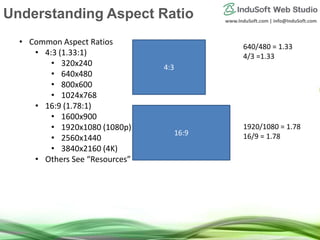
• Common Aspect Ratios
• 4:3 (1.33:1)
• 320x240
• 640x480
• 800x600
• 1024x768
• 16:9 (1.78:1)
• 1600x900
• 1920x1080 (1080p)
• 2560x1440
• 3840x2160 (4K)
• Others See “Resources”
4:3
16:9
640/480 = 1.33
4/3 =1.33
1920/1080 = 1.78
16/9 = 1.78
www.InduSoft.com | info@InduSoft.com
Display Resolutions
Source:
https://en.wikipedia.org/wiki/File:Vector_Video_Standards4.svg
www.InduSoft.com | info@InduSoft.com
Resources
Best resolution to choose
http://www.indusoft.com/blog/2011/03/28/what-is-the-best-resolution-for-a-project-
in-indusoft-web-studio/
1. Native, if you know it
2. Aspect ratio, if you know it
3. Popular
https://www.w3counter.com/globalstats.php
Aspect Ratio blog post
http://www.indusoft.com/blog/2013/10/01/aspect-ratios-and-your-indusoft-web-
studio-project/
Multi Monitor Sample
http://www.indusoft.com/Products-
Downloads/SampleApplications?EntryId=1070&Command=Core_Download
http://www.indusoft.com/Documentation/Technical-
Notes?EntryId=955&Command=Core_Download
www.InduSoft.com | info@InduSoft.com
Project Resolution vs. Screen
Resolution
Project
Resolution Screen
Resolution
Can’t change in GUI
www.InduSoft.com | info@InduSoft.com
Proj vs. Screen vs Container
5 x 5
Project Resolution
5 x 5
Screen Resolution
5 x 5
Container Resolution
www.InduSoft.com | info@InduSoft.com
Auto Screen Scaling
• Enlarges (or shrinks) keeping aspect ratio until it fits the container (bottom or right
side)
• Project – Viewer (Local Viewer and Secure Viewer)
• Thin Clients different check box
• Web Settings (Web Thin Client)
• Graphics – Thin Clients - Mobile Access – Global Settings (SMA)
www.InduSoft.com | info@InduSoft.com
Proj vs. Screen vs Container
5 x 5
Project Resolution
5 x 5
Screen Resolution
10 x 10
Container Resolution
Auto Screen Scale OFF
5 x 5
www.InduSoft.com | info@InduSoft.com
Proj vs. Screen vs Container
5 x 5
Project Resolution
5 x 5
Screen Resolution
10 x 10
Container Resolution
Auto Screen Scale ON
Project Resolution is only used with
Auto Screen Scaling
www.InduSoft.com | info@InduSoft.com
Convert Resolution
• Suggested use, when you want to change the aspect ratio
• May need additional clean up
• Check Box, Keep original aspect ratio for each object
• Resize objects, keep aspect ratio, changes spacing
www.InduSoft.com | info@InduSoft.com
Manual Change of Screen
Attributes
• Change the screen dimensions
• Use to make screen groups
• Alter an individual screen for use on a particular device
• Size/position screen to fill area left by Auto Screen Scale
www.InduSoft.com | info@InduSoft.com
If changing Aspect Ratio
1. Make backup of project
2. Change resolution of monitor (depends on graphics card)
3. Use Auto Screen Scale. Fill in “bar” with optional screen/objects
4. Convert Resolution
5. Redevelop screens. Can copy and paste
www.InduSoft.com | info@InduSoft.com
Open() optional parameters
• The Open() Function supports optional screen
coordinates, could be different than original size
• Open(strScreenAndProperties,optNumX1,optNumY1,op
tNumX2,optNumY2,optNumResizeFlag,optNumID,optSt
rMnemonicList)
• Useful for popup and dialog
www.InduSoft.com | info@InduSoft.com
Span Multiple Screens
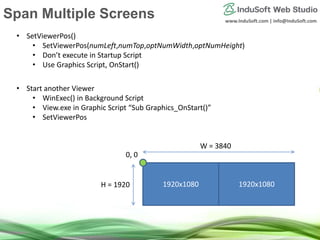
• SetViewerPos()
• SetViewerPos(numLeft,numTop,optNumWidth,optNumHeight)
• Don’t execute in Startup Script
• Use Graphics Script, OnStart()
1920x1080 1920x1080
• Start another Viewer
• WinExec() in Background Script
• View.exe in Graphic Script “Sub Graphics_OnStart()”
• SetViewerPos
0, 0
W = 3840
H = 1920
www.InduSoft.com | info@InduSoft.com
Pop up keyboard scaling
www.InduSoft.com
info@InduSoft.com
Q & A
www.InduSoft.com | info@InduSoft.com
Email
(US) info@indusoft.com
(Brazil) info@indusoft.com.br
(Germany) info@indusoft.com.de
Support support@indusoft.com
Web site
(English) www.indusoft.com
(Portuguese) www.indusoft.com.br
(German) www.indusoft.com.de
Phone +1 (512) 349-0334 (US)
+55 (11) 3293-9139 (Brazil)
+49 (0) 6227-732510 (Germany)
Toll-Free 877-INDUSOFT (877-463-8763)
Fax +1 (512) 349-0375
Contact InduSoft Today
Germany
USA
Brazil
www.InduSoft.com
info@InduSoft.com
Thank you!

Graphical Interface Scaling in InduSoft Web Studio

  • 1.
  • 2.
    www.InduSoft.com | info@InduSoft.com Agenda •Reasons to scale your screen • Understanding Aspect Ratio • Project Resolution vs. Screen Resolution • Auto Screen Scaling check box • Convert Resolution • Manual Change of Screen Attributes • Open() optional parameters • Span Multiple screens, SetViewerPos() • VK scaling
  • 3.
    www.InduSoft.com | info@InduSoft.com PleaseVote! Please Cast Your Vote Here!
  • 4.
    www.InduSoft.com | info@InduSoft.com Reasonsto scale • Machine builders can offer “Standard”, “Low- end”, and “High-end” offerings • Obsolete or failing hardware • Large production monitoring or Andon • Video Wall (matrix) • Mobile view (example, tablets, phones)
  • 5.
    www.InduSoft.com | info@InduSoft.com UnderstandingAspect Ratio • Common Aspect Ratios • 4:3 (1.33:1) • 320x240 • 640x480 • 800x600 • 1024x768 • 16:9 (1.78:1) • 1600x900 • 1920x1080 (1080p) • 2560x1440 • 3840x2160 (4K) • Others See “Resources” 4:3 16:9 640/480 = 1.33 4/3 =1.33 1920/1080 = 1.78 16/9 = 1.78
  • 6.
    www.InduSoft.com | info@InduSoft.com DisplayResolutions Source: https://en.wikipedia.org/wiki/File:Vector_Video_Standards4.svg
  • 7.
    www.InduSoft.com | info@InduSoft.com Resources Bestresolution to choose http://www.indusoft.com/blog/2011/03/28/what-is-the-best-resolution-for-a-project- in-indusoft-web-studio/ 1. Native, if you know it 2. Aspect ratio, if you know it 3. Popular https://www.w3counter.com/globalstats.php Aspect Ratio blog post http://www.indusoft.com/blog/2013/10/01/aspect-ratios-and-your-indusoft-web- studio-project/ Multi Monitor Sample http://www.indusoft.com/Products- Downloads/SampleApplications?EntryId=1070&Command=Core_Download http://www.indusoft.com/Documentation/Technical- Notes?EntryId=955&Command=Core_Download
  • 8.
    www.InduSoft.com | info@InduSoft.com ProjectResolution vs. Screen Resolution Project Resolution Screen Resolution Can’t change in GUI
  • 9.
    www.InduSoft.com | info@InduSoft.com Projvs. Screen vs Container 5 x 5 Project Resolution 5 x 5 Screen Resolution 5 x 5 Container Resolution
  • 10.
    www.InduSoft.com | info@InduSoft.com AutoScreen Scaling • Enlarges (or shrinks) keeping aspect ratio until it fits the container (bottom or right side) • Project – Viewer (Local Viewer and Secure Viewer) • Thin Clients different check box • Web Settings (Web Thin Client) • Graphics – Thin Clients - Mobile Access – Global Settings (SMA)
  • 11.
    www.InduSoft.com | info@InduSoft.com Projvs. Screen vs Container 5 x 5 Project Resolution 5 x 5 Screen Resolution 10 x 10 Container Resolution Auto Screen Scale OFF 5 x 5
  • 12.
    www.InduSoft.com | info@InduSoft.com Projvs. Screen vs Container 5 x 5 Project Resolution 5 x 5 Screen Resolution 10 x 10 Container Resolution Auto Screen Scale ON Project Resolution is only used with Auto Screen Scaling
  • 13.
    www.InduSoft.com | info@InduSoft.com ConvertResolution • Suggested use, when you want to change the aspect ratio • May need additional clean up • Check Box, Keep original aspect ratio for each object • Resize objects, keep aspect ratio, changes spacing
  • 14.
    www.InduSoft.com | info@InduSoft.com ManualChange of Screen Attributes • Change the screen dimensions • Use to make screen groups • Alter an individual screen for use on a particular device • Size/position screen to fill area left by Auto Screen Scale
  • 15.
    www.InduSoft.com | info@InduSoft.com Ifchanging Aspect Ratio 1. Make backup of project 2. Change resolution of monitor (depends on graphics card) 3. Use Auto Screen Scale. Fill in “bar” with optional screen/objects 4. Convert Resolution 5. Redevelop screens. Can copy and paste
  • 16.
    www.InduSoft.com | info@InduSoft.com Open()optional parameters • The Open() Function supports optional screen coordinates, could be different than original size • Open(strScreenAndProperties,optNumX1,optNumY1,op tNumX2,optNumY2,optNumResizeFlag,optNumID,optSt rMnemonicList) • Useful for popup and dialog
  • 17.
    www.InduSoft.com | info@InduSoft.com SpanMultiple Screens • SetViewerPos() • SetViewerPos(numLeft,numTop,optNumWidth,optNumHeight) • Don’t execute in Startup Script • Use Graphics Script, OnStart() 1920x1080 1920x1080 • Start another Viewer • WinExec() in Background Script • View.exe in Graphic Script “Sub Graphics_OnStart()” • SetViewerPos 0, 0 W = 3840 H = 1920
  • 18.
  • 19.
  • 20.
    www.InduSoft.com | info@InduSoft.com Email (US)info@indusoft.com (Brazil) info@indusoft.com.br (Germany) info@indusoft.com.de Support support@indusoft.com Web site (English) www.indusoft.com (Portuguese) www.indusoft.com.br (German) www.indusoft.com.de Phone +1 (512) 349-0334 (US) +55 (11) 3293-9139 (Brazil) +49 (0) 6227-732510 (Germany) Toll-Free 877-INDUSOFT (877-463-8763) Fax +1 (512) 349-0375 Contact InduSoft Today Germany USA Brazil
  • 21.