SAP Solution Manager
: Platform for SAP Projects
SAP Field Services
Title of Presentation, Speaker Name / 2
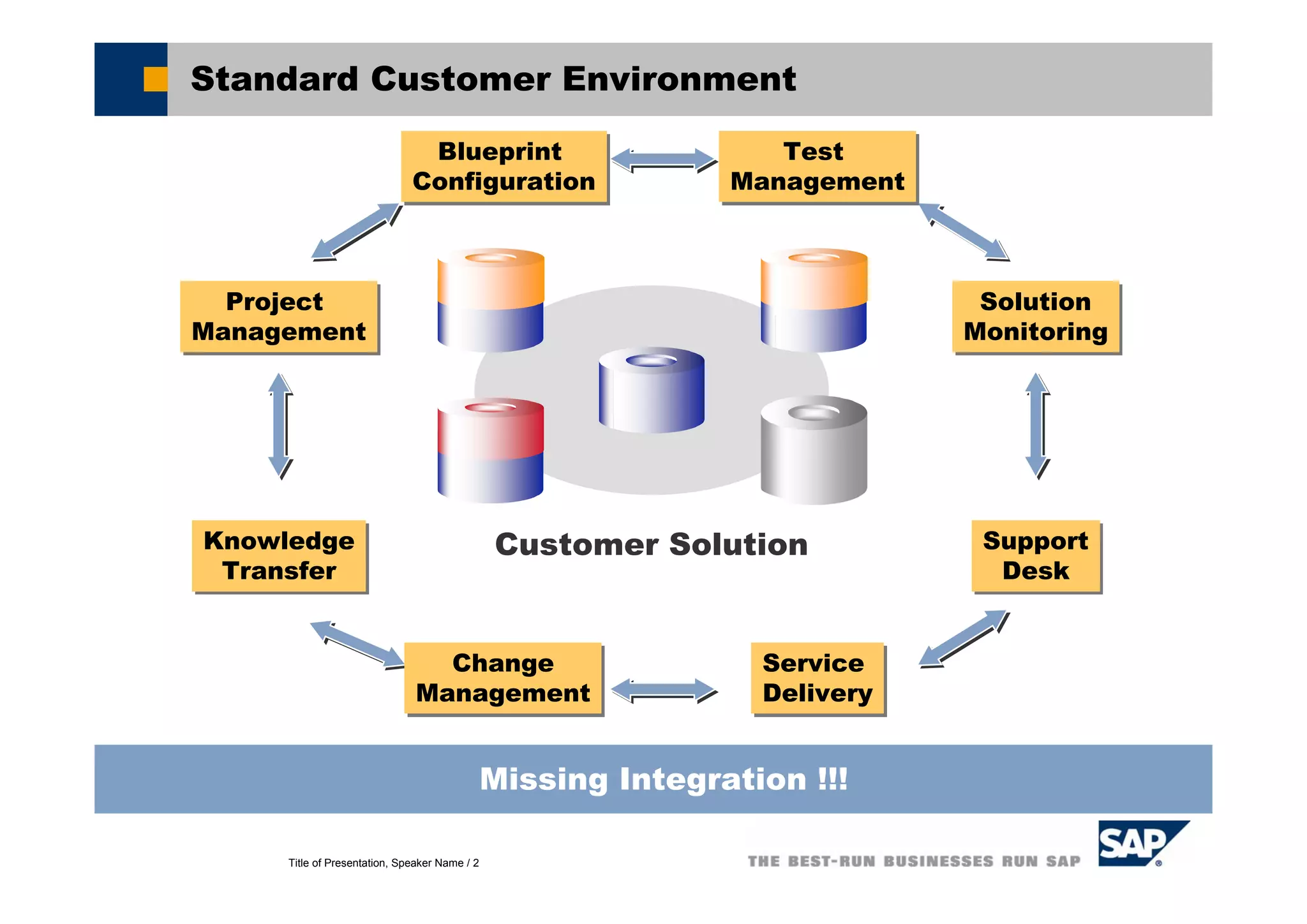
Standard Customer Environment
Customer Solution
Missing Integration !!!
Blueprint
Configuration
Blueprint
Configuration
Test
Management
Test
Management
Project
Management
Project
Management
Solution
Monitoring
Solution
Monitoring
Knowledge
Transfer
Knowledge
Transfer
Support
Desk
Support
Desk
Change
Management
Change
Management
Service
Delivery
Service
Delivery
Title of Presentation, Speaker Name / 3
SAP Solution Manager: Mission Statement
With SAP Solution Manager,
you can manage your
SAP solution throughout
the entire life cycle to...
ensure reliability
reduce Total Cost of Ownership
increase Return on Investments
SAP Solution Manager is delivered
as part of your annual maintenance fee!!!
... And here is how you can achieve the benefits:
Title of Presentation, Speaker Name / 4
A Different Approach
A different approach is required for
managing IT solutions
It is characterized by the following
aspects
Integration
Integration is vital because you need one place
where all information comes together
Life-cycle orientation
Life-Cycle Orientation is vital because it structures
the customers’ tasks that customers from a time
perspective
Business-process orientation
Business processes are the glue for the
information which is acquired during the software
life-cyle
Title of Presentation, Speaker Name / 5
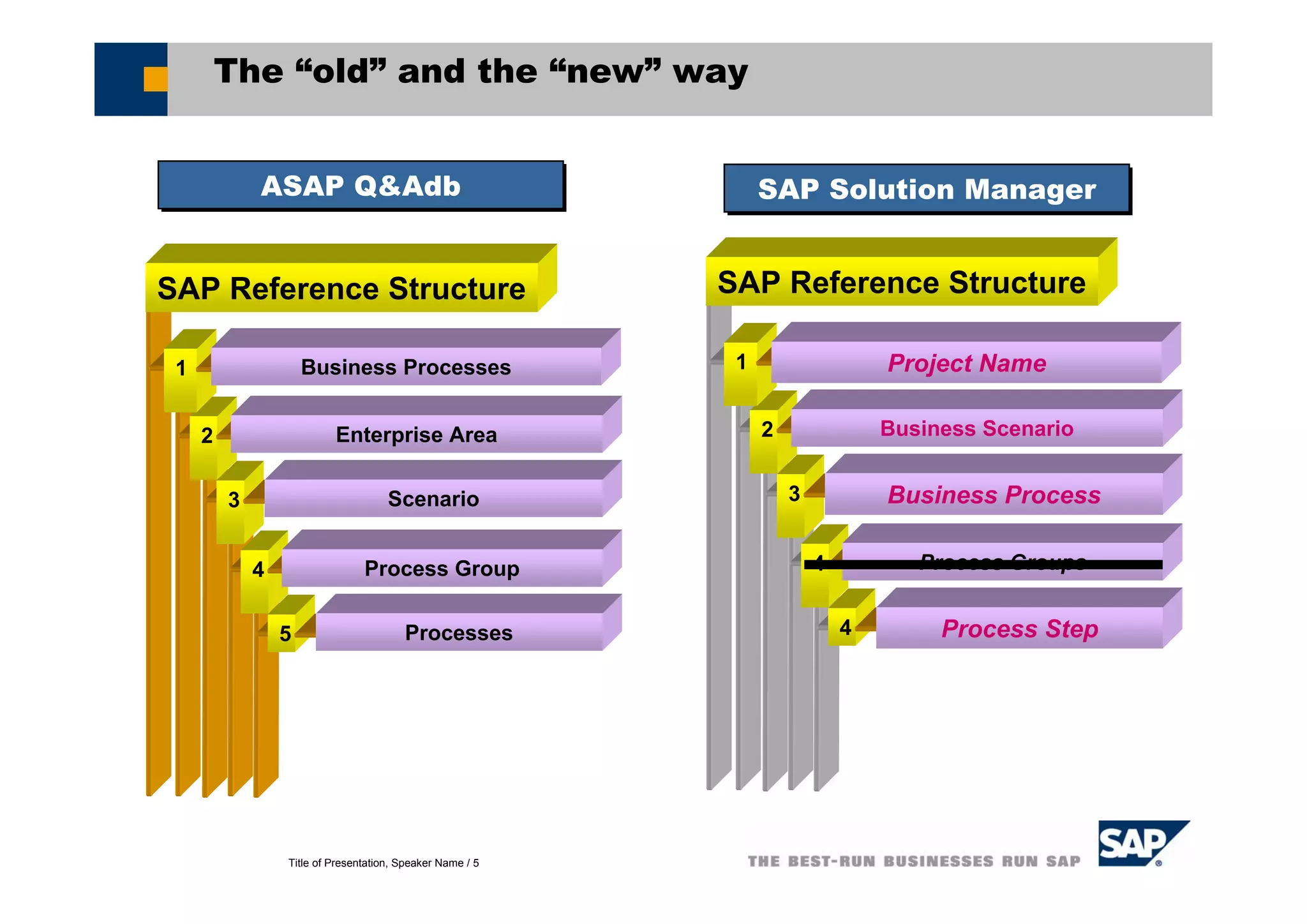
4 Process Group
5 Processes
2 Enterprise Area
3 Scenario
SAP Reference Structure
1 Business Processes
The “old” and the “new” way
4 Process Groups
4 Process Step
2 Business Scenario
3 Business Process
SAP Reference Structure
1 Project Name
SAP Solution ManagerSAP Solution ManagerASAP Q&AdbASAP Q&Adb
Title of Presentation, Speaker Name / 6
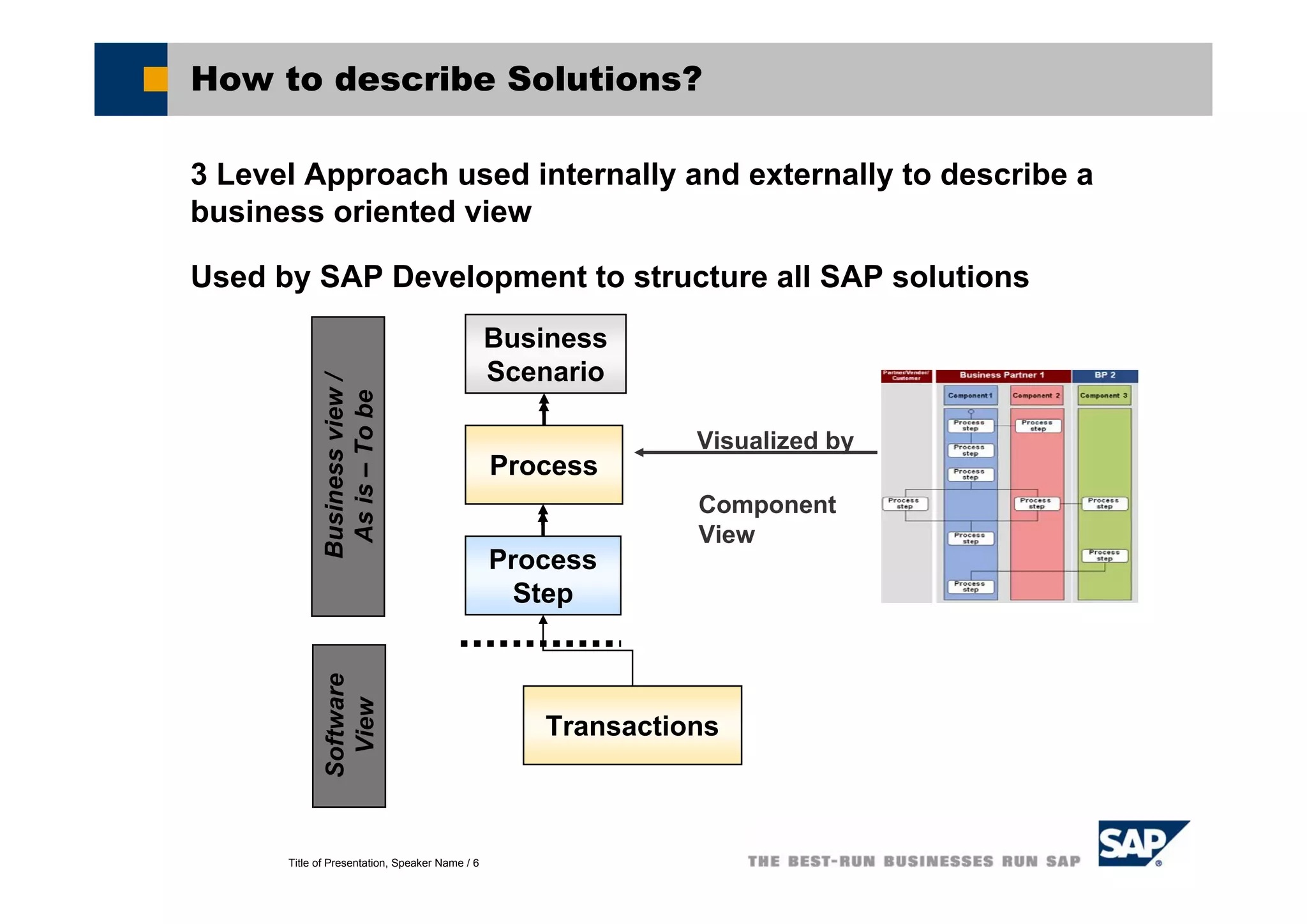
How to describe Solutions?
3 Level Approach used internally and externally to describe a
business oriented view
Used by SAP Development to structure all SAP solutions
Business
Scenario
Process
Step
Process
Visualized by
Component
View
Transactions
Businessview/
Asis–Tobe
Software
View
Title of Presentation, Speaker Name / 7
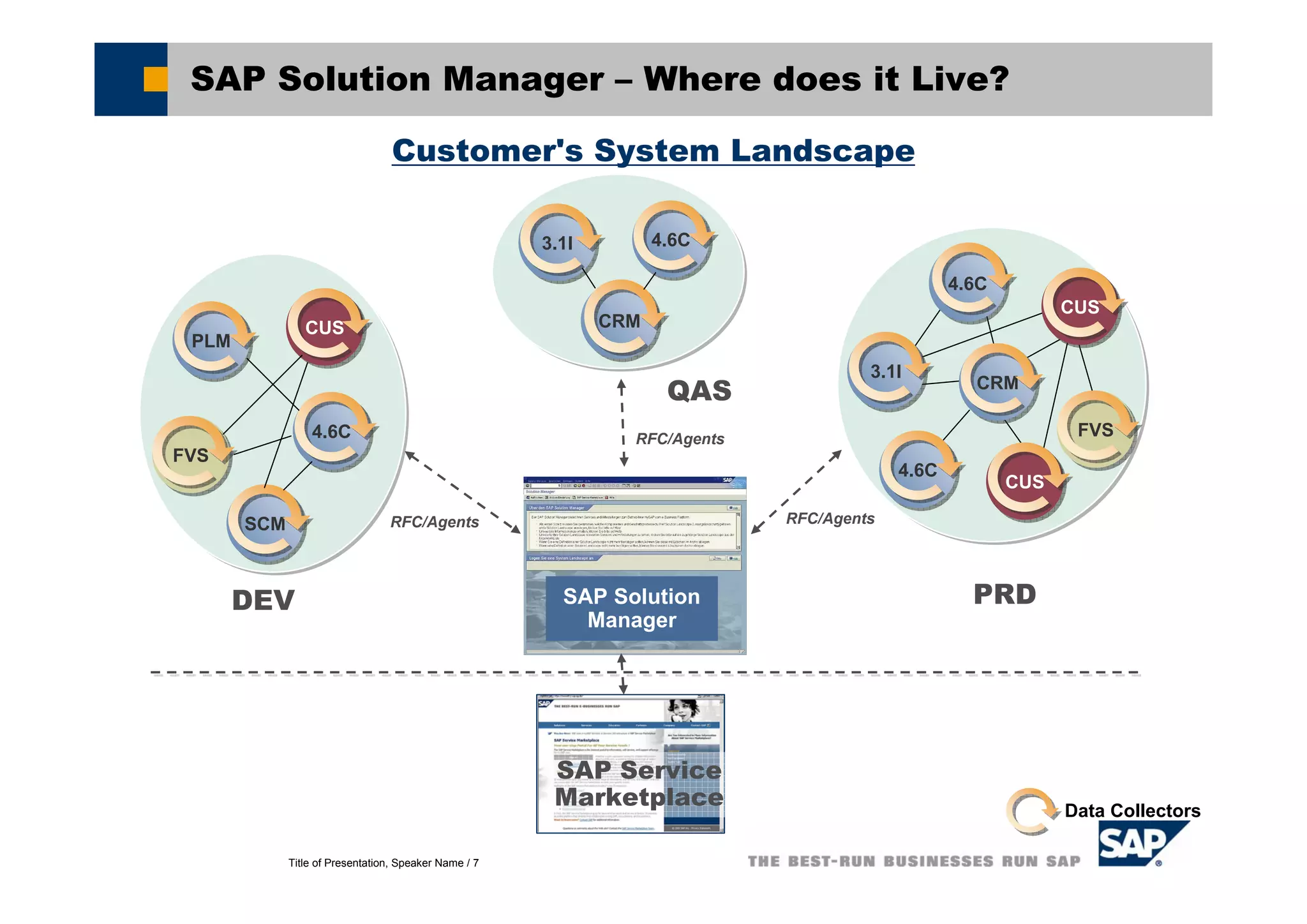
SAP Solution Manager – Where does it Live?
Customer's System Landscape
SAP Service
Marketplace
3.1I3.1I
SCMSCM
CUSCUS
FVSFVS
4.6C4.6C
PLMPLM
CRMCRM
4.6C4.6C
PRD
3.1I3.1I
4.6C4.6C
CRMCRM
4.6C4.6C
FVSFVS
QAS
DEV
CUSCUS
CUSCUS
SAP Solution
Manager
RFC/Agents RFC/Agents
Data Collectors
RFC/Agents
Title of Presentation, Speaker Name / 8
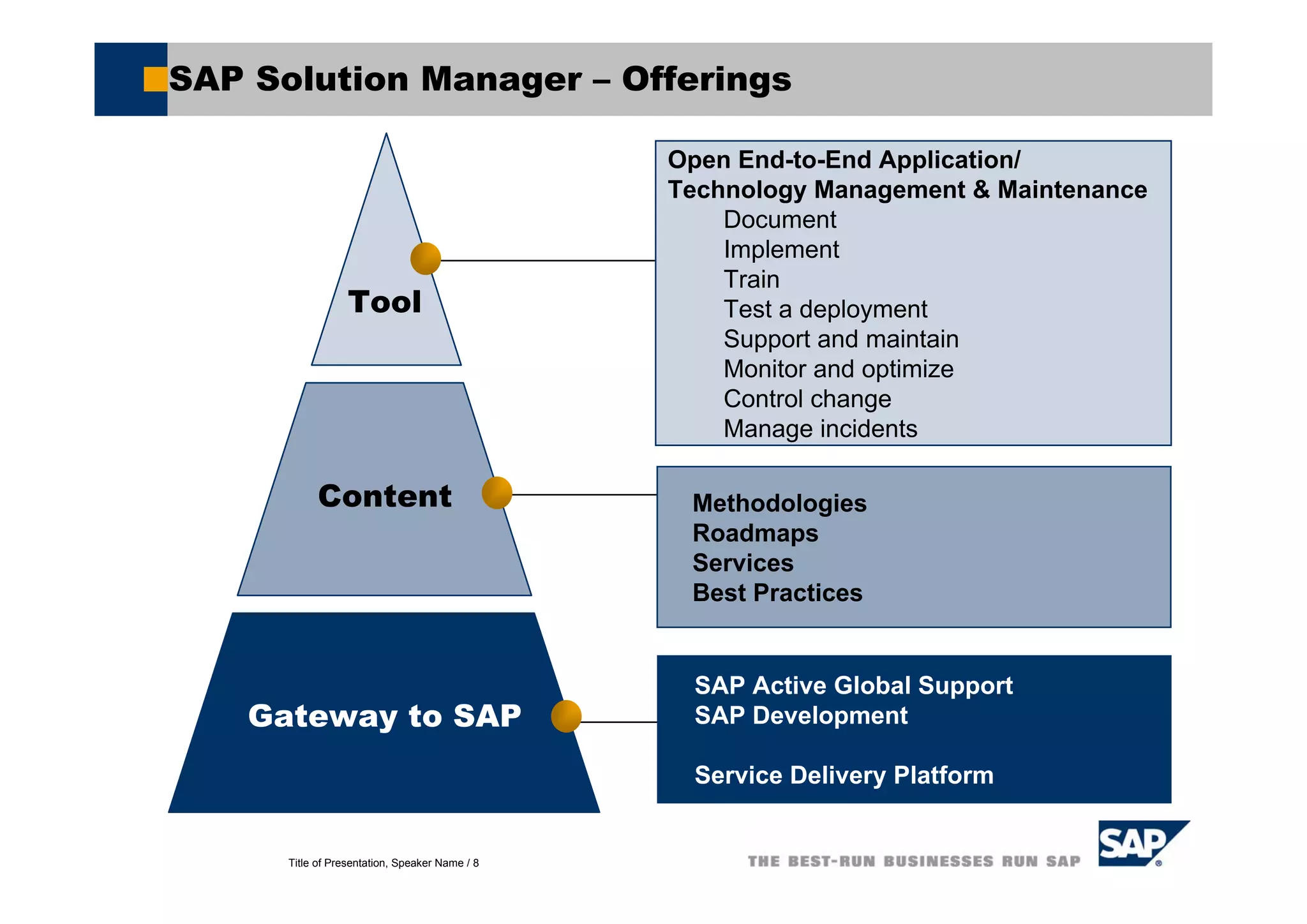
SAP Solution Manager – Offerings
Content
Gateway to SAP
Tool
Open End-to-End Application/
Technology Management & Maintenance
Document
Implement
Train
Test a deployment
Support and maintain
Monitor and optimize
Control change
Manage incidents
Methodologies
Roadmaps
Services
Best Practices
SAP Active Global Support
SAP Development
Service Delivery Platform
Title of Presentation, Speaker Name / 9
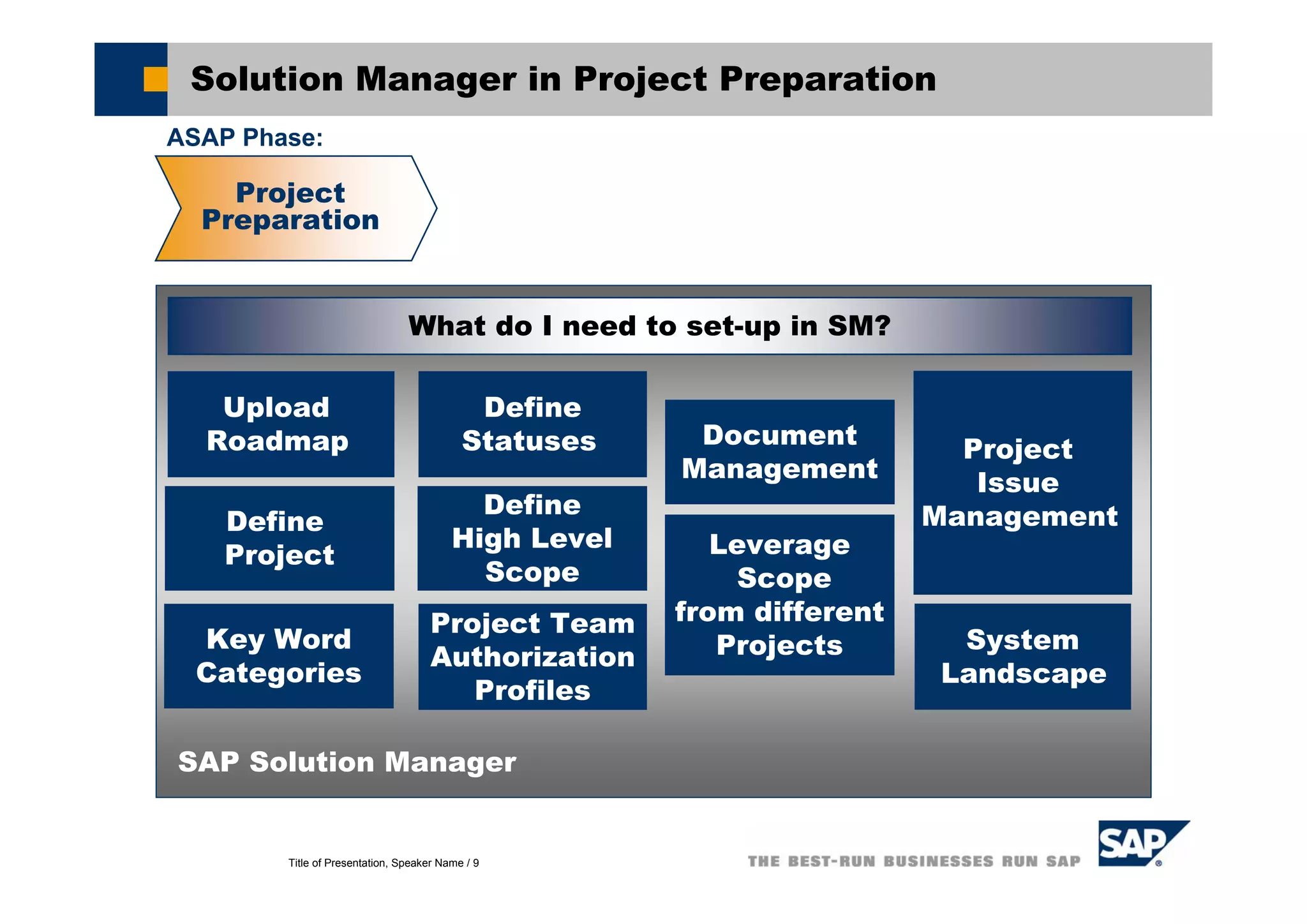
Solution Manager in Project Preparation
Project
Preparation
Project
Issue
ManagementDefine
Project
System
Landscape
SAP Solution Manager
What do I need to set-up in SM?
Key Word
Categories
Define
Statuses
Project Team
Authorization
Profiles
Document
Management
Define
High Level
Scope
Leverage
Scope
from different
Projects
Upload
Roadmap
ASAP Phase:
Title of Presentation, Speaker Name / 10
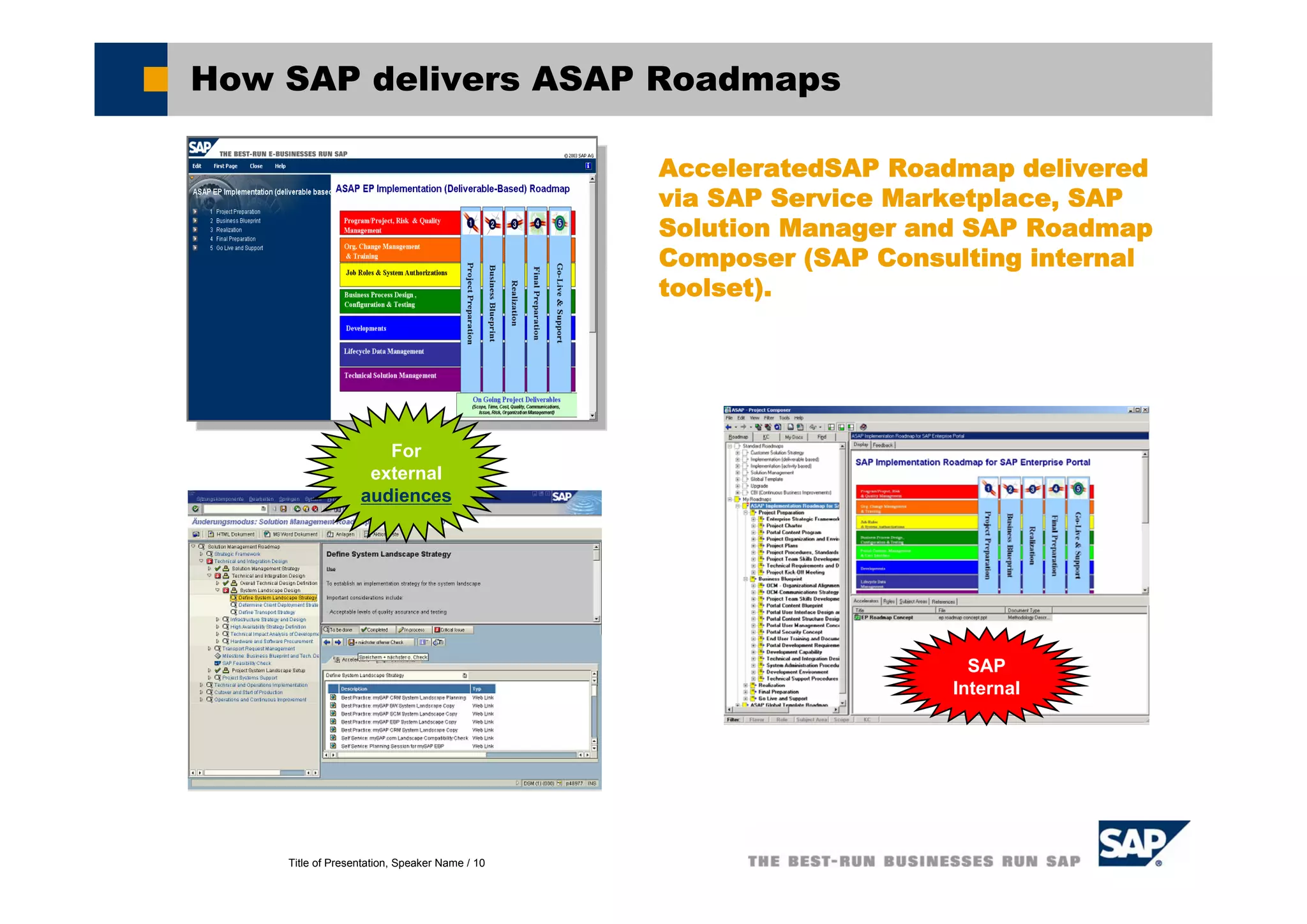
How SAP delivers ASAP Roadmaps
AcceleratedSAP Roadmap delivered
via SAP Service Marketplace, SAP
Solution Manager and SAP Roadmap
Composer (SAP Consulting internal
toolset).
SAP
Internal
For
external
audiences
Title of Presentation, Speaker Name / 11
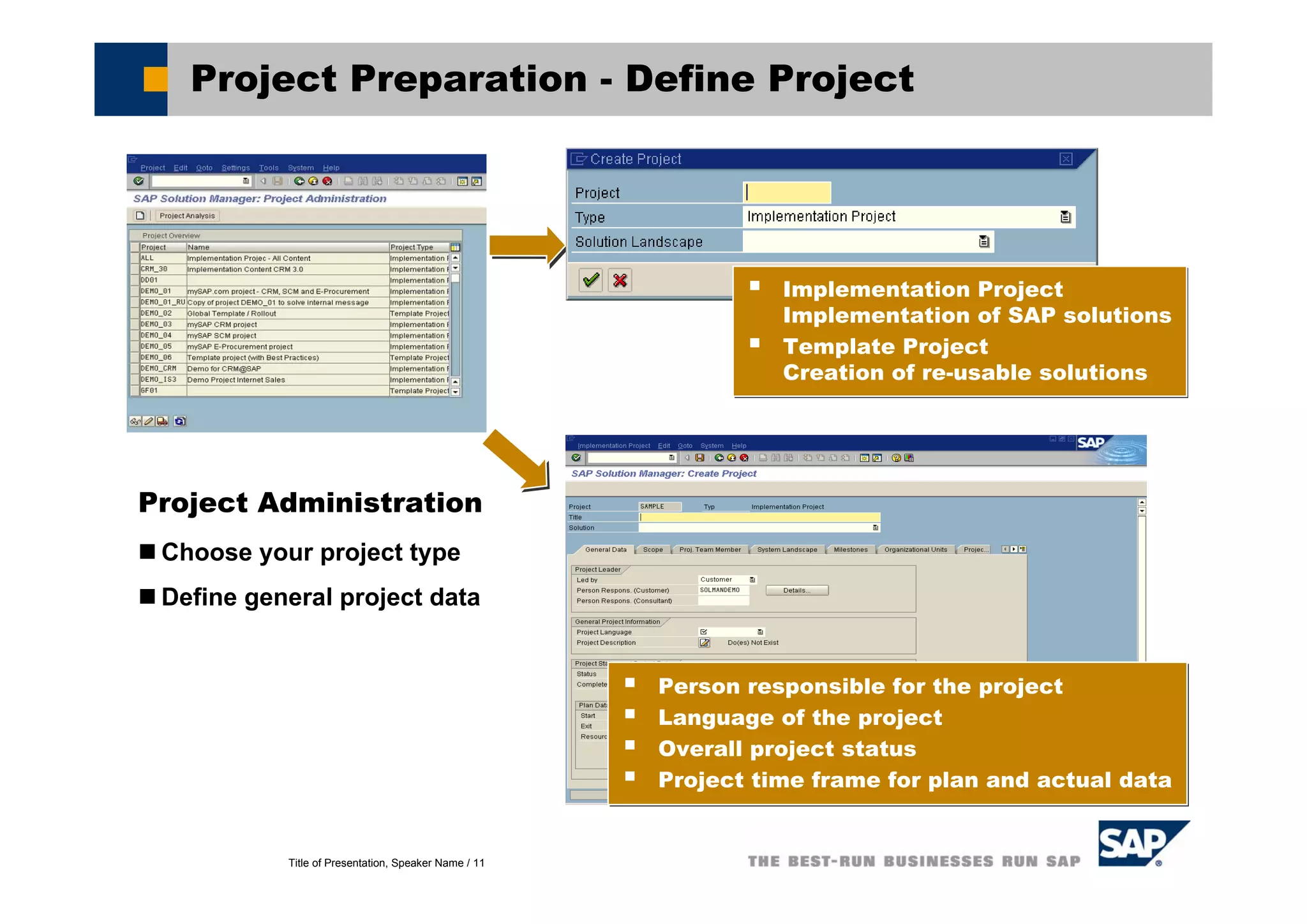
Project Preparation - Define Project
Project Administration
Choose your project type
Define general project data
Implementation Project
Implementation of SAP solutions
Template Project
Creation of re-usable solutions
Implementation Project
Implementation of SAP solutions
Template Project
Creation of re-usable solutions
Person responsible for the project
Language of the project
Overall project status
Project time frame for plan and actual data
Person responsible for the project
Language of the project
Overall project status
Project time frame for plan and actual data
Title of Presentation, Speaker Name / 12
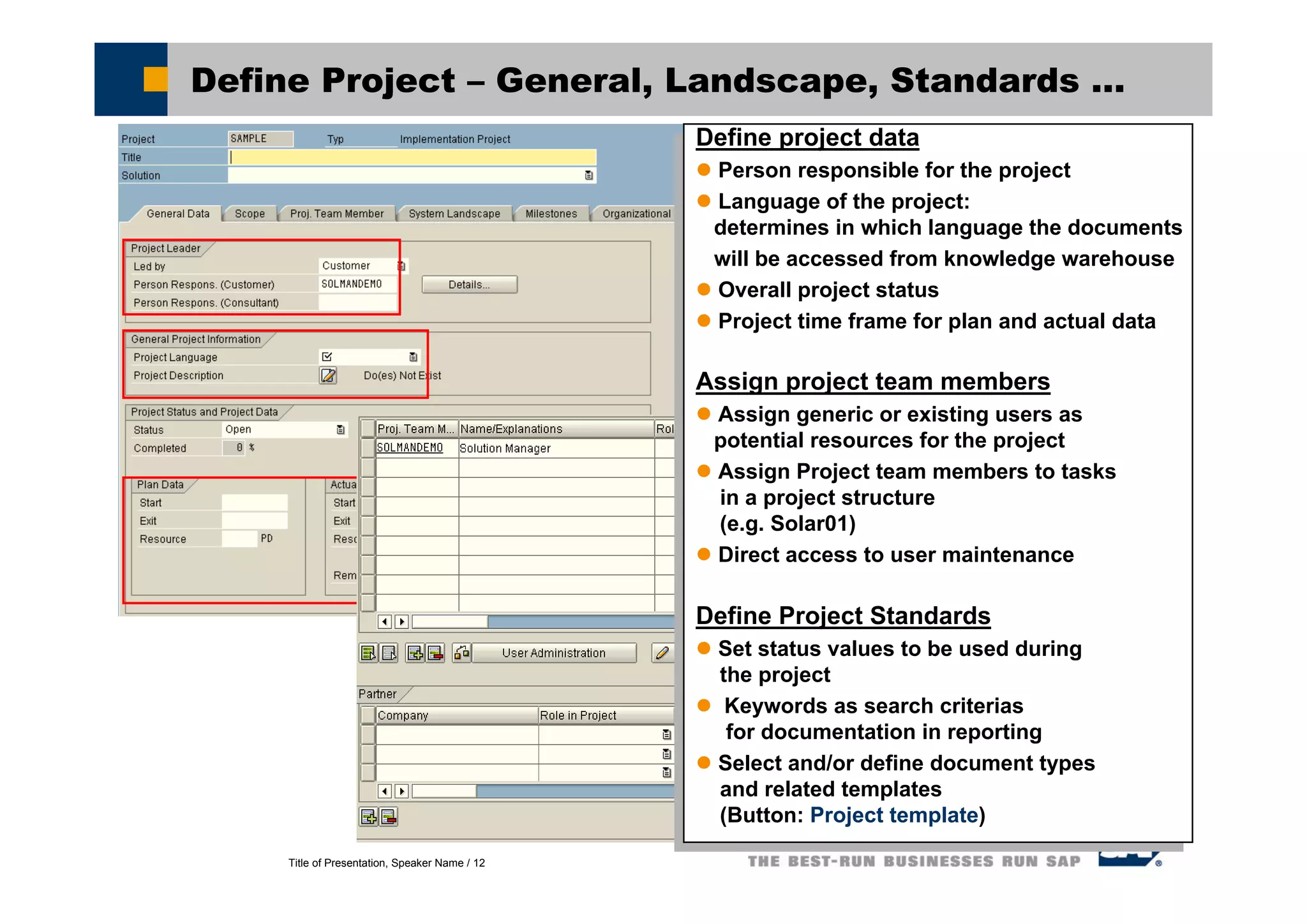
Define Project – General, Landscape, Standards ...
Define project data
Person responsible for the project
Language of the project:
determines in which language the documents
will be accessed from knowledge warehouse
Overall project status
Project time frame for plan and actual data
Assign project team members
Assign generic or existing users as
potential resources for the project
Assign Project team members to tasks
in a project structure
(e.g. Solar01)
Direct access to user maintenance
Define Project Standards
Set status values to be used during
the project
Keywords as search criterias
for documentation in reporting
Select and/or define document types
and related templates
(Button: Project template)
Define project data
Person responsible for the project
Language of the project:
determines in which language the documents
will be accessed from knowledge warehouse
Overall project status
Project time frame for plan and actual data
Assign project team members
Assign generic or existing users as
potential resources for the project
Assign Project team members to tasks
in a project structure
(e.g. Solar01)
Direct access to user maintenance
Define Project Standards
Set status values to be used during
the project
Keywords as search criterias
for documentation in reporting
Select and/or define document types
and related templates
(Button: Project template)
Title of Presentation, Speaker Name / 13
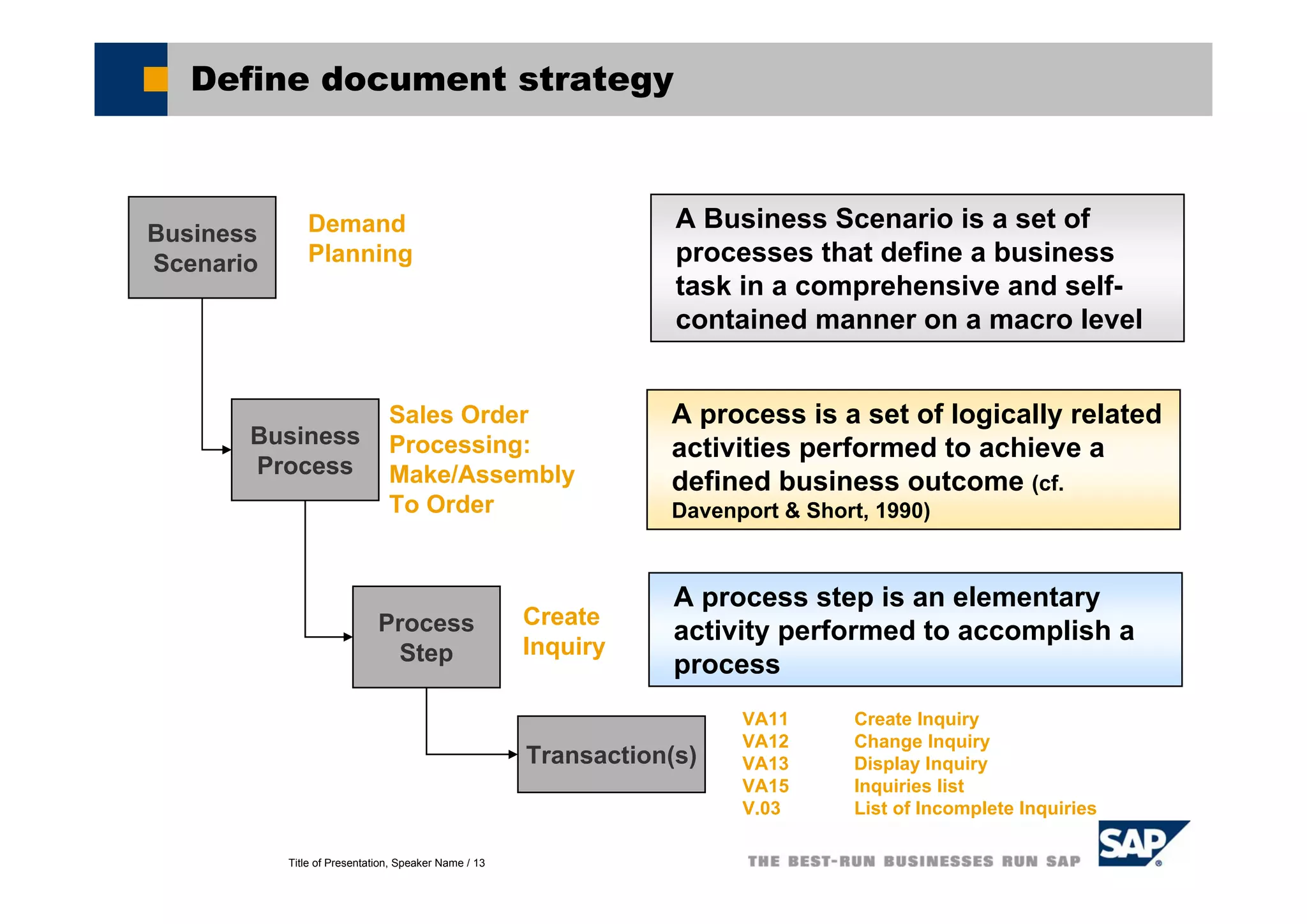
Define document strategy
Business
Scenario
Business
Process
Process
Step
A Business Scenario is a set of
processes that define a business
task in a comprehensive and self-
contained manner on a macro level
A process is a set of logically related
activities performed to achieve a
defined business outcome (cf.
Davenport & Short, 1990)
A process step is an elementary
activity performed to accomplish a
process
Demand
Planning
Sales Order
Processing:
Make/Assembly
To Order
Create
Inquiry
Transaction(s)
VA11 Create Inquiry
VA12 Change Inquiry
VA13 Display Inquiry
VA15 Inquiries list
V.03 List of Incomplete Inquiries
Title of Presentation, Speaker Name / 14
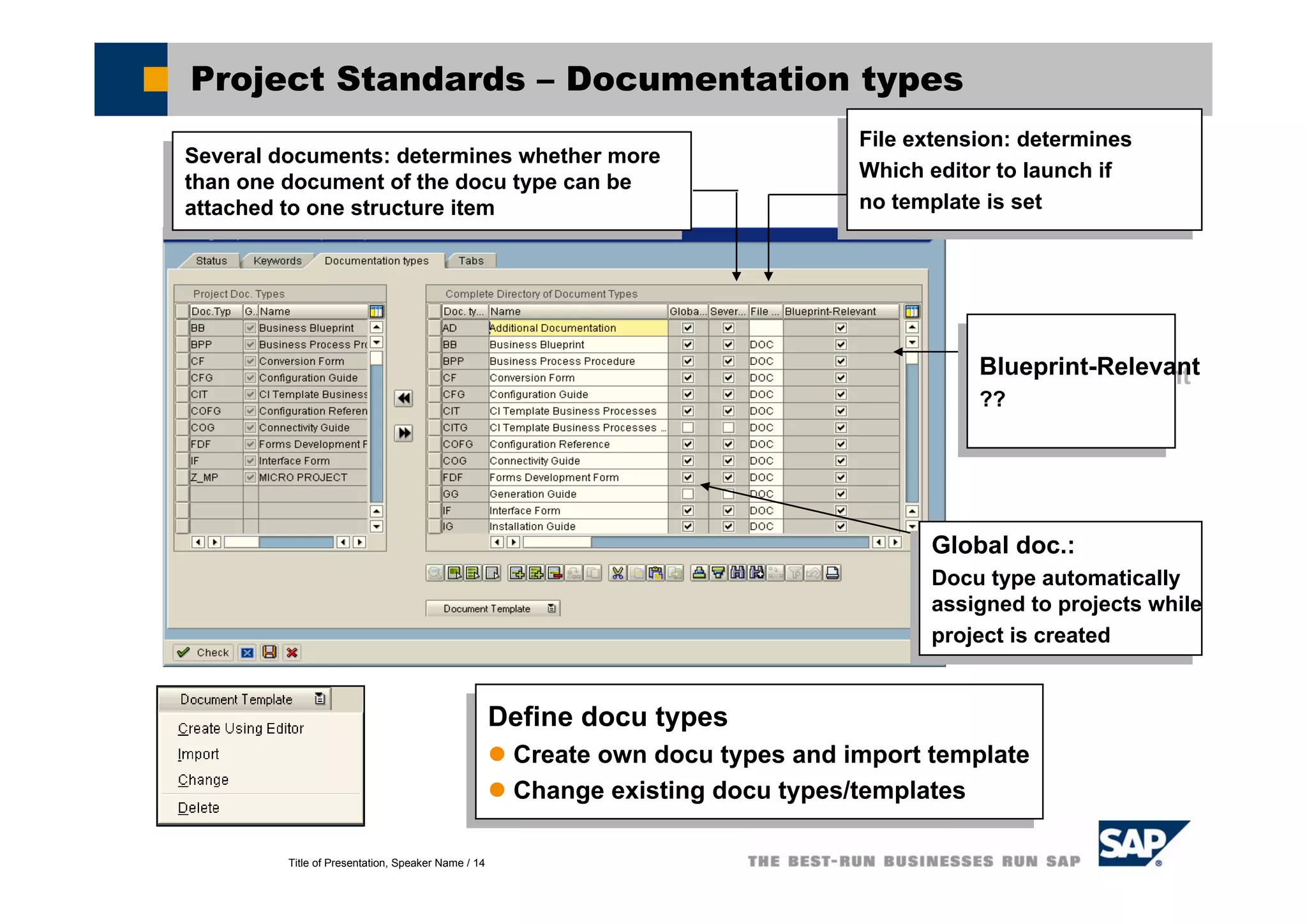
Project Standards – Documentation types
Define docu types
Create own docu types and import template
Change existing docu types/templates
Define docu types
Create own docu types and import template
Change existing docu types/templates
Blueprint-Relevant
??
Blueprint-Relevant
??
File extension: determines
Which editor to launch if
no template is set
File extension: determines
Which editor to launch if
no template is set
Several documents: determines whether more
than one document of the docu type can be
attached to one structure item
Several documents: determines whether more
than one document of the docu type can be
attached to one structure item
Global doc.:
Docu type automatically
assigned to projects while
project is created
Global doc.:
Docu type automatically
assigned to projects while
project is created
Title of Presentation, Speaker Name / 15
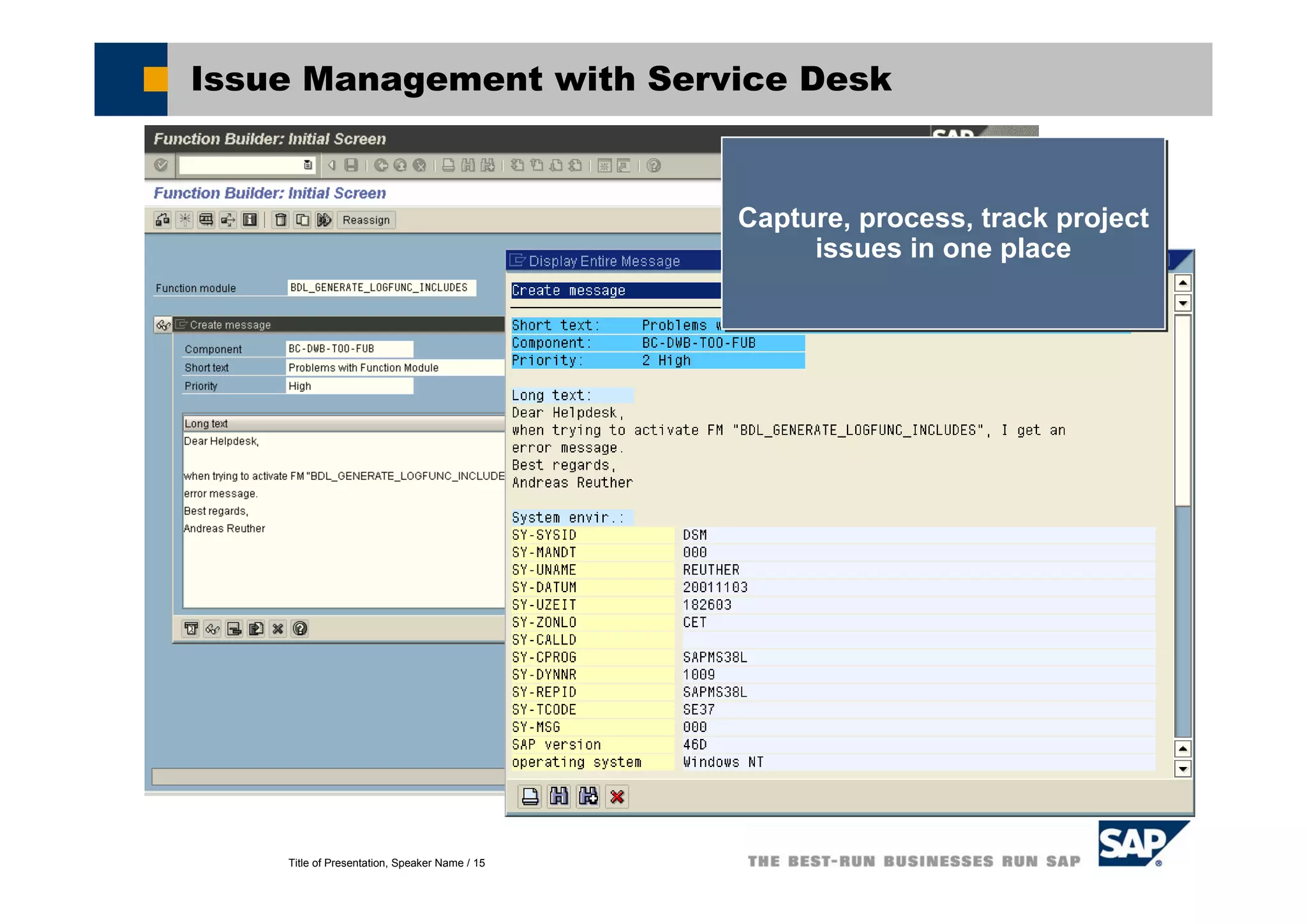
Issue Management with Service Desk
Capture, process, track project
issues in one place
Capture, process, track project
issues in one place
Title of Presentation, Speaker Name / 16
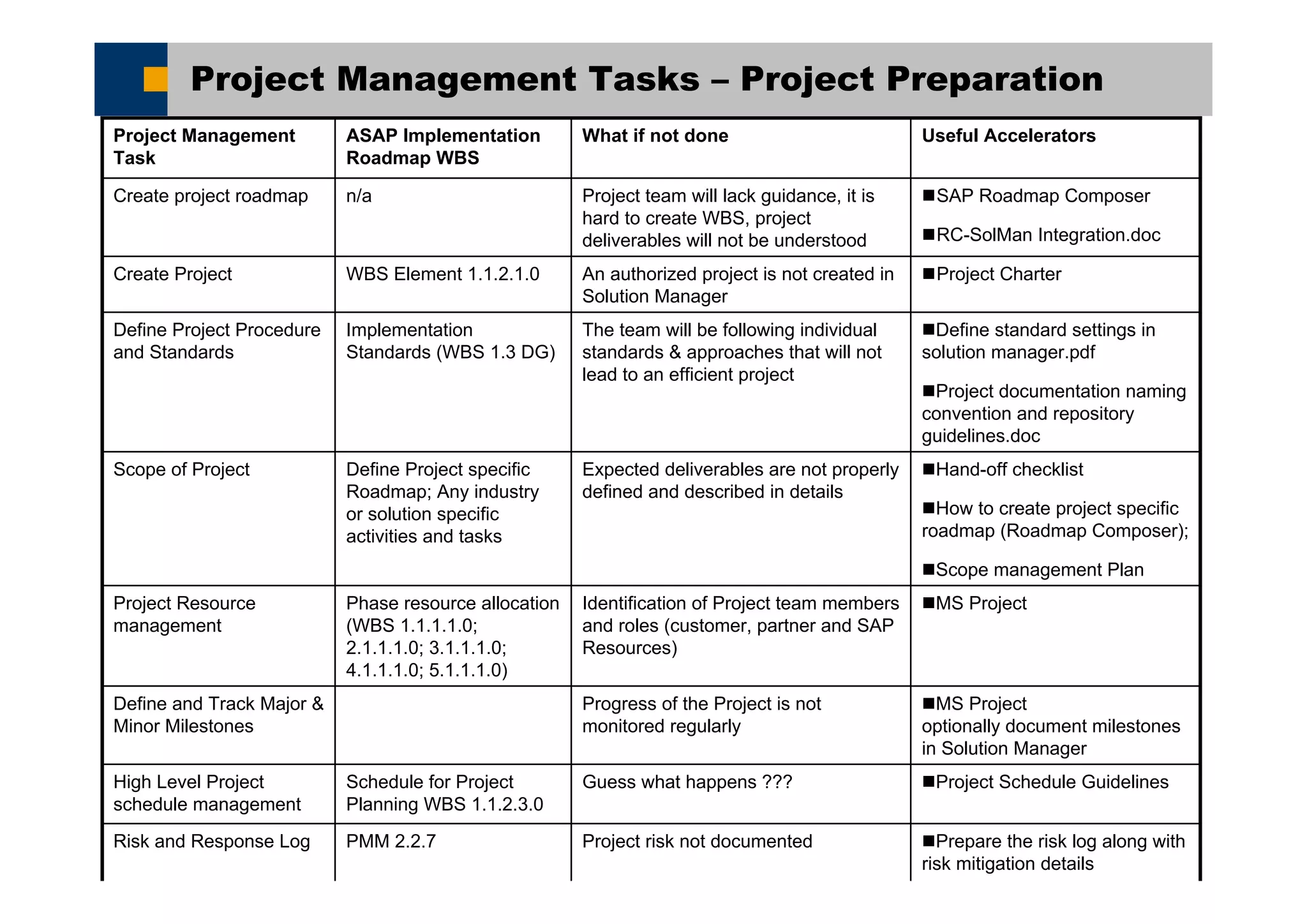
Project Management Tasks – Project Preparation
Project Schedule GuidelinesGuess what happens ???Schedule for Project
Planning WBS 1.1.2.3.0
High Level Project
schedule management
Prepare the risk log along with
risk mitigation details
Project risk not documentedPMM 2.2.7Risk and Response Log
SAP Roadmap Composer
RC-SolMan Integration.doc
Project team will lack guidance, it is
hard to create WBS, project
deliverables will not be understood
n/aCreate project roadmap
Project CharterAn authorized project is not created in
Solution Manager
WBS Element 1.1.2.1.0Create Project
MS Project
optionally document milestones
in Solution Manager
Progress of the Project is not
monitored regularly
Define and Track Major &
Minor Milestones
Useful AcceleratorsWhat if not doneASAP Implementation
Roadmap WBS
Project Management
Task
MS ProjectIdentification of Project team members
and roles (customer, partner and SAP
Resources)
Phase resource allocation
(WBS 1.1.1.1.0;
2.1.1.1.0; 3.1.1.1.0;
4.1.1.1.0; 5.1.1.1.0)
Project Resource
management
Hand-off checklist
How to create project specific
roadmap (Roadmap Composer);
Scope management Plan
Expected deliverables are not properly
defined and described in details
Define Project specific
Roadmap; Any industry
or solution specific
activities and tasks
Scope of Project
Define standard settings in
solution manager.pdf
Project documentation naming
convention and repository
guidelines.doc
The team will be following individual
standards & approaches that will not
lead to an efficient project
Implementation
Standards (WBS 1.3 DG)
Define Project Procedure
and Standards
Title of Presentation, Speaker Name / 17
Demo and Exercises
Project Preparation – Demo and Exercises
Title of Presentation, Speaker Name / 18
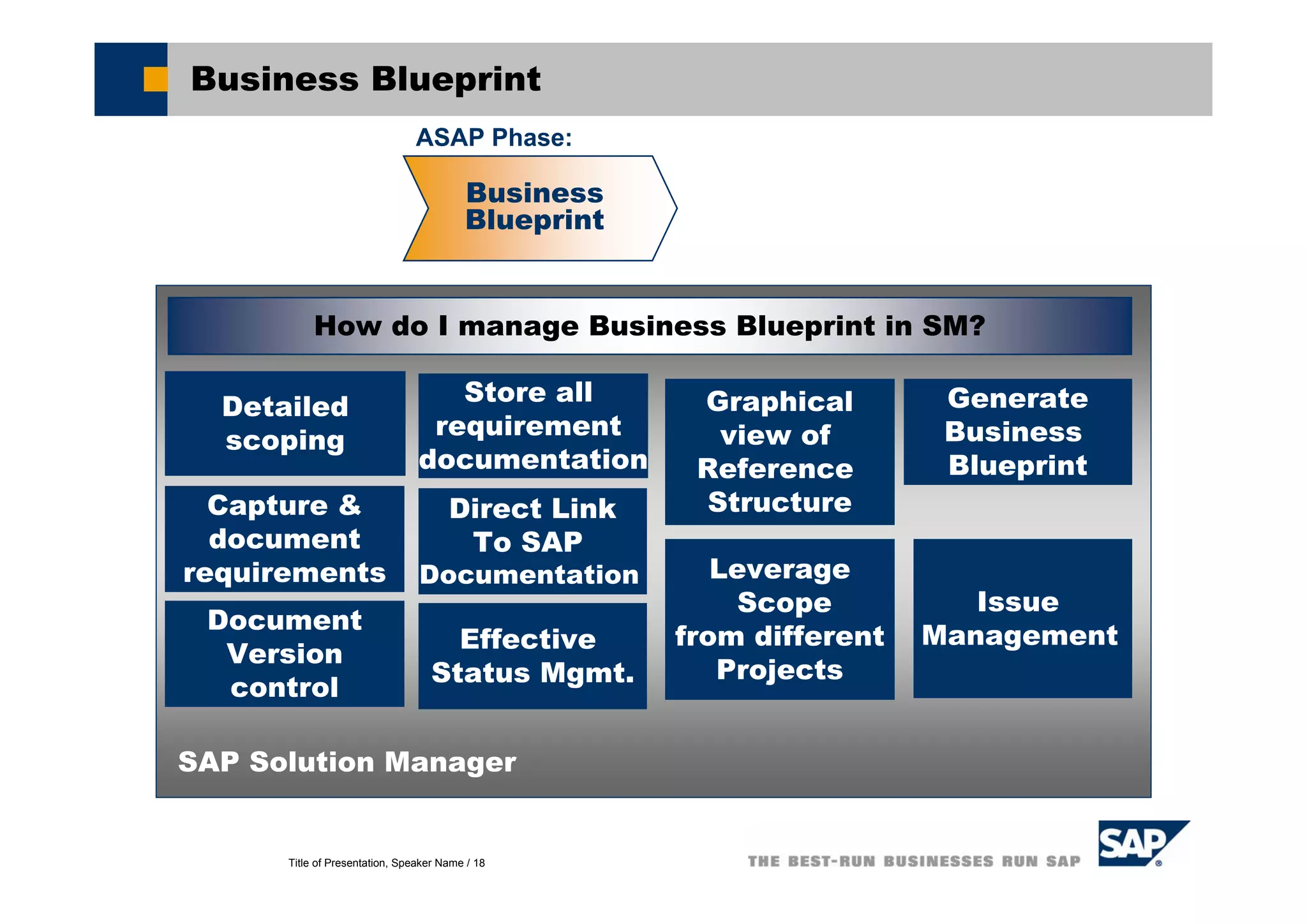
Business Blueprint
Issue
Management
Detailed
scoping
Capture &
document
requirements
SAP Solution Manager
How do I manage Business Blueprint in SM?
Document
Version
control
Store all
requirement
documentation
Direct Link
To SAP
Documentation
Effective
Status Mgmt.
Leverage
Scope
from different
Projects
Business
Blueprint
Graphical
view of
Reference
Structure
ASAP Phase:
Generate
Business
Blueprint
Title of Presentation, Speaker Name / 19
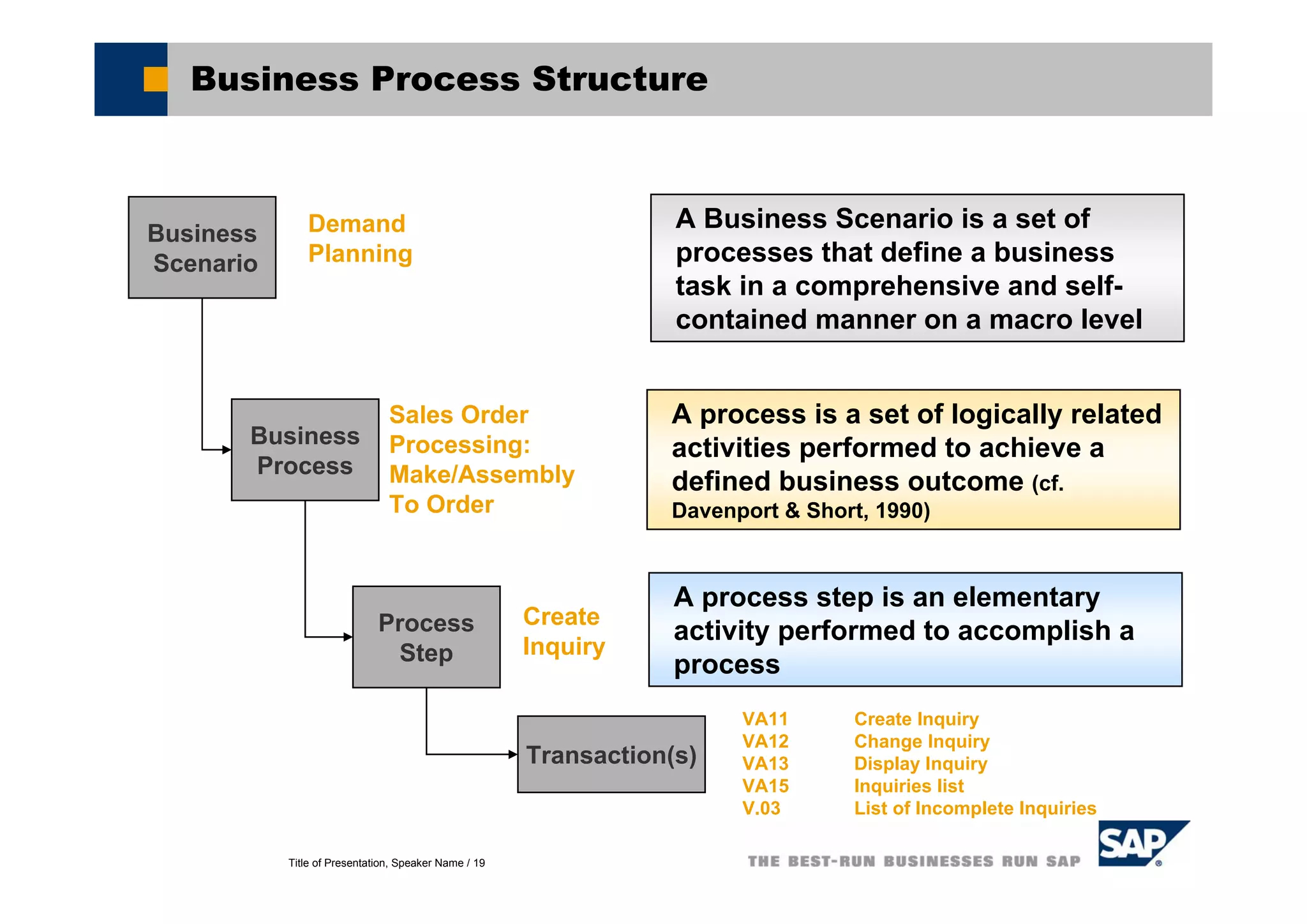
Business Process Structure
Business
Scenario
Business
Process
Process
Step
A Business Scenario is a set of
processes that define a business
task in a comprehensive and self-
contained manner on a macro level
A process is a set of logically related
activities performed to achieve a
defined business outcome (cf.
Davenport & Short, 1990)
A process step is an elementary
activity performed to accomplish a
process
Demand
Planning
Sales Order
Processing:
Make/Assembly
To Order
Create
Inquiry
Transaction(s)
VA11 Create Inquiry
VA12 Change Inquiry
VA13 Display Inquiry
VA15 Inquiries list
V.03 List of Incomplete Inquiries
Title of Presentation, Speaker Name / 20
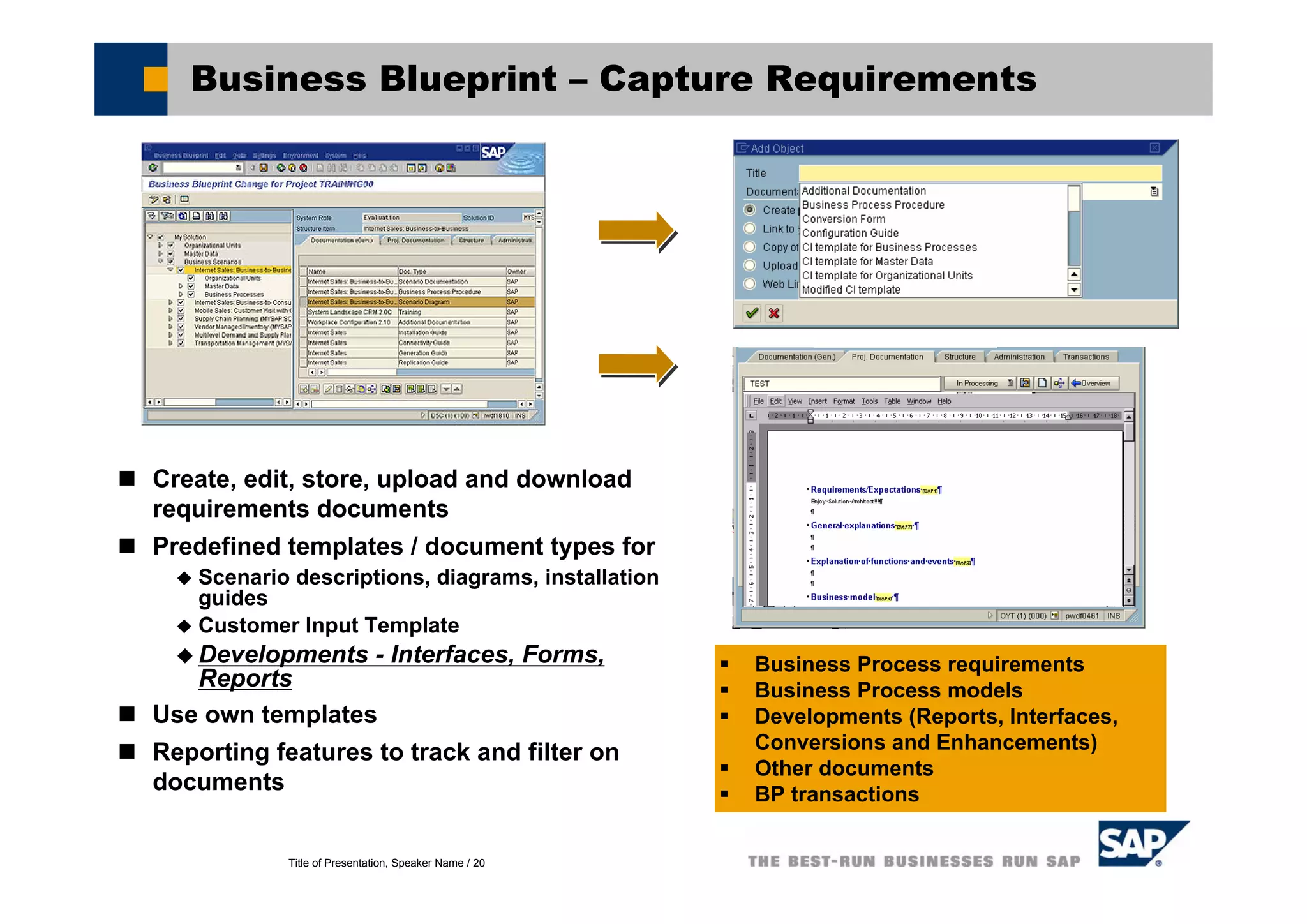
Business Blueprint – Capture Requirements
Create, edit, store, upload and download
requirements documents
Predefined templates / document types for
Scenario descriptions, diagrams, installation
guides
Customer Input Template
Developments - Interfaces, Forms,
Reports
Use own templates
Reporting features to track and filter on
documents
Business Process requirements
Business Process models
Developments (Reports, Interfaces,
Conversions and Enhancements)
Other documents
BP transactions
Title of Presentation, Speaker Name / 21
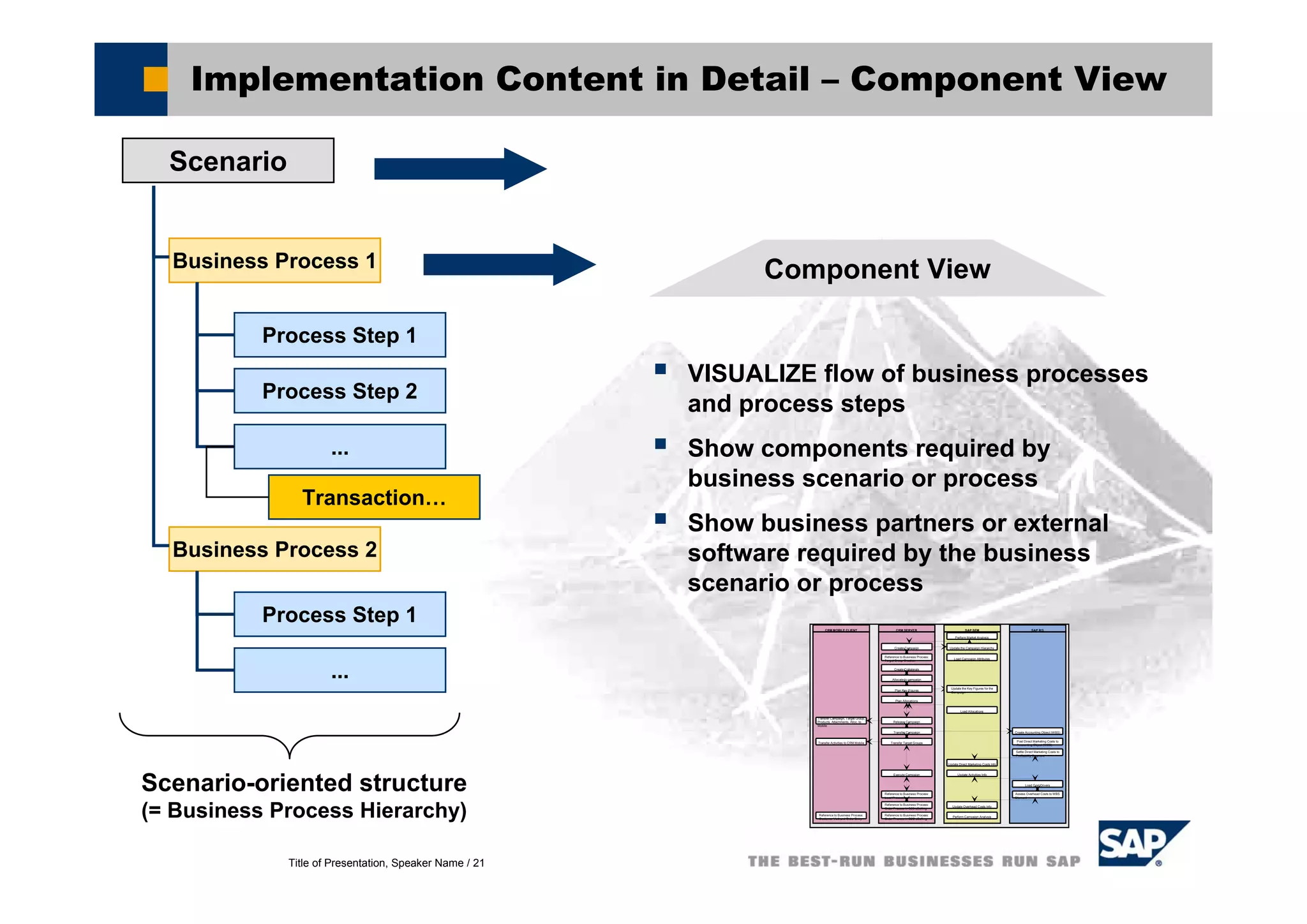
Implementation Content in Detail – Component View
Scenario
Business Process 1
Business Process 2
Process Step 1
Process Step 2
...
Process Step 1
...
Component View
VISUALIZE flow of business processes
and process steps
Show components required by
business scenario or process
Show business partners or external
software required by the business
scenario or process
Transfer Campaign, Target Group,
Products, Attachments, Alloc. to
Mobile
CRM MOBILE CLIENT
Transfer Activities to CRM Mobile
Reference to Business Process:
Customer Visit and Order Entry
CRM SERVER
Create Campaign
Reference to Business Process:
Target Group Creation
Create Collaterals
Allocate to campaign
Plan Key Figures
Plan Allocations
Release Campaign
Transfer Campaign
Transfer Target Groups
Execute Campaign
Reference to Business Process:
Lead Processing
Reference to Business Process:
Order Process in B2B eSelling
Reference to Business Process:
Order Process in B2C eSelling
SAP R/3
Create Accounting Object (WBS)
Post Direct Marketing Costs to
Accounting Object (WBS)
Settle Direct Marketing Costs to
Profitability Segment
Load Cost Drivers
Assess Overhead Costs to WBS
Element
SAP SEM
Perform Market Analysis
Update the Campaign Hierarchy
Load Campaign Attributes
Update the Key Figures for the
Campaign
Load Allocations
Update Direct Marketing Costs Info
Update Activities Info
Update Overhead Costs Info
Perform Campaign Analysis
Scenario-oriented structure
(= Business Process Hierarchy)
Transaction…
Title of Presentation, Speaker Name / 22
Implementation Content in Detail - Documentation
Scenario
Business Process 1
Business Process 2
Process Step 1
Process Step 2
...
Process Step 1
...
Documentation
Describes use and application of
business scenarios and processes
=> the complete Business
Blueprint documents
Context-dependent online help*
Available SAP training offerings*
Business
Scenario
Documentation
* Optional delivery
Transaction…
In Knowledge
WH with
- Versioning
- Authorization
- Status,…
Title of Presentation, Speaker Name / 23
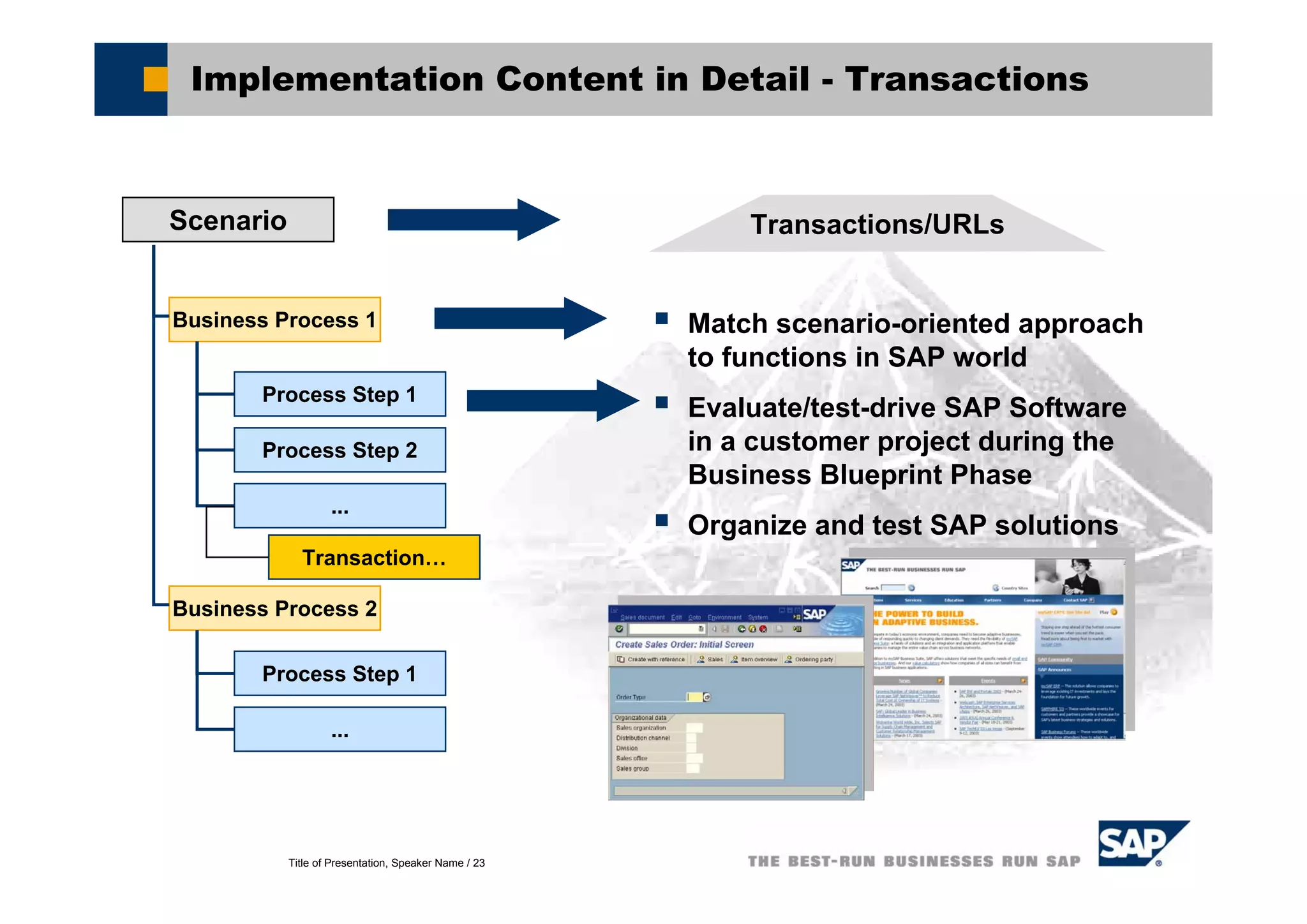
Implementation Content in Detail - Transactions
Transactions/URLs
Match scenario-oriented approach
to functions in SAP world
Evaluate/test-drive SAP Software
in a customer project during the
Business Blueprint Phase
Organize and test SAP solutions
Scenario
Business Process 1
Business Process 2
Process Step 1
Process Step 2
...
Process Step 1
...
Transaction…
Title of Presentation, Speaker Name / 24
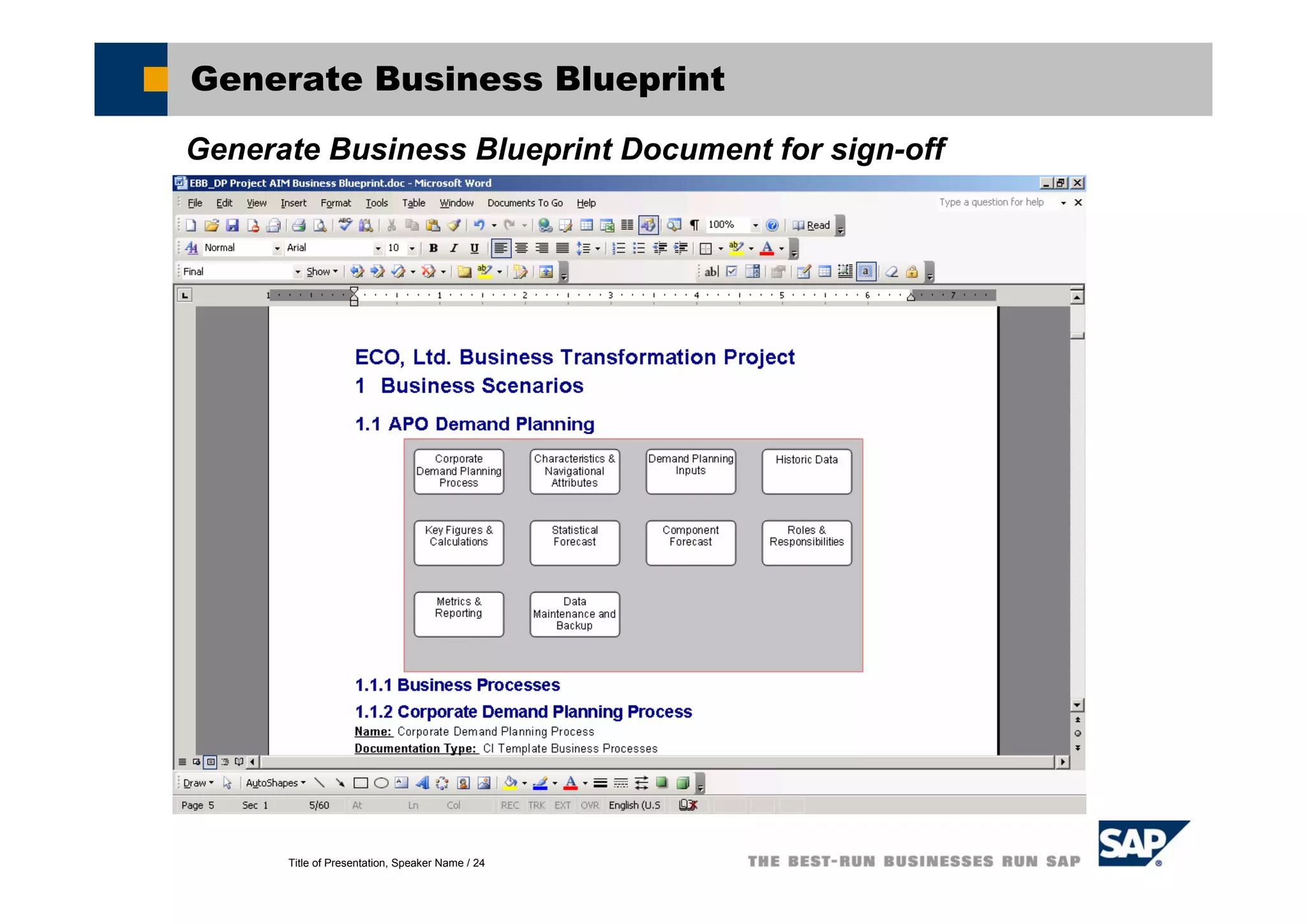
Generate Business Blueprint
Generate Business Blueprint Document for sign-off
Title of Presentation, Speaker Name / 25
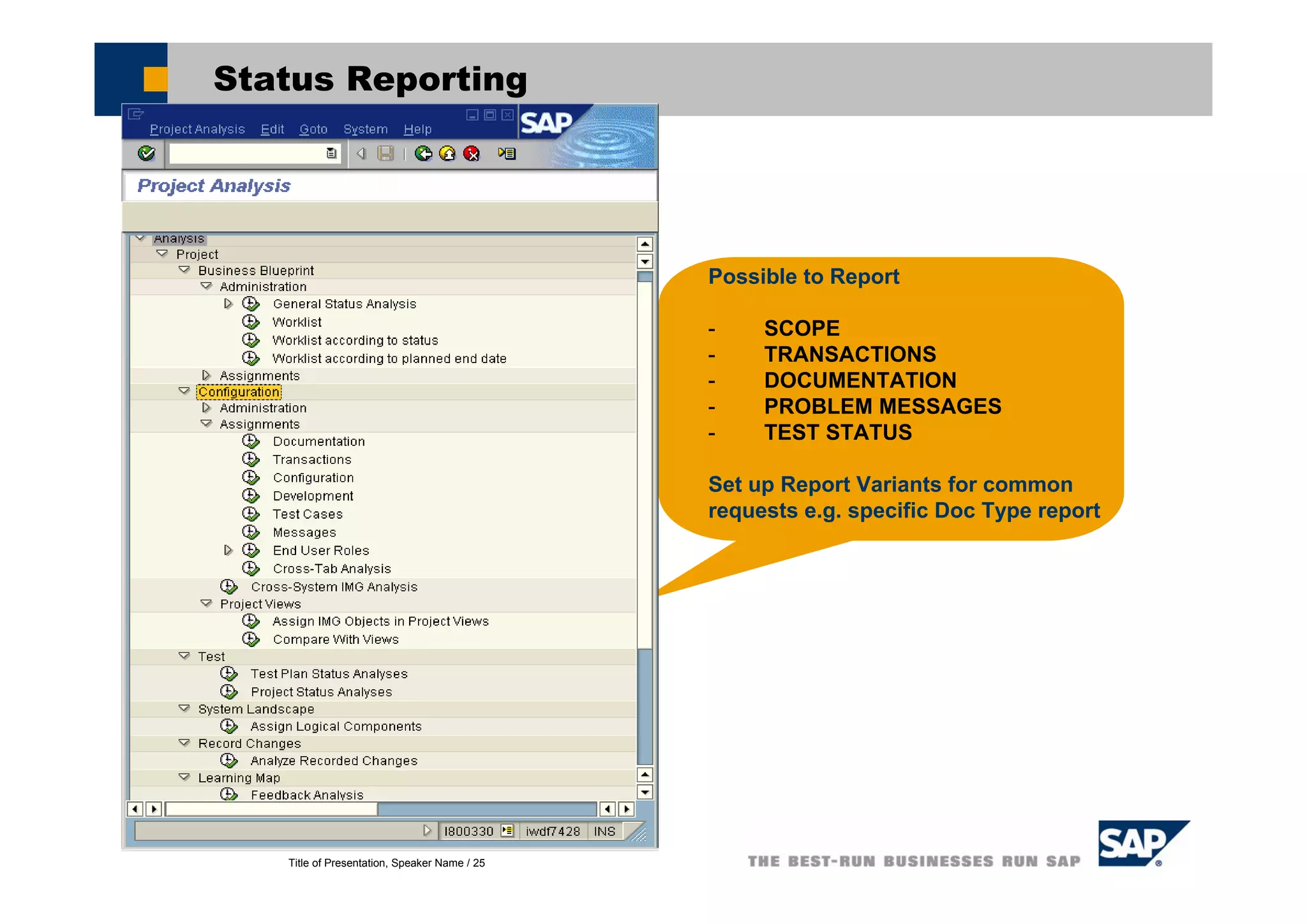
Status Reporting
Possible to Report
- SCOPE
- TRANSACTIONS
- DOCUMENTATION
- PROBLEM MESSAGES
- TEST STATUS
Set up Report Variants for common
requests e.g. specific Doc Type report
Title of Presentation, Speaker Name / 26
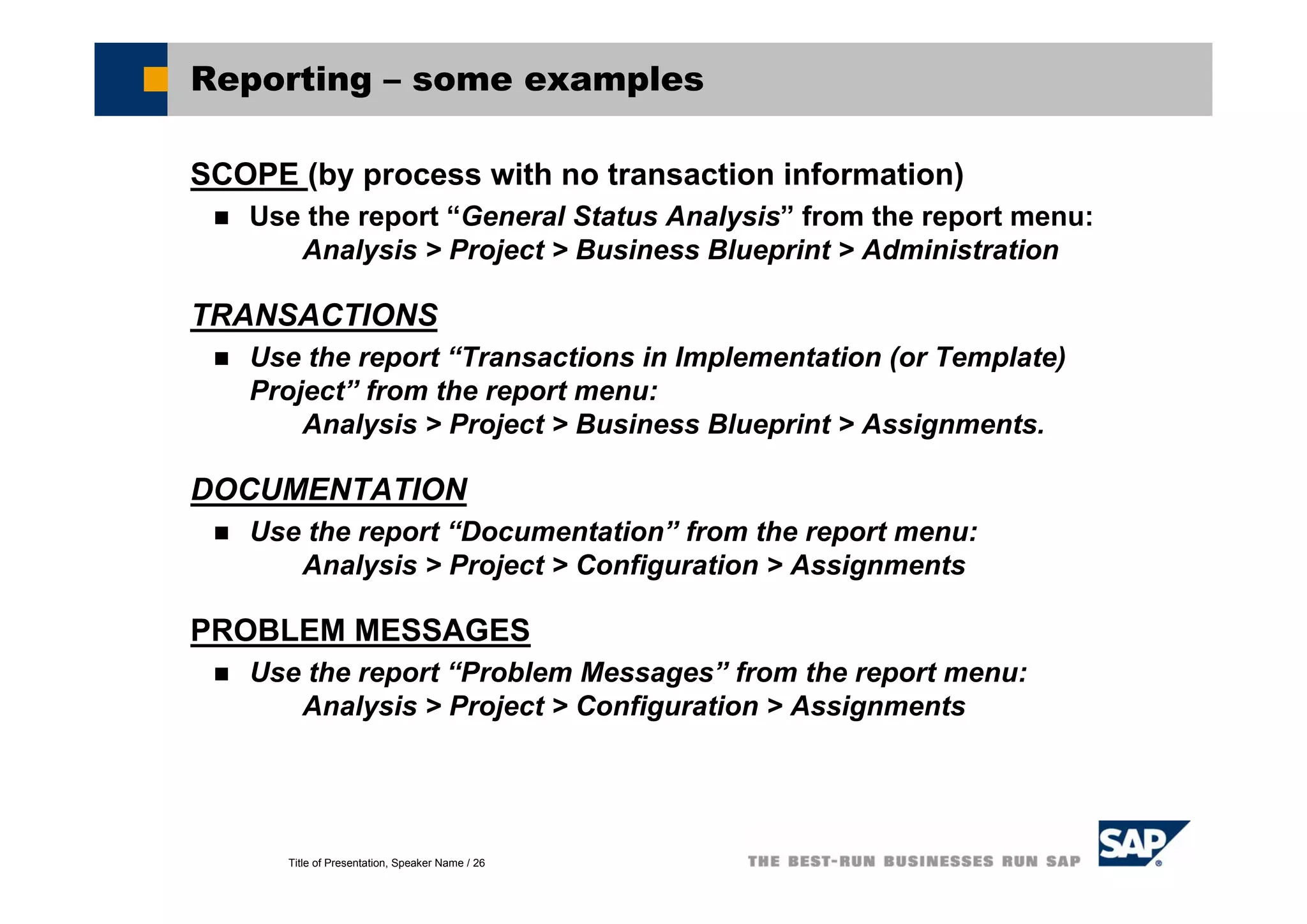
Reporting – some examples
SCOPE (by process with no transaction information)
Use the report “General Status Analysis” from the report menu:
Analysis > Project > Business Blueprint > Administration
TRANSACTIONS
Use the report “Transactions in Implementation (or Template)
Project” from the report menu:
Analysis > Project > Business Blueprint > Assignments.
DOCUMENTATION
Use the report “Documentation” from the report menu:
Analysis > Project > Configuration > Assignments
PROBLEM MESSAGES
Use the report “Problem Messages” from the report menu:
Analysis > Project > Configuration > Assignments
Title of Presentation, Speaker Name / 27
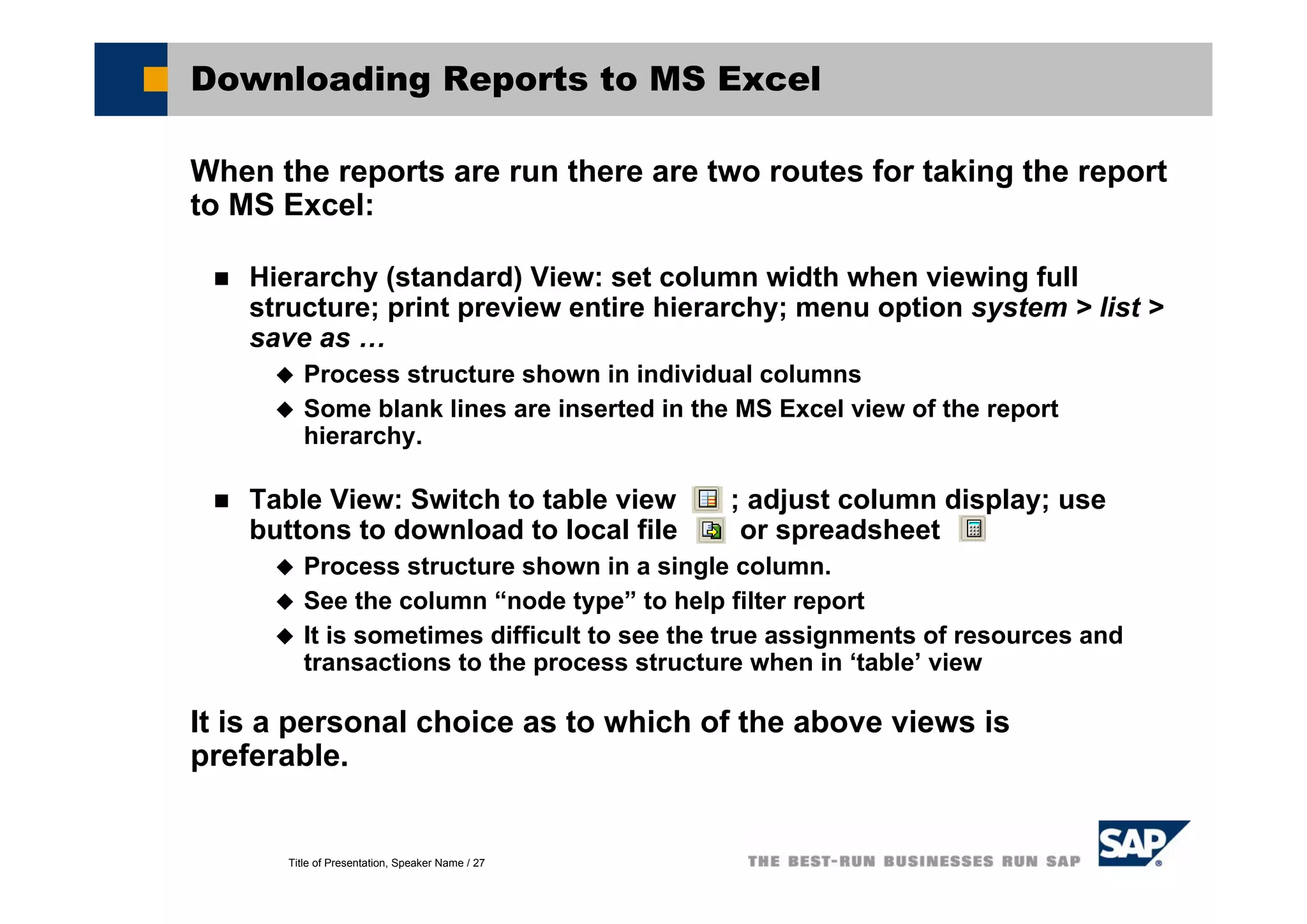
Downloading Reports to MS Excel
When the reports are run there are two routes for taking the report
to MS Excel:
Hierarchy (standard) View: set column width when viewing full
structure; print preview entire hierarchy; menu option system > list >
save as …
Process structure shown in individual columns
Some blank lines are inserted in the MS Excel view of the report
hierarchy.
Table View: Switch to table view ; adjust column display; use
buttons to download to local file or spreadsheet
Process structure shown in a single column.
See the column “node type” to help filter report
It is sometimes difficult to see the true assignments of resources and
transactions to the process structure when in ‘table’ view
It is a personal choice as to which of the above views is
preferable.
Title of Presentation, Speaker Name / 28
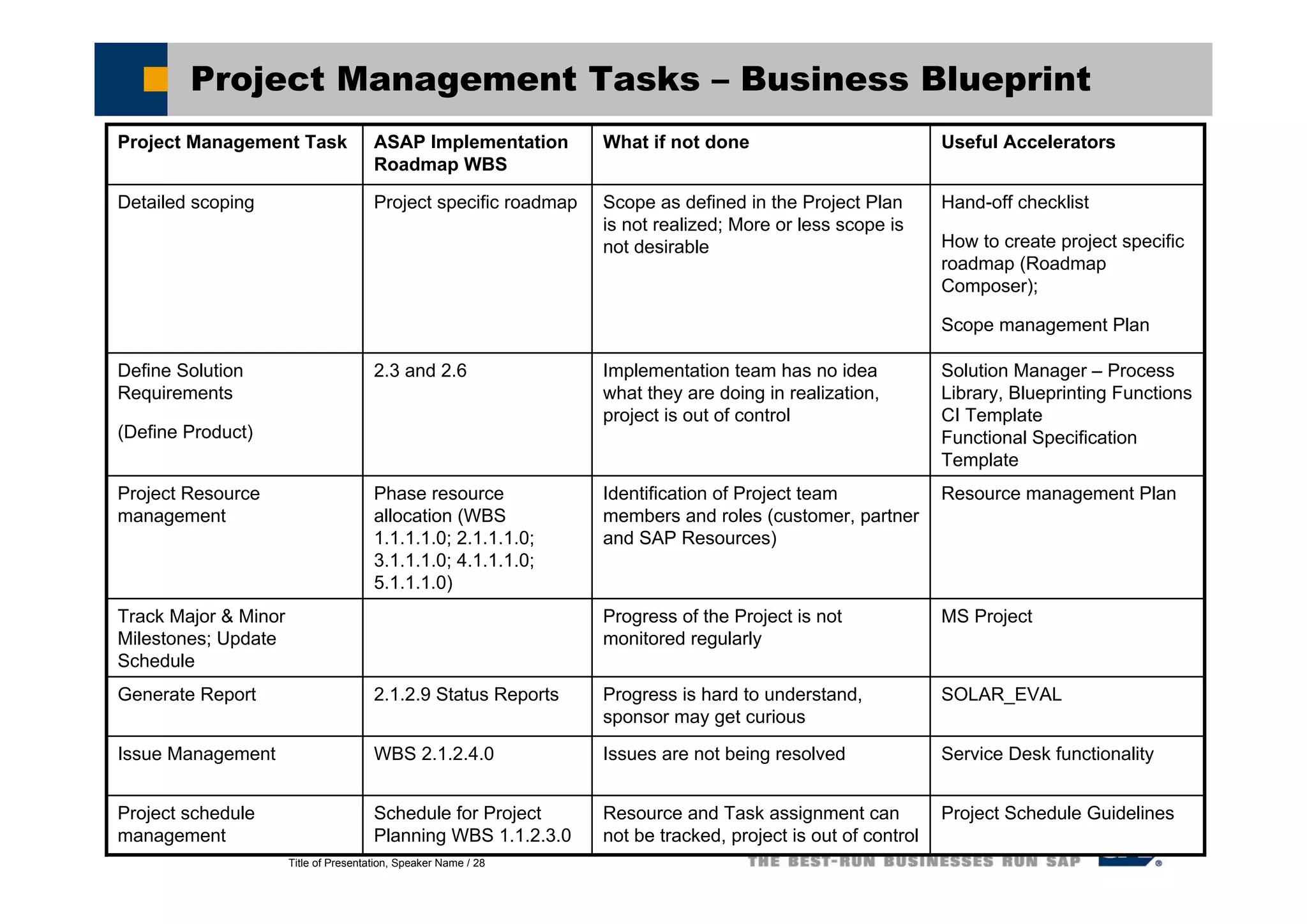
Project Management Tasks – Business Blueprint
Solution Manager – Process
Library, Blueprinting Functions
CI Template
Functional Specification
Template
Implementation team has no idea
what they are doing in realization,
project is out of control
2.3 and 2.6Define Solution
Requirements
(Define Product)
SOLAR_EVALProgress is hard to understand,
sponsor may get curious
2.1.2.9 Status ReportsGenerate Report
Service Desk functionalityIssues are not being resolvedWBS 2.1.2.4.0Issue Management
MS ProjectProgress of the Project is not
monitored regularly
Track Major & Minor
Milestones; Update
Schedule
Useful AcceleratorsWhat if not doneASAP Implementation
Roadmap WBS
Project Management Task
Project Schedule GuidelinesResource and Task assignment can
not be tracked, project is out of control
Schedule for Project
Planning WBS 1.1.2.3.0
Project schedule
management
Resource management PlanIdentification of Project team
members and roles (customer, partner
and SAP Resources)
Phase resource
allocation (WBS
1.1.1.1.0; 2.1.1.1.0;
3.1.1.1.0; 4.1.1.1.0;
5.1.1.1.0)
Project Resource
management
Hand-off checklist
How to create project specific
roadmap (Roadmap
Composer);
Scope management Plan
Scope as defined in the Project Plan
is not realized; More or less scope is
not desirable
Project specific roadmapDetailed scoping
Title of Presentation, Speaker Name / 29
Demo and Exercises
Business Blueprint – Demo and Exercises
Title of Presentation, Speaker Name / 30
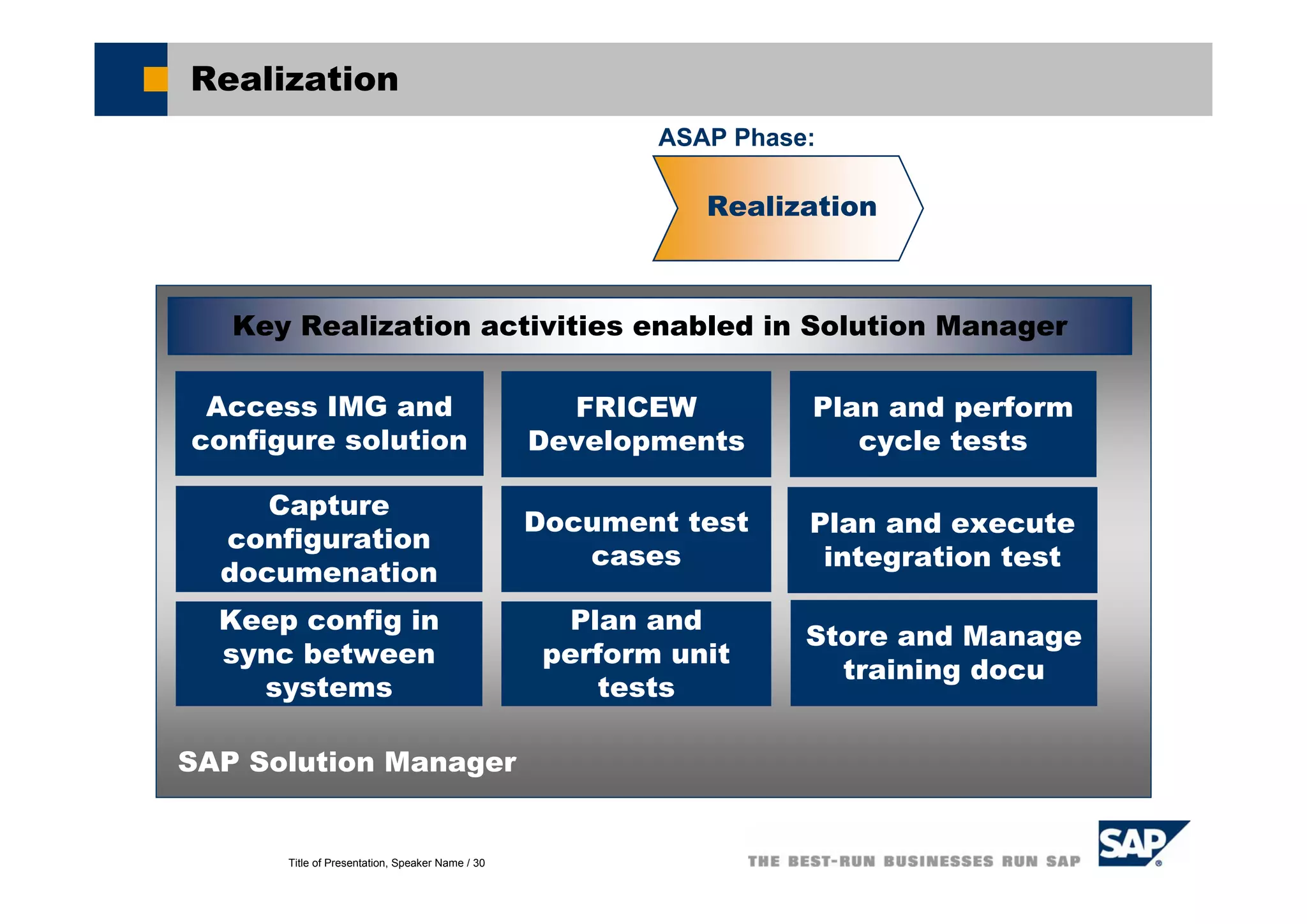
Realization
Access IMG and
configure solution
Capture
configuration
documenation
SAP Solution Manager
Key Realization activities enabled in Solution Manager
Document test
cases
Keep config in
sync between
systems
FRICEW
Developments
Realization
Plan and
perform unit
tests
Plan and execute
integration test
Store and Manage
training docu
Plan and perform
cycle tests
ASAP Phase:
Title of Presentation, Speaker Name / 31
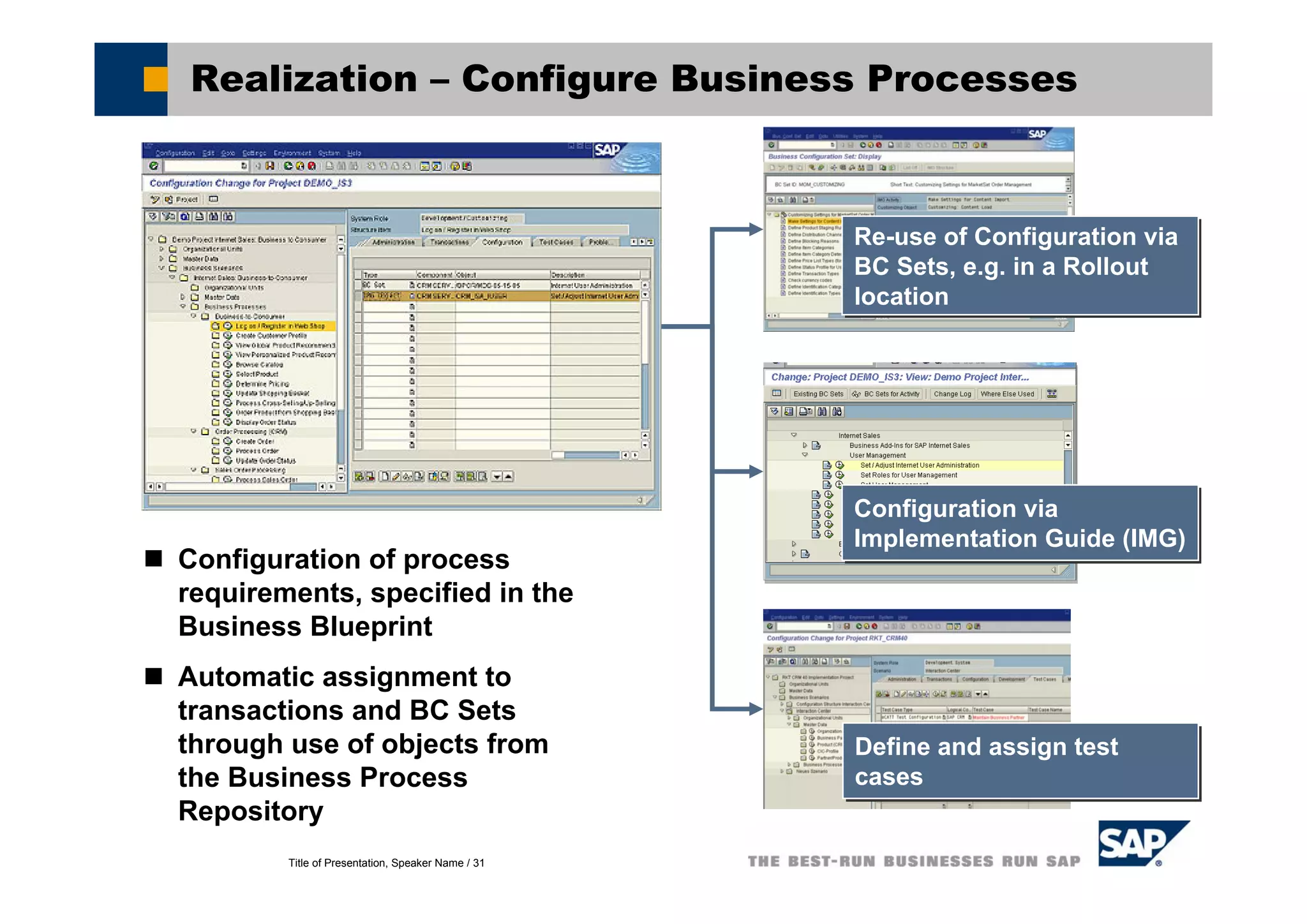
Realization – Configure Business Processes
Configuration of process
requirements, specified in the
Business Blueprint
Automatic assignment to
transactions and BC Sets
through use of objects from
the Business Process
Repository
Re-use of Configuration via
BC Sets, e.g. in a Rollout
location
Re-use of Configuration via
BC Sets, e.g. in a Rollout
location
Configuration via
Implementation Guide (IMG)
Configuration via
Implementation Guide (IMG)
Define and assign test
cases
Define and assign test
cases
Title of Presentation, Speaker Name / 32
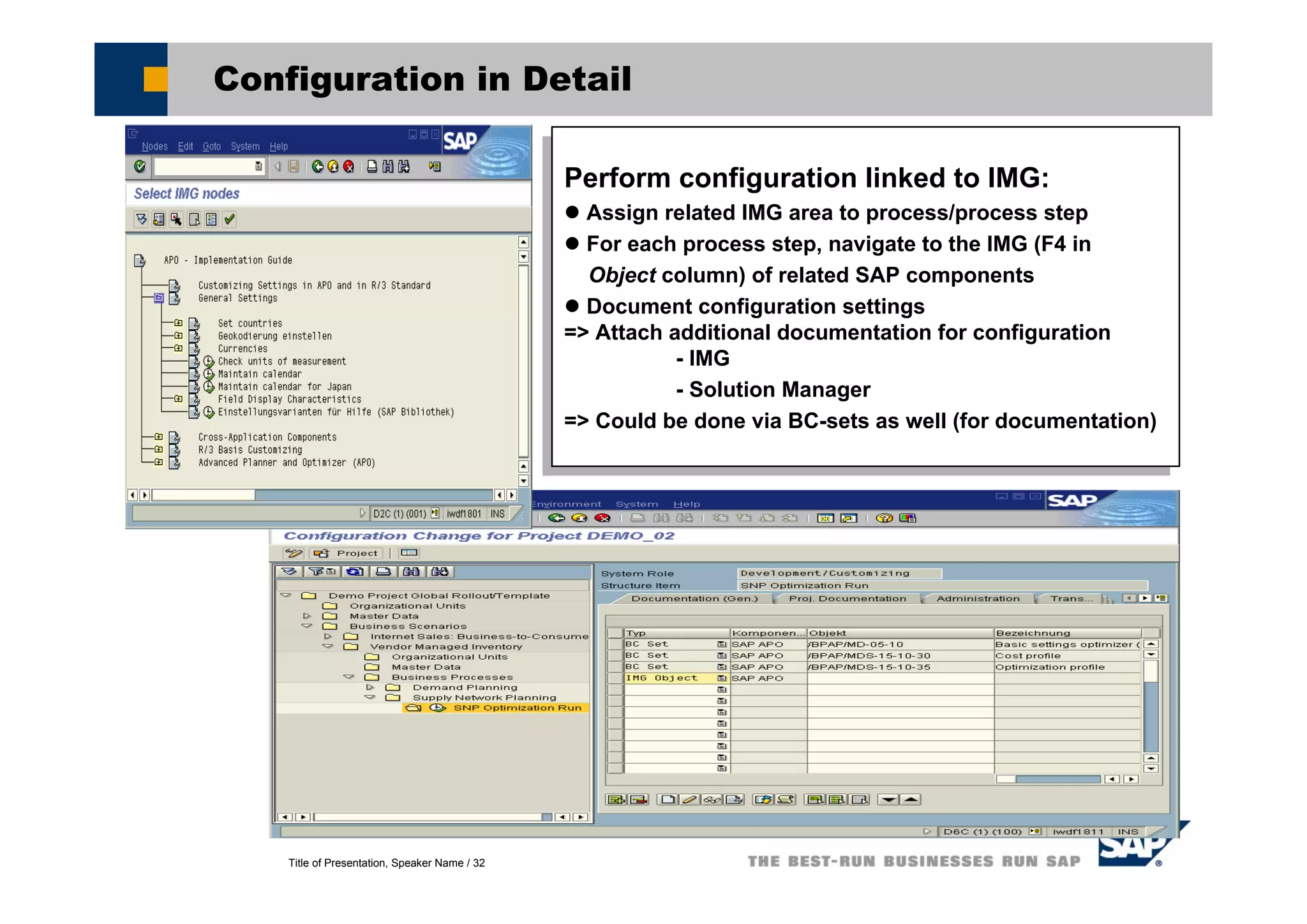
Configuration in Detail
Perform configuration linked to IMG:
Assign related IMG area to process/process step
For each process step, navigate to the IMG (F4 in
Object column) of related SAP components
Document configuration settings
=> Attach additional documentation for configuration
- IMG
- Solution Manager
=> Could be done via BC-sets as well (for documentation)
Perform configuration linked to IMG:
Assign related IMG area to process/process step
For each process step, navigate to the IMG (F4 in
Object column) of related SAP components
Document configuration settings
=> Attach additional documentation for configuration
- IMG
- Solution Manager
=> Could be done via BC-sets as well (for documentation)
Title of Presentation, Speaker Name / 33
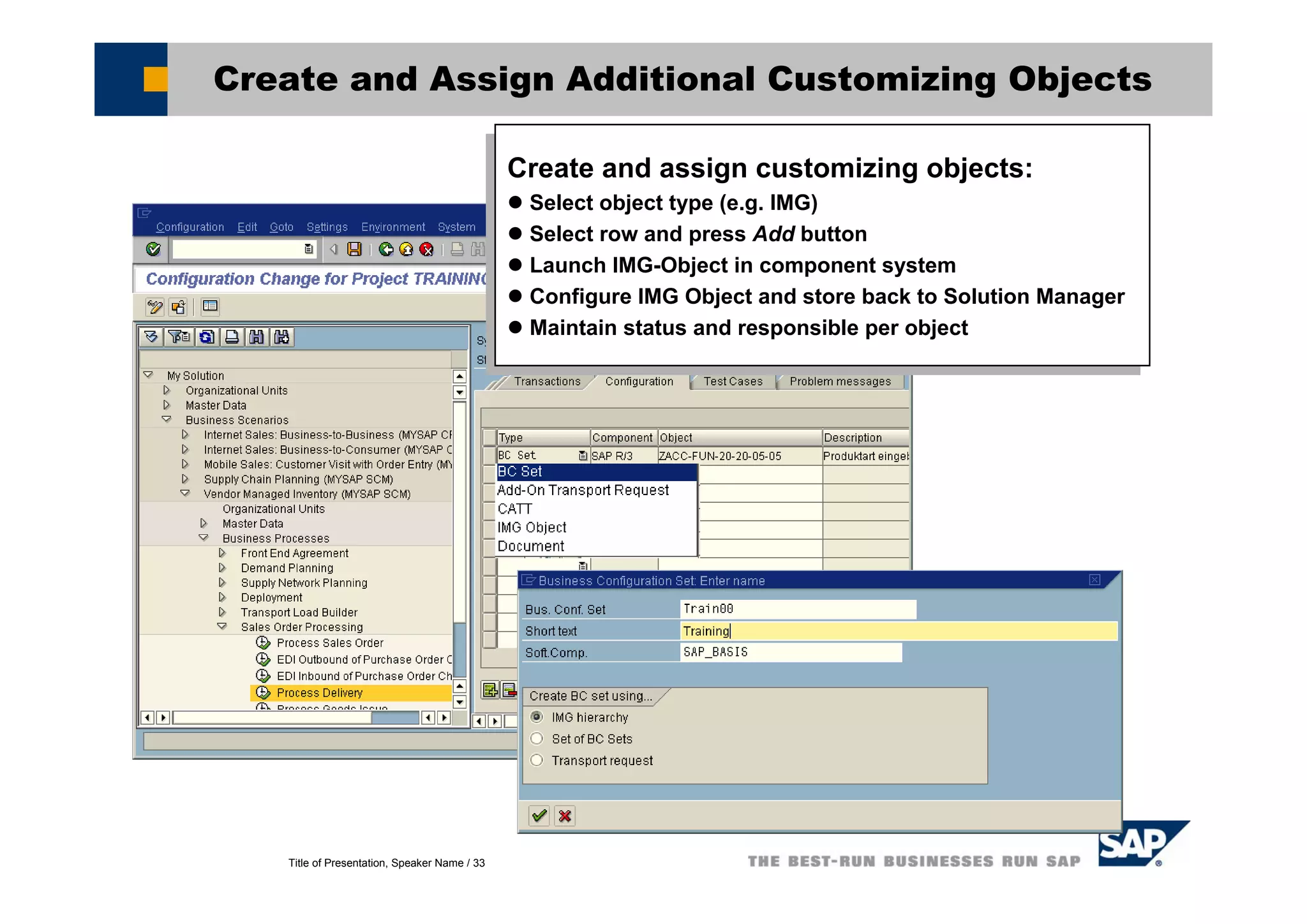
Create and Assign Additional Customizing Objects
Create and assign customizing objects:
Select object type (e.g. IMG)
Select row and press Add button
Launch IMG-Object in component system
Configure IMG Object and store back to Solution Manager
Maintain status and responsible per object
Create and assign customizing objects:
Select object type (e.g. IMG)
Select row and press Add button
Launch IMG-Object in component system
Configure IMG Object and store back to Solution Manager
Maintain status and responsible per object
Title of Presentation, Speaker Name / 34
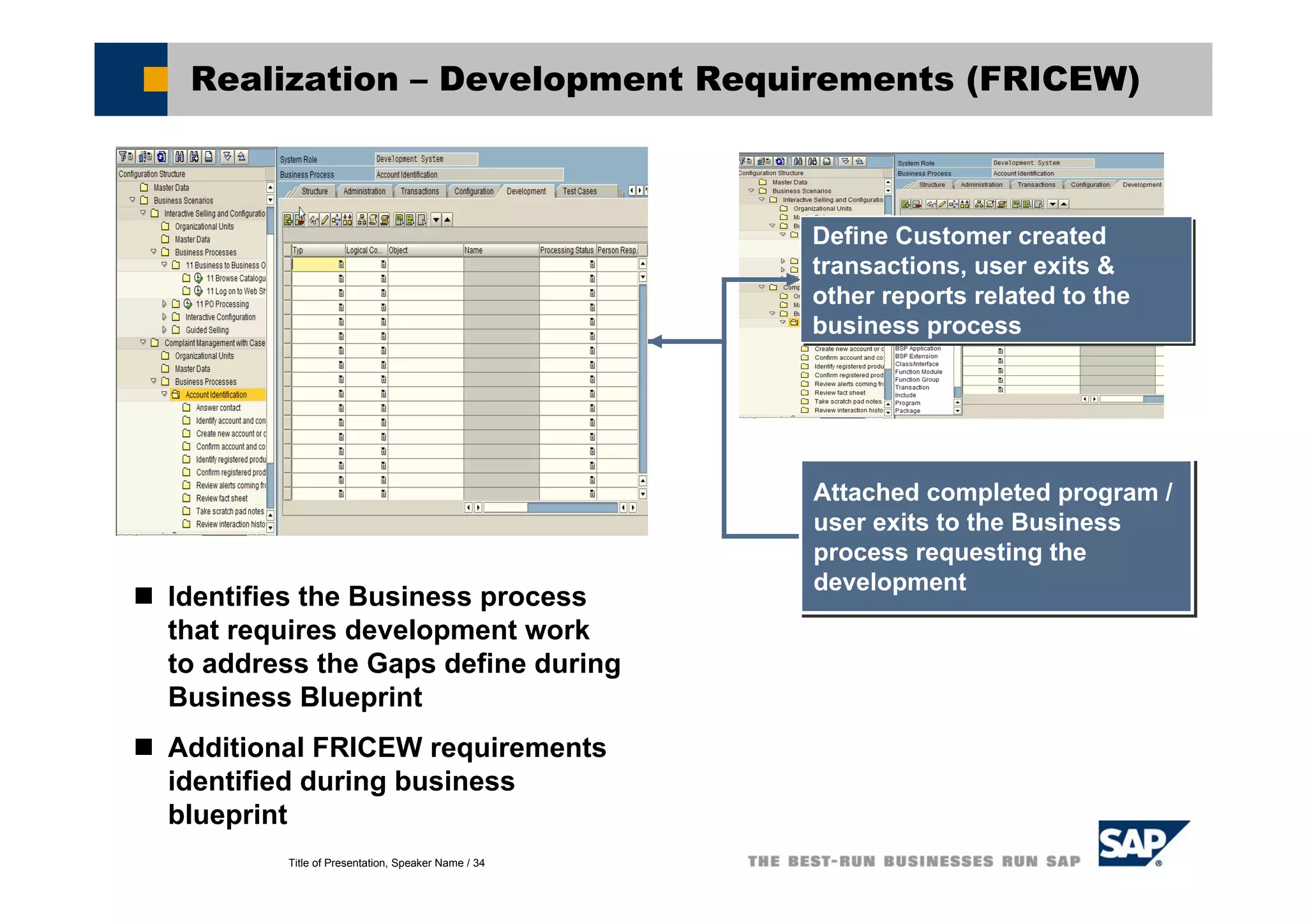
Realization – Development Requirements (FRICEW)
Define Customer created
transactions, user exits &
other reports related to the
business process
Define Customer created
transactions, user exits &
other reports related to the
business process
Identifies the Business process
that requires development work
to address the Gaps define during
Business Blueprint
Additional FRICEW requirements
identified during business
blueprint
Attached completed program /
user exits to the Business
process requesting the
development
Attached completed program /
user exits to the Business
process requesting the
development
Title of Presentation, Speaker Name / 35
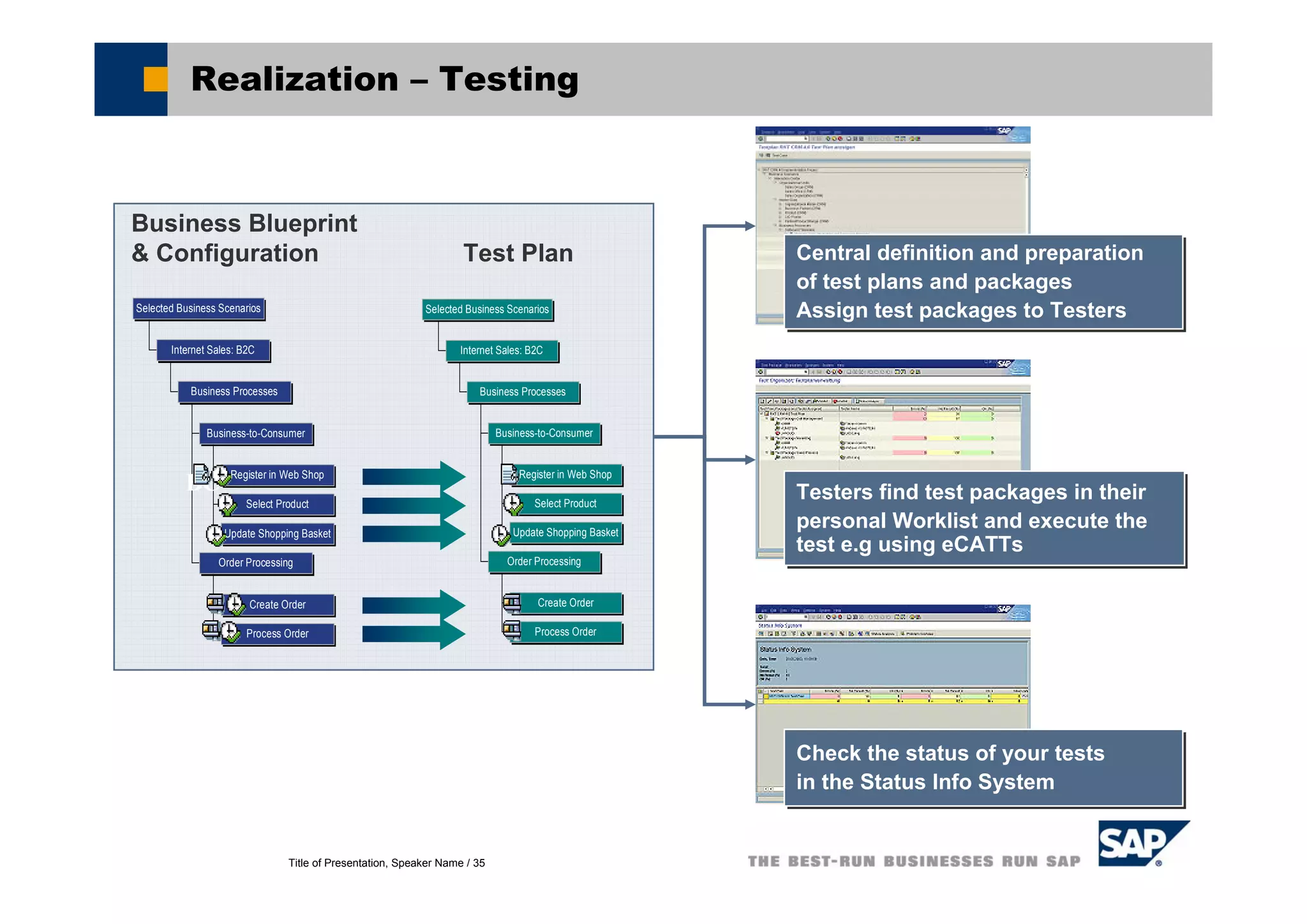
Realization – Testing
Central definition and preparation
of test plans and packages
Assign test packages to Testers
Central definition and preparation
of test plans and packages
Assign test packages to Testers
Testers find test packages in their
personal Worklist and execute the
test e.g using eCATTs
Testers find test packages in their
personal Worklist and execute the
test e.g using eCATTs
Check the status of your tests
in the Status Info System
Check the status of your tests
in the Status Info System
Business Blueprint
& Configuration Test Plan
Register in Web Shop
Select Product
Update Shopping Basket
Business-to-Consumer
Create Order
Process Order
Order Processing
Business Processes
Internet Sales: B2C
Selected Business Scenarios
BC Register in Web Shop
Select Product
Update Shopping Basket
Business-to-Consumer
Create Order
Process Order
Order Processing
Business Processes
Internet Sales: B2C
Selected Business Scenarios
Title of Presentation, Speaker Name / 36
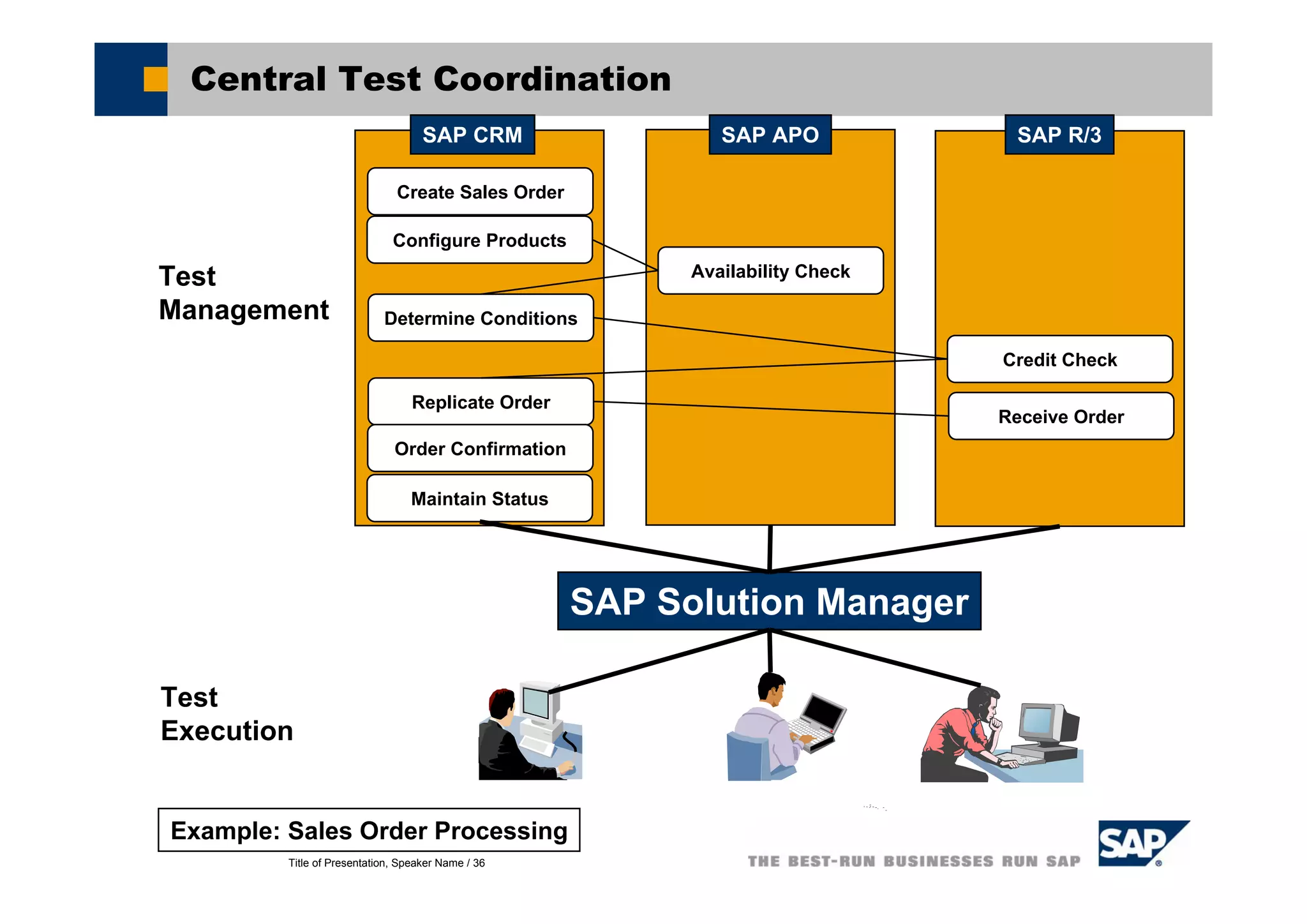
Central Test Coordination
Example: Sales Order Processing
Create Sales Order
Configure Products
Availability Check
Determine Conditions
Credit Check
Receive Order
Replicate Order
Order Confirmation
Maintain Status
SAP CRM SAP APO SAP R/3
Test
Management
Test
Execution
SAP Solution Manager
Title of Presentation, Speaker Name / 37
Usage of Test Workbench in Solution Manager
Test Plan Management (transaction STWB_2)
Define test plan according to your solution manager project
Create Test Packages
Assign Tester to Test packages
Display Test Package => expand structure => test cases visible
Possibility for Status Analysis => test cases visible
Testing (transaction STWB_WORK)
Tester will find the worklist with the assigned Test Packages
Select Test Package
Expand structure => test cases visible
Test
test the functionality with reference to the test case directly in your test system
Maintain status for the test case within Test Package in Solution Manager
Make Status Analysis via Test Packages in Test Plan Management
(transaction STWB_2)
Title of Presentation, Speaker Name / 38
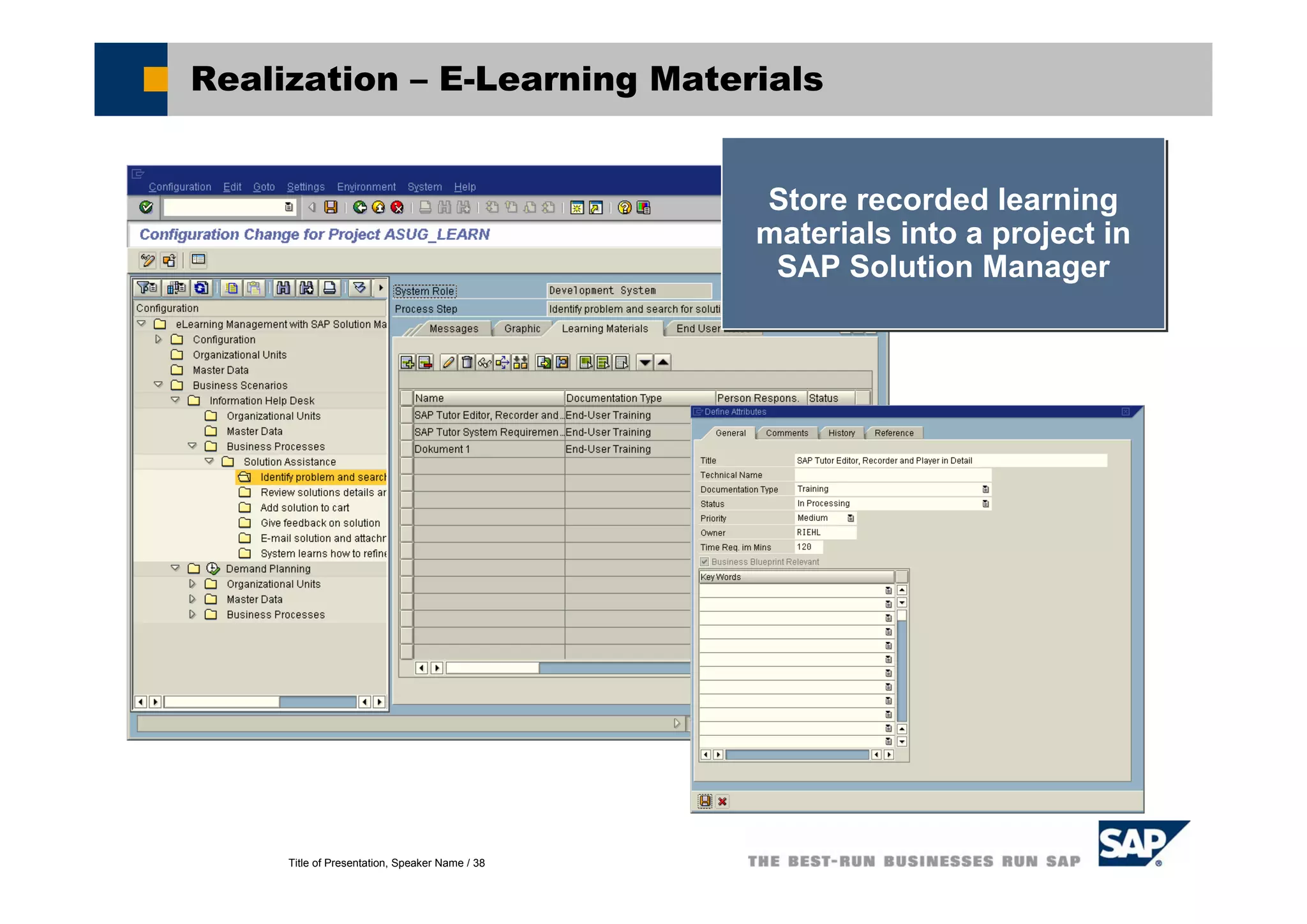
Realization – E-Learning Materials
Store recorded learning
materials into a project in
SAP Solution Manager
Store recorded learning
materials into a project in
SAP Solution Manager
Title of Presentation, Speaker Name / 39
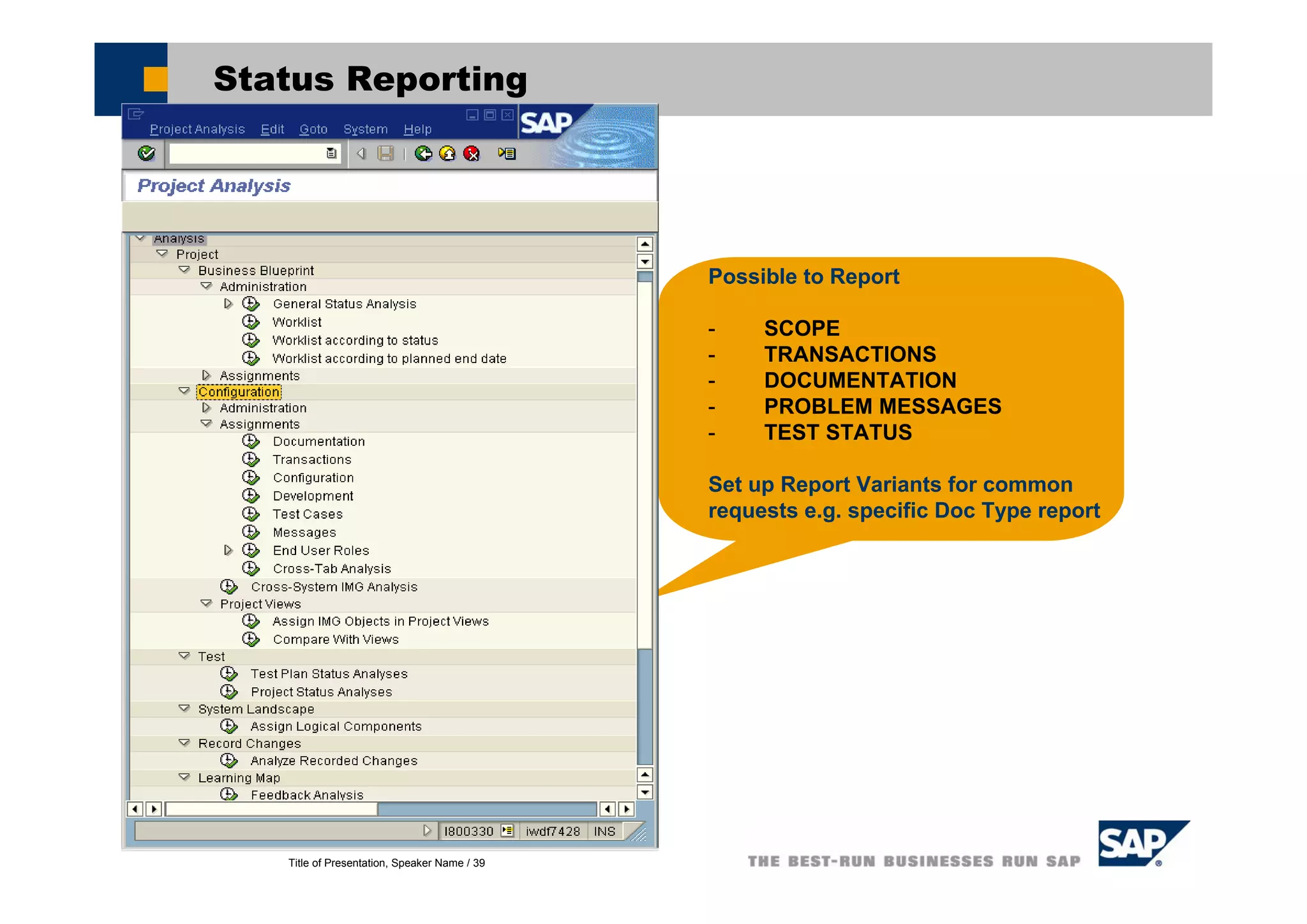
Status Reporting
Possible to Report
- SCOPE
- TRANSACTIONS
- DOCUMENTATION
- PROBLEM MESSAGES
- TEST STATUS
Set up Report Variants for common
requests e.g. specific Doc Type report
Title of Presentation, Speaker Name / 40
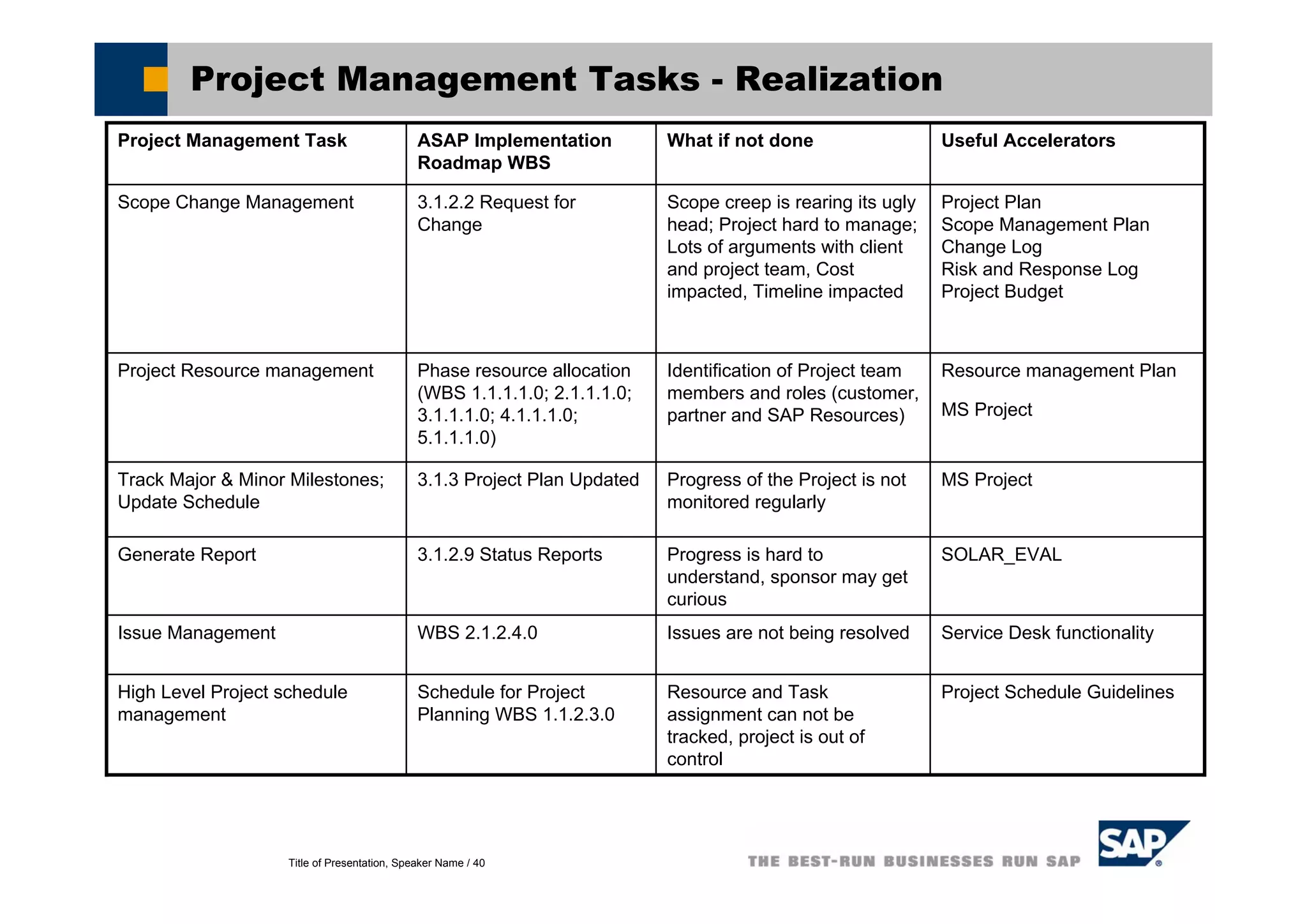
Project Management Tasks - Realization
SOLAR_EVALProgress is hard to
understand, sponsor may get
curious
3.1.2.9 Status ReportsGenerate Report
Service Desk functionalityIssues are not being resolvedWBS 2.1.2.4.0Issue Management
MS ProjectProgress of the Project is not
monitored regularly
3.1.3 Project Plan UpdatedTrack Major & Minor Milestones;
Update Schedule
Useful AcceleratorsWhat if not doneASAP Implementation
Roadmap WBS
Project Management Task
Project Schedule GuidelinesResource and Task
assignment can not be
tracked, project is out of
control
Schedule for Project
Planning WBS 1.1.2.3.0
High Level Project schedule
management
Resource management Plan
MS Project
Identification of Project team
members and roles (customer,
partner and SAP Resources)
Phase resource allocation
(WBS 1.1.1.1.0; 2.1.1.1.0;
3.1.1.1.0; 4.1.1.1.0;
5.1.1.1.0)
Project Resource management
Project Plan
Scope Management Plan
Change Log
Risk and Response Log
Project Budget
Scope creep is rearing its ugly
head; Project hard to manage;
Lots of arguments with client
and project team, Cost
impacted, Timeline impacted
3.1.2.2 Request for
Change
Scope Change Management
Title of Presentation, Speaker Name / 41
Demo and Exercises
Realization - Demo and Exercises
Title of Presentation, Speaker Name / 42
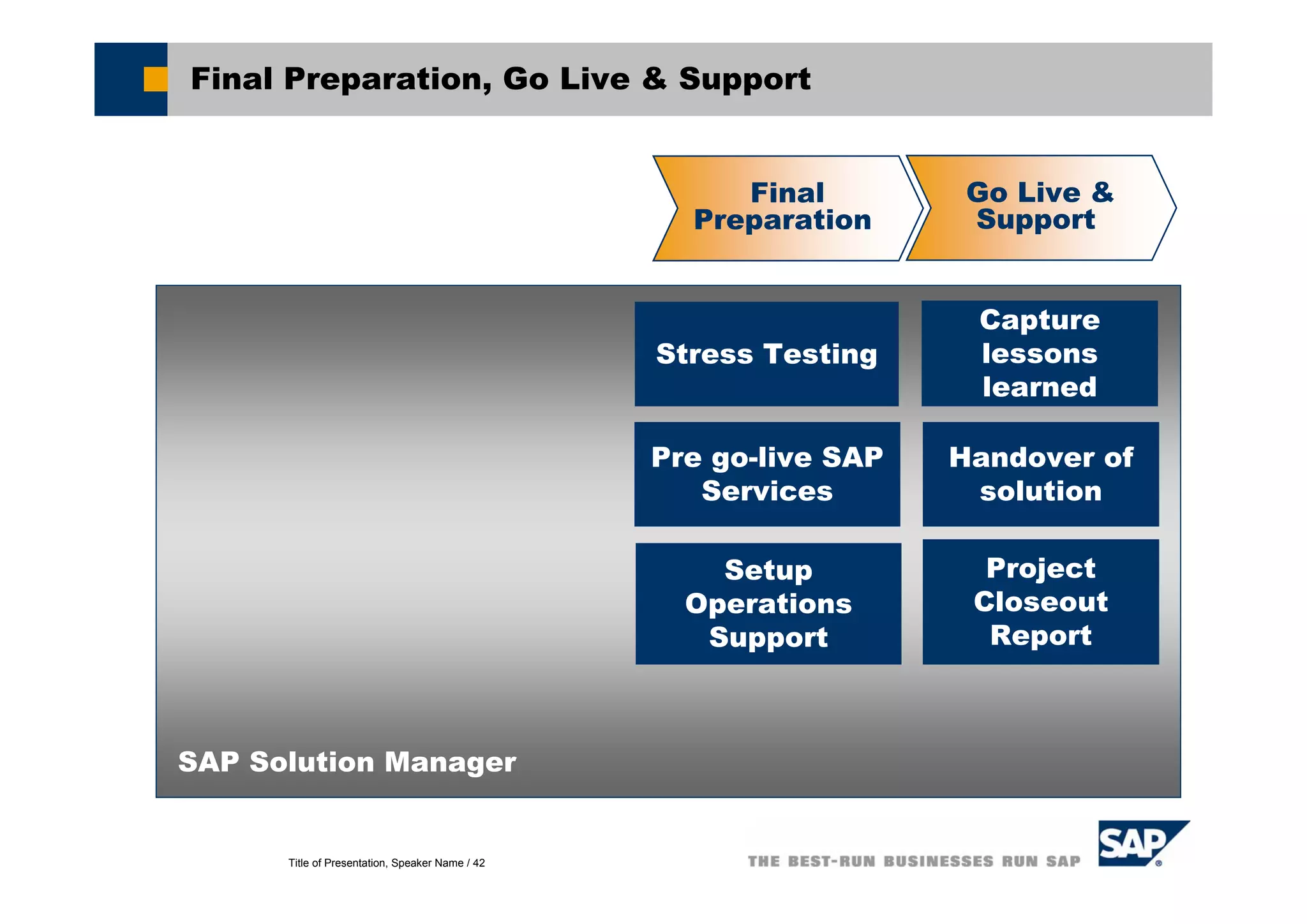
Final Preparation, Go Live & Support
SAP Solution Manager
Final
Preparation
Go Live &
Support
Pre go-live SAP
Services
Stress Testing
Capture
lessons
learned
Setup
Operations
Support
Handover of
solution
Project
Closeout
Report
Title of Presentation, Speaker Name / 43
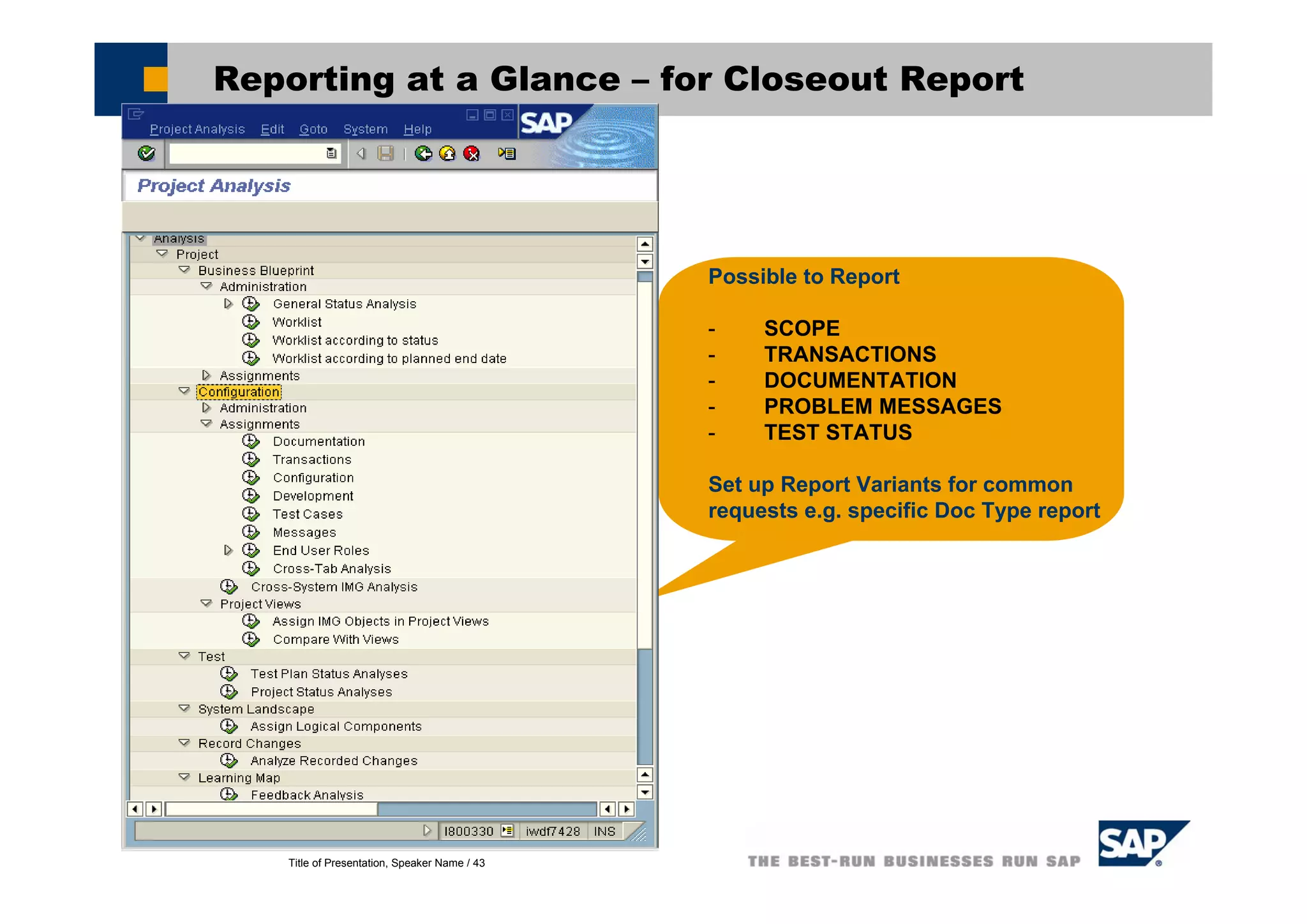
Reporting at a Glance – for Closeout Report
Possible to Report
- SCOPE
- TRANSACTIONS
- DOCUMENTATION
- PROBLEM MESSAGES
- TEST STATUS
Set up Report Variants for common
requests e.g. specific Doc Type report
Title of Presentation, Speaker Name / 44
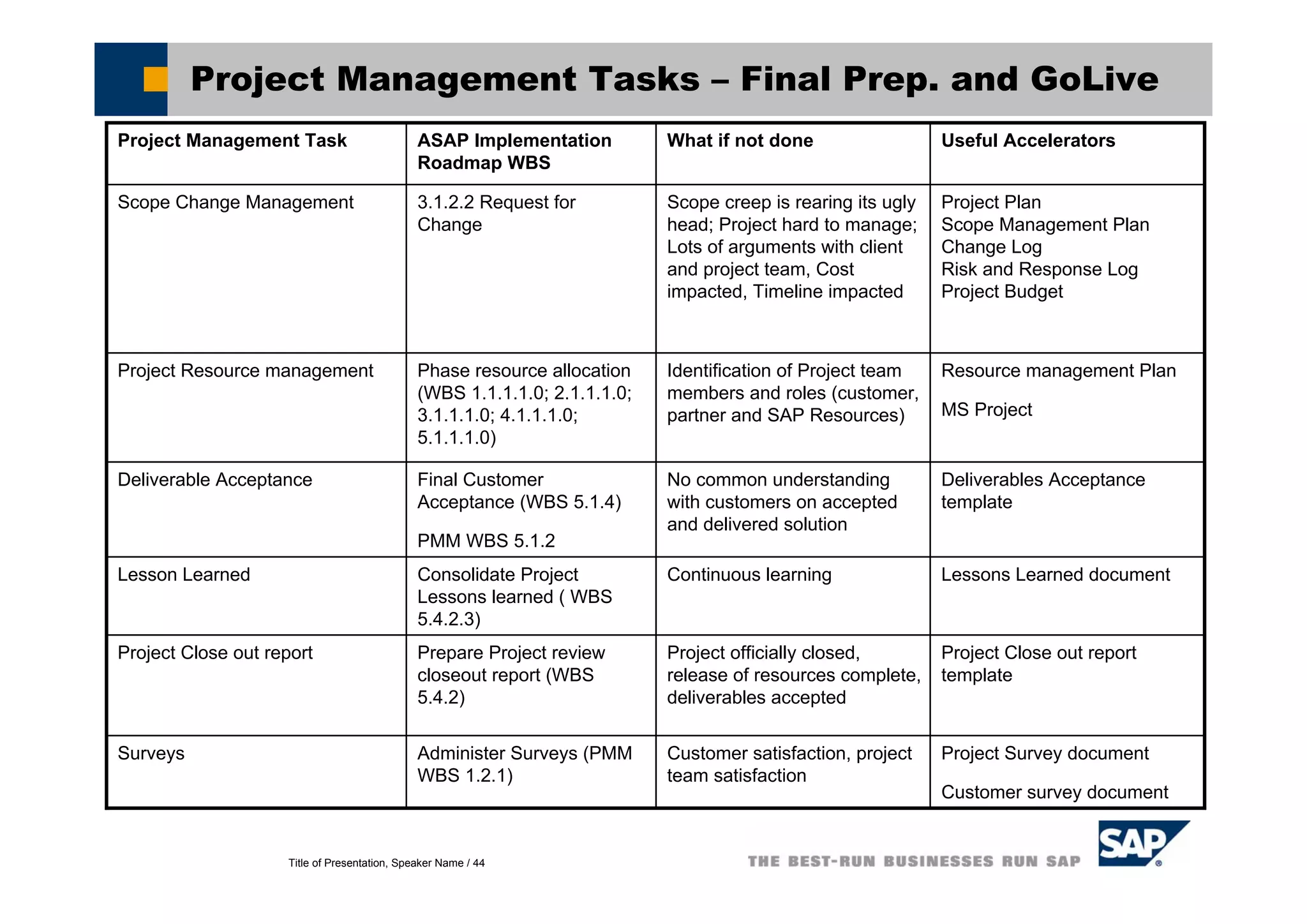
Project Management Tasks – Final Prep. and GoLive
Lessons Learned documentContinuous learningConsolidate Project
Lessons learned ( WBS
5.4.2.3)
Lesson Learned
Project Close out report
template
Project officially closed,
release of resources complete,
deliverables accepted
Prepare Project review
closeout report (WBS
5.4.2)
Project Close out report
Deliverables Acceptance
template
No common understanding
with customers on accepted
and delivered solution
Final Customer
Acceptance (WBS 5.1.4)
PMM WBS 5.1.2
Deliverable Acceptance
Useful AcceleratorsWhat if not doneASAP Implementation
Roadmap WBS
Project Management Task
Project Survey document
Customer survey document
Customer satisfaction, project
team satisfaction
Administer Surveys (PMM
WBS 1.2.1)
Surveys
Resource management Plan
MS Project
Identification of Project team
members and roles (customer,
partner and SAP Resources)
Phase resource allocation
(WBS 1.1.1.1.0; 2.1.1.1.0;
3.1.1.1.0; 4.1.1.1.0;
5.1.1.1.0)
Project Resource management
Project Plan
Scope Management Plan
Change Log
Risk and Response Log
Project Budget
Scope creep is rearing its ugly
head; Project hard to manage;
Lots of arguments with client
and project team, Cost
impacted, Timeline impacted
3.1.2.2 Request for
Change
Scope Change Management

SAP - SOLUTION MANAGER

  • 1.
    SAP Solution Manager :Platform for SAP Projects SAP Field Services
  • 2.
    Title of Presentation,Speaker Name / 2 Standard Customer Environment Customer Solution Missing Integration !!! Blueprint Configuration Blueprint Configuration Test Management Test Management Project Management Project Management Solution Monitoring Solution Monitoring Knowledge Transfer Knowledge Transfer Support Desk Support Desk Change Management Change Management Service Delivery Service Delivery
  • 3.
    Title of Presentation,Speaker Name / 3 SAP Solution Manager: Mission Statement With SAP Solution Manager, you can manage your SAP solution throughout the entire life cycle to... ensure reliability reduce Total Cost of Ownership increase Return on Investments SAP Solution Manager is delivered as part of your annual maintenance fee!!! ... And here is how you can achieve the benefits:
  • 4.
    Title of Presentation,Speaker Name / 4 A Different Approach A different approach is required for managing IT solutions It is characterized by the following aspects Integration Integration is vital because you need one place where all information comes together Life-cycle orientation Life-Cycle Orientation is vital because it structures the customers’ tasks that customers from a time perspective Business-process orientation Business processes are the glue for the information which is acquired during the software life-cyle
  • 5.
    Title of Presentation,Speaker Name / 5 4 Process Group 5 Processes 2 Enterprise Area 3 Scenario SAP Reference Structure 1 Business Processes The “old” and the “new” way 4 Process Groups 4 Process Step 2 Business Scenario 3 Business Process SAP Reference Structure 1 Project Name SAP Solution ManagerSAP Solution ManagerASAP Q&AdbASAP Q&Adb
  • 6.
    Title of Presentation,Speaker Name / 6 How to describe Solutions? 3 Level Approach used internally and externally to describe a business oriented view Used by SAP Development to structure all SAP solutions Business Scenario Process Step Process Visualized by Component View Transactions Businessview/ Asis–Tobe Software View
  • 7.
    Title of Presentation,Speaker Name / 7 SAP Solution Manager – Where does it Live? Customer's System Landscape SAP Service Marketplace 3.1I3.1I SCMSCM CUSCUS FVSFVS 4.6C4.6C PLMPLM CRMCRM 4.6C4.6C PRD 3.1I3.1I 4.6C4.6C CRMCRM 4.6C4.6C FVSFVS QAS DEV CUSCUS CUSCUS SAP Solution Manager RFC/Agents RFC/Agents Data Collectors RFC/Agents
  • 8.
    Title of Presentation,Speaker Name / 8 SAP Solution Manager – Offerings Content Gateway to SAP Tool Open End-to-End Application/ Technology Management & Maintenance Document Implement Train Test a deployment Support and maintain Monitor and optimize Control change Manage incidents Methodologies Roadmaps Services Best Practices SAP Active Global Support SAP Development Service Delivery Platform
  • 9.
    Title of Presentation,Speaker Name / 9 Solution Manager in Project Preparation Project Preparation Project Issue ManagementDefine Project System Landscape SAP Solution Manager What do I need to set-up in SM? Key Word Categories Define Statuses Project Team Authorization Profiles Document Management Define High Level Scope Leverage Scope from different Projects Upload Roadmap ASAP Phase:
  • 10.
    Title of Presentation,Speaker Name / 10 How SAP delivers ASAP Roadmaps AcceleratedSAP Roadmap delivered via SAP Service Marketplace, SAP Solution Manager and SAP Roadmap Composer (SAP Consulting internal toolset). SAP Internal For external audiences
  • 11.
    Title of Presentation,Speaker Name / 11 Project Preparation - Define Project Project Administration Choose your project type Define general project data Implementation Project Implementation of SAP solutions Template Project Creation of re-usable solutions Implementation Project Implementation of SAP solutions Template Project Creation of re-usable solutions Person responsible for the project Language of the project Overall project status Project time frame for plan and actual data Person responsible for the project Language of the project Overall project status Project time frame for plan and actual data
  • 12.
    Title of Presentation,Speaker Name / 12 Define Project – General, Landscape, Standards ... Define project data Person responsible for the project Language of the project: determines in which language the documents will be accessed from knowledge warehouse Overall project status Project time frame for plan and actual data Assign project team members Assign generic or existing users as potential resources for the project Assign Project team members to tasks in a project structure (e.g. Solar01) Direct access to user maintenance Define Project Standards Set status values to be used during the project Keywords as search criterias for documentation in reporting Select and/or define document types and related templates (Button: Project template) Define project data Person responsible for the project Language of the project: determines in which language the documents will be accessed from knowledge warehouse Overall project status Project time frame for plan and actual data Assign project team members Assign generic or existing users as potential resources for the project Assign Project team members to tasks in a project structure (e.g. Solar01) Direct access to user maintenance Define Project Standards Set status values to be used during the project Keywords as search criterias for documentation in reporting Select and/or define document types and related templates (Button: Project template)
  • 13.
    Title of Presentation,Speaker Name / 13 Define document strategy Business Scenario Business Process Process Step A Business Scenario is a set of processes that define a business task in a comprehensive and self- contained manner on a macro level A process is a set of logically related activities performed to achieve a defined business outcome (cf. Davenport & Short, 1990) A process step is an elementary activity performed to accomplish a process Demand Planning Sales Order Processing: Make/Assembly To Order Create Inquiry Transaction(s) VA11 Create Inquiry VA12 Change Inquiry VA13 Display Inquiry VA15 Inquiries list V.03 List of Incomplete Inquiries
  • 14.
    Title of Presentation,Speaker Name / 14 Project Standards – Documentation types Define docu types Create own docu types and import template Change existing docu types/templates Define docu types Create own docu types and import template Change existing docu types/templates Blueprint-Relevant ?? Blueprint-Relevant ?? File extension: determines Which editor to launch if no template is set File extension: determines Which editor to launch if no template is set Several documents: determines whether more than one document of the docu type can be attached to one structure item Several documents: determines whether more than one document of the docu type can be attached to one structure item Global doc.: Docu type automatically assigned to projects while project is created Global doc.: Docu type automatically assigned to projects while project is created
  • 15.
    Title of Presentation,Speaker Name / 15 Issue Management with Service Desk Capture, process, track project issues in one place Capture, process, track project issues in one place
  • 16.
    Title of Presentation,Speaker Name / 16 Project Management Tasks – Project Preparation Project Schedule GuidelinesGuess what happens ???Schedule for Project Planning WBS 1.1.2.3.0 High Level Project schedule management Prepare the risk log along with risk mitigation details Project risk not documentedPMM 2.2.7Risk and Response Log SAP Roadmap Composer RC-SolMan Integration.doc Project team will lack guidance, it is hard to create WBS, project deliverables will not be understood n/aCreate project roadmap Project CharterAn authorized project is not created in Solution Manager WBS Element 1.1.2.1.0Create Project MS Project optionally document milestones in Solution Manager Progress of the Project is not monitored regularly Define and Track Major & Minor Milestones Useful AcceleratorsWhat if not doneASAP Implementation Roadmap WBS Project Management Task MS ProjectIdentification of Project team members and roles (customer, partner and SAP Resources) Phase resource allocation (WBS 1.1.1.1.0; 2.1.1.1.0; 3.1.1.1.0; 4.1.1.1.0; 5.1.1.1.0) Project Resource management Hand-off checklist How to create project specific roadmap (Roadmap Composer); Scope management Plan Expected deliverables are not properly defined and described in details Define Project specific Roadmap; Any industry or solution specific activities and tasks Scope of Project Define standard settings in solution manager.pdf Project documentation naming convention and repository guidelines.doc The team will be following individual standards & approaches that will not lead to an efficient project Implementation Standards (WBS 1.3 DG) Define Project Procedure and Standards
  • 17.
    Title of Presentation,Speaker Name / 17 Demo and Exercises Project Preparation – Demo and Exercises
  • 18.
    Title of Presentation,Speaker Name / 18 Business Blueprint Issue Management Detailed scoping Capture & document requirements SAP Solution Manager How do I manage Business Blueprint in SM? Document Version control Store all requirement documentation Direct Link To SAP Documentation Effective Status Mgmt. Leverage Scope from different Projects Business Blueprint Graphical view of Reference Structure ASAP Phase: Generate Business Blueprint
  • 19.
    Title of Presentation,Speaker Name / 19 Business Process Structure Business Scenario Business Process Process Step A Business Scenario is a set of processes that define a business task in a comprehensive and self- contained manner on a macro level A process is a set of logically related activities performed to achieve a defined business outcome (cf. Davenport & Short, 1990) A process step is an elementary activity performed to accomplish a process Demand Planning Sales Order Processing: Make/Assembly To Order Create Inquiry Transaction(s) VA11 Create Inquiry VA12 Change Inquiry VA13 Display Inquiry VA15 Inquiries list V.03 List of Incomplete Inquiries
  • 20.
    Title of Presentation,Speaker Name / 20 Business Blueprint – Capture Requirements Create, edit, store, upload and download requirements documents Predefined templates / document types for Scenario descriptions, diagrams, installation guides Customer Input Template Developments - Interfaces, Forms, Reports Use own templates Reporting features to track and filter on documents Business Process requirements Business Process models Developments (Reports, Interfaces, Conversions and Enhancements) Other documents BP transactions
  • 21.
    Title of Presentation,Speaker Name / 21 Implementation Content in Detail – Component View Scenario Business Process 1 Business Process 2 Process Step 1 Process Step 2 ... Process Step 1 ... Component View VISUALIZE flow of business processes and process steps Show components required by business scenario or process Show business partners or external software required by the business scenario or process Transfer Campaign, Target Group, Products, Attachments, Alloc. to Mobile CRM MOBILE CLIENT Transfer Activities to CRM Mobile Reference to Business Process: Customer Visit and Order Entry CRM SERVER Create Campaign Reference to Business Process: Target Group Creation Create Collaterals Allocate to campaign Plan Key Figures Plan Allocations Release Campaign Transfer Campaign Transfer Target Groups Execute Campaign Reference to Business Process: Lead Processing Reference to Business Process: Order Process in B2B eSelling Reference to Business Process: Order Process in B2C eSelling SAP R/3 Create Accounting Object (WBS) Post Direct Marketing Costs to Accounting Object (WBS) Settle Direct Marketing Costs to Profitability Segment Load Cost Drivers Assess Overhead Costs to WBS Element SAP SEM Perform Market Analysis Update the Campaign Hierarchy Load Campaign Attributes Update the Key Figures for the Campaign Load Allocations Update Direct Marketing Costs Info Update Activities Info Update Overhead Costs Info Perform Campaign Analysis Scenario-oriented structure (= Business Process Hierarchy) Transaction…
  • 22.
    Title of Presentation,Speaker Name / 22 Implementation Content in Detail - Documentation Scenario Business Process 1 Business Process 2 Process Step 1 Process Step 2 ... Process Step 1 ... Documentation Describes use and application of business scenarios and processes => the complete Business Blueprint documents Context-dependent online help* Available SAP training offerings* Business Scenario Documentation * Optional delivery Transaction… In Knowledge WH with - Versioning - Authorization - Status,…
  • 23.
    Title of Presentation,Speaker Name / 23 Implementation Content in Detail - Transactions Transactions/URLs Match scenario-oriented approach to functions in SAP world Evaluate/test-drive SAP Software in a customer project during the Business Blueprint Phase Organize and test SAP solutions Scenario Business Process 1 Business Process 2 Process Step 1 Process Step 2 ... Process Step 1 ... Transaction…
  • 24.
    Title of Presentation,Speaker Name / 24 Generate Business Blueprint Generate Business Blueprint Document for sign-off
  • 25.
    Title of Presentation,Speaker Name / 25 Status Reporting Possible to Report - SCOPE - TRANSACTIONS - DOCUMENTATION - PROBLEM MESSAGES - TEST STATUS Set up Report Variants for common requests e.g. specific Doc Type report
  • 26.
    Title of Presentation,Speaker Name / 26 Reporting – some examples SCOPE (by process with no transaction information) Use the report “General Status Analysis” from the report menu: Analysis > Project > Business Blueprint > Administration TRANSACTIONS Use the report “Transactions in Implementation (or Template) Project” from the report menu: Analysis > Project > Business Blueprint > Assignments. DOCUMENTATION Use the report “Documentation” from the report menu: Analysis > Project > Configuration > Assignments PROBLEM MESSAGES Use the report “Problem Messages” from the report menu: Analysis > Project > Configuration > Assignments
  • 27.
    Title of Presentation,Speaker Name / 27 Downloading Reports to MS Excel When the reports are run there are two routes for taking the report to MS Excel: Hierarchy (standard) View: set column width when viewing full structure; print preview entire hierarchy; menu option system > list > save as … Process structure shown in individual columns Some blank lines are inserted in the MS Excel view of the report hierarchy. Table View: Switch to table view ; adjust column display; use buttons to download to local file or spreadsheet Process structure shown in a single column. See the column “node type” to help filter report It is sometimes difficult to see the true assignments of resources and transactions to the process structure when in ‘table’ view It is a personal choice as to which of the above views is preferable.
  • 28.
    Title of Presentation,Speaker Name / 28 Project Management Tasks – Business Blueprint Solution Manager – Process Library, Blueprinting Functions CI Template Functional Specification Template Implementation team has no idea what they are doing in realization, project is out of control 2.3 and 2.6Define Solution Requirements (Define Product) SOLAR_EVALProgress is hard to understand, sponsor may get curious 2.1.2.9 Status ReportsGenerate Report Service Desk functionalityIssues are not being resolvedWBS 2.1.2.4.0Issue Management MS ProjectProgress of the Project is not monitored regularly Track Major & Minor Milestones; Update Schedule Useful AcceleratorsWhat if not doneASAP Implementation Roadmap WBS Project Management Task Project Schedule GuidelinesResource and Task assignment can not be tracked, project is out of control Schedule for Project Planning WBS 1.1.2.3.0 Project schedule management Resource management PlanIdentification of Project team members and roles (customer, partner and SAP Resources) Phase resource allocation (WBS 1.1.1.1.0; 2.1.1.1.0; 3.1.1.1.0; 4.1.1.1.0; 5.1.1.1.0) Project Resource management Hand-off checklist How to create project specific roadmap (Roadmap Composer); Scope management Plan Scope as defined in the Project Plan is not realized; More or less scope is not desirable Project specific roadmapDetailed scoping
  • 29.
    Title of Presentation,Speaker Name / 29 Demo and Exercises Business Blueprint – Demo and Exercises
  • 30.
    Title of Presentation,Speaker Name / 30 Realization Access IMG and configure solution Capture configuration documenation SAP Solution Manager Key Realization activities enabled in Solution Manager Document test cases Keep config in sync between systems FRICEW Developments Realization Plan and perform unit tests Plan and execute integration test Store and Manage training docu Plan and perform cycle tests ASAP Phase:
  • 31.
    Title of Presentation,Speaker Name / 31 Realization – Configure Business Processes Configuration of process requirements, specified in the Business Blueprint Automatic assignment to transactions and BC Sets through use of objects from the Business Process Repository Re-use of Configuration via BC Sets, e.g. in a Rollout location Re-use of Configuration via BC Sets, e.g. in a Rollout location Configuration via Implementation Guide (IMG) Configuration via Implementation Guide (IMG) Define and assign test cases Define and assign test cases
  • 32.
    Title of Presentation,Speaker Name / 32 Configuration in Detail Perform configuration linked to IMG: Assign related IMG area to process/process step For each process step, navigate to the IMG (F4 in Object column) of related SAP components Document configuration settings => Attach additional documentation for configuration - IMG - Solution Manager => Could be done via BC-sets as well (for documentation) Perform configuration linked to IMG: Assign related IMG area to process/process step For each process step, navigate to the IMG (F4 in Object column) of related SAP components Document configuration settings => Attach additional documentation for configuration - IMG - Solution Manager => Could be done via BC-sets as well (for documentation)
  • 33.
    Title of Presentation,Speaker Name / 33 Create and Assign Additional Customizing Objects Create and assign customizing objects: Select object type (e.g. IMG) Select row and press Add button Launch IMG-Object in component system Configure IMG Object and store back to Solution Manager Maintain status and responsible per object Create and assign customizing objects: Select object type (e.g. IMG) Select row and press Add button Launch IMG-Object in component system Configure IMG Object and store back to Solution Manager Maintain status and responsible per object
  • 34.
    Title of Presentation,Speaker Name / 34 Realization – Development Requirements (FRICEW) Define Customer created transactions, user exits & other reports related to the business process Define Customer created transactions, user exits & other reports related to the business process Identifies the Business process that requires development work to address the Gaps define during Business Blueprint Additional FRICEW requirements identified during business blueprint Attached completed program / user exits to the Business process requesting the development Attached completed program / user exits to the Business process requesting the development
  • 35.
    Title of Presentation,Speaker Name / 35 Realization – Testing Central definition and preparation of test plans and packages Assign test packages to Testers Central definition and preparation of test plans and packages Assign test packages to Testers Testers find test packages in their personal Worklist and execute the test e.g using eCATTs Testers find test packages in their personal Worklist and execute the test e.g using eCATTs Check the status of your tests in the Status Info System Check the status of your tests in the Status Info System Business Blueprint & Configuration Test Plan Register in Web Shop Select Product Update Shopping Basket Business-to-Consumer Create Order Process Order Order Processing Business Processes Internet Sales: B2C Selected Business Scenarios BC Register in Web Shop Select Product Update Shopping Basket Business-to-Consumer Create Order Process Order Order Processing Business Processes Internet Sales: B2C Selected Business Scenarios
  • 36.
    Title of Presentation,Speaker Name / 36 Central Test Coordination Example: Sales Order Processing Create Sales Order Configure Products Availability Check Determine Conditions Credit Check Receive Order Replicate Order Order Confirmation Maintain Status SAP CRM SAP APO SAP R/3 Test Management Test Execution SAP Solution Manager
  • 37.
    Title of Presentation,Speaker Name / 37 Usage of Test Workbench in Solution Manager Test Plan Management (transaction STWB_2) Define test plan according to your solution manager project Create Test Packages Assign Tester to Test packages Display Test Package => expand structure => test cases visible Possibility for Status Analysis => test cases visible Testing (transaction STWB_WORK) Tester will find the worklist with the assigned Test Packages Select Test Package Expand structure => test cases visible Test test the functionality with reference to the test case directly in your test system Maintain status for the test case within Test Package in Solution Manager Make Status Analysis via Test Packages in Test Plan Management (transaction STWB_2)
  • 38.
    Title of Presentation,Speaker Name / 38 Realization – E-Learning Materials Store recorded learning materials into a project in SAP Solution Manager Store recorded learning materials into a project in SAP Solution Manager
  • 39.
    Title of Presentation,Speaker Name / 39 Status Reporting Possible to Report - SCOPE - TRANSACTIONS - DOCUMENTATION - PROBLEM MESSAGES - TEST STATUS Set up Report Variants for common requests e.g. specific Doc Type report
  • 40.
    Title of Presentation,Speaker Name / 40 Project Management Tasks - Realization SOLAR_EVALProgress is hard to understand, sponsor may get curious 3.1.2.9 Status ReportsGenerate Report Service Desk functionalityIssues are not being resolvedWBS 2.1.2.4.0Issue Management MS ProjectProgress of the Project is not monitored regularly 3.1.3 Project Plan UpdatedTrack Major & Minor Milestones; Update Schedule Useful AcceleratorsWhat if not doneASAP Implementation Roadmap WBS Project Management Task Project Schedule GuidelinesResource and Task assignment can not be tracked, project is out of control Schedule for Project Planning WBS 1.1.2.3.0 High Level Project schedule management Resource management Plan MS Project Identification of Project team members and roles (customer, partner and SAP Resources) Phase resource allocation (WBS 1.1.1.1.0; 2.1.1.1.0; 3.1.1.1.0; 4.1.1.1.0; 5.1.1.1.0) Project Resource management Project Plan Scope Management Plan Change Log Risk and Response Log Project Budget Scope creep is rearing its ugly head; Project hard to manage; Lots of arguments with client and project team, Cost impacted, Timeline impacted 3.1.2.2 Request for Change Scope Change Management
  • 41.
    Title of Presentation,Speaker Name / 41 Demo and Exercises Realization - Demo and Exercises
  • 42.
    Title of Presentation,Speaker Name / 42 Final Preparation, Go Live & Support SAP Solution Manager Final Preparation Go Live & Support Pre go-live SAP Services Stress Testing Capture lessons learned Setup Operations Support Handover of solution Project Closeout Report
  • 43.
    Title of Presentation,Speaker Name / 43 Reporting at a Glance – for Closeout Report Possible to Report - SCOPE - TRANSACTIONS - DOCUMENTATION - PROBLEM MESSAGES - TEST STATUS Set up Report Variants for common requests e.g. specific Doc Type report
  • 44.
    Title of Presentation,Speaker Name / 44 Project Management Tasks – Final Prep. and GoLive Lessons Learned documentContinuous learningConsolidate Project Lessons learned ( WBS 5.4.2.3) Lesson Learned Project Close out report template Project officially closed, release of resources complete, deliverables accepted Prepare Project review closeout report (WBS 5.4.2) Project Close out report Deliverables Acceptance template No common understanding with customers on accepted and delivered solution Final Customer Acceptance (WBS 5.1.4) PMM WBS 5.1.2 Deliverable Acceptance Useful AcceleratorsWhat if not doneASAP Implementation Roadmap WBS Project Management Task Project Survey document Customer survey document Customer satisfaction, project team satisfaction Administer Surveys (PMM WBS 1.2.1) Surveys Resource management Plan MS Project Identification of Project team members and roles (customer, partner and SAP Resources) Phase resource allocation (WBS 1.1.1.1.0; 2.1.1.1.0; 3.1.1.1.0; 4.1.1.1.0; 5.1.1.1.0) Project Resource management Project Plan Scope Management Plan Change Log Risk and Response Log Project Budget Scope creep is rearing its ugly head; Project hard to manage; Lots of arguments with client and project team, Cost impacted, Timeline impacted 3.1.2.2 Request for Change Scope Change Management