Splunk in Retail Business
1
Author: Douglas Bernardini
• Splunk (Cloud) is SaaS or Software as a
Service
• Capture, index and compare real-time
machine-gererated data in a flexible
repository
• Can searched, analyzed and visualized to
generate insights, graphs, reports, alerts
and dashboards.
• Data is converted to operational
intelligence for better informed decision
across an organization
2
What is Splunk?
2
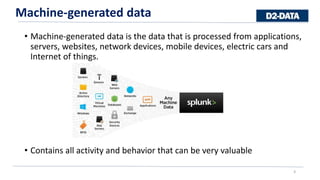
• Machine-generated data is the data that is processed from applications,
servers, websites, network devices, mobile devices, electric cars and
Internet of things.
• Contains all activity and behavior that can be very valuable
3
Machine-generated data
3
• Operational intelligence gives a real-time understanding of what’s
happening across organization and business insights for fast and
informed decisions
4
Operational intelligence
4
• Full-Featured, Integrated Analytics
• Rapidly explore, analyze and
visualize data; create dashboards
and share reports from one
integrated analytics platform
that works with Apache Hadoop
and NoSQL data stores.
5
 Fast to Deploy and Drive Value
 Simply point Hunk at your Hadoop cluster and start exploring and analyzing data immediately.
 Results Preview
 streams back interim results immediately while the MapReduce job continues to run in the background.
can pause and refine queries without having to wait for full MapReduce jobs to complete
For massive quantities of Big data stored on
Hadoop and noSQL there is Hunk, a Splunk
Analytics.
Hunk
5
6
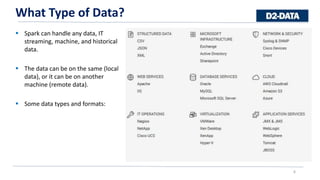
 Spark can handle any data, IT
streaming, machine, and historical
data.
 The data can be on the same (local
data), or it can be on another
machine (remote data).
 Some data types and formats:
What Type of Data?
6
7
Study Case
7
• Gaming sales analytics
• Pricing comparation
• Category sales
• Time
• Region
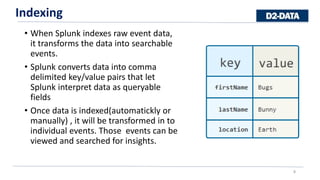
• When Splunk indexes raw event data,
it transforms the data into searchable
events.
• Splunk converts data into comma
delimited key/value pairs that let
Splunk interpret data as queryable
fields
• Once data is indexed(automatickly or
manually) , it will be transformed in to
individual events. Those events can be
viewed and searched for insights.
8
Indexing
8
Event: is a single piece of data, similar to a record in a log file or other data input.
172.26.34.223 - - [01/Jul/2005:12:05:27 -0700] "GET /trade/app?action=logout HTTP/1.1" 200 2953
When Splunk indexes data, it breaks up the data into individual pieces and gives each piece:
• Timestamp
• uses to correlate events by time, to create the timeline histogram and to set time ranges for searches
• Host
• hostname, IP address, or domain name of the network host on which the event originated
• Source
• source of an event - where the event originated
• Path of files and directories or network-based
• Source type
• tells Splunk what kind of data it is, so that Splunk can format the data intelligently during indexing (Ex.
access_combined,apache_error)
9
Events
9
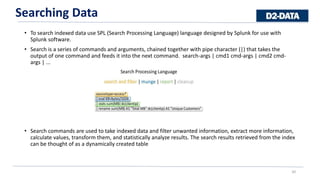
• To search indexed data use SPL (Search Processing Language) language designed by Splunk for use with
Splunk software.
• Search is a series of commands and arguments, chained together with pipe character (|) that takes the
output of one command and feeds it into the next command. search-args | cmd1 cmd-args | cmd2 cmd-
args | ...
• Search commands are used to take indexed data and filter unwanted information, extract more information,
calculate values, transform them, and statistically analyze results. The search results retrieved from the index
can be thought of as a dynamically created table
10
Searching Data
10
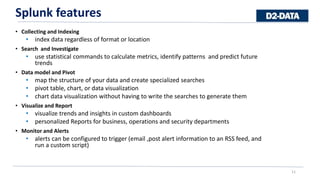
• Collecting and Indexing
• index data regardless of format or location
• Search and Investigate
• use statistical commands to calculate metrics, identify patterns and predict future
trends
• Data model and Pivot
• map the structure of your data and create specialized searches
• pivot table, chart, or data visualization
• chart data visualization without having to write the searches to generate them
• Visualize and Report
• visualize trends and insights in custom dashboards
• personalized Reports for business, operations and security departments
• Monitor and Alerts
• alerts can be configured to trigger (email ,post alert information to an RSS feed, and
run a custom script)
11
Splunk features
11
• Search and Investigate
• use statistical commands to calculate metrics, identify patterns and predict future
trends
Ex: index=_demo sourcetype=access_combined iPhone status>=400
12
Splunk features
12
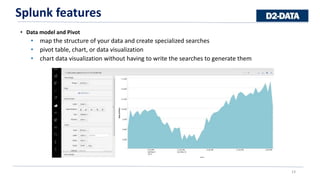
• Data model and Pivot
• map the structure of your data and create specialized searches
• pivot table, chart, or data visualization
• chart data visualization without having to write the searches to generate them
13
Splunk features
13
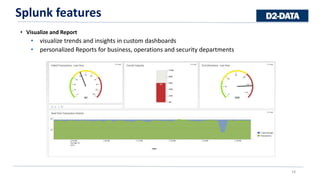
• Visualize and Report
• visualize trends and insights in custom dashboards
• personalized Reports for business, operations and security departments
14
Splunk features
14
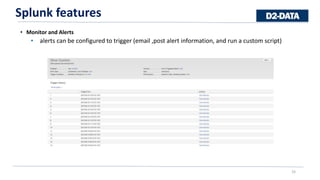
• Monitor and Alerts
• alerts can be configured to trigger (email ,post alert information, and run a custom script)
15
Splunk features
15
• Deployment is very fast
• For Cloud version, all you need to do to set up your Sandbox is to provide your information and
you will get an email with Sandbox log in instrucitons
16
Deployment
16
• Loading Data
• Loading data is very easy and can just use a data file from your local computer
17
Loading Data
17
• Lets start with all purchase transactions with in all access soucetypes.
• Search command: sourcetype=access_* action=purchase
18
Searching
18
• With one click you can visualize your findings, and then add that
visuals to a dasboard if you click on Save As and then Dashboard
command.
19
Visualizatin and Dashoard
19
20
Visualization and Dashboards
20
sourcetype=access_* action=purchase |
timechart span=1h count by categoryId
usenull=f
sourcetype=access_*
action=purchase | timechart span=1h
sum(price) by productName usenull=f
21
Visualization and Dashboards
21
sourcetype=access_* status=200
action=purchase | chart dc(clientip) over
date_hour by categoryId usenull=f
Combined..
• Pros:
• Easy to use
• Can be used for anyone within an organization
(managers, IT, CEO,etc)
• lots of plugins and customizations
• Impressive dashboard with search and
charting tools
• Cons
• Expensive
22
Pros and Cons of Splunk
22
douglas.bernardini@d2-data.com
Questions?
23

Splunk

  • 1.
    Splunk in RetailBusiness 1 Author: Douglas Bernardini
  • 2.
    • Splunk (Cloud)is SaaS or Software as a Service • Capture, index and compare real-time machine-gererated data in a flexible repository • Can searched, analyzed and visualized to generate insights, graphs, reports, alerts and dashboards. • Data is converted to operational intelligence for better informed decision across an organization 2 What is Splunk? 2
  • 3.
    • Machine-generated datais the data that is processed from applications, servers, websites, network devices, mobile devices, electric cars and Internet of things. • Contains all activity and behavior that can be very valuable 3 Machine-generated data 3
  • 4.
    • Operational intelligencegives a real-time understanding of what’s happening across organization and business insights for fast and informed decisions 4 Operational intelligence 4
  • 5.
    • Full-Featured, IntegratedAnalytics • Rapidly explore, analyze and visualize data; create dashboards and share reports from one integrated analytics platform that works with Apache Hadoop and NoSQL data stores. 5  Fast to Deploy and Drive Value  Simply point Hunk at your Hadoop cluster and start exploring and analyzing data immediately.  Results Preview  streams back interim results immediately while the MapReduce job continues to run in the background. can pause and refine queries without having to wait for full MapReduce jobs to complete For massive quantities of Big data stored on Hadoop and noSQL there is Hunk, a Splunk Analytics. Hunk 5
  • 6.
    6  Spark canhandle any data, IT streaming, machine, and historical data.  The data can be on the same (local data), or it can be on another machine (remote data).  Some data types and formats: What Type of Data? 6
  • 7.
    7 Study Case 7 • Gamingsales analytics • Pricing comparation • Category sales • Time • Region
  • 8.
    • When Splunkindexes raw event data, it transforms the data into searchable events. • Splunk converts data into comma delimited key/value pairs that let Splunk interpret data as queryable fields • Once data is indexed(automatickly or manually) , it will be transformed in to individual events. Those events can be viewed and searched for insights. 8 Indexing 8
  • 9.
    Event: is asingle piece of data, similar to a record in a log file or other data input. 172.26.34.223 - - [01/Jul/2005:12:05:27 -0700] "GET /trade/app?action=logout HTTP/1.1" 200 2953 When Splunk indexes data, it breaks up the data into individual pieces and gives each piece: • Timestamp • uses to correlate events by time, to create the timeline histogram and to set time ranges for searches • Host • hostname, IP address, or domain name of the network host on which the event originated • Source • source of an event - where the event originated • Path of files and directories or network-based • Source type • tells Splunk what kind of data it is, so that Splunk can format the data intelligently during indexing (Ex. access_combined,apache_error) 9 Events 9
  • 10.
    • To searchindexed data use SPL (Search Processing Language) language designed by Splunk for use with Splunk software. • Search is a series of commands and arguments, chained together with pipe character (|) that takes the output of one command and feeds it into the next command. search-args | cmd1 cmd-args | cmd2 cmd- args | ... • Search commands are used to take indexed data and filter unwanted information, extract more information, calculate values, transform them, and statistically analyze results. The search results retrieved from the index can be thought of as a dynamically created table 10 Searching Data 10
  • 11.
    • Collecting andIndexing • index data regardless of format or location • Search and Investigate • use statistical commands to calculate metrics, identify patterns and predict future trends • Data model and Pivot • map the structure of your data and create specialized searches • pivot table, chart, or data visualization • chart data visualization without having to write the searches to generate them • Visualize and Report • visualize trends and insights in custom dashboards • personalized Reports for business, operations and security departments • Monitor and Alerts • alerts can be configured to trigger (email ,post alert information to an RSS feed, and run a custom script) 11 Splunk features 11
  • 12.
    • Search andInvestigate • use statistical commands to calculate metrics, identify patterns and predict future trends Ex: index=_demo sourcetype=access_combined iPhone status>=400 12 Splunk features 12
  • 13.
    • Data modeland Pivot • map the structure of your data and create specialized searches • pivot table, chart, or data visualization • chart data visualization without having to write the searches to generate them 13 Splunk features 13
  • 14.
    • Visualize andReport • visualize trends and insights in custom dashboards • personalized Reports for business, operations and security departments 14 Splunk features 14
  • 15.
    • Monitor andAlerts • alerts can be configured to trigger (email ,post alert information, and run a custom script) 15 Splunk features 15
  • 16.
    • Deployment isvery fast • For Cloud version, all you need to do to set up your Sandbox is to provide your information and you will get an email with Sandbox log in instrucitons 16 Deployment 16
  • 17.
    • Loading Data •Loading data is very easy and can just use a data file from your local computer 17 Loading Data 17
  • 18.
    • Lets startwith all purchase transactions with in all access soucetypes. • Search command: sourcetype=access_* action=purchase 18 Searching 18
  • 19.
    • With oneclick you can visualize your findings, and then add that visuals to a dasboard if you click on Save As and then Dashboard command. 19 Visualizatin and Dashoard 19
  • 20.
    20 Visualization and Dashboards 20 sourcetype=access_*action=purchase | timechart span=1h count by categoryId usenull=f sourcetype=access_* action=purchase | timechart span=1h sum(price) by productName usenull=f
  • 21.
    21 Visualization and Dashboards 21 sourcetype=access_*status=200 action=purchase | chart dc(clientip) over date_hour by categoryId usenull=f Combined..
  • 22.
    • Pros: • Easyto use • Can be used for anyone within an organization (managers, IT, CEO,etc) • lots of plugins and customizations • Impressive dashboard with search and charting tools • Cons • Expensive 22 Pros and Cons of Splunk 22
  • 23.