10(ish) Golden Rules for a
S/4HANA Migration
John Appleby
GM, Bluefin Solutions Inc.
• S/4HANA Introduction
 Differences between Suite on HANA and S/4HANA
 Deployment Options
• Preparing for your S/4HANA Migration
 Building an integrated schedule
 Sandboxing and prototypying
 Housekeeping & Solution Manager
 Change Management & Test Management
 Sizing, Architecture, HA, DR, Backup & Recovery
What you will learn today
2
S/4HANA Introduction
• The next version of SAP Business Suite
• New SKU and Code Fork
 Only supported with the SAP HANA DB
• S/4HANA themes:
 Renewed interface with Fiori UX
 Simplified structure with SAP HANA
 Cloud deployment first
What is S/4HANA
4
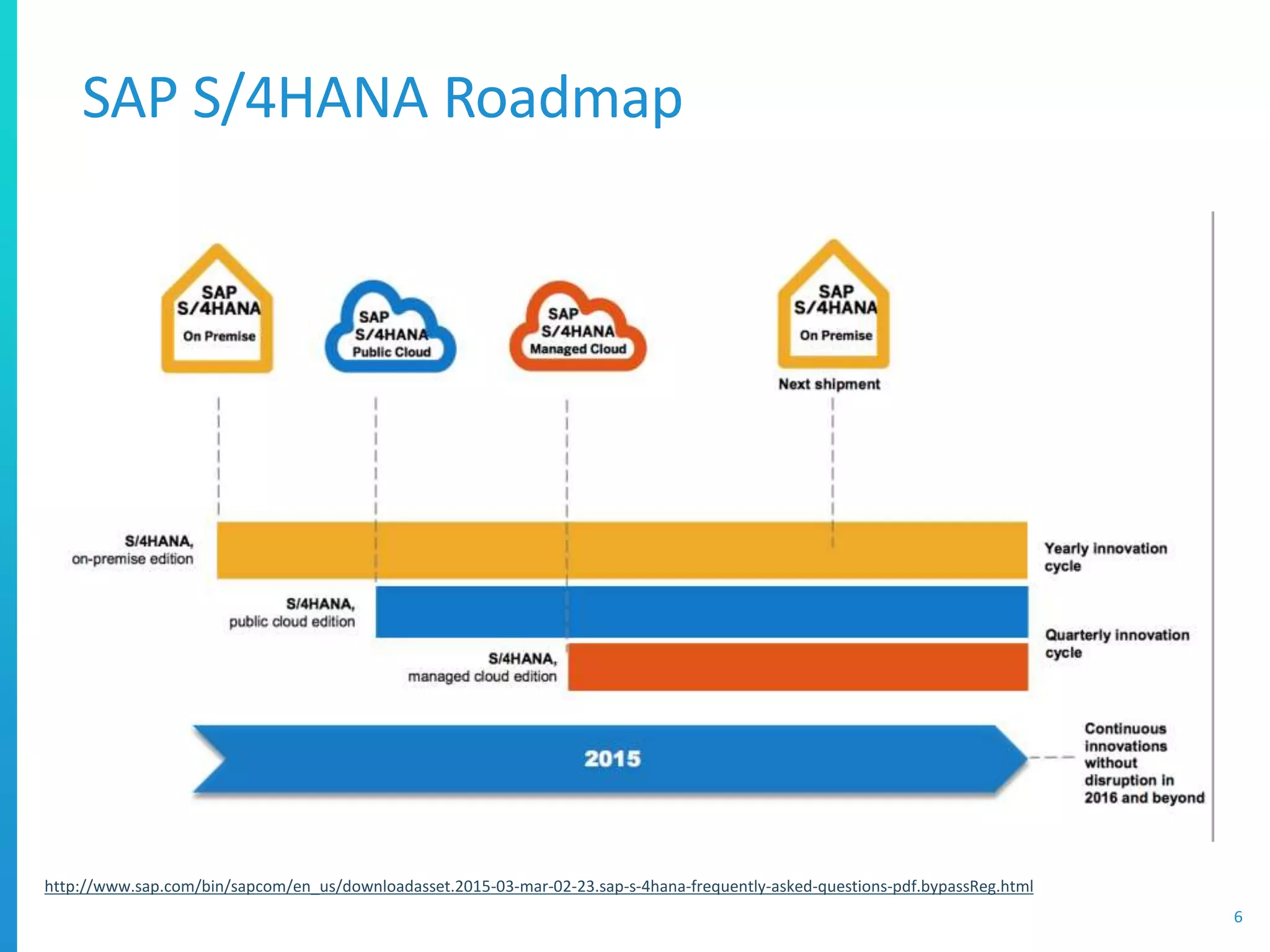
S/4HANA Deployment Options
5
Public Cloud
• Shared HANA multi-
tenant DB
• HANA Cloud Platform
Extensions
• Quarterly Release
Schedule
• 100% Managed by SAP
• Automatic Updates
Managed Cloud
• Managed HANA DB and
network
• HANA Cloud Platform
Extensions
• ABAP Customization
• Quarterly Release
Schedule
• 100% Managed by SAP
• Scheduled Updates
On-Premises
• On-Premises or Hosted
• ABAP Customization
• Yearly Release Schedule
• Managed by
Customer/Partner
• Update schedule
defined by customer
SAP S/4HANA Roadmap
6
http://www.sap.com/bin/sapcom/en_us/downloadasset.2015-03-mar-02-23.sap-s-4hana-frequently-asked-questions-pdf.bypassReg.html
SAP S/4HANA Customer Journey
7
http://www.sap.com/bin/sapcom/en_us/downloadasset.2015-03-mar-02-23.sap-s-4hana-frequently-asked-questions-pdf.bypassReg.html
Planning for your migration
• Most Customers look for a technical migration first
 To S/4HANA or Suite on HANA
• Out of Scope:
 HANA Live / Analytics
 Simple Finance (i.e. S/4HANA)
• Suite on HANA is the stepping stone to S/4HANA
 Then perform code changes, activate S/4HANA extensions
• S/4HANA direct migration expected late 2015
 N.B. Migrating to SoH is a great first step to S/4HANA!
1) Define Project Scope
9
• Cover all Technical Migration activities
 Upgrade to ECC 6.0 EhP7 (if necessary)
 Unicode Conversion (if necessary)
 HANA Migration
• Restitution
 “As fast, faster, or much faster”
 ABAP code optimization (some things will be slower)
2 Define Technical Scope
10
ECC EHP 7
Upgrade
Unicode
ECC to HANA
MIgration
New GL
SFIN
S/4HANA
ECC on HANA
• Build one Integrated Schedule
 Weekly goals
• Include all teams above
 And partners!
 Assign ownership
• Agree schedule with all teams
 Takes time (1-2 weeks)
 Aligns with project prep phase
3) Build the Integrated Schedule
11
4) Define Stakeholders & Comms Plan
12
Functional
PMOBasis
Release
Management
BW/
Analytics
Integration
Change
Management
Test
Management
Business
Owners
Sponsors
ABAP
Infrastructure
Enterprise
Security
SAP
Security
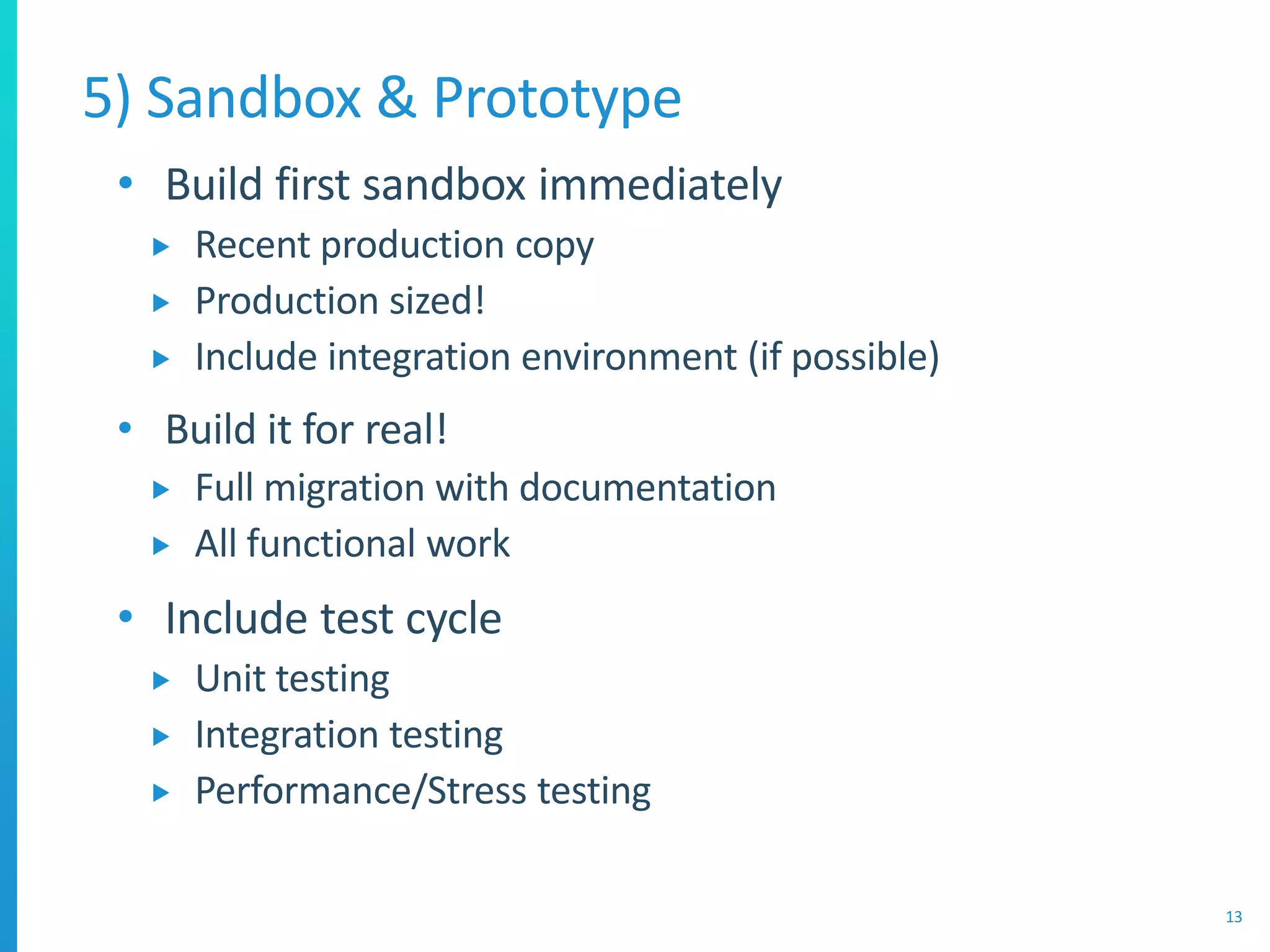
• Build first sandbox immediately
 Recent production copy
 Production sized!
 Include integration environment (if possible)
• Build it for real!
 Full migration with documentation
 All functional work
• Include test cycle
 Unit testing
 Integration testing
 Performance/Stress testing
5) Sandbox & Prototype
13
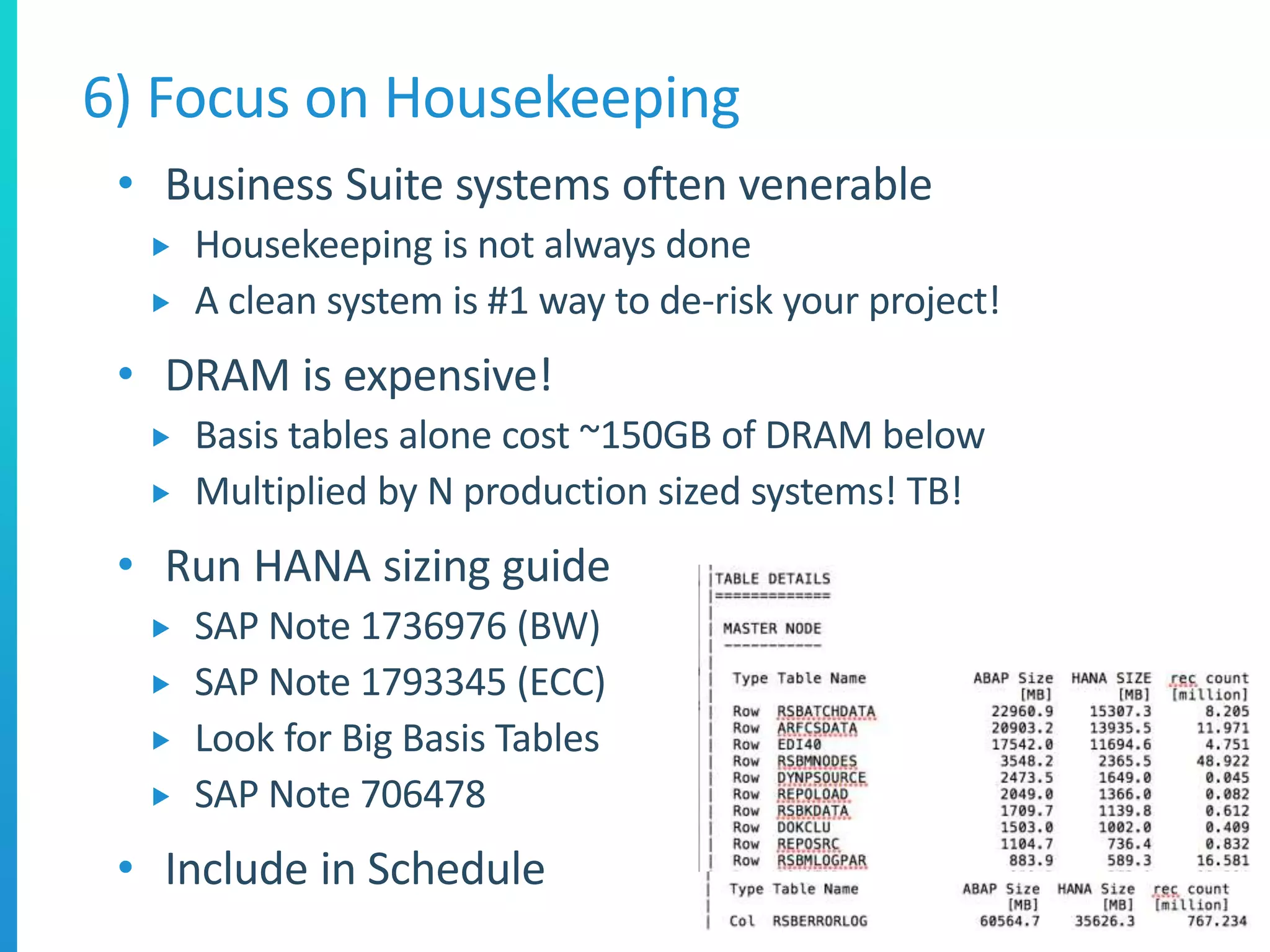
• Business Suite systems often venerable
 Housekeeping is not always done
 A clean system is #1 way to de-risk your project!
• DRAM is expensive!
 Basis tables alone cost ~150GB of DRAM below
 Multiplied by N production sized systems! TB!
• Run HANA sizing guide
 SAP Note 1736976 (BW)
 SAP Note 1793345 (ECC)
 Look for Big Basis Tables
 SAP Note 706478
• Include in Schedule
6) Focus on Housekeeping
14
• Disk Databases are inexpensive
 Data Reduction rarely considered
• Top 100 tables usually 90% of DB space
 Run HANA sizing guide
 SAP Note 1736976 (BW)
 SAP Note 1793345 (ECC)
• Analyze Top 100 tables
 Create action plan
 PSA, DSO Change Log deletion (BW)
 IDOC, Old Functional Areas, Data Archiving (ECC)
• Remember every GB saved is 10-20GB stored!
7) Data Reduction Program
15
• Test Management is critical
 Some customers have a mature strategy
 Some do not
• Revise your test management strategy
 Test Automation
 Test Coverage
 Test Prioritization
• Reduce your time to complete testing!
 How long does it take to complete regression test?
8) Change & Test Management
• Make sure you are on the latest latest SP!
 http://scn.sap.com/community/abap/custom-code-management
• Custom Code Management Tools (CCMT)
 Custom Code Management Cockpit (CDMC)
 Usage & Procedure Logging (UPL)
 CloneFinder
• Use these tools in combination with:
 Testing
 Process prioritization by business users
9) Solution Manager is your friend!
17
Test
Strategy
Priority
Testing
Clones CDMCUPL
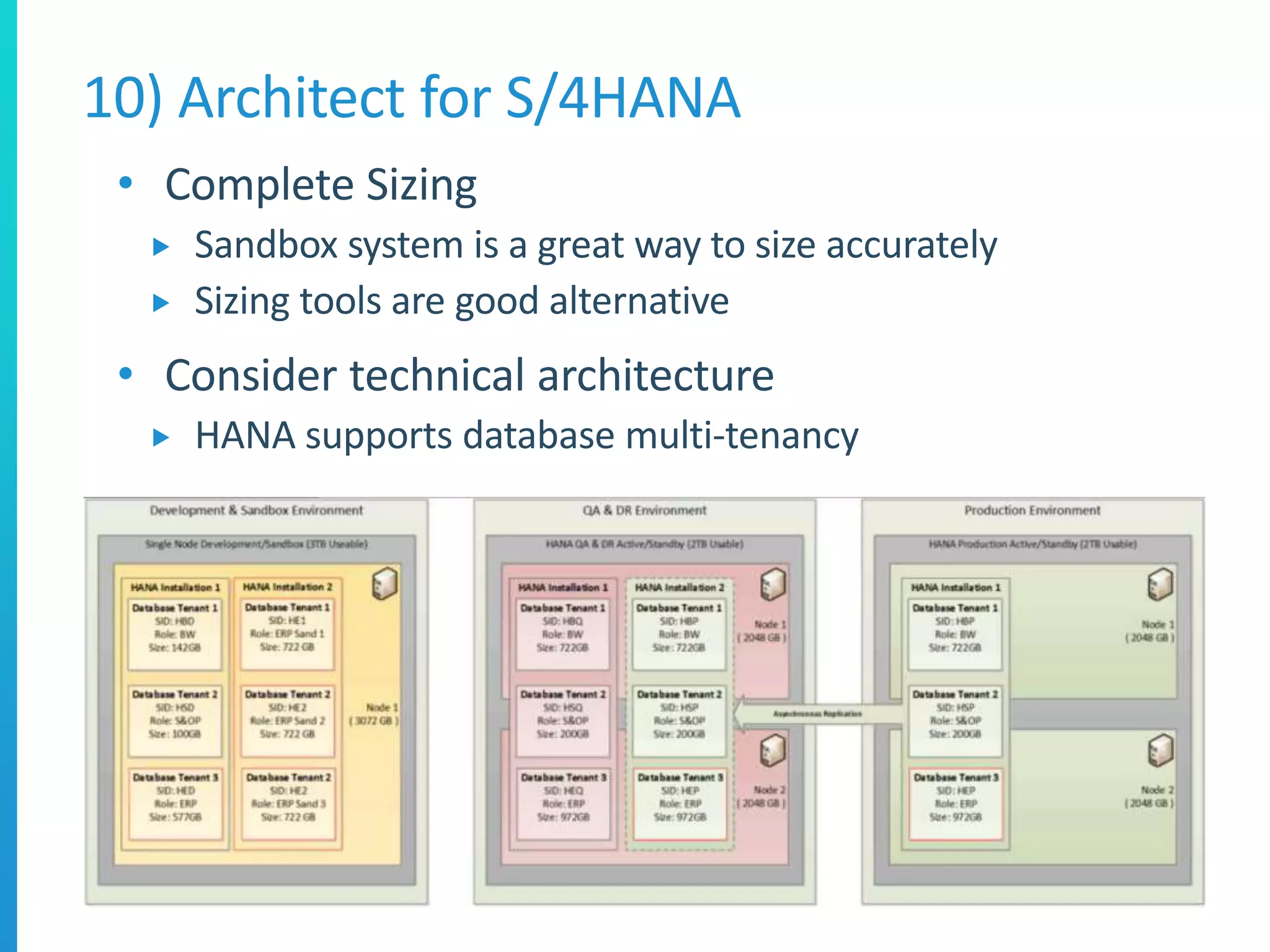
• Complete Sizing
 Sandbox system is a great way to size accurately
 Sizing tools are good alternative
• Consider technical architecture
 HANA supports database multi-tenancy
10) Architect for S/4HANA
• HANA supports system replication
 Active/Passive Synchronous (HA)
 Multi-tier Asynchronous (DR)
 SUSE Linux supports automated host failover
• Very low cost to implement
 As compares to e.g. RAC
 Most HANA systems are HA
• Even lower cost options
 Share QA & DR
11) Architect for HA/DR
• HANA Advisory Council
 https://blogs.saphana.com/2015/01/12/now-time-plug-sap-hana-customer-communities
• HANA Ambassador Program
 North America only
 Ask your SAP Account Executive
• Max Attention / Active Embedded
 Various services provided
 Some useful (going live services, custom code)
• Active Global Support
 Going live services
12) Get Support from SAP
• Cutover plan touches many teams
 But most teams build “MY PLAN”
• Build an integrated plan
 All teams, all activities
 Number the plan
 Align the numbers with the cutover doc
• Track forecast and actual
 Tool doesn’t matter (Project, Excel etc.)
13) Build an integrated cutover plan
John Appleby
john.appleby@bluefinsolutions.com
@applebyj
bluefinsolutions.com/johnappleby

10 Golden Rules for S/4 HANA Migrations

  • 1.
    10(ish) Golden Rulesfor a S/4HANA Migration John Appleby GM, Bluefin Solutions Inc.
  • 2.
    • S/4HANA Introduction Differences between Suite on HANA and S/4HANA  Deployment Options • Preparing for your S/4HANA Migration  Building an integrated schedule  Sandboxing and prototypying  Housekeeping & Solution Manager  Change Management & Test Management  Sizing, Architecture, HA, DR, Backup & Recovery What you will learn today 2
  • 3.
  • 4.
    • The nextversion of SAP Business Suite • New SKU and Code Fork  Only supported with the SAP HANA DB • S/4HANA themes:  Renewed interface with Fiori UX  Simplified structure with SAP HANA  Cloud deployment first What is S/4HANA 4
  • 5.
    S/4HANA Deployment Options 5 PublicCloud • Shared HANA multi- tenant DB • HANA Cloud Platform Extensions • Quarterly Release Schedule • 100% Managed by SAP • Automatic Updates Managed Cloud • Managed HANA DB and network • HANA Cloud Platform Extensions • ABAP Customization • Quarterly Release Schedule • 100% Managed by SAP • Scheduled Updates On-Premises • On-Premises or Hosted • ABAP Customization • Yearly Release Schedule • Managed by Customer/Partner • Update schedule defined by customer
  • 6.
  • 7.
    SAP S/4HANA CustomerJourney 7 http://www.sap.com/bin/sapcom/en_us/downloadasset.2015-03-mar-02-23.sap-s-4hana-frequently-asked-questions-pdf.bypassReg.html
  • 8.
  • 9.
    • Most Customerslook for a technical migration first  To S/4HANA or Suite on HANA • Out of Scope:  HANA Live / Analytics  Simple Finance (i.e. S/4HANA) • Suite on HANA is the stepping stone to S/4HANA  Then perform code changes, activate S/4HANA extensions • S/4HANA direct migration expected late 2015  N.B. Migrating to SoH is a great first step to S/4HANA! 1) Define Project Scope 9
  • 10.
    • Cover allTechnical Migration activities  Upgrade to ECC 6.0 EhP7 (if necessary)  Unicode Conversion (if necessary)  HANA Migration • Restitution  “As fast, faster, or much faster”  ABAP code optimization (some things will be slower) 2 Define Technical Scope 10 ECC EHP 7 Upgrade Unicode ECC to HANA MIgration New GL SFIN S/4HANA ECC on HANA
  • 11.
    • Build oneIntegrated Schedule  Weekly goals • Include all teams above  And partners!  Assign ownership • Agree schedule with all teams  Takes time (1-2 weeks)  Aligns with project prep phase 3) Build the Integrated Schedule 11
  • 12.
    4) Define Stakeholders& Comms Plan 12 Functional PMOBasis Release Management BW/ Analytics Integration Change Management Test Management Business Owners Sponsors ABAP Infrastructure Enterprise Security SAP Security
  • 13.
    • Build firstsandbox immediately  Recent production copy  Production sized!  Include integration environment (if possible) • Build it for real!  Full migration with documentation  All functional work • Include test cycle  Unit testing  Integration testing  Performance/Stress testing 5) Sandbox & Prototype 13
  • 14.
    • Business Suitesystems often venerable  Housekeeping is not always done  A clean system is #1 way to de-risk your project! • DRAM is expensive!  Basis tables alone cost ~150GB of DRAM below  Multiplied by N production sized systems! TB! • Run HANA sizing guide  SAP Note 1736976 (BW)  SAP Note 1793345 (ECC)  Look for Big Basis Tables  SAP Note 706478 • Include in Schedule 6) Focus on Housekeeping 14
  • 15.
    • Disk Databasesare inexpensive  Data Reduction rarely considered • Top 100 tables usually 90% of DB space  Run HANA sizing guide  SAP Note 1736976 (BW)  SAP Note 1793345 (ECC) • Analyze Top 100 tables  Create action plan  PSA, DSO Change Log deletion (BW)  IDOC, Old Functional Areas, Data Archiving (ECC) • Remember every GB saved is 10-20GB stored! 7) Data Reduction Program 15
  • 16.
    • Test Managementis critical  Some customers have a mature strategy  Some do not • Revise your test management strategy  Test Automation  Test Coverage  Test Prioritization • Reduce your time to complete testing!  How long does it take to complete regression test? 8) Change & Test Management
  • 17.
    • Make sureyou are on the latest latest SP!  http://scn.sap.com/community/abap/custom-code-management • Custom Code Management Tools (CCMT)  Custom Code Management Cockpit (CDMC)  Usage & Procedure Logging (UPL)  CloneFinder • Use these tools in combination with:  Testing  Process prioritization by business users 9) Solution Manager is your friend! 17 Test Strategy Priority Testing Clones CDMCUPL
  • 18.
    • Complete Sizing Sandbox system is a great way to size accurately  Sizing tools are good alternative • Consider technical architecture  HANA supports database multi-tenancy 10) Architect for S/4HANA
  • 19.
    • HANA supportssystem replication  Active/Passive Synchronous (HA)  Multi-tier Asynchronous (DR)  SUSE Linux supports automated host failover • Very low cost to implement  As compares to e.g. RAC  Most HANA systems are HA • Even lower cost options  Share QA & DR 11) Architect for HA/DR
  • 20.
    • HANA AdvisoryCouncil  https://blogs.saphana.com/2015/01/12/now-time-plug-sap-hana-customer-communities • HANA Ambassador Program  North America only  Ask your SAP Account Executive • Max Attention / Active Embedded  Various services provided  Some useful (going live services, custom code) • Active Global Support  Going live services 12) Get Support from SAP
  • 21.
    • Cutover plantouches many teams  But most teams build “MY PLAN” • Build an integrated plan  All teams, all activities  Number the plan  Align the numbers with the cutover doc • Track forecast and actual  Tool doesn’t matter (Project, Excel etc.) 13) Build an integrated cutover plan
  • 22.